belt VOLVO V60 2014 Owner's Manual
[x] Cancel search | Manufacturer: VOLVO, Model Year: 2014, Model line: V60, Model: VOLVO V60 2014Pages: 442, PDF Size: 13.85 MB
Page 145 of 442
05 Loading and storage
05
143
Loading - long load
To simplify loading (p. 142) in the cargo area, the rear seat backrest can be folded down.The passenger seat backrest can also be folded for an extra long load2
.
Lowering the rear seat backrestTo simplify loading in the cargo area, the rear seat backrest can be folded down, see Seats,rear (p. 74).
Roof load
The load carriers recommended for roof loads are the ones developed by Volvo. This is inorder to avoid damage to the car and in orderto achieve the maximum possible safety dur-ing a journey. Carefully follow the installation instructions supplied with the carriers.
• Check periodically that the load carriers and load are properly secured. Lash theload securely with retaining straps.
• Distribute the load evenly over the loadcarriers. Put the heaviest objects at thebottom.
• The size of the area exposed to the wind,and therefore fuel consumption, increasewith the size of the load.
• Drive gently. Avoid quick acceleration,heavy braking and hard cornering.
WARNING
The car's centre of gravity and driving cha- racteristics are altered by roof loads. Forinformation about the maximum allowableload on the roof, including load carriersand any space box, Weights (p. 390).
Related information
•
Loading (p. 142)
Load retaining eyelets
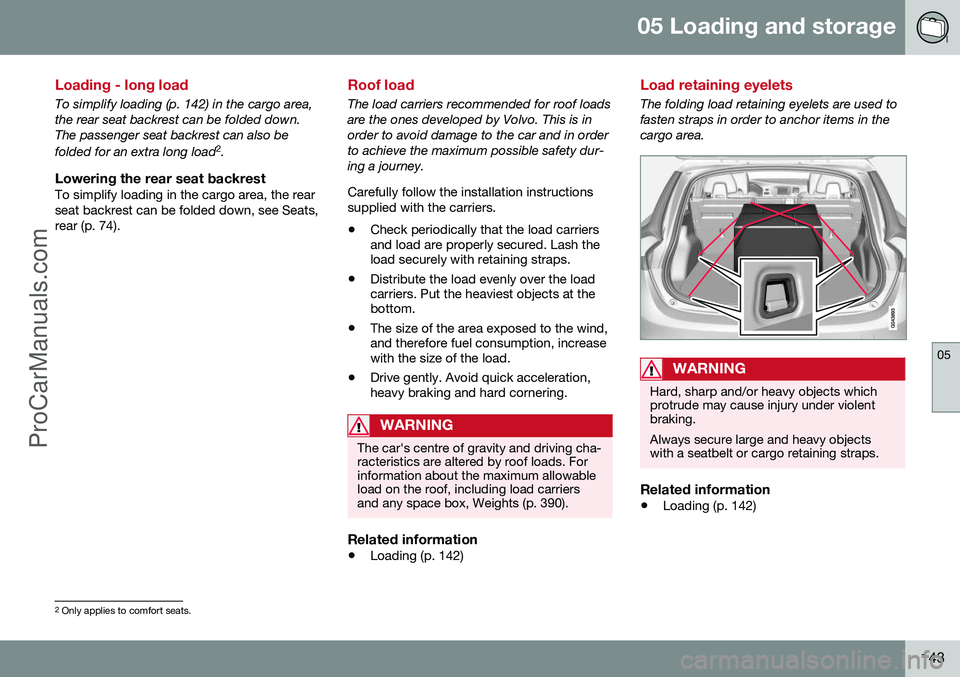
The folding load retaining eyelets are used to fasten straps in order to anchor items in thecargo area.
WARNING
Hard, sharp and/or heavy objects which protrude may cause injury under violentbraking. Always secure large and heavy objects with a seatbelt or cargo retaining straps.
Related information
• Loading (p. 142)
2
Only applies to comfort seats.
ProCarManuals.co’
Page 195 of 442
07 Driver support
07
* Option/accessory, for more information, see Introduction.193
The same symbol is also shown when Dis- tance Warning (p. 202) function is activated.
NOTE
Only use the time intervals permitted by local traffic regulations. If Cruise Control does not appear to react when activated, this may be because thetime distance to the car in front is prevent-ing an increase in speed. The higher the speed the longer the calcu- lated distance in metres for a given timeinterval.
Related information
•
Adaptive cruise control - ACC* (p. 188)
• Adaptive cruise control* - overview (p. 190)
• Adaptive cruise control* - function (p.189)
• Adaptive cruise control* - deactivate (p.194)
Adaptive cruise control* - temporary deactivation, and standby mode
The adaptive cruise control (ACC – Adaptive Cruise Control) helps the driver to maintain aneven speed and a safe distance from the vehi-cle ahead. The cruise control can be tempo-rarily deactivated and set in standby mode.
Temporary deactivation - standby mode
with Speed limiter
To temporarily disengage the adaptive cruisecontrol and set it in standby mode:
• Press the steering wheel button
This symbol and the stored speed's marking then change colour fromGREEN to WHITE.
Temporary deactivation - standby mode without Speed limiter
To temporarily disengage the adaptive cruise control and set it in standby mode:
• Press the steering wheel button
Standby mode due to driver interventionCruise control is temporarily disengaged and set in standby mode if:
• the foot brake is used
• the clutch pedal is depressed for longer than 1 minute 9 •
the gear selector is moved to
N position
(automatic gearbox)
• the driver maintains a speed higher than the set speed for longer than 1 minute.
The driver must then regulate the speed. A temporary increase in speed with the accel- erator pedal, e.g. during overtaking, does notaffect the cruise control setting - the carreturns to the last stored speed when theaccelerator pedal is released.
Automatic standby modeThe adaptive cruise control is dependent onother systems, e.g. DSTC (Stability and trac-tion control system) (p. 175). If any of thesesystems stop working then cruise control isautomatically deactivated. In the event of automatic deactivation a signal will sound and the message
Cruise control
Cancelled is shown in the combined instru-
ment panel. The driver must then intervene and adapt the speed and distance to thevehicle ahead. An automatic deactivation can be due to:
• the driver opens the door
• the driver takes off his seatbelt
• engine speed is too low/high
• speed has fallen below 30 km/h 10
9
Disengaging and selecting a higher or lower gear does not involve standby mode.
10 Does not apply to a car with Queue Assistant - it manages right down to stationary.
ProCarManuals.co’
Page 197 of 442
07 Driver support
07
}}
* Option/accessory, for more information, see Introduction.195
Adaptive Cruise Control* - Queue Assist
The adaptive cruise control (ACC – Adaptive Cruise Control) helps the driver to maintain aneven speed and a safe distance from the vehi-cle ahead. Queue Assist also provides theAdaptive Cruise Control with enhanced func-tionality at speeds below 30 km/h.. In cars with automatic gearbox the adaptive cruise control is supplemented with theQueue Assist function (also referred to as"Queue Assist"). Queue Assistant has the following functions:
• Extended speed range - also below 30 km/h and when stationary
• Change of target
• Automatic braking ceases when station-ary
• Automatic activation parking brake.
Note that the lowest programmable speed for the adaptive cruise control is 30 km/h - eventhough it is capable of following another vehi-cle down to a standstill, a lower speed can-
not be selected.
Extended speed range
NOTE
In order to activate the cruise control the driver's door must be closed and the drivermust be wearing the seatbelt.
With an automatic gearbox, the adaptive cruise control can follow another vehiclewithin the range 0-200 km/h.
NOTE
Activation of the cruise control below 30 km/h requires a vehicle in front within areasonable distance.
For shorter stops in connection with inching in slow traffic or at traffic lights driving isautomatically resumed if the stops do notexceed about 3 seconds - if it takes longerbefore the car in front starts moving againthen the Adaptive cruise control is set instandby mode with automatic braking. Thedriver must then reactivate it in one of the fol-lowing ways:
• Press the steering wheel button
.
or
• Depress the accelerator pedal.
> The cruise control will then resume fol- lowing the vehicle in front.
NOTE
Queue Assist can hold the car stationary for a maximum of 4 minutes - then theparking brake is applied and Cruise Con-trol is disengaged.
• The driver has to release the parking brake before the cruise control can bereactivated.
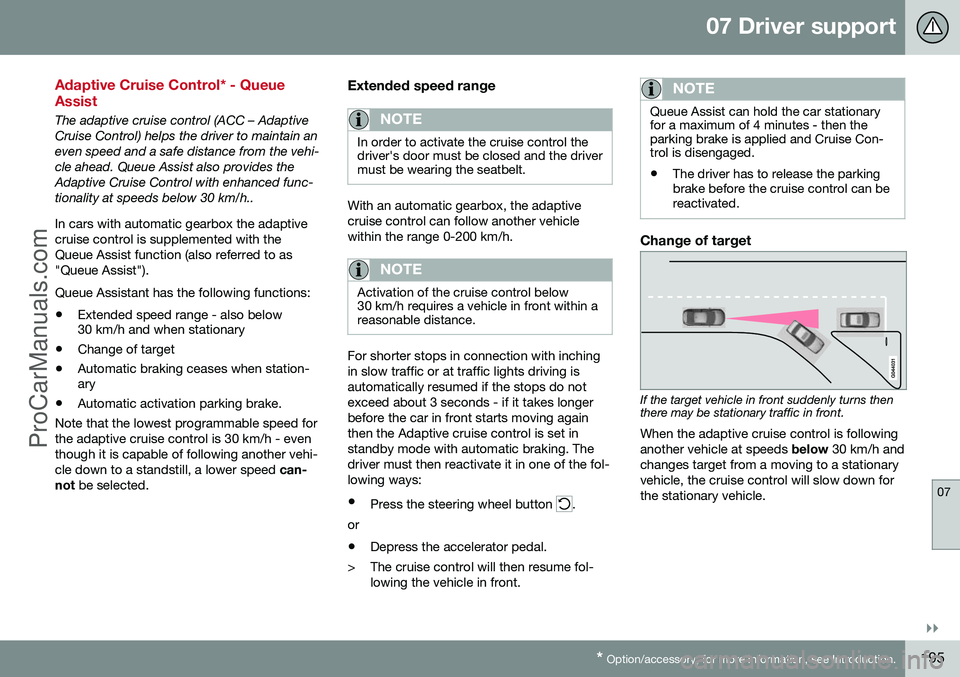
Change of target
If the target vehicle in front suddenly turns then there may be stationary traffic in front.
When the adaptive cruise control is following another vehicle at speeds below 30 km/h and
changes target from a moving to a stationaryvehicle, the cruise control will slow down forthe stationary vehicle.
ProCarManuals.co’
Page 198 of 442
||
07 Driver support
07
196* Option/accessory, for more information, see Introduction.
WARNING
When the cruise control is following another vehicle at speeds in excess of
30 km/h and the target is changed from amoving vehicle to a stationary vehicle, thecruise control will ignore the stationaryvehicle and instead select the storedspeed. • The driver must intervene him/herself and brake.
Automatic standby mode with change of target
The adaptive cruise control is disengaged and set in standby mode:
• when the speed is below 5 km/h and cruise control is not sure whether the tar-get object is a stationary vehicle or someother object, e.g. a speed bump.
• when the speed is below 5 km/h and thevehicle in front turns off so the cruisecontrol no longer has a vehicle to follow.
Termination of automatic braking at a
standstill
In certain situations, Queue Assist stops automatic braking at a standstill. This meansthat the brakes are released and the car maystart to roll - the driver must therefore inter-vene and brake the car himself/herself inorder to maintain its position. Queue Assist releases the foot brake and setsthe adaptive cruise control in standby modein the following situations:
• the driver puts his/her foot on the brake pedal
• the parking brake is applied
• the gear selector is moved to
P, N or R
position
• the driver sets the cruise control instandby mode.
Automatic activation parking brakeIn certain situations Queue Assist applies the parking brake in order to keep the car remain-ing stationary. This takes place if:
• the driver opens the door or takes off his/her seatbelt
• DSTC is changed from
Normal to Sport
mode
• Queue Assist has held the car stationaryfor more than 4 minutes
• the engine is switched off
• the brakes have overheated.
Related information
•Adaptive cruise control - ACC* (p. 188)
• Adaptive cruise control* - overview (p.190)
• Adaptive cruise control* - function (p.189)
Adaptive cruise control* - switch cruise control functionality
The adaptive cruise control (ACC – Adaptive Cruise Control) helps the driver maintain asafe distance from the vehicle ahead.
Changing from ACC to CCWith one press of the button the adaptivepart (spacing system) in the cruise control isdeactivated, at which point the car just fol-lows the set speed.
• Give a
long press on the steering wheel
button
- the combined instrument
panel's symbol changes from
to .
> By these means the standard cruise con- trol (p. 185) CC (Cruise Control) is activated.
WARNING
The car no longer brakes automatically after switching from ACC to CC - it merelyfollows the set speed.
Changing back from CC to ACCSwitch off cruise control with 1-2 presses on
in accordance with the deactivation
instructions (p. 194). The next time the sys- tem is switched on it is the Adaptive cruisecontrol that is activated.
ProCarManuals.co’
Page 284 of 442
08 Starting and driving
08
282* Option/accessory, for more information, see Introduction.
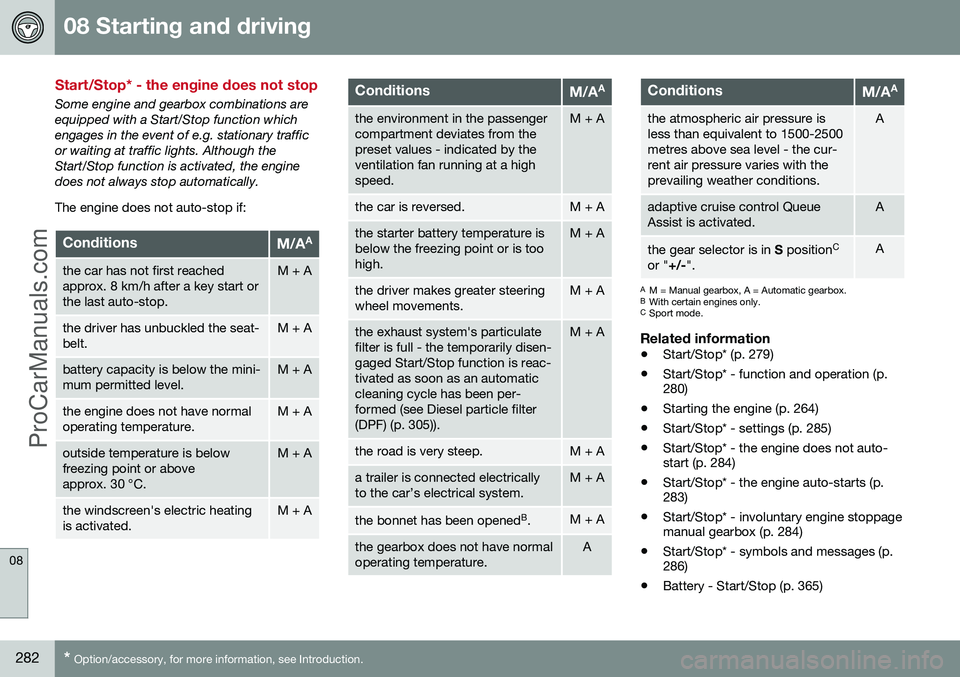
Start/Stop* - the engine does not stop
Some engine and gearbox combinations are equipped with a Start/Stop function whichengages in the event of e.g. stationary trafficor waiting at traffic lights. Although theStart/Stop function is activated, the enginedoes not always stop automatically. The engine does not auto-stop if:
ConditionsM/A A
the car has not first reached approx. 8 km/h after a key start orthe last auto-stop.M + A
the driver has unbuckled the seat- belt.M + A
battery capacity is below the mini- mum permitted level.M + A
the engine does not have normal operating temperature.M + A
outside temperature is below freezing point or aboveapprox. 30 °C.M + A
the windscreen's electric heating is activated.M + A
ConditionsM/AA
the environment in the passenger compartment deviates from thepreset values - indicated by theventilation fan running at a highspeed.M + A
the car is reversed.M + A
the starter battery temperature is below the freezing point or is toohigh.M + A
the driver makes greater steering wheel movements.M + A
the exhaust system's particulate filter is full - the temporarily disen-gaged Start/Stop function is reac-tivated as soon as an automaticcleaning cycle has been per-formed (see Diesel particle filter(DPF) (p. 305)).M + A
the road is very steep.M + A
a trailer is connected electrically to the car’s electrical system.M + A
the bonnet has been opened
B
.M + A
the gearbox does not have normal operating temperature.A
ConditionsM/A A
the atmospheric air pressure is less than equivalent to 1500-2500metres above sea level - the cur-rent air pressure varies with theprevailing weather conditions.A
adaptive cruise control Queue Assist is activated.A
the gear selector is in
S position C
or " +/-".A
A
M = Manual gearbox, A = Automatic gearbox.
B With certain engines only.
C Sport mode.
Related information
• Start/Stop* (p. 279)
• Start/Stop* - function and operation (p. 280)
• Starting the engine (p. 264)
• Start/Stop* - settings (p. 285)
• Start/Stop* - the engine does not auto-start (p. 284)
• Start/Stop* - the engine auto-starts (p.283)
• Start/Stop* - involuntary engine stoppagemanual gearbox (p. 284)
• Start/Stop* - symbols and messages (p.286)
• Battery - Start/Stop (p. 365)
ProCarManuals.co’
Page 285 of 442
08 Starting and driving
08
* Option/accessory, for more information, see Introduction.283
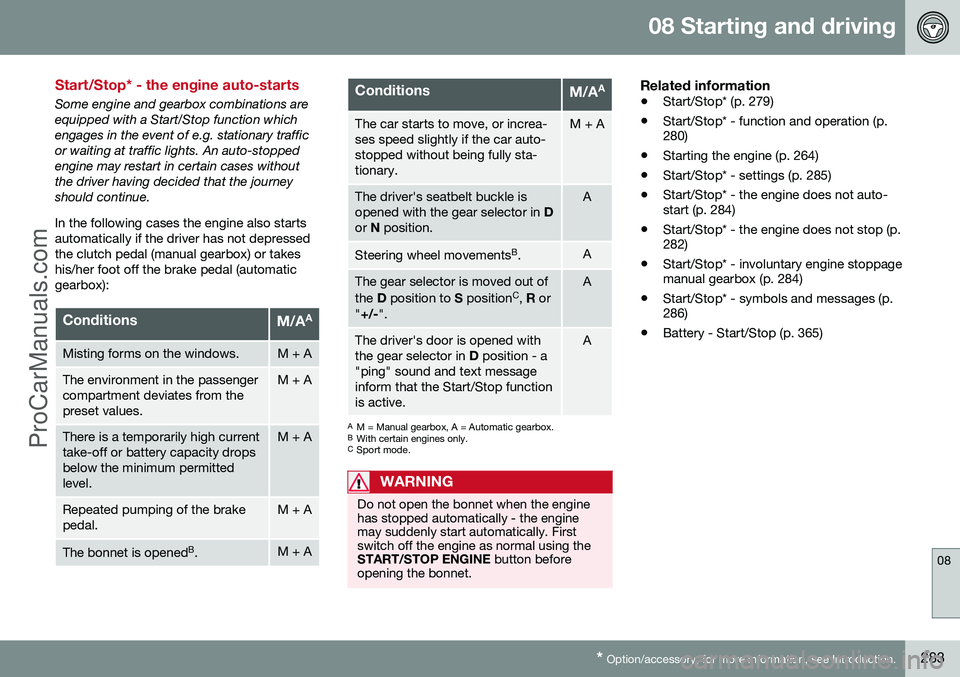
Start/Stop* - the engine auto-starts
Some engine and gearbox combinations are equipped with a Start/Stop function whichengages in the event of e.g. stationary trafficor waiting at traffic lights. An auto-stoppedengine may restart in certain cases withoutthe driver having decided that the journeyshould continue. In the following cases the engine also starts automatically if the driver has not depressedthe clutch pedal (manual gearbox) or takeshis/her foot off the brake pedal (automaticgearbox):
ConditionsM/A A
Misting forms on the windows.M + A
The environment in the passenger compartment deviates from thepreset values.M + A
There is a temporarily high current take-off or battery capacity dropsbelow the minimum permittedlevel.M + A
Repeated pumping of the brake pedal.M + A
The bonnet is opened
B
.M + A
ConditionsM/A A
The car starts to move, or increa- ses speed slightly if the car auto-stopped without being fully sta-tionary.M + A
The driver's seatbelt buckle is opened with the gear selector in
D
or N position.A
Steering wheel movements B
.A
The gear selector is moved out of the D position to S position C
, R or
" +/- ".A
The driver's door is opened with the gear selector in D position - a
"ping" sound and text messageinform that the Start/Stop functionis active.A
A M = Manual gearbox, A = Automatic gearbox.
B With certain engines only.
C Sport mode.
WARNING
Do not open the bonnet when the engine has stopped automatically - the enginemay suddenly start automatically. Firstswitch off the engine as normal using theSTART/STOP ENGINE button before
opening the bonnet.
Related information
• Start/Stop* (p. 279)
• Start/Stop* - function and operation (p. 280)
• Starting the engine (p. 264)
• Start/Stop* - settings (p. 285)
• Start/Stop* - the engine does not auto-start (p. 284)
• Start/Stop* - the engine does not stop (p.282)
• Start/Stop* - involuntary engine stoppagemanual gearbox (p. 284)
• Start/Stop* - symbols and messages (p.286)
• Battery - Start/Stop (p. 365)
ProCarManuals.co’
Page 296 of 442
||
08 Starting and driving
08
294
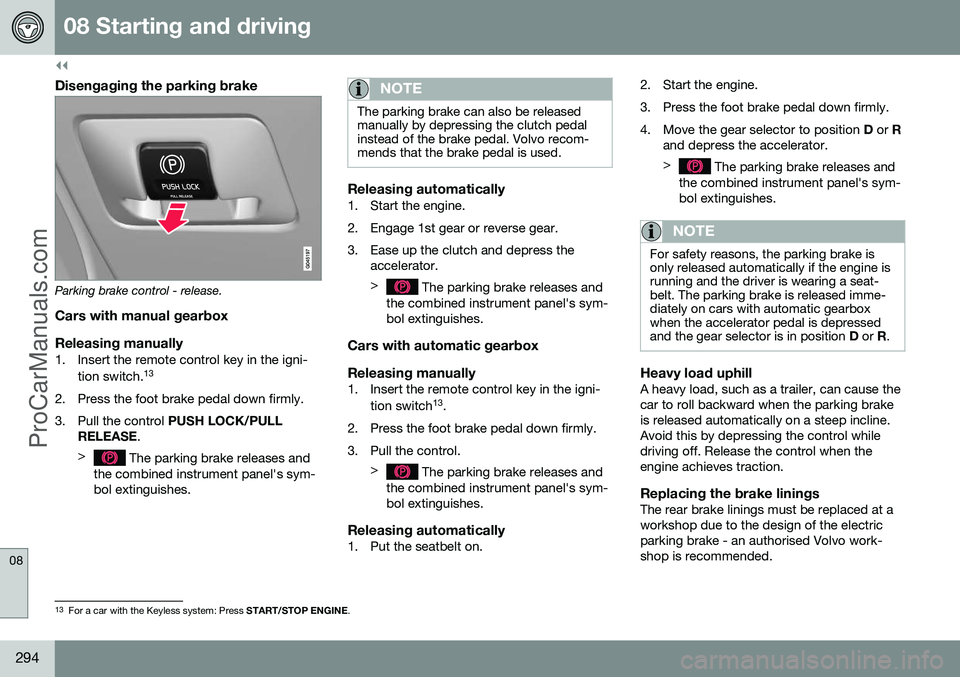
Disengaging the parking brake
Parking brake control - release.
Cars with manual gearbox
Releasing manually
1. Insert the remote control key in the igni- tion switch. 13
2. Press the foot brake pedal down firmly.
3. Pull the control PUSH LOCK/PULL
RELEASE .
>
The parking brake releases and
the combined instrument panel's sym- bol extinguishes.
NOTE
The parking brake can also be released manually by depressing the clutch pedalinstead of the brake pedal. Volvo recom-mends that the brake pedal is used.
Releasing automatically1. Start the engine.
2. Engage 1st gear or reverse gear.
3. Ease up the clutch and depress the accelerator. >
The parking brake releases and
the combined instrument panel's sym- bol extinguishes.
Cars with automatic gearbox Releasing manually
1. Insert the remote control key in the igni-
tion switch 13
.
2. Press the foot brake pedal down firmly.
3. Pull the control. >
The parking brake releases and
the combined instrument panel's sym- bol extinguishes.
Releasing automatically1. Put the seatbelt on. 2. Start the engine.
3. Press the foot brake pedal down firmly.
4. Move the gear selector to position
D or R
and depress the accelerator. >
The parking brake releases and
the combined instrument panel's sym- bol extinguishes.
NOTE
For safety reasons, the parking brake is only released automatically if the engine isrunning and the driver is wearing a seat-belt. The parking brake is released imme-diately on cars with automatic gearboxwhen the accelerator pedal is depressedand the gear selector is in position D or R.
Heavy load uphillA heavy load, such as a trailer, can cause the car to roll backward when the parking brakeis released automatically on a steep incline.Avoid this by depressing the control whiledriving off. Release the control when theengine achieves traction.
Replacing the brake liningsThe rear brake linings must be replaced at aworkshop due to the design of the electricparking brake - an authorised Volvo work-shop is recommended.
13
For a car with the Keyless system: Press START/STOP ENGINE.
ProCarManuals.co’
Page 385 of 442
10 Maintenance and service
10
383
Group 3
(dry dirt, dust)
1. Use a soft brush to remove the dirt.
2. Same procedure as for group 1.
Stains on interior plastic parts, metal parts and wood parts
A fibrillated fibre or microfibre cloth, lightly moistened with water, available from Volvodealers, is recommended for cleaning interiorparts and surfaces. Do not scrape or rub stains. Never use strong stain removers. A special cleaning agentavailable from Volvo dealers can be used formore difficult cleaning.
SeatbeltsUse water and a synthetic detergent. A spe-cial textile cleaning agent is available fromyour Volvo dealer. Make sure the seatbelt isdry before allowing it to retract.
Related information
• Car washing (p. 379)
Paint damage
Paint is an important part of the car's rust- proofing and should therefore be checkedregularly. The most common types of paint-work damage are stone chips, scratches, andmarks on the edges of wings, doors andbumpers.
Touching up minor paintwork damageTo avoid the onset of rust, damaged paint-work should be rectified immediately. Materials
• primer 17
- a special adhesive primer in a
spray can is available for e.g. plastic- coated bumpers
• basecoat and clearcoat - available in spray cans or as touch-up pens/sticks 18
• masking tape
• fine sand paper 17
.
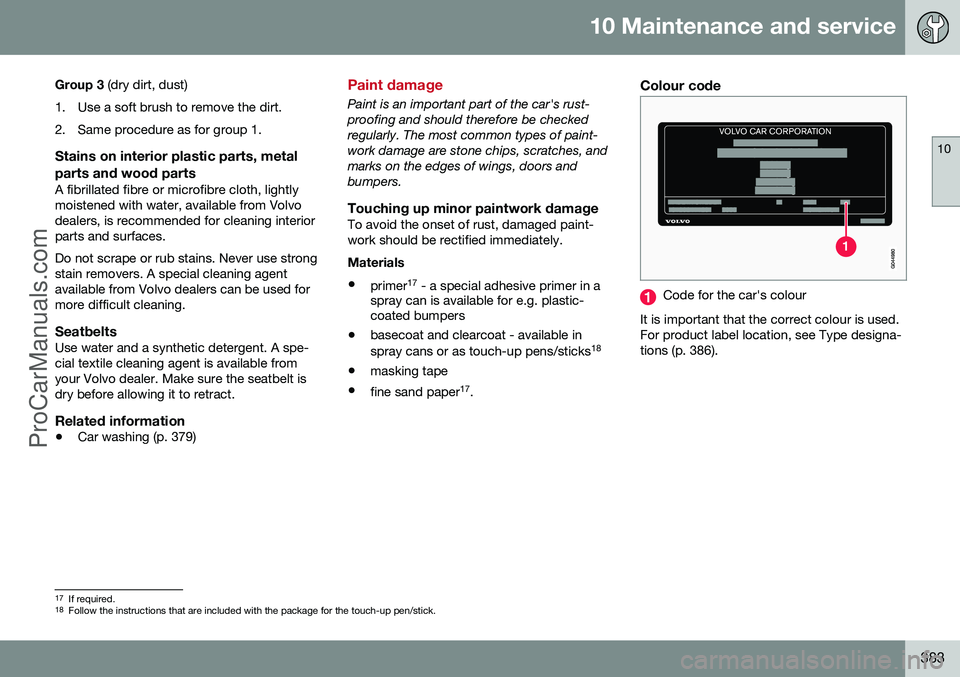
Colour code
Code for the car's colour
It is important that the correct colour is used. For product label location, see Type designa-tions (p. 386).
17 If required.
18 Follow the instructions that are included with the package for the touch-up pen/stick.
ProCarManuals.co’
Page 427 of 442
11 Specifications
11
* Option/accessory, for more information, see Introduction.425
QUENTIAL DAMAGE OR FOR ANY LOST PROFITS OR REVENUES.
©
Gracenote, Inc. 2009
Related information
• Volvo Sensus (p. 68)
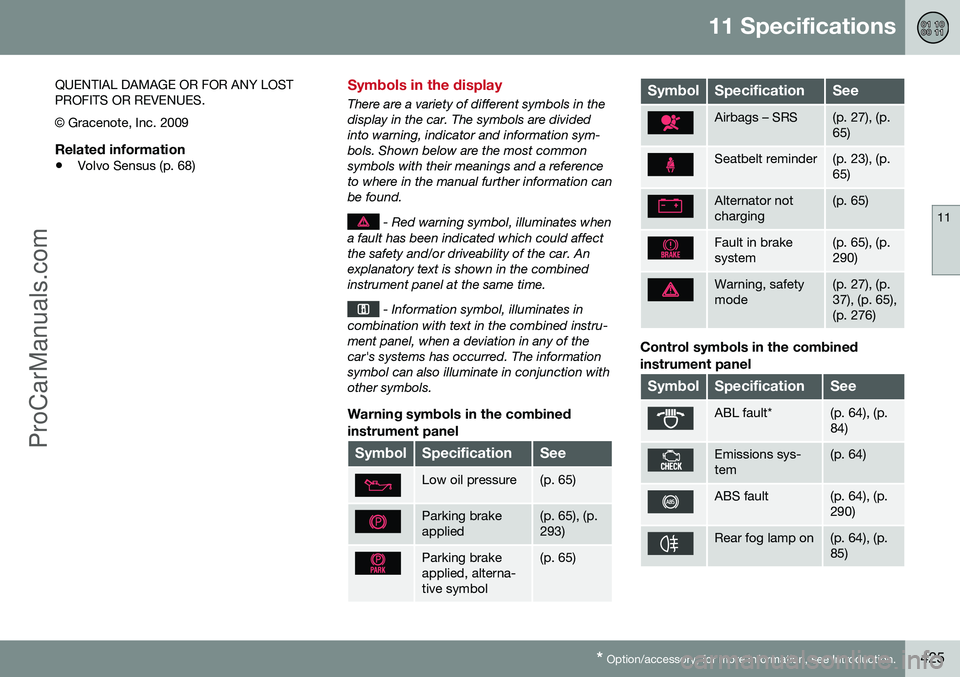
Symbols in the display
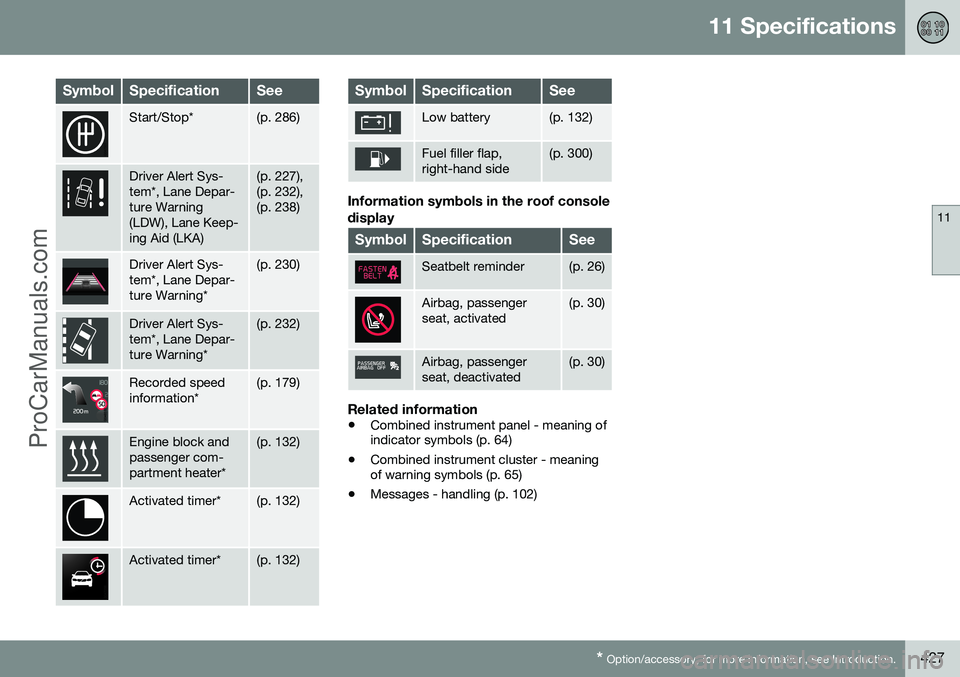
There are a variety of different symbols in the display in the car. The symbols are dividedinto warning, indicator and information sym-bols. Shown below are the most commonsymbols with their meanings and a referenceto where in the manual further information canbe found.
- Red warning symbol, illuminates when
a fault has been indicated which could affect the safety and/or driveability of the car. Anexplanatory text is shown in the combinedinstrument panel at the same time.
- Information symbol, illuminates in
combination with text in the combined instru- ment panel, when a deviation in any of thecar's systems has occurred. The informationsymbol can also illuminate in conjunction withother symbols.
Warning symbols in the combined
instrument panel
SymbolSpecificationSee
Low oil pressure(p. 65)
Parking brake applied(p. 65), (p. 293)
Parking brake applied, alterna-tive symbol(p. 65)
SymbolSpecificationSee
Airbags – SRS(p. 27), (p. 65)
Seatbelt reminder(p. 23), (p. 65)
Alternator not charging(p. 65)
Fault in brake system(p. 65), (p. 290)
Warning, safety mode(p. 27), (p. 37), (p. 65),(p. 276)
Control symbols in the combined instrument panel
SymbolSpecificationSee
ABL fault*(p. 64), (p. 84)
Emissions sys- tem(p. 64)
ABS fault(p. 64), (p. 290)
Rear fog lamp on(p. 64), (p. 85)
ProCarManuals.co’
Page 429 of 442
11 Specifications
11
* Option/accessory, for more information, see Introduction.427
SymbolSpecificationSee
Start/Stop*(p. 286)
Driver Alert Sys- tem*, Lane Depar-ture Warning(LDW), Lane Keep-ing Aid (LKA)(p. 227), (p. 232),(p. 238)
Driver Alert Sys- tem*, Lane Depar-ture Warning*(p. 230)
Driver Alert Sys- tem*, Lane Depar-ture Warning*(p. 232)
Recorded speed information*(p. 179)
Engine block and passenger com-partment heater*(p. 132)
Activated timer*(p. 132)
Activated timer*(p. 132)
SymbolSpecificationSee
Low battery(p. 132)
Fuel filler flap, right-hand side(p. 300)
Information symbols in the roof console display
SymbolSpecificationSee
Seatbelt reminder(p. 26)
Airbag, passenger seat, activated(p. 30)
Airbag, passenger seat, deactivated(p. 30)
Related information
• Combined instrument panel - meaning of indicator symbols (p. 64)
• Combined instrument cluster - meaningof warning symbols (p. 65)
• Messages - handling (p. 102)
ProCarManuals.co’