change wheel VOLVO V60 2014 Owner's Manual
[x] Cancel search | Manufacturer: VOLVO, Model Year: 2014, Model line: V60, Model: VOLVO V60 2014Pages: 442, PDF Size: 13.85 MB
Page 246 of 442
07 Driver support
07
244* Option/accessory, for more information, see Introduction.
Park assist camera
The parking camera is an assist system and is activated when reverse gear is engaged (canbe changed in the settings menu (p. 246)). The camera image is shown on the centre console's screen.
NOTE
When a towbar is configured with the car's electrical system, the protrusion of thetowbar is included when the functionmeasures the parking space.
WARNING
• The parking camera serves as an aid. It does not relieve the driver of respon-sibility when reversing.
• The camera has blind spots, whereobstacles cannot be detected.
• Be aware of people and animals in thevicinity of the car.
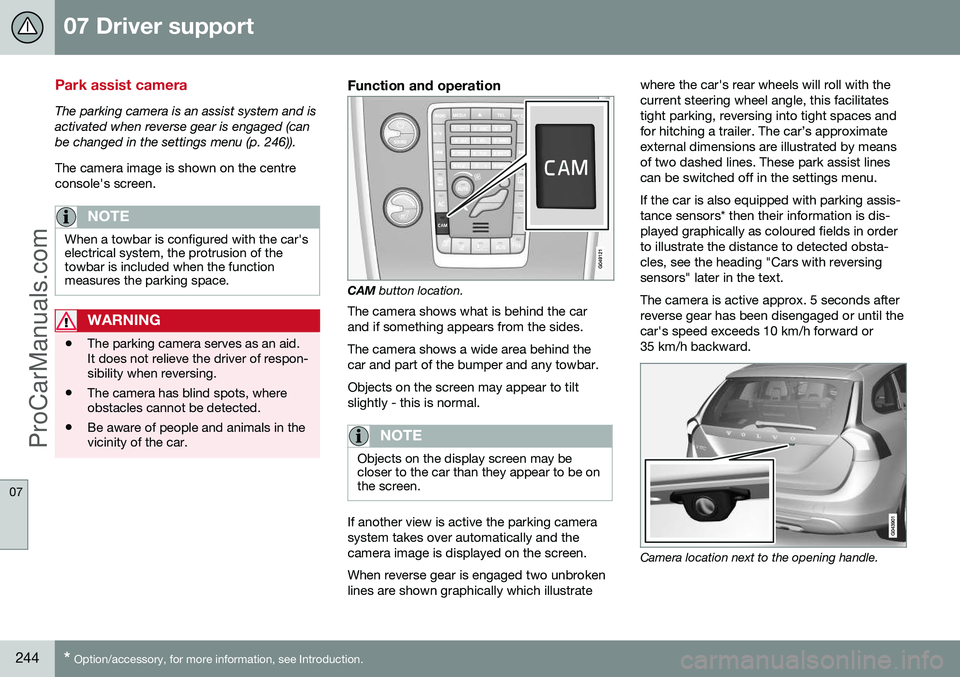
Function and operation
CAM
button location.
The camera shows what is behind the car and if something appears from the sides. The camera shows a wide area behind the car and part of the bumper and any towbar. Objects on the screen may appear to tilt slightly - this is normal.
NOTE
Objects on the display screen may be closer to the car than they appear to be onthe screen.
If another view is active the parking camera system takes over automatically and thecamera image is displayed on the screen. When reverse gear is engaged two unbroken lines are shown graphically which illustrate where the car's rear wheels will roll with thecurrent steering wheel angle, this facilitatestight parking, reversing into tight spaces andfor hitching a trailer. The car’s approximateexternal dimensions are illustrated by meansof two dashed lines. These park assist linescan be switched off in the settings menu. If the car is also equipped with parking assis- tance sensors* then their information is dis-played graphically as coloured fields in orderto illustrate the distance to detected obsta-cles, see the heading "Cars with reversingsensors" later in the text. The camera is active approx. 5 seconds after reverse gear has been disengaged or until thecar's speed exceeds 10 km/h forward or35 km/h backward.
Camera location next to the opening handle.
ProCarManuals.com
Page 254 of 442
||
07 Driver support
07
252* Option/accessory, for more information, see Introduction.
IMPORTANT
The PAP system's parameters may need to be updated when changing to anotherapproved wheel rim size involving changedtyre circumference. Consult a workshop -an authorised Volvo workshop is recom-mended.
Maintenance
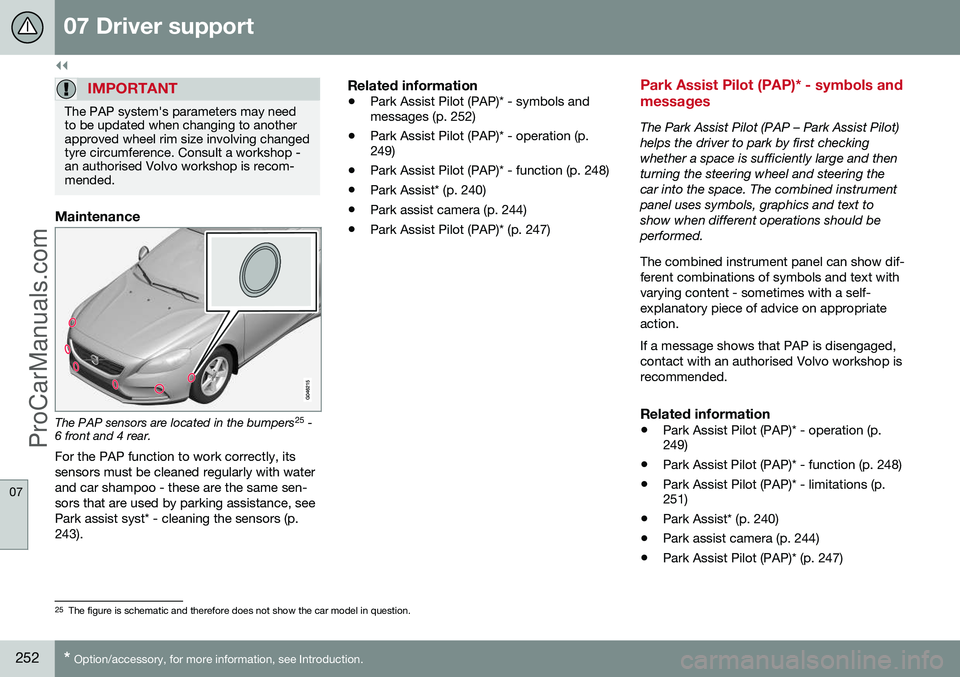
The PAP sensors are located in the bumpers 25
-
6 front and 4 rear.
For the PAP function to work correctly, its sensors must be cleaned regularly with waterand car shampoo - these are the same sen-sors that are used by parking assistance, seePark assist syst* - cleaning the sensors (p.243).
Related information
• Park Assist Pilot (PAP)* - symbols and messages (p. 252)
• Park Assist Pilot (PAP)* - operation (p.249)
• Park Assist Pilot (PAP)* - function (p. 248)
• Park Assist* (p. 240)
• Park assist camera (p. 244)
• Park Assist Pilot (PAP)* (p. 247)
Park Assist Pilot (PAP)* - symbols and messages
The Park Assist Pilot (PAP – Park Assist Pilot) helps the driver to park by first checkingwhether a space is sufficiently large and thenturning the steering wheel and steering thecar into the space. The combined instrumentpanel uses symbols, graphics and text toshow when different operations should beperformed. The combined instrument panel can show dif- ferent combinations of symbols and text withvarying content - sometimes with a self-explanatory piece of advice on appropriateaction. If a message shows that PAP is disengaged, contact with an authorised Volvo workshop isrecommended.
Related information
•
Park Assist Pilot (PAP)* - operation (p. 249)
• Park Assist Pilot (PAP)* - function (p. 248)
• Park Assist Pilot (PAP)* - limitations (p.251)
• Park Assist* (p. 240)
• Park assist camera (p. 244)
• Park Assist Pilot (PAP)* (p. 247)
25
The figure is schematic and therefore does not show the car model in question.
ProCarManuals.co’
Page 276 of 442
||
08 Starting and driving
08
274* Option/accessory, for more information, see Introduction.
• Pull the lever back towards "
–" (minus) to
change down a gear and release it.
The manual gearshift mode " +S–" can be
selected at any time while driving. Geartronic automatically shifts down if the driver allows the speed to decrease lowerthan a level suitable for the selected gear, inorder to avoid jerking and stalling. To return to automatic driving mode:
• Move the lever to the side to the end position at
D.
NOTE
If the gearbox has a Sport programme then the gearbox will only become manualafter the gear selector has been movedforwards or backwards in its " +S–" posi-
tion. The combined instrument panel then changes indication from
S to show which
of the gears 1, 2, 3 etc. is engaged.
Paddles*As a supplement to manual gear changing with the gear selector there are also controlslocated on the steering wheel, so-called"paddles". To be able to change gear with the steering wheel paddles they must first be activated.This is by means of pulling one of the paddlestoward the steering wheel - the combined instrument panel then changes indicationfrom "
D" to a figure, which indicates the cur-
rent gear. To then change gear one step: • Pull one of the paddles backwards - towards the steering wheel - and release.
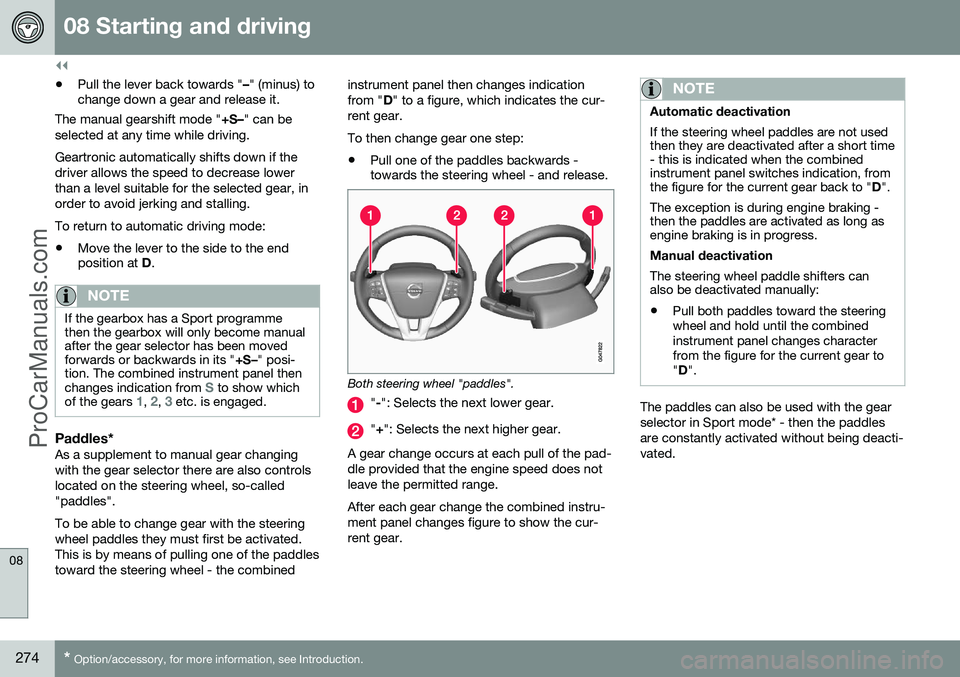
Both steering wheel "paddles".
"
-": Selects the next lower gear.
" + ": Selects the next higher gear.
A gear change occurs at each pull of the pad- dle provided that the engine speed does notleave the permitted range. After each gear change the combined instru- ment panel changes figure to show the cur-rent gear.
NOTE
Automatic deactivation If the steering wheel paddles are not used then they are deactivated after a short time- this is indicated when the combinedinstrument panel switches indication, fromthe figure for the current gear back to " D".
The exception is during engine braking -then the paddles are activated as long asengine braking is in progress. Manual deactivation The steering wheel paddle shifters can also be deactivated manually: • Pull both paddles toward the steering wheel and hold until the combinedinstrument panel changes characterfrom the figure for the current gear to"
D ".
The paddles can also be used with the gear selector in Sport mode* - then the paddlesare constantly activated without being deacti-vated.
ProCarManuals.co’
Page 277 of 442
08 Starting and driving
08
* Option/accessory, for more information, see Introduction.275
Geartronic - Sport mode* (S) 9The Sport programme provides sportier characteristics and allowshigher engine speed for the gears.At the same time it responds more
quickly to acceleration. During active driving,the use of a lower gear is prioritised, leadingto a delayed upshift.
To activate Sport mode: • Move the gear selector to the side from
D
position to the end position at " +S–" - the
combined instrument panel changes indi- cation from
D to S.
Sport mode can be selected at any time while driving.
Geartronic - Winter modeIt can be easier to pull away on slippery roadsif 3rd gear is engaged manually.
1. Depress the brake pedal and move the gear selector from D position to the end
position at " +S–" - the combined instru-
ment panel changes indication from
D to
the figure
110 .
2. Scroll up to gear 3 by pushing the lever forward towards " +" (plus) twice - the dis-
play shifts the indication from
1 to 3.
3. Release the brake and accelerate care- fully. The gearbox "winter mode" means that the car moves off with a lower engine speed andreduced engine power on the drive wheels.
Kick-downWhen the accelerator pedal is pressed all theway to the floor (beyond the position normallyregarded as full acceleration) a lower gear isimmediately engaged. This is known as kick-down. If the accelerator is released from the kick- down position, the gearbox automaticallychanges up. Kick-down is used when maximum accelera- tion is needed, such as for overtaking. Safety function To prevent overrevving the engine, the gear- box control program has a protective down-shift inhibitor which prevents the kick-downfunction. Geartronic does not permit downshifting/ kick-down which would result in an enginespeed high enough to damage the engine.Nothing happens if the driver still tries to shiftdown in this way at high engine speed – theoriginal gear remains engaged. When kick-down is activated the car can change one or more gears at a time depend-ing on engine speed. The car changes up when the engine reaches its maximum speedin order to prevent damage to the engine.
Related information
•
Transmission fluid - grade and volume (p. 399)
9
With some engines only.10
If the car has Sport mode* then " S" is shown first.
ProCarManuals.co’
Page 291 of 442
08 Starting and driving
08
289
and
• Deactivated ECO function: Short coasting with
engine braking = Minimum con-
sumption.
NOTE
However, to achieve optimal low fuel con- sumption, Eco Coast in combination withshort coasting distances should generallybe avoided.
Activate Eco CoastThe function is activated when the accelera- tor pedal is fully released, in combination withthe following parameters: • The
ECO button activated
• The gear selector in
D position
• Speed within the range of approx. 65-140 km/h
• The road's downhill gradient is notsteeper than approx. 6%.
Deactivate Eco CoastIn certain situations it may be desirable to deactivate the Eco Coast function. Examplesof such situations include:
• on steep downhill gradients - to be able to use engine braking.
• before an imminent overtaking manoeu-vre - in order to be able to complete it inthe safest way possible. Deactivating Eco Coast and returning to engine braking can be performed as follows:
• Press the
ECO button.
• Move the gear lever to manual "
S+/-"
position.
• Change gear with the steering wheel pad- dle shifters.
• Actuate the accelerator or brake pedal.
Eco Coast - LimitationsThe function is not available if:
• cruise control is activated
• the road's downhill gradient is steeperthan approx. 6%.
• manual gear changing is performed withthe steering wheel paddle shifters*
• engine and/or gearbox are not at normaloperating temperature.
• the gear selector is moved from
D- to " S
+/- " position
• speed is outside the range ofapprox. 65-140 km/h
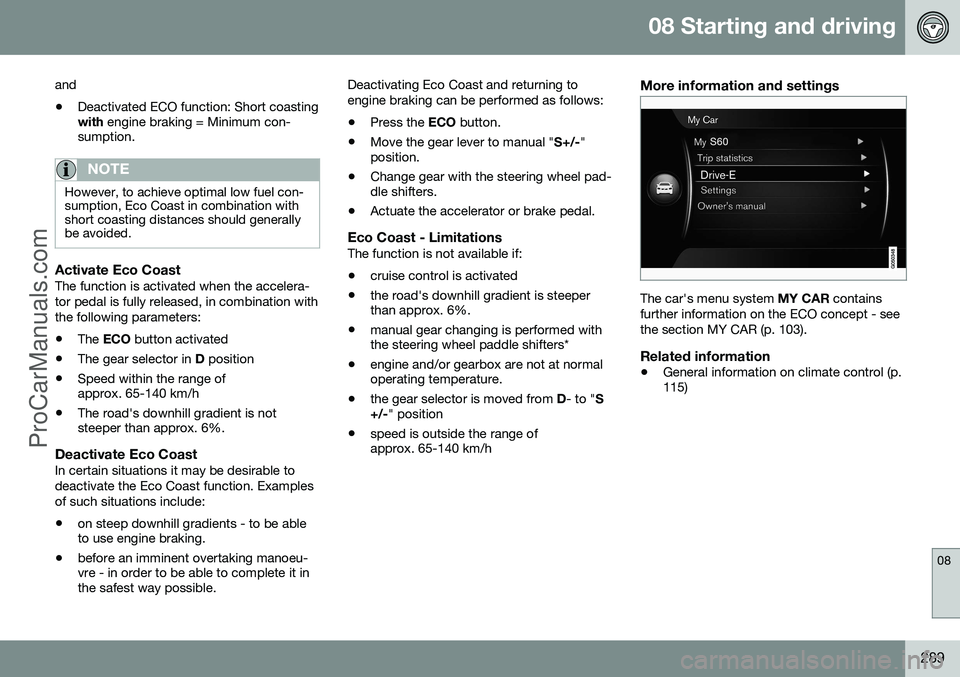
More information and settings
The car's menu system
MY CAR contains
further information on the ECO concept - see the section MY CAR (p. 103).
Related information
• General information on climate control (p. 115)
ProCarManuals.co’
Page 293 of 442
08 Starting and driving
08
291
WARNING
If and illuminate at the same
time, there may be a fault in the brake sys- tem. If the level in the brake fluid reservoir is normal at this stage, drive carefully to thenearest workshop and have the brake sys-tem checked - an authorised Volvo work-shop is recommended. If the brake fluid is below the MIN level in
the brake fluid reservoir, do not drive fur- ther before topping up the brake fluid. The reason for the loss of brake fluid must be investigated.
Related information
• Parking brake (p. 293)
• Foot brake - emergency brake lights and automatic hazard warning flashers (p.291)
• Foot brake - emergency brake assistance(p. 292)
• Foot brake - anti-lock braking system (p.291)
Foot brake - anti-lock braking system
The anti-lock braking system, ABS (Anti-lock Braking System), prevents the wheels fromlocking up during braking. The function allows steering ability to be maintained, and it is easier to swerve to avoida hazard for example. Vibration may be felt inthe brake pedal when this is engaged and thisis normal. A short test of the ABS system is made auto- matically after the engine has been startedwhen the driver releases the brake pedal. Afurther automatic test of the ABS system maybe made when the car reaches 10 km/h. Thetest may be experienced as pulses in thebrake pedal.
Related information
•Foot brake (p. 290)
• Parking brake (p. 293)
• Foot brake - emergency brake lights and automatic hazard warning flashers (p.291)
• Foot brake - emergency brake assistance(p. 292)
Foot brake - emergency brake lights and automatic hazard warningflashers
Emergency brake lights are activated to alert vehicles behind about sudden braking. Thefunction means that the brake light flashesinstead of - as in normal braking - shining witha constant glow. Emergency brake lights are activated at speeds above 50 km/h in the event of suddenbraking. After the car's speed has beenslowed below 10 km/h the brake light returnsfrom flashing to the normal constant glow -while at the same time the hazard warningflashers (p. 86) are activated, and they flashuntil the driver changes engine speed with theaccelerator pedal or they are deactivated withtheir button.
Related information
•Foot brake (p. 290)
• Parking brake (p. 293)
• Foot brake - emergency brake assistance (p. 292)
• Foot brake - anti-lock braking system (p.291)
ProCarManuals.co’
Page 295 of 442
08 Starting and driving
08
}}
293
Parking brake
The parking brake holds the car stationary, when the driver's seat is empty, by mechani-cally locking/blocking two wheels.
FunctionA faint electric motor noise can be heardwhen the electrical parking brake is beingapplied. The noise can also be heard duringthe automatic function checking of the park-ing brake. If the car is stationary when the parking brake is applied then it only acts on the rear wheels.If it is applied when the car is moving then thenormal foot brake is used, i.e. the brake actson all four wheels. Brake function changesover to the rear wheels when the car is almoststationary.
Low battery voltageIf the battery voltage is too low then the park-ing brake can neither be released nor applied.Connect a donor battery if the battery voltageis too low, see Jump starting with battery (p.270).
Applying the parking brake
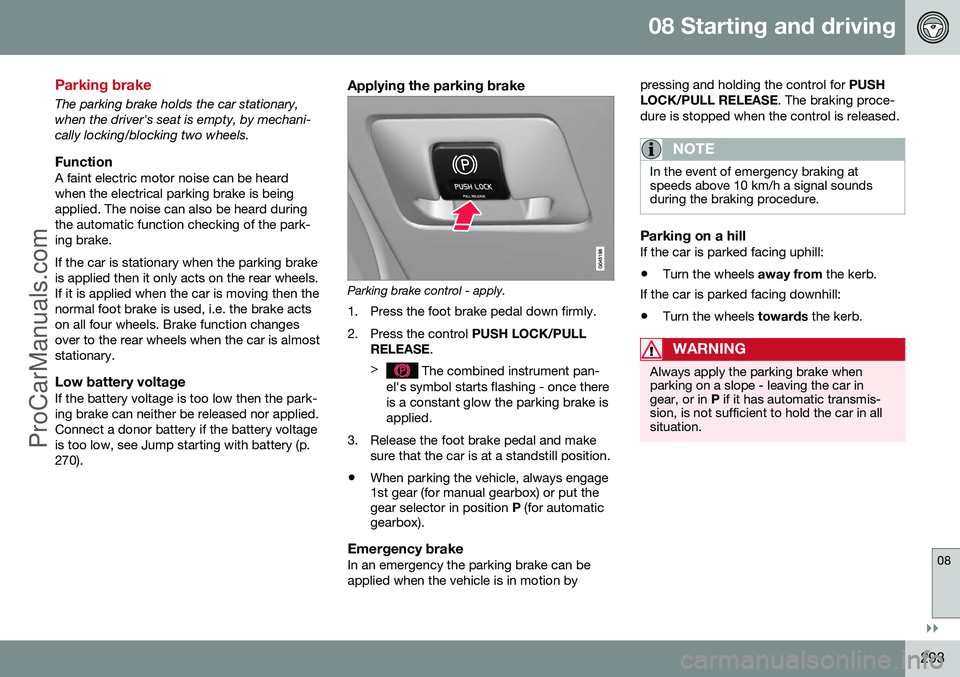
Parking brake control - apply.
1. Press the foot brake pedal down firmly.
2. Press the control PUSH LOCK/PULL
RELEASE .
>
The combined instrument pan-
el's symbol starts flashing - once there is a constant glow the parking brake isapplied.
3. Release the foot brake pedal and make sure that the car is at a standstill position.
• When parking the vehicle, always engage 1st gear (for manual gearbox) or put thegear selector in position
P (for automatic
gearbox).
Emergency brakeIn an emergency the parking brake can be applied when the vehicle is in motion by pressing and holding the control for
PUSH
LOCK/PULL RELEASE . The braking proce-
dure is stopped when the control is released.
NOTE
In the event of emergency braking at speeds above 10 km/h a signal soundsduring the braking procedure.
Parking on a hillIf the car is parked facing uphill:
• Turn the wheels
away from the kerb.
If the car is parked facing downhill: • Turn the wheels
towards the kerb.
WARNING
Always apply the parking brake when parking on a slope - leaving the car ingear, or in P if it has automatic transmis-
sion, is not sufficient to hold the car in allsituation.
ProCarManuals.co’
Page 321 of 442
09 Wheels and tyres
09
319
New tyres
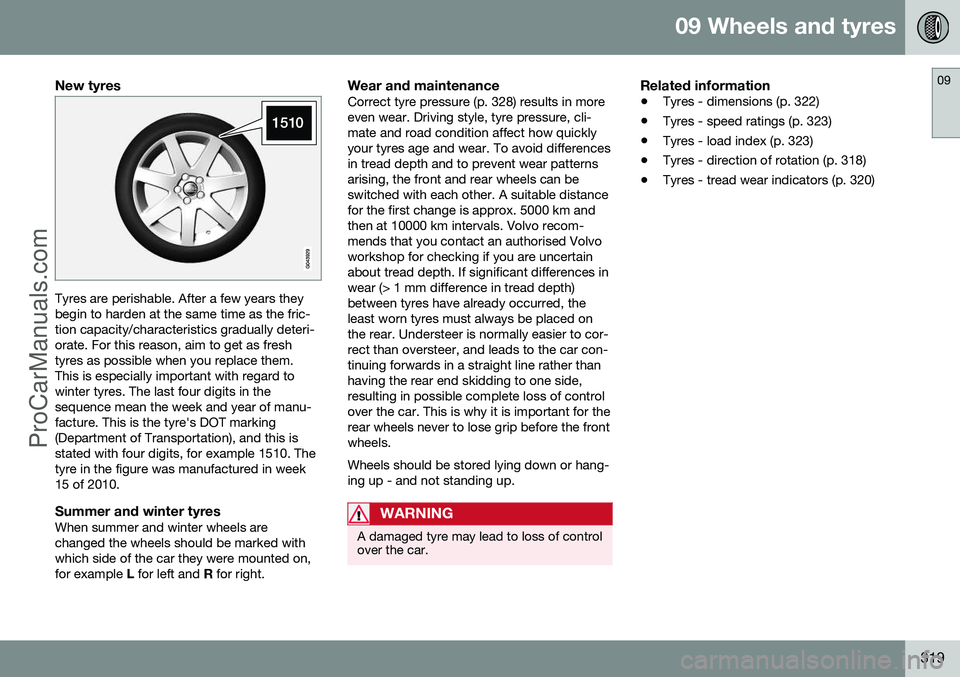
Tyres are perishable. After a few years they begin to harden at the same time as the fric-tion capacity/characteristics gradually deteri-orate. For this reason, aim to get as freshtyres as possible when you replace them.This is especially important with regard towinter tyres. The last four digits in thesequence mean the week and year of manu-facture. This is the tyre's DOT marking(Department of Transportation), and this isstated with four digits, for example 1510. Thetyre in the figure was manufactured in week15 of 2010.
Summer and winter tyresWhen summer and winter wheels arechanged the wheels should be marked withwhich side of the car they were mounted on,for example L for left and R for right.
Wear and maintenanceCorrect tyre pressure (p. 328) results in moreeven wear. Driving style, tyre pressure, cli-mate and road condition affect how quicklyyour tyres age and wear. To avoid differencesin tread depth and to prevent wear patternsarising, the front and rear wheels can beswitched with each other. A suitable distancefor the first change is approx. 5000 km andthen at 10000 km intervals. Volvo recom-mends that you contact an authorised Volvoworkshop for checking if you are uncertainabout tread depth. If significant differences inwear (> 1 mm difference in tread depth)between tyres have already occurred, theleast worn tyres must always be placed onthe rear. Understeer is normally easier to cor-rect than oversteer, and leads to the car con-tinuing forwards in a straight line rather thanhaving the rear end skidding to one side,resulting in possible complete loss of controlover the car. This is why it is important for therear wheels never to lose grip before the frontwheels. Wheels should be stored lying down or hang- ing up - and not standing up.
WARNING
A damaged tyre may lead to loss of control over the car.
Related information
• Tyres - dimensions (p. 322)
• Tyres - speed ratings (p. 323)
• Tyres - load index (p. 323)
• Tyres - direction of rotation (p. 318)
• Tyres - tread wear indicators (p. 320)
ProCarManuals.co’
Page 322 of 442
09 Wheels and tyres
09
320* Option/accessory, for more information, see Introduction.
Tyres - tread wear indicators
A tread wear indicator shows the status of the tyre's tread.
G021829
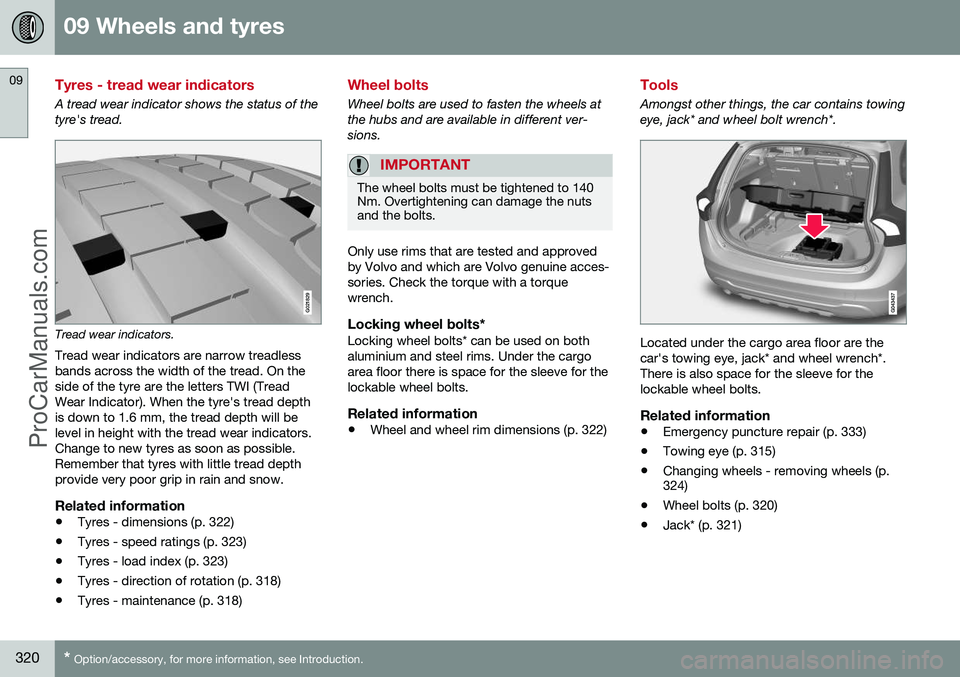
Tread wear indicators.
Tread wear indicators are narrow treadless bands across the width of the tread. On theside of the tyre are the letters TWI (TreadWear Indicator). When the tyre's tread depthis down to 1.6 mm, the tread depth will belevel in height with the tread wear indicators.Change to new tyres as soon as possible.Remember that tyres with little tread depthprovide very poor grip in rain and snow.
Related information
• Tyres - dimensions (p. 322)
• Tyres - speed ratings (p. 323)
• Tyres - load index (p. 323)
• Tyres - direction of rotation (p. 318)
• Tyres - maintenance (p. 318)
Wheel bolts
Wheel bolts are used to fasten the wheels at the hubs and are available in different ver-sions.
IMPORTANT
The wheel bolts must be tightened to 140 Nm. Overtightening can damage the nutsand the bolts.
Only use rims that are tested and approved by Volvo and which are Volvo genuine acces-sories. Check the torque with a torquewrench.
Locking wheel bolts*Locking wheel bolts* can be used on bothaluminium and steel rims. Under the cargoarea floor there is space for the sleeve for thelockable wheel bolts.
Related information
•
Wheel and wheel rim dimensions (p. 322)
Tools
Amongst other things, the car contains towing
eye, jack* and wheel bolt wrench*.
Located under the cargo area floor are the car's towing eye, jack* and wheel wrench*.There is also space for the sleeve for thelockable wheel bolts.
Related information
• Emergency puncture repair (p. 333)
• Towing eye (p. 315)
• Changing wheels - removing wheels (p. 324)
• Wheel bolts (p. 320)
• Jack* (p. 321)
ProCarManuals.co’
Page 326 of 442
||
09 Wheels and tyres
09
324* Option/accessory, for more information, see Introduction.
W270 km/h
Y300 km/h
WARNING
The car must be fitted with tyres which have the same or a higher load index (p.323) (LI) and speed rating (SS) than speci-fied. If a tyre with too low a load index orspeed rating is used, it may overheat.
Related information
• Tyres - dimensions (p. 322)
• Tyres - load index (p. 323)
• Tyres - direction of rotation (p. 318)
Changing wheels - removing wheels
The car's wheels can be changed for e.g. win- ter wheels/winter tyres.
Spare wheel*The following instructions only apply if aspare wheel has been purchased as an accessory for the car.
If the car is not equip-
ped with a spare wheel - see information about Emergency puncture repair (TMK) (p.333). The spare wheel (Temporary spare) is only intended for use temporarily and must bereplaced by an ordinary wheel as soon aspossible. The car's handling may be alteredby the use of the spare wheel. The sparewheel is smaller than the normal wheel. Thecar's ground clearance is affected accord-ingly. Pay attention to high kerbs and do notmachine wash the car. If the spare wheel isfitted on the front axle, you cannot use snowchains at the same time. On all-wheel drivecars the drive on the rear axle can be discon-nected. The spare wheel must not berepaired. The correct tyre pressure for the spare wheel is stated in the tyre pressure table (p. 407).
IMPORTANT
• Never drive faster than 80 km/h with a spare wheel on the car.
• The car must never be driven fittedwith more than one "TemporarySpare" wheel.
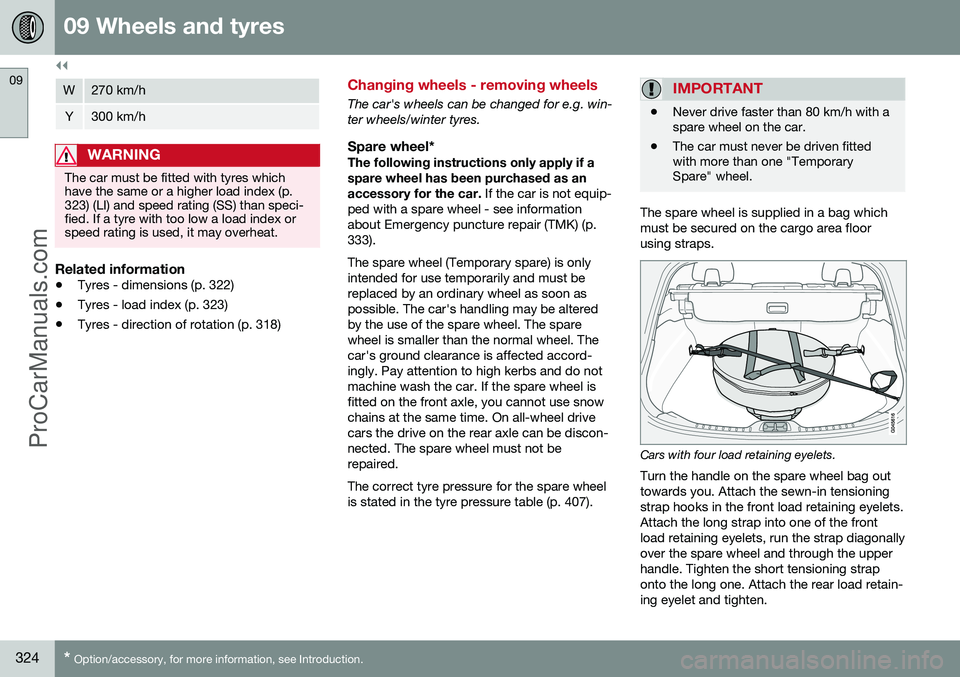
The spare wheel is supplied in a bag which must be secured on the cargo area floorusing straps.
Cars with four load retaining eyelets.
Turn the handle on the spare wheel bag out towards you. Attach the sewn-in tensioningstrap hooks in the front load retaining eyelets.Attach the long strap into one of the frontload retaining eyelets, run the strap diagonallyover the spare wheel and through the upperhandle. Tighten the short tensioning straponto the long one. Attach the rear load retain-ing eyelet and tighten.
ProCarManuals.co’