oil level VOLVO V60 2014 Owners Manual
[x] Cancel search | Manufacturer: VOLVO, Model Year: 2014, Model line: V60, Model: VOLVO V60 2014Pages: 442, PDF Size: 13.85 MB
Page 11 of 442
Table of contents
9
10
10 Maintenance and service
Volvo service programme....................... 340
Raising the car........................................ 341
Bonnet - opening and closing................. 343
Engine compartment - overview............. 343
Engine compartment - checking............. 344
Engine oil - general................................. 345
Engine oil - checking and filling.............. 346
Coolant - level......................................... 349
Brake and clutch fluid - level.................. 350
Power steering fluid - level...................... 351Climate control system - fault tracing and
repair....................................................... 352
Lamp replacement.................................. 352
Lamp replacement - headlamps............. 353Lamp replacement - cover for main/
dipped beam bulbs................................. 354
Lamp replacement - dipped beam......... 355
Lamp replacement - main beam............. 355
Lamp replacement - extra main beam.... 355Lamp replacement - direction indicators
front......................................................... 356
Lamp replacement - rear lamp............... 356Lamp replacement - location of rear
lamps...................................................... 357
10
Lamp replacement - number plate light-
ing........................................................... 357 Lamp replacement - lighting in cargo
area......................................................... 357 Lamp replacement - vanity mirror light-
ing........................................................... 358
Lamps - specifications ........................... 358
Wiper blades........................................... 359
Washer fluid - filling................................ 361
Battery..................................................... 361
Battery - symbols.................................... 362
Starter battery - replacement.................. 363
Battery - Start/Stop................................. 365
Fuses - general....................................... 367
Fuses - in engine compartment.............. 368
Fuses - under glovebox.......................... 372Fuses - in the control module under the
glovebox................................................. 374
Fuses - in cargo area.............................. 376Fuses - in the engine compartment's
cold zone................................................ 377
Car washing............................................ 379
Polishing and waxing.............................. 380
Water and dirt-repellent coating............. 381
Rustproofing........................................... 381
10
Cleaning the interior................................ 381
Paint damage.......................................... 383
ProCarManuals.co’
Page 22 of 442
||
01 Introduction
01
20* Option/accessory, for more information, see Introduction.
A sophisticated air quality system, IAQS* (Interior Air Quality System) ensures that theincoming air is cleaner than the air in the traf-fic outside. The system consists of an electronic sensor and a carbon filter. The incoming air is moni-tored continuously and if there is an increasein the level of certain unhealthy gases such ascarbon monoxide then the air intake isclosed. Such a situation may arise in heavytraffic, queues and tunnels for example. The entry of nitrous oxides, ground-level ozone and hydrocarbons is prevented by thecarbon filter.
InteriorThe interior of a Volvo is designed to be plea-sant and comfortable, even for people withcontact allergies and for asthma sufferers.Extreme attention has been given to choosingenvironmentally-compatible materials.
Volvo workshops and the environmentRegular maintenance creates the conditionsfor a long service life and low fuel consump-tion for your car. In this way you contribute toa cleaner environment. When Volvo's work-shops are entrusted with the service andmaintenance of your car it becomes part ofour system. Volvo makes clear demandsregarding the way in which our workshopsare designed in order to prevent spills anddischarges into the environment. Our work-shop staff have the knowledge and the tools required to guarantee good environmentalcare.
Reducing environmental impactYou can easily help reduce environmentalimpact - here are a few tips: •
Avoid letting the engine idle - switch off the engine when stationary for longerperiods. Pay attention to local regula-tions.
• Drive economically - think ahead.
• Perform service and maintenance inaccordance with the owner's manual'sinstructions - follow the intervals recom-mended in the Service and WarrantyBooklet.
• If the car is equipped with an engineblock heater*, use it before starting fromcold - it improves starting capacity andreduces wear in cold weather and theengine reaches normal operating tem-perature more quickly, which lowers con-sumption and reduces emissions.
• High speed increases consumption con-siderably due to increased wind resis-tance - a doubling of speed increaseswind resistance 4 times.
• Always dispose of environmentally hazar-dous waste, such as batteries and oils, inan environmentally safe manner. Consulta workshop in the event of uncertaintyabout how this type of waste should bediscarded - an authorised Volvo work-shop is recommended. Following this advice can save money, the planet's resources are saved, and the car'sdurability is extended. For more informationand further advice, see Eco guide (p. 63),Economical driving (p. 305) and Fuel con-sumption (p. 403).
RecyclingAs a part of Volvo's environmental work, it isimportant that the car is recycled in an envi-ronmentally sound manner. Almost all of thecar can be recycled. The last owner of the caris therefore requested to contact a dealer forreferral to a certified/approved recyclingfacility.
Related information
•
The owner's manual and the environment (p. 21)
ProCarManuals.co’
Page 64 of 442
||
03 Instruments and controls
03
62* Option/accessory, for more information, see Introduction.
272), Automatic gearbox -- Geartronic* (p. 273) or Automatic gearbox --Powershift* (p. 276).
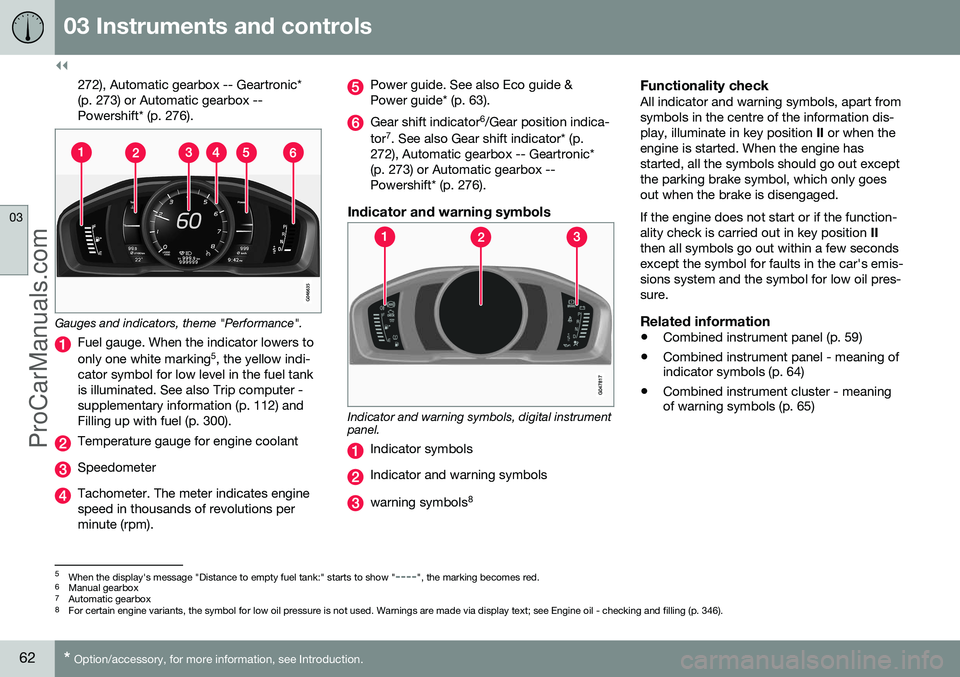
Gauges and indicators, theme "Performance".
Fuel gauge. When the indicator lowers to only one white marking 5
, the yellow indi-
cator symbol for low level in the fuel tank is illuminated. See also Trip computer -supplementary information (p. 112) andFilling up with fuel (p. 300).
Temperature gauge for engine coolant
Speedometer
Tachometer. The meter indicates engine speed in thousands of revolutions perminute (rpm).
Power guide. See also Eco guide & Power guide* (p. 63).
Gear shift indicator 6
/Gear position indica-
tor 7
. See also Gear shift indicator* (p.
272), Automatic gearbox -- Geartronic* (p. 273) or Automatic gearbox --Powershift* (p. 276).
Indicator and warning symbols
Indicator and warning symbols, digital instrument panel.
Indicator symbols
Indicator and warning symbols
warning symbols 8
Functionality checkAll indicator and warning symbols, apart from symbols in the centre of the information dis-play, illuminate in key position
II or when the
engine is started. When the engine hasstarted, all the symbols should go out exceptthe parking brake symbol, which only goesout when the brake is disengaged. If the engine does not start or if the function- ality check is carried out in key position II
then all symbols go out within a few secondsexcept the symbol for faults in the car's emis-sions system and the symbol for low oil pres-sure.
Related information
• Combined instrument panel (p. 59)
• Combined instrument panel - meaning of indicator symbols (p. 64)
• Combined instrument cluster - meaningof warning symbols (p. 65)
5
When the display's message "Distance to empty fuel tank:" starts to show "----", the marking becomes red.
6 Manual gearbox
7 Automatic gearbox
8 For certain engine variants, the symbol for low oil pressure is not used. Warnings are made via display text; see Engine oil - checking and filling (p. 346).
ProCarManuals.co’
Page 68 of 442
||
03 Instruments and controls
03
66
engine immediately and check the engine oil level, top up if necessary. If the symbol illumi-nates and the oil level is normal, contact aworkshop. Volvo recommends that you seekassistance from an authorised Volvo work-shop.
Parking brake appliedThis symbol illuminates with a constant glowwhen the parking brake is applied. The sym-bol flashes during application, and thenchanges over to a constant glow. A flashing symbol in any other situation means that a fault has arisen. Read the mes-sage on the information display. For more information, see Parking brake (p. 293).
Airbags – SRSIf this symbol remains illuminated or illumi-nates while driving, it means a fault has beendetected in the seatbelt buckle, SRS, SIPS, orIC systems. Drive immediately to a workshopto have the system checked. Volvo recom-mends that you seek assistance from anauthorised Volvo workshop.
Seatbelt reminderThis symbol flashes if someone in a front seathas not put on their seatbelt or if someone ina rear seat has taken off their seatbelt.
Alternator not chargingThis symbol illuminates during driving if afault has occurred in the electrical system.Visit a workshop. Volvo recommends that youseek assistance from an authorised Volvoworkshop.
Fault in brake systemIf this symbol illuminates, the brake fluid levelmay be too low. Stop the car in a safe placeand check the level in the brake fluid reser-voir; see Brake and clutch fluid - level (p.350). If the brake and ABS symbols illuminate at the same time, there may be a fault in thebrake force distribution system.
1. Stop the car in a safe place and turn offthe engine.
2. Restart the engine.
•If both symbols extinguish, continue driving.
• If the symbols remain illuminated,check the level in the brake fluid reser-voir, see Brake and clutch fluid - level(p. 350). If the brake fluid level is nor-mal but the symbols are still illumi-nated, the car can be driven, with greatcare, to a workshop to have the brakesystem checked. Volvo recommendsthat you seek assistance from anauthorised Volvo workshop.
WARNING
If the brake fluid is under the
MIN level in
the brake fluid reservoir, do not drive fur- ther before topping up the brake fluid. The loss of brake fluid must be investiga- ted by a workshop. Volvo recommendsthat you contact an authorised Volvoworkshop.
WARNING
If the BRAKE and ABS symbols are lit at the same time, there is a risk that the rearend will skid during heavy braking.
WarningThe red warning symbol illuminates when a fault has been indicated which could affectthe safety and/or driveability of the car. Anexplanatory text is shown on the informationdisplay at the same time. The symbol remainsvisible until the fault has been rectified but thetext message can be cleared with the OK
button; see Menu navigation - combinedinstrument panel (p. 100). The warning sym-bol can also illuminate in conjunction withother symbols. Action:
1. Stop in a safe place. Do not drive the car further.
ProCarManuals.co’
Page 103 of 442
03 Instruments and controls
03
* Option/accessory, for more information, see Introduction.101
Menu overview - combined instrument panel
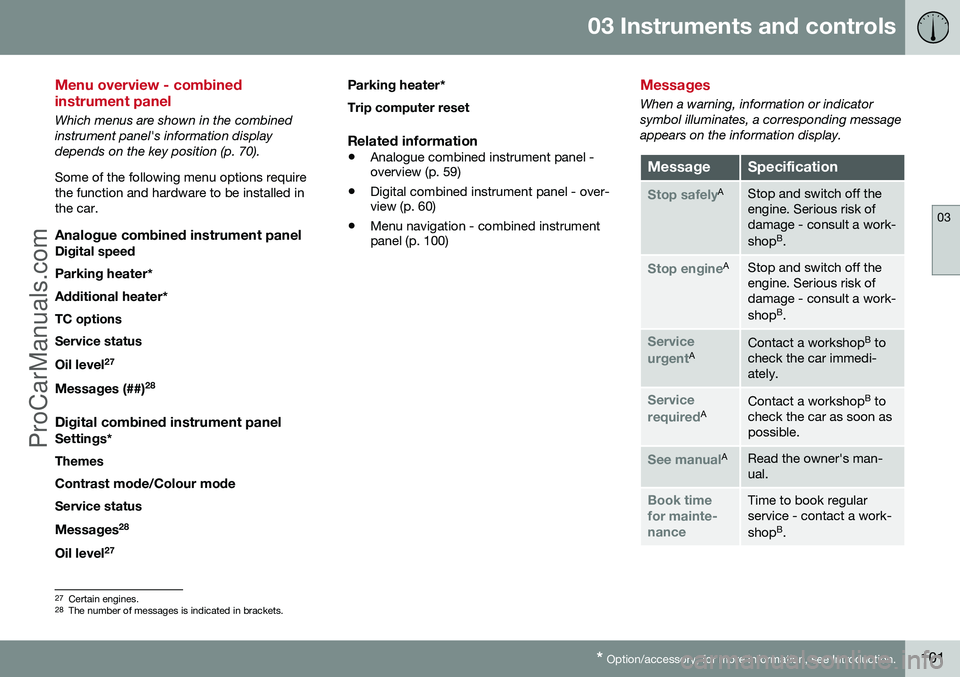
Which menus are shown in the combined instrument panel's information displaydepends on the key position (p. 70). Some of the following menu options require the function and hardware to be installed inthe car.
Analogue combined instrument panelDigital speed
Parking heater *
Additional heater *
TC options Service status
Oil level 27
Messages (##) 28
Digital combined instrument panel
Settings
*
Themes
Contrast mode /Colour mode
Service status
Messages 28
Oil level 27 Parking heater
*
Trip computer reset
Related information
• Analogue combined instrument panel - overview (p. 59)
• Digital combined instrument panel - over-view (p. 60)
• Menu navigation - combined instrumentpanel (p. 100)
Messages
When a warning, information or indicator symbol illuminates, a corresponding messageappears on the information display.
MessageSpecification
Stop safelyAStop and switch off the engine. Serious risk ofdamage - consult a work- shop B
.
Stop engineAStop and switch off the engine. Serious risk ofdamage - consult a work- shop B
.
Service urgentAContact a workshop B
to
check the car immedi- ately.
Service requiredAContact a workshop B
to
check the car as soon as possible.
See manualARead the owner's man- ual.
Book time for mainte-nanceTime to book regular service - contact a work- shop B
.
27 Certain engines.
28 The number of messages is indicated in brackets.
ProCarManuals.co’
Page 109 of 442
03 Instruments and controls
03
}}
107
FunctionsInformation
Oil levelAFor more information, see Engine oil - checking and filling (p. 346).
Messages (##)For more information, see Messages - handling (p. 102).
A
Certain engines.
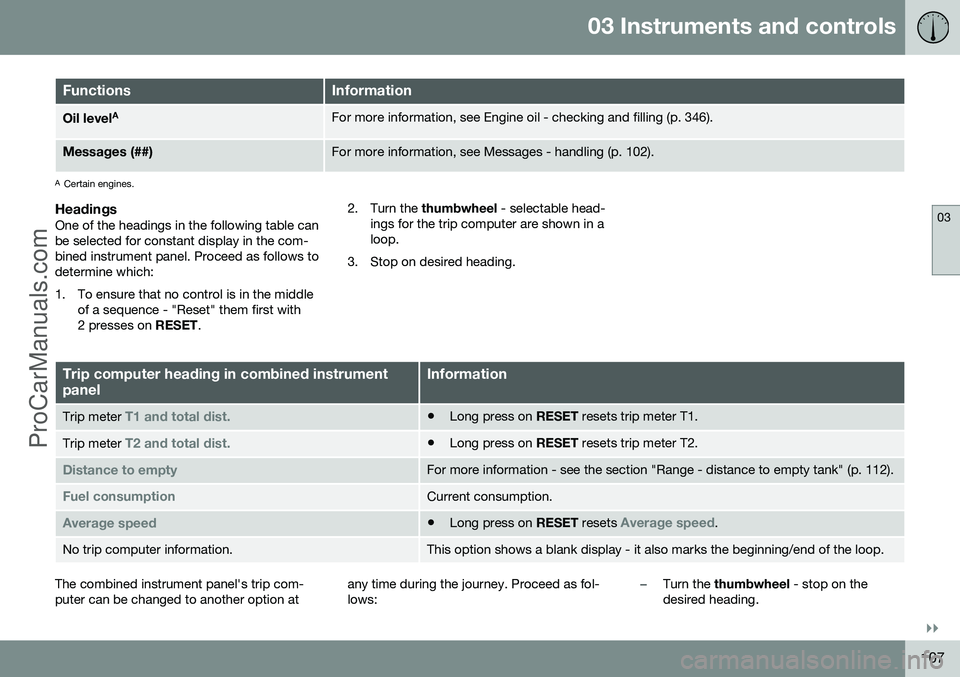
HeadingsOne of the headings in the following table can be selected for constant display in the com-bined instrument panel. Proceed as follows todetermine which:
1. To ensure that no control is in the middle
of a sequence - "Reset" them first with 2 presses on RESET. 2. Turn the
thumbwheel - selectable head-
ings for the trip computer are shown in aloop.
3. Stop on desired heading.
Trip computer heading in combined instrument panelInformation
Trip meter T1 and total dist.• Long press on
RESET resets trip meter T1.
Trip meter T2 and total dist.•Long press on
RESET resets trip meter T2.
Distance to emptyFor more information - see the section "Range - distance to empty tank" (p. 112).
Fuel consumptionCurrent consumption.
Average speed•Long press on
RESET resets Average speed.
No trip computer information.This option shows a blank display - it also marks the beginning/end of the loop.
The combined instrument panel's trip com- puter can be changed to another option at any time during the journey. Proceed as fol-lows:–Turn the
thumbwheel - stop on the
desired heading.
ProCarManuals.co’
Page 112 of 442
||
03 Instruments and controls
03
110* Option/accessory, for more information, see Introduction.
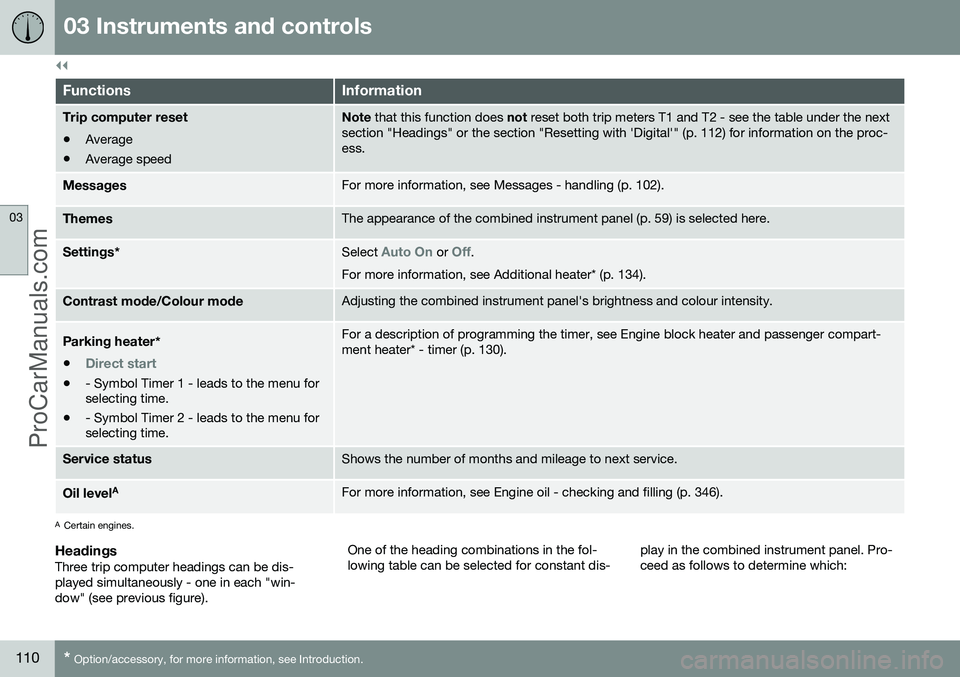
FunctionsInformation
Trip computer reset • Average
• Average speedNote
that this function does not reset both trip meters T1 and T2 - see the table under the next
section "Headings" or the section "Resetting with 'Digital'" (p. 112) for information on the proc- ess.
MessagesFor more information, see Messages - handling (p. 102).
ThemesThe appearance of the combined instrument panel (p. 59) is selected here.
Settings *Select Auto On or Off.
For more information, see Additional heater* (p. 134).
Contrast mode /Colour modeAdjusting the combined instrument panel's brightness and colour intensity.
Parking heater *
•
Direct start
• - Symbol Timer 1 - leads to the menu for selecting time.
• - Symbol Timer 2 - leads to the menu forselecting time.
For a description of programming the timer, see Engine block heater and passenger compart- ment heater* - timer (p. 130).
Service statusShows the number of months and mileage to next service.
Oil level AFor more information, see Engine oil - checking and filling (p. 346).
A
Certain engines.
HeadingsThree trip computer headings can be dis- played simultaneously - one in each "win-dow" (see previous figure). One of the heading combinations in the fol-lowing table can be selected for constant dis-
play in the combined instrument panel. Pro-ceed as follows to determine which:
ProCarManuals.co’
Page 292 of 442
08 Starting and driving
08
290* Option/accessory, for more information, see Introduction.
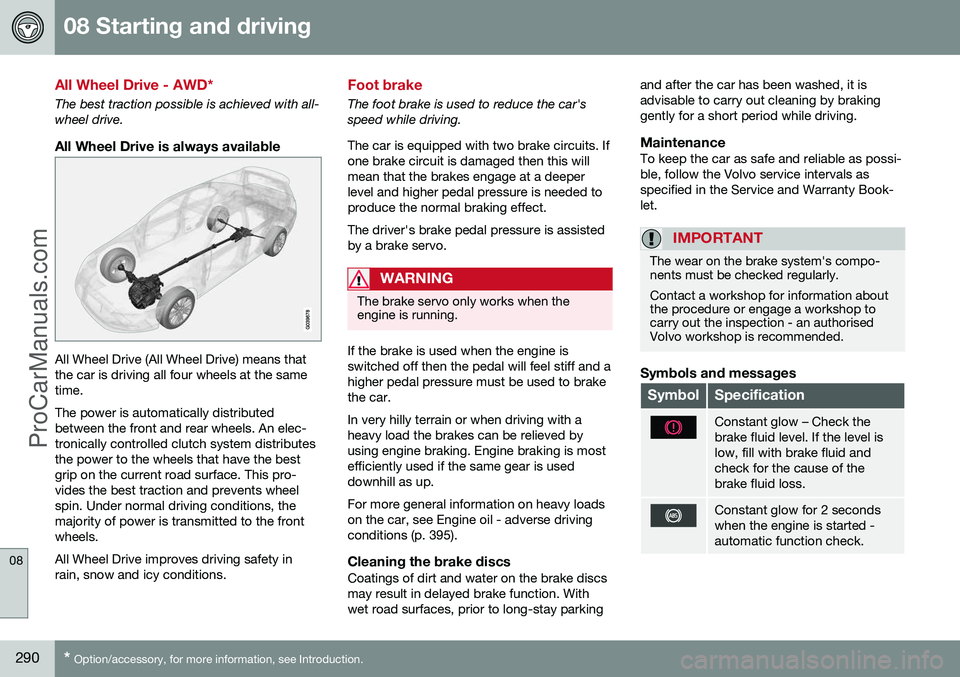
All Wheel Drive - AWD*
The best traction possible is achieved with all- wheel drive.
All Wheel Drive is always available
All Wheel Drive (All Wheel Drive) means that the car is driving all four wheels at the sametime. The power is automatically distributed between the front and rear wheels. An elec-tronically controlled clutch system distributesthe power to the wheels that have the bestgrip on the current road surface. This pro-vides the best traction and prevents wheelspin. Under normal driving conditions, themajority of power is transmitted to the frontwheels. All Wheel Drive improves driving safety in rain, snow and icy conditions.
Foot brake
The foot brake is used to reduce the car's speed while driving. The car is equipped with two brake circuits. If one brake circuit is damaged then this willmean that the brakes engage at a deeperlevel and higher pedal pressure is needed toproduce the normal braking effect. The driver's brake pedal pressure is assisted by a brake servo.
WARNING
The brake servo only works when the engine is running.
If the brake is used when the engine is switched off then the pedal will feel stiff and ahigher pedal pressure must be used to brakethe car. In very hilly terrain or when driving with a heavy load the brakes can be relieved byusing engine braking. Engine braking is mostefficiently used if the same gear is useddownhill as up. For more general information on heavy loads on the car, see Engine oil - adverse drivingconditions (p. 395).
Cleaning the brake discsCoatings of dirt and water on the brake discsmay result in delayed brake function. Withwet road surfaces, prior to long-stay parking and after the car has been washed, it isadvisable to carry out cleaning by brakinggently for a short period while driving.
MaintenanceTo keep the car as safe and reliable as possi-ble, follow the Volvo service intervals asspecified in the Service and Warranty Book-let.
IMPORTANT
The wear on the brake system's compo- nents must be checked regularly. Contact a workshop for information about the procedure or engage a workshop tocarry out the inspection - an authorisedVolvo workshop is recommended.
Symbols and messages
SymbolSpecification
Constant glow – Check the brake fluid level. If the level islow, fill with brake fluid andcheck for the cause of thebrake fluid loss.
Constant glow for 2 seconds when the engine is started -automatic function check.
ProCarManuals.co’
Page 299 of 442
08 Starting and driving
08
297
Fording
Fording means that the car is driven through a water-covered roadway. Fording must be car-ried out with great caution. The car can be driven through water at a maximum depth of 25 cm at a maximumspeed of 10 km/h. Extra caution should beexercised when passing through flowingwater. During driving in water, maintain a low speed and do not stop the car. When the water hasbeen passed, depress the brake pedal lightlyand check that full brake function is achieved.Water and mud for example can make thebrake linings wet resulting in delayed brakefunction. •Clean the electric contacts of the electric engine block heater and trailer couplingafter driving in water and mud.
• Do not let the car stand with water overthe sills for any long period of time - thiscould cause electrical malfunctions.IMPORTANT
Engine damage can occur if water enters the air filter. In depths greater than 25 cm, water could enter the transmission. This reduces thelubricating ability of the oils and shortensthe service life of these systems. In the event of the engine stalling in water, do not try restart - tow the car from thewater to a workshop - an authorised Volvoworkshop is recommended. Risk of enginebreakdown.
Related information
•Recovery (p. 316)
• Towing (p. 313)
Overheating
Under special conditions, for example hard driving in hilly terrain and hot climate, there isa risk that the engine and drive system mayoverheat - in particular with a heavy load. For information about overheating when driv- ing with a trailer, see Driving with a trailer (p.306). • Remove any auxiliary lamps from in front of the grille when driving in hot climates.
• If the temperature in the engine's coolingsystem is too high then a warning symbolis illuminated in the combined instrumentpanel's information display and a text message
High engine temp Stop safelyis shown there - stop the car in a safe way and allow the engine to run at idlingspeed for several minutes in order to cooldown.
• If the text message
High engine temp
Stop engine or Coolant level low, Stop
engine is shown then the engine must be
switched off after stopping the car.
• In the event of overheating in the gearbox a built-in protection function is activatedwhich, amongst other things, illuminatesa warning symbol in the combined instru-ment panel, and its display shows the text message
Transmission hot Reduce
speed or Transmission hot Stop safely- follow the recommendation given and lower the speed and stop the car in a safeway and allow the engine to run at idling
ProCarManuals.co’
Page 301 of 442
08 Starting and driving
08
299
Before a long journey
Before a long journey, it makes good sense to go through the following points: •Check that the engine is working normally and that fuel consumption (p. 403) is nor-mal.
• Make sure that there are no leaks (fuel, oilor other fluid).
• Check all bulbs and tyre tread depths.
• Carrying a warning triangle (p. 329) is alegal requirement in certain countries.
Related information
• Engine oil - checking and filling (p. 346)
• Changing wheels - removing wheels (p.324)
• Lamp replacement (p. 352)
Winter driving
For winter driving it is important to perform certain checks in order to ensure that the carcan be driven safely. Check the following in particular before the cold season:
• The engine coolant (p. 349) must contain at least 50% glycol. This mixture protectsthe engine against frost erosion down toapproximately –35 °C. To achieve opti-mum antifreeze protection, different typesof glycol must not be mixed.
• The fuel tank must be kept filled to pre-vent condensation.
• Engine oil viscosity is important. Oils withlower viscosity (thinner oils) facilitate star-ting in cold weather and also reduce fuelconsumption while the engine is cold. Formore information on suitable oils, seeEngine oil - adverse driving conditions (p.395).
IMPORTANT
Low viscosity oil must not be used for hard driving or in hot weather.
•The condition of the starter battery and charge level must be inspected. Coldweather places great demands on the starter battery and its capacity is reducedby the cold.
• Use washer fluid (p. 361) to avoid iceforming in the washer fluid reservoir.
To achieve optimum roadholding Volvo rec- ommends using winter tyres on all wheels ifthere is a risk of snow or ice.
NOTE
The use of winter tyres is a legal require- ment in certain countries. Studded tyresare not permitted in all countries.
Slippery driving conditionsPractise driving on slippery surfaces under controlled conditions to learn how the carreacts.
ProCarManuals.co’