ECO mode VOLVO V60 2015 Owner´s Manual
[x] Cancel search | Manufacturer: VOLVO, Model Year: 2015, Model line: V60, Model: VOLVO V60 2015Pages: 414, PDF Size: 11.44 MB
Page 87 of 414
03 Your driving environment
Instruments and controls
03
}}
* Option/accessory, for more information, see Introduction.85
change in your car's behavior. Even so, an uncorrected condition could hurt fuel econ-omy, emission controls, and drivability.Extended driving without correcting the causecould even damage other components inyour vehicle. This light may illuminate if the fuel filler cap is not closed tightly or if the engine was runningwhile the vehicle was refueled.
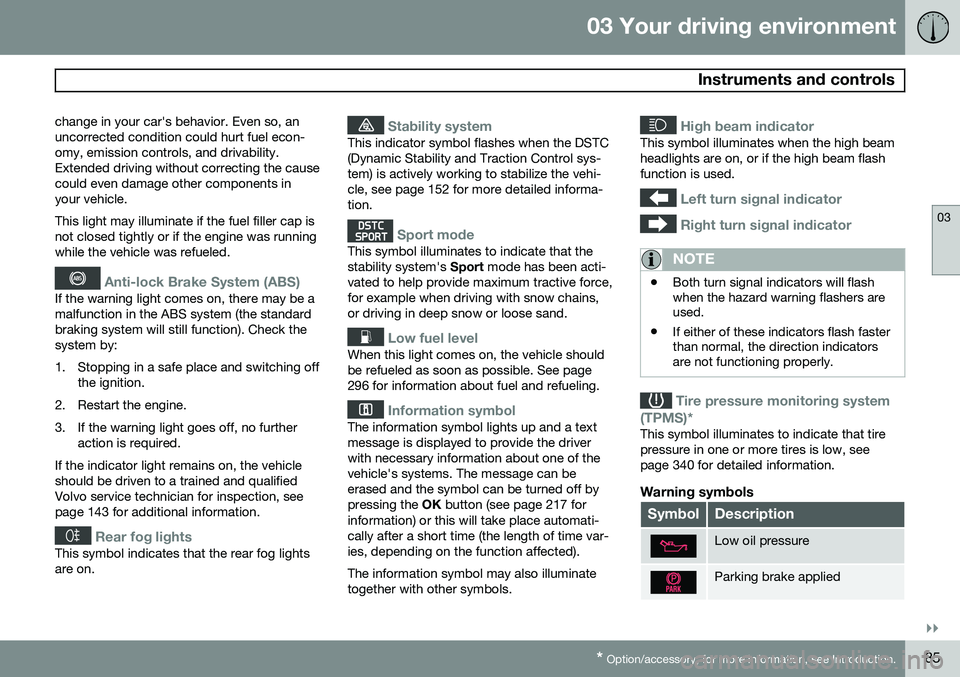
Anti-lock Brake System (ABS)
If the warning light comes on, there may be a malfunction in the ABS system (the standardbraking system will still function). Check thesystem by:
1. Stopping in a safe place and switching off
the ignition.
2. Restart the engine.
3. If the warning light goes off, no further action is required.
If the indicator light remains on, the vehicle should be driven to a trained and qualifiedVolvo service technician for inspection, seepage 143 for additional information.
Rear fog lights
This symbol indicates that the rear fog lights are on.
Stability system
This indicator symbol flashes when the DSTC (Dynamic Stability and Traction Control sys-tem) is actively working to stabilize the vehi-cle, see page 152 for more detailed informa-tion.
Sport mode
This symbol illuminates to indicate that the stability system's Sport mode has been acti-
vated to help provide maximum tractive force,for example when driving with snow chains,or driving in deep snow or loose sand.
Low fuel level
When this light comes on, the vehicle should be refueled as soon as possible. See page296 for information about fuel and refueling.
Information symbol
The information symbol lights up and a text message is displayed to provide the driverwith necessary information about one of thevehicle's systems. The message can beerased and the symbol can be turned off bypressing the OK button (see page 217 for
information) or this will take place automati-cally after a short time (the length of time var-ies, depending on the function affected). The information symbol may also illuminate together with other symbols.
High beam indicator
This symbol illuminates when the high beam headlights are on, or if the high beam flashfunction is used.
Left turn signal indicator
Right turn signal indicator
NOTE
• Both turn signal indicators will flash when the hazard warning flashers areused.
• If either of these indicators flash fasterthan normal, the direction indicatorsare not functioning properly.
Tire pressure monitoring system
(TPMS)*
This symbol illuminates to indicate that tire pressure in one or more tires is low, seepage 340 for detailed information.
Warning symbols
SymbolDescription
Low oil pressure
Parking brake applied
Page 90 of 414
03 Your driving environment
Instruments and controls
03
88* Option/accessory, for more information, see Introduction.
NOTE
When the ambient temperature is between 23° and 36 °F (–5° and +2 °C), a snowflakesymbol will be displayed next to the tem-perature. This symbol serves as a warningfor possible slippery road surfaces. Pleasenote that this symbol does not indicate a
fault with your vehicle. At low speeds or when the vehicle is not moving, the temperature readings may beslightly higher than the actual ambienttemperature.
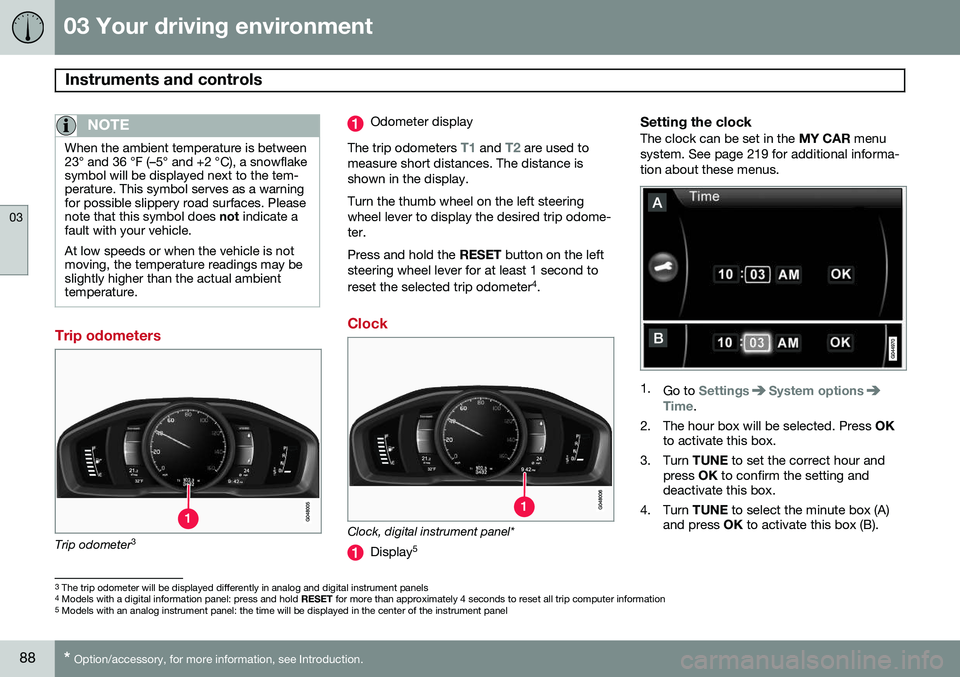
Trip odometers
Trip odometer 3
Odometer display
The trip odometers
T1 and T2 are used to
measure short distances. The distance is shown in the display. Turn the thumb wheel on the left steering wheel lever to display the desired trip odome-ter. Press and hold the RESET button on the left
steering wheel lever for at least 1 second to reset the selected trip odometer 4
.
Clock
Clock, digital instrument panel*
Display 5
Setting the clockThe clock can be set in the
MY CAR menu
system. See page 219 for additional informa- tion about these menus.
1. Go to SettingsSystem optionsTime.
2. The hour box will be selected. Press OK
to activate this box.
3. Turn TUNE to set the correct hour and
press OK to confirm the setting and
deactivate this box.
4. Turn TUNE to select the minute box (A)
and press OK to activate this box (B).
3
The trip odometer will be displayed differently in analog and digital instrument panels
4 Models with a digital information panel: press and hold RESET for more than approximately 4 seconds to reset all trip computer information
5 Models with an analog instrument panel: the time will be displayed in the center of the instrument panel
Page 92 of 414

03 Your driving environment
Ignition modes
03
90* Option/accessory, for more information, see Introduction.
Inserting and removing the remote key
Ignition slot with remote key and START/STOP
ENGINE button.
Inserting the remote key 1Holding the end of the remote key with the base of the key blade, insert the remote keyinto the ignition slot as shown in the illustra-tion and press it in as far as possible.
CAUTION
Foreign objects in the ignition slot can impair function or cause damage.
Removing the remote keyThe remote key can be removed from the ignition slot by pulling it out.
Functions
The remote key has 3 modes:
0, I, and II that
can be used without starting the engine. The following table shows examples of whichfunctions are available in the respectivemodes.
NOTE
To access ignition modes I or II without
starting the engine, the brake pedal must not be depressed.
ModeFunction
0The odometer, clock and tem- perature gauge are illuminated.Power seats* can be adjustedand the infotainment system canbe used for a limited time (to min-imize battery drain seepage 248).
IThe Moonroof*, power windows, 12-volt sockets in the passengercompartment, navigation sys-tem*, climate system blower,windshield wipers can be used.
IIThe headlights/taillights illumi- nate. Warning/indicator lights illu-minate for 5 seconds. Other sys-tems are activated. However, theheated seats* and heated rearwindow function can only be acti-vated when the engine is running. Mode II should only be used for very short periods to help avoiddraining the battery.
1
Not necessary in vehicles with the optional keyless drive.
Page 93 of 414
03 Your driving environment
Ignition modes
03
91
Ignition modes
Ignition mode 0–The vehicle is unlocked.
Ignition mode I–With the remote key fully pressed into the ignition slot1
, press START/STOP
ENGINE briefly.
Ignition mode II–With the remote key fully pressed into the ignition slot 1
, press START/STOP
ENGINE for approximately 2 seconds.
Returning to mode 0To return to mode 0 from mode II or I, press
START/STOP ENGINE briefly.
Starting and stopping the engine
See page 124 for information on starting the engine and switching it off.
Emergency towing
See page 311 for important information about the remote key when the vehicle isbeing towed.
1
Not necessary in vehicles with the optional keyless drive.
Page 103 of 414
03 Your driving environment
Lighting
03
}}
101
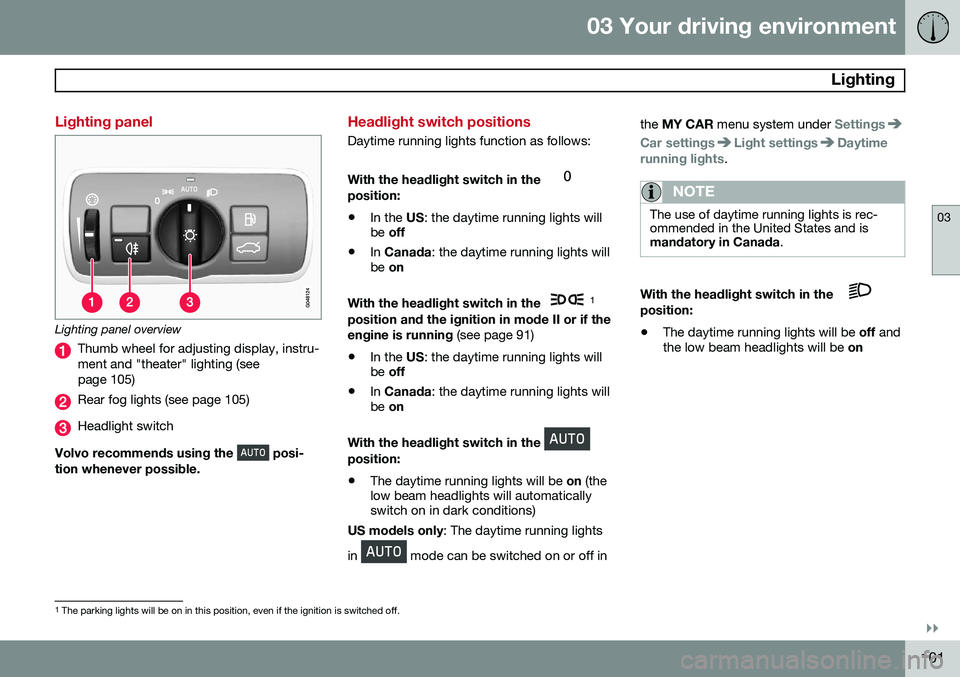
Lighting panel
Lighting panel overview
Thumb wheel for adjusting display, instru- ment and "theater" lighting (seepage 105)
Rear fog lights (see page 105)
Headlight switch
Volvo recommends using the
posi-
tion whenever possible.
Headlight switch positions
Daytime running lights function as follows: With the headlight switch in the
position:
• In the
US: the daytime running lights will
be off
• In
Canada : the daytime running lights will
be on
With the headlight switch in the
1
position and the ignition in mode II or if the engine is running (see page 91)
• In the
US: the daytime running lights will
be off
• In
Canada : the daytime running lights will
be on
With the headlight switch in the
position: • The daytime running lights will be
on (the
low beam headlights will automatically switch on in dark conditions)
US models only : The daytime running lights
in
mode can be switched on or off in the
MY CAR menu system under
Settings
Car settingsLight settingsDaytime
running lights.
NOTE
The use of daytime running lights is rec- ommended in the United States and ismandatory in Canada .
With the headlight switch in the position:
• The daytime running lights will be
off and
the low beam headlights will be on
1
The parking lights will be on in this position, even if the ignition is switched off.
Page 105 of 414
03 Your driving environment
Lighting
03
}}
103
Models with an analog instrument panel When AHB is activated, the
symbol
will illuminate in the instrument panel. The high beam indicator (
) in the instrument
panel will also illuminate when the high beams are on. Models with a digital instrument panel When AHB is activated,
will illuminate
as a white symbol in the instrument panel.
When the high beams are on, the symbol will change to blue.
NOTE
•Keep the windshield in front of the camera free of ice, snow, dirt, etc.
• Do not mount or in any way attachanything on the windshield that couldobstruct the camera.
If Active high beam Temporary
unavailable Switch manually is displayed in
the instrument panel, switching between high and low beams will have to be done man-ually. However, the light switch can remain inthe AUTO position. The same applies if
Windscreen Sensors blocked is displayed
and the
symbol is displayed. The
symbol will go out when these mes-
sages are displayed. AHB may be temporarily unavailable (e.g., in heavy fog or rain). When AHB becomes activeagain or if the sensors in the windshield areno longer obscured, the messages will disap- pear and the
symbol will illuminate.
CAUTION
In the following situations, it may be nec- essary to switch between high and lowbeams manually:
• In heavy fog or rain
• In blowing snow or slush
• In bright moonlight
• In freezing rain
• In areas with dim street lighting
• When oncoming vehicles have dim front lighting
• If there are pedestrians on or near theroad
• If there are reflective objects, such assigns, near the road
• When oncoming vehicles' lights areobscured by e.g., fences, bushes, etc.
• When there are vehicles on connectingroads
• At the top of hills or in dips in the road
• In sharp curves
See page183 for more information about the camera's limitations.
Page 106 of 414
03 Your driving environment
Lighting
03
104* Option/accessory, for more information, see Introduction.
Tunnel detection (models with the rain sensor* only)
The rain sensor reacts to the change in light- ing conditions when, for example, the vehicleenters a tunnel and the tunnel detection fea-ture will then activate the low beam head-lights. The low beams will be switched offapprox. 20 seconds after the vehicle leavesthe tunnel. The rain sensor does not have to be activated for tunnel detection to function.
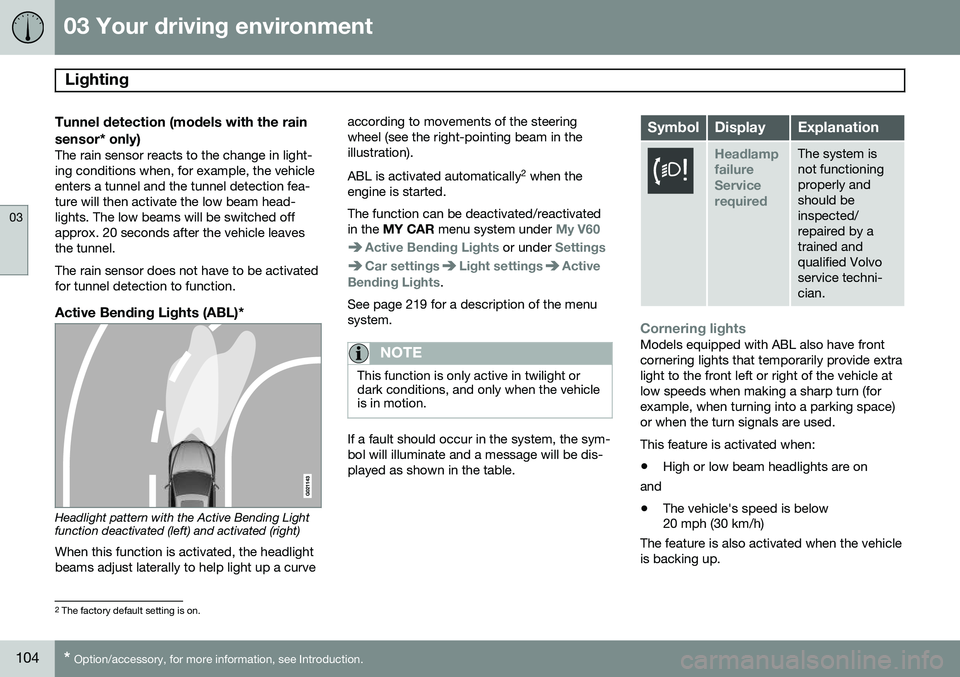
Active Bending Lights (ABL)*
Headlight pattern with the Active Bending Light function deactivated (left) and activated (right)
When this function is activated, the headlight beams adjust laterally to help light up a curve according to movements of the steeringwheel (see the right-pointing beam in theillustration). ABL is activated automatically
2
when the
engine is started. The function can be deactivated/reactivated in the MY CAR menu system under
My V60
Active Bending Lights or under Settings
Car settingsLight settingsActive
Bending Lights.
See page 219 for a description of the menu system.
NOTE
This function is only active in twilight or dark conditions, and only when the vehicleis in motion.
If a fault should occur in the system, the sym- bol will illuminate and a message will be dis-played as shown in the table.
SymbolDisplayExplanation
Headlamp failureServicerequiredThe system is not functioningproperly andshould beinspected/repaired by atrained andqualified Volvoservice techni-cian.
Cornering lightsModels equipped with ABL also have front cornering lights that temporarily provide extralight to the front left or right of the vehicle atlow speeds when making a sharp turn (forexample, when turning into a parking space)or when the turn signals are used. This feature is activated when: • High or low beam headlights are on
and
• The vehicle's speed is below 20 mph (30 km/h)
The feature is also activated when the vehicle is backing up.
2 The factory default setting is on.
Page 109 of 414
03 Your driving environment
Lighting
03
}}
* Option/accessory, for more information, see Introduction.107
NOTE
• This automatic flashing sequence can be interrupted by immediately movingthe lever in the opposite direction.
• If the turn signal indicator flashesfaster than normal, check for aburned-out turn signal bulb.
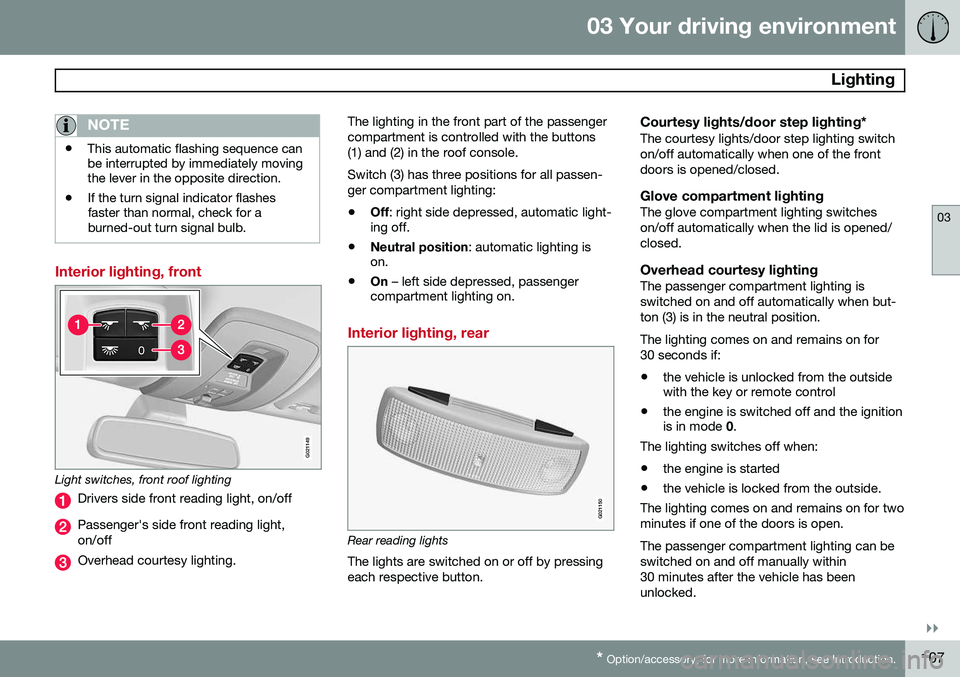
Interior lighting, front
G021149
Light switches, front roof lighting
Drivers side front reading light, on/off
Passenger's side front reading light, on/off
Overhead courtesy lighting. The lighting in the front part of the passenger compartment is controlled with the buttons(1) and (2) in the roof console. Switch (3) has three positions for all passen- ger compartment lighting:
• Off
: right side depressed, automatic light-
ing off.
• Neutral position
: automatic lighting is
on.
• On
– left side depressed, passenger
compartment lighting on.
Interior lighting, rear
G021150
Rear reading lights
The lights are switched on or off by pressing each respective button.
Courtesy lights/door step lighting*The courtesy lights/door step lighting switchon/off automatically when one of the frontdoors is opened/closed.
Glove compartment lightingThe glove compartment lighting switcheson/off automatically when the lid is opened/closed.
Overhead courtesy lightingThe passenger compartment lighting isswitched on and off automatically when but-ton (3) is in the neutral position. The lighting comes on and remains on for 30 seconds if:
• the vehicle is unlocked from the outside with the key or remote control
• the engine is switched off and the ignitionis in mode
0.
The lighting switches off when:
• the engine is started
• the vehicle is locked from the outside.
The lighting comes on and remains on for two minutes if one of the doors is open. The passenger compartment lighting can be switched on and off manually within30 minutes after the vehicle has beenunlocked.
Page 110 of 414
03 Your driving environment
Lighting
03
108
If the lighting is switched on manually and the vehicle is locked, the courtesy lighting willswitch off automatically after one minute.
Cargo area lightingThe cargo area lighting comes on automati-cally when the tailgate is opened.
Home safe lighting
When you leave your vehicle at night, you can make use of the home safe lighting functionto illuminate the area in front of the vehicle.
1. Remove the key from the ignition slot toput the ignition in mode 0 (see page 91
for information about the ignition modes).
2. Pull the turn signal lever as far as possible towards the steering wheel and release it.
3. Exit the vehicle and lock the doors.The headlights, parking lights, turn signals, lights in the door mirrors, license plate lights,and footwell lighting will illuminate and remain on for 30 4
, 60 or 90 seconds. The time inter-
val can be set in MY CAR under
Settings
Car settingsLight settingsHome safe
light duration. See page 219 for a descrip-
tion of the menu system.
Approach lighting
Approach lighting is activated by pressing the approach light button on the remote key (seethe illustration on page 61). When the function has been activated, the parking lights, indicator lights, door mirrorlights, license plate lighting, dome lightingand door step lighting come on. The time interval for this lighting can be set by pressing MY CAR and going to
Car
settings
Light settingsApproach light
duration. See page 219 for a description of
the menu system.
4 Factory setting
Page 113 of 414
03 Your driving environment
Wipers and washers
03
111
NOTE
The rear wiper is equipped with cut-off function, which means that it will not oper-ate if its electric motor overheats. Thewiper will function again after a cool-downperiod (30 seconds or longer, dependingon the heat of the motor and ambient tem-perature conditions).
Tailgate wiper and reverse gearIf the windshield wipers are on and the trans- mission is put into reverse gear, the tailgatewiper will go into intermittent wiping func- tion1
. This function is deactivated when a dif-
ferent gear is selected.
NOTE
On vehicles with the optional rain sensor, the tailgate wiper will be activated whenreverse is selected, if the rain sensor isactivated and it is raining.
If the tailgate wiper is in the normal (continu- ous) wiping mode, selecting different gearswill not affect its function.
1 Consult your Volvo retailer if you would like to have this function deactivated.