bluetooth VOLVO V60 2015 Owner´s Manual
[x] Cancel search | Manufacturer: VOLVO, Model Year: 2015, Model line: V60, Model: VOLVO V60 2015Pages: 414, PDF Size: 11.44 MB
Page 286 of 414
06 Infotainment
Bluetooth® hands-free connection
06
284
Phone menuPhone bookClear phone
book.
NOTE
Clearing the entries in the infotainment system's phone book does not deleteentries in the cell phone's phone book.
Bluetooth® version information
For information about the Bluetooth ®
version
installed in the vehicle, go to
Phone menu
Phone settingsBluetooth software
version in car.
Page 287 of 414
06 Infotainment
Cell phone voice control*
06
}}
* Option/accessory, for more information, see Introduction.285
Introduction
The infotainment system's voice control fea- ture 1
enables the driver to voice-activate cer-
tain functions in a Bluetooth ®
-connected cell
phone or the navigation system.
NOTE
• The information in this section applies to using voice commands to operate a Bluetooth
®
-connected cell phone .
See also the section "Bluetooth ®
hands-free connection" beginning on page 276 for detailed informationabout using a cell phone with the vehi-cle's infotainment system.
• The navigation system has a separateuser's guide containing informationabout voice commands for operatingthat system.
Voice commands offer convenience and help avoid distractions so that you can concen-trate on driving and focus your attention onroad and traffic conditions.
WARNING
As the driver, you have full responsibility for operating the vehicle safely and adher-ing to all applicable traffic regulations.
The voice control feature provides access to a number of functions in the Bluetooth ®
hands-free and navigation systems while allowing you to keep your hands on the steer-ing wheel. Input is in dialogue form usingspoken commands from the user and verbalprompts from the system. Voice control uses the same microphone as the Bluetooth ®
hands-free system (see the illustration on page 276) and system prompts are providedthrough the infotainment system's frontspeakers.
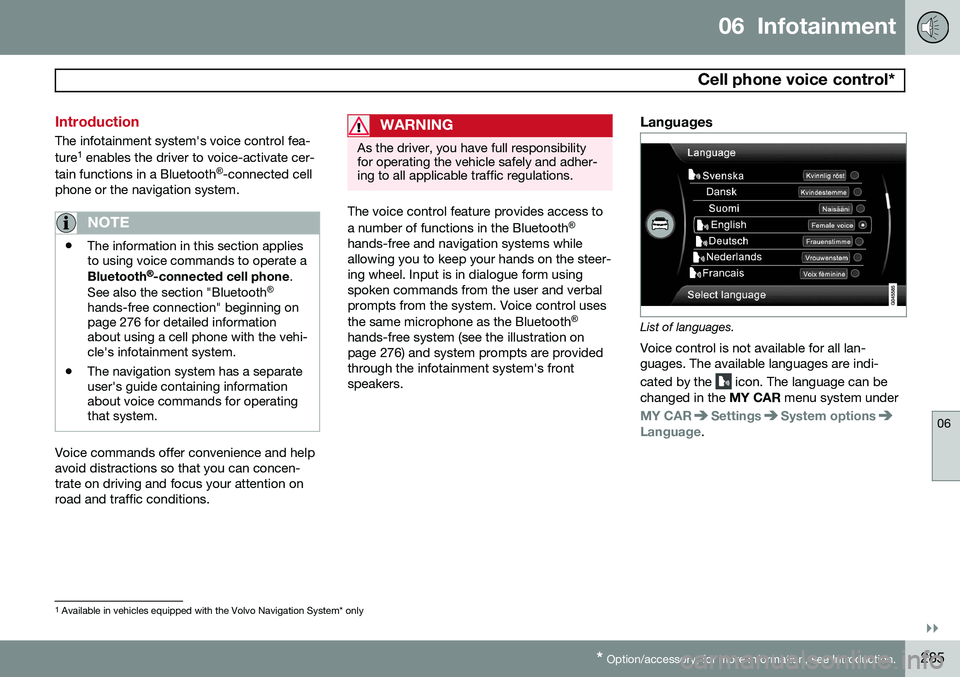
Languages
List of languages.
Voice control is not available for all lan- guages. The available languages are indi- cated by the
icon. The language can be
changed in the MY CAR menu system under
MY CARSettingsSystem optionsLanguage.
1
Available in vehicles equipped with the Volvo Navigation System* only
Page 288 of 414
06 Infotainment
Cell phone voice control*
06
286* Option/accessory, for more information, see Introduction.
Getting started
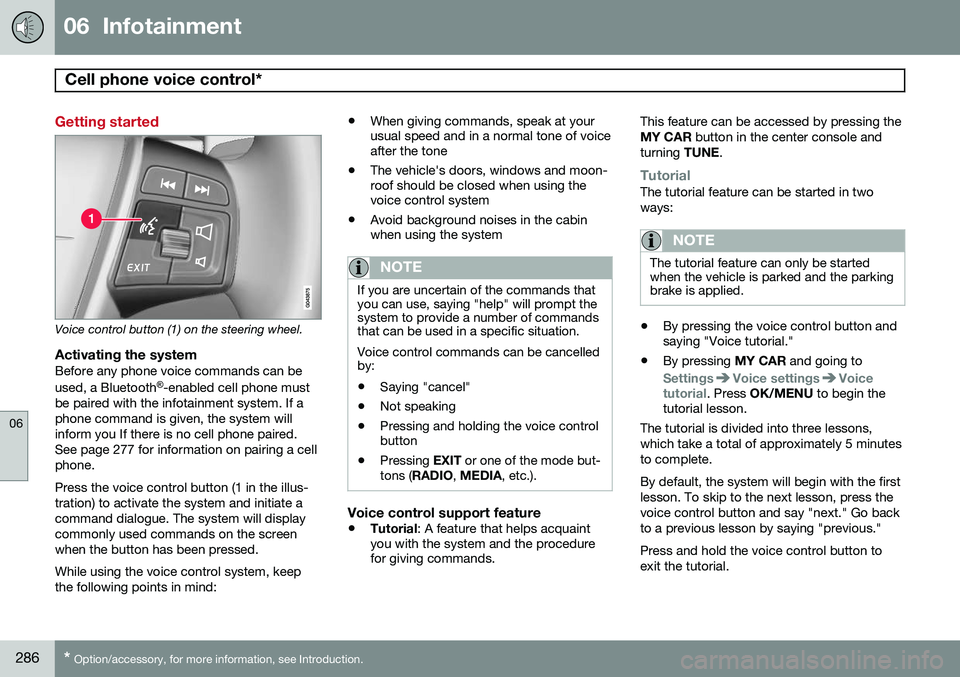
Voice control button (1) on the steering wheel.
Activating the systemBefore any phone voice commands can be used, a Bluetooth ®
-enabled cell phone must
be paired with the infotainment system. If a phone command is given, the system willinform you If there is no cell phone paired.See page 277 for information on pairing a cellphone. Press the voice control button (1 in the illus- tration) to activate the system and initiate acommand dialogue. The system will displaycommonly used commands on the screenwhen the button has been pressed. While using the voice control system, keep the following points in mind: •
When giving commands, speak at your usual speed and in a normal tone of voiceafter the tone
• The vehicle's doors, windows and moon-roof should be closed when using thevoice control system
• Avoid background noises in the cabinwhen using the system
NOTE
If you are uncertain of the commands that you can use, saying "help" will prompt thesystem to provide a number of commandsthat can be used in a specific situation. Voice control commands can be cancelled by:
• Saying "cancel"
• Not speaking
• Pressing and holding the voice control button
• Pressing
EXIT or one of the mode but-
tons ( RADIO , MEDIA , etc.).
Voice control support feature
•Tutorial
: A feature that helps acquaint
you with the system and the procedure for giving commands. This feature can be accessed by pressing the MY CAR
button in the center console and
turning TUNE.
TutorialThe tutorial feature can be started in two ways:
NOTE
The tutorial feature can only be started when the vehicle is parked and the parkingbrake is applied.
•By pressing the voice control button and saying "Voice tutorial."
• By pressing
MY CAR and going to
SettingsVoice settingsVoice
tutorial. Press OK/MENU to begin the
tutorial lesson.
The tutorial is divided into three lessons, which take a total of approximately 5 minutesto complete. By default, the system will begin with the first lesson. To skip to the next lesson, press thevoice control button and say "next." Go backto a previous lesson by saying "previous." Press and hold the voice control button to exit the tutorial.
Page 289 of 414
06 Infotainment
Cell phone voice control*
06
}}
* Option/accessory, for more information, see Introduction.287
Voice output volume
Press MY CAR and go to SettingsVoice
settings
Voice output volume. Press OK/
MENU and turn TUNE to raise or lower the
volume. Press EXIT to save the change and
exit the menu.
Using voice commands
The driver initiates a voice command dialogue by pressing the voice control button (see theillustration on page 286). When a dialogue has been initiated, com- monly used commands will be shown in thedisplay. Grayed-out texts or texts in paren-theses are not part of the spoken command. Once you become familiar with the system, you can speed up the command dialogue bybriefly pressing the voice control button toskip prompts from the system. Commands can be given in several ways .
For example, the command "Phone call con- tact" can be spoken as:
• "Phone > Call contact"—say "Phone," wait for a system response, and thencontinue by saying "Call contact."
• "Phone call contact"—give the entirecommand at one time The following is a list of features that can be voice-controlled with a Bluetooth
®
-connected
cell phone.
ShortcutsShortcut commands for using the phone can be found in the MY CAR menu system, under
SettingsVoice settingsVoice
command list
Phone commands and
General commands. See page 219 for more
information on the menu system.
Dialing a numberThe system understands the digits zero to nine. These numbers can be spoken individu-ally, in groups of several digits at a time, orthe entire number can be given at once.Numbers above nine will not be recognized. The following is an example of a voice com- mand dialogue. The system's response mayvary depending on the situation.
The user initiates the dialogue by
saying:
Phone > dial number orPhone dial number
System responseNumber please
User actionBegin saying the digits in the phone number. If you say several digits and pause, the sys-tem will repeat them and prompt you by say-ing "Continue." Continue saying the digits. When you have finished, complete the command by saying"Dial." • You can also change the number by using the commands "Correction" (whichdeletes the last group of digits spoken) or"Delete" (which will erase the entirephone number).
Dialing from a call listThe dialogue below enables you make a call from one of your cell phone's call lists.
The user initiates the dialogue by saying:
Phone > dial from call list orPhone dial from call listContinue by responding to the system's prompts.
Calling a contactThe dialogue below enables you to call thepre-defined contacts in your cell phone. Seethe phone's user's guide if necessary.
Page 290 of 414
06 Infotainment
Cell phone voice control*
06
288* Option/accessory, for more information, see Introduction.
The user initiates the dialogue by saying:
Phone > call contact orPhone call contactContinue by responding to the system's prompts. When calling contacts, keep the following in mind:
• If there are several contacts with similar names, they will be presented in the dis-play in numbered lines and the systemwill prompt you to pick a line number
• If there are more lines in the list than canbe displayed at one time, saying "Down"will enable you to scroll downward in thelist (and saying "up" will take you back upthrough the list).
Dialing voice mailThe dialogue below enables you to call your voice mail to check any messages that youmay have received. Your voice mail phone number must be registered in the Bluetooth ®
function, see page 280.
The user initiates the dialogue by
saying:
Phone > dial voice mail or Phone dial voice mailContinue by responding to the system's prompts.
Page 377 of 414
09 Maintenance and specifications
Fuses09
}}
* Option/accessory, for more information, see Introduction.375
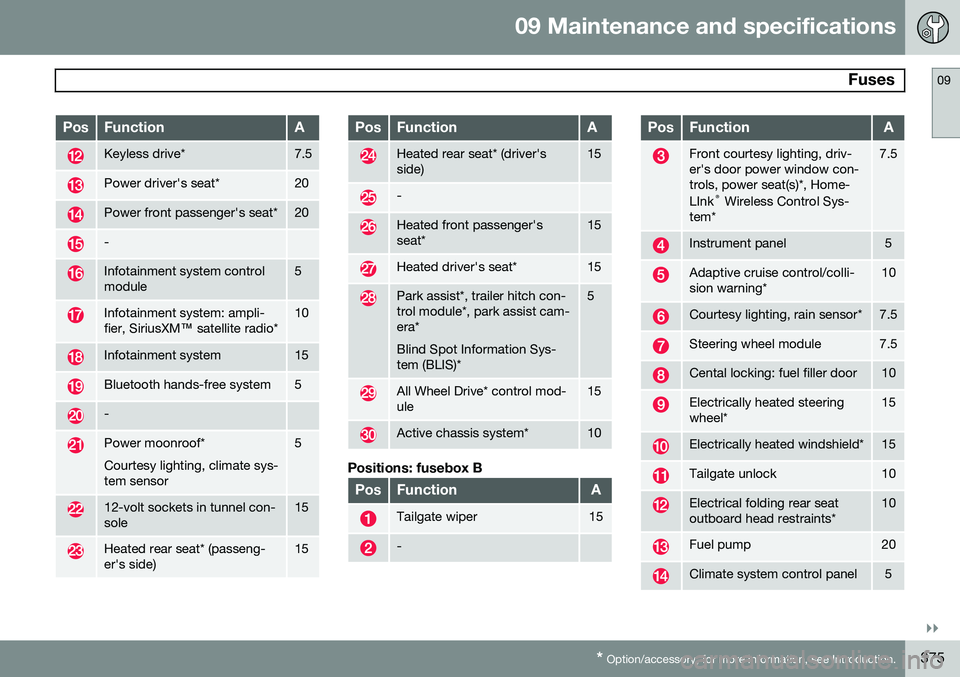
PosFunctionA
Keyless drive*7.5
Power driver's seat*20
Power front passenger's seat*20
-
Infotainment system control module5
Infotainment system: ampli- fier, SiriusXM ™ satellite radio*10
Infotainment system15
Bluetooth hands-free system5
-
Power moonroof* Courtesy lighting, climate sys- tem sensor5
12-volt sockets in tunnel con- sole15
Heated rear seat* (passeng- er's side)15
PosFunctionA
Heated rear seat* (driver's side)15
-
Heated front passenger's seat*15
Heated driver's seat*15
Park assist*, trailer hitch con- trol module*, park assist cam-era* Blind Spot Information Sys- tem (BLIS)*5
All Wheel Drive* control mod- ule15
Active chassis system*10
Positions: fusebox B
PosFunctionA
Tailgate wiper15
-
PosFunctionA
Front courtesy lighting, driv- er's door power window con-trols, power seat(s)*, Home- LInk ®
Wireless Control Sys-
tem*7.5
Instrument panel5
Adaptive cruise control/colli- sion warning*10
Courtesy lighting, rain sensor*7.5
Steering wheel module7.5
Cental locking: fuel filler door10
Electrically heated steering wheel*15
Electrically heated windshield*15
Tailgate unlock10
Electrical folding rear seat outboard head restraints*10
Fuel pump20
Climate system control panel5
Page 401 of 414
10 Specifications
Overview of information and warning symbols
10
* Option/accessory, for more information, see Introduction.399
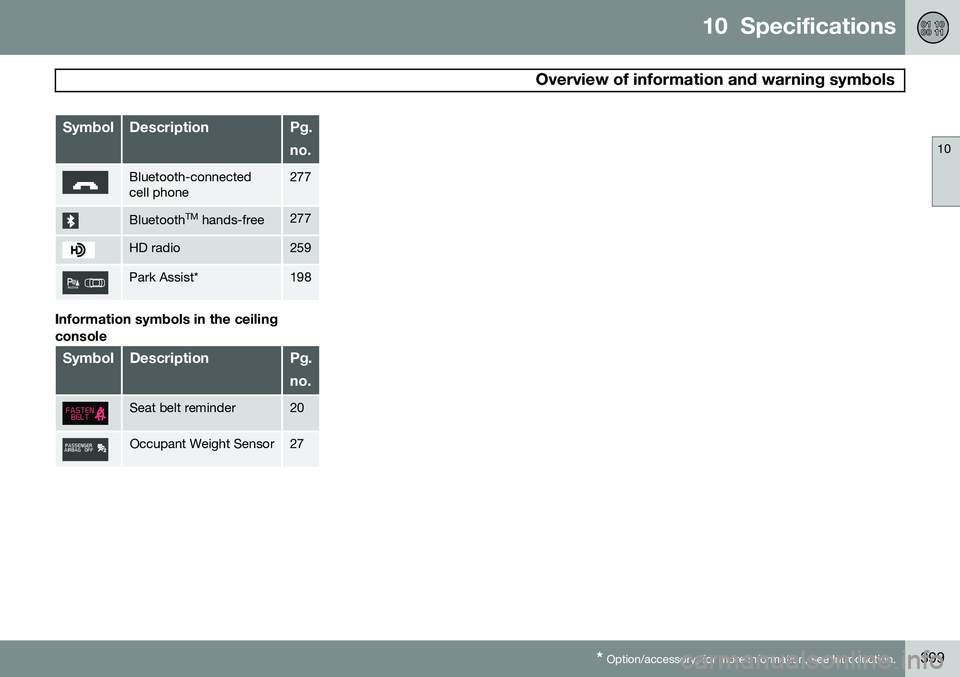
SymbolDescriptionPg. no.
Bluetooth-connected cell phone277
Bluetooth TM
hands-free277
HD radio259
Park Assist*198
Information symbols in the ceiling console
SymbolDescriptionPg. no.
Seat belt reminder20
Occupant Weight Sensor27
Page 404 of 414
11 Index
11
402
1, 2, 3 ...
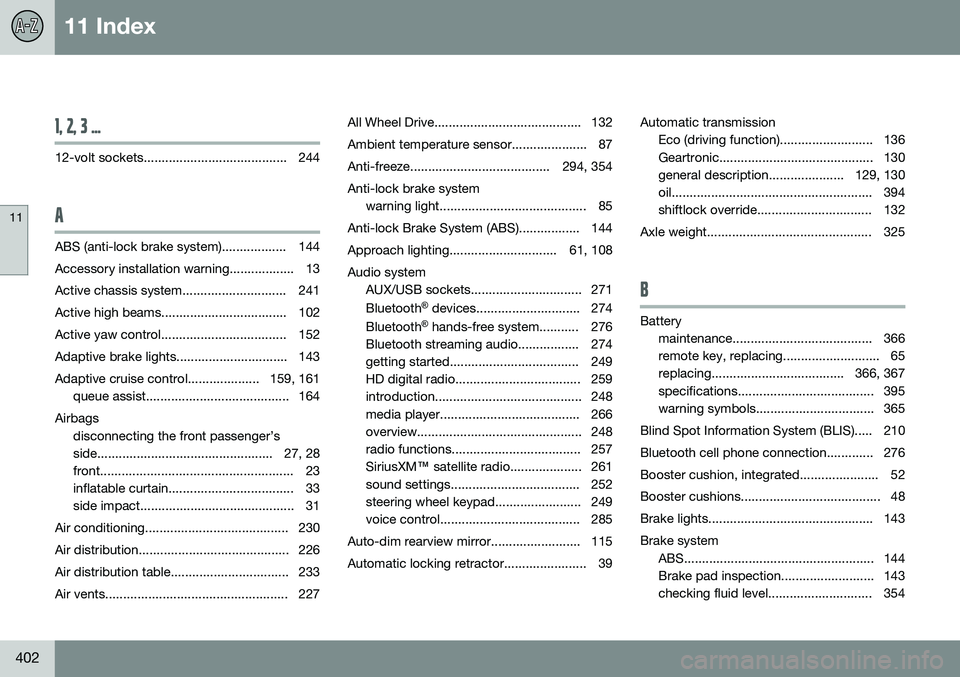
12-volt sockets........................................ 244
A
ABS (anti-lock brake system).................. 144
Accessory installation warning.................. 13
Active chassis system............................. 241
Active high beams................................... 102Active yaw control................................... 152
Adaptive brake lights............................... 143
Adaptive cruise control.................... 159, 161 queue assist........................................ 164
Airbags disconnecting the front passenger’s
side................................................. 27, 28
front...................................................... 23
inflatable curtain................................... 33
side impact........................................... 31
Air conditioning........................................ 230
Air distribution.......................................... 226
Air distribution table................................. 233
Air vents................................................... 227 All Wheel Drive......................................... 132
Ambient temperature sensor..................... 87
Anti-freeze....................................... 294, 354Anti-lock brake system
warning light......................................... 85
Anti-lock Brake System (ABS)................. 144
Approach lighting.............................. 61, 108Audio system AUX/USB sockets............................... 271 Bluetooth ®
devices............................. 274
Bluetooth ®
hands-free system........... 276
Bluetooth streaming audio................. 274
getting started.................................... 249
HD digital radio................................... 259
introduction......................................... 248
media player....................................... 266
overview.............................................. 248
radio functions.................................... 257SiriusXM ™ satellite radio.................... 261
sound settings.................................... 252
steering wheel keypad........................ 249
voice control....................................... 285
Auto-dim rearview mirror......................... 115
Automatic locking retractor....................... 39 Automatic transmission
Eco (driving function).......................... 136
Geartronic........................................... 130
general description..................... 129, 130
oil........................................................ 394
shiftlock override................................ 132
Axle weight.............................................. 325
B
Battery maintenance....................................... 366
remote key, replacing........................... 65
replacing..................................... 366, 367
specifications...................................... 395
warning symbols................................. 365
Blind Spot Information System (BLIS)..... 210
Bluetooth cell phone connection............. 276
Booster cushion, integrated...................... 52
Booster cushions....................................... 48
Brake lights.............................................. 143Brake system ABS..................................................... 144
Brake pad inspection.......................... 143
checking fluid level............................. 354
Page 407 of 414
11 Index
11
405
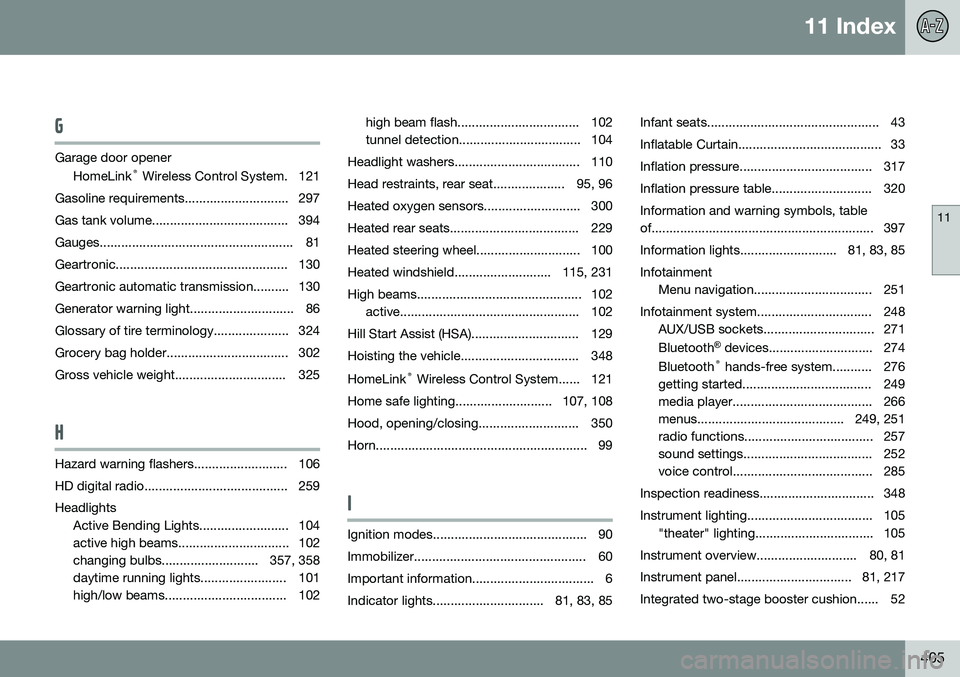
G
Garage door openerHomeLink ®
Wireless Control System. 121
Gasoline requirements............................. 297
Gas tank volume...................................... 394
Gauges...................................................... 81
Geartronic................................................ 130
Geartronic automatic transmission.......... 130
Generator warning light............................. 86
Glossary of tire terminology..................... 324
Grocery bag holder.................................. 302
Gross vehicle weight............................... 325
H
Hazard warning flashers.......................... 106
HD digital radio........................................ 259Headlights Active Bending Lights......................... 104
active high beams............................... 102
changing bulbs........................... 357, 358
daytime running lights........................ 101
high/low beams.................................. 102 high beam flash.................................. 102
tunnel detection.................................. 104
Headlight washers................................... 110
Head restraints, rear seat.................... 95, 96
Heated oxygen sensors........................... 300
Heated rear seats.................................... 229
Heated steering wheel............................. 100
Heated windshield........................... 115, 231
High beams.............................................. 102 active.................................................. 102
Hill Start Assist (HSA).............................. 129
Hoisting the vehicle................................. 348 HomeLink ®
Wireless Control System...... 121
Home safe lighting........................... 107, 108
Hood, opening/closing............................ 350
Horn........................................................... 99
I
Ignition modes........................................... 90
Immobilizer................................................ 60
Important information.................................. 6
Indicator lights............................... 81, 83, 85 Infant seats................................................ 43
Inflatable Curtain........................................ 33
Inflation pressure..................................... 317
Inflation pressure table............................ 320Information and warning symbols, table
of.............................................................. 397
Information lights........................... 81, 83, 85Infotainment
Menu navigation................................. 251
Infotainment system................................ 248 AUX/USB sockets............................... 271 Bluetooth ®
devices............................. 274
Bluetooth ®
hands-free system........... 276
getting started.................................... 249
media player....................................... 266
menus......................................... 249, 251
radio functions.................................... 257
sound settings.................................... 252
voice control....................................... 285
Inspection readiness................................ 348
Instrument lighting................................... 105 "theater" lighting................................. 105
Instrument overview............................ 80, 81
Instrument panel................................ 81, 217
Integrated two-stage booster cushion...... 52