brakes VOLVO V60 2015 Owner´s Manual
[x] Cancel search | Manufacturer: VOLVO, Model Year: 2015, Model line: V60, Model: VOLVO V60 2015Pages: 414, PDF Size: 11.44 MB
Page 179 of 414
04 Driver support
City Safety™
04
}}
177
Maximum pulse energy2.64 μJ
Maximum average output45 mW
Pulse length33 ns
Divergence (horizontal × verti- cal)28° × 12°
NOTE
The function of aftermarket laser detectors may be affected by City Safety's laser sen-sor.
WARNING
The laser sensor emits light when the igni- tion is in mode II or higher, even if City
Safety™ has been switched off.
WARNING
Eye injury may occur if any of the following points are not followed: • It is essential that all pertinent instruc- tions be followed when handling laserinstruments. Testing, repairing, remov-ing, adjusting and/or replacing anycomponents in the laser sensor mayonly be done by a trained and qualifiedVolvo service technician.
• Do not remove the laser sensor(including removal of the lenses). Alaser sensor that has been removedbelongs to laser class 3B according tostandard IEC 60825-1. Devices in laserclass 3B present a risk of injury to theeyes.
• The laser sensor’s connector must bedisconnected before the sensor isremoved from the windshield.
• The laser sensor must be mounted inplace on the windshield before con-necting the sensor’s connector.
• Do not view the laser sensor (whichemits spreading, invisible laser beams)with optical instruments from a dis-tance of less than 4 inches (100 mm).Symbols and messages in the display
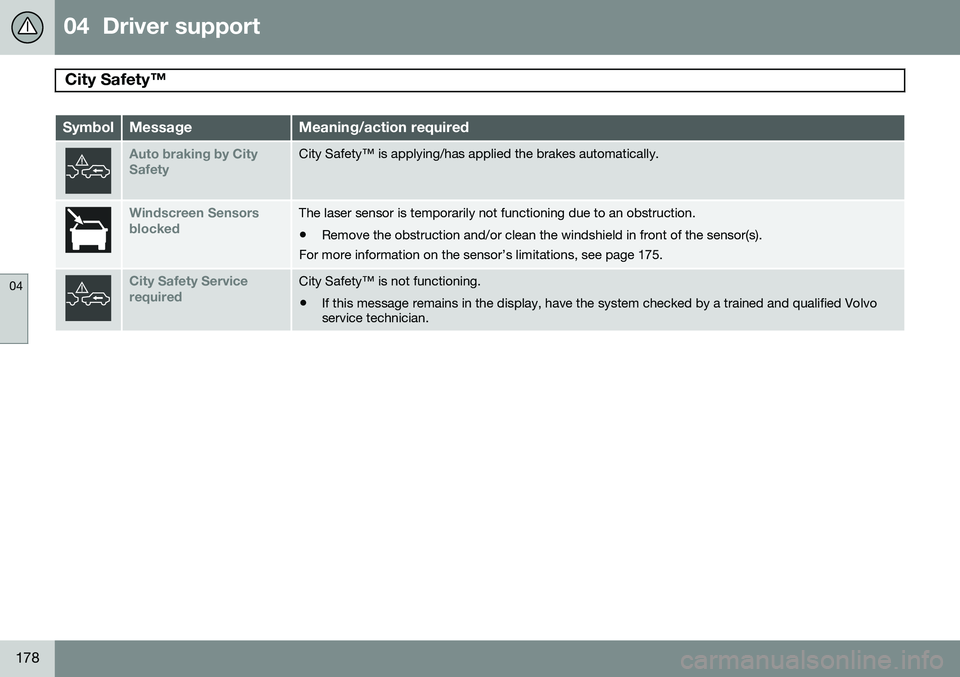
When City Safety™ automatically applies the brakes, one or more of the symbols in themain instrument panel may illuminate and itsassociated message will be displayed. A text message can be erased by pressing briefly on the
OK button on the turn signal
lever.
Page 180 of 414
04 Driver support
City Safety™
04
178
SymbolMessageMeaning/action required
Auto braking by City SafetyCity Safety™ is applying/has applied the brakes automatically.
Windscreen Sensors blockedThe laser sensor is temporarily not functioning due to an obstruction.
• Remove the obstruction and/or clean the windshield in front of the sensor(s).
For more information on the sensor’s limitations, see page 175.
City Safety Service requiredCity Safety™ is not functioning.
• If this message remains in the display, have the system checked by a trained and qualified Volvo service technician.
Page 181 of 414

04 Driver support
Pedestrian and Cyclist Detection with Full Auto Brake*
04
}}
* Option/accessory, for more information, see Introduction.179
Introduction
Pedestrian and Cyclist Detection with Full Auto Brake is designed to assist the driver ifthere is a risk of a collision with a pedestrian,a cyclist, a vehicle ahead that is at a standstillor one that is moving in the same direction asyour vehicle. This system consists of the following three functions: • Collision Warning
warns the driver of a
potential collision situation.
• Brake Support
helps the driver brake
efficiently in a critical situation.
• Auto-brake
brakes the vehicle automati-
cally if a collision with a pedestrian, a cyclist or another vehicle cannot be avoi-ded and the driver does not apply thebrakes in time or steer around the per-son/vehicle. Auto-brake can help preventa collision or reduce the speed at which acollision occurs.
Since Pedestrian and Cyclist Detection with Full Auto Brake is activated in circumstanceswhere the driver should have begun brakingmuch sooner, the system will not be able toassist the driver in all situations. This system is designed to activate as late as possible to help avoid unnecessary interven-tion. The system should not be used in such a waythat the driver changes his/her way of operat-ing the vehicle. If the driver relies entirely onthe system, the chances of an accident even-tually occurring increase considerably. The Pedestrian and Cyclist Detection with Full Auto Brake and City Safety™ systems sup-plement each other. See page 173 fordetailed information about City Safety™.
WARNING
No automatic system can be guaranteed to function 100% correctly in all situations.For that reason, never test the Auto-brakesystem by driving toward a person orobject. This could result in serious injury ordeath.
WARNING
•
Pedestrian and Cyclist Detection with Full Auto Brake does not work in alldriving, traffic, weather and road con-ditions. It does not react to vehiclesnot traveling in the same direction asyour vehicle.
• Pedestrian and Cyclist Detection withFull Auto Brake does not react to ani-mals.
• Warnings are only provided when therisk of collision is high. The "Function"section provides information aboutlimitations that the driver must beaware of before using Collision Warn-ing.
• Pedestrian and Cyclist Detection withFull Auto Brake will not provide awarning or brake the vehicle forpedestrians or cyclists at speedsabove 50 mph (80 km/h).
Page 182 of 414
04 Driver support
Pedestrian and Cyclist Detection with Full Auto Brake*
04
180* Option/accessory, for more information, see Introduction.
WARNING
• Pedestrian and Cyclist Detection with Full Auto Brake will not provide awarning or brake the vehicle forpedestrians in darkness or in tunnels,even if there is street lighting in thearea.
• The auto-brake function can help pre-vent a collision or reduce the speed atimpact but the driver should alwaysapply the brakes for the best possiblebraking effect, even if auto-brake isactively applying the brakes.
• Never wait for a collision warning. Thissystem is designed to be a supple-mentary driving aid. It is not, however,intended to replace the driver's atten-tion and judgement. The driver isresponsible for maintaining a safe dis-tance and speed, even when the colli-sion warning system is in use.
• Maintenance of the Pedestrian andCyclist Detection with Full Auto Brakesystem's components must only beperformed by a trained and qualifiedVolvo technician.
Function
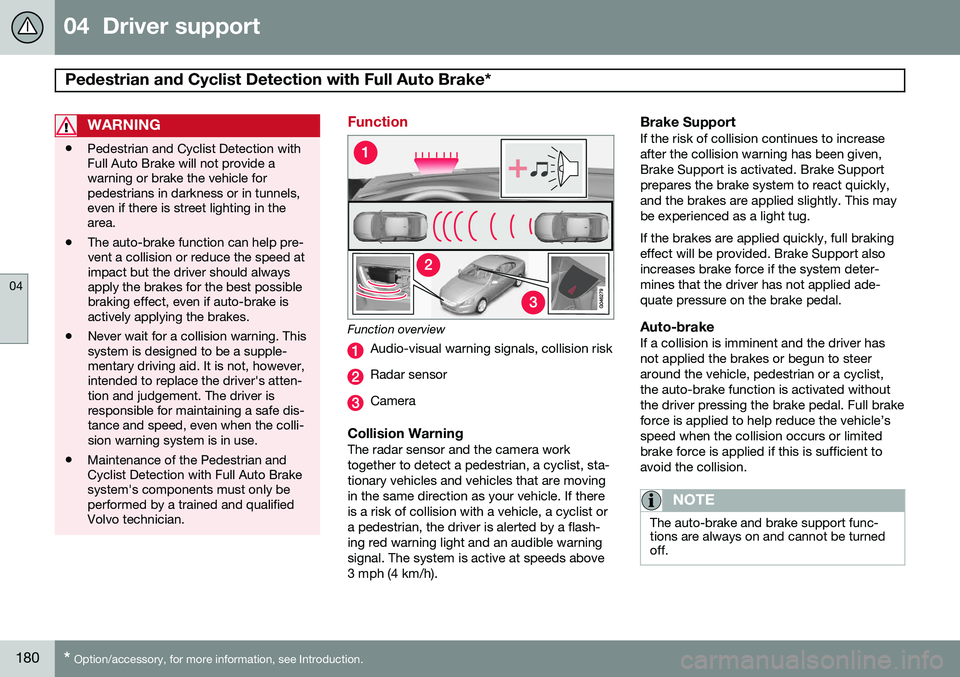
Function overview
Audio-visual warning signals, collision risk
Radar sensor
Camera
Collision WarningThe radar sensor and the camera work together to detect a pedestrian, a cyclist, sta-tionary vehicles and vehicles that are movingin the same direction as your vehicle. If thereis a risk of collision with a vehicle, a cyclist ora pedestrian, the driver is alerted by a flash-ing red warning light and an audible warningsignal. The system is active at speeds above3 mph (4 km/h).
Brake SupportIf the risk of collision continues to increaseafter the collision warning has been given,Brake Support is activated. Brake Supportprepares the brake system to react quickly,and the brakes are applied slightly. This maybe experienced as a light tug. If the brakes are applied quickly, full braking effect will be provided. Brake Support alsoincreases brake force if the system deter-mines that the driver has not applied ade-quate pressure on the brake pedal.
Auto-brakeIf a collision is imminent and the driver hasnot applied the brakes or begun to steeraround the vehicle, pedestrian or a cyclist,the auto-brake function is activated withoutthe driver pressing the brake pedal. Full brakeforce is applied to help reduce the vehicle’sspeed when the collision occurs or limitedbrake force is applied if this is sufficient toavoid the collision.
NOTE
The auto-brake and brake support func- tions are always on and cannot be turnedoff.
Page 183 of 414
04 Driver support
Pedestrian and Cyclist Detection with Full Auto Brake*
04
}}
* Option/accessory, for more information, see Introduction.181
Operation
Settings are made by pressing MY CAR on
the center console control panel and using the menus displayed.
Activating/deactivating both warning
signals
To switch the system's audible and visual
signals on or off at the same time, press MY
CAR on the center console control panel and
go to
SettingsCar settingsDriver
support systems
Collision Warning. If
Pedestrian and Cyclist Detection with Full Auto Brake is on, the system will perform aself-test each time the engine is started bybriefly illuminating the warning light. See page219 for a description of the menu system. When the engine is switched on, the system setting that was being used when it wasswitched off will be the default setting.
NOTE
The auto-brake and pedestrian/cyclist detection features are always on, even ifthe audible and visual warning signalshave been deactivated.
Activating/deactivating the audible warning signal only
The audible warning signal can be activated/ deactivated by pressing MY CAR on the cen-
ter console control panel and going to
SettingsCar settingsDriver support
systems
Warning sound if risk of
collision.
Setting a warning distanceThis setting determines the distance at which the visual and audible warnings are triggered. Select
Long, Normal or Short by pressing
MY CAR on the center console control panel
and going to
SettingsCar settings
Driver support systemsCollision
Warning
Warning distance.
The warning distance determines the level of sensitivity used by the system. The warning distance
Long provides an earlier warning.
Begin by using Long and if the system gives
too many warnings, try changing to Normal.
WARNING
• The setting Short should only be used
in situations where traffic is light and moving at low speeds.
• Pedestrian and Cyclist Detection withFull Auto Brake alerts the driver to therisk of a collision but this function can-not reduce the driver’s reaction time.
• For the system to be as effective aspossible, it is recommended that Dis-tance Alert be set to 4 or 5, seepage 170.
NOTE
•When Adaptive Cruise Control is used, the warning light and signal will beused by that function, even if thewarnings provided by Pedestrian andCyclist Detection with Full Auto Brakehave been deactivated by the driver.
• In situations where traffic is moving atconsiderably different speeds, or if thevehicle ahead brakes suddenly, warn-ings may be considered to be late, even if the setting
Long has been
selected.
Checking settingsThe current system settings can be checked by pressing MY CAR on the center console
Page 202 of 414
04 Driver support
Park assist*
04
200* Option/accessory, for more information, see Introduction.
NOTE
• Rear park assist is deactivated auto- matically when towing a trailer if Volvogenuine trailer wiring is used. If a non-Volvo trailer hitch is being used, it maybe necessary to switch off the systemmanually, see page 198.
• The system will not detect highobjects, such as a loading dock, etc.
• Objects such as chains, thin shinypoles or low objects may temporarilynot be detected by the system. Thismay result in the pulsing tone unex-pectedly stopping instead of changingto a constant tone as the vehicleapproaches the object. In such cases,use caution when backing up or stopthe vehicle to help avoid damage.
Front park assist
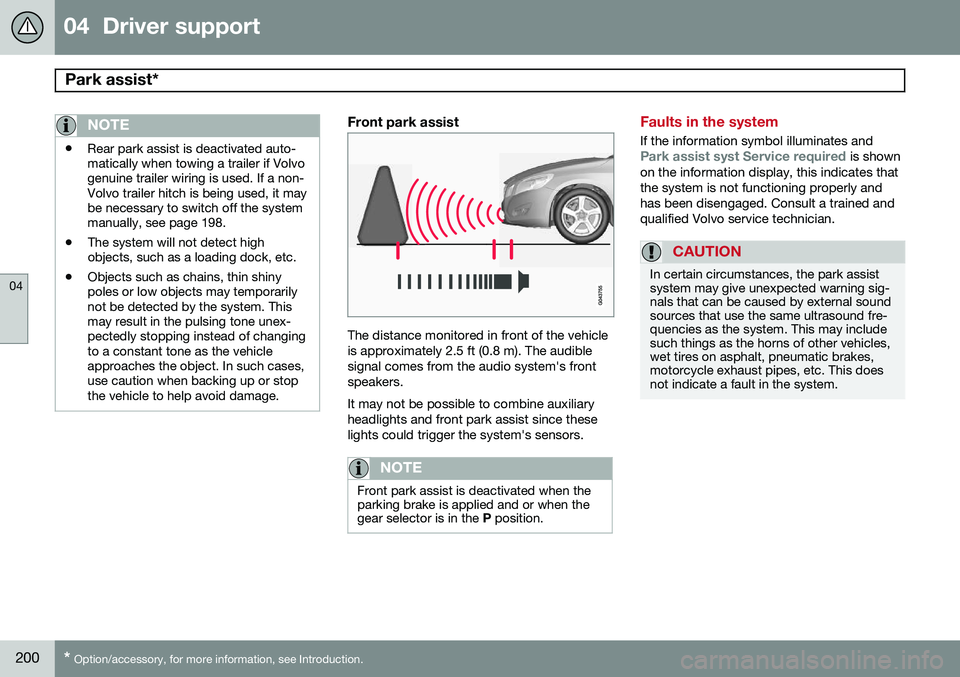
The distance monitored in front of the vehicle is approximately 2.5 ft (0.8 m). The audiblesignal comes from the audio system's frontspeakers. It may not be possible to combine auxiliary headlights and front park assist since theselights could trigger the system's sensors.
NOTE
Front park assist is deactivated when the parking brake is applied and or when thegear selector is in the
P position.
Faults in the system
If the information symbol illuminates andPark assist syst Service required is shown
on the information display, this indicates that the system is not functioning properly andhas been disengaged. Consult a trained andqualified Volvo service technician.
CAUTION
In certain circumstances, the park assist system may give unexpected warning sig-nals that can be caused by external soundsources that use the same ultrasound fre-quencies as the system. This may includesuch things as the horns of other vehicles,wet tires on asphalt, pneumatic brakes,motorcycle exhaust pipes, etc. This doesnot indicate a fault in the system.
Page 208 of 414
04 Driver support
Park Assist Pilot (PAP)*
04
206* Option/accessory, for more information, see Introduction.
Introduction
The off/on button shown is located on the center console
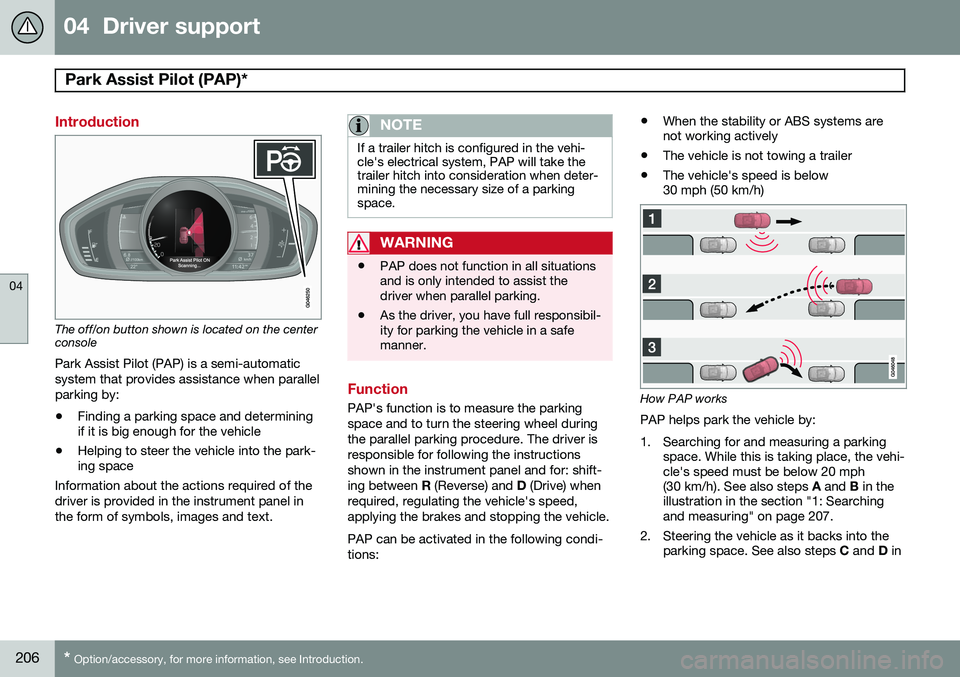
Park Assist Pilot (PAP) is a semi-automatic system that provides assistance when parallelparking by:
• Finding a parking space and determining if it is big enough for the vehicle
• Helping to steer the vehicle into the park-ing space
Information about the actions required of the driver is provided in the instrument panel inthe form of symbols, images and text.
NOTE
If a trailer hitch is configured in the vehi- cle's electrical system, PAP will take thetrailer hitch into consideration when deter-mining the necessary size of a parkingspace.
WARNING
• PAP does not function in all situations and is only intended to assist thedriver when parallel parking.
• As the driver, you have full responsibil-ity for parking the vehicle in a safemanner.
Function
PAP's function is to measure the parking space and to turn the steering wheel duringthe parallel parking procedure. The driver isresponsible for following the instructionsshown in the instrument panel and for: shift-ing between
R (Reverse) and D (Drive) when
required, regulating the vehicle's speed,applying the brakes and stopping the vehicle. PAP can be activated in the following condi- tions: •
When the stability or ABS systems are not working actively
• The vehicle is not towing a trailer
• The vehicle's speed is below30 mph (50 km/h)How PAP works
PAP helps park the vehicle by:
1. Searching for and measuring a parking space. While this is taking place, the vehi- cle's speed must be below 20 mph(30 km/h). See also steps A and B in the
illustration in the section "1: Searchingand measuring" on page 207.
2. Steering the vehicle as it backs into the parking space. See also steps C and D in
Page 210 of 414
04 Driver support
Park Assist Pilot (PAP)*
04
208* Option/accessory, for more information, see Introduction.
NOTE
• Release the wheel while PAP is steer- ing the vehicle.
• The steering wheel must be able toturn freely.
• For PAP to function optimally, waituntil the steering wheel is no longerturning before beginning the nextphase of the parallel parking proce-dure.
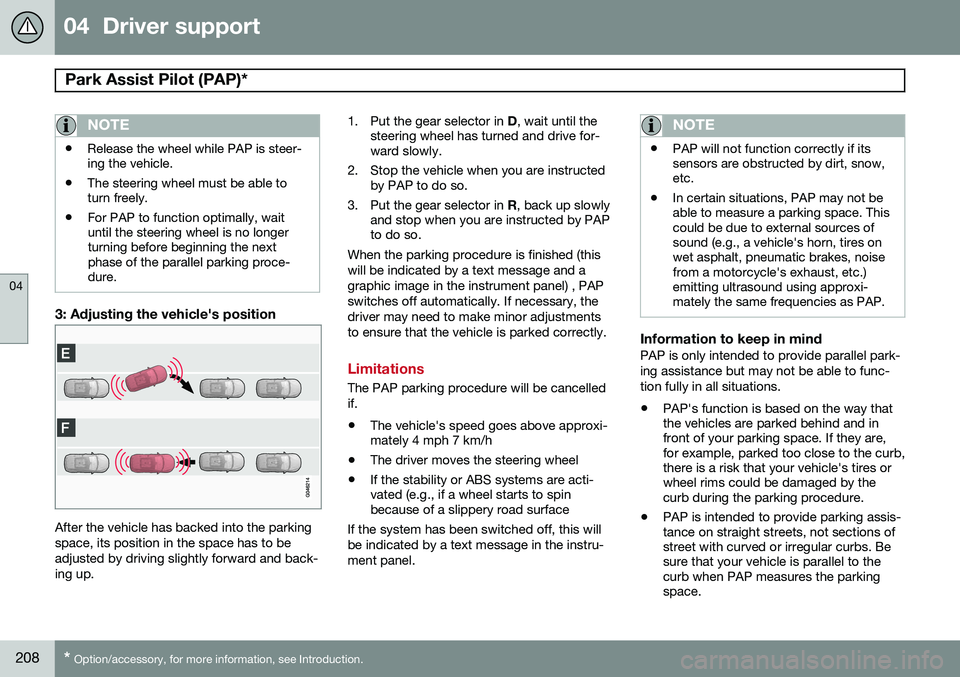
3: Adjusting the vehicle's position
After the vehicle has backed into the parking space, its position in the space has to beadjusted by driving slightly forward and back-ing up. 1. Put the gear selector in
D, wait until the
steering wheel has turned and drive for- ward slowly.
2. Stop the vehicle when you are instructed by PAP to do so.
3. Put the gear selector in R, back up slowly
and stop when you are instructed by PAPto do so.
When the parking procedure is finished (this will be indicated by a text message and agraphic image in the instrument panel) , PAPswitches off automatically. If necessary, thedriver may need to make minor adjustmentsto ensure that the vehicle is parked correctly.
Limitations
The PAP parking procedure will be cancelled if.
• The vehicle's speed goes above approxi- mately 4 mph 7 km/h
• The driver moves the steering wheel
• If the stability or ABS systems are acti-vated (e.g., if a wheel starts to spinbecause of a slippery road surface
If the system has been switched off, this will be indicated by a text message in the instru-ment panel.
NOTE
• PAP will not function correctly if its sensors are obstructed by dirt, snow,etc.
• In certain situations, PAP may not beable to measure a parking space. Thiscould be due to external sources ofsound (e.g., a vehicle's horn, tires onwet asphalt, pneumatic brakes, noisefrom a motorcycle's exhaust, etc.)emitting ultrasound using approxi-mately the same frequencies as PAP.
Information to keep in mindPAP is only intended to provide parallel park- ing assistance but may not be able to func-tion fully in all situations.
• PAP's function is based on the way that the vehicles are parked behind and infront of your parking space. If they are,for example, parked too close to the curb,there is a risk that your vehicle's tires orwheel rims could be damaged by thecurb during the parking procedure.
• PAP is intended to provide parking assis-tance on straight streets, not sections ofstreet with curved or irregular curbs. Besure that your vehicle is parallel to thecurb when PAP measures the parkingspace.
Page 294 of 414
07 During your trip
Driving recommendations
07
292
General information
Economical driving conserves natural
resources
Better driving economy may be obtained by thinking ahead, avoiding rapid starts andstops and adjusting the speed of your vehicleto immediate traffic conditions. Observe the following rules:
• Bring the engine to normal operating tem- perature as soon as possible by drivingwith a light foot on the accelerator pedalfor the first few minutes of operation. Acold engine uses more fuel and is subjectto increased wear.
• Whenever possible, avoid using the vehi-cle for driving short distances. This doesnot allow the engine to reach normaloperating temperature.
• Drive carefully and avoid rapid accelera-tion and hard braking.
• Use the transmission's Drive (
D) position
as often as possible and avoid using kick-down.
• Using the engine's optional Eco function 1
can help improve fuel economy. Seepage 136 for additional information. •
Using the transmission's Sport mode 2
may increase fuel consumption some-what. Use the transmission's Drive ( D)
position as often as possible. See page131 for additional information about Sportmode.
• Do not exceed posted speed limits.
• Avoid carrying unnecessary items (extraload) in the vehicle.
• Maintain correct tire pressure. Check tirepressure regularly (when tires are cold).
• Remove snow tires when threat of snowor ice has ended.
• Note that roof racks, ski racks, etc,increase air resistance and also fuel con-sumption.
• At highway driving speeds, fuel consump-tion will be lower with the air conditioningon and the windows closed than with theair conditioning off and the windowsopen.
• Using the onboard trip computer's fuelconsumption modes can help you learnhow to drive more economically.
Other factors that decrease gas mileage are: •
Dirty air cleaner
• Dirty engine oil and clogged oil filter
• Dragging brakes
• Incorrect front end alignment
Some of the above mentioned items and oth-ers are checked at the standard maintenanceintervals.
WARNING
Driving with the tailgate open: Driving
with the tailgate open could lead to poi- sonous exhaust gases entering the pas-senger compartment. If the tailgate mustbe kept open for any reason, proceed asfollows: • Close the windows
• Set the ventilation system control to air flow to floor, windshield and side win-dows and the blower control to itshighest setting.
Weight distribution affects handlingAt the specified curb weight your vehicle has a tendency to understeer, which means thatthe steering wheel has to be turned morethan might seem appropriate for the curva-ture of a bend. This ensures good stabilityand reduces the risk of rear wheel skid.
1
Available on certain 4-cyl. engines
2 Models with the T6 turbo engine only.
Page 295 of 414
07 During your trip
Driving recommendations
07
}}
293
Remember that these properties can alter with the vehicle load. The heavier the load inthe cargo area, the less the tendency toundersteer.
Handling, roadholdingVehicle load, tire design and inflation pres-sure all affect vehicle handling. Therefore,check that the tires are inflated to the recom-mended pressure according to the vehicleload. See the "Tire pressure" section. Loadsshould be distributed so that capacity weightor maximum permissible axle loads are notexceeded.
Driving through water
•
The vehicle can be driven through water up to a depth of approximately 10 in.(25 cm), at a maximum speed of 6 mph(10 km/h).
• Take particular care when driving throughflowing water.
• Clean the electrical connections for trailerwiring after driving in mud or water.
• When driving through water, maintain lowspeed and do not stop in the water.
WARNING
•Avoid driving through standing or rushing water. Doing so can be dan-gerous and it may also be difficult todetermine the actual depth of thewater.
• If water cannot be avoided, after driv-ing through the water, press lightly onthe brake pedal to ensure that thebrakes are functioning normally. Wateror mud can make the brake liningsslippery, resulting in delayed brakingeffect.
CAUTION
• Engine damage will occur if water is drawn into the air cleaner.
• If the vehicle is driven through waterdeeper than 10 in (25 cm), water mayenter the differential and the transmis-sion. This reduces the oil's lubricatingcapacity and may shorten the servicelife of these components.
• Do not allow the vehicle to stand inwater up to the door sills longer thanabsolutely necessary. This could resultin electrical malfunctions.
• If the engine has been stopped whilethe vehicle is in water, do not attemptto restart it. Have the vehicle towedout of the water.
Engine and cooling systemUnder special conditions, for example when driving in hilly terrain, extreme heat or withheavy loads, there is a risk that the engineand cooling system will overheat. Proceed asfollows to avoid overheating the engine. •
Maintain a low speed when driving with a trailer up long, steep hills.
• Do not turn the engine off immediatelywhen stopping after a hard drive.