remote start VOLVO V60 2015 Owner´s Manual
[x] Cancel search | Manufacturer: VOLVO, Model Year: 2015, Model line: V60, Model: VOLVO V60 2015Pages: 414, PDF Size: 11.44 MB
Page 149 of 414

03 Your driving environment
Parking brake
03
}}
147
Releasing the electric parking brake
Parking brake control
Manual release1. Fasten the seat belt.
2. Insert the remote key in the ignition slotand press the START/STOP ENGINE
button (or press the START/STOP
ENGINE button with a valid remote key in
the passenger compartment on vehicles with the optional keyless drive). 3. Press firmly on the brake pedal.
4. Pull the parking brake control.
Automatic release1. Start the engine.
NOTE
•
For safety reasons, the parking brake is only released automatically if the engineis running and the driver is wearing aseat belt.
• The electric parking brake will bereleased immediately when the acceler-ator pedal is pressed and the gearselector is in position
D or R.
2. Fasten the seat belt.
3. Move the gear selector to position D or R
and press the accelerator pedal. The parking brake will release when the vehi-cle begins to move.
Heavy load uphillA heavy load, such as a trailer, can cause the vehicle to roll backward when the parkingbrake is released automatically on a steepincline. To help avoid this:
1. Keep the electric parking brake lever pushed in with the left hand while shifting into Drive with the right.
2. While pressing the accelerator pedal to pull away, release the parking brake leveronly after the vehicle begins to move.
Symbol and messages in the instrument panel
See page 217 for information about display- ing or erasing messages.
SymbolMessageDescription/action
"Message"Read the message in the information display
A flashing symbol indicates that the parking brake is being applied. If the symbol flashes in any other situation then this means that a fault has arisen. Read the message on the information display.
Page 250 of 414
06 Infotainment
Introduction
06
248* Option/accessory, for more information, see Introduction.
General information
The infotainment system consists of radio and media player features and also makes itpossible to communicate via a cell phone.The information is displayed on a 7" screen inthe center console. Infotainment functionscan be controlled from the center console orvia the buttons on the steering wheel keypad.On models equipped with the navigation sys-tem*, voice commands can also be used toe.g., set destinations, make calls from a Bluetooth ®
-connected cell phone, etc.
If the infotainment system was on when the ignition was switched off, the most recently used source (
FM1, etc.) will restart the next
time the ignition is put in mode I or higher.
The driver's door must also be closed on vehicles with keyless drive*. The infotainment system can be operated for 15 minutes at a time while the engine isswitched off by pressing the On/Off button. While the engine is being started, the infotain- ment system will be temporarily interruptedand will resume when the engine has started.
NOTE
To help avoid excessive battery drain, remove the remote key from the ignitionslot if the infotainment system is usedwhile the engine is switched off.
Dolby Digital, Dolby Pro Logic
The system is manufactured under license from Dolby Laboratories LicensingCorporation. Dolby Digital, Dolby Pro Logic and the
symbol are trademarks of Dolby Laboratories Licensing Corporation.
Audyssey MultEQ 1
The Audyssey MultEQ system has been used to optimize sound quality to help ensure aworld-class listening experience.
1
Applies only to models with Premium Sound Multimedia.
Page 276 of 414
06 Infotainment
Bluetooth® media
06
274
Introduction
The vehicle's media player is equipped with Bluetooth ®
and can play streaming audio files
from a Bluetooth ®
device such as a cell
phone or mp3 player. Navigation and control of the device can be done through the vehi-cle's center console control panel or thesteering wheel keypad. On certain externaldevices, it is also possible to change tracksfrom the device.
NOTE
Any Bluetooth cell phones used must sup- port Audio/Video Remote Control Profile(AVRCP) and Advanced Audio DistributionProfile (A2DP). The phone must useAVRCP version 1.3 and A2DP 1.2. If olderversions of these standards are used, cer-tain features (e.g., scan or random) maynot function. Not all cell phones are fully compatible with the vehicle's Bluetooth system. A listof compatible phones is available at youVolvo retailer or at www.volvocars.us.
Menu navigation
Choices can be made in the Bluetoothmenus from the center console control panel or the steering wheel keypad. For additionalinformation about navigating the variousmenus, see page 249. The vehicle's media player can only play audio files through the Bluetooth
®
function.
Overview
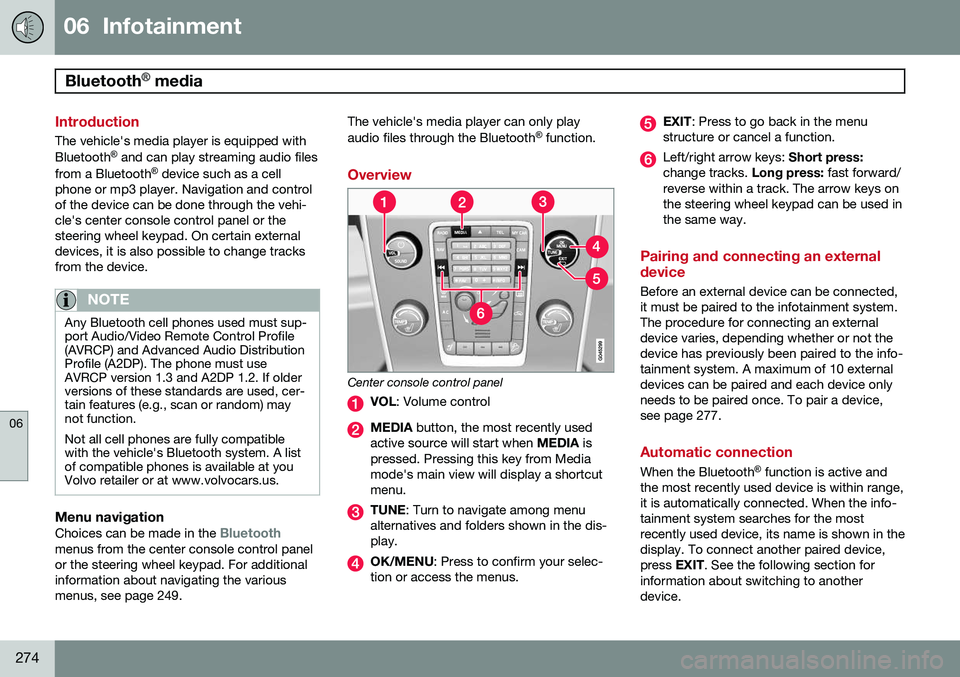
Center console control panel
VOL : Volume control
MEDIA button, the most recently used
active source will start when MEDIA is
pressed. Pressing this key from Media mode's main view will display a shortcutmenu.
TUNE : Turn to navigate among menu
alternatives and folders shown in the dis- play.
OK/MENU : Press to confirm your selec-
tion or access the menus.
EXIT : Press to go back in the menu
structure or cancel a function.
Left/right arrow keys: Short press:
change tracks. Long press: fast forward/
reverse within a track. The arrow keys on the steering wheel keypad can be used inthe same way.
Pairing and connecting an external device
Before an external device can be connected, it must be paired to the infotainment system.The procedure for connecting an externaldevice varies, depending whether or not thedevice has previously been paired to the info-tainment system. A maximum of 10 externaldevices can be paired and each device onlyneeds to be paired once. To pair a device,see page 277.
Automatic connection
When the Bluetooth ®
function is active and
the most recently used device is within range, it is automatically connected. When the info-tainment system searches for the mostrecently used device, its name is shown in thedisplay. To connect another paired device,press EXIT. See the following section for
information about switching to anotherdevice.
Page 313 of 414
07 During your trip
Emergency towing
07
* Option/accessory, for more information, see Introduction.311
Having the vehicle towed by a tow truck
Call for professional help from an authorized towing company. Volvo recommends the useof flat bed equipment.
CAUTION
In certain conditions, the towing eyelet may be used to pull the vehicle onto aflatbed tow truck.
• The vehicle's position and ground clearance determine if it can be pulledup onto a flatbed tow truck using thetowing eyelet.
• If the angle of the tow truck’s ramp istoo steep or the ground clearanceunder the vehicle is insufficient, dam-age could occur by attempting to pullthe vehicle using the towing eyelet.
• If necessary, lift the vehicle using thetow truck’s lifting device.
WARNING
No person or object should be behind the tow truck while the vehicle is being pulledup onto the flatbed.
CAUTION
•The vehicle should always be towed in the forward direction.
• Vehicles with All Wheel Drive (AWD)*that are being towed with the frontwheels off the ground should not betowed at a speed above approx.45 mph (70 km/h) and should not betowed farther than 30 miles (50 km).
Towing the vehicle
1. With the remote key fully pressed into the
ignition slot 1
, press START/STOP
ENGINE for approximately 2 seconds to
activate ignition mode II.
2. The remote key must remain in the igni- tion slot 2
for the entire time that the vehi-
cle is being towed.
3. Keep the tow rope taut when the towing vehicle slows down by applying light pressure on the brake pedal. This willhelp prevent jarring movements of thevehicle being towed.
4. Be prepared to apply the brakes to stop the vehicle being towed.
CAUTION
General towing precautions:
• Please check with state and local authorities before attempting this typeof towing, as vehicles being towed aresubject to regulations regarding maxi-mum towing speed, length and type oftowing device, lighting, etc.
• If the vehicle's battery is dead, seepage 127 to provide current for releas-ing the electric parking brake and tomove the gear selector from the
P
position to N. If this is not possible,
see page 132 for information aboutmanually overriding the shiftlock sys-tem to move the gear selector from P
to N.
• Maximum speed: 50 mph (80 km/h).Do not exceed the maximum allowabletowing speed.
• Maximum distance with front wheelson ground: 50 miles (80 km).
• The vehicle should only be towed inthe forward direction.
1
Not necessary in vehicles with the optional keyless drive.
2 For vehicles with the optional keyless drive, the remote key must be in the vehicle.
Page 353 of 414
09 Maintenance and specifications
Hood and engine compartment09
351
WARNING
The cooling fan (located at the front of the engine compartment, behind the radiator)may start or continue to operate (for up to6 minutes) after the engine has beenswitched off.
WARNING
Before performing any operations in the engine compartment, the ignition shouldalways be completely switched off (inmode 0, see page 91) and there should be
no remote keys in the passenger compart-ment. The gear selector should be in the P
(park) position. If the engine has been run-ning, wait until it has cooled before touch-ing any components in the engine com-partment. The distributor ignition system operates at very high voltages. Special safety precau-tions must be followed to prevent injury.Always turn the ignition off when:
• Replacing distributor ignition compo- nents e.g. plugs, coil, etc.
• Do not touch any part of the distributorignition system while the engine is run-ning. This may result in unintendedmovements and body injury.
Page 358 of 414
09 Maintenance and specifications
Replacing bulbs 09
356* Option/accessory, for more information, see Introduction.
Introduction
All bulb specifications are listed on page 361. The following bulbs should only be replacedby a trained and qualified Volvo service tech-nician:
• Active Bending Lights
• Front parking lights
• Front side marker lights
• Cornering lights
• Turn signals in the door mirrors
• Approach lighting in the door mirrors
• Interior lighting (except for the front foot- well lighting)
• Glove compartment lighting
• Rear parking lights/side marker lights
• LED bulbsNOTE
•For information regarding any bulbs not mentioned in this section, pleasecontact your Volvo retailer or a trainedand authorized Volvo service techni-cian.
• Always switch off the ignition beforestarting to replace a bulb.
• If an error message remains in the dis-play after a faulty bulb has beenreplaced, contact an authorized Volvoworkshop.
• Condensation may form temporarily onthe inside of the lenses of exteriorlights such as headlights, fog lights, ortaillights. This is normal and the lightsare designed to withstand moisture.Normally, condensation will dissipateafter the lights have been on for ashort time.
• The optional Active Bending Lightbulbs contain trace amounts of mer-cury. These bulbs should always bedisposed of by a trained and qualifiedVolvo service technician.
CAUTION
Never touch the glass of bulbs with your fingers. Grease and oils from your fingersvaporize in the heat and will leave adeposit on the reflector, which will damageit.
WARNING
•The engine should not be running when changing bulbs.
• If the engine has been running justprior to replacing bulbs in the head-light housing, please keep in mind thatcomponents in the engine compart-ment will be hot.
WARNING
•Active Bending Lights* – due to the high voltage used by these headlights,these bulbs should only be replacedby a trained and qualified Volvo serv-ice technician.
• Turn off the lights and remove theremote key from the ignition beforechanging any bulbs.
Page 364 of 414
09 Maintenance and specifications
Wiper blades and washer fluid 09
362
Wiper blades
Service position
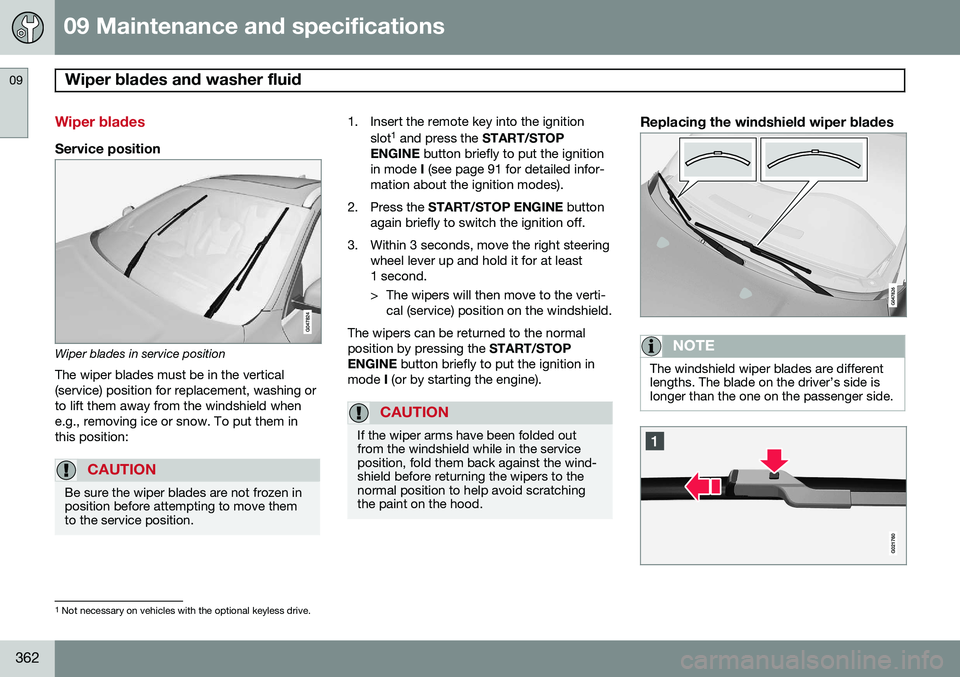
Wiper blades in service positionThe wiper blades must be in the vertical (service) position for replacement, washing orto lift them away from the windshield whene.g., removing ice or snow. To put them inthis position:
CAUTION
Be sure the wiper blades are not frozen in position before attempting to move themto the service position.
1. Insert the remote key into the ignition slot1
and press the START/STOP
ENGINE button briefly to put the ignition
in mode I (see page 91 for detailed infor-
mation about the ignition modes).
2. Press the START/STOP ENGINE button
again briefly to switch the ignition off.
3. Within 3 seconds, move the right steering wheel lever up and hold it for at least 1 second.
> The wipers will then move to the verti-cal (service) position on the windshield.
The wipers can be returned to the normal position by pressing the START/STOP
ENGINE button briefly to put the ignition in
mode I (or by starting the engine).
CAUTION
If the wiper arms have been folded out from the windshield while in the serviceposition, fold them back against the wind-shield before returning the wipers to thenormal position to help avoid scratchingthe paint on the hood.
Replacing the windshield wiper blades
NOTE
The windshield wiper blades are different lengths. The blade on the driver’s side islonger than the one on the passenger side.
1
Not necessary on vehicles with the optional keyless drive.
Page 404 of 414
11 Index
11
402
1, 2, 3 ...
12-volt sockets........................................ 244
A
ABS (anti-lock brake system).................. 144
Accessory installation warning.................. 13
Active chassis system............................. 241
Active high beams................................... 102Active yaw control................................... 152
Adaptive brake lights............................... 143
Adaptive cruise control.................... 159, 161 queue assist........................................ 164
Airbags disconnecting the front passenger’s
side................................................. 27, 28
front...................................................... 23
inflatable curtain................................... 33
side impact........................................... 31
Air conditioning........................................ 230
Air distribution.......................................... 226
Air distribution table................................. 233
Air vents................................................... 227 All Wheel Drive......................................... 132
Ambient temperature sensor..................... 87
Anti-freeze....................................... 294, 354Anti-lock brake system
warning light......................................... 85
Anti-lock Brake System (ABS)................. 144
Approach lighting.............................. 61, 108Audio system AUX/USB sockets............................... 271 Bluetooth ®
devices............................. 274
Bluetooth ®
hands-free system........... 276
Bluetooth streaming audio................. 274
getting started.................................... 249
HD digital radio................................... 259
introduction......................................... 248
media player....................................... 266
overview.............................................. 248
radio functions.................................... 257SiriusXM ™ satellite radio.................... 261
sound settings.................................... 252
steering wheel keypad........................ 249
voice control....................................... 285
Auto-dim rearview mirror......................... 115
Automatic locking retractor....................... 39 Automatic transmission
Eco (driving function).......................... 136
Geartronic........................................... 130
general description..................... 129, 130
oil........................................................ 394
shiftlock override................................ 132
Axle weight.............................................. 325
B
Battery maintenance....................................... 366
remote key, replacing........................... 65
replacing..................................... 366, 367
specifications...................................... 395
warning symbols................................. 365
Blind Spot Information System (BLIS)..... 210
Bluetooth cell phone connection............. 276
Booster cushion, integrated...................... 52
Booster cushions....................................... 48
Brake lights.............................................. 143Brake system ABS..................................................... 144
Brake pad inspection.......................... 143
checking fluid level............................. 354
Page 406 of 414
11 Index
11
404
Distance Alert.......................................... 170Dome lighting........................................... 107
Door mirrors............................................. 114
Driver alert............................................... 189 Lane Departure Warning..................... 191
Lane Keeping Aid............................... 194
Driver distraction warning.......................... 13
Driving economically................................ 292
Driving in cold weather............................ 294
Driving through water.............................. 293
E
ECC................................................. 230, 232
Eco (driving function)............................... 136
Eco coast................................................. 136
Eco guide................................................. 134
Economical driving.................................. 292
Electrically heated steering wheel........... 100
Electric parking brake.............................. 146
Electronic Climate Control....... 228, 230, 232 air distribution table............................ 233
Interior Air Quality System.................. 232 Emergency locking retractor...................... 39
Emergency starting.................................. 127
Emergency towing................................... 310
Emission inspection readiness................ 348Engine
overheating........................................... 86
specifications...................................... 392
Start/Stop........................................... 139
starting................................................ 124
switching off....................................... 127
Engine compartment overview................ 350
Engine Drag Control (EDC)...................... 152
Engine oil................................................. 393 checking............................................. 352
low pressure warning light.................... 85
volumes.............................................. 394
Engine remote start (ERS)........................ 126
Environment............................................... 12
Eyelets for anchoring loads..................... 301
F
Federal Clean Air Act............................... 346 Flat tires repairing with tire sealing system....... 330
Floor mats cleaning.............................................. 383
placing correctly................................. 124
Fluid specifications.................................. 394
Fog lights................................................... 85 rear...................................................... 105
Four C (active chassis system)................ 241
Front airbags.............................................. 23 disconnecting passenger’s side air-
bag.................................................. 27, 28
Front park assist.............................. 198, 200
Front seats........................................... 92, 94
Fuel filler cap........................................... 299
Fuel filler door, opening........................... 298
Fuel level warning light.............................. 85
Fuel requirements............................ 296, 297
Fuel tank volume..................................... 394
Fuses............................... 369, 370, 374, 377
Page 410 of 414
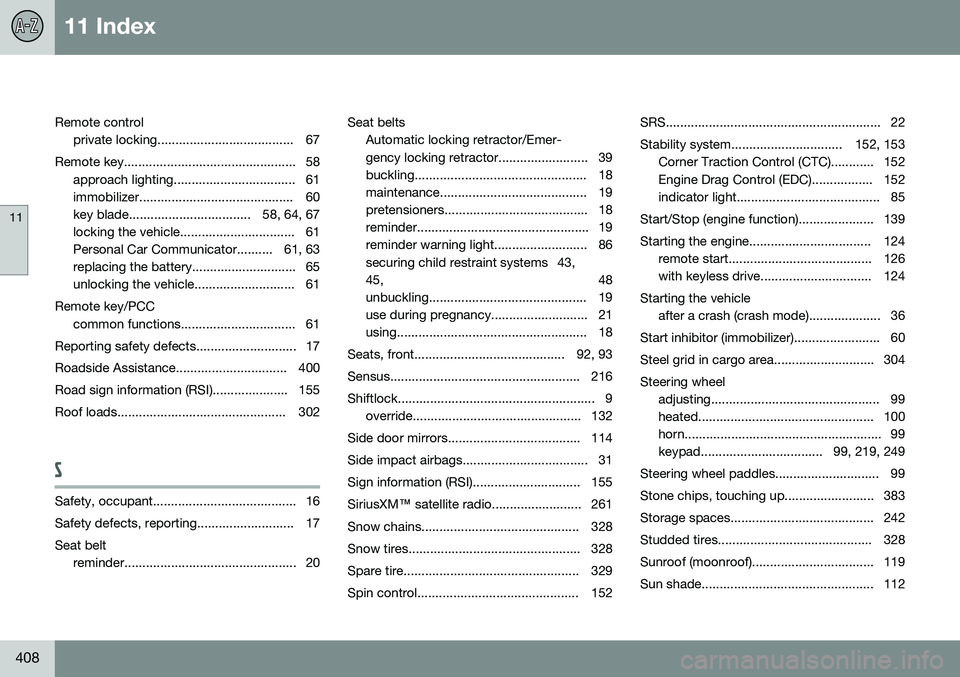
11 Index
11
408
Remote controlprivate locking...................................... 67
Remote key................................................ 58 approach lighting.................................. 61
immobilizer........................................... 60
key blade.................................. 58, 64, 67
locking the vehicle................................ 61
Personal Car Communicator.......... 61, 63
replacing the battery............................. 65
unlocking the vehicle............................ 61
Remote key/PCC common functions................................ 61
Reporting safety defects............................ 17
Roadside Assistance............................... 400
Road sign information (RSI)..................... 155
Roof loads............................................... 302
S
Safety, occupant........................................ 16
Safety defects, reporting........................... 17Seat belt reminder................................................ 20 Seat belts
Automatic locking retractor/Emer-
gency locking retractor......................... 39
buckling................................................ 18
maintenance......................................... 19
pretensioners........................................ 18
reminder................................................ 19
reminder warning light.......................... 86
securing child restraint systems 43,45, 48
unbuckling............................................ 19
use during pregnancy........................... 21
using..................................................... 18
Seats, front.......................................... 92, 93
Sensus..................................................... 216
Shiftlock....................................................... 9 override............................................... 132
Side door mirrors..................................... 114
Side impact airbags................................... 31
Sign information (RSI).............................. 155SiriusXM ™ satellite radio......................... 261
Snow chains............................................ 328
Snow tires................................................ 328
Spare tire................................................. 329
Spin control............................................. 152 SRS............................................................ 22
Stability system............................... 152, 153
Corner Traction Control (CTC)............ 152
Engine Drag Control (EDC)................. 152
indicator light........................................ 85
Start/Stop (engine function)..................... 139
Starting the engine.................................. 124 remote start........................................ 126
with keyless drive............................... 124
Starting the vehicle after a crash (crash mode).................... 36
Start inhibitor (immobilizer)........................ 60
Steel grid in cargo area............................ 304Steering wheel adjusting............................................... 99
heated................................................. 100
horn....................................................... 99
keypad.................................. 99, 219, 249
Steering wheel paddles............................. 99
Stone chips, touching up......................... 383
Storage spaces........................................ 242
Studded tires........................................... 328
Sunroof (moonroof).................................. 119
Sun shade................................................ 112