turn signal VOLVO V60 2015 Owner´s Manual
[x] Cancel search | Manufacturer: VOLVO, Model Year: 2015, Model line: V60, Model: VOLVO V60 2015Pages: 414, PDF Size: 11.44 MB
Page 265 of 414
06 Infotainment
Radio
06
}}
263
Scanning
Scan automatically searches through the list
of satellite channels. The search will only be carried out in the selected category, seepage 258 for more detailed information on thescan function.
Storing a channelA total of 20 satellite channels can be stored; 10 channels each for SAT1 and SAT2, see
page 258 for detailed information on storing channels.
• A
long press on one of the number keys
stores the currently tuned channel on that key.
• A
short press on a number key while the
radio is in
SAT1 or SAT2 mode will tune
to the preset satellite channel stored on that button, regardless of the currentlyselected channel category.
Searching for and storing songs
The Song Seek function provides notification
when SiriusXM ™ is broadcasting the songs
selected in song memory.
Song memoryenables you to store the name of the song for future advance notification when that song isbeing played.
Song seekWhen a satellite radio channel plays one of the songs stored in the song memory while the Song seek feature is activated, the lis-tener will be alerted by a text message and anaudible signal. Press
OK/MENU to listen to the song or EXIT
to cancel.To activate/deactivate the song seek func- tion:
1. Press OK/MENU .
2. Turn TUNE to scroll to
Song memoryand press OK/MENU .
3. Turn TUNE to scroll to
Song Seek and
press OK/MENU to activate or deactivate
the function.
NOTE
When the song has ended, the radio will remain tuned to the channel on which thesong was played.
Song memoryUp to ten songs can be saved in the system's memory. To add the currently playing song to the list:
1. Press OK/MENU .
2. Scroll to
Song memory and press OK/
MENU . 3.
Scroll to
Add current song to song
memory and press OK/MENU.
If a new song is selected when the memory is full, you will be prompted to delete a songfrom the list. To do so:
1. Press OK/MENU .
2. Turn TUNE to scroll through the list of
songs. Select a song and press OK/
MENU to delete it from the list.
Radio textThis text provides information about the song that is currently playing. To turn this featureon or off, press OK/MENU and scroll to
Show radio text and press OK/MENU to
toggle between on or off.
Advanced SiriusXM™ settings
This menu function enables you to make set- tings on certain SiriusXM ™ satellite radio
functions. To access this menu:
1. Press OK/MENU .
2. Scroll to the
Advanced settings menu
and press OK/MENU .
Page 282 of 414
06 Infotainment
Bluetooth® hands-free connection
06
280
In phone mode, the various call lists can be displayed in
Phone menuCall lists:
•
All calls
•Missed calls
•Answered calls
•Dialled calls (certain cell phones show
this list in reverse order)
•
Call duration
If no number has been stored, this menu can be accessed by pressing and holding 1.
Voice mailIn normal view, a speed dial number for voicemail can be programmed and accessed bypressing and holding 1.
The number for voice mail can be changed in phone mode in
Phone menuCall options
Voicemail numberChange number.
Sound settings
Call volumeCall volume can be only be adjusted during a call. Use the buttons in the steering wheelkeypad or the infotainment system’s VOL
control.
Infotainment system volumeIf no phone call is in progress, volume for theinfotainment system can be adjusted in thenormal way with the infotainment system'sVOL control or from the steering wheel key-
pad. Infotainment system sound can be automati- cally muted when a phone call is received in
Phone menuPhone settingsSounds
and volume
Mute radio/media.
Ringing volume
In phone mode, go to Phone menuPhone
settings
Sounds and volumeRing
volume and adjust the volume by turning
VOL . Save the setting by pressing EXIT.
Ringing tonesThe hands-free system’s integrated ringing tones can be selected in
Phone menu
Phone settingsSounds and volume
Ring signalsRing signal 1, etc.
NOTE
The connected cell phone’s ring tone may not be switched off when one of thehands-free system's ringing tones is used.
If you prefer to use the connected cell phone’s ring tone 2
, go to
Phone menu
Phone settingsSounds and volume
Ring signalsMobile phone ring signal.
Phone book
The hands-free system uses two phone books (one with the cell phone's list of con-tacts and one with contacts saved directly inthe infotainment system), which are com-bined to form one phone book.
• The infotainment system downloads the phone book from a connected cell phone.This phone book will only be displayedwhen this cell phone is connected to thehands-free system.
• The infotainment system also has an inte-grated phone book made up of contactsthat have been saved in the system,regardless of which cell phone is currently
2
Not supported by all cell phones.
Page 358 of 414
09 Maintenance and specifications
Replacing bulbs 09
356* Option/accessory, for more information, see Introduction.
Introduction
All bulb specifications are listed on page 361. The following bulbs should only be replacedby a trained and qualified Volvo service tech-nician:
• Active Bending Lights
• Front parking lights
• Front side marker lights
• Cornering lights
• Turn signals in the door mirrors
• Approach lighting in the door mirrors
• Interior lighting (except for the front foot- well lighting)
• Glove compartment lighting
• Rear parking lights/side marker lights
• LED bulbsNOTE
•For information regarding any bulbs not mentioned in this section, pleasecontact your Volvo retailer or a trainedand authorized Volvo service techni-cian.
• Always switch off the ignition beforestarting to replace a bulb.
• If an error message remains in the dis-play after a faulty bulb has beenreplaced, contact an authorized Volvoworkshop.
• Condensation may form temporarily onthe inside of the lenses of exteriorlights such as headlights, fog lights, ortaillights. This is normal and the lightsare designed to withstand moisture.Normally, condensation will dissipateafter the lights have been on for ashort time.
• The optional Active Bending Lightbulbs contain trace amounts of mer-cury. These bulbs should always bedisposed of by a trained and qualifiedVolvo service technician.
CAUTION
Never touch the glass of bulbs with your fingers. Grease and oils from your fingersvaporize in the heat and will leave adeposit on the reflector, which will damageit.
WARNING
•The engine should not be running when changing bulbs.
• If the engine has been running justprior to replacing bulbs in the head-light housing, please keep in mind thatcomponents in the engine compart-ment will be hot.
WARNING
•Active Bending Lights* – due to the high voltage used by these headlights,these bulbs should only be replacedby a trained and qualified Volvo serv-ice technician.
• Turn off the lights and remove theremote key from the ignition beforechanging any bulbs.
Page 361 of 414
09 Maintenance and specifications
Replacing bulbs09
}}
359
Extra high beam1
1. Remove the headlight housing from the
vehicle (see page 356).
2. Remove the cover over the bulbs (see page 357).
3. Remove the bulb by turning it counter- clockwise and pulling it straight out.
4. Remove the connector from the bulb.
5. Press the new bulb into the socket and turn it clockwise to put it in place. It can only be secured in one position.
6. Put the cover back into position and rein- stall the headlight housing.
Turn signals
1. Remove the headlight housing from thevehicle (see page 356).
2. Remove the cover by pulling it straight out.
3. Pull the holder to access the bulb.
4. Press in the bulb and turn it to remove it from the holder.
5. Press and turn the new bulb into place.
6. Reinsert the bulb holder into the headlight housing.
7. Put the cover back into position and rein- stall the headlight housing.
Taillight housing
Brake light (LED)
Parking lights/side marker light (LED)
Turn signal
Brake light (LED)
Backup light
Rear fog light
1Models with optional Active Bending Lights only.
Page 362 of 414
09 Maintenance and specifications
Replacing bulbs 09
360
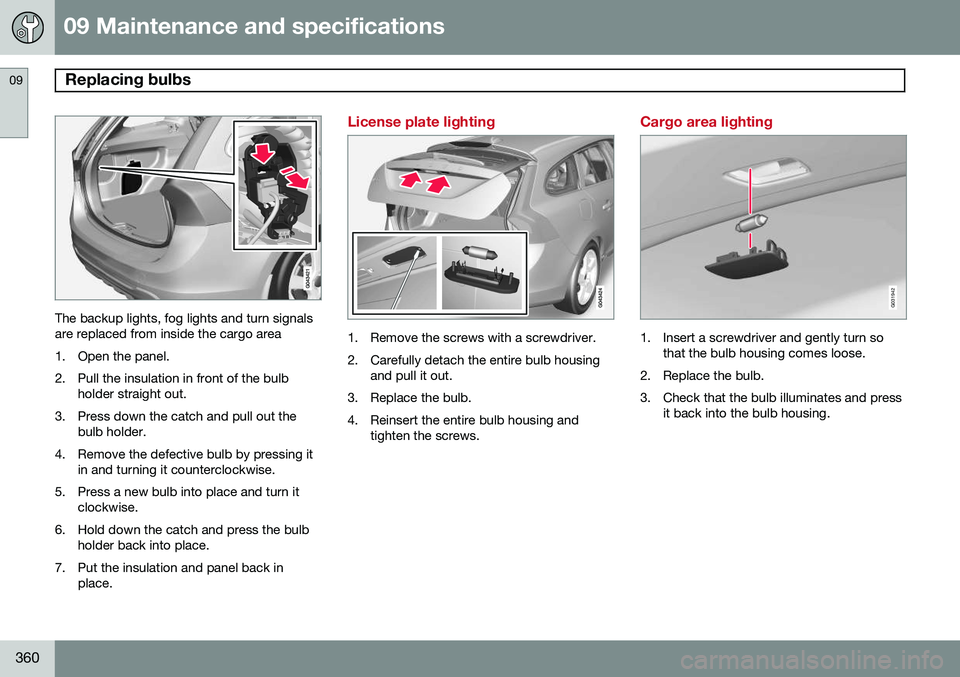
The backup lights, fog lights and turn signals are replaced from inside the cargo area
1. Open the panel.2. Pull the insulation in front of the bulb holder straight out.
3. Press down the catch and pull out the bulb holder.
4. Remove the defective bulb by pressing it in and turning it counterclockwise.
5. Press a new bulb into place and turn it clockwise.
6. Hold down the catch and press the bulb holder back into place.
7. Put the insulation and panel back in place.
License plate lighting
1. Remove the screws with a screwdriver.
2. Carefully detach the entire bulb housingand pull it out.
3. Replace the bulb.
4. Reinsert the entire bulb housing and tighten the screws.
Cargo area lighting
G031942
1. Insert a screwdriver and gently turn so that the bulb housing comes loose.
2. Replace the bulb.
3. Check that the bulb illuminates and press it back into the bulb housing.
Page 400 of 414
10 Specifications
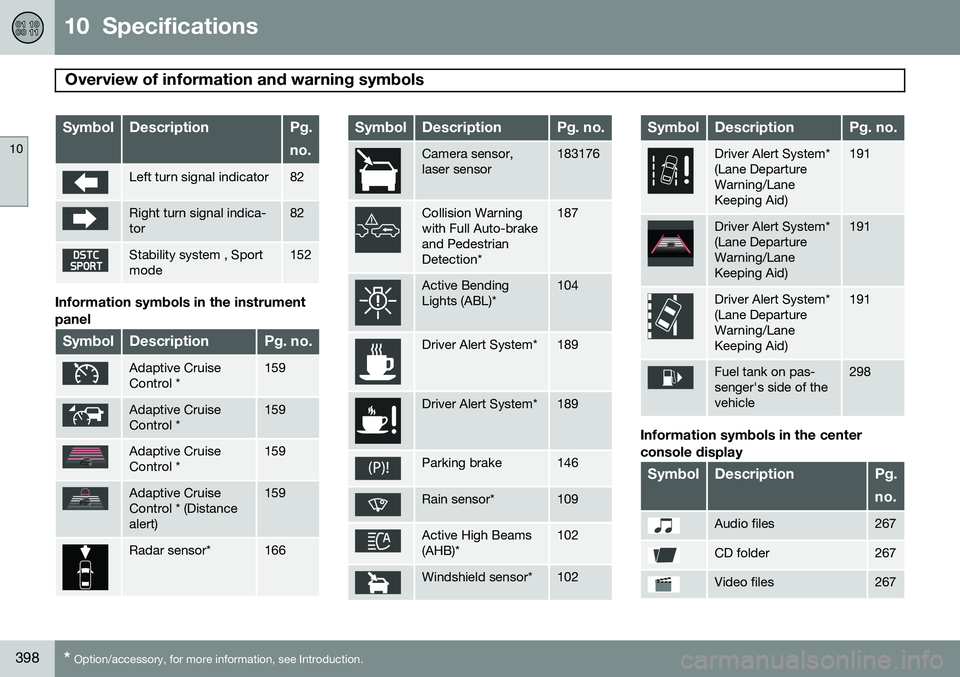
Overview of information and warning symbols
10
398* Option/accessory, for more information, see Introduction.
SymbolDescriptionPg. no.
Left turn signal indicator82
Right turn signal indica- tor82
Stability system , Sport mode152
Information symbols in the instrument panel
SymbolDescriptionPg. no.
Adaptive Cruise Control *159
Adaptive Cruise Control *159
Adaptive Cruise Control *159
Adaptive Cruise Control * (Distancealert)159
Radar sensor*166
SymbolDescriptionPg. no.
Camera sensor, laser sensor183176
Collision Warning with Full Auto-brakeand PedestrianDetection*187
Active Bending Lights (ABL)*104
Driver Alert System*189
Driver Alert System*189
Parking brake146
Rain sensor*109
Active High Beams (AHB)*102
Windshield sensor*102
SymbolDescriptionPg. no.
Driver Alert System* (Lane DepartureWarning/LaneKeeping Aid)191
Driver Alert System* (Lane DepartureWarning/LaneKeeping Aid)191
Driver Alert System* (Lane DepartureWarning/LaneKeeping Aid)191
Fuel tank on pas- senger's side of thevehicle298
Information symbols in the center console display
SymbolDescriptionPg. no.
Audio files267
CD folder267
Video files267
Page 411 of 414
11 Index
11
409
Supplemental restraint system.................. 22
warning light......................................... 86
Symbols, overview................................... 397
T
Tailgate driving with it open............................. 292
locking/unlocking.................................. 73
opening manually................................. 74
wiper/washer...................................... 110
Tailgate wipers......................................... 363 Temperature sensor ambient................................................. 87
Temporary spare tire............................... 329
Three-way catalytic converter................. 299
Tire designations..................................... 322
Tire inflation pressure.............................. 320
Tire Pressure Monitoring System.... 340, 341 indicator light........................................ 85
Tires......................................................... 314 age...................................................... 314
changing from summer to winter........ 315
glossary of terms................................ 324
improving economy............................ 315 inflation pressure................................ 317
inflation pressure table....................... 320
load ratings......................................... 319
rotation............................................... 314
Self-supporting run flat tires (SST)..... 342
snow................................................... 328
spare................................................... 329
specifications...................................... 318
speed ratings...................................... 318
storing................................................. 316
studded............................................... 328
tire pressure monitoring system......... 340
tire sealing system.............................. 330
tread wear indicator............................ 315
uniform tire quality grading................. 327
Tire sealing system.................................. 330 Top tether anchors (child restraint sys-
tems).......................................................... 51
Touching up paint.................................... 383
Towing a trailer................................ 307, 308 trailer hitch.......................................... 308
Towing the vehicle................................... 310
Traction control........................................ 152
Trailer towing................................... 307, 308 trailer hitch.......................................... 308 Transmission
general description..................... 129, 130
Hill Start Assist................................... 129
oil........................................................ 394
shiftlock override................................ 132
Tread wear indicator................................ 315
Trip computer.......................................... 234
Trip odometers.......................................... 88
Trips, long distance................................. 294
Tunnel detection...................................... 104
Turn signals............................................. 106 changing bulbs................................... 359
indicator lights...................................... 85
Two-stage booster cushion....................... 52
U
Uniform Tire Quality Grading................... 327
Unlocking the tailgate................................ 73
Unlocking the vehicle.......................... 61, 71
Upholstery care....................................... 381