instrument panel VOLVO V60 2015 Owner´s Manual
[x] Cancel search | Manufacturer: VOLVO, Model Year: 2015, Model line: V60, Model: VOLVO V60 2015Pages: 414, PDF Size: 11.44 MB
Page 179 of 414
04 Driver support
City Safety™
04
}}
177
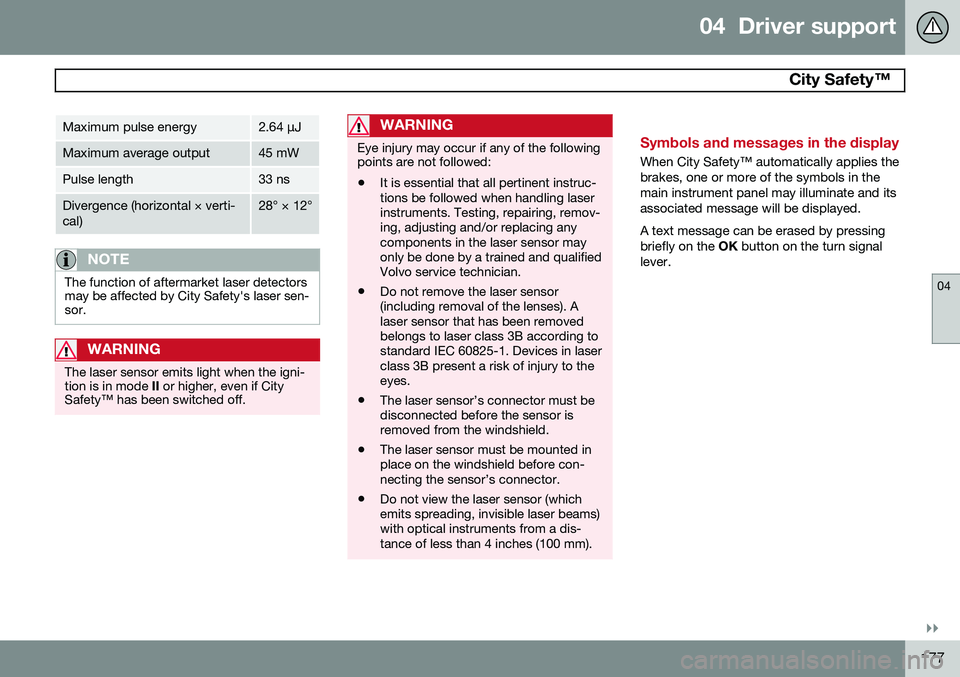
Maximum pulse energy2.64 μJ
Maximum average output45 mW
Pulse length33 ns
Divergence (horizontal × verti- cal)28° × 12°
NOTE
The function of aftermarket laser detectors may be affected by City Safety's laser sen-sor.
WARNING
The laser sensor emits light when the igni- tion is in mode II or higher, even if City
Safety™ has been switched off.
WARNING
Eye injury may occur if any of the following points are not followed: • It is essential that all pertinent instruc- tions be followed when handling laserinstruments. Testing, repairing, remov-ing, adjusting and/or replacing anycomponents in the laser sensor mayonly be done by a trained and qualifiedVolvo service technician.
• Do not remove the laser sensor(including removal of the lenses). Alaser sensor that has been removedbelongs to laser class 3B according tostandard IEC 60825-1. Devices in laserclass 3B present a risk of injury to theeyes.
• The laser sensor’s connector must bedisconnected before the sensor isremoved from the windshield.
• The laser sensor must be mounted inplace on the windshield before con-necting the sensor’s connector.
• Do not view the laser sensor (whichemits spreading, invisible laser beams)with optical instruments from a dis-tance of less than 4 inches (100 mm).Symbols and messages in the display
When City Safety™ automatically applies the brakes, one or more of the symbols in themain instrument panel may illuminate and itsassociated message will be displayed. A text message can be erased by pressing briefly on the
OK button on the turn signal
lever.
Page 192 of 414
04 Driver support
Driver Alert System*
04
190* Option/accessory, for more information, see Introduction.
Operating DACSettings are made using menu system and the display in the center console. See page219 for more information on the menu sys-tem.
On/OffTo put Driver Alert in standby mode:
• In the
MY CAR menu, scroll to
Car
settings
Driver support systemsDriver Alert and check the box. If the box
is not checked, the function is off.
FunctionDriver Alert is activated when the vehicle exceeds a speed of 40 mph (65 km/h) and willremain active as long as the speed is overapprox. 37 mph (60 km/h).
If the vehicle is being driven errati-cally, the driver will be alerted by anaudible signal and the message
Driver Alert Time for a break is
displayed. The warning will be repeated after a short time if the driving pattern remains thesame.
Press the OK button to erase a message.
WARNING
• An alert should be taken seriously since it is sometimes difficult for adriver to realize that he/she is fatigued.
• In the event of a warning or if thedriver feels fatigued, stop as soon aspossible in a safe place and rest.
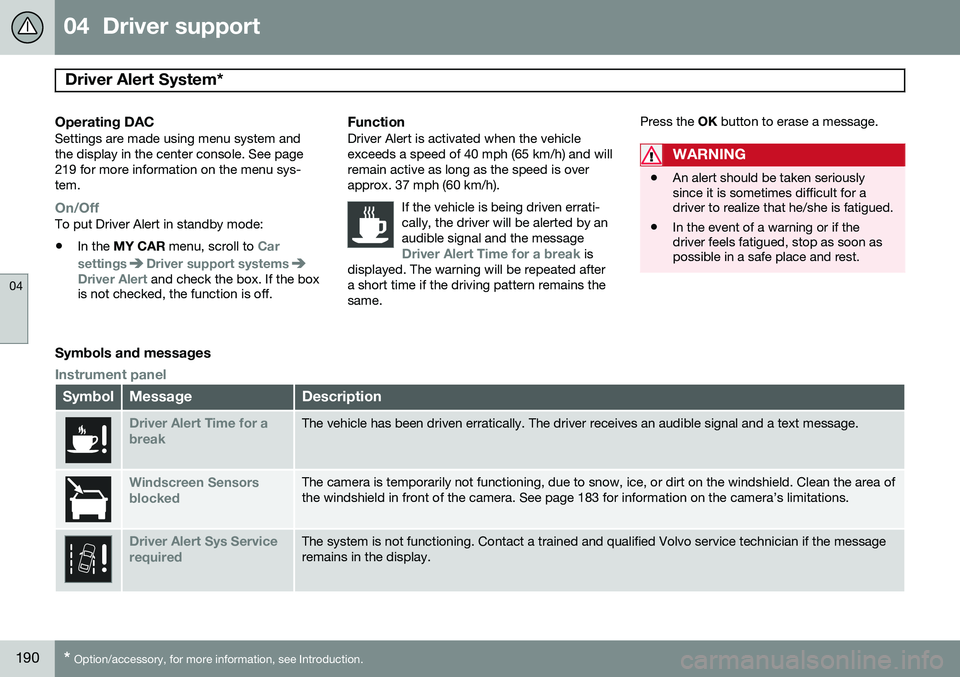
Symbols and messages
Instrument panel
SymbolMessageDescription
Driver Alert Time for a breakThe vehicle has been driven erratically. The driver receives an audible signal and a text message.
Windscreen Sensors blockedThe camera is temporarily not functioning, due to snow, ice, or dirt on the windshield. Clean the area of the windshield in front of the camera. See page 183 for information on the camera’s limitations.
Driver Alert Sys Service requiredThe system is not functioning. Contact a trained and qualified Volvo service technician if the message remains in the display.
Page 194 of 414
04 Driver support
Driver Alert System*
04
192* Option/accessory, for more information, see Introduction.
WARNING
This feature is only intended to assist the driver and does not function in all driving,weather, traffic or road conditions. As the driver, you have full responsibility for operating the vehicle in a safe manner.
Operation and function
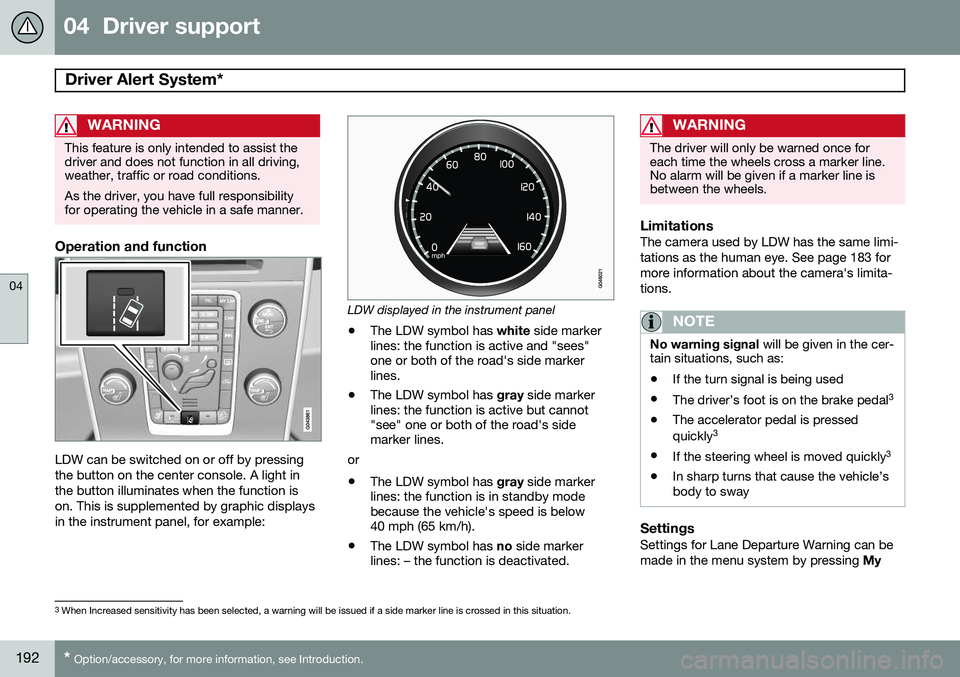
LDW can be switched on or off by pressing the button on the center console. A light inthe button illuminates when the function ison. This is supplemented by graphic displaysin the instrument panel, for example:
LDW displayed in the instrument panel
• The LDW symbol has
white side marker
lines: the function is active and "sees" one or both of the road's side markerlines.
• The LDW symbol has
gray side marker
lines: the function is active but cannot"see" one or both of the road's sidemarker lines.
or
• The LDW symbol has
gray side marker
lines: the function is in standby modebecause the vehicle's speed is below40 mph (65 km/h).
• The LDW symbol has
no side marker
lines: – the function is deactivated.
WARNING
The driver will only be warned once for each time the wheels cross a marker line.No alarm will be given if a marker line isbetween the wheels.
LimitationsThe camera used by LDW has the same limi- tations as the human eye. See page 183 formore information about the camera's limita-tions.
NOTE
No warning signal will be given in the cer-
tain situations, such as:
• If the turn signal is being used
• The driver’s foot is on the brake pedal 3
• The accelerator pedal is pressed quickly 3
• If the steering wheel is moved quickly 3
• In sharp turns that cause the vehicle’s body to sway
SettingsSettings for Lane Departure Warning can be made in the menu system by pressing
My
3
When Increased sensitivity has been selected, a warning will be issued if a side marker line is crossed in this situation.
Page 199 of 414
04 Driver support
Driver Alert System*
04
* Option/accessory, for more information, see Introduction.197
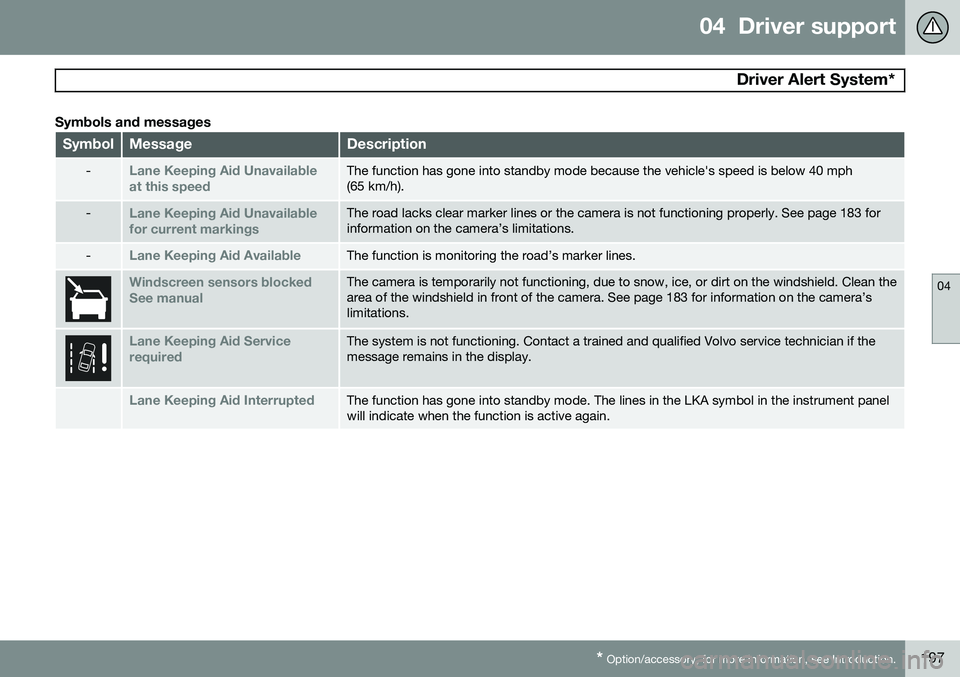
Symbols and messages
SymbolMessageDescription
-Lane Keeping Aid Unavailable
at this speedThe function has gone into standby mode because the vehicle's speed is below 40 mph (65 km/h).
-Lane Keeping Aid Unavailable
for current markingsThe road lacks clear marker lines or the camera is not functioning properly. See page 183 for information on the camera’s limitations.
-Lane Keeping Aid AvailableThe function is monitoring the road’s marker lines.
Windscreen sensors blocked See manualThe camera is temporarily not functioning, due to snow, ice, or dirt on the windshield. Clean the area of the windshield in front of the camera. See page 183 for information on the camera’slimitations.
Lane Keeping Aid Service requiredThe system is not functioning. Contact a trained and qualified Volvo service technician if the message remains in the display.
Lane Keeping Aid InterruptedThe function has gone into standby mode. The lines in the LKA symbol in the instrument panel will indicate when the function is active again.
Page 208 of 414
04 Driver support
Park Assist Pilot (PAP)*
04
206* Option/accessory, for more information, see Introduction.
Introduction
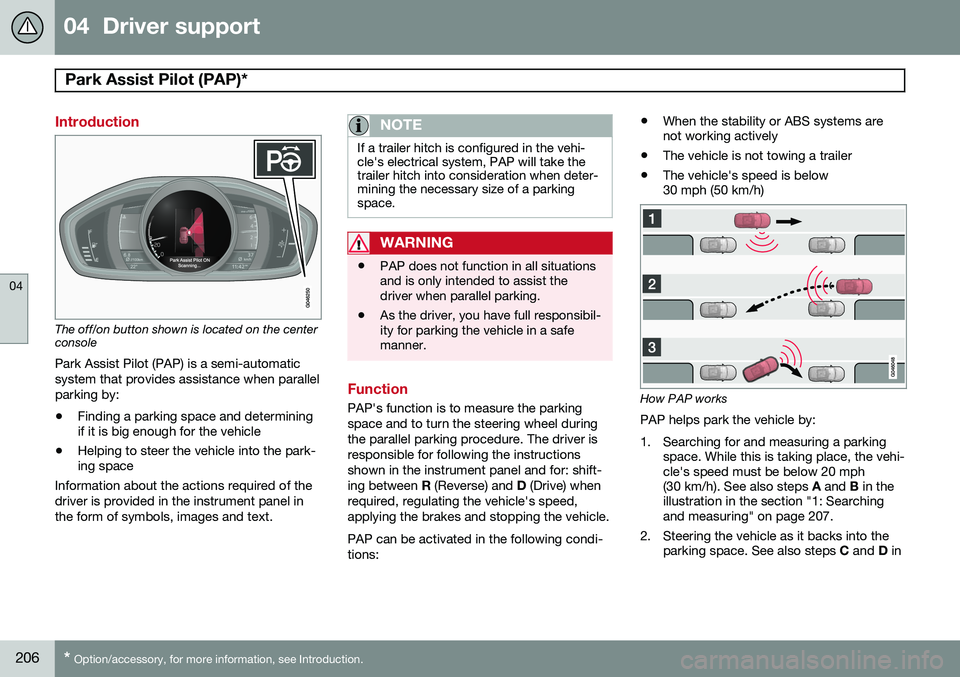
The off/on button shown is located on the center console
Park Assist Pilot (PAP) is a semi-automatic system that provides assistance when parallelparking by:
• Finding a parking space and determining if it is big enough for the vehicle
• Helping to steer the vehicle into the park-ing space
Information about the actions required of the driver is provided in the instrument panel inthe form of symbols, images and text.
NOTE
If a trailer hitch is configured in the vehi- cle's electrical system, PAP will take thetrailer hitch into consideration when deter-mining the necessary size of a parkingspace.
WARNING
• PAP does not function in all situations and is only intended to assist thedriver when parallel parking.
• As the driver, you have full responsibil-ity for parking the vehicle in a safemanner.
Function
PAP's function is to measure the parking space and to turn the steering wheel duringthe parallel parking procedure. The driver isresponsible for following the instructionsshown in the instrument panel and for: shift-ing between
R (Reverse) and D (Drive) when
required, regulating the vehicle's speed,applying the brakes and stopping the vehicle. PAP can be activated in the following condi- tions: •
When the stability or ABS systems are not working actively
• The vehicle is not towing a trailer
• The vehicle's speed is below30 mph (50 km/h)How PAP works
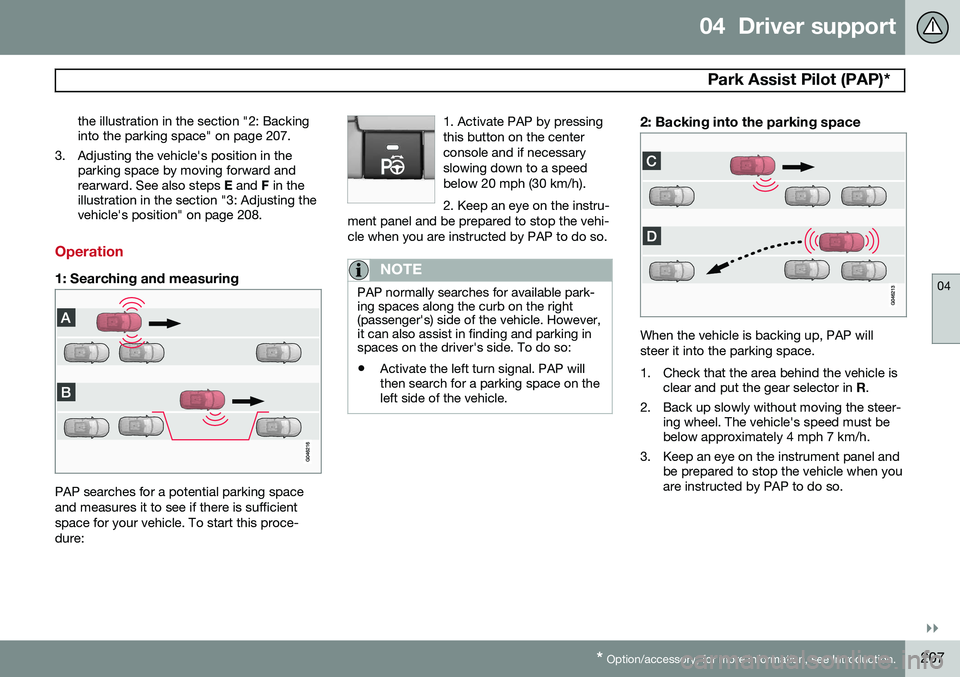
PAP helps park the vehicle by:
1. Searching for and measuring a parking space. While this is taking place, the vehi- cle's speed must be below 20 mph(30 km/h). See also steps A and B in the
illustration in the section "1: Searchingand measuring" on page 207.
2. Steering the vehicle as it backs into the parking space. See also steps C and D in
Page 209 of 414
04 Driver support
Park Assist Pilot (PAP)*
04
}}
* Option/accessory, for more information, see Introduction.207
the illustration in the section "2: Backing into the parking space" on page 207.
3. Adjusting the vehicle's position in the parking space by moving forward andrearward. See also steps E and F in the
illustration in the section "3: Adjusting thevehicle's position" on page 208.
Operation
1: Searching and measuring
PAP searches for a potential parking space and measures it to see if there is sufficientspace for your vehicle. To start this proce-dure: 1. Activate PAP by pressingthis button on the centerconsole and if necessaryslowing down to a speedbelow 20 mph (30 km/h). 2. Keep an eye on the instru-
ment panel and be prepared to stop the vehi- cle when you are instructed by PAP to do so.
NOTE
PAP normally searches for available park- ing spaces along the curb on the right(passenger's) side of the vehicle. However,it can also assist in finding and parking inspaces on the driver's side. To do so: • Activate the left turn signal. PAP will then search for a parking space on theleft side of the vehicle.
2: Backing into the parking space
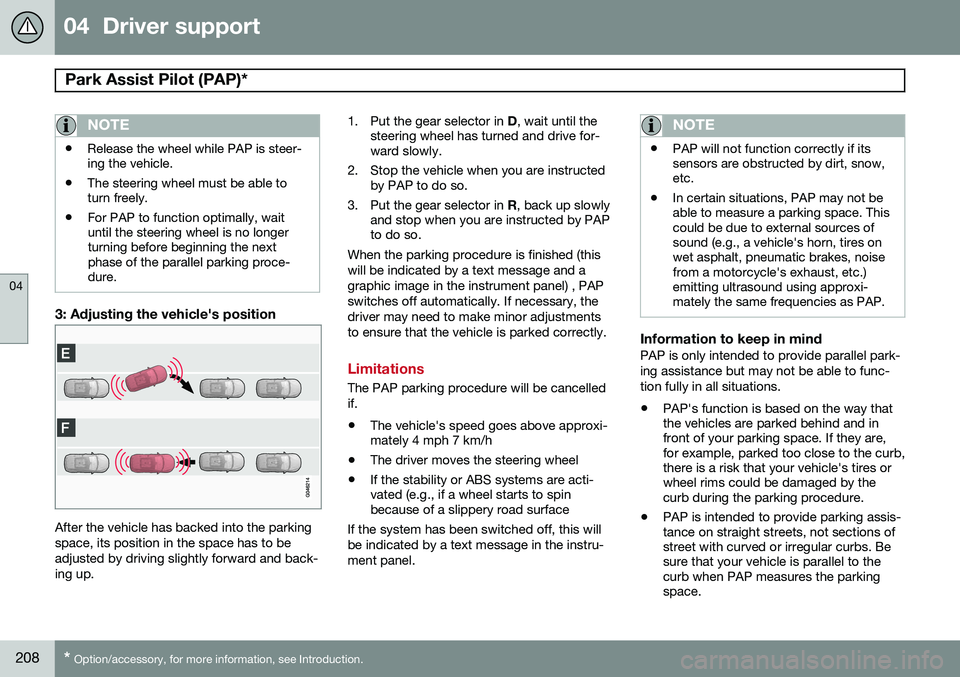
When the vehicle is backing up, PAP will steer it into the parking space.
1. Check that the area behind the vehicle is
clear and put the gear selector in R.
2. Back up slowly without moving the steer- ing wheel. The vehicle's speed must be below approximately 4 mph 7 km/h.
3. Keep an eye on the instrument panel and be prepared to stop the vehicle when youare instructed by PAP to do so.
Page 210 of 414
04 Driver support
Park Assist Pilot (PAP)*
04
208* Option/accessory, for more information, see Introduction.
NOTE
• Release the wheel while PAP is steer- ing the vehicle.
• The steering wheel must be able toturn freely.
• For PAP to function optimally, waituntil the steering wheel is no longerturning before beginning the nextphase of the parallel parking proce-dure.
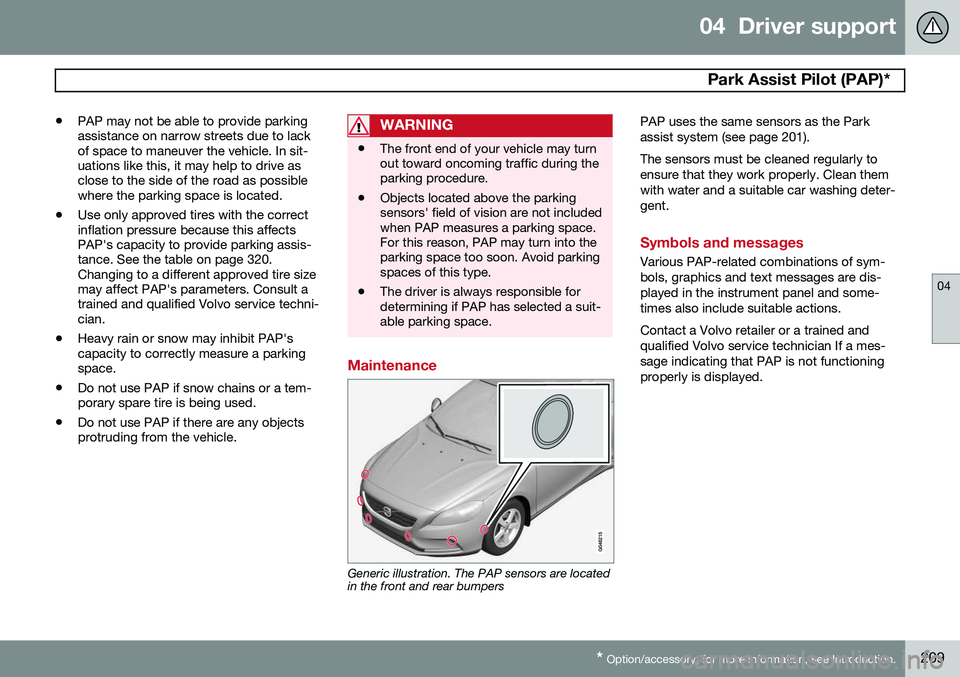
3: Adjusting the vehicle's position
After the vehicle has backed into the parking space, its position in the space has to beadjusted by driving slightly forward and back-ing up. 1. Put the gear selector in
D, wait until the
steering wheel has turned and drive for- ward slowly.
2. Stop the vehicle when you are instructed by PAP to do so.
3. Put the gear selector in R, back up slowly
and stop when you are instructed by PAPto do so.
When the parking procedure is finished (this will be indicated by a text message and agraphic image in the instrument panel) , PAPswitches off automatically. If necessary, thedriver may need to make minor adjustmentsto ensure that the vehicle is parked correctly.
Limitations
The PAP parking procedure will be cancelled if.
• The vehicle's speed goes above approxi- mately 4 mph 7 km/h
• The driver moves the steering wheel
• If the stability or ABS systems are acti-vated (e.g., if a wheel starts to spinbecause of a slippery road surface
If the system has been switched off, this will be indicated by a text message in the instru-ment panel.
NOTE
• PAP will not function correctly if its sensors are obstructed by dirt, snow,etc.
• In certain situations, PAP may not beable to measure a parking space. Thiscould be due to external sources ofsound (e.g., a vehicle's horn, tires onwet asphalt, pneumatic brakes, noisefrom a motorcycle's exhaust, etc.)emitting ultrasound using approxi-mately the same frequencies as PAP.
Information to keep in mindPAP is only intended to provide parallel park- ing assistance but may not be able to func-tion fully in all situations.
• PAP's function is based on the way that the vehicles are parked behind and infront of your parking space. If they are,for example, parked too close to the curb,there is a risk that your vehicle's tires orwheel rims could be damaged by thecurb during the parking procedure.
• PAP is intended to provide parking assis-tance on straight streets, not sections ofstreet with curved or irregular curbs. Besure that your vehicle is parallel to thecurb when PAP measures the parkingspace.
Page 211 of 414
04 Driver support
Park Assist Pilot (PAP)*
04
* Option/accessory, for more information, see Introduction.209
•
PAP may not be able to provide parking assistance on narrow streets due to lackof space to maneuver the vehicle. In sit-uations like this, it may help to drive asclose to the side of the road as possiblewhere the parking space is located.
• Use only approved tires with the correctinflation pressure because this affectsPAP's capacity to provide parking assis-tance. See the table on page 320.Changing to a different approved tire sizemay affect PAP's parameters. Consult atrained and qualified Volvo service techni-cian.
• Heavy rain or snow may inhibit PAP'scapacity to correctly measure a parkingspace.
• Do not use PAP if snow chains or a tem-porary spare tire is being used.
• Do not use PAP if there are any objectsprotruding from the vehicle.
WARNING
• The front end of your vehicle may turn out toward oncoming traffic during theparking procedure.
• Objects located above the parkingsensors' field of vision are not includedwhen PAP measures a parking space.For this reason, PAP may turn into theparking space too soon. Avoid parkingspaces of this type.
• The driver is always responsible fordetermining if PAP has selected a suit-able parking space.
Maintenance
Generic illustration. The PAP sensors are located in the front and rear bumpers PAP uses the same sensors as the Park assist system (see page 201). The sensors must be cleaned regularly to ensure that they work properly. Clean themwith water and a suitable car washing deter-gent.
Symbols and messages
Various PAP-related combinations of sym- bols, graphics and text messages are dis-played in the instrument panel and some-times also include suitable actions. Contact a Volvo retailer or a trained and qualified Volvo service technician If a mes-sage indicating that PAP is not functioningproperly is displayed.
Page 213 of 414
04 Driver support
Blind Spot Information System (BLIS)*
04
}}
* Option/accessory, for more information, see Introduction.211
Activating/deactivating BLIS
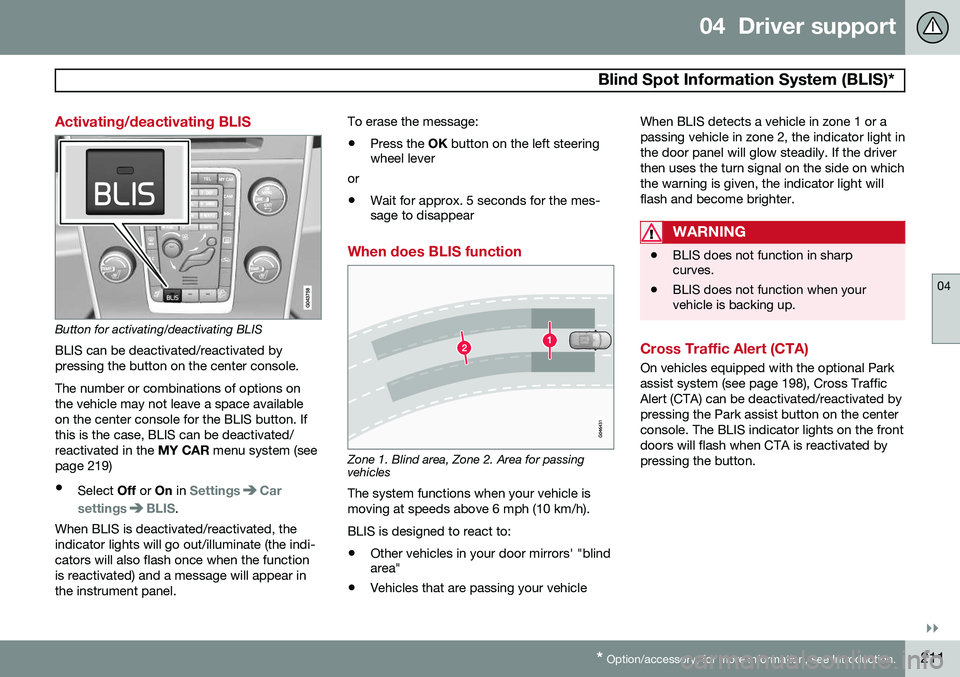
Button for activating/deactivating BLIS BLIS can be deactivated/reactivated by pressing the button on the center console. The number or combinations of options on the vehicle may not leave a space availableon the center console for the BLIS button. Ifthis is the case, BLIS can be deactivated/reactivated in the MY CAR menu system (see
page 219)
• Select Off or On in
SettingsCar
settings
BLIS.
When BLIS is deactivated/reactivated, the indicator lights will go out/illuminate (the indi-cators will also flash once when the functionis reactivated) and a message will appear inthe instrument panel. To erase the message: •
Press the
OK button on the left steering
wheel lever
or
• Wait for approx. 5 seconds for the mes- sage to disappear
When does BLIS function
Zone 1. Blind area, Zone 2. Area for passing vehicles
The system functions when your vehicle is moving at speeds above 6 mph (10 km/h). BLIS is designed to react to:
• Other vehicles in your door mirrors' "blind area"
• Vehicles that are passing your vehicle When BLIS detects a vehicle in zone 1 or a passing vehicle in zone 2, the indicator light inthe door panel will glow steadily. If the driverthen uses the turn signal on the side on whichthe warning is given, the indicator light willflash and become brighter.
WARNING
•
BLIS does not function in sharp curves.
• BLIS does not function when yourvehicle is backing up.
Cross Traffic Alert (CTA)
On vehicles equipped with the optional Park assist system (see page 198), Cross TrafficAlert (CTA) can be deactivated/reactivated bypressing the Park assist button on the centerconsole. The BLIS indicator lights on the frontdoors will flash when CTA is reactivated bypressing the button.
Page 215 of 414
04 Driver support
Blind Spot Information System (BLIS)*
04
* Option/accessory, for more information, see Introduction.213
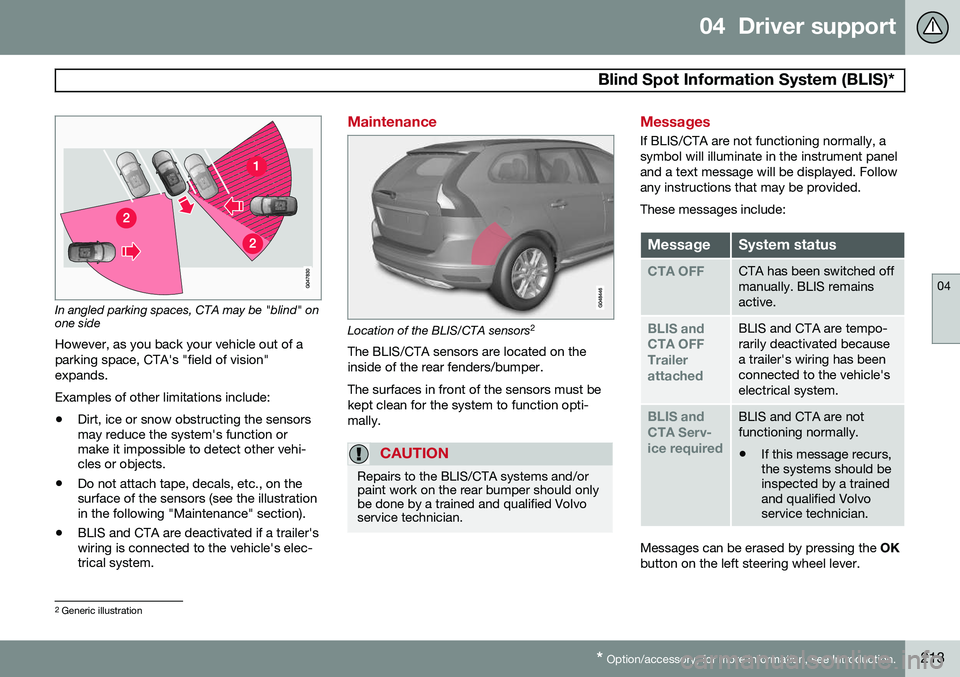
In angled parking spaces, CTA may be "blind" on one side
However, as you back your vehicle out of a parking space, CTA's "field of vision"expands. Examples of other limitations include:
• Dirt, ice or snow obstructing the sensors may reduce the system's function ormake it impossible to detect other vehi-cles or objects.
• Do not attach tape, decals, etc., on thesurface of the sensors (see the illustrationin the following "Maintenance" section).
• BLIS and CTA are deactivated if a trailer'swiring is connected to the vehicle's elec-trical system.
Maintenance
Location of the BLIS/CTA sensors 2
The BLIS/CTA sensors are located on the inside of the rear fenders/bumper. The surfaces in front of the sensors must be kept clean for the system to function opti-mally.
CAUTION
Repairs to the BLIS/CTA systems and/or paint work on the rear bumper should onlybe done by a trained and qualified Volvoservice technician.
Messages
If BLIS/CTA are not functioning normally, a symbol will illuminate in the instrument paneland a text message will be displayed. Followany instructions that may be provided. These messages include:
MessageSystem status
CTA OFFCTA has been switched off manually. BLIS remainsactive.
BLIS and CTA OFFTrailerattachedBLIS and CTA are tempo- rarily deactivated becausea trailer's wiring has beenconnected to the vehicle'selectrical system.
BLIS and CTA Serv-ice requiredBLIS and CTA are not functioning normally.
• If this message recurs, the systems should beinspected by a trainedand qualified Volvoservice technician.
Messages can be erased by pressing the
OK
button on the left steering wheel lever.
2 Generic illustration