ignition VOLVO V60 2015 Owner´s Manual
[x] Cancel search | Manufacturer: VOLVO, Model Year: 2015, Model line: V60, Model: VOLVO V60 2015Pages: 414, PDF Size: 11.44 MB
Page 273 of 414
06 Infotainment
AUX/USB sockets
06
}}
271
Connecting external devices
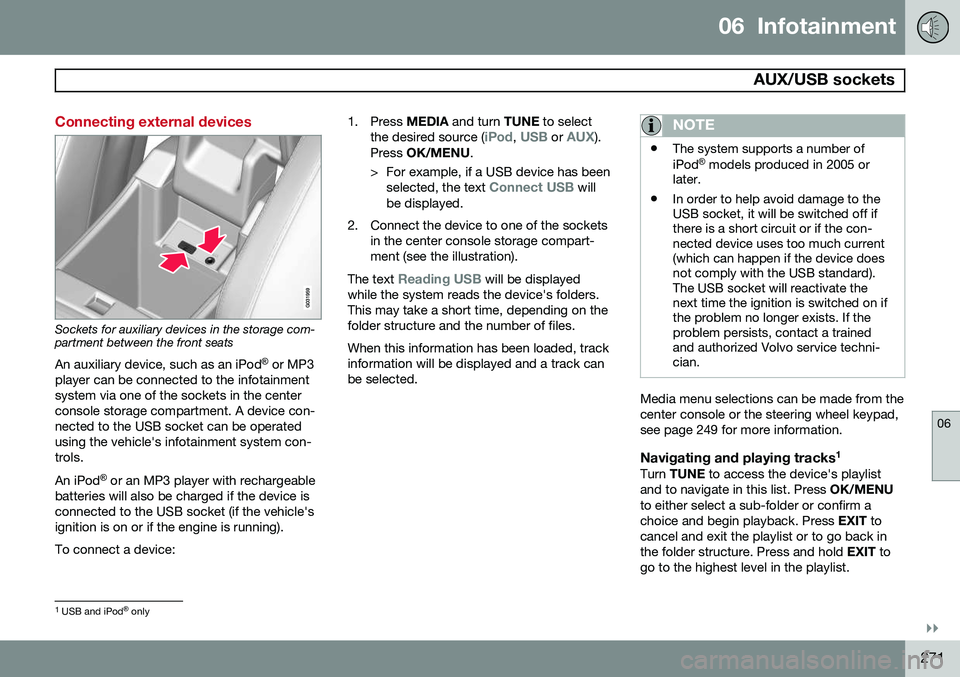
Sockets for auxiliary devices in the storage com- partment between the front seatsAn auxiliary device, such as an iPod ®
or MP3
player can be connected to the infotainment system via one of the sockets in the centerconsole storage compartment. A device con-nected to the USB socket can be operatedusing the vehicle's infotainment system con-trols. An iPod ®
or an MP3 player with rechargeable
batteries will also be charged if the device is connected to the USB socket (if the vehicle'signition is on or if the engine is running). To connect a device: 1. Press
MEDIA and turn TUNE to select
the desired source (
iPod, USB or AUX).
Press OK/MENU .
> For example, if a USB device has been selected, the text
Connect USB will
be displayed.
2. Connect the device to one of the sockets in the center console storage compart- ment (see the illustration).
The text
Reading USB will be displayed
while the system reads the device's folders. This may take a short time, depending on thefolder structure and the number of files. When this information has been loaded, track information will be displayed and a track canbe selected.
NOTE
• The system supports a number of iPod ®
models produced in 2005 or
later.
• In order to help avoid damage to the USB socket, it will be switched off ifthere is a short circuit or if the con-nected device uses too much current(which can happen if the device doesnot comply with the USB standard).The USB socket will reactivate thenext time the ignition is switched on ifthe problem no longer exists. If theproblem persists, contact a trainedand authorized Volvo service techni-cian.
Media menu selections can be made from the center console or the steering wheel keypad,see page 249 for more information.
Navigating and playing tracks 1Turn
TUNE to access the device's playlist
and to navigate in this list. Press OK/MENU
to either select a sub-folder or confirm achoice and begin playback. Press EXIT to
cancel and exit the playlist or to go back inthe folder structure. Press and hold EXIT to
go to the highest level in the playlist.
1 USB and iPod ®
only
Page 281 of 414
06 Infotainment
Bluetooth® hands-free connection
06
}}
279
Making a call1. Ensure that is shown at the top of
the center console display and that the hands-free function is in telephone mode.
2. Dial the desired phone number using the center console keypad or use the speeddial function (see page 283). In normalview (see page see page 249 for informa-tion about the various display views), it isalso possible to turn TUNE clockwise to
access the phone book and then counter-clockwise for the call list. See page 284for more information about the phonebook.
3. Press the thumb wheel or OK/MENU.
End or reject a call by pressing EXIT.
Disconnecting the cell phoneThe cell phone is automatically disconnectedfrom the infotainment system if it is movedout of range. The cell phone can be manually disconnected from the hands-free system by pressing andholding TEL or in phone mode, going to
Phone menuDisconnect phone. See also
page 280 for more information about con- nections. The hands-free system is also deactivatedwhen the ignition is switched off (or if thedriver’s door is opened). When the cell phone is disconnected from the hands-free system, a call in progress can becontinued using the cell phone’s own speakerand microphone. Even if the cell phone has been disconnected manually, some phones may reconnect auto-matically, for example when a new call is initi-ated.
Removing a paired deviceA paired phone or device can be removedfrom the list. To do so:
1. Press
TEL.
2. Select
Phone menuRemove
Bluetooth device.
Handling calls
Incoming calls–Press OK/MENU (or the thumb wheel on
the steering wheel keypad) to answer a call, even if the infotainment system is currently in another mode (e.g.,
RADIO orMEDIA).
Press EXIT to reject a call.
Auto answerThis function means that incoming calls will be answered automatically. Activate or deac-tivate the function in the menu system under
Phone menuCall optionsAuto
answer.
Call settingsWhile a call is in progress, press OK/MENU
or the thumb wheel on the steering wheel keypad to access the following functions:
•
Mute: mute the infotainment system’s
microphone.
•
Mobile phone: transfer the call from
hands-free to the cell phone. On certain cell phones, the connection will be bro-ken, which is normal. The hands-freefunction will ask if you would like toreconnect.
•
Dial number: dial a third party during an
ongoing call using the keypad (the current call will be put on hold).
Call listsCall lists are copied to the hands-free func- tion each time a cell phone is connected andthe lists are updated while the phone is con-nected. In normal view, turn TUNE counter-
clockwise to see the
All calls list.
Page 296 of 414
07 During your trip
Driving recommendations
07
294
WARNING
The cooling fan may start or continue to operate (for up to 6 minutes) after theengine has been switched off.
•Remove any auxiliary lights from in front of the grille when driving in hot weatherconditions.
• Do not exceed engine speeds of4500 rpm if driving with a trailer in hillyterrain. The oil temperature could becometoo high.
Conserving electrical currentKeep the following in mind to help minimize battery drain:
• When the engine is not running, avoid using ignition mode
II. Many electrical
systems (the audio system, the optionalnavigation system, power windows, etc)will function in ignition modes 0 and I.
These modes reduce drain on the battery.
• Please keep in mind that using systems,accessories, etc., that consume a greatdeal of current when the engine is notrunning could result in the battery beingcompletely drained. Driving or having theengine running for approximately15 minutes will help keep the batterycharged. •
The optional 12-volt socket in the cargoarea provides electrical current even withthe ignition switched off, which drains thebattery.
Before a long distance tripIt is always worthwhile to have your vehicle checked by a trained and qualified Volvoservice technician before driving long dis-tances. Your retailer will also be able to sup-ply you with bulbs, fuses, spark plugs andwiper blades for your use in the event thatproblems occur. As a minimum, the following items should be checked before any long trip:
• Check that engine runs smoothly and that fuel consumption is normal.
• Check for fuel, oil, and fluid leakage.
• Have the transmission oil level checked.
• Check condition of drive belts.
• Check state of the battery's charge.
• Examine tires carefully (the spare tire aswell), and replace those that are worn.Check tire pressures.
• The brakes, front wheel alignment, andsteering gear should be checked by atrained and qualified Volvo service techni-cian only.
• Check all lights, including high beams. •
Reflective warning triangles are legallyrequired in some states/provinces.
• Have a word with a trained and qualifiedVolvo service technician if you intend todrive in countries where it may be difficultto obtain the correct fuel.
• Consider your destination. If you will bedriving through an area where snow or iceare likely to occur, consider snow tires.
Cold weather precautionsIf you wish to check your vehicle before the approach of cold weather, the followingadvice is worth noting:
• Make sure that the engine coolant con- tains 50 percent antifreeze. Any othermixture will reduce freeze protection. Thisgives protection against freezing down to–31 °F (–35 °C). The use of "recycled"antifreeze is not approved by Volvo. Dif-ferent types of antifreeze must not bemixed.
• Volvo recommends using only genuineVolvo antifreeze in your vehicle's radiator.
• Try to keep the fuel tank well filled – thishelps prevent the formation of condensa-tion in the tank. In addition, in extremelycold weather conditions it is worthwhileto add fuel line de-icer before refueling.
• The viscosity of the engine oil is impor-tant. Oil with low viscosity (thinner oil)
Page 300 of 414
07 During your trip
Refueling
07
298
Use of AdditivesWith the exception of gas line antifreeze dur- ing winter months, do not add solvents, thick-eners, or other store-bought additives to yourvehicle's fuel, cooling, or lubricating systems.Overuse may damage your engine, and someof these additives contain organically volatilechemicals. Do not needlessly expose yourselfto these chemicals.
WARNING
Never carry a cell phone that is switched
on while refueling your vehicle. If the
phone rings, this may cause a spark that could ignite gasoline fumes, resulting infire and injury.
WARNING
Carbon monoxide is a poisonous, color- less, and odorless gas. It is present in allexhaust gases. If you ever smell exhaustfumes inside the vehicle, make sure thepassenger compartment is ventilated, andimmediately return the vehicle to a trainedand qualified Volvo service technician forcorrection.
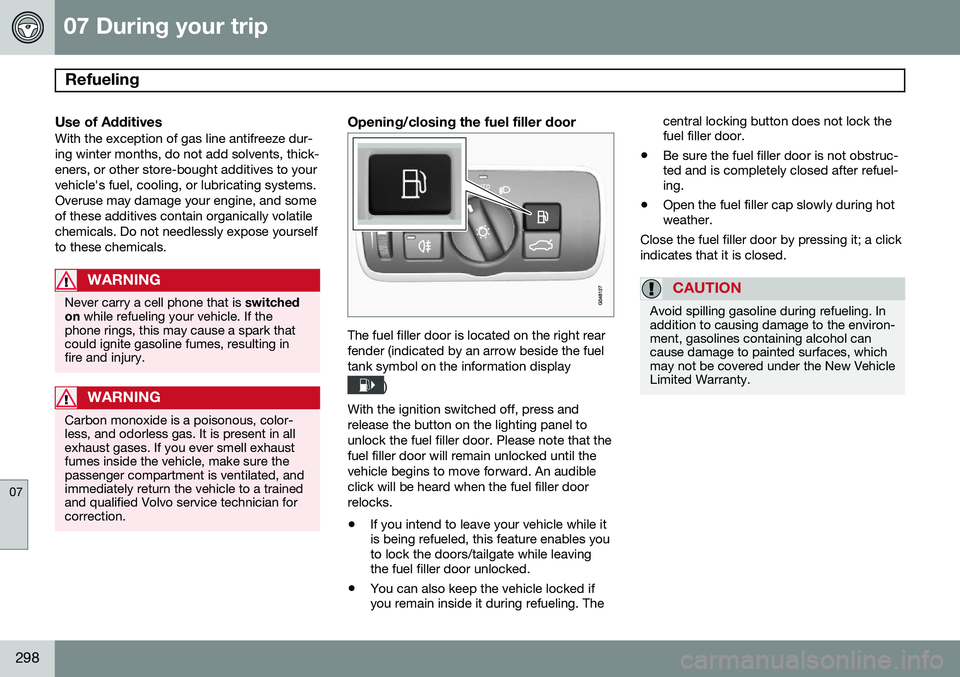
Opening/closing the fuel filler door
The fuel filler door is located on the right rear fender (indicated by an arrow beside the fueltank symbol on the information display
)
With the ignition switched off, press and release the button on the lighting panel tounlock the fuel filler door. Please note that thefuel filler door will remain unlocked until thevehicle begins to move forward. An audibleclick will be heard when the fuel filler doorrelocks. • If you intend to leave your vehicle while it is being refueled, this feature enables youto lock the doors/tailgate while leavingthe fuel filler door unlocked.
• You can also keep the vehicle locked ifyou remain inside it during refueling. The central locking button does not lock thefuel filler door.
• Be sure the fuel filler door is not obstruc-ted and is completely closed after refuel-ing.
• Open the fuel filler cap slowly during hotweather.
Close the fuel filler door by pressing it; a click indicates that it is closed.
CAUTION
Avoid spilling gasoline during refueling. In addition to causing damage to the environ-ment, gasolines containing alcohol cancause damage to painted surfaces, whichmay not be covered under the New VehicleLimited Warranty.
Page 301 of 414
07 During your trip
Refueling
07
}}
299
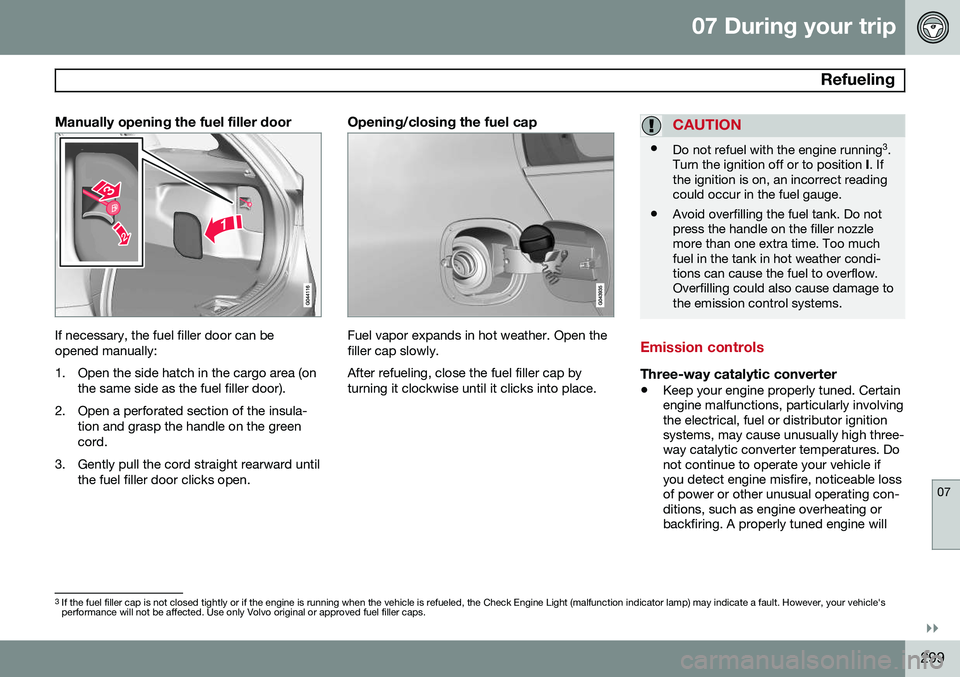
Manually opening the fuel filler door
If necessary, the fuel filler door can be opened manually:
1. Open the side hatch in the cargo area (onthe same side as the fuel filler door).
2. Open a perforated section of the insula- tion and grasp the handle on the green cord.
3. Gently pull the cord straight rearward until the fuel filler door clicks open.
Opening/closing the fuel cap
Fuel vapor expands in hot weather. Open the filler cap slowly. After refueling, close the fuel filler cap by turning it clockwise until it clicks into place.
CAUTION
•Do not refuel with the engine running 3
.
Turn the ignition off or to position I. If
the ignition is on, an incorrect reading could occur in the fuel gauge.
• Avoid overfilling the fuel tank. Do notpress the handle on the filler nozzlemore than one extra time. Too muchfuel in the tank in hot weather condi-tions can cause the fuel to overflow.Overfilling could also cause damage tothe emission control systems.
Emission controls
Three-way catalytic converter
•
Keep your engine properly tuned. Certain engine malfunctions, particularly involvingthe electrical, fuel or distributor ignitionsystems, may cause unusually high three-way catalytic converter temperatures. Donot continue to operate your vehicle ifyou detect engine misfire, noticeable lossof power or other unusual operating con-ditions, such as engine overheating orbackfiring. A properly tuned engine will
3
If the fuel filler cap is not closed tightly or if the engine is running when the vehicle is refueled, the Check Engine Light (malfunction indicator lamp) may indicate a fault. However, your vehicle's performance will not be affected. Use only Volvo original or approved fuel filler caps.
Page 312 of 414
07 During your trip
Emergency towing
07
310
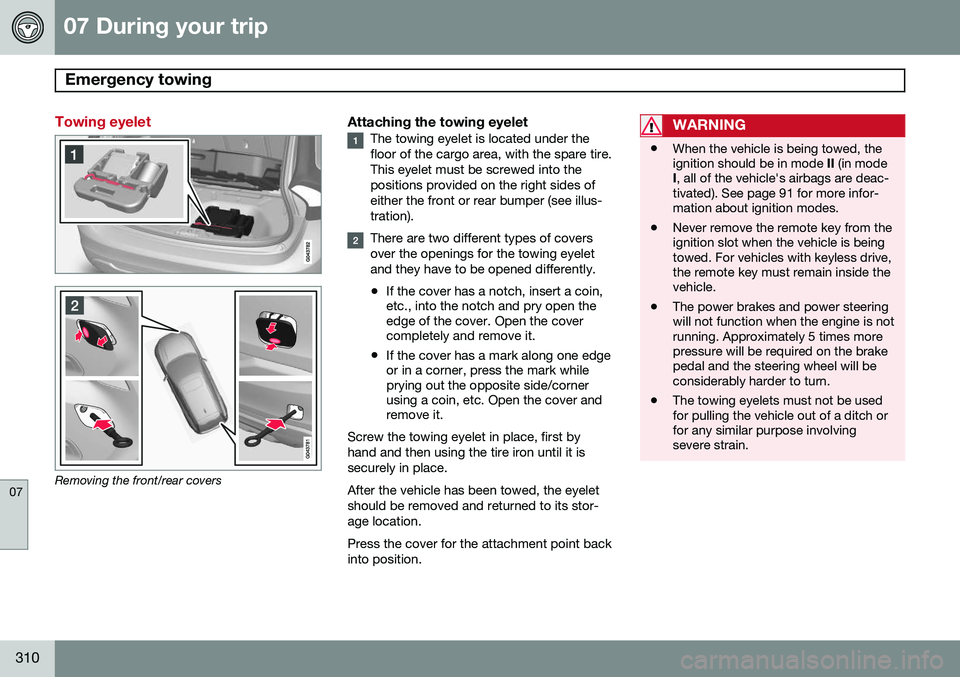
Towing eyelet
Removing the front/rear covers
Attaching the towing eyeletThe towing eyelet is located under the floor of the cargo area, with the spare tire.This eyelet must be screwed into thepositions provided on the right sides ofeither the front or rear bumper (see illus-tration).
There are two different types of covers over the openings for the towing eyeletand they have to be opened differently.
• If the cover has a notch, insert a coin, etc., into the notch and pry open theedge of the cover. Open the covercompletely and remove it.
• If the cover has a mark along one edgeor in a corner, press the mark whileprying out the opposite side/cornerusing a coin, etc. Open the cover andremove it.
Screw the towing eyelet in place, first by hand and then using the tire iron until it issecurely in place. After the vehicle has been towed, the eyelet should be removed and returned to its stor-age location. Press the cover for the attachment point back into position.
WARNING
• When the vehicle is being towed, the ignition should be in mode
II (in mode
I , all of the vehicle's airbags are deac-
tivated). See page 91 for more infor-mation about ignition modes.
• Never remove the remote key from theignition slot when the vehicle is beingtowed. For vehicles with keyless drive,the remote key must remain inside thevehicle.
• The power brakes and power steeringwill not function when the engine is notrunning. Approximately 5 times morepressure will be required on the brakepedal and the steering wheel will beconsiderably harder to turn.
• The towing eyelets must not be usedfor pulling the vehicle out of a ditch orfor any similar purpose involvingsevere strain.
Page 313 of 414
07 During your trip
Emergency towing
07
* Option/accessory, for more information, see Introduction.311
Having the vehicle towed by a tow truck
Call for professional help from an authorized towing company. Volvo recommends the useof flat bed equipment.
CAUTION
In certain conditions, the towing eyelet may be used to pull the vehicle onto aflatbed tow truck.
• The vehicle's position and ground clearance determine if it can be pulledup onto a flatbed tow truck using thetowing eyelet.
• If the angle of the tow truck’s ramp istoo steep or the ground clearanceunder the vehicle is insufficient, dam-age could occur by attempting to pullthe vehicle using the towing eyelet.
• If necessary, lift the vehicle using thetow truck’s lifting device.
WARNING
No person or object should be behind the tow truck while the vehicle is being pulledup onto the flatbed.
CAUTION
•The vehicle should always be towed in the forward direction.
• Vehicles with All Wheel Drive (AWD)*that are being towed with the frontwheels off the ground should not betowed at a speed above approx.45 mph (70 km/h) and should not betowed farther than 30 miles (50 km).
Towing the vehicle
1. With the remote key fully pressed into the
ignition slot 1
, press START/STOP
ENGINE for approximately 2 seconds to
activate ignition mode II.
2. The remote key must remain in the igni- tion slot 2
for the entire time that the vehi-
cle is being towed.
3. Keep the tow rope taut when the towing vehicle slows down by applying light pressure on the brake pedal. This willhelp prevent jarring movements of thevehicle being towed.
4. Be prepared to apply the brakes to stop the vehicle being towed.
CAUTION
General towing precautions:
• Please check with state and local authorities before attempting this typeof towing, as vehicles being towed aresubject to regulations regarding maxi-mum towing speed, length and type oftowing device, lighting, etc.
• If the vehicle's battery is dead, seepage 127 to provide current for releas-ing the electric parking brake and tomove the gear selector from the
P
position to N. If this is not possible,
see page 132 for information aboutmanually overriding the shiftlock sys-tem to move the gear selector from P
to N.
• Maximum speed: 50 mph (80 km/h).Do not exceed the maximum allowabletowing speed.
• Maximum distance with front wheelson ground: 50 miles (80 km).
• The vehicle should only be towed inthe forward direction.
1
Not necessary in vehicles with the optional keyless drive.
2 For vehicles with the optional keyless drive, the remote key must be in the vehicle.
Page 344 of 414
08 Wheels and tires
Tire Pressure Monitoring System (TPMS)
08
342* Option/accessory, for more information, see Introduction.
NOTE
• If you change to tires with a different recommended inflation pressure, theTPMS system must be recalibrated tothese tires. On U.S. models, this mustbe done by a trained and qualifiedVolvo service technician. On Canadianmodels, see the following section"Recalibrating TPMS."
• If a tire is changed, or if the TPMS sen-sor is moved to another wheel, thesensor's seal, nut, and valve coreshould be replaced.
• When installing TPMS sensors, thevehicle must be parked for at least15 minutes with the ignition off. If thevehicle is driven within 15 minutes, aTPMS error message will be displayed.
Recalibrating TPMS (Canadian models only)*
In certain cases, it may be necessary to reca- librate TPMS to conform to Volvo's recom-mended tire inflation pressures (see the infla-tion pressure table on page 320), for exam-ple, if higher inflation pressure is necessarywhen transporting heavy loads, etc. This is done in the vehicle's menu system. See page 219 for a description of the menusystem. To recalibrate:
1. Switch off the engine.
2. Inflate the tires to the desired pressure
and put the ignition in mode I or II (see
page 91 for additional information).
3. Press the MY CAR key in the center con-
sole control panel and select
Settings
Car settingsTyre pressure
4. Press OK/MENU , select Calibrate tyre
pressure and press OK/MENU again.
5. Drive the vehicle at a speed above 25 mph (40 km/h) continuously for at least 10 minutes.
> When the calibration message is nolonger displayed, TPMS has been recalibrated to the new inflation pres-sure.
Activating/deactivating TPMS
(Canadian models only)*
1. Switch off the engine.
2. Put the ignition in mode I or II (see page
91 for additional information).
3. Press the MY CAR key in the center con-
sole control panel and select
Settings
Car settingsTyre pressure
4. Select Tyre pressure system and press
OK/MENU to turn the system on or off.
Self-supporting run flat tires (SST)*
Self-supporting run flat tires are available as optional equipment. The vehicle must beequipped with the Tire Pressure MonitoringSystem (TPMS) if tires of this type are instal-led. Tires of this type have specially reinforced sidewalls that make it possible to continuedriving to a limited extent even though the tirehas lost some or all of its inflation pressure.These tires are mounted on special rims (nor-mal tires can also be mounted on these rims). If an SST tire loses inflation pressure, the yel- low TPMS symbol illuminates in the instru-ment panel and a text message is also dis-played. If this happens, reduce speed to notmore than 50 mph (80 km/h). The tire shouldbe replaced as soon as possible. Drive carefully; it may be difficult to determine which tire is damaged. To find the damagedtire, check the inflation pressure in all fourtires.
Page 353 of 414
09 Maintenance and specifications
Hood and engine compartment09
351
WARNING
The cooling fan (located at the front of the engine compartment, behind the radiator)may start or continue to operate (for up to6 minutes) after the engine has beenswitched off.
WARNING
Before performing any operations in the engine compartment, the ignition shouldalways be completely switched off (inmode 0, see page 91) and there should be
no remote keys in the passenger compart-ment. The gear selector should be in the P
(park) position. If the engine has been run-ning, wait until it has cooled before touch-ing any components in the engine com-partment. The distributor ignition system operates at very high voltages. Special safety precau-tions must be followed to prevent injury.Always turn the ignition off when:
• Replacing distributor ignition compo- nents e.g. plugs, coil, etc.
• Do not touch any part of the distributorignition system while the engine is run-ning. This may result in unintendedmovements and body injury.
Page 358 of 414
09 Maintenance and specifications
Replacing bulbs 09
356* Option/accessory, for more information, see Introduction.
Introduction
All bulb specifications are listed on page 361. The following bulbs should only be replacedby a trained and qualified Volvo service tech-nician:
• Active Bending Lights
• Front parking lights
• Front side marker lights
• Cornering lights
• Turn signals in the door mirrors
• Approach lighting in the door mirrors
• Interior lighting (except for the front foot- well lighting)
• Glove compartment lighting
• Rear parking lights/side marker lights
• LED bulbsNOTE
•For information regarding any bulbs not mentioned in this section, pleasecontact your Volvo retailer or a trainedand authorized Volvo service techni-cian.
• Always switch off the ignition beforestarting to replace a bulb.
• If an error message remains in the dis-play after a faulty bulb has beenreplaced, contact an authorized Volvoworkshop.
• Condensation may form temporarily onthe inside of the lenses of exteriorlights such as headlights, fog lights, ortaillights. This is normal and the lightsare designed to withstand moisture.Normally, condensation will dissipateafter the lights have been on for ashort time.
• The optional Active Bending Lightbulbs contain trace amounts of mer-cury. These bulbs should always bedisposed of by a trained and qualifiedVolvo service technician.
CAUTION
Never touch the glass of bulbs with your fingers. Grease and oils from your fingersvaporize in the heat and will leave adeposit on the reflector, which will damageit.
WARNING
•The engine should not be running when changing bulbs.
• If the engine has been running justprior to replacing bulbs in the head-light housing, please keep in mind thatcomponents in the engine compart-ment will be hot.
WARNING
•Active Bending Lights* – due to the high voltage used by these headlights,these bulbs should only be replacedby a trained and qualified Volvo serv-ice technician.
• Turn off the lights and remove theremote key from the ignition beforechanging any bulbs.