key battery VOLVO V60 2015 Owner´s Manual
[x] Cancel search | Manufacturer: VOLVO, Model Year: 2015, Model line: V60, Model: VOLVO V60 2015Pages: 414, PDF Size: 11.44 MB
Page 25 of 414
01 Safety
Supplemental Restraint System (SRS)01
}}
23
WARNING
If your vehicle has become flood-damaged in any way (e.g., soaked carpeting/stand-ing water on the floor of the vehicle), donot attempt to start the vehicle or insertthe remote key into the ignition slot beforedisconnecting the battery (see below). Thismay cause airbag deployment which couldresult in serious injury. Have the vehicletowed to a trained and qualified Volvoservice technician for repairs. Before attempting to tow the vehicle:
1. Switch off the ignition for at least10 minutes and disconnect the bat- tery.
2. Follow the instructions for manually overriding the shiftlock system onpage 132.
Front airbags
G018665
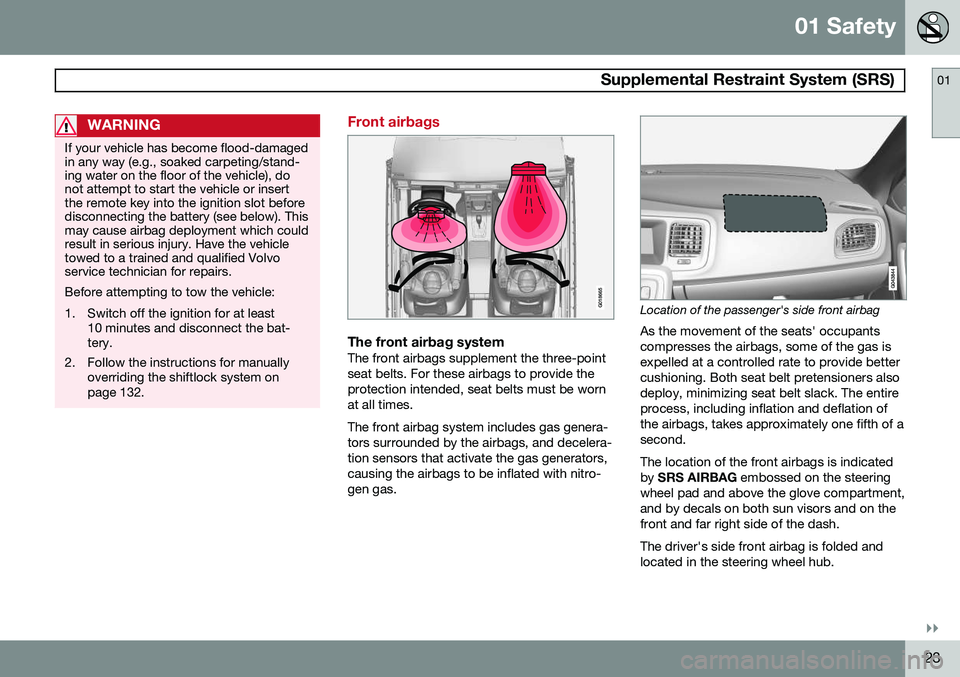
The front airbag systemThe front airbags supplement the three-point seat belts. For these airbags to provide theprotection intended, seat belts must be wornat all times. The front airbag system includes gas genera- tors surrounded by the airbags, and decelera-tion sensors that activate the gas generators,causing the airbags to be inflated with nitro-gen gas.
Location of the passenger's side front airbag
As the movement of the seats' occupants compresses the airbags, some of the gas isexpelled at a controlled rate to provide bettercushioning. Both seat belt pretensioners alsodeploy, minimizing seat belt slack. The entireprocess, including inflation and deflation ofthe airbags, takes approximately one fifth of asecond. The location of the front airbags is indicated by SRS AIRBAG embossed on the steering
wheel pad and above the glove compartment,and by decals on both sun visors and on thefront and far right side of the dash. The driver's side front airbag is folded and located in the steering wheel hub.
Page 63 of 414
02 Locks and alarm
Remote key and key blade
02
}}
* Option/accessory, for more information, see Introduction.61
accept any interference received, including interference that may cause undesired opera-tion. Canada–IC: 3659A-WFS125VOOperation is subject to the following condi- tions: (1) this device may not cause interfer-ence, and (2) this device must accept anyinterference, including interference that maycause undesired operation of the device. See page 124 for information on starting the vehicle.
Replacing the battery in the remote keyThe batteries should be replaced if:
• The information symbol illuminates and
Low battery in remote control. Please change batteries. is shown in the dis-
play and/or
• if the locks do not react after several attempts to unlock or lock the vehicle.
NOTE
The remote key's range is normally approximately 60 ft (20 m) from the vehi-cle.
See page 65 for information about replacing the battery.
Remote key/Personal Car Communicator (PCC)* - commonfunctions
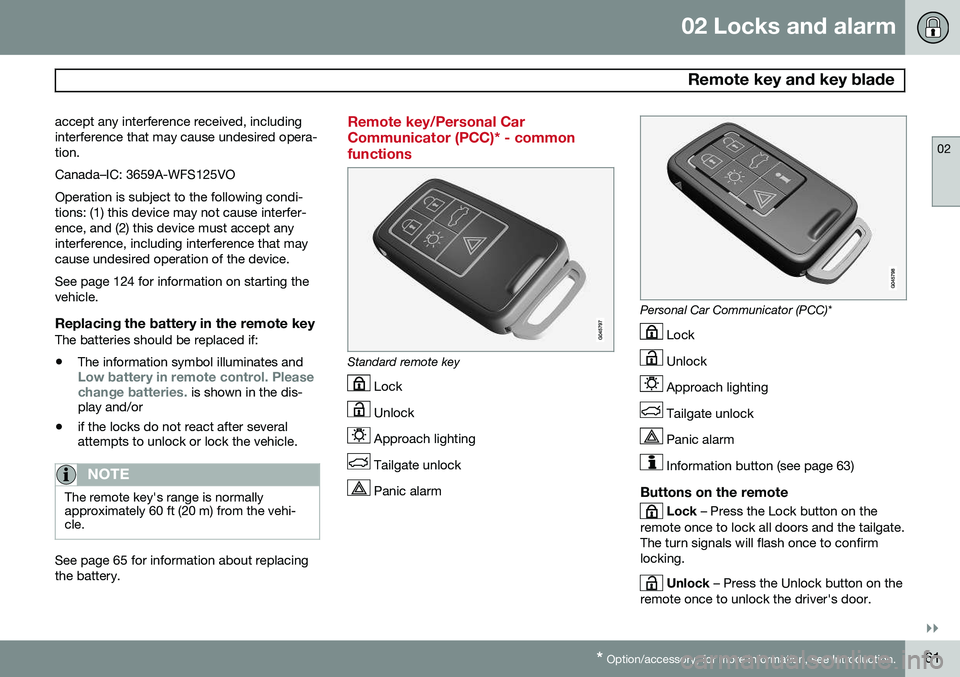
Standard remote key
Lock
Unlock
Approach lighting
Tailgate unlock
Panic alarm
Personal Car Communicator (PCC)*
Lock
Unlock
Approach lighting
Tailgate unlock
Panic alarm
Information button (see page 63)
Buttons on the remote
Lock – Press the Lock button on the
remote once to lock all doors and the tailgate. The turn signals will flash once to confirmlocking.
Unlock – Press the Unlock button on the
remote once to unlock the driver's door.
Page 67 of 414
02 Locks and alarm
Remote key and key blade
02
}}
* Option/accessory, for more information, see Introduction.65
Unlocking the driver's door with the detached key blade
Driver's door keyhole cover
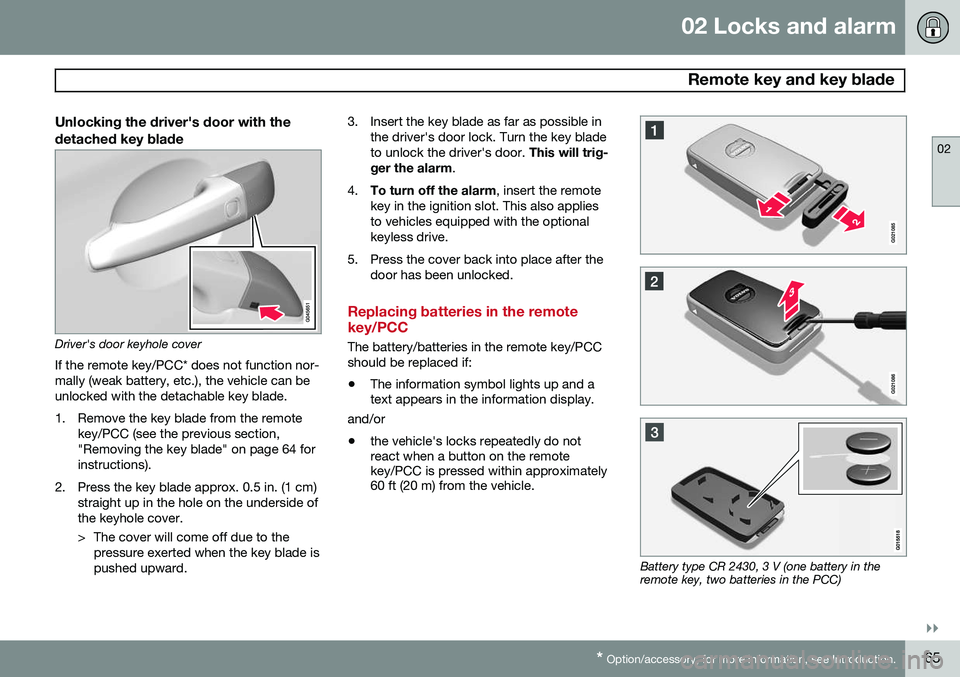
If the remote key/PCC* does not function nor- mally (weak battery, etc.), the vehicle can beunlocked with the detachable key blade.
1. Remove the key blade from the remote key/PCC (see the previous section, "Removing the key blade" on page 64 forinstructions).
2. Press the key blade approx. 0.5 in. (1 cm) straight up in the hole on the underside ofthe keyhole cover.
> The cover will come off due to thepressure exerted when the key blade is pushed upward. 3. Insert the key blade as far as possible in
the driver's door lock. Turn the key bladeto unlock the driver's door. This will trig-
ger the alarm .
4. To turn off the alarm , insert the remote
key in the ignition slot. This also appliesto vehicles equipped with the optionalkeyless drive.
5. Press the cover back into place after the door has been unlocked.
Replacing batteries in the remote key/PCC
The battery/batteries in the remote key/PCC should be replaced if: •The information symbol lights up and a text appears in the information display.
and/or
• the vehicle's locks repeatedly do notreact when a button on the remotekey/PCC is pressed within approximately60 ft (20 m) from the vehicle.
Battery type CR 2430, 3 V (one battery in the remote key, two batteries in the PCC)
Page 68 of 414
02 Locks and alarm
Remote key and key blade
02
66
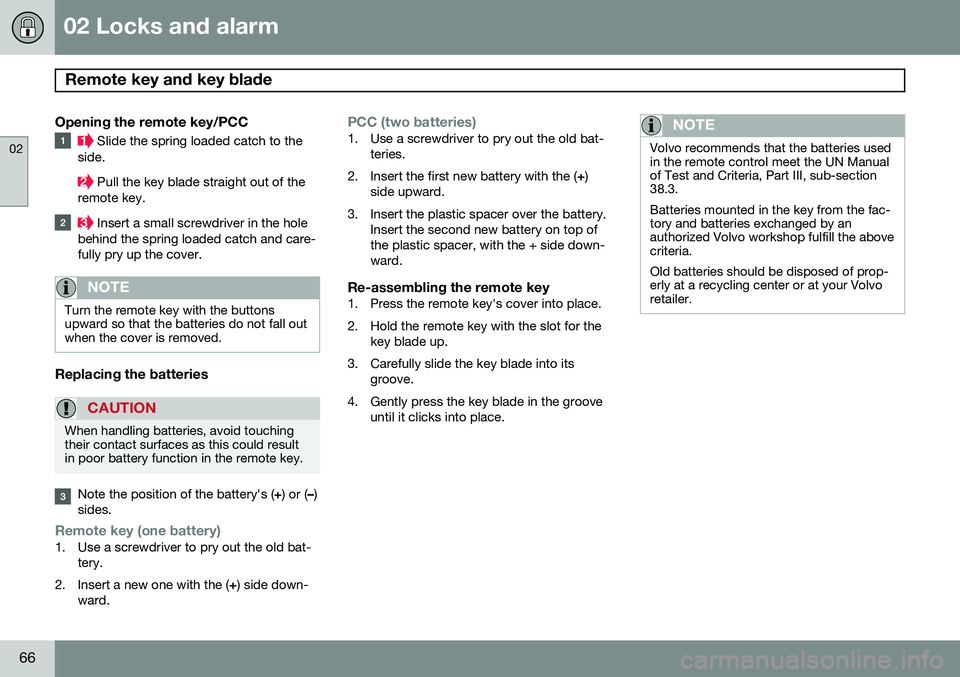
Opening the remote key/PCC
Slide the spring loaded catch to the
side.
Pull the key blade straight out of the
remote key.
Insert a small screwdriver in the hole
behind the spring loaded catch and care- fully pry up the cover.
NOTE
Turn the remote key with the buttons upward so that the batteries do not fall outwhen the cover is removed.
Replacing the batteries
CAUTION
When handling batteries, avoid touching their contact surfaces as this could resultin poor battery function in the remote key.
Note the position of the battery's ( +) or ( –)
sides.
Remote key (one battery)1. Use a screwdriver to pry out the old bat- tery.
2. Insert a new one with the ( +) side down-
ward.
PCC (two batteries)1. Use a screwdriver to pry out the old bat- teries.
2. Insert the first new battery with the ( +)
side upward.
3. Insert the plastic spacer over the battery. Insert the second new battery on top of the plastic spacer, with the + side down-ward.
Re-assembling the remote key1. Press the remote key's cover into place.
2. Hold the remote key with the slot for thekey blade up.
3. Carefully slide the key blade into its groove.
4. Gently press the key blade in the groove until it clicks into place.
NOTE
Volvo recommends that the batteries used in the remote control meet the UN Manualof Test and Criteria, Part III, sub-section38.3. Batteries mounted in the key from the fac- tory and batteries exchanged by anauthorized Volvo workshop fulfill the abovecriteria. Old batteries should be disposed of prop- erly at a recycling center or at your Volvoretailer.
Page 70 of 414
02 Locks and alarm
Keyless drive
02
68* Option/accessory, for more information, see Introduction.
Keyless drive* (models with Personal Car Communicator only)
Keyless locking and unlocking
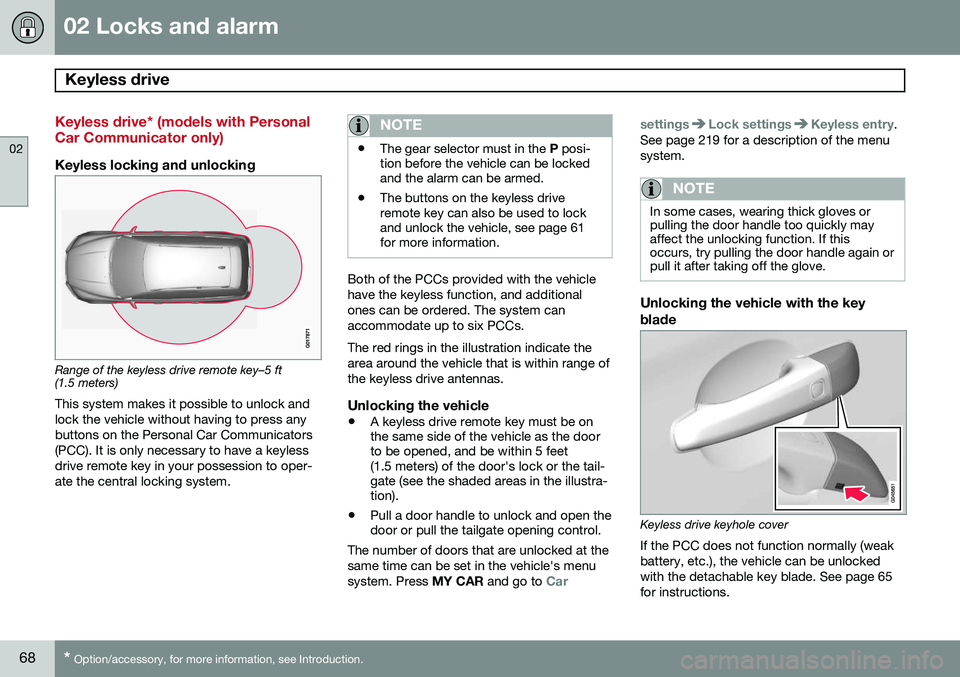
Range of the keyless drive remote key–5 ft (1.5 meters)
This system makes it possible to unlock and lock the vehicle without having to press anybuttons on the Personal Car Communicators(PCC). It is only necessary to have a keylessdrive remote key in your possession to oper-ate the central locking system.
NOTE
• The gear selector must in the
P posi-
tion before the vehicle can be locked and the alarm can be armed.
• The buttons on the keyless driveremote key can also be used to lockand unlock the vehicle, see page 61for more information.
Both of the PCCs provided with the vehicle have the keyless function, and additionalones can be ordered. The system canaccommodate up to six PCCs. The red rings in the illustration indicate the area around the vehicle that is within range ofthe keyless drive antennas.
Unlocking the vehicle
•
A keyless drive remote key must be on the same side of the vehicle as the doorto be opened, and be within 5 feet(1.5 meters) of the door's lock or the tail-gate (see the shaded areas in the illustra-tion).
• Pull a door handle to unlock and open thedoor or pull the tailgate opening control.
The number of doors that are unlocked at the same time can be set in the vehicle's menusystem. Press MY CAR and go to
Car settings
Lock settingsKeyless entry.
See page 219 for a description of the menu system.
NOTE
In some cases, wearing thick gloves or pulling the door handle too quickly mayaffect the unlocking function. If thisoccurs, try pulling the door handle again orpull it after taking off the glove.
Unlocking the vehicle with the key blade
Keyless drive keyhole cover If the PCC does not function normally (weak battery, etc.), the vehicle can be unlockedwith the detachable key blade. See page 65for instructions.
Page 77 of 414
02 Locks and alarm
Alarm
02
}}
75
The alarm system
The alarm is automatically armed whenever the vehicle is locked with the remote key oroptional Personal Car Communicator. When armed, the alarm continuously moni- tors a number of points on the vehicle. Thefollowing conditions will trigger the alarm:• The hood is forced open.
• The tailgate is forced open.
• A door is forced open.
• The ignition slot is tampered with.
• An attempt is made to start the vehicle with a non-approved key (a key notcoded to the car's ignition).
• The battery is disconnected (while thealarm is armed).
• The siren is disconnected when the alarmis disarmed.
A message will appear in the information dis- play if a fault should occur in the alarm sys-tem. Contact a trained and qualified Volvoservice technician.
NOTE
Do not attempt to repair any of the compo- nents in the alarm system yourself. Thiscould affect the insurance policy on thevehicle.
The alarm indicator light
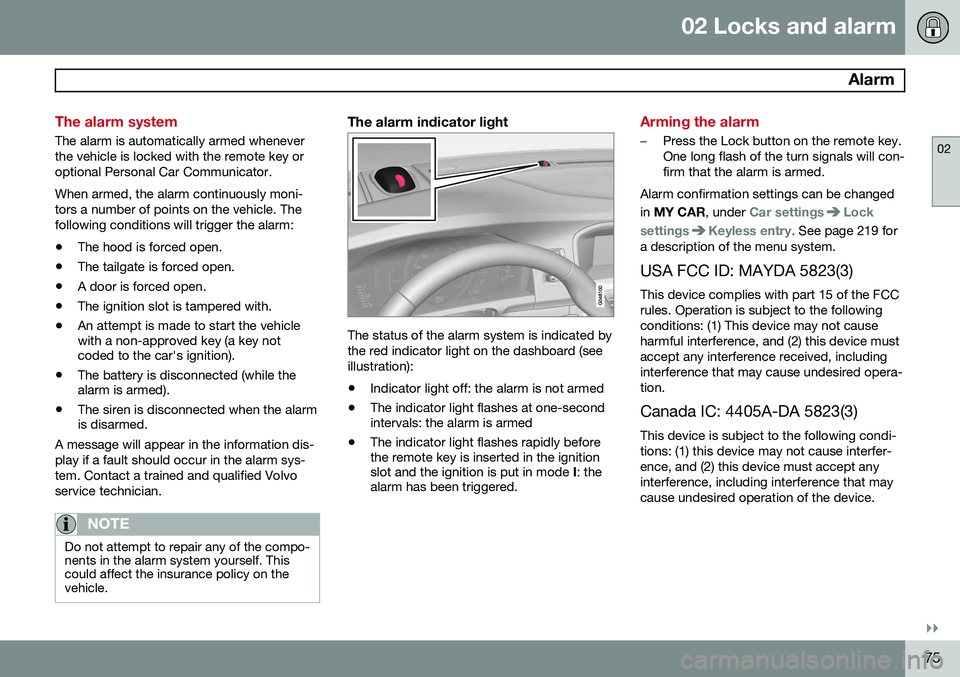
The status of the alarm system is indicated by the red indicator light on the dashboard (seeillustration):
• Indicator light off: the alarm is not armed
• The indicator light flashes at one-second intervals: the alarm is armed
• The indicator light flashes rapidly beforethe remote key is inserted in the ignitionslot and the ignition is put in mode
I: the
alarm has been triggered.
Arming the alarm
–Press the Lock button on the remote key. One long flash of the turn signals will con-firm that the alarm is armed.
Alarm confirmation settings can be changed in MY CAR , under
Car settingsLock
settings
Keyless entry. See page 219 for
a description of the menu system.
USA FCC ID: MAYDA 5823(3) This device complies with part 15 of the FCC rules. Operation is subject to the followingconditions: (1) This device may not causeharmful interference, and (2) this device mustaccept any interference received, includinginterference that may cause undesired opera-tion. Canada IC: 4405A-DA 5823(3)
This device is subject to the following condi- tions: (1) this device may not cause interfer-ence, and (2) this device must accept anyinterference, including interference that maycause undesired operation of the device.
Page 92 of 414

03 Your driving environment
Ignition modes
03
90* Option/accessory, for more information, see Introduction.
Inserting and removing the remote key
Ignition slot with remote key and START/STOP
ENGINE button.
Inserting the remote key 1Holding the end of the remote key with the base of the key blade, insert the remote keyinto the ignition slot as shown in the illustra-tion and press it in as far as possible.
CAUTION
Foreign objects in the ignition slot can impair function or cause damage.
Removing the remote keyThe remote key can be removed from the ignition slot by pulling it out.
Functions
The remote key has 3 modes:
0, I, and II that
can be used without starting the engine. The following table shows examples of whichfunctions are available in the respectivemodes.
NOTE
To access ignition modes I or II without
starting the engine, the brake pedal must not be depressed.
ModeFunction
0The odometer, clock and tem- perature gauge are illuminated.Power seats* can be adjustedand the infotainment system canbe used for a limited time (to min-imize battery drain seepage 248).
IThe Moonroof*, power windows, 12-volt sockets in the passengercompartment, navigation sys-tem*, climate system blower,windshield wipers can be used.
IIThe headlights/taillights illumi- nate. Warning/indicator lights illu-minate for 5 seconds. Other sys-tems are activated. However, theheated seats* and heated rearwindow function can only be acti-vated when the engine is running. Mode II should only be used for very short periods to help avoiddraining the battery.
1
Not necessary in vehicles with the optional keyless drive.
Page 117 of 414
03 Your driving environment
Mirrors
03
}}
* Option/accessory, for more information, see Introduction.115
Automatically tilting the door mirrors when parking
The door mirrors can tilt down automatically to help give the driver a better view along thesides of the vehicle, for example when paral-lel parking. When the transmission is nolonger in reverse, the mirrors will automati-cally return to their original position. This function can be activated/deactivated in MY CAR under
SettingsCar settings
Side mirror settingsIn reverse gear tilt
left mirror
or In reverse gear tilt right
mirror. See page 219 for information about
the MY CAR menu system.
Automatic retraction when lockingWhen the vehicle is locked/unlocked with the remote key the door mirrors are automaticallyretracted/extended. The function can be activated/deactivated in MY CAR under
SettingsCar settings
Side mirror settingsRetract side mirrors
when locking. See page 219 for a descrip-
tion of the menu system.
Resetting to neutralMirrors that have been moved out of position by an external force must be electrically reset to the neutral position for electric retracting/extending to work. •
Retract the mirrors with the
L and R but-
tons.
• Fold them out again with the
L and R but-
tons.
The mirrors are now reset in neutral position.
Home safe and approach lightingThe light on the door mirrors comes on when approach lighting or home safe lighting isselected, see page 108.
Heated windshield*, rear window and door mirror defrosters
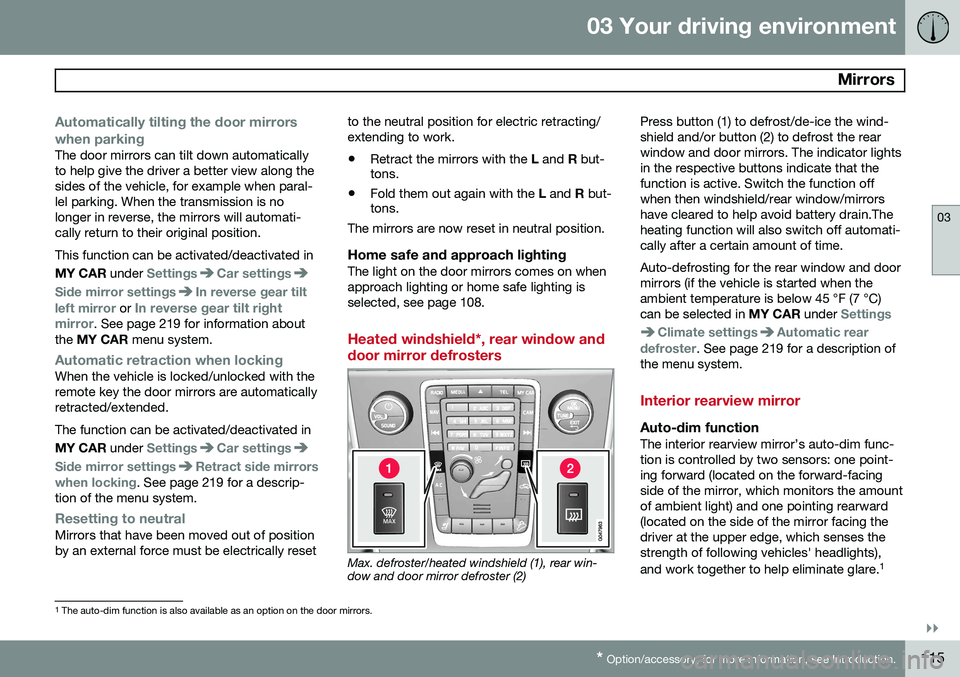
Max. defroster/heated windshield (1), rear win- dow and door mirror defroster (2) Press button (1) to defrost/de-ice the wind- shield and/or button (2) to defrost the rearwindow and door mirrors. The indicator lightsin the respective buttons indicate that thefunction is active. Switch the function offwhen then windshield/rear window/mirrorshave cleared to help avoid battery drain.Theheating function will also switch off automati-cally after a certain amount of time. Auto-defrosting for the rear window and door mirrors (if the vehicle is started when theambient temperature is below 45 °F (7 °C)can be selected in
MY CAR under
Settings
Climate settingsAutomatic rear
defroster. See page 219 for a description of
the menu system.
Interior rearview mirror
Auto-dim functionThe interior rearview mirror’s auto-dim func- tion is controlled by two sensors: one point-ing forward (located on the forward-facingside of the mirror, which monitors the amountof ambient light) and one pointing rearward(located on the side of the mirror facing thedriver at the upper edge, which senses thestrength of following vehicles' headlights), and work together to help eliminate glare. 1
1
The auto-dim function is also available as an option on the door mirrors.
Page 126 of 414
03 Your driving environment
Starting the engine
03
124* Option/accessory, for more information, see Introduction.
Start
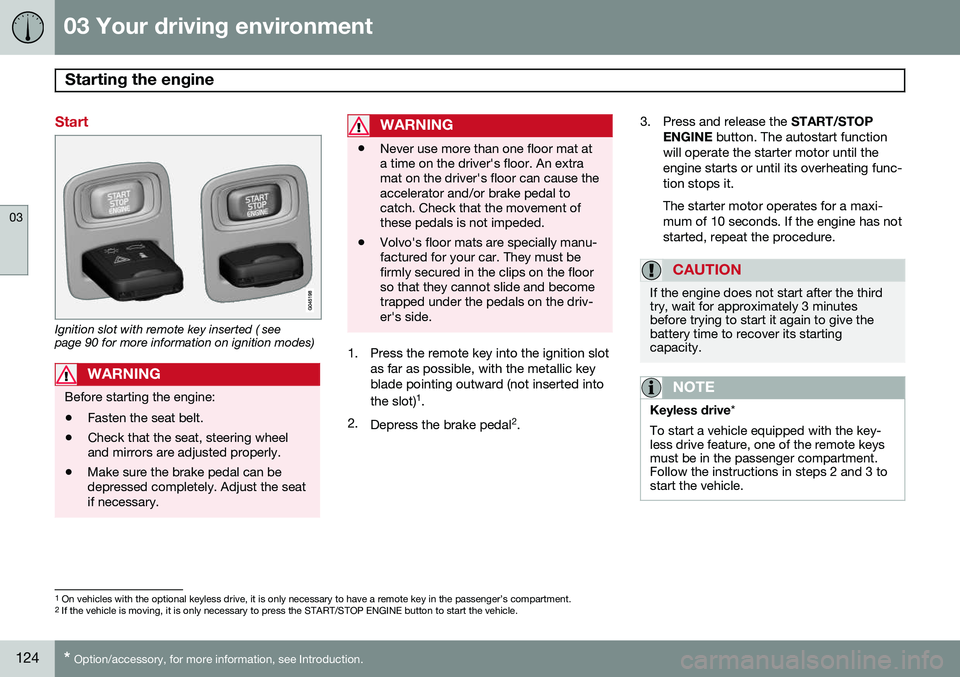
Ignition slot with remote key inserted ( see page 90 for more information on ignition modes)
WARNING
Before starting the engine:
• Fasten the seat belt.
• Check that the seat, steering wheel and mirrors are adjusted properly.
• Make sure the brake pedal can bedepressed completely. Adjust the seatif necessary.
WARNING
•Never use more than one floor mat at a time on the driver's floor. An extramat on the driver's floor can cause theaccelerator and/or brake pedal tocatch. Check that the movement ofthese pedals is not impeded.
• Volvo's floor mats are specially manu-factured for your car. They must befirmly secured in the clips on the floorso that they cannot slide and becometrapped under the pedals on the driv-er's side.
1. Press the remote key into the ignition slot
as far as possible, with the metallic key blade pointing outward (not inserted into the slot) 1
.
2. Depress the brake pedal 2
. 3. Press and release the
START/STOP
ENGINE button. The autostart function
will operate the starter motor until the engine starts or until its overheating func-tion stops it. The starter motor operates for a maxi- mum of 10 seconds. If the engine has notstarted, repeat the procedure.
CAUTION
If the engine does not start after the third try, wait for approximately 3 minutesbefore trying to start it again to give thebattery time to recover its startingcapacity.
NOTE
Keyless drive *
To start a vehicle equipped with the key- less drive feature, one of the remote keysmust be in the passenger compartment.Follow the instructions in steps 2 and 3 tostart the vehicle.
1 On vehicles with the optional keyless drive, it is only necessary to have a remote key in the passenger’s compartment.
2 If the vehicle is moving, it is only necessary to press the START/STOP ENGINE button to start the vehicle.
Page 128 of 414
03 Your driving environment
Starting the engine
03
126* Option/accessory, for more information, see Introduction.
Engine Remote Start (ERS)*
IntroductionERS is a feature that makes it possible to remotely start the engine to cool or heat thepassenger compartment before driving. The climate control system will start using the same settings as when the engine wasswitched off. When the engine is started using ERS, it will run for a maximum of 15 minutes beforeautomatically switching off again. After 2 ERSstarts, the engine must be started in the nor-mal way before ERS can be used again.
NOTE
• Always adhere to applicable State, Province and/or Local laws regardingengine idling when using ERS.
• The service life of the remote key'sbattery is affected by ERS use. If thisfeature is used frequently, the batteryshould be replaced once a year, seepage 61).
WARNING
Keep the following in mind before using ERS
• The vehicle should be in view.
• The vehicle should be unoccupied.
• The vehicle must not be parked indoors or in an enclosed area.Exhaust fumes are harmful to thehealth.
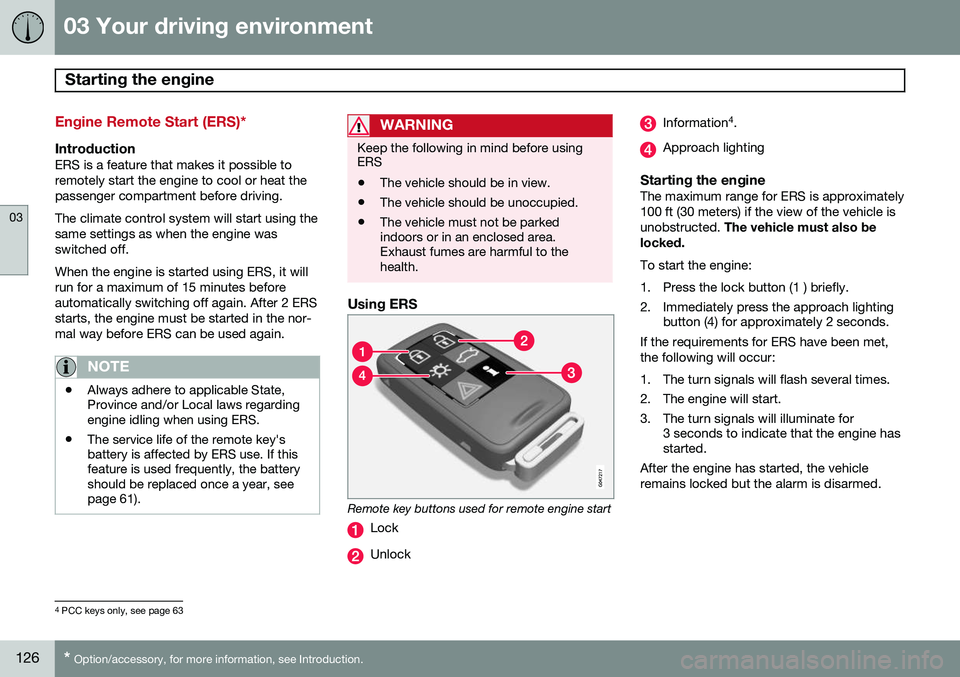
Using ERS
Remote key buttons used for remote engine start
Lock
Unlock
Information 4
.
Approach lighting
Starting the engineThe maximum range for ERS is approximately 100 ft (30 meters) if the view of the vehicle isunobstructed. The vehicle must also be
locked. To start the engine:
1. Press the lock button (1 ) briefly.
2. Immediately press the approach lighting button (4) for approximately 2 seconds.
If the requirements for ERS have been met, the following will occur:
1. The turn signals will flash several times.
2. The engine will start.
3. The turn signals will illuminate for 3 seconds to indicate that the engine has started.
After the engine has started, the vehicle remains locked but the alarm is disarmed.
4 PCC keys only, see page 63