sensus VOLVO V60 2016 Owner´s Manual
[x] Cancel search | Manufacturer: VOLVO, Model Year: 2016, Model line: V60, Model: VOLVO V60 2016Pages: 402, PDF Size: 10.3 MB
Page 5 of 402
Contents
* Option/accessory, for more information, see Introduction.3
03
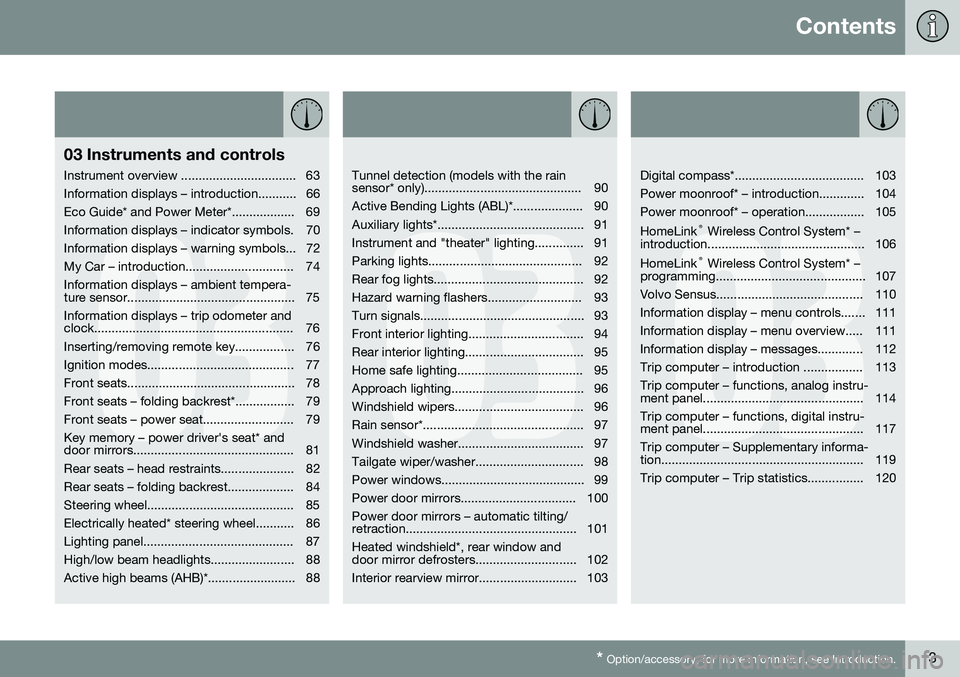
03 Instruments and controls
Instrument overview ................................. 63
Information displays – introduction........... 66
Eco Guide* and Power Meter*.................. 69
Information displays – indicator symbols. 70
Information displays – warning symbols... 72
My Car – introduction............................... 74Information displays – ambient tempera-
ture sensor................................................ 75 Information displays – trip odometer and
clock......................................................... 76
Inserting/removing remote key................. 76
Ignition modes.......................................... 77
Front seats................................................ 78
Front seats – folding backrest*................. 79
Front seats – power seat.......................... 79Key memory – power driver's seat* and
door mirrors.............................................. 81
Rear seats – head restraints..................... 82
Rear seats – folding backrest................... 84
Steering wheel.......................................... 85
Electrically heated* steering wheel........... 86
Lighting panel........................................... 87
High/low beam headlights........................ 88
Active high beams (AHB)*......................... 88
03
Tunnel detection (models with the rain
sensor* only)............................................. 90
Active Bending Lights (ABL)*.................... 90
Auxiliary lights*.......................................... 91
Instrument and "theater" lighting.............. 91
Parking lights............................................ 92
Rear fog lights........................................... 92
Hazard warning flashers........................... 93
Turn signals............................................... 93
Front interior lighting................................. 94
Rear interior lighting.................................. 95
Home safe lighting.................................... 95
Approach lighting...................................... 96
Windshield wipers..................................... 96
Rain sensor*.............................................. 97
Windshield washer.................................... 97
Tailgate wiper/washer............................... 98
Power windows......................................... 99
Power door mirrors................................. 100Power door mirrors – automatic tilting/
retraction................................................. 101 Heated windshield*, rear window and
door mirror defrosters............................. 102
Interior rearview mirror............................ 103
03
Digital compass*..................................... 103
Power moonroof* – introduction............. 104
Power moonroof* – operation................. 105 HomeLink ®
Wireless Control System* –
introduction............................................. 106HomeLink ®
Wireless Control System* –
programming........................................... 107
Volvo Sensus.......................................... 110
Information display – menu controls....... 111
Information display – menu overview..... 111
Information display – messages............. 112
Trip computer – introduction ................. 113Trip computer – functions, analog instru-
ment panel.............................................. 114 Trip computer – functions, digital instru-
ment panel.............................................. 117 Trip computer – Supplementary informa-
tion.......................................................... 119
Trip computer – Trip statistics................ 120
Page 20 of 402
01 Introduction
01
18
Change of ownership
When the vehicle changes owners, all per- sonal settings should be reset to the factorydefaults. To reset, press the MY CAR button in the
center console followed by OK/MENU and
select
SettingsReset to factory settings.
User data e.g., for apps, the web browser and for personal settings in menus such asthe climate system and vehicle settingsshould be reset to factory defaults. For vehicles equipped with the optional Volvo On Call with Sensus Connect (VOC), personalsettings stored in the vehicle should bedeleted, see Changing ownership of a vehiclewith Volvo On Call.
Related information
• Volvo ID (p. 21)
Crash event data
This vehicle is equipped with an event data recorder (EDR). The main purpose of an EDRis to record, in certain crash or near crash-likesituations, such as an air bag deployment orhitting a road obstacle, data that will assist inunderstanding how a vehicle's systems per-formed. The EDR is designed to record datarelated to vehicle dynamics and safety sys-tems for a short period of time, typically 30seconds or less. The EDR in this vehicle isdesigned to record such data as:
• How various systems in your vehicle were operating;
• Whether or not the driver and passengersafety belts were buckled/fastened;
• How far (if at all) the driver was depress-ing the accelerator and/or brake pedal;and,
• How fast the vehicle was traveling.
These data can help provide a better under- standing of the circumstances in whichcrashes and injuries occur.NOTE
EDR data are recorded by your vehicle only if a non-trivial crash situation occurs;no data are recorded by the EDR undernormal driving conditions and no personaldata (e.g., name, gender, age, and crashlocation) are recorded. However, otherparties, such as law enforcement, couldcombine the EDR data with the type ofpersonally identifying data routinelyacquired during a crash investigation.
To read data recorded by an EDR, special equipment is required, and access to thevehicle or the EDR is needed. In addition tothe vehicle manufacturer, other parties, suchas law enforcement, that have the specialequipment, can read the information if theyhave access to the vehicle or the EDR. Furthermore, your vehicle is equipped with a number of computers whose task is to con-tinuously control and monitor the vehicle’soperation. They can also register informationduring normal driving conditions if they detecta fault relating to the vehicle’s operation andfunctionality. Some of the stored informationis required by technicians when carrying outservice and maintenance to enable them todiagnose and rectify any faults that haveoccurred in the vehicle and to enable Volvo tofulfill legal and other regulatory requirements.This information may be stored in the vehi-cle’s computers for a certain period of time.
Page 22 of 402
||
01 Introduction
01
20* Option/accessory, for more information, see Introduction.
parts may also have been affected due to environmental exposure.
Related information
• Important warnings (p. 23)
• Information on the Internet (p. 20)
• Contacting Volvo (p. 13)
Information on the Internet
Additional information regarding your vehicle can be found at www.volvocars.com.
Support on the InternetGo to support.volvocars.com or use the QRcode below to visit the site, which is availablein most markets.
QR code to the support site
The information on the support site is search- able and is grouped into different categories.It includes support for e.g., Internet-basedservices and functions, Volvo On Call (VOC),the navigation system* and apps. Video andstep-by-step instructions explain various pro-cedures such as how to connect the vehicleto the Internet via a cell phone.
Downloadable information
MapsSensus Navigation system* maps can be downloaded from the support site.
Mobile appsFor certain model year 2014 and 2015 Volvos, the owner's manual is available in the form ofan app. The VOC* app can also be foundhere.
Owner's manuals for earlier model Volvos
Owner's manuals for earlier model Volvos are available in PDF format. Quick Guides andsupplements can also be found on the sup-port site. Select a model and a model yearand download the desired information.
ContactContact information for customer support andthe nearest Volvo retailer are available on thesite.
Related information
• About this manual (p. 14)
• Contacting Volvo (p. 13)
Page 26 of 402
01 Introduction
01
24
Volvo On Call Roadside Assistance
Your new Volvo comes with a four year ON CALL roadside assistance. Additional information, features, and benefits of this program are described in a separateinformation package in your glove compart-ment. If you require assistance, dial:In the U.S. 1-800-638-6586 (1-800-63-
VOLVO)In Canada 1-800-263-0475
NOTE
Some vehicles may be equipped with Volvo On Call with Sensus Connect ,
which will allow access to the call centerand additional features directly from thevehicle. This is in addition to the Volvo OnCall Roadside Assistance program men-tioned above. Volvo On Call with Sensus Connect will
be a customer pay subscription offer after an initial complimentary trial period.
Related information
• Information on the Internet (p. 20)
Technician certification
In addition to Volvo factory training, Volvo supports certification by the National Institutefor Automotive Service Excellence (A.S.E.). Certified technicians have demonstrated a high degree of competence in specific areas.Besides passing exams, each technicianmust also have worked in the field for two ormore years before a certificate is issued.These professional technicians are best ableto analyze vehicle problems and perform thenecessary maintenance procedures to keepyour Volvo at peak operating condition.
Page 67 of 402
03 Instruments and controls
03
* Option/accessory, for more information, see Introduction.65
FunctionSee
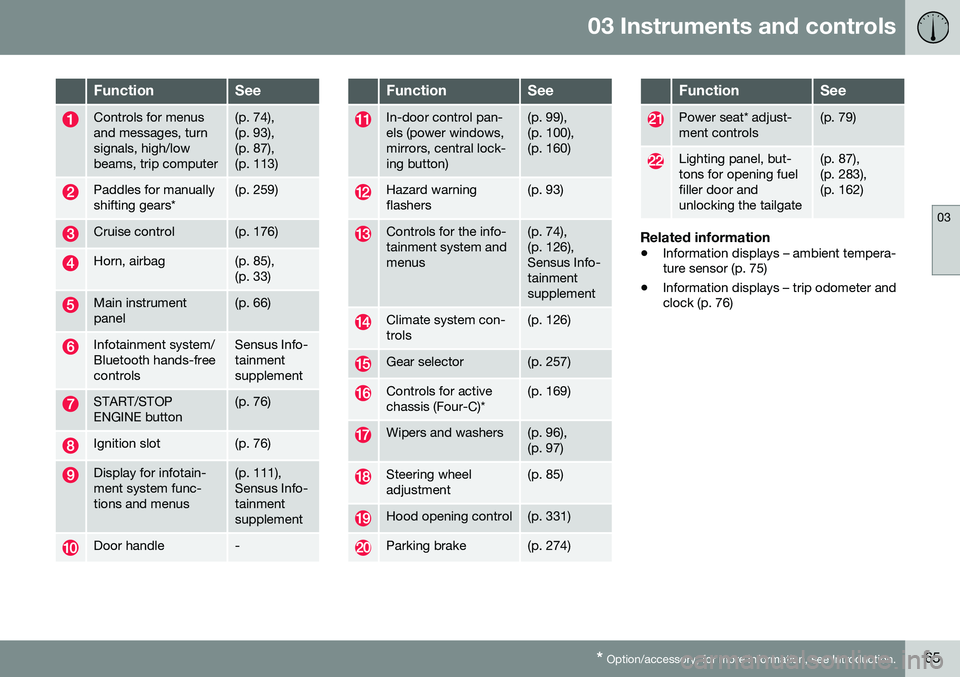
Controls for menus and messages, turnsignals, high/lowbeams, trip computer(p. 74), (p. 93),(p. 87),(p. 113)
Paddles for manually shifting gears*(p. 259)
Cruise control(p. 176)
Horn, airbag(p. 85), (p. 33)
Main instrument panel(p. 66)
Infotainment system/ Bluetooth hands-freecontrolsSensus Info- tainmentsupplement
START/STOP ENGINE button(p. 76)
Ignition slot(p. 76)
Display for infotain- ment system func-tions and menus(p. 111), Sensus Info-tainmentsupplement
Door handle-
FunctionSee
In-door control pan- els (power windows,mirrors, central lock-ing button)(p. 99), (p. 100),(p. 160)
Hazard warning flashers(p. 93)
Controls for the info- tainment system andmenus(p. 74), (p. 126),Sensus Info-tainmentsupplement
Climate system con- trols(p. 126)
Gear selector(p. 257)
Controls for active chassis (Four-C)*(p. 169)
Wipers and washers(p. 96), (p. 97)
Steering wheel adjustment(p. 85)
Hood opening control(p. 331)
Parking brake(p. 274)
FunctionSee
Power seat* adjust- ment controls(p. 79)
Lighting panel, but- tons for opening fuelfiller door andunlocking the tailgate(p. 87), (p. 283),(p. 162)
Related information
• Information displays – ambient tempera- ture sensor (p. 75)
• Information displays – trip odometer andclock (p. 76)
Page 77 of 402
03 Instruments and controls
03
* Option/accessory, for more information, see Introduction.75
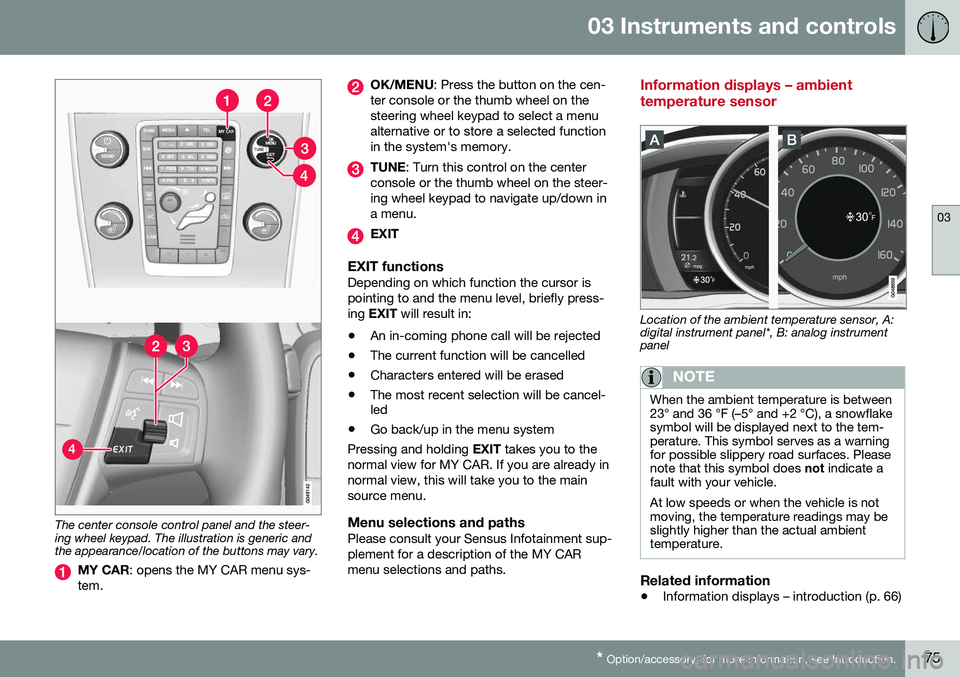
The center console control panel and the steer- ing wheel keypad. The illustration is generic andthe appearance/location of the buttons may vary.
MY CAR : opens the MY CAR menu sys-
tem.
OK/MENU : Press the button on the cen-
ter console or the thumb wheel on the steering wheel keypad to select a menualternative or to store a selected functionin the system's memory.
TUNE : Turn this control on the center
console or the thumb wheel on the steer- ing wheel keypad to navigate up/down ina menu.
EXIT
EXIT functionsDepending on which function the cursor is pointing to and the menu level, briefly press-ing EXIT will result in:
• An in-coming phone call will be rejected
• The current function will be cancelled
• Characters entered will be erased
• The most recent selection will be cancel- led
• Go back/up in the menu system
Pressing and holding EXIT takes you to the
normal view for MY CAR. If you are already in normal view, this will take you to the mainsource menu.
Menu selections and pathsPlease consult your Sensus Infotainment sup-plement for a description of the MY CARmenu selections and paths.
Information displays – ambient temperature sensor
Location of the ambient temperature sensor, A: digital instrument panel*, B: analog instrumentpanel
NOTE
When the ambient temperature is between 23° and 36 °F (–5° and +2 °C), a snowflakesymbol will be displayed next to the tem-perature. This symbol serves as a warningfor possible slippery road surfaces. Pleasenote that this symbol does not indicate a
fault with your vehicle. At low speeds or when the vehicle is not moving, the temperature readings may beslightly higher than the actual ambienttemperature.
Related information
• Information displays – introduction (p. 66)
Page 88 of 402
||
03 Instruments and controls
03
86* Option/accessory, for more information, see Introduction.
3. Push back the lever to lock the steering
wheel in place. If the lever is difficult to push into place, press the steering wheellightly at the same time as you push thelever.
WARNING
Never adjust the steering wheel while driv- ing.
With the optional speed-dependent power steering the level of steering force can beadjusted, see Active chassis* (Four C)(p. 169).
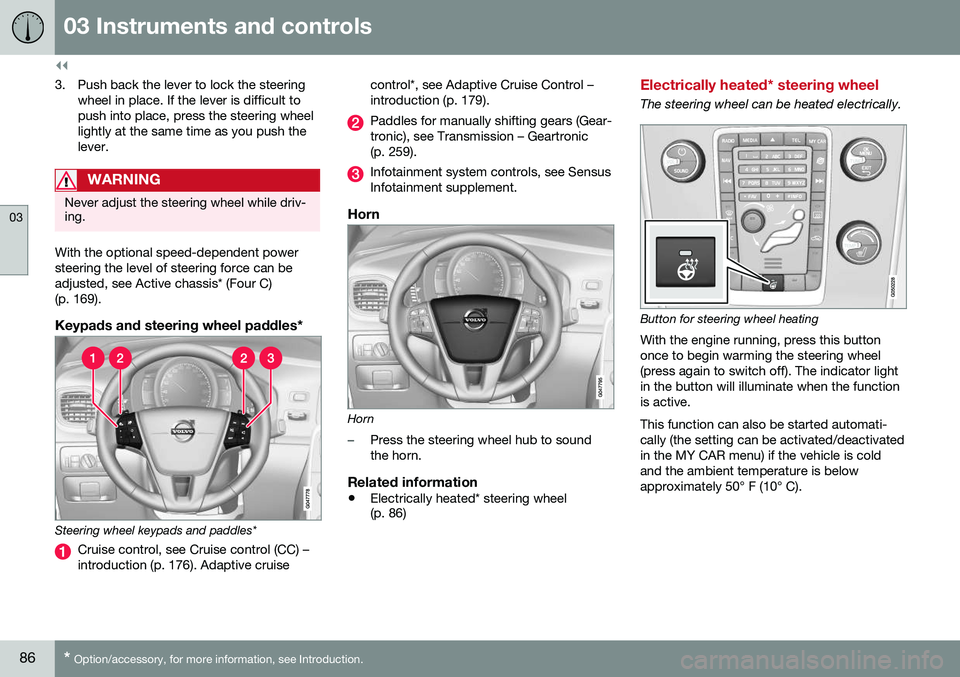
Keypads and steering wheel paddles*
Steering wheel keypads and paddles*
Cruise control, see Cruise control (CC) – introduction (p. 176). Adaptive cruise control*, see Adaptive Cruise Control –introduction (p. 179).
Paddles for manually shifting gears (Gear- tronic), see Transmission – Geartronic(p. 259).
Infotainment system controls, see Sensus Infotainment supplement.
Horn
Horn
–Press the steering wheel hub to sound the horn.
Related information
•
Electrically heated* steering wheel (p. 86)
Electrically heated* steering wheel
The steering wheel can be heated electrically.
Button for steering wheel heating
With the engine running, press this button once to begin warming the steering wheel(press again to switch off). The indicator lightin the button will illuminate when the functionis active. This function can also be started automati- cally (the setting can be activated/deactivatedin the MY CAR menu) if the vehicle is coldand the ambient temperature is belowapproximately 50° F (10° C).
Page 112 of 402
03 Instruments and controls
03
110* Option/accessory, for more information, see Introduction.
Volvo Sensus
Volvo Sensus is the core of the contact inter- face with your vehicle. Sensus provides infor-mation, entertainment and offers access tofunctions that make owning and operating aVolvo easier.
Volvo Sensus is the operating system in your vehicle and it enables you to interact intui-tively with the vehicle’s various features andfunctions, including accessing the Internet,when it suits you. Volvo Sensus uses the center console screen to display information and menus, and tooffer a user interface that enables you tomake personalized settings for e.g., vehicle,infotainment and climate system functions. The buttons on the center console or the steering wheel keypad are used to activate/deactivate functions and change numeroussettings. Pressing the MY CAR button on the center
console displays all of the settings related to driving and operating the vehicle, such as City Safety, lock and alarm functions, auto-matic blower speed, setting the clock, etc. Pressing the source buttons on the center console (
RADIO, MEDIA , TEL ,
, NAV * and
CAM *, etc.) make it possible to select e.g.,
AM or FM radio, play a CD or DVD, use the Bluetooth ®
hands-free feature, the navigation
system* or the park assist camera*. See your on-board owner’s manual or the separate printed supplements for detailedinformation about the functionality offered byVolvo Sensus.
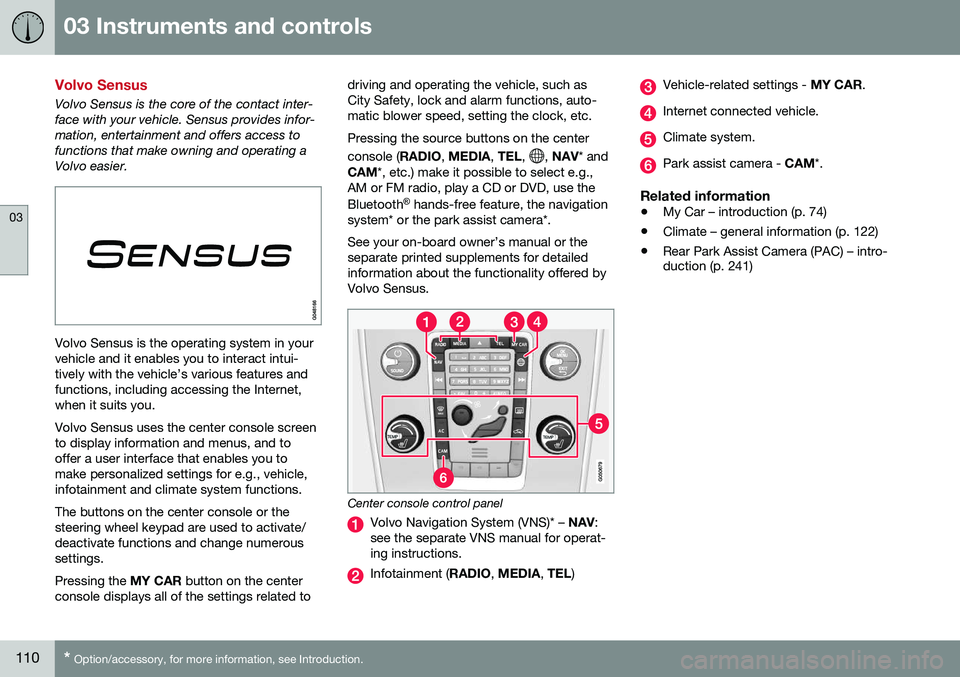
Center console control panel
Volvo Navigation System (VNS)* – NAV:
see the separate VNS manual for operat- ing instructions.
Infotainment ( RADIO, MEDIA , TEL )
Vehicle-related settings - MY CAR.
Internet connected vehicle.
Climate system.
Park assist camera - CAM*.
Related information
•My Car – introduction (p. 74)
• Climate – general information (p. 122)
• Rear Park Assist Camera (PAC) – intro- duction (p. 241)
Page 331 of 402
10 Maintenance and servicing
10
}}
* Option/accessory, for more information, see Introduction.329
Onboard Diagnostic System
OBD II is part of your vehicle's computerized engine management system. It stores diag-nostic information about your vehicle's emis-sion controls. It can light the Check Enginelight (MIL) if it detects an emission control"fault." A "fault" is a component or systemthat is not performing within an expectedrange. A fault may be permanent or tempo-rary. OBD II will store a message about anyfault.
Emission inspection readiness
How do states use OBD II for emission inspections?
Many states connect a computer directly to a vehicle's OBD II system. The inspector canthen read "faults." In some states, this type ofinspection has replaced the tailpipe emissiontest.
How can my vehicle fail OBD II emission
inspection?
Your vehicle can fail OBD II emission inspec- tion for any of the following reasons.
• If your Check Engine (MIL) light is lit, your vehicle may fail inspection.
• If your vehicle's Check Engine light waslit, but went out without any action onyour part, OBD II will still have a recordedfault. Your vehicle may pass or fail,depending on the inspection practices inyour area. •
If you had recent service that requireddisconnecting the battery, OBD II diag-nostic information may be incompleteand "not ready" for inspection. A vehiclethat is not ready may fail inspection.
How can I prepare for my next OBD II
emission inspection?
• If your Check Engine (MIL) light is lit – or was lit but went out without service, haveyour vehicle diagnosed and, if necessary,serviced by a qualified Volvo technician.
• If you recently had service for a lit CheckEngine light, or if you had service thatrequired disconnecting the battery, aperiod of driving is necessary to bring theOBD II system to "ready" for inspection.Two half-hour trips of mixed stop-and-go/highway driving are typically neededto allow OBD II to reach readiness. YourVolvo retailer can provide you with moreinformation on planning a trip.
• Maintain your vehicle in accordance withyour vehicle's maintenance schedule.
Booking service and repairs
Connected Service Booking (CSB) makes set- ting up a time for service, maintenance and/orrepairs directly from the vehicle quick andconvenient.
Prerequisites
• The owner (primary driver) must have a valid Volvo ID. See Volvo ID (p. 21) foradditional information.
• The vehicle must be connected to the Internet using a paired Bluetooth ®
cell
phone. See your Sensus Infotainment supplement for information on pairing acell phone. On models equipped withVolvo On Call (VOC)*, you can connect tothe Internet using your separate VOCdata plan. Refer to your separate VolvoOn Call manual.
• By default, the retailer where you pur-chased your vehicle will be your preferred(primary) retailer/Volvo authorized work-shop who will perform service and repairson your vehicle. To change the preferredretailer, go to Dealer Locator atvolvocars.com and select a retailer, clickon Service Scheduler and book anappointment at the new preferred retailer.
• In order to be guided through the on-screen steps, the menu alternative
Display notifications must be activated.
CSB menu accessOnce the prerequisites have been estab- lished, all CSB-related menus can be
Page 332 of 402
||
10 Maintenance and servicing
10
330
accessed in MY CAR by pressing OK/MENU
and then selecting Maintenance & repair.
Booking information and data from the vehicle
If you request an appointment from your vehi- cle, with your consent, booking information and data about your vehicle 1
will be transmit-
ted to your preferred retailer.
Using the serviceOnce the prerequisites have been estab- lished, all CSB-related menus can beaccessed in MY CAR by pressing OK/MENU
and then selecting
Maintenance & repair.
If the time for the next regularly scheduled service is approaching, if the vehicle requirescertain types of repairs or if a system needsto be checked, a message will be displayed.You will then by guided through the stepsrequired to book service or repairs.
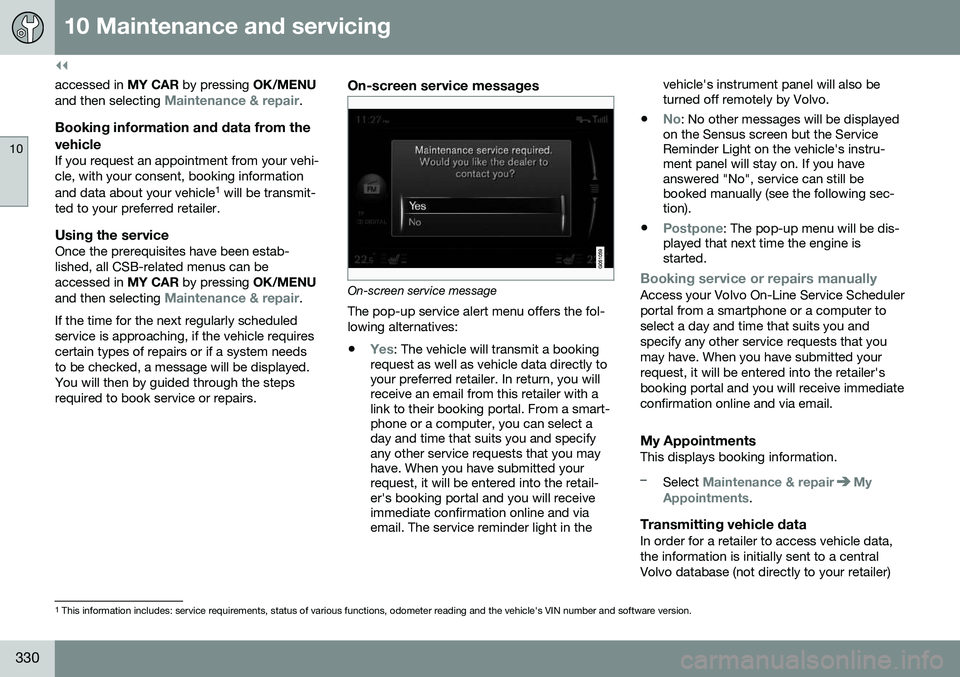
On-screen service messages
On-screen service message The pop-up service alert menu offers the fol- lowing alternatives:
•
Yes: The vehicle will transmit a booking
request as well as vehicle data directly to your preferred retailer. In return, you willreceive an email from this retailer with alink to their booking portal. From a smart-phone or a computer, you can select aday and time that suits you and specifyany other service requests that you mayhave. When you have submitted yourrequest, it will be entered into the retail-er's booking portal and you will receiveimmediate confirmation online and viaemail. The service reminder light in the vehicle's instrument panel will also beturned off remotely by Volvo.
•
No: No other messages will be displayed
on the Sensus screen but the Service Reminder Light on the vehicle's instru-ment panel will stay on. If you haveanswered "No", service can still bebooked manually (see the following sec-tion).
•
Postpone: The pop-up menu will be dis-
played that next time the engine is started.
Booking service or repairs manuallyAccess your Volvo On-Line Service Scheduler portal from a smartphone or a computer toselect a day and time that suits you andspecify any other service requests that youmay have. When you have submitted yourrequest, it will be entered into the retailer'sbooking portal and you will receive immediateconfirmation online and via email.
My AppointmentsThis displays booking information.
–Select Maintenance & repairMy
Appointments.
Transmitting vehicle dataIn order for a retailer to access vehicle data, the information is initially sent to a centralVolvo database (not directly to your retailer)
1 This information includes: service requirements, status of various functions, odometer reading and the vehicle's VIN number and software version.