ECU VOLVO V60 2016 Owner´s Manual
[x] Cancel search | Manufacturer: VOLVO, Model Year: 2016, Model line: V60, Model: VOLVO V60 2016Pages: 402, PDF Size: 10.3 MB
Page 58 of 402
||
02 Safety
02
56
Related information
•Child safety (p. 46)
• Infant seats (p. 49)
• Convertible seats (p. 51)
• Integrated booster cushion – general information (p. 57)
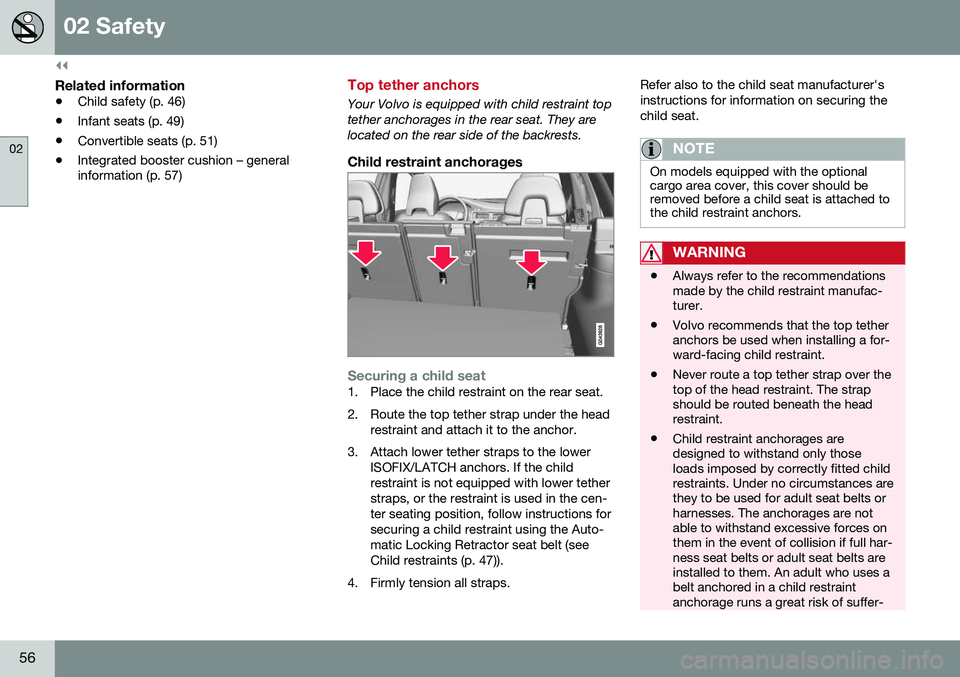
Top tether anchors
Your Volvo is equipped with child restraint top tether anchorages in the rear seat. They arelocated on the rear side of the backrests.
Child restraint anchorages
Securing a child seat1. Place the child restraint on the rear seat.
2. Route the top tether strap under the head
restraint and attach it to the anchor.
3. Attach lower tether straps to the lower ISOFIX/LATCH anchors. If the child restraint is not equipped with lower tetherstraps, or the restraint is used in the cen-ter seating position, follow instructions forsecuring a child restraint using the Auto-matic Locking Retractor seat belt (seeChild restraints (p. 47)).
4. Firmly tension all straps. Refer also to the child seat manufacturer'sinstructions for information on securing thechild seat.
NOTE
On models equipped with the optional cargo area cover, this cover should beremoved before a child seat is attached tothe child restraint anchors.
WARNING
•
Always refer to the recommendations made by the child restraint manufac-turer.
• Volvo recommends that the top tetheranchors be used when installing a for-ward-facing child restraint.
• Never route a top tether strap over thetop of the head restraint. The strapshould be routed beneath the headrestraint.
• Child restraint anchorages aredesigned to withstand only thoseloads imposed by correctly fitted childrestraints. Under no circumstances arethey to be used for adult seat belts orharnesses. The anchorages are notable to withstand excessive forces onthem in the event of collision if full har-ness seat belts or adult seat belts areinstalled to them. An adult who uses abelt anchored in a child restraintanchorage runs a great risk of suffer-
Page 59 of 402
02 Safety
02
}}
57
ing severe injuries should a collision occur.
• Do not install rear speakers thatrequire the removal of the top tetheranchors or interfere with the properuse of the top tether strap.
Related information
•
Child safety (p. 46)
• Infant seats (p. 49)
• Convertible seats (p. 51)
• Integrated booster cushion – general information (p. 57)
• ISOFIX/LATCH lower anchors (p. 55)
Integrated booster cushion – general information
The booster cushions are designed to raise the child higher so that the shoulder strapcrosses over the child's collarbone, not overthe neck.
Integrated two-stage booster cushion 2Volvo's optional integrated booster cushionsare located in the outboard seating positions.These booster cushions have been speciallydesigned to help safeguard children in therear seat. They should be stowed (p. 60)(folded down into the seat cushion) when notin use. When using an integrated boostercushion (p. 59), the child must be securedwith the vehicle's three-point seat belt.
Use these booster cushions only with children whose weight isbetween: • Stage 1: 48 – 80 lbs (22 – 36 kg)
• Stage 2: 33 – 55 lbs (15 – 25 kg)
and whose height is between:• Stage 1: 45 – 55 in. (115 – 140 cm)
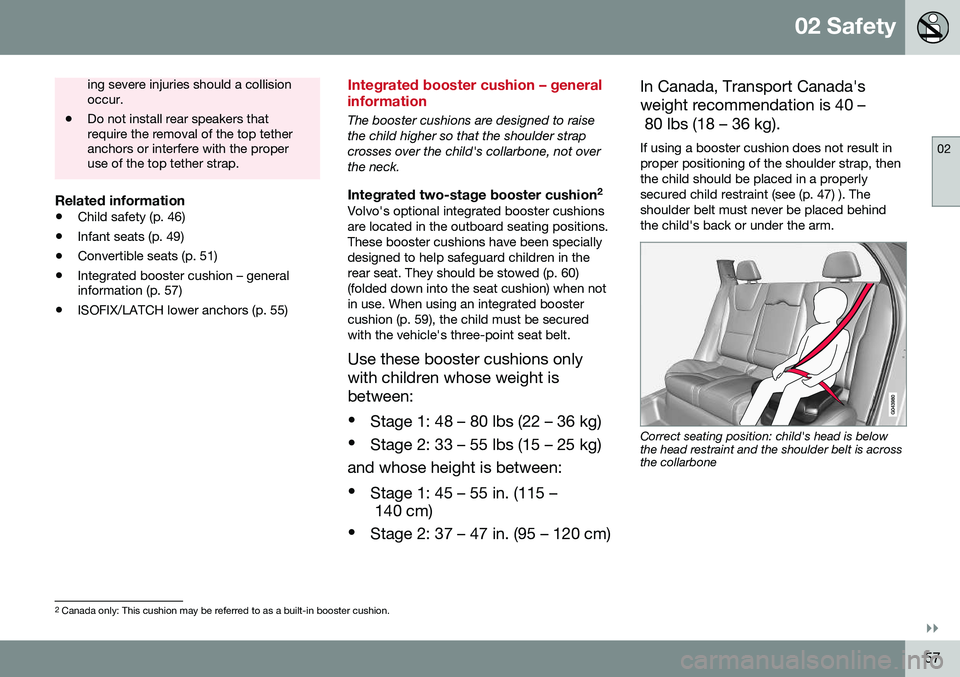
• Stage 2: 37 – 47 in. (95 – 120 cm) In Canada, Transport Canada's weight recommendation is 40 – 80 lbs (18 – 36 kg). If using a booster cushion does not result in proper positioning of the shoulder strap, thenthe child should be placed in a properlysecured child restraint (see (p. 47) ). Theshoulder belt must never be placed behindthe child's back or under the arm.
Correct seating position: child's head is below the head restraint and the shoulder belt is acrossthe collarbone
2
Canada only: This cushion may be referred to as a built-in booster cushion.
Page 60 of 402
||
02 Safety
02
58
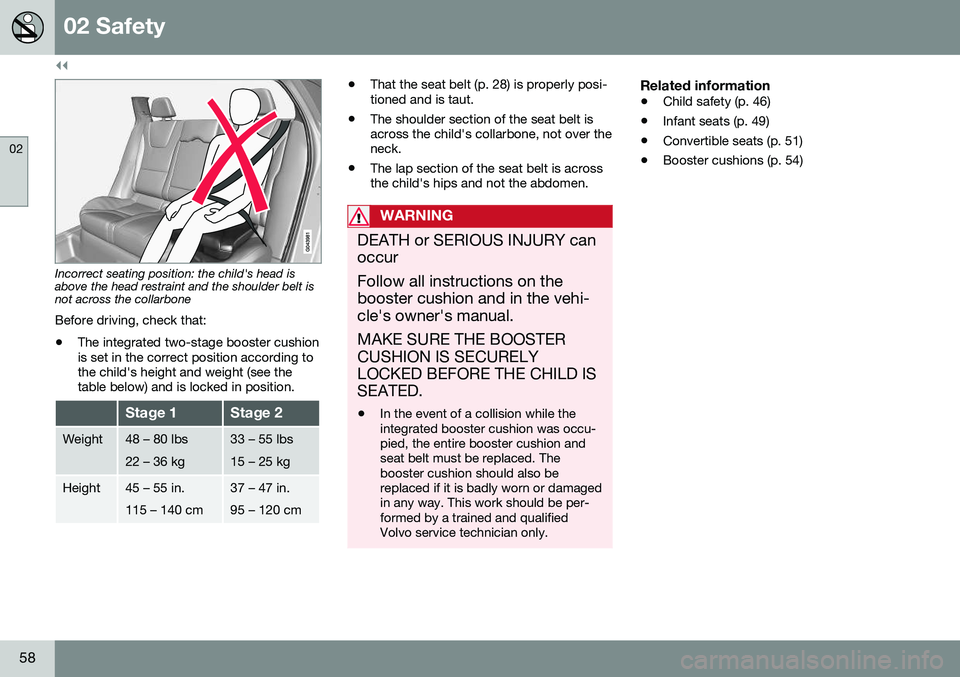
Incorrect seating position: the child's head is above the head restraint and the shoulder belt isnot across the collarbone Before driving, check that:
• The integrated two-stage booster cushion is set in the correct position according tothe child's height and weight (see thetable below) and is locked in position.
Stage 1Stage 2
Weight48 – 80 lbs 22 – 36 kg33 – 55 lbs 15 – 25 kg
Height45 – 55 in. 115 – 140 cm37 – 47 in. 95 – 120 cm
•That the seat belt (p. 28) is properly posi- tioned and is taut.
• The shoulder section of the seat belt isacross the child's collarbone, not over theneck.
• The lap section of the seat belt is acrossthe child's hips and not the abdomen.
WARNING
DEATH or SERIOUS INJURY can occur Follow all instructions on the booster cushion and in the vehi-cle's owner's manual. MAKE SURE THE BOOSTER CUSHION IS SECURELYLOCKED BEFORE THE CHILD ISSEATED. •In the event of a collision while the integrated booster cushion was occu-pied, the entire booster cushion andseat belt must be replaced. Thebooster cushion should also bereplaced if it is badly worn or damagedin any way. This work should be per-formed by a trained and qualifiedVolvo service technician only.
Related information
•
Child safety (p. 46)
• Infant seats (p. 49)
• Convertible seats (p. 51)
• Booster cushions (p. 54)
Page 61 of 402
02 Safety
02
59
Integrated booster cushion – using
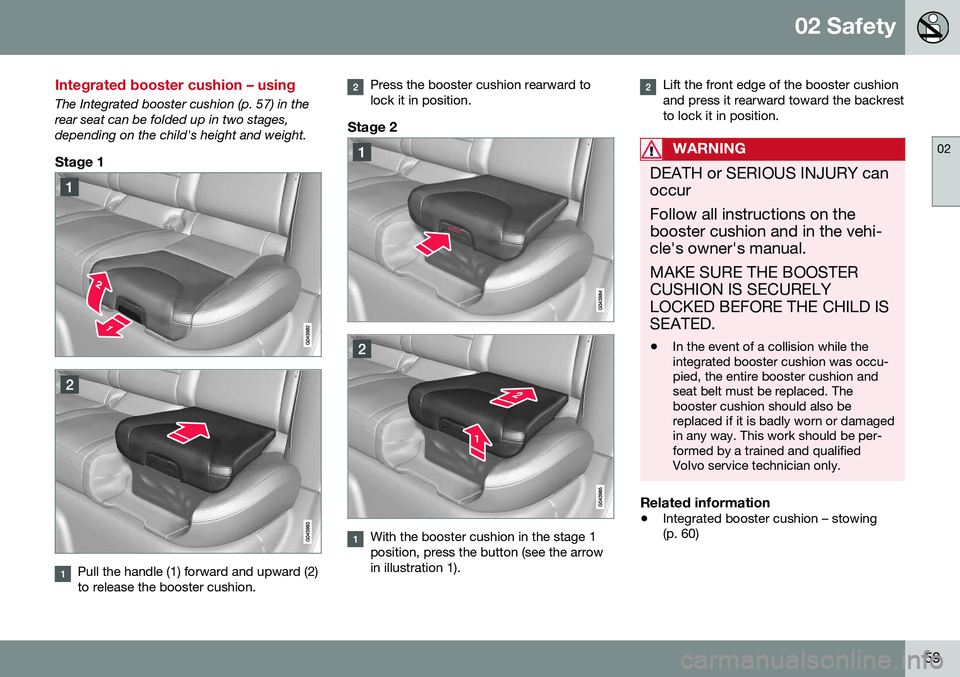
The Integrated booster cushion (p. 57) in the rear seat can be folded up in two stages,depending on the child's height and weight.
Stage 1
Pull the handle (1) forward and upward (2) to release the booster cushion.
Press the booster cushion rearward to lock it in position.
Stage 2
With the booster cushion in the stage 1 position, press the button (see the arrowin illustration 1).
Lift the front edge of the booster cushion and press it rearward toward the backrestto lock it in position.
WARNING
DEATH or SERIOUS INJURY can occur Follow all instructions on the booster cushion and in the vehi-cle's owner's manual. MAKE SURE THE BOOSTER CUSHION IS SECURELYLOCKED BEFORE THE CHILD ISSEATED. •In the event of a collision while the integrated booster cushion was occu-pied, the entire booster cushion andseat belt must be replaced. Thebooster cushion should also bereplaced if it is badly worn or damagedin any way. This work should be per-formed by a trained and qualifiedVolvo service technician only.
Related information
•
Integrated booster cushion – stowing (p. 60)
Page 62 of 402
02 Safety
02
60
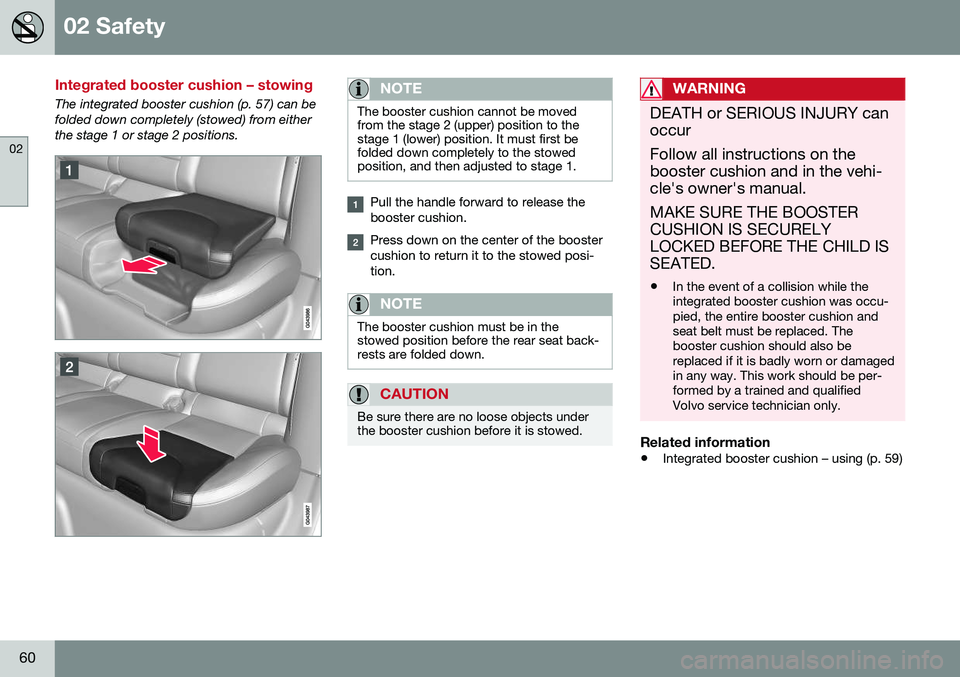
Integrated booster cushion – stowing
The integrated booster cushion (p. 57) can be folded down completely (stowed) from eitherthe stage 1 or stage 2 positions.NOTE
The booster cushion cannot be moved from the stage 2 (upper) position to thestage 1 (lower) position. It must first befolded down completely to the stowedposition, and then adjusted to stage 1.
Pull the handle forward to release the booster cushion.
Press down on the center of the booster cushion to return it to the stowed posi-tion.
NOTE
The booster cushion must be in the stowed position before the rear seat back-rests are folded down.
CAUTION
Be sure there are no loose objects under the booster cushion before it is stowed.
WARNING
DEATH or SERIOUS INJURY can occur Follow all instructions on the booster cushion and in the vehi-cle's owner's manual. MAKE SURE THE BOOSTER CUSHION IS SECURELYLOCKED BEFORE THE CHILD ISSEATED. •In the event of a collision while the integrated booster cushion was occu-pied, the entire booster cushion andseat belt must be replaced. Thebooster cushion should also bereplaced if it is badly worn or damagedin any way. This work should be per-formed by a trained and qualifiedVolvo service technician only.
Related information
•
Integrated booster cushion – using (p. 59)
Page 80 of 402
||
03 Instruments and controls
03
78* Option/accessory, for more information, see Introduction.
Ignition mode I–With the remote key fully pressed into the ignition slot 8
, press START/STOP
ENGINE briefly.
Ignition mode II–With the remote key fully pressed into the ignition slot 8
, press START/STOP
ENGINE for approximately 2 seconds.
Returning to mode 0To return to mode 0 from mode II or I, press
START/STOP ENGINE briefly.
Starting and stopping the engineSee Starting the engine (p. 252) and Switch- ing off the engine (p. 254) for information onstarting the engine and switching it off.
Emergency towingSee Towing the vehicle (p. 289) for importantinformation about the remote key when thevehicle is being towed.
Related information
•Inserting/removing remote key (p. 76)
Front seats
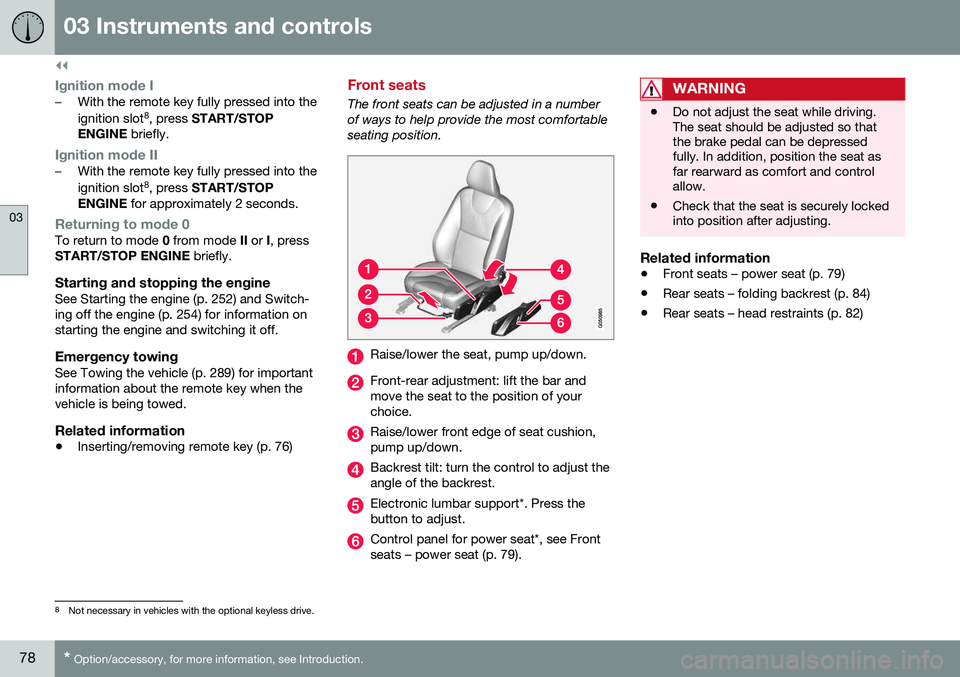
The front seats can be adjusted in a number of ways to help provide the most comfortableseating position.
Raise/lower the seat, pump up/down.
Front-rear adjustment: lift the bar and move the seat to the position of yourchoice.
Raise/lower front edge of seat cushion, pump up/down.
Backrest tilt: turn the control to adjust the angle of the backrest.
Electronic lumbar support*. Press the button to adjust.
Control panel for power seat*, see Front seats – power seat (p. 79).
WARNING
•Do not adjust the seat while driving. The seat should be adjusted so thatthe brake pedal can be depressedfully. In addition, position the seat asfar rearward as comfort and controlallow.
• Check that the seat is securely lockedinto position after adjusting.
Related information
•
Front seats – power seat (p. 79)
• Rear seats – folding backrest (p. 84)
• Rear seats – head restraints (p. 82)
8
Not necessary in vehicles with the optional keyless drive.
Page 81 of 402
03 Instruments and controls
03
}}
* Option/accessory, for more information, see Introduction.79
Front seats – folding backrest* 10
The front passenger's seat backrest can be folded down to make it easier to transportlong objects.
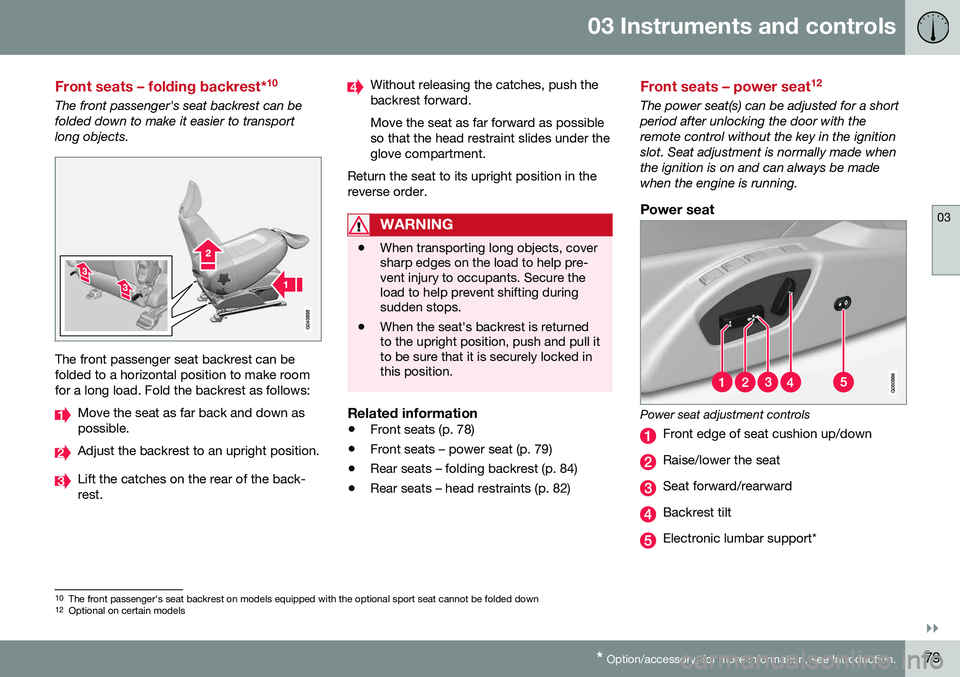
The front passenger seat backrest can be folded to a horizontal position to make roomfor a long load. Fold the backrest as follows:
Move the seat as far back and down as possible.
Adjust the backrest to an upright position.
Lift the catches on the rear of the back- rest.
Without releasing the catches, push the backrest forward. Move the seat as far forward as possible so that the head restraint slides under theglove compartment.
Return the seat to its upright position in thereverse order.
WARNING
• When transporting long objects, cover sharp edges on the load to help pre-vent injury to occupants. Secure theload to help prevent shifting duringsudden stops.
• When the seat's backrest is returnedto the upright position, push and pull itto be sure that it is securely locked inthis position.
Related information
•
Front seats (p. 78)
• Front seats – power seat (p. 79)
• Rear seats – folding backrest (p. 84)
• Rear seats – head restraints (p. 82)
Front seats – power seat 12
The power seat(s) can be adjusted for a short period after unlocking the door with theremote control without the key in the ignitionslot. Seat adjustment is normally made whenthe ignition is on and can always be madewhen the engine is running.
Power seat
Power seat adjustment controls
Front edge of seat cushion up/down
Raise/lower the seat
Seat forward/rearward
Backrest tilt
Electronic lumbar support*
10
The front passenger's seat backrest on models equipped with the optional sport seat cannot be folded down
12 Optional on certain models
Page 87 of 402
03 Instruments and controls
03
}}
* Option/accessory, for more information, see Introduction.85
NOTE
It may be necessary to move the front seats forward or put their backrests in amore upright position before folding downthe rear seat backrests.
WARNING
• When one or more sections of the backrest is returned to the uprightposition, check that it is properlylocked in place by pushing and pullingit. The red indicators should also notbe visible.
• Return the outboard head restraints tothe upright position.
• Long loads should always be securelyanchored to help avoid injury in theevent of a sudden stop.
• Always turn the engine off and applythe parking brake when loading/unloading the vehicle.
• Place the transmission in the Park (
P)
position to help prevent inadvertentmovement of the gear selector.
• On hot days, the temperature in thevehicle interior can rise very quickly.Exposure of people to these high tem-peratures for even a short period oftime can cause heat-related injury ordeath. Small children are particularly atrisk.
Related information
•
Front seats (p. 78)
• Front seats – power seat (p. 79)
• Rear seats – head restraints (p. 82)
Steering wheel
The steering wheel can be adjusted to various positions and has controls for the horn, cruisecontrol*, menus, the infotainment system and Bluetooth
®-connected cell phone.
Adjusting
G021138
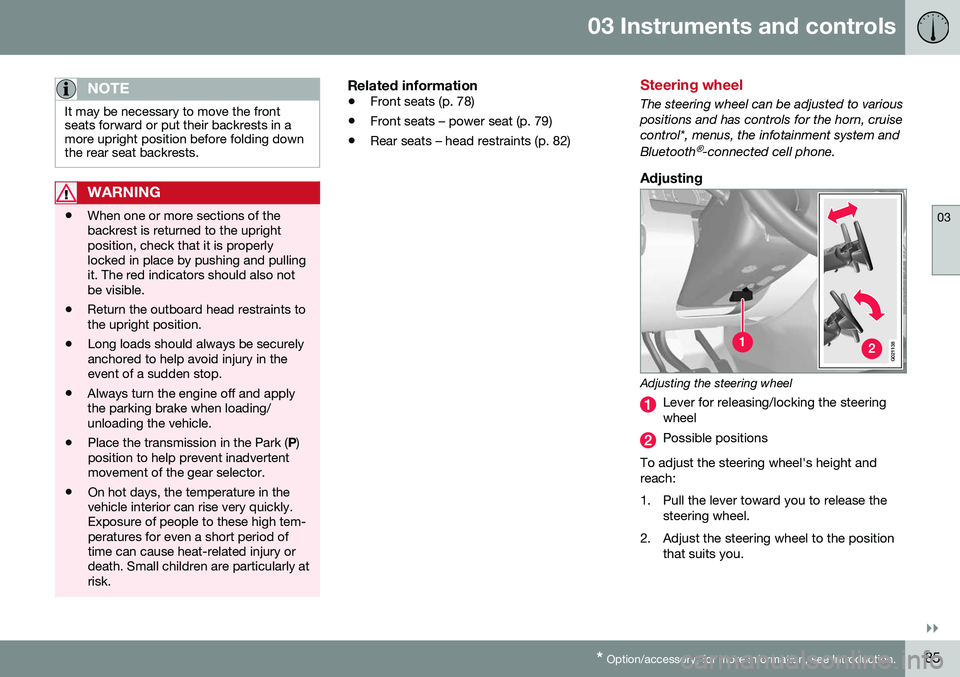
Adjusting the steering wheel
Lever for releasing/locking the steering wheel
Possible positions
To adjust the steering wheel's height and reach:
1. Pull the lever toward you to release the steering wheel.
2. Adjust the steering wheel to the position that suits you.
Page 106 of 402
||
03 Instruments and controls
03
104* Option/accessory, for more information, see Introduction.
4. Press and hold the button for 3 seconds
until the number of the current magnetic zone is displayed.
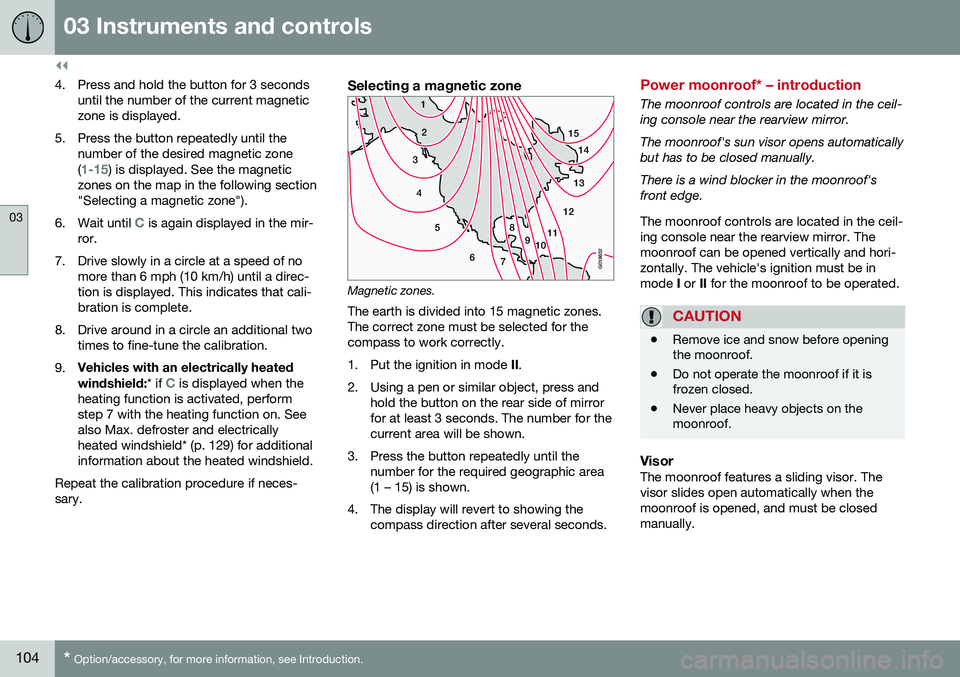
5. Press the button repeatedly until the number of the desired magnetic zone (
1-15) is displayed. See the magnetic
zones on the map in the following section "Selecting a magnetic zone").
6. Wait until
C is again displayed in the mir-
ror.
7. Drive slowly in a circle at a speed of no more than 6 mph (10 km/h) until a direc- tion is displayed. This indicates that cali-bration is complete.
8. Drive around in a circle an additional two times to fine-tune the calibration.
9. Vehicles with an electrically heated windshield:
* if
C is displayed when the
heating function is activated, perform step 7 with the heating function on. Seealso Max. defroster and electricallyheated windshield* (p. 129) for additionalinformation about the heated windshield.
Repeat the calibration procedure if neces-sary.
Selecting a magnetic zone
15 14
13
12
11
9
8
7
6
5
4
3
2
1
10
G018632
Magnetic zones.The earth is divided into 15 magnetic zones. The correct zone must be selected for thecompass to work correctly.
1. Put the ignition in mode II.
2. Using a pen or similar object, press and hold the button on the rear side of mirror for at least 3 seconds. The number for thecurrent area will be shown.
3. Press the button repeatedly until the number for the required geographic area(1 – 15) is shown.
4. The display will revert to showing the compass direction after several seconds.
Power moonroof* – introduction
The moonroof controls are located in the ceil- ing console near the rearview mirror. The moonroof's sun visor opens automatically but has to be closed manually. There is a wind blocker in the moonroof's front edge. The moonroof controls are located in the ceil- ing console near the rearview mirror. Themoonroof can be opened vertically and hori-zontally. The vehicle's ignition must be inmode I or II for the moonroof to be operated.
CAUTION
• Remove ice and snow before opening the moonroof.
• Do not operate the moonroof if it isfrozen closed.
• Never place heavy objects on themoonroof.
VisorThe moonroof features a sliding visor. The visor slides open automatically when themoonroof is opened, and must be closedmanually.
Page 109 of 402
03 Instruments and controls
03
}}
* Option/accessory, for more information, see Introduction.107
WARNING
•
If you use HomeLink ®
to open a
garage door or gate, be sure no one is near the gate or door while it is inmotion.
• When programming a garage dooropener, it is advised to park outside ofthe garage.
• Do not use HomeLink ®
with any
garage door opener that lacks safetystop and reverse features as requiredby U.S. federal safety standards (thisincludes any garage door openermodel manufactured before April 1,1982). A garage door that cannotdetect an object - signaling the door tostop and reverse - does not meet cur-rent U.S. federal safety standards. Formore information, contact HomeLinkat: www.homelink.com.
The HomeLink ®
22
Wireless Control System
provides a convenient way to replace up to three hand-held radio-frequency (RF) trans-mitters used to activate devices such as gateoperators, garage door openers, entry doorlocks, security systems, even home lighting.Additional information can be found on theInternet at, www.homelink.com/www.youtube.com/HomeLinkGentex or byphoning the hotline at 1–800–355–3515. Retain the original transmitter of the RFdevice you are programming for use in othervehicles as well as for future HomeLink pro-gramming. It is also suggested that upon thesale of the vehicle, the programmed Home-Link buttons be erased for security purposes.Refer to “Resetting HomeLink Buttons” in HomeLink
®
Wireless Control System* – pro-
gramming (p. 107).
Using HomeLinkTo operate, simply press and hold the pro- grammed HomeLink button until the traineddevice begins to operate (this may take sev-eral seconds). Activation will now occur forthe trained device (i.e., garage door opener,gate operator, security system, entry doorlock, home/office lighting, etc.). For conven-ience, the hand-held transmitter of the devicemay also be used at any time. In the eventthat there are still programming difficulties orquestions, contact HomeLink at:www.homelink.com/www.youtube.com/HomeLinkGentex or by phoning the hotline at1–800–355–3515.
NOTE
If the ignition is switched off, HomeLink will function for 30 minutes after the driv-er's door has been opened.
HomeLink ®
Wireless Control System*
– programming
The HomeLink Wireless Control System pro- vides a convenient way to replace up to threehand-held radio-frequency (RF) transmittersused to activate devices such as gate opera-tors, garage door openers, entry door locks,security systems, even home lighting. Addi-tional information can be found on the Inter-net atwww.homelink.com/www.youtube.com/HomeLinkGentex or by phoning the hotline at1–800–355–3515.
NOTE
Some vehicles may require the ignition to be switched on or be in the “accessories”position for programming and/or operationof HomeLink. It is also recommended thata new battery be placed in the hand-heldtransmitter of the device being pro-grammed to HomeLink for quicker trainingand accurate transmission of the radio-fre-quency signal. The HomeLink buttonsmust be reset first. When this has beencompleted, Homelink is in learning modeso that you can perform programming.
1. Position the end of your hand-held trans- mitter 1–3 inches (5–14 cm) away from the HomeLink button you wish to pro-gram while keeping the indicator light inview.
22HomeLink and the HomeLink house are registered trademarks of Gentex Corporation.