climate control VOLVO V60 2016 Owner´s Manual
[x] Cancel search | Manufacturer: VOLVO, Model Year: 2016, Model line: V60, Model: VOLVO V60 2016Pages: 402, PDF Size: 10.3 MB
Page 129 of 402
04 Climate
04
* Option/accessory, for more information, see Introduction.127
Heated seats
The front seat heating has three levels to increase comfort for the driver and passengerin cold weather. The rear outboard seat heating has three lev- els to increase comfort for the passengers incold weather.
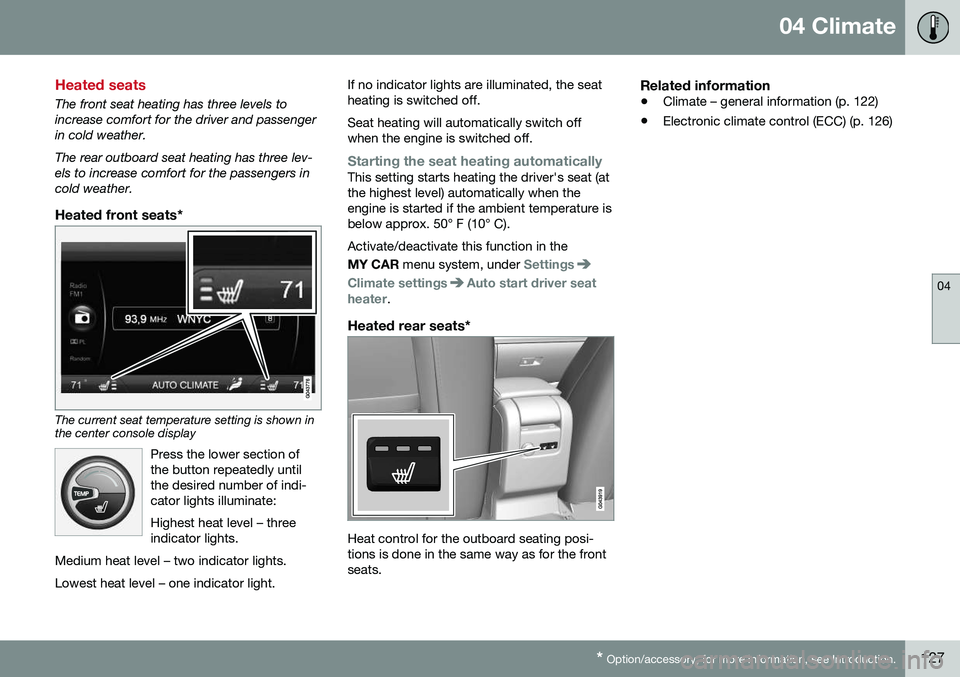
Heated front seats*
The current seat temperature setting is shown in the center console display
Press the lower section of the button repeatedly untilthe desired number of indi-cator lights illuminate: Highest heat level – three indicator lights.
Medium heat level – two indicator lights. Lowest heat level – one indicator light.
If no indicator lights are illuminated, the seat heating is switched off. Seat heating will automatically switch off when the engine is switched off.
Starting the seat heating automaticallyThis setting starts heating the driver's seat (at the highest level) automatically when theengine is started if the ambient temperature isbelow approx. 50° F (10° C). Activate/deactivate this function in the MY CAR menu system, under
Settings
Climate settingsAuto start driver seat
heater.
Heated rear seats*
Heat control for the outboard seating posi- tions is done in the same way as for the frontseats.
Related information
• Climate – general information (p. 122)
• Electronic climate control (ECC) (p. 126)
Page 130 of 402
04 Climate
04
128
Temperature and blower control
When the vehicle is started, the most recent setting is resumed. The blower should always be activated to help avoid condensation and fogging on thewindows.
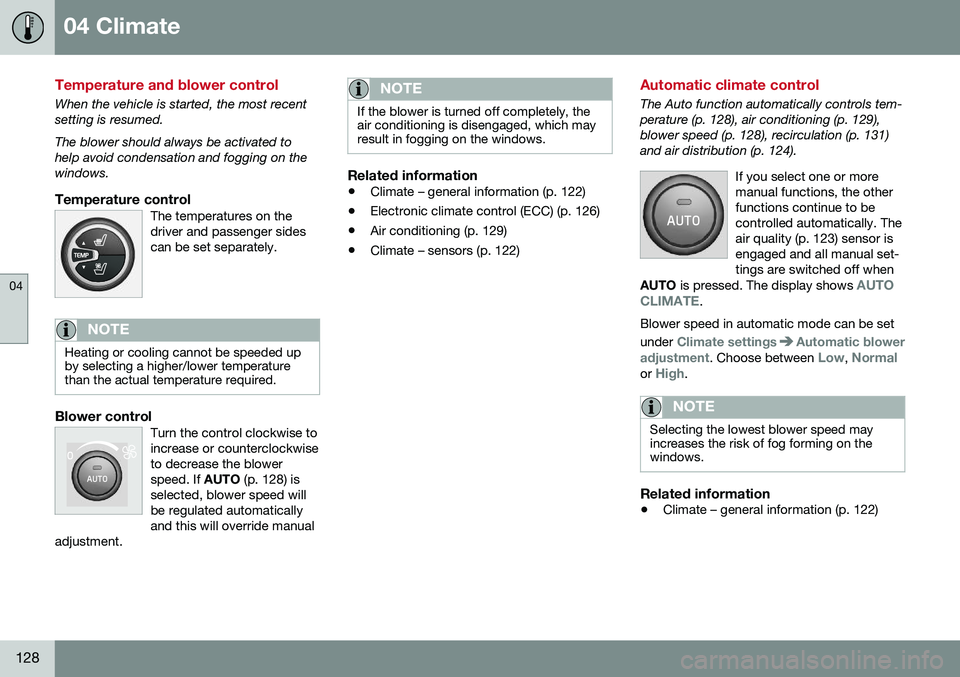
Temperature controlThe temperatures on thedriver and passenger sidescan be set separately.
NOTE
Heating or cooling cannot be speeded up by selecting a higher/lower temperaturethan the actual temperature required.
Blower controlTurn the control clockwise to increase or counterclockwiseto decrease the blowerspeed. If AUTO (p. 128) is
selected, blower speed willbe regulated automaticallyand this will override manual
adjustment.
NOTE
If the blower is turned off completely, the air conditioning is disengaged, which mayresult in fogging on the windows.
Related information
• Climate – general information (p. 122)
• Electronic climate control (ECC) (p. 126)
• Air conditioning (p. 129)
• Climate – sensors (p. 122)
Automatic climate control
The Auto function automatically controls tem- perature (p. 128), air conditioning (p. 129),blower speed (p. 128), recirculation (p. 131)and air distribution (p. 124).
If you select one or moremanual functions, the otherfunctions continue to becontrolled automatically. Theair quality (p. 123) sensor isengaged and all manual set-tings are switched off when
AUTO is pressed. The display shows
AUTO
CLIMATE.
Blower speed in automatic mode can be set under
Climate settingsAutomatic blower
adjustment
. Choose between Low, Normalor High.
NOTE
Selecting the lowest blower speed may increases the risk of fog forming on thewindows.
Related information
• Climate – general information (p. 122)
Page 131 of 402
04 Climate
04
}}
* Option/accessory, for more information, see Introduction.129
Air conditioning
The air conditioning function cools and dehu- midifies the air in the passenger compart-ment.
When the indicator light inthe button is on, the air con-ditioning is controlled auto-matically. This cools/heatsand dehumidifies the incom-ing air. When the indicatorlight in the button is off, the
air conditioning is disengaged. Other func-tions are still controlled automatically. Whenmaximum defroster (p. 129) is selected, theair conditioning system is set for maximumblower speed and dehumidifies the cabin asquickly as possible.
Related information
• Climate – general information (p. 122)
• Automatic climate control (p. 128)
Max. defroster and electrically heated windshield*
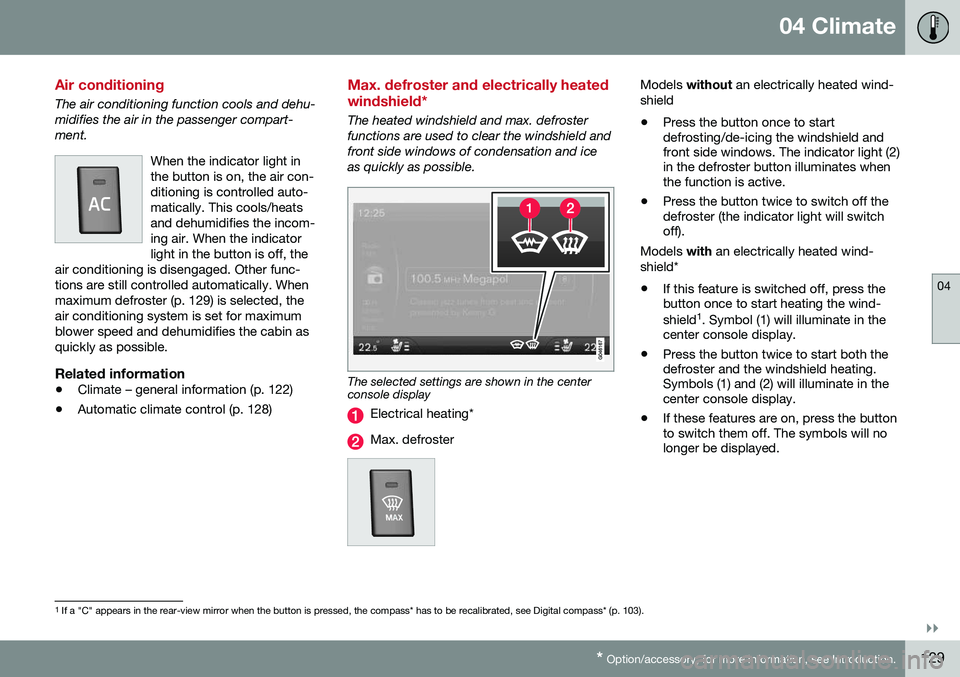
The heated windshield and max. defroster functions are used to clear the windshield andfront side windows of condensation and iceas quickly as possible.
The selected settings are shown in the center console display
Electrical heating*
Max. defroster
Models
without an electrically heated wind-
shield • Press the button once to start defrosting/de-icing the windshield andfront side windows. The indicator light (2)in the defroster button illuminates whenthe function is active.
• Press the button twice to switch off thedefroster (the indicator light will switchoff).
Models with an electrically heated wind-
shield*
• If this feature is switched off, press thebutton once to start heating the wind- shield 1
. Symbol (1) will illuminate in the
center console display.
• Press the button twice to start both the defroster and the windshield heating.Symbols (1) and (2) will illuminate in thecenter console display.
• If these features are on, press the buttonto switch them off. The symbols will nolonger be displayed.
1
If a "C" appears in the rear-view mirror when the button is pressed, the compass* has to be recalibrated, see Digital compass* (p. 103).
Page 132 of 402
||
04 Climate
04
130* Option/accessory, for more information, see Introduction.
NOTE
• Triangular areas at the far sides of the windshield are not heated electricallyand will take slightly longer todefrost/de-ice.
• The heated windshield may affect theperformance/range of e.g., transpond-ers used to automatically pay highwaytolls or other communication equip-ment.
The following occurs when the defroster/ windshield heating functions have been acti-vated: •
Blower speed increases automatically and the air conditioning (p. 129) willswitch on (if not already on and if the pas-senger compartment blower is not turnedoff) to dehumidify the air in the passengercompartment. Air conditioning can beswitched off by pressing the
AC button.
• Recirculation (p. 131) will not functionwhile defrost is engaged.
The climate system will return to its previous
settings when the defroster/windshield heat- ing function is switched off. See also Heated windshield*, rear window and door mirror defrosters (p. 102) for addi-tional information.
Related information
• Climate – general information (p. 122)
• Automatic climate control (p. 128)
Air distribution – function
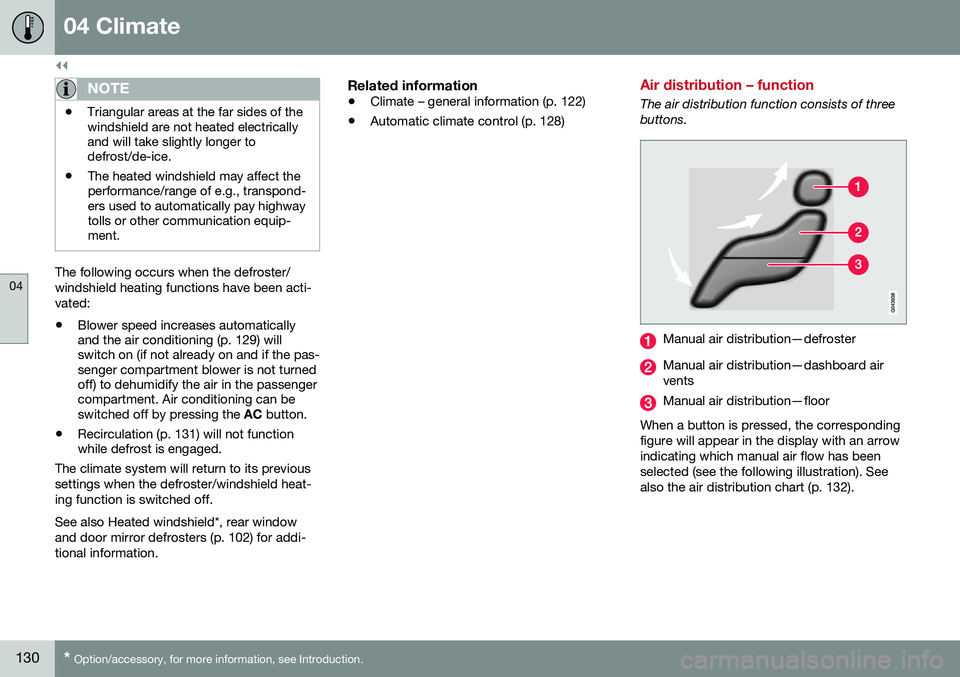
The air distribution function consists of three buttons.
Manual air distribution—defroster
Manual air distribution—dashboard air vents
Manual air distribution—floor
When a button is pressed, the corresponding figure will appear in the display with an arrowindicating which manual air flow has beenselected (see the following illustration). Seealso the air distribution chart (p. 132).
Page 257 of 402
08 Starting and driving
08
* Option/accessory, for more information, see Introduction.255
Engine Remote Start (ERS)* – starting the engine
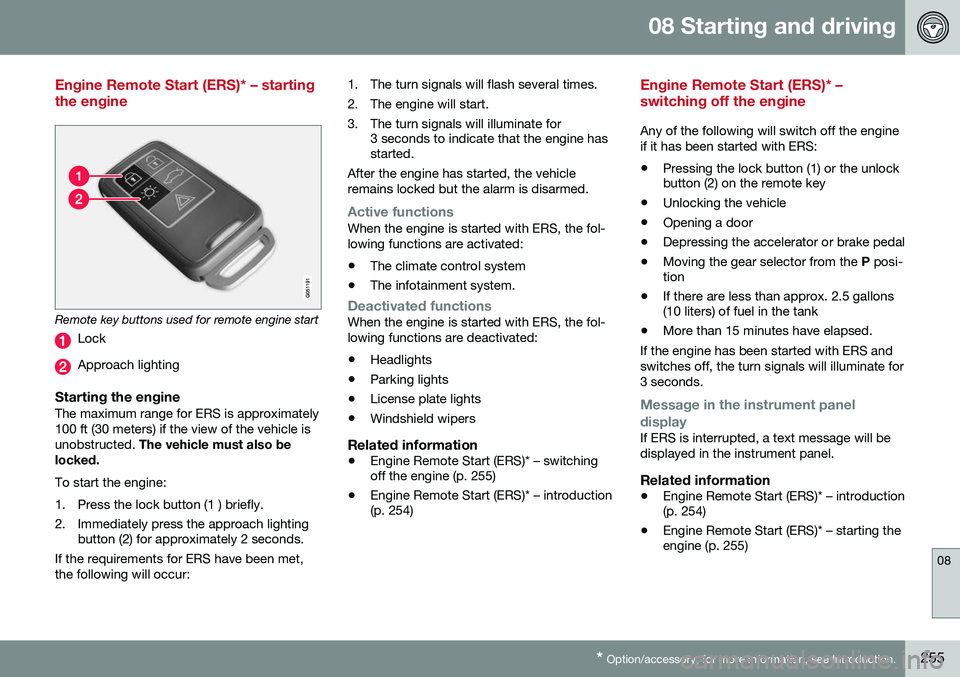
Remote key buttons used for remote engine start
Lock
Approach lighting
Starting the engineThe maximum range for ERS is approximately 100 ft (30 meters) if the view of the vehicle isunobstructed. The vehicle must also be
locked. To start the engine:
1. Press the lock button (1 ) briefly.
2. Immediately press the approach lighting button (2) for approximately 2 seconds.
If the requirements for ERS have been met, the following will occur: 1. The turn signals will flash several times.
2. The engine will start.
3. The turn signals will illuminate for
3 seconds to indicate that the engine has started.
After the engine has started, the vehicle remains locked but the alarm is disarmed.
Active functionsWhen the engine is started with ERS, the fol- lowing functions are activated: • The climate control system
• The infotainment system.
Deactivated functionsWhen the engine is started with ERS, the fol- lowing functions are deactivated: •Headlights
• Parking lights
• License plate lights
• Windshield wipers
Related information
•
Engine Remote Start (ERS)* – switching off the engine (p. 255)
• Engine Remote Start (ERS)* – introduction(p. 254)
Engine Remote Start (ERS)* – switching off the engine
Any of the following will switch off the engine if it has been started with ERS:
• Pressing the lock button (1) or the unlock button (2) on the remote key
• Unlocking the vehicle
• Opening a door
• Depressing the accelerator or brake pedal
• Moving the gear selector from the
P posi-
tion
• If there are less than approx. 2.5 gallons(10 liters) of fuel in the tank
• More than 15 minutes have elapsed.
If the engine has been started with ERS and switches off, the turn signals will illuminate for3 seconds.
Message in the instrument panel
display
If ERS is interrupted, a text message will be displayed in the instrument panel.
Related information
• Engine Remote Start (ERS)* – introduction (p. 254)
• Engine Remote Start (ERS)* – starting theengine (p. 255)
Page 266 of 402
||
08 Starting and driving
08
264* Option/accessory, for more information, see Introduction.
Condition/situation
The driver is turning the steering wheel hard.
The road's incline is very steep.
A trailer's electrical system is connected to the vehicle.
The hood has been opened A
.
The transmission has not reached its nor- mal operating temperature.
Atmospheric pressure is below a level equivalent to an altitude of approx. 4,900–8,200 ft (1500–2500 m) above sea level.The actual pressure is also affected by cur-rent weather conditions.
The Adaptive Cruise Control's* Queue Assist feature is activated.
The gear selector is in the SB
or " +/–" posi-
tion.
A Certain engines only
B Sport mode (where applicable)
Related information
• Start/Stop – introduction (p. 262)
• Start/Stop – function (p. 262)
• Start/Stop – settings (p. 265)
• Start/Stop – Auto-start exceptions (p. 264) •
Start/Stop – Hill Start Assist (HSA)(p. 262)
• Start/Stop – symbols and messages(p. 266)
Start/Stop – Auto-start exceptions
In certain situations or conditions, the engine may auto-start
even though the driver is still
pressing the brake pedal, such as if:
Condition/situation
Condensation forms on the windows.
The climate system cannot keep the desired settings in the passenger compart-ment.
Electrical current consumption is tempo- rarily high or the main battery's charge isbelow the minimum level.
The brake pedal is pumped repeatedly.
The hood has been opened A
.
The vehicle begins to move or increases speed slightly (if the engine auto-stoppedbefore the vehicle was at a standstill (seeECO* (p. 267))).
The driver unbuckles his/her seat belt while the gear selector is in the D or N positions.
The steering wheel is turned A
.
Page 270 of 402
||
08 Starting and driving
08
268* Option/accessory, for more information, see Introduction.
This feature is primarily intended to be used in driving situations where a decrease inspeed is expected, such as when approach-ing an intersection or a traffic light. Eco Coast enables proactive driving with as little braking as possible.
Combinations of On and OffDepending on the driving situation, Eco can be used in different ways to help reduce fuelconsumption:
• With Eco activated
: this enables Eco
Coast, which allows the vehicle to roll
freely for as far as possible when the
driver releases the accelerator pedal (e.g., when approaching a traffic light or inter-section).
or
• With Eco deactivated
: engine braking
can be used when the vehicle will only
roll for a short distance (in heavy traffic,
etc.) or when driving down hills .
To help keep fuel consumption as low as possible, Eco Coast should not be used intraffic situations where the brakes have to beused frequently.
Activating Eco CoastEco Coast is activated when the accelerator pedal is released completely if:
• Eco is activated
• The gear selector is in
D •
The vehicle's speed is between approxi- mately 40–85 mph (65–140 km/h). Alwaysobserve posted speed limits
• The gradient of a down-slope is less thanapproximately 6%
Deactivating Eco CoastIn certain situations, it may be advisable to switch off the Eco Coast function, such as:
• When driving down steep hills, in order to utilize engine braking
• Prior to passing another vehicle, in orderto do so as safely as possible
Deactivating Eco Coast (and reactivating engine braking) can be done in the followingways:
• Press the
ECO button on the center con-
sole
• Move the gear selector to the manual "
S
+/– " position
• Change gears using the steering wheel paddles*
• Press the brake or accelerator pedal
Eco Coast limitationsThis function will not be available if:
• Cruise control is activated
• The gradient of a down-slope is morethan approximately 6%
• The steering wheel paddles* are used tomanually change gears •
The engine and/or transmission have notreached their normal operating tempera-ture
• The gear selector is moved from
D to the
manual " S+/–" position
• The vehicle's speed is not within the40–85 mph (65–140 km/h). interval
Additional information and settings
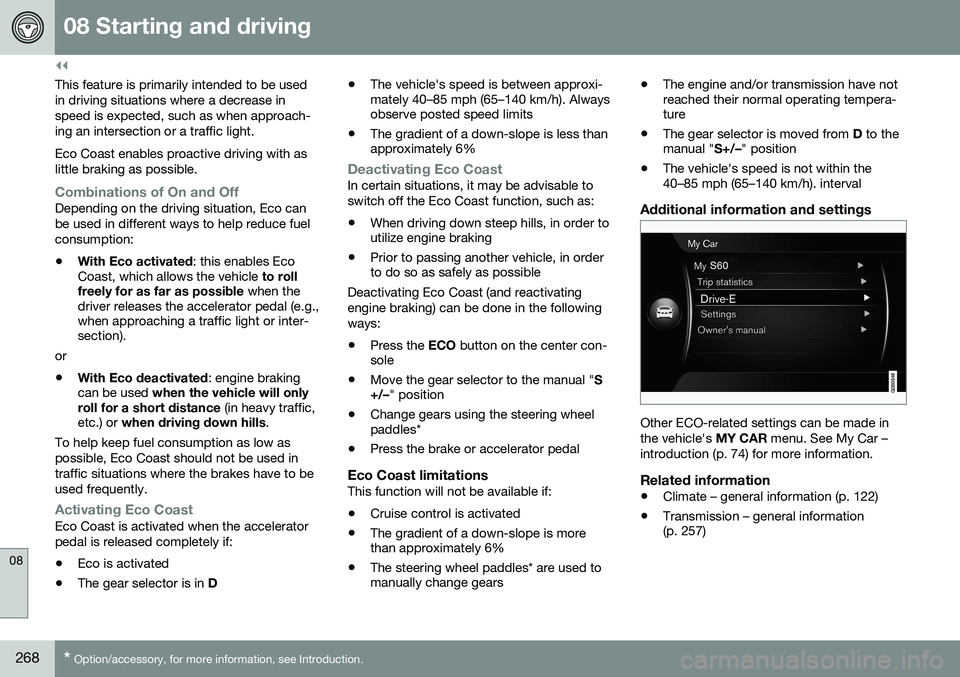
Other ECO-related settings can be made in the vehicle's
MY CAR menu. See My Car –
introduction (p. 74) for more information.
Related information
• Climate – general information (p. 122)
• Transmission – general information (p. 257)
Page 288 of 402
||
08 Starting and driving
08
286* Option/accessory, for more information, see Introduction.
• Using the engine's optional Eco func- tion18
can help improve fuel economy. For
additional information, see ECO* (p. 267).
• Using the transmission's Sport mode 19
may increase fuel consumption some- what. Use the transmission's Drive ( D)
position as often as possible. For addi-tional information about Sport mode, seeTransmission – Geartronic (p. 259).
• Do not exceed posted speed limits.
• Avoid carrying unnecessary items (extraload) in the vehicle.
• Maintain correct tire pressure. Check tirepressure regularly (when tires are cold).
• Remove snow tires when threat of snowor ice has ended.
• Note that roof racks, ski racks, etc,increase air resistance and also fuel con-sumption.
• At highway driving speeds, fuel consump-tion will be lower with the air conditioningon and the windows closed than with theair conditioning off and the windowsopen.
• Using the onboard trip computer's fuelconsumption modes can help you learnhow to drive more economically.
Other factors that decrease gas mileage are: •
Dirty air cleaner
• Dirty engine oil and clogged oil filter
• Dragging brakes
• Incorrect front end alignment
Some of the above mentioned items and oth-ers are checked at the standard maintenanceintervals.
WARNING
Driving with the tailgate open: Driving
with the tailgate open could lead to poi- sonous exhaust gases entering the pas-senger compartment. If the tailgate mustbe kept open for any reason, proceed asfollows: • Close the windows
• Set the ventilation system control to air flow to floor, windshield and side win-dows and the blower control to itshighest setting.
Handling and roadholdingAt the specified curb weight your vehicle has a tendency to understeer, which means thatthe steering wheel has to be turned morethan might seem appropriate for the curva-ture of a bend. This ensures good stabilityand reduces the risk of rear wheel skid.Remember that these properties can alter with the vehicle load. The heavier the load inthe cargo area, the less the tendency toundersteer. •
Vehicle load, tire design and inflation pressure all affect vehicle handling.Therefore, check that the tires are inflatedto the recommended pressure accordingto the vehicle load. Loads should be dis-tributed so that capacity weight or maxi-mum permissible axle loads are notexceeded.
• At the specified curb weight your vehiclehas a tendency to understeer, whichmeans that the steering wheel has to beturned more than might seem appropriatefor the curvature of a bend. This ensuresgood stability and reduces the risk of rearwheel skid. Remember that these proper-ties can alter with the vehicle load. Theheavier the load in the cargo compart-ment, the less the tendency to under-steer.
Related information
• Climate – general information (p. 122)
18
Available on certain 4-cyl. engines
19 Models with the T6 turbo engine only.
Page 310 of 402
09 Wheels and tires
09
308
side B-pillar and in the tire inflation table in this chapter.
• Cold tires
: The tires are considered to be
cold when they have the same tempera-ture as the surrounding (ambient) air. Thistemperature is normally reached after thevehicle has been parked for at least3 hours.Tire specifications – Uniform Tire Quality Grading
ALL PASSENGER VEHICLE TIRES MUST CONFORM TO FEDERAL SAFETYREQUIREMENTS IN ADDITION TO THESEGRADES .
Quality grades can be found, where appli-cable, on the tire sidewall between thetread shoulder and maximum sectionwidth. For example: Treadwear 200 Traction AA Temperature A
TREADWEARThe treadwear grade is a comparative rating based on the wear rate of the tire when tes-ted under controlled conditions on a specifiedgovernment test course. For example, a tiregraded 150 would wear one and one half(1 ½) times as well on the government courseas a tire graded 100. The relative perform-ance of tires depends upon the actual condi-tions of their use, however, and many departsignificantly from the norm due to variation indriving habits, maintenance practices and dif-ferences in road characteristics and climate.
TRACTIONThe traction grades, from highest to lowest,are AA, A, B, and C, as measured under con-trolled conditions on specified governmenttest surfaces of asphalt and concrete. A tiremarked C may have poor traction perform- ance. The traction grade assigned to this tireis based on braking (straight-ahead) tractiontests and is not a measure of cornering (turn-ing) traction.
WARNING
The traction grade assigned to this tire is based on braking (straight-ahead) tractiontests and is not a measure of cornering(turning) traction.
TEMPERATUREThe temperature grades are A (the highest), B, and C, representing the tire's resistance tothe generation of heat and its ability to dissi-pate heat when tested under controlled con-ditions on a specified indoor laboratory testwheel. Sustained high temperature can causethe material of the tire to degenerate andreduce tire life, and excessive temperaturecan lead to sudden tire failure. The grade Ccorresponds to a minimum level of perform-ance that all passenger vehicle tires mustmeet under the Federal Motor Safety Stand-ard No. 109. Grades B and A represent higherlevels of performance on the laboratory testwheel than the minimum required by law.
Page 328 of 402
10 Maintenance and servicing
10
326
Maintenance – introduction
Periodic maintenance will help keep your vehicle running well.
IntroductionThe maintenance services contain severalchecks that require special instruments andtools and therefore must be performed by aqualified technician. To keep your Volvo intop condition, specify time-tested and provenGenuine Volvo Parts and Accessories.
The Federal Clean Air Act – U.S.The Federal Clean Air Act requires vehicle manufacturers to furnish written instructionsto the ultimate purchaser to assure the properservicing and function of the components thatcontrol emissions. These services, which arelisted in the "Warranty and Service RecordsInformation" booklet, are not covered by thewarranty. You will be required to pay for laborand material used.
MaintenanceYour Volvo passed several major inspections before it was delivered to you, in accordancewith Volvo specifications. The maintenanceprocedures outlined in the Warranty andService Records Information booklet, many ofwhich will positively affect your vehicle'semissions, should be performed as indicated.It is recommended that receipts for vehicleemission maintenance be retained in casequestions arise concerning maintenance.Inspection and maintenance should also beperformed anytime a malfunction is observedor suspected.
Applicable warranties – U.S./CanadaIn accordance with applicable U.S. and Canadian regulations, the following list ofwarranties is provided.
• New Vehicle Limited Warranty
• Parts and Accessories Limited Warranty
• Corrosion Protection Limited Warranty
• Seat Belt and Supplemental Restraint Systems Limited Warranty
• Emission Design and Defect Warranty
• Emission Performance Warranty
These are the federal warranties; other war- ranties are provided as required by state/provincial law. Refer to your separate War-ranty and Service Records Information book-let for detailed information concerning eachof the warranties.
Periodic maintenance helps minimize emissions
NOTE
• Refer to your Warranty and Service Records Information booklet for acomprehensive service and mainte-nance schedule up to 150,000 miles(240,000 km). This program containsinspections and services necessary forthe proper function of your vehicle andincludes components that affect vehi-cle emissions.
• The Warranty and Service RecordsInformation booklet also containsdetailed information concerning thewarranties that apply to your vehicle.
Related information
•
Climate – general information (p. 122)