keyless VOLVO V60 2016 Owner´s Manual
[x] Cancel search | Manufacturer: VOLVO, Model Year: 2016, Model line: V60, Model: VOLVO V60 2016Pages: 402, PDF Size: 10.3 MB
Page 159 of 402
06 Locks and alarm
06
}}
* Option/accessory, for more information, see Introduction.157
position of the driver's seat
2
and door mirrors
will be stored in the remote key's memory. The next time a door is opened by a person with the same remote key in his/her posses-
sion, the driver's seat and door mirrors willautomatically move to the position that theywere in when the door was most recentlylocked.
NOTE
If several people carrying remote keys approach the vehicle at the same time, thedriver's seat and door mirrors will assumethe positions they were in for the personwho opens the driver's door.
See also power seats (p. 79) for information on adjusting and storing the seat's position inthe seat memory.
NOTE
If the vehicle is locked by pressing the but- ton on one of the door handles or bypressing the lock button on the remotekey, or if it is left unlocked for more than30 minutes, the key memory function willbe deactivated. To reactivate the key's memory: • Unlock the vehicle by pulling a door handle with the remote key in yourpossession or by pressing the unlockbutton on the remote key.
Related information
•
Keyless drive*– locking/unlocking (p. 155)
• Remote key – functions (p. 149)
Keyless drive* – messages
If all of the remote keys are removed from the vehicle while the engine is running or if theignition modes (p. 77) is in mode
II and all of
the doors are closed, a message will appearin the instrument panel display and an audiblesignal will sound. When at least one remote key has been returned to the car, the message will beerased in the display and the audible signalwill stop when:
• A door has been opened and closed
• The remote key has been inserted in the ignition slot
• The
OK button has been pressed. For the
location of this button, see Informationdisplay – menu controls (p. 111)
2 Power seats only
Page 160 of 402
06 Locks and alarm
06
158* Option/accessory, for more information, see Introduction.
CAUTION
• Keyless drive remote keys should never be left in the vehicle. In the eventof a break-in, a remote found in thevehicle could make it possible to startthe engine.
• Electromagnetic fields or metalobstructions can interfere with thekeyless drive system. The remote keyshould never be placed closer thanapproximately 4-6 in. (10-15 cm) tocell phones, metallic objects or e.g.,stored in a metal briefcase.
USA – FCC ID:KR55WK48952, KR55WK48964 NOTEThis device complies with part 15 of the FCC Rules. Operation is subject to the followingtwo conditions: (1) This device may not causeharmful interference, and (2) this device mustaccept interference received, including inter-ference that may cause undesired operation. CAUTIONChanges or modifications not expressly approved by the manufacturer could void theuser's authority to operate the equipment. Siemens VDO5WK48891Tested To Comply With FCC Standards For Automobile UseCanada – IC:267T-5WK48952, 267T-5WK48964, 267T-5WK48891 NOTEThis device complies with RSS -210 of Indus- try Canada. Operation is subject to the fol-lowing two conditions: (1) This device maynot cause harmful interference, and (2) thisdevice must accept interference received,including interference that may cause unde-sired operation. CAUTIONChanges or modifications not expressly approved by the manufacturer could void theuser's authority to operate the equipment.
Keyless drive* – antenna locations
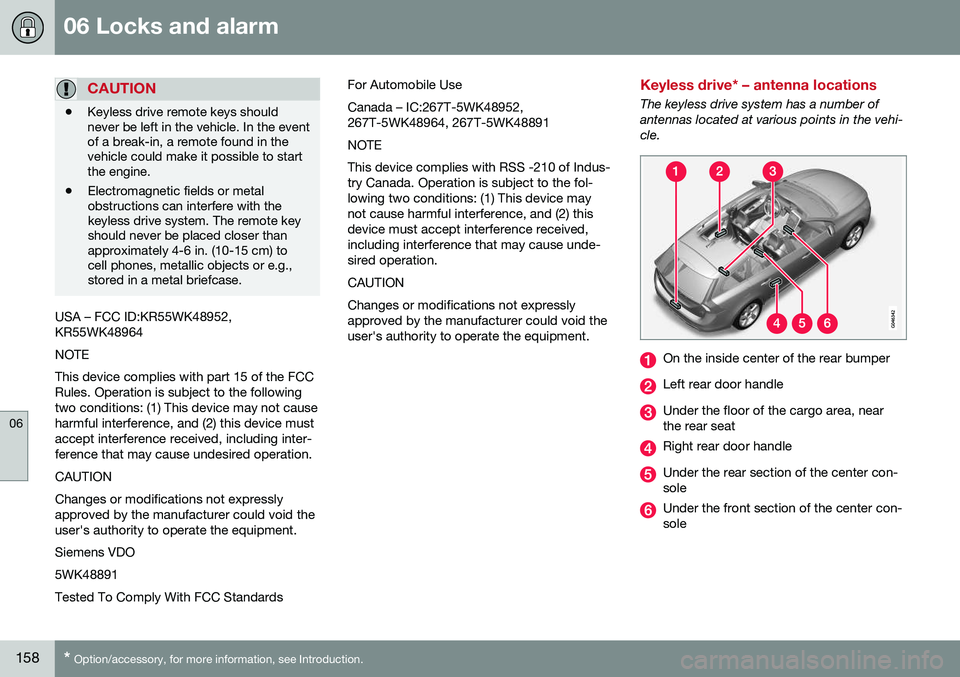
The keyless drive system has a number of antennas located at various points in the vehi-cle.
On the inside center of the rear bumper
Left rear door handle
Under the floor of the cargo area, near the rear seat
Right rear door handle
Under the rear section of the center con- sole
Under the front section of the center con- sole
Page 161 of 402
06 Locks and alarm
06
* Option/accessory, for more information, see Introduction.159
WARNING
People with implanted pacemakers should not allow the pacemaker to come closerthan 9 inches (22 cm) to any of the keylessdrive system's antennas. This is to helpprevent interference between the pace-maker and the keyless drive system.
Related information
• Keyless drive*– locking/unlocking (p. 155)
Locking/unlocking – from the outside
The remote key (p. 146) is used to lock/unlock all of the doors and the tailgate at the sametime. Different settings for unlocking the vehi-cle can be selected, see Remote key – func-tions (p. 149). Before the vehicle can be locked from the outside with the remote key, the driver's doormust be closed. If the tailgate or any otherdoor is open, it will be locked and the alarmwill be armed.
NOTE
Be sure the remote key is outside of the vehicle before the other doors/tailgate areclosed to help avoid locking the remoteinside the vehicle.
If the vehicle is equipped with the optional keyless drive system, all doors/tailgate mustbe closed before the vehicle can be locked. The first press on the unlock button unlocks the driver's door and a second press unlocksthe other doors and the tailgate (see alsoremote key and key blade (p. 146)). This set-ting can be changed in the menu system. SeeMY CAR
(p. 74) for a description.
If the locks repeatedly do not react when theunlock button is pressed, it may be necessaryto replace the battery in the remote, seeRemote key – replacing the battery (p. 153). In this case the vehicle can be unlocked withthe detachable key blade (p. 152).
Related information
•
Locking/unlocking – from inside (p. 160)
Page 165 of 402
06 Locks and alarm
06
}}
163
Unlocking the tailgate with the remote key
–Press the tailgate unlock button on the remote key to unlock (but not open) thetailgate. See Remote key and keyblade (p. 146) for more information.
> The alarm indicator light on the dash-board will go out to indicate that the alarm is not monitoring the entire vehi-cle.
NOTE
• If the doors are locked while the tail- gate is open, the tailgate will remainunlocked until the vehicle is relockedby pressing the Lock button on theremote key.
• On keyless drive vehicles, the gearselector must be in the Park (
P) posi-
tion, all doors and the tailgate must beclosed and the ignition must beswitched off before the vehicle can belocked.
Unlocking the tailgate from the driver's seat
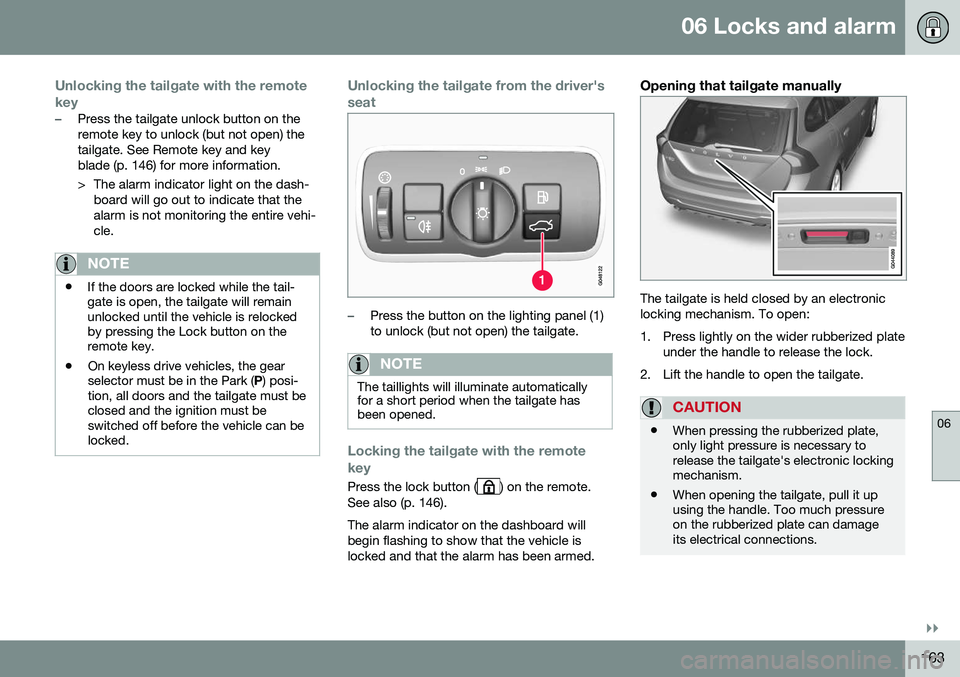
–Press the button on the lighting panel (1) to unlock (but not open) the tailgate.
NOTE
The taillights will illuminate automatically for a short period when the tailgate hasbeen opened.
Locking the tailgate with the remote key
Press the lock button () on the remote.
See also (p. 146). The alarm indicator on the dashboard will begin flashing to show that the vehicle islocked and that the alarm has been armed.
Opening that tailgate manually
The tailgate is held closed by an electronic locking mechanism. To open:
1. Press lightly on the wider rubberized plate under the handle to release the lock.
2. Lift the handle to open the tailgate.
CAUTION
• When pressing the rubberized plate, only light pressure is necessary torelease the tailgate's electronic lockingmechanism.
• When opening the tailgate, pull it upusing the handle. Too much pressureon the rubberized plate can damageits electrical connections.
Page 167 of 402
06 Locks and alarm
06
165
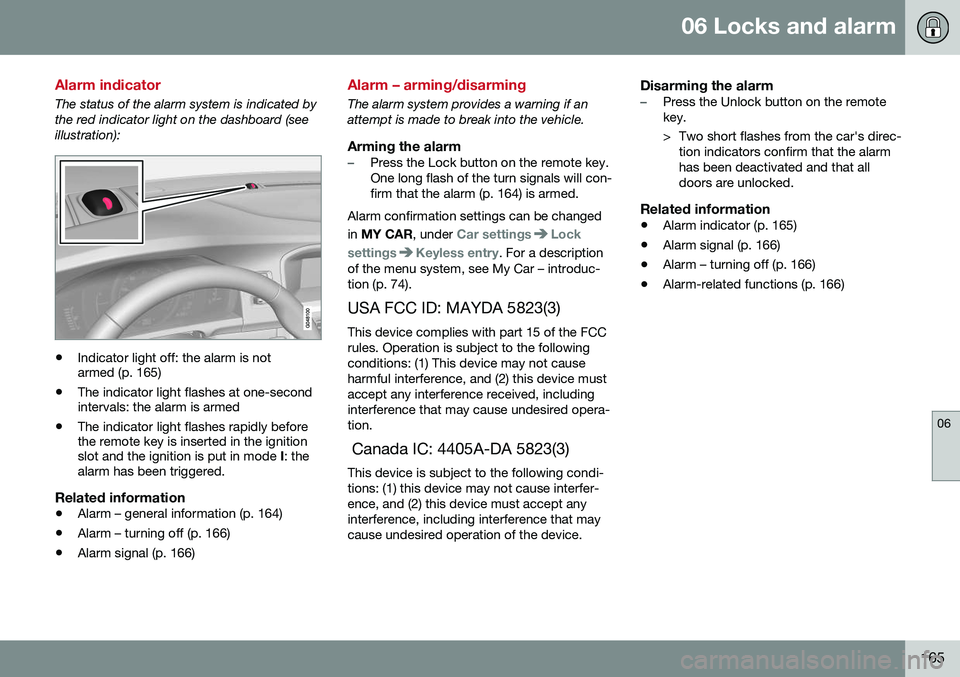
Alarm indicator
The status of the alarm system is indicated by the red indicator light on the dashboard (seeillustration):
•Indicator light off: the alarm is not armed (p. 165)
• The indicator light flashes at one-secondintervals: the alarm is armed
• The indicator light flashes rapidly beforethe remote key is inserted in the ignitionslot and the ignition is put in mode
I: the
alarm has been triggered.
Related information
• Alarm – general information (p. 164)
• Alarm – turning off (p. 166)
• Alarm signal (p. 166)
Alarm – arming/disarming
The alarm system provides a warning if an attempt is made to break into the vehicle.
Arming the alarm–Press the Lock button on the remote key. One long flash of the turn signals will con-firm that the alarm (p. 164) is armed.
Alarm confirmation settings can be changed in MY CAR , under
Car settingsLock
settings
Keyless entry. For a description
of the menu system, see My Car – introduc- tion (p. 74).
USA FCC ID: MAYDA 5823(3) This device complies with part 15 of the FCCrules. Operation is subject to the followingconditions: (1) This device may not causeharmful interference, and (2) this device mustaccept any interference received, includinginterference that may cause undesired opera-tion. Canada IC: 4405A-DA 5823(3) This device is subject to the following condi- tions: (1) this device may not cause interfer-ence, and (2) this device must accept anyinterference, including interference that maycause undesired operation of the device.
Disarming the alarm–Press the Unlock button on the remote key.
> Two short flashes from the car's direc- tion indicators confirm that the alarm has been deactivated and that alldoors are unlocked.
Related information
• Alarm indicator (p. 165)
• Alarm signal (p. 166)
• Alarm – turning off (p. 166)
• Alarm-related functions (p. 166)
Page 168 of 402
06 Locks and alarm
06
166
Alarm signal
An audible (p. 164) signal is given by a battery powered siren. The alarm cycle lasts for30 seconds. The visual alarm signal is given by flashing all turn signals for approximately 5 minutes oruntil the alarm is turned off.
Related information
•Alarm indicator (p. 165)
• Alarm – arming/disarming (p. 165)
• Alarm – turning off (p. 166)
Alarm – turning off
The alarm system provides a warning if an attempt is made to break into the vehicle. If the alarm is sounding, it can be stopped by pressing the Unlock button on the remote keyor by inserting the remote key in the ignitionslot. Two short flashes from the car's turn sig-nals confirm that the alarm has been turnedoff.
Related information
•Alarm indicator (p. 165)
• Alarm – arming/disarming (p. 165)
• Remote key – replacing the battery (p. 153)
Alarm-related functions
The following is general information regarding the alarm system in your vehicle.
Automatic re-armingIf the doors are unlocked, the locks will auto-matically re-engage (re-lock) and the alarmwill re-arm after 2 minutes unless a door orthe tailgate has been opened.
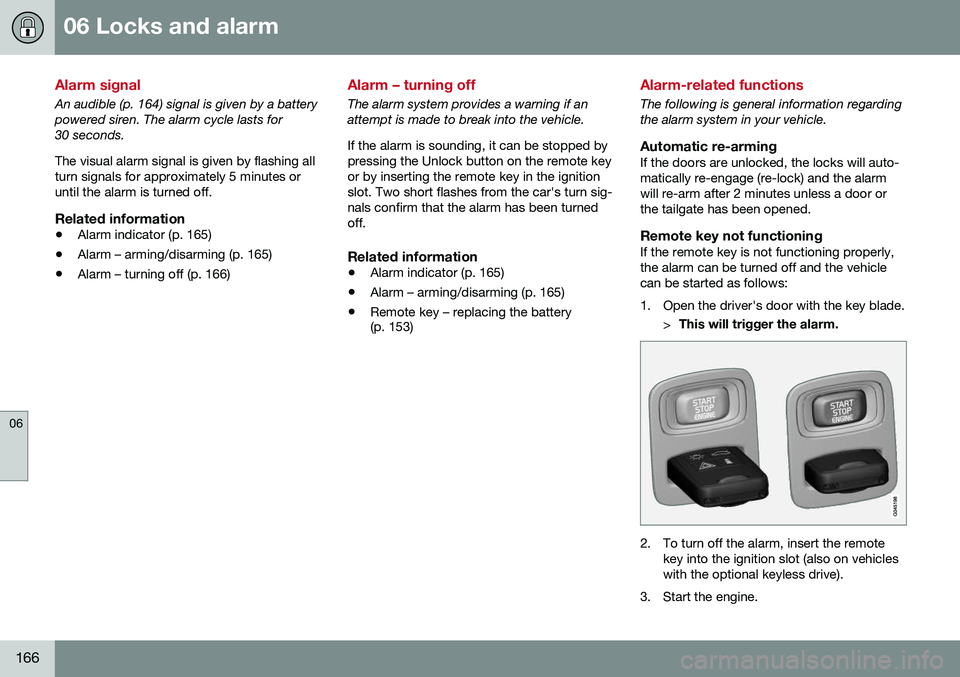
Remote key not functioningIf the remote key is not functioning properly,the alarm can be turned off and the vehiclecan be started as follows:
1. Open the driver's door with the key blade.
>This will trigger the alarm.
2. To turn off the alarm, insert the remote
key into the ignition slot (also on vehicles with the optional keyless drive).
3. Start the engine.
Page 254 of 402
08 Starting and driving
08
252* Option/accessory, for more information, see Introduction.
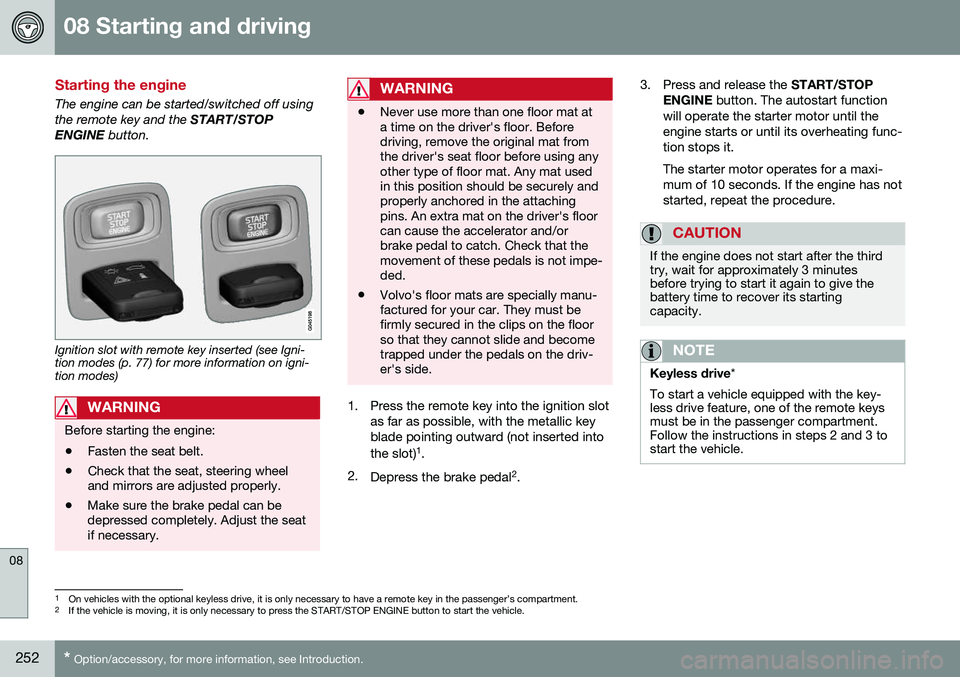
Starting the engine
The engine can be started/switched off using the remote key and the START/STOP
ENGINE button.
Ignition slot with remote key inserted (see Igni- tion modes (p. 77) for more information on igni-tion modes)
WARNING
Before starting the engine:
• Fasten the seat belt.
• Check that the seat, steering wheel and mirrors are adjusted properly.
• Make sure the brake pedal can bedepressed completely. Adjust the seatif necessary.
WARNING
•Never use more than one floor mat at a time on the driver's floor. Beforedriving, remove the original mat fromthe driver's seat floor before using anyother type of floor mat. Any mat usedin this position should be securely andproperly anchored in the attachingpins. An extra mat on the driver's floorcan cause the accelerator and/orbrake pedal to catch. Check that themovement of these pedals is not impe-ded.
• Volvo's floor mats are specially manu-factured for your car. They must befirmly secured in the clips on the floorso that they cannot slide and becometrapped under the pedals on the driv-er's side.
1. Press the remote key into the ignition slot
as far as possible, with the metallic key blade pointing outward (not inserted into the slot) 1
.
2. Depress the brake pedal 2
. 3. Press and release the
START/STOP
ENGINE button. The autostart function
will operate the starter motor until the engine starts or until its overheating func-tion stops it. The starter motor operates for a maxi- mum of 10 seconds. If the engine has notstarted, repeat the procedure.
CAUTION
If the engine does not start after the third try, wait for approximately 3 minutesbefore trying to start it again to give thebattery time to recover its startingcapacity.
NOTE
Keyless drive *
To start a vehicle equipped with the key- less drive feature, one of the remote keysmust be in the passenger compartment.Follow the instructions in steps 2 and 3 tostart the vehicle.
1 On vehicles with the optional keyless drive, it is only necessary to have a remote key in the passenger’s compartment.
2 If the vehicle is moving, it is only necessary to press the START/STOP ENGINE button to start the vehicle.
Page 255 of 402
08 Starting and driving
08
253
WARNING
•Always remove the remote key from the ignition slot when leaving the vehi-cle and ensure that the ignition inmode
0 (see Ignition modes (p. 77) for
information about the ignition modes).
• On vehicles with the optional keylessdrive, never remove the remote keyfrom the vehicle while it is being drivenor towed.
• Always place the gear selector in Parkand apply the parking brake beforeleaving the vehicle. Never leave thevehicle unattended with the enginerunning.
• Always open garage doors fully beforestarting the engine inside a garage toensure adequate ventilation. Theexhaust gases contain carbon monox-ide, which is invisible and odorless butvery poisonous.
NOTE
•
After a cold start, idle speed may be noticeably higher than normal for ashort period. This is done to help bringcomponents in the emission controlsystem to their normal operating tem-perature as quickly as possible, whichenables them to control emissions andhelp reduce the vehicle's impact on the environment 3
.
CAUTION
• When starting in cold weather, the automatic transmission may shift up atslightly higher engine speeds than nor-mal until the automatic transmissionfluid reaches normal operating tem-perature.
• Do not race a cold engine immediatelyafter starting. Oil flow may not reachsome lubrication points fast enough toprevent engine damage.
• The engine should be idling when youmove the gear selector. Never acceler-ate until after you feel the transmissionengage. Accelerating immediately afterselecting a gear will cause harshengagement and premature transmis-sion wear.
• Selecting
P or N when idling at a
standstill for prolonged periods of timewill help prevent overheating of theautomatic transmission fluid.
Related information
• Switching off the engine (p. 254)
3
If the gear selector is in the D or R positions and the car is not moving, engine speed (rpm) will be lower and it will take longer for the engine to reach normal operating temperature.
Page 278 of 402
08 Starting and driving
08
276
Parking brake – releasing
Releasing the electric parking brake
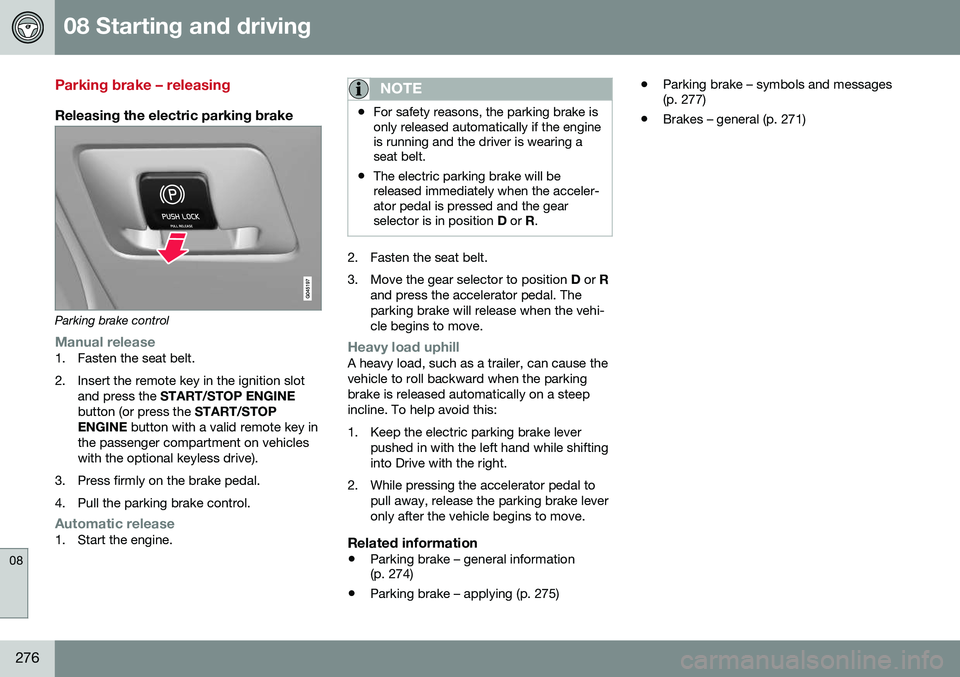
Parking brake control
Manual release1. Fasten the seat belt.
2. Insert the remote key in the ignition slotand press the START/STOP ENGINE
button (or press the START/STOP
ENGINE button with a valid remote key in
the passenger compartment on vehicles with the optional keyless drive).
3. Press firmly on the brake pedal.
4. Pull the parking brake control.
Automatic release1. Start the engine.
NOTE
• For safety reasons, the parking brake is only released automatically if the engineis running and the driver is wearing aseat belt.
• The electric parking brake will bereleased immediately when the acceler-ator pedal is pressed and the gearselector is in position
D or R.
2. Fasten the seat belt.
3. Move the gear selector to position D or R
and press the accelerator pedal. The parking brake will release when the vehi-cle begins to move.
Heavy load uphillA heavy load, such as a trailer, can cause the vehicle to roll backward when the parkingbrake is released automatically on a steepincline. To help avoid this:
1. Keep the electric parking brake lever pushed in with the left hand while shifting into Drive with the right.
2. While pressing the accelerator pedal to pull away, release the parking brake leveronly after the vehicle begins to move.
Related information
• Parking brake – general information (p. 274)
• Parking brake – applying (p. 275) •
Parking brake – symbols and messages(p. 277)
• Brakes – general (p. 271)
Page 291 of 402
08 Starting and driving
08
}}
289
be switched off (but will be on again the next time the engine is started)
• TSA may not intervene when the vehicleand trailer begin to sway if the driver triesto compensate for the swaying motion bymoving the steering wheel rapidly
How TSA worksOnce swaying has begun, it can be very diffi- cult to stop, which makes it difficult to controlthe vehicle and trailer. The TSA system continuously monitors the vehicle's movements, particularly lateralmovement. If the system detects a tendencyto sway, the brakes are applied individuallyon the front wheels, which has a stabilizingeffect on the vehicle and trailer. This is oftenenough to enable the driver to regain controlof the vehicle. If this is not adequate to stop the swaying motion, the brakes are applied to all of thewheels on the vehicle and on the trailer if it isequipped with brakes, and engine power istemporarily reduced. As the swaying motionbegins to decrease and the vehicle-trailerhave once again become stable, TSA will nowstop regulating the brakes/engine power andthe driver regains control of the vehicle.
Related information
• Towing a trailer (p. 287)
• Loading – general (p. 139)
Towing the vehicle
Always check with state and local authorities before attempting to tow another vehiclebecause this type of towing is subject to reg-ulations regarding maximum towing speed,length and type of towing device, lighting, etc.
1. With the remote key fully pressed into the
ignition slot 20
, press START/STOP
ENGINE for approximately 2 seconds to
activate ignition mode II. 2. The remote key must remain in the igni-
tion slot 21
for the entire time that the vehi-
cle is being towed.
3. Keep the tow rope taut when the towing vehicle slows down by applying light pressure on the brake pedal. This willhelp prevent jarring movements of thevehicle being towed.
4. Be prepared to apply the brakes to stop the vehicle being towed.
20Not necessary in vehicles with the optional keyless drive.