service VOLVO V60 2016 Owner´s Manual
[x] Cancel search | Manufacturer: VOLVO, Model Year: 2016, Model line: V60, Model: VOLVO V60 2016Pages: 402, PDF Size: 10.3 MB
Page 314 of 402
||
09 Wheels and tires
09
312
NOTE
If a malfunction occurs in the system, the tire pressure warning light will flash forapproximately 1 minute and then remain illuminated.
Tire press. syst Service
required will be displayed.
Related information
• Tire Pressure Monitoring System (TPMS) – recalibrating (p. 313)
• Tire Pressure Monitoring System (TPMS)– messages (p. 314)
• Tire Pressure Monitoring System (TPMS)– activating/deactivating (p. 314)
• Tire Pressure Monitoring System (TPMS)– changing wheels (p. 312)
Tire Pressure Monitoring System (TPMS) – changing wheels
Please keep the following in mind when changing or replacing the factory installedTPMS wheels/tires on the vehicle: •
Not all aftermarket wheels are equipped with TPMS sensors in the valves.
• If the vehicle is equipped with a tempo-rary spare tire, this tire does not have aTPMS sensor.
• If wheels without TPMS sensors aremounted on the vehicle, a text messagewill displayed in the instrument paneleach time the vehicle is driven above20 mph (30 km/h) for 10 minutes or more.
• Once TPMS sensors are properly instal-led, the warning message should notreappear. If the message is still displayed,drive the vehicle for several minutes at aspeed of 20 mph (30 km/h) or faster toerase the message.
• Volvo recommends that TPMS sensorsbe fitted on all wheels used on the vehi-cle, including winter tires. Volvo does notrecommend moving sensors back andforth between sets of wheels.
CAUTION
When inflating tires with TPMS sensors, press the pump's mouthpiece straightonto the valve to help avoid bending orotherwise damaging the valve.
CAUTION
• After inflating the tires, always reinstall the valve cap to help avoid damage tothe valve from dirt, gravel, etc.
• Use plastic valve caps only. Metalcaps could corrode and become diffi-cult to remove.
NOTE
•
If you change to tires with a different dimension than the factory-installedones, the TPMS system must bereconfigured for these tires. This mustbe done by a trained and qualifiedVolvo service technician.
• If a tire is changed, or if the TPMS sen-sor is moved to another wheel, thesensor's seal, nut, and valve coreshould be replaced.
• When installing TPMS sensors, thevehicle must be parked for at least15 minutes with the ignition off. If thevehicle is driven within 15 minutes, aTPMS error message will be displayed.
Page 317 of 402
09 Wheels and tires
09
315
CAUTION
•After inflating the tires, always reinstall the valve cap to help avoid damage tothe valve from dirt, gravel, etc.
• Use plastic valve caps only. Metalcaps could corrode and become diffi-cult to remove.
WARNING
•Incorrect inflation pressure could lead to tire failure, resulting in a loss of con-trol of the vehicle.
• Tire monitoring systems cannot indi-cate sudden tire damage caused byexternal factors (e.g., a blowout) inadvance.
Related information
•
Tire Pressure Monitoring System (TPMS) – general information (p. 311)
• Tire Pressure Monitoring System (TPMS)– recalibrating (p. 313)
• Tire Pressure Monitoring System (TPMS)– activating/deactivating (p. 314)
• Tire Pressure Monitoring System (TPMS)– changing wheels (p. 312)
• Tire pressure monitoring - introduction(p. 310)
• Tire inflation – pressure table (p. 305)
Tire Monitor - introduction
Tire Monitor uses the rotational speed of the tires in combination with signal analysis of theABS sensor signals to determine if they areproperly inflated. When a tire is under-inflated, its diameter (and consequently also its rotational speed)changes. By comparing the individual tireswith each other it is possible to determine ifone or more tires are under inflated. When low inflation pressure is detected or if the system is not functioning properly, TireMonitor will light up the tire pressure warning light (
) (also referred to as a telltale) in
the instrument panel and will display one of the following messages in the text window, for example:
Tire pressure low Check rear
right tire7 or Tire press. syst Service
required.
If two or more tires have low pressure or if the system cannot determine which tire has low pressure, a general text (
Tire pressure low
Check tires) will be displayed.
NOTE
If a malfunction occurs in the system, the tire pressure warning light will flash forapproximately 1 minute and then remain illuminated.
Tire press. syst Service
required will be displayed.
NOTE
The system indicates low tire pressure but does not replace normal tire maintenance.For information on correct tire pressure,please refer to the tire inflation pressuretable (see Tire inflation – pressure table(p. 305)), the tire inflation pressure placardlocated on the driver's side B-pillar (thestructural member at the side of the vehi-cle, at the rear of the driver's door open-ing) or consult your Volvo retailer.
Related information
• Tire pressure monitoring - introduction (p. 310)
7
That last part of this message varies, depending on the tire(s) effected.
Page 318 of 402
09 Wheels and tires
09
316
Calibrating Tire Monitor
In order for Tire Monitor to work correctly, tire pressure reference values must be set. Thismust be done each time wheels or tire pres-sures are changed.
Calibration1. Switch off the engine.
2. Inflate the tires to the desired pressure(consult tire pressure placard located on the driver's side B-pillar (the structuralmember at the side of the vehicle) andput the ignition in mode II, see Ignition
modes (p. 77).
3. Press the MY CAR button on the center
console control panel and select
Settings
Car settingsTire monitoring.
4. Press OK/MENU , select
Calibrate tire
pressure and press OK/MENU again.
5. Drive away. > The calibration process will be comple-ted while driving and will be interrupted if the vehicle is parked and the engineis switched off. Calibration continuesautomatically when driving resumes.The system will not give any confirma-tion when calibration is finishedalthough it will state if calibration fails.
The new reference values will be used untilsteps 1-5 stated above are repeated.
NOTE
Always remember to calibrate Tire Monitor when the wheels have been changed orthe tire pressure has been correctedaccording to tire pressure placard or tirepressure table. If correct reference valueshave not been set, the system cannotissue low tire pressure alerts correctly.
Tire Monitor status information
The current status of the system and the tires is indicated by color-coded graphics. This status can be displayed by pressing the MY CAR button on the center console and
going to
SettingsCar settingsTire
monitoring.
The following color-coded graphics indicate:
• All green
: the system is operational and
all tire pressures are at or above the rec- ommended levels.
• One yellow wheel
: the tire indicated is
under-inflated.
• All wheels yellow
: two or more tires are
under-inflated
• All wheels gray
: the system is currently
unavailable. It might be necessary todrive at a speed of at least 20 mph(30 km/h) for several minutes for the sys-tem to become operational.
• All wheels gray in combination with the message
Tire press. syst Service
required and the telltale in the instru-
ment panel (
) is illuminated : the
system is not functioning correctly. Have it checked by a trained and qualifiedVolvo service technician.
• All wheels gray in combination with the message
Tire press. syst currently
unavailable and the telltale in the
instrument panel (
) is illuminated :
Page 321 of 402
09 Wheels and tires
09
* Option/accessory, for more information, see Introduction.319
WARNING
• After using the tire sealing system, the vehicle should not be driven fartherthan approximately 120 miles (200km).
• Have the tire inspected by a trainedand qualified Volvo service technicianas soon as possible to determine if itcan be permanently repaired or mustbe replaced.
• The vehicle should not be driven fasterthan 50 mph (80 km/h) while using atire that has been temporarily repairedwith the tire sealing system.
• After using the tire sealing system,drive carefully and avoid abrupt steer-ing maneuvers and sudden stops.
Tire sealing system–temporarily repairing a flat tire
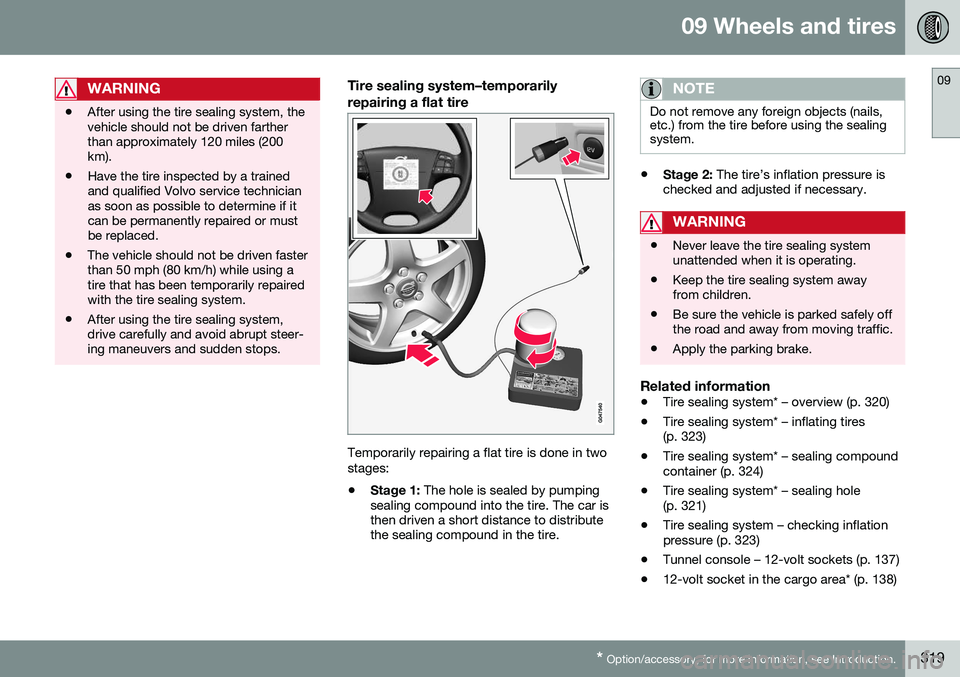
Temporarily repairing a flat tire is done in two stages:
• Stage 1:
The hole is sealed by pumping
sealing compound into the tire. The car is then driven a short distance to distributethe sealing compound in the tire.
NOTE
Do not remove any foreign objects (nails, etc.) from the tire before using the sealingsystem.
• Stage 2:
The tire’s inflation pressure is
checked and adjusted if necessary.
WARNING
• Never leave the tire sealing system unattended when it is operating.
• Keep the tire sealing system awayfrom children.
• Be sure the vehicle is parked safely offthe road and away from moving traffic.
• Apply the parking brake.
Related information
•
Tire sealing system* – overview (p. 320)
• Tire sealing system* – inflating tires (p. 323)
• Tire sealing system* – sealing compoundcontainer (p. 324)
• Tire sealing system* – sealing hole(p. 321)
• Tire sealing system – checking inflationpressure (p. 323)
• Tunnel console – 12-volt sockets (p. 137)
• 12-volt socket in the cargo area* (p. 138)
Page 323 of 402
09 Wheels and tires
09
}}
* Option/accessory, for more information, see Introduction.321
Tire sealing system* – sealing hole
The tire sealing system can be used to tem- porarily seal a hole in the tread surface of atire.
Stage 1: Sealing the hole1. Peel off the speed limit sticker and affix it
to the steering wheel hub where it will beclearly visible to the driver.
2. Ensure that the on/off switch is in posi- tion 0 (the 0 side of the switch should be
pressed down).
WARNING
Contact with the sealing compound may cause skin irritation. If contact occurs,wash the affected area immediately withsoap and water.
3. Unscrew the orange cover over the bottle holder and unscrew the cap on the bottle of sealing compound.
NOTE
Do not break the seal on the bottle. This occurs automatically when the bottle isscrewed into the holder.
4. Screw the bottle into the bottle holder.
WARNING
The bottle is equipped with a catch to keep it securely in place and help preventsealing compound leakage. Once in place,the bottle cannot be unscrewed. This mustbe done by a trained and qualified Volvoservice technician.
5. Remove the valve cap from the tire’sinflation valve and screw the tire sealing system’s hose connector onto the valveas tightly as possible by hand.
6. Connect the electrical wire to the nearest 12-volt socket in the vehicle.
NOTE
Be sure that none of the other 12-volt sockets is being used while the compres-sor is in operation.
7. Start the vehicle’s engine.
WARNING
The vehicle´s engine should be running when the tire sealing system is used toavoid battery drain. Therefore, be sure thevehicle is parked in a well ventilated place,or outdoors, before using the system.
8. Start the tire sealing system’s compres- sor by pressing the on/off switch to posi- tion I.
Page 324 of 402
||
09 Wheels and tires
09
322
WARNING
•Never stand next to the tire being infla- ted when the compressor is in opera-tion.
• If cracks, bubbles, etc. form on the tire,switch off the compressor immediately.
• If there is visible damage to the sidewallor the rim, the tire cannot be repaired.The vehicle should not be driven if thisoccurs. Contact a towing service orVolvo On Call Roadside Assistance ifapplicable.
NOTE
The air pressure gauge will temporarily show an increase in pressure to approxi-mately 88 psi (6 bar) while the sealingcompound is being pumped into the tire.The pressure should return to a normallevel after approximately 30 seconds.
9. Within seven minutes, inflate the tire to
between 22—44 psi (1.8—3.0 bar). Switch off the compressor briefly to get aclear reading from the pressure gauge.
CAUTION
The compressor should not be used for more than 10 minutes at a time to avoidoverheating.
WARNING
If the pressure remains below 22 psi (1.8 bar) after approximately sevenminutes, turn off the compressor. In thiscase, the hole is too large to be sealed andthe vehicle should not be driven.
10. Switch off the compressor and discon-nect the electrical wire from the 12-volt socket.
11. Unscrew the hose from the tire’s inflation valve and reinstall the valve cap.
CAUTION
•After inflating the tires, always reinstall the valve cap to help avoid damage tothe valve from dirt, gravel, etc.
• Use plastic valve caps only. Metal capscould corrode and become difficult toremove.
12. Immediately drive the vehicle for approxi-
mately 2 miles (3 km) at a maximum speed of 50 mph (80 km/h) to distributethe sealing compound in the tire.
CAUTION
If your vehicle is equipped with the Tire Pressure Monitoring System (TPMS), theuse of the sealing compound may lead toincorrect tire pressure readings or in rarecases, damage to the tire pressure sensor.Use the tire sealing system to check andadjust the damaged tire's inflation pres-sure.
NOTE
•Safely stow the tire sealing system in a convenient place as it will soon beused again to check the tire’s inflationpressure.
• The empty bottle of sealing compoundcannot be removed from the bottleholder. Consult a trained and qualifiedVolvo service technician to have thebottle removed and properly disposedof.
WARNING
If heavy vibrations, unsteady steering behavior, or noises should occur whiledriving, reduce speed and park the vehiclein a safe place. Recheck the tire forbumps, cracks, or other visible damage,and recheck its inflation pressure. If thepressure is below 19 psi (1.3 bar), do notcontinue driving. Have the vehicle towedto a trained and qualified Volvo servicetechnician.
Page 328 of 402
10 Maintenance and servicing
10
326
Maintenance – introduction
Periodic maintenance will help keep your vehicle running well.
IntroductionThe maintenance services contain severalchecks that require special instruments andtools and therefore must be performed by aqualified technician. To keep your Volvo intop condition, specify time-tested and provenGenuine Volvo Parts and Accessories.
The Federal Clean Air Act – U.S.The Federal Clean Air Act requires vehicle manufacturers to furnish written instructionsto the ultimate purchaser to assure the properservicing and function of the components thatcontrol emissions. These services, which arelisted in the "Warranty and Service RecordsInformation" booklet, are not covered by thewarranty. You will be required to pay for laborand material used.
MaintenanceYour Volvo passed several major inspections before it was delivered to you, in accordancewith Volvo specifications. The maintenanceprocedures outlined in the Warranty andService Records Information booklet, many ofwhich will positively affect your vehicle'semissions, should be performed as indicated.It is recommended that receipts for vehicleemission maintenance be retained in casequestions arise concerning maintenance.Inspection and maintenance should also beperformed anytime a malfunction is observedor suspected.
Applicable warranties – U.S./CanadaIn accordance with applicable U.S. and Canadian regulations, the following list ofwarranties is provided.
• New Vehicle Limited Warranty
• Parts and Accessories Limited Warranty
• Corrosion Protection Limited Warranty
• Seat Belt and Supplemental Restraint Systems Limited Warranty
• Emission Design and Defect Warranty
• Emission Performance Warranty
These are the federal warranties; other war- ranties are provided as required by state/provincial law. Refer to your separate War-ranty and Service Records Information book-let for detailed information concerning eachof the warranties.
Periodic maintenance helps minimize emissions
NOTE
• Refer to your Warranty and Service Records Information booklet for acomprehensive service and mainte-nance schedule up to 150,000 miles(240,000 km). This program containsinspections and services necessary forthe proper function of your vehicle andincludes components that affect vehi-cle emissions.
• The Warranty and Service RecordsInformation booklet also containsdetailed information concerning thewarranties that apply to your vehicle.
Related information
•
Climate – general information (p. 122)
Page 329 of 402
10 Maintenance and servicing
10
327
Maintenance – owner maintenance
Periodic maintenance requirements and inter- vals are described in your vehicle's Warrantyand Service Records Information booklet. The following points can be carried out between the normally scheduled maintenanceservices.
Owner maintenance
Each time the car is refueled:
•Check the engine oil level.
• Clean the windshield, windshield wipers, headlights, and taillights.
Monthly:
• Check cold tire pressure in all tires. Inspect the tires for wear.
• Check that engine coolant and other fluidlevels are between the indicated "min"and "max" markings.
• Clean interior glass surfaces with a glasscleaner and soft paper towels.
• Wipe driver information displays with asoft cloth.
• Visually inspect battery terminals for cor-rosion. Corrosion may indicate a looseterminal connector, or a battery near theend of its useful service life. Consult yourVolvo retailer for additional information.
As needed:Wash the car, including the undercarriage, to reduce wear that can be caused by a buildup of dirt, and corrosion that can be caused bysalt residues. Clean leaves and twigs from air intake vents at the base of the windshield, and from otherplaces where they may collect.
NOTE
Complete service information for qualified technicians is available online for purchaseor subscription at www.volvotechinfo.com.
Related information
•
Maintenance – opening/closing hood (p. 331)
• Engine compartment – overview (p. 332)
• Engine compartment – coolant (p. 335)
• Engine compartment – engine oil (p. 333)
• Engine compartment – power steeringfluid (p. 337)
• Engine compartment – washer fluid(p. 348)
• Cleaning the interior (p. 366)
• Washing the car (p. 364)
• Tire inflation – checking pressure (p. 302)
• Tires – tread wear indicator (p. 295)
Page 331 of 402
10 Maintenance and servicing
10
}}
* Option/accessory, for more information, see Introduction.329
Onboard Diagnostic System
OBD II is part of your vehicle's computerized engine management system. It stores diag-nostic information about your vehicle's emis-sion controls. It can light the Check Enginelight (MIL) if it detects an emission control"fault." A "fault" is a component or systemthat is not performing within an expectedrange. A fault may be permanent or tempo-rary. OBD II will store a message about anyfault.
Emission inspection readiness
How do states use OBD II for emission inspections?
Many states connect a computer directly to a vehicle's OBD II system. The inspector canthen read "faults." In some states, this type ofinspection has replaced the tailpipe emissiontest.
How can my vehicle fail OBD II emission
inspection?
Your vehicle can fail OBD II emission inspec- tion for any of the following reasons.
• If your Check Engine (MIL) light is lit, your vehicle may fail inspection.
• If your vehicle's Check Engine light waslit, but went out without any action onyour part, OBD II will still have a recordedfault. Your vehicle may pass or fail,depending on the inspection practices inyour area. •
If you had recent service that requireddisconnecting the battery, OBD II diag-nostic information may be incompleteand "not ready" for inspection. A vehiclethat is not ready may fail inspection.
How can I prepare for my next OBD II
emission inspection?
• If your Check Engine (MIL) light is lit – or was lit but went out without service, haveyour vehicle diagnosed and, if necessary,serviced by a qualified Volvo technician.
• If you recently had service for a lit CheckEngine light, or if you had service thatrequired disconnecting the battery, aperiod of driving is necessary to bring theOBD II system to "ready" for inspection.Two half-hour trips of mixed stop-and-go/highway driving are typically neededto allow OBD II to reach readiness. YourVolvo retailer can provide you with moreinformation on planning a trip.
• Maintain your vehicle in accordance withyour vehicle's maintenance schedule.
Booking service and repairs
Connected Service Booking (CSB) makes set- ting up a time for service, maintenance and/orrepairs directly from the vehicle quick andconvenient.
Prerequisites
• The owner (primary driver) must have a valid Volvo ID. See Volvo ID (p. 21) foradditional information.
• The vehicle must be connected to the Internet using a paired Bluetooth ®
cell
phone. See your Sensus Infotainment supplement for information on pairing acell phone. On models equipped withVolvo On Call (VOC)*, you can connect tothe Internet using your separate VOCdata plan. Refer to your separate VolvoOn Call manual.
• By default, the retailer where you pur-chased your vehicle will be your preferred(primary) retailer/Volvo authorized work-shop who will perform service and repairson your vehicle. To change the preferredretailer, go to Dealer Locator atvolvocars.com and select a retailer, clickon Service Scheduler and book anappointment at the new preferred retailer.
• In order to be guided through the on-screen steps, the menu alternative
Display notifications must be activated.
CSB menu accessOnce the prerequisites have been estab- lished, all CSB-related menus can be
Page 332 of 402
||
10 Maintenance and servicing
10
330
accessed in MY CAR by pressing OK/MENU
and then selecting Maintenance & repair.
Booking information and data from the vehicle
If you request an appointment from your vehi- cle, with your consent, booking information and data about your vehicle 1
will be transmit-
ted to your preferred retailer.
Using the serviceOnce the prerequisites have been estab- lished, all CSB-related menus can beaccessed in MY CAR by pressing OK/MENU
and then selecting
Maintenance & repair.
If the time for the next regularly scheduled service is approaching, if the vehicle requirescertain types of repairs or if a system needsto be checked, a message will be displayed.You will then by guided through the stepsrequired to book service or repairs.
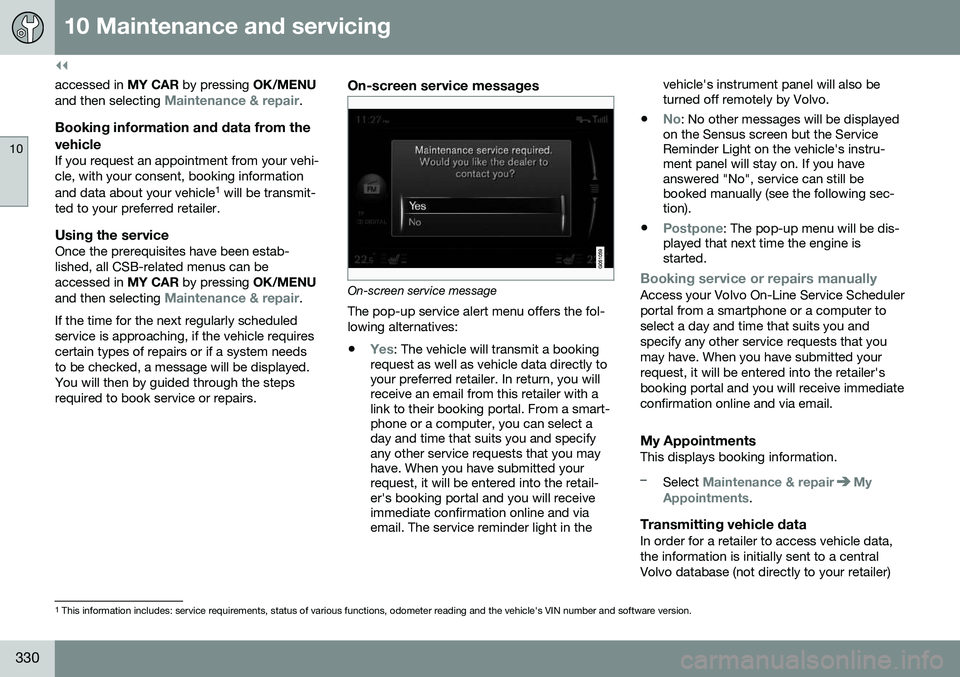
On-screen service messages
On-screen service message The pop-up service alert menu offers the fol- lowing alternatives:
•
Yes: The vehicle will transmit a booking
request as well as vehicle data directly to your preferred retailer. In return, you willreceive an email from this retailer with alink to their booking portal. From a smart-phone or a computer, you can select aday and time that suits you and specifyany other service requests that you mayhave. When you have submitted yourrequest, it will be entered into the retail-er's booking portal and you will receiveimmediate confirmation online and viaemail. The service reminder light in the vehicle's instrument panel will also beturned off remotely by Volvo.
•
No: No other messages will be displayed
on the Sensus screen but the Service Reminder Light on the vehicle's instru-ment panel will stay on. If you haveanswered "No", service can still bebooked manually (see the following sec-tion).
•
Postpone: The pop-up menu will be dis-
played that next time the engine is started.
Booking service or repairs manuallyAccess your Volvo On-Line Service Scheduler portal from a smartphone or a computer toselect a day and time that suits you andspecify any other service requests that youmay have. When you have submitted yourrequest, it will be entered into the retailer'sbooking portal and you will receive immediateconfirmation online and via email.
My AppointmentsThis displays booking information.
–Select Maintenance & repairMy
Appointments.
Transmitting vehicle dataIn order for a retailer to access vehicle data, the information is initially sent to a centralVolvo database (not directly to your retailer)
1 This information includes: service requirements, status of various functions, odometer reading and the vehicle's VIN number and software version.