roof VOLVO V60 2016 Owner´s Manual
[x] Cancel search | Manufacturer: VOLVO, Model Year: 2016, Model line: V60, Model: VOLVO V60 2016Pages: 402, PDF Size: 10.3 MB
Page 5 of 402
Contents
* Option/accessory, for more information, see Introduction.3
03
03 Instruments and controls
Instrument overview ................................. 63
Information displays – introduction........... 66
Eco Guide* and Power Meter*.................. 69
Information displays – indicator symbols. 70
Information displays – warning symbols... 72
My Car – introduction............................... 74Information displays – ambient tempera-
ture sensor................................................ 75 Information displays – trip odometer and
clock......................................................... 76
Inserting/removing remote key................. 76
Ignition modes.......................................... 77
Front seats................................................ 78
Front seats – folding backrest*................. 79
Front seats – power seat.......................... 79Key memory – power driver's seat* and
door mirrors.............................................. 81
Rear seats – head restraints..................... 82
Rear seats – folding backrest................... 84
Steering wheel.......................................... 85
Electrically heated* steering wheel........... 86
Lighting panel........................................... 87
High/low beam headlights........................ 88
Active high beams (AHB)*......................... 88
03
Tunnel detection (models with the rain
sensor* only)............................................. 90
Active Bending Lights (ABL)*.................... 90
Auxiliary lights*.......................................... 91
Instrument and "theater" lighting.............. 91
Parking lights............................................ 92
Rear fog lights........................................... 92
Hazard warning flashers........................... 93
Turn signals............................................... 93
Front interior lighting................................. 94
Rear interior lighting.................................. 95
Home safe lighting.................................... 95
Approach lighting...................................... 96
Windshield wipers..................................... 96
Rain sensor*.............................................. 97
Windshield washer.................................... 97
Tailgate wiper/washer............................... 98
Power windows......................................... 99
Power door mirrors................................. 100Power door mirrors – automatic tilting/
retraction................................................. 101 Heated windshield*, rear window and
door mirror defrosters............................. 102
Interior rearview mirror............................ 103
03
Digital compass*..................................... 103
Power moonroof* – introduction............. 104
Power moonroof* – operation................. 105 HomeLink ®
Wireless Control System* –
introduction............................................. 106HomeLink ®
Wireless Control System* –
programming........................................... 107
Volvo Sensus.......................................... 110
Information display – menu controls....... 111
Information display – menu overview..... 111
Information display – messages............. 112
Trip computer – introduction ................. 113Trip computer – functions, analog instru-
ment panel.............................................. 114 Trip computer – functions, digital instru-
ment panel.............................................. 117 Trip computer – Supplementary informa-
tion.......................................................... 119
Trip computer – Trip statistics................ 120
Page 6 of 402
Contents
4* Option/accessory, for more information, see Introduction.
04
04 Climate
Climate – general information................. 122
Climate – sensors................................... 122
Air quality................................................ 123
Interior Air Quality System (IAQS)*.......... 123
Climate – menu settings......................... 124
Air distribution – general......................... 124
Electronic climate control (ECC)............. 126
Heated seats........................................... 127
Temperature and blower control............ 128
Automatic climate control....................... 128
Air conditioning....................................... 129Max. defroster and electrically heated
windshield*.............................................. 129
Air distribution – function........................ 130
Air distribution – recirculation................. 131
Air distribution – table............................. 132
05
05 Loading and storage
Storage spaces....................................... 135
Tunnel console........................................ 137
Tunnel console – 12-volt sockets........... 137
Glove compartment................................ 138
Vanity mirror............................................ 138
12-volt socket in the cargo area*............ 138
Loading – general................................... 139
Loading – roof load carriers.................... 139
Load anchoring eyelets........................... 140
Grocery bag holder................................. 141
Cargo net – general information............. 141
Cargo area cover.................................... 143
Steel cargo grid....................................... 143
06
06 Locks and alarm
Remote key and key blade..................... 146
Remote key – loss................................... 146
Key memory............................................ 147
Locking/unlocking confirmation.............. 147
Immobilizer (start inhibitor)...................... 148
Remote key – functions.......................... 149
Remote key – range................................ 150Detachable key blade – general informa-
tion.......................................................... 151 Detachable key blade – detaching/rein-
serting..................................................... 151
Detachable key blade – unlocking.......... 152
Private locking........................................ 152
Remote key – replacing the battery........ 153
Keyless drive*– locking/unlocking.......... 155Keyless drive* – unlocking with key
blade....................................................... 156
Keyless drive* – key memory.................. 156
Keyless drive* – messages..................... 157
Keyless drive* – antenna locations......... 158
Locking/unlocking – from the outside..... 159
Manual locking........................................ 160
Locking/unlocking – from inside............. 160
Locking/unlocking – glove compartment 162
Page 43 of 402
02 Safety
02
}}
41
Related information
•Supplemental Restraint System (SRS) (p. 31)
• Front airbags (p. 33)
• Inflatable Curtain (IC) (p. 41)
Inflatable Curtain (IC)
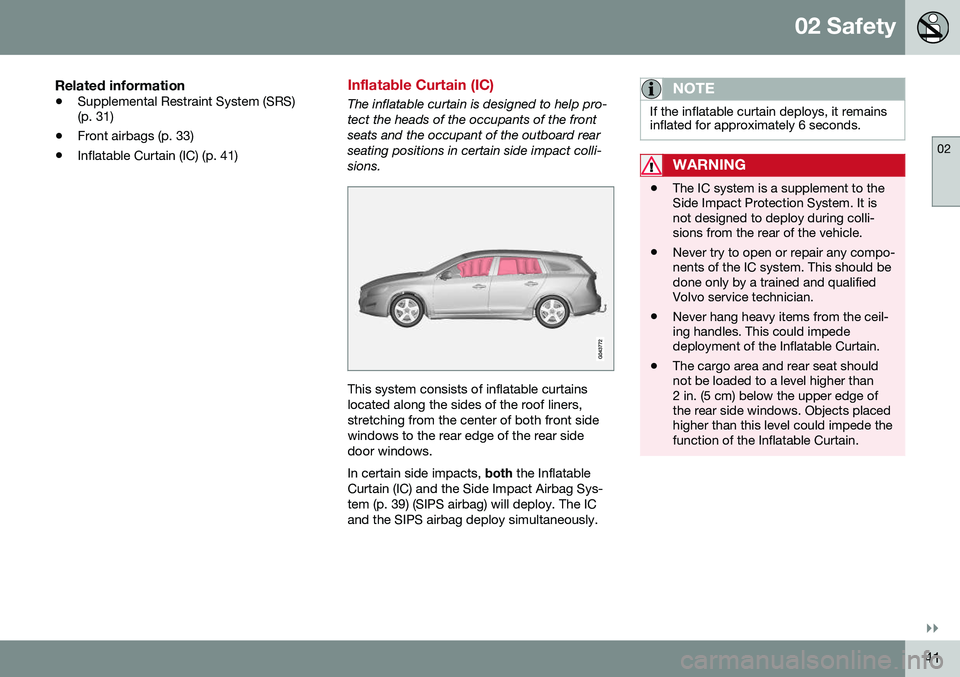
The inflatable curtain is designed to help pro- tect the heads of the occupants of the frontseats and the occupant of the outboard rearseating positions in certain side impact colli-sions.
This system consists of inflatable curtains located along the sides of the roof liners,stretching from the center of both front sidewindows to the rear edge of the rear sidedoor windows. In certain side impacts,
both the Inflatable
Curtain (IC) and the Side Impact Airbag Sys- tem (p. 39) (SIPS airbag) will deploy. The ICand the SIPS airbag deploy simultaneously.
NOTE
If the inflatable curtain deploys, it remains inflated for approximately 6 seconds.
WARNING
• The IC system is a supplement to the Side Impact Protection System. It isnot designed to deploy during colli-sions from the rear of the vehicle.
• Never try to open or repair any compo-nents of the IC system. This should bedone only by a trained and qualifiedVolvo service technician.
• Never hang heavy items from the ceil-ing handles. This could impededeployment of the Inflatable Curtain.
• The cargo area and rear seat shouldnot be loaded to a level higher than2 in. (5 cm) below the upper edge ofthe rear side windows. Objects placedhigher than this level could impede thefunction of the Inflatable Curtain.
Page 79 of 402
03 Instruments and controls
03
}}
* Option/accessory, for more information, see Introduction.77
Removing the remote keyThe remote key can be removed from the ignition slot by pulling it out.
Related information
• Ignition modes (p. 77)
Ignition modes
The vehicle's ignition has 3 modes:
0, I, and II
that can be used without starting the engine. The following table shows examples of whichfunctions are available in the respectivemodes.
NOTE
To access ignition modes I or II without
starting the engine, the brake pedal must not be depressed.
ModeFunction
0The odometer, clock and tem- perature gauge are illuminated.Power seats* can be adjustedand the infotainment system canbe used for a limited time (to min-imize battery drain, see the Sen-sus Infotainment Supplement).
IThe Moonroof*, power windows, 12-volt sockets in the passengercompartment, navigation sys-tem*, climate system blower,windshield wipers can be used.
IIThe headlights/taillights illumi- nate. Warning/indicator lights illu-minate for 5 seconds. Other sys-tems are activated. However, theheated seats* and heated rearwindow function can only be acti-vated when the engine is running. Mode II should only be used for very short periods to help avoiddraining the battery.
Ignition modes
Ignition mode 0–The vehicle is unlocked.
Page 93 of 402
03 Instruments and controls
03
* Option/accessory, for more information, see Introduction.91
Cornering lights 18Models equipped with ABL also have front cornering lights that temporarily provide extralight to the front left or right of the vehicle atlow speeds when making a sharp turn (forexample, when turning into a parking space)or when the turn signals are used. This feature is activated when: •
High or low beam headlights are on
and
• The vehicle's speed is below 20 mph (30 km/h)
The feature is also activated when the vehicle is backing up. The cornering lights are deactivated when the vehicle's speed exceeds approx. 25 mph(40 km/h).
Related information
• Lighting panel (p. 87)
• High/low beam headlights (p. 88)
• Active high beams (AHB)* (p. 88)
Auxiliary lights*
If the vehicle is fitted with auxiliary lights, the driver can use the
MY CAR menu system to
choose to deactivate and turn these lights onand off along with the high beam headlights. The auxiliary lights must be connected to the vehicle's electrical system, which should onlybe done by a trained and authorized Volvoservice technician. See My Car – introduction(p. 74) for more information about the menusystem.
Instrument and "theater" lighting
Instrument lightingIllumination of the display and instrument lights will vary, depending on ignition mode. The display lighting is automatically subdued in darkness and the sensitivity is set with thethumb wheel. The intensity of the instrument lighting is adjusted with the thumb wheel.
"Theater" lightingWhen the overhead courtesy lighting hasgone out and the engine is running, severalLEDs located near the roof console illuminateto provide faint lighting for the occupants ofthe front seats. This lighting goes out justafter the overhead courtesy lighting when thevehicle is locked.
Related information
• Lighting panel (p. 87)
• Front interior lighting (p. 94)
• Rear interior lighting (p. 95)
• Ignition modes (p. 77)
18
Certain models only
Page 96 of 402
||
03 Instruments and controls
03
94* Option/accessory, for more information, see Introduction.
NOTE
• This automatic flashing sequence can be interrupted by immediately movingthe lever in the opposite direction.
• If the turn signal indicator flashesfaster than normal, check for aburned-out turn signal bulb.
Related information
•
Hazard warning flashers (p. 93)
Front interior lighting
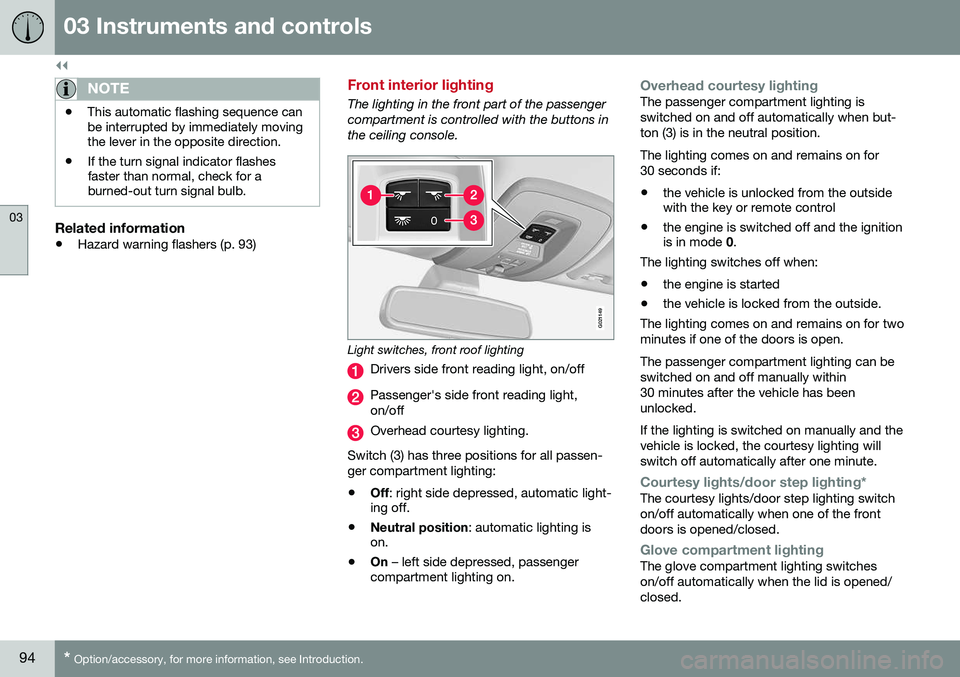
The lighting in the front part of the passenger compartment is controlled with the buttons inthe ceiling console.
G021149
Light switches, front roof lighting
Drivers side front reading light, on/off
Passenger's side front reading light, on/off
Overhead courtesy lighting.
Switch (3) has three positions for all passen- ger compartment lighting:
• Off
: right side depressed, automatic light-
ing off.
• Neutral position
: automatic lighting is
on.
• On
– left side depressed, passenger
compartment lighting on.
Overhead courtesy lightingThe passenger compartment lighting is switched on and off automatically when but-ton (3) is in the neutral position. The lighting comes on and remains on for 30 seconds if:
• the vehicle is unlocked from the outside with the key or remote control
• the engine is switched off and the ignitionis in mode
0.
The lighting switches off when:
• the engine is started
• the vehicle is locked from the outside.
The lighting comes on and remains on for two minutes if one of the doors is open. The passenger compartment lighting can be switched on and off manually within30 minutes after the vehicle has beenunlocked. If the lighting is switched on manually and the vehicle is locked, the courtesy lighting willswitch off automatically after one minute.
Courtesy lights/door step lighting*The courtesy lights/door step lighting switch on/off automatically when one of the frontdoors is opened/closed.
Glove compartment lightingThe glove compartment lighting switches on/off automatically when the lid is opened/closed.
Page 106 of 402
||
03 Instruments and controls
03
104* Option/accessory, for more information, see Introduction.
4. Press and hold the button for 3 seconds
until the number of the current magnetic zone is displayed.
5. Press the button repeatedly until the number of the desired magnetic zone (
1-15) is displayed. See the magnetic
zones on the map in the following section "Selecting a magnetic zone").
6. Wait until
C is again displayed in the mir-
ror.
7. Drive slowly in a circle at a speed of no more than 6 mph (10 km/h) until a direc- tion is displayed. This indicates that cali-bration is complete.
8. Drive around in a circle an additional two times to fine-tune the calibration.
9. Vehicles with an electrically heated windshield:
* if
C is displayed when the
heating function is activated, perform step 7 with the heating function on. Seealso Max. defroster and electricallyheated windshield* (p. 129) for additionalinformation about the heated windshield.
Repeat the calibration procedure if neces-sary.
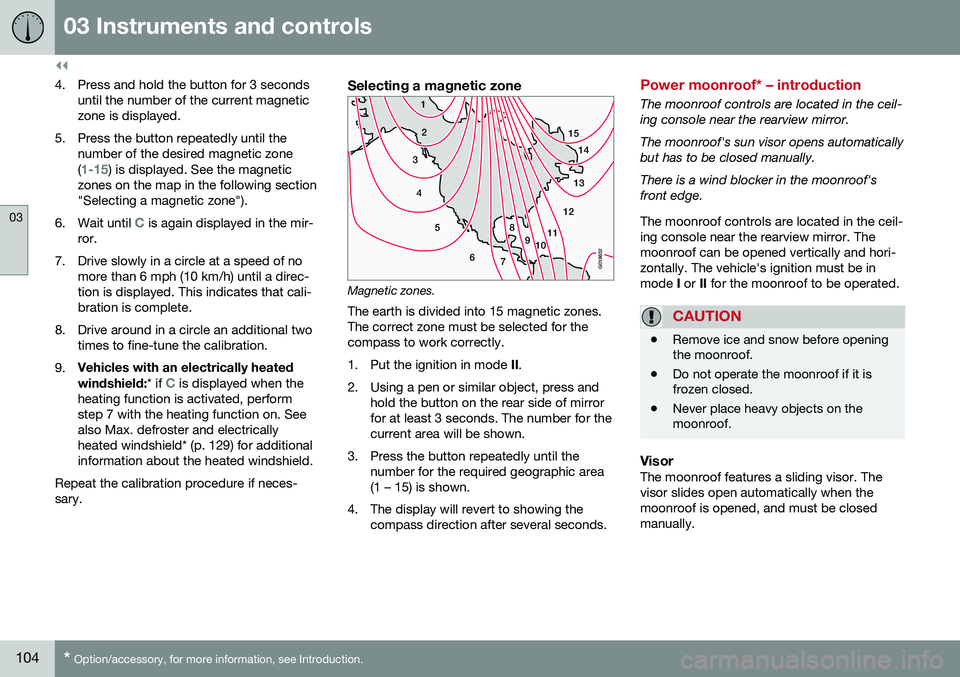
Selecting a magnetic zone
15 14
13
12
11
9
8
7
6
5
4
3
2
1
10
G018632
Magnetic zones.The earth is divided into 15 magnetic zones. The correct zone must be selected for thecompass to work correctly.
1. Put the ignition in mode II.
2. Using a pen or similar object, press and hold the button on the rear side of mirror for at least 3 seconds. The number for thecurrent area will be shown.
3. Press the button repeatedly until the number for the required geographic area(1 – 15) is shown.
4. The display will revert to showing the compass direction after several seconds.
Power moonroof* – introduction
The moonroof controls are located in the ceil- ing console near the rearview mirror. The moonroof's sun visor opens automatically but has to be closed manually. There is a wind blocker in the moonroof's front edge. The moonroof controls are located in the ceil- ing console near the rearview mirror. Themoonroof can be opened vertically and hori-zontally. The vehicle's ignition must be inmode I or II for the moonroof to be operated.
CAUTION
• Remove ice and snow before opening the moonroof.
• Do not operate the moonroof if it isfrozen closed.
• Never place heavy objects on themoonroof.
VisorThe moonroof features a sliding visor. The visor slides open automatically when themoonroof is opened, and must be closedmanually.
Page 107 of 402
03 Instruments and controls
03
}}
* Option/accessory, for more information, see Introduction.105
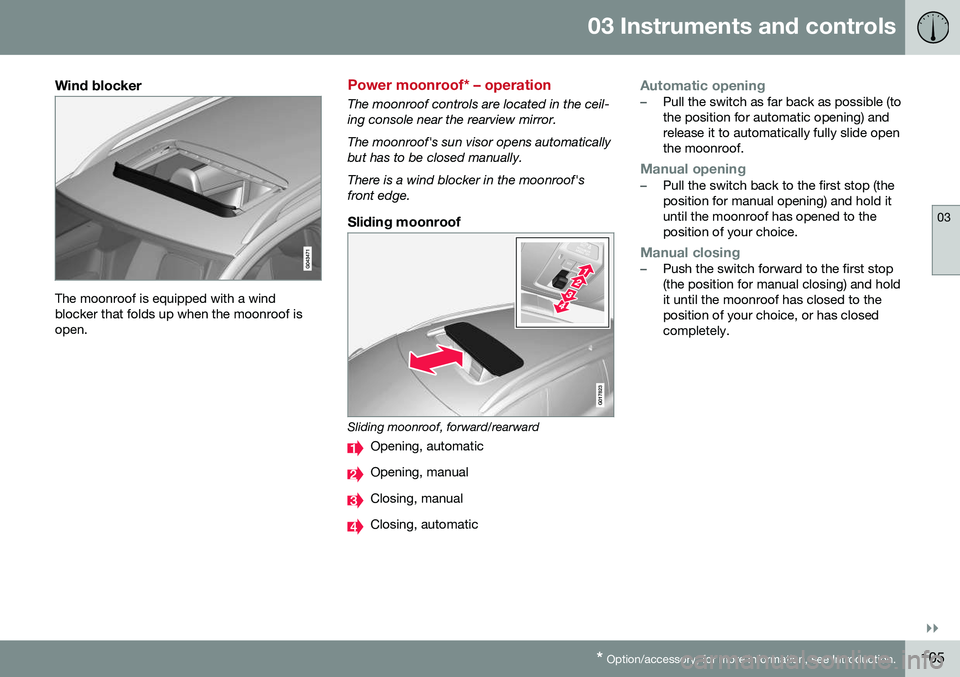
Wind blocker
The moonroof is equipped with a wind blocker that folds up when the moonroof isopen.
Power moonroof* – operation
The moonroof controls are located in the ceil- ing console near the rearview mirror. The moonroof's sun visor opens automatically but has to be closed manually. There is a wind blocker in the moonroof's front edge.
Sliding moonroof
G017823
Sliding moonroof, forward/rearward
Opening, automatic
Opening, manual
Closing, manual
Closing, automatic
Automatic opening–Pull the switch as far back as possible (to the position for automatic opening) andrelease it to automatically fully slide openthe moonroof.
Manual opening–Pull the switch back to the first stop (the position for manual opening) and hold ituntil the moonroof has opened to theposition of your choice.
Manual closing–Push the switch forward to the first stop (the position for manual closing) and holdit until the moonroof has closed to theposition of your choice, or has closedcompletely.
Page 108 of 402
||
03 Instruments and controls
03
106* Option/accessory, for more information, see Introduction.
Automatic closing–Push the switch as far forward as possi- ble (the position for automatic closing)and release it to automatically close themoonroof.
WARNING
• During manual closing, if the moonroof is obstructed, immediately open itagain.
• Never open or close the moonroof if itis obstructed in any way.
• Never allow a child to operate themoonroof.
• Never leave a child alone in a vehicle.
• When leaving the vehicle, ensure thatthe ignition is in mode
0 (see Ignition
modes (p. 77) for information about thevarious ignition modes) to disable themoonroof. Never leave the remote keyin the vehicle.
• Never extend any object or body partthough the open moonroof, even if thevehicle's ignition is completelyswitched off.
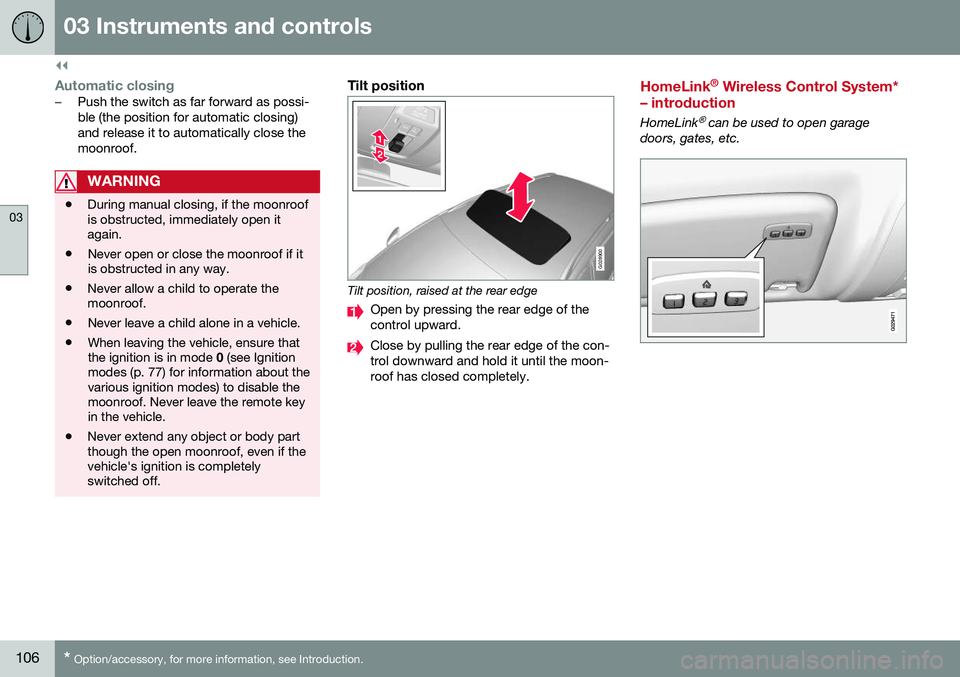
Tilt position
G028900
Tilt position, raised at the rear edge
Open by pressing the rear edge of the control upward.
Close by pulling the rear edge of the con- trol downward and hold it until the moon-roof has closed completely.
HomeLink ®
Wireless Control System*
– introduction
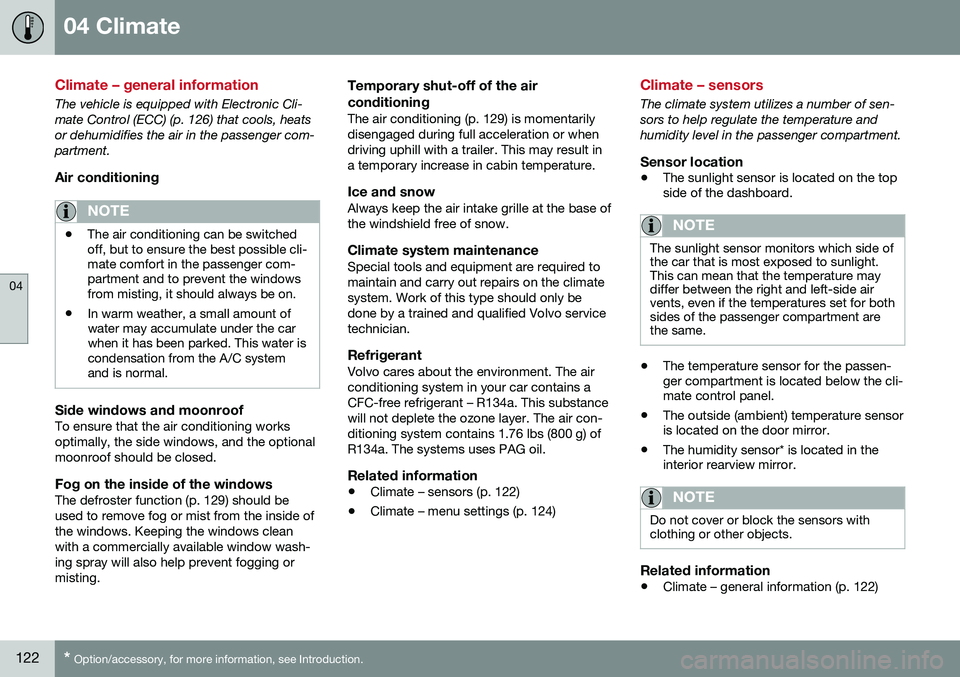
HomeLink® can be used to open garage
doors, gates, etc.
Page 124 of 402
04 Climate
04
122* Option/accessory, for more information, see Introduction.
Climate – general information
The vehicle is equipped with Electronic Cli- mate Control (ECC) (p. 126) that cools, heatsor dehumidifies the air in the passenger com-partment.
Air conditioning
NOTE
• The air conditioning can be switched off, but to ensure the best possible cli-mate comfort in the passenger com-partment and to prevent the windowsfrom misting, it should always be on.
• In warm weather, a small amount ofwater may accumulate under the carwhen it has been parked. This water iscondensation from the A/C systemand is normal.
Side windows and moonroofTo ensure that the air conditioning works optimally, the side windows, and the optionalmoonroof should be closed.
Fog on the inside of the windowsThe defroster function (p. 129) should beused to remove fog or mist from the inside ofthe windows. Keeping the windows cleanwith a commercially available window wash-ing spray will also help prevent fogging ormisting.
Temporary shut-off of the air conditioning
The air conditioning (p. 129) is momentarily disengaged during full acceleration or whendriving uphill with a trailer. This may result ina temporary increase in cabin temperature.
Ice and snowAlways keep the air intake grille at the base ofthe windshield free of snow.
Climate system maintenanceSpecial tools and equipment are required tomaintain and carry out repairs on the climatesystem. Work of this type should only bedone by a trained and qualified Volvo servicetechnician.
RefrigerantVolvo cares about the environment. The airconditioning system in your car contains aCFC-free refrigerant – R134a. This substancewill not deplete the ozone layer. The air con-ditioning system contains 1.76 lbs (800 g) ofR134a. The systems uses PAG oil.
Related information
•
Climate – sensors (p. 122)
• Climate – menu settings (p. 124)
Climate – sensors
The climate system utilizes a number of sen- sors to help regulate the temperature andhumidity level in the passenger compartment.
Sensor location
• The sunlight sensor is located on the top side of the dashboard.
NOTE
The sunlight sensor monitors which side of the car that is most exposed to sunlight.This can mean that the temperature maydiffer between the right and left-side airvents, even if the temperatures set for bothsides of the passenger compartment arethe same.
•The temperature sensor for the passen- ger compartment is located below the cli-mate control panel.
• The outside (ambient) temperature sensoris located on the door mirror.
• The humidity sensor* is located in theinterior rearview mirror.
NOTE
Do not cover or block the sensors with clothing or other objects.
Related information
•
Climate – general information (p. 122)