tailgate VOLVO V60 2016 Owner´s Manual
[x] Cancel search | Manufacturer: VOLVO, Model Year: 2016, Model line: V60, Model: VOLVO V60 2016Pages: 402, PDF Size: 10.3 MB
Page 5 of 402
Contents
* Option/accessory, for more information, see Introduction.3
03
03 Instruments and controls
Instrument overview ................................. 63
Information displays – introduction........... 66
Eco Guide* and Power Meter*.................. 69
Information displays – indicator symbols. 70
Information displays – warning symbols... 72
My Car – introduction............................... 74Information displays – ambient tempera-
ture sensor................................................ 75 Information displays – trip odometer and
clock......................................................... 76
Inserting/removing remote key................. 76
Ignition modes.......................................... 77
Front seats................................................ 78
Front seats – folding backrest*................. 79
Front seats – power seat.......................... 79Key memory – power driver's seat* and
door mirrors.............................................. 81
Rear seats – head restraints..................... 82
Rear seats – folding backrest................... 84
Steering wheel.......................................... 85
Electrically heated* steering wheel........... 86
Lighting panel........................................... 87
High/low beam headlights........................ 88
Active high beams (AHB)*......................... 88
03
Tunnel detection (models with the rain
sensor* only)............................................. 90
Active Bending Lights (ABL)*.................... 90
Auxiliary lights*.......................................... 91
Instrument and "theater" lighting.............. 91
Parking lights............................................ 92
Rear fog lights........................................... 92
Hazard warning flashers........................... 93
Turn signals............................................... 93
Front interior lighting................................. 94
Rear interior lighting.................................. 95
Home safe lighting.................................... 95
Approach lighting...................................... 96
Windshield wipers..................................... 96
Rain sensor*.............................................. 97
Windshield washer.................................... 97
Tailgate wiper/washer............................... 98
Power windows......................................... 99
Power door mirrors................................. 100Power door mirrors – automatic tilting/
retraction................................................. 101 Heated windshield*, rear window and
door mirror defrosters............................. 102
Interior rearview mirror............................ 103
03
Digital compass*..................................... 103
Power moonroof* – introduction............. 104
Power moonroof* – operation................. 105 HomeLink ®
Wireless Control System* –
introduction............................................. 106HomeLink ®
Wireless Control System* –
programming........................................... 107
Volvo Sensus.......................................... 110
Information display – menu controls....... 111
Information display – menu overview..... 111
Information display – messages............. 112
Trip computer – introduction ................. 113Trip computer – functions, analog instru-
ment panel.............................................. 114 Trip computer – functions, digital instru-
ment panel.............................................. 117 Trip computer – Supplementary informa-
tion.......................................................... 119
Trip computer – Trip statistics................ 120
Page 7 of 402
Contents
* Option/accessory, for more information, see Introduction.5
06
Locking/unlocking – tailgate................... 162
Alarm – general information.................... 164
Alarm indicator........................................ 165
Alarm – arming/disarming....................... 165
Alarm signal............................................ 166
Alarm – turning off................................... 166
Alarm-related functions........................... 166
07
07 Driver support
Active chassis* (Four C).......................... 169
Stability system – introduction................ 169
Stability system – operation.................... 170Stability system – symbols and mes-
sages....................................................... 172
Adjustable steering force*....................... 174 Road Sign Information (RSI)* – introduc-
tion.......................................................... 174
Road Sign Information (RSI) – operation 175
Road Sign Information (RSI) – limitations 175
Cruise control (CC) – introduction.......... 176Cruise control (CC) – engaging and set-
ting speed............................................... 176 Toggling between ACC and CC (stand-
ard Cruise Control).................................. 178
Cruise control (CC) – deactivating.......... 178
Adaptive Cruise Control – introduction... 179
Adaptive Cruise Control – function......... 180
Adaptive Cruise Control – engaging....... 182
Adaptive Cruise Control – setting speed 183Adaptive Cruise Control – setting time
interval..................................................... 184
Adaptive Cruise Control – deactivating.. 184Adaptive Cruise Control – passing
another vehicle........................................ 186
07
Adaptive Cruise Control (ACC) – Queue
Assist...................................................... 186
Radar sensor........................................... 188
Adaptive Cruise Control – limitations...... 188Adaptive Cruise Control – symbols and
messages................................................ 190 Adaptive Cruise Control – troubleshoot-
ing........................................................... 192
Distance Alert – introduction................... 193
Distance Alert – operation....................... 193
Distance Alert – limitations...................... 194
Distance Alert – symbols and messages 196
City Safety – introduction........................ 197
City Safety – function.............................. 198
City Safety – operation............................ 199
City Safety – limitations.......................... 199
City Safety – troubleshooting.................. 200
City Safety – symbols and messages..... 202
City Safety – Laser sensor...................... 203
Collision warning – introduction.............. 204
Collision warning* – function................... 206
Collision warning* – operation................ 207
Collision warning* – Cyclist detection..... 208Collision warning* – Pedestrian detec-
tion.......................................................... 209
Page 11 of 402
Contents
9
10
Wiper blades – service position.............. 346
Wiper blades – windshield...................... 347
Wiper blades – tailgate........................... 348
Engine compartment – washer fluid....... 348
Battery – symbols................................... 349
Battery – handling................................... 349
Battery – maintenance............................ 350
Battery – changing.................................. 351
Fuses – introduction............................... 353
Fuses – engine compartment................. 354
Fuses – glove compartment................... 358
Fuses – cargo area/trunk........................ 361Fuses – engine compartment cold zone
(Start/Stop only)...................................... 362
Washing the car...................................... 364
Automatic car wash................................ 365
Polishing and waxing.............................. 365
Cleaning the interior................................ 366
Touching up paintwork........................... 368
11
11 Specifications
Label information.................................... 371
Dimensions............................................. 374
Weights................................................... 378
Engine specifications.............................. 380
Oil specifications..................................... 381
Oil volume............................................... 382
Coolant – specification and volume........ 383Transmission oil – specification and vol-
umes....................................................... 383
Brake fluid – specification and volume... 383
Power steering – specification................ 384Fuel tank volume – specification and vol-
ume......................................................... 384 Air conditioning – specification and vol-
ume......................................................... 384
Battery specifications............................. 385
Symbols – general information............... 386
Warning symbols.................................... 386
Indicator symbols.................................... 387
Information symbols............................... 388
Information symbols – ceiling console.... 389
Information symbols – center console.... 389
12
12 Index
Index....................................................... 390
Page 67 of 402
03 Instruments and controls
03
* Option/accessory, for more information, see Introduction.65
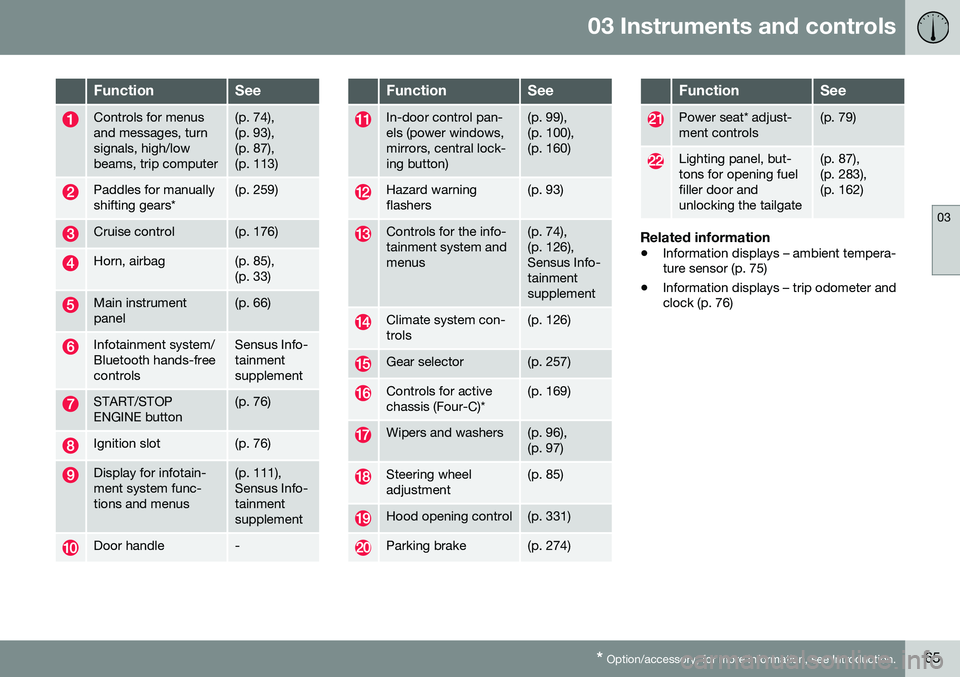
FunctionSee
Controls for menus and messages, turnsignals, high/lowbeams, trip computer(p. 74), (p. 93),(p. 87),(p. 113)
Paddles for manually shifting gears*(p. 259)
Cruise control(p. 176)
Horn, airbag(p. 85), (p. 33)
Main instrument panel(p. 66)
Infotainment system/ Bluetooth hands-freecontrolsSensus Info- tainmentsupplement
START/STOP ENGINE button(p. 76)
Ignition slot(p. 76)
Display for infotain- ment system func-tions and menus(p. 111), Sensus Info-tainmentsupplement
Door handle-
FunctionSee
In-door control pan- els (power windows,mirrors, central lock-ing button)(p. 99), (p. 100),(p. 160)
Hazard warning flashers(p. 93)
Controls for the info- tainment system andmenus(p. 74), (p. 126),Sensus Info-tainmentsupplement
Climate system con- trols(p. 126)
Gear selector(p. 257)
Controls for active chassis (Four-C)*(p. 169)
Wipers and washers(p. 96), (p. 97)
Steering wheel adjustment(p. 85)
Hood opening control(p. 331)
Parking brake(p. 274)
FunctionSee
Power seat* adjust- ment controls(p. 79)
Lighting panel, but- tons for opening fuelfiller door andunlocking the tailgate(p. 87), (p. 283),(p. 162)
Related information
• Information displays – ambient tempera- ture sensor (p. 75)
• Information displays – trip odometer andclock (p. 76)
Page 76 of 402
||
03 Instruments and controls
03
74
Reminder – doors not closedIf one of the doors is not closed properly, the
information or warning symbol illuminates
(depending on the vehicle's speed), a graphic will be displayed in instrument panel and an explanatory text message 3
will also be dis-
played in the instrument panel. Stop the vehi- cle in a safe place as soon as possible andclose the door.
If the vehicle is driven at a speedlower than approximately 5 mph(7 km/h), the information symbol illu-
minates.
If the vehicle is driven at a speed higher than approximately 5 mph(7 km/h), the warning symbol illumi-
nates.
If the hood is not closed properly, the warn-
ing symbol illuminates, a graphic will be dis-
played in instrument panel and an explana- tory text message 3
will also be displayed in
the instrument panel. Stop the vehicle in a safe place as soon as possible and close thehood. If the tailgate is not closed properly, the
information symbol illuminates and a graphic
will be displayed in instrument panel. Stop the vehicle in a safe place as soon as possi-ble and close the tailgate.
Related information
• Information displays – introduction (p. 66)
• Information displays – indicator symbols (p. 70)
My Car – introduction
The MY CAR menu system provides access to menus for operating many of the vehicle'sfunctions, such as setting the clock, door mir-rors, lock and alarm settings, etc. Some of the features or functions are stand- ard; others are optional and vary according tomodel/market.
OperationUse the buttons on the center console or thesteering wheel keypad to navigate in themenus.
3
Text message applies only to models with the optional digital instrument panel
Page 94 of 402
03 Instruments and controls
03
92
Parking lights
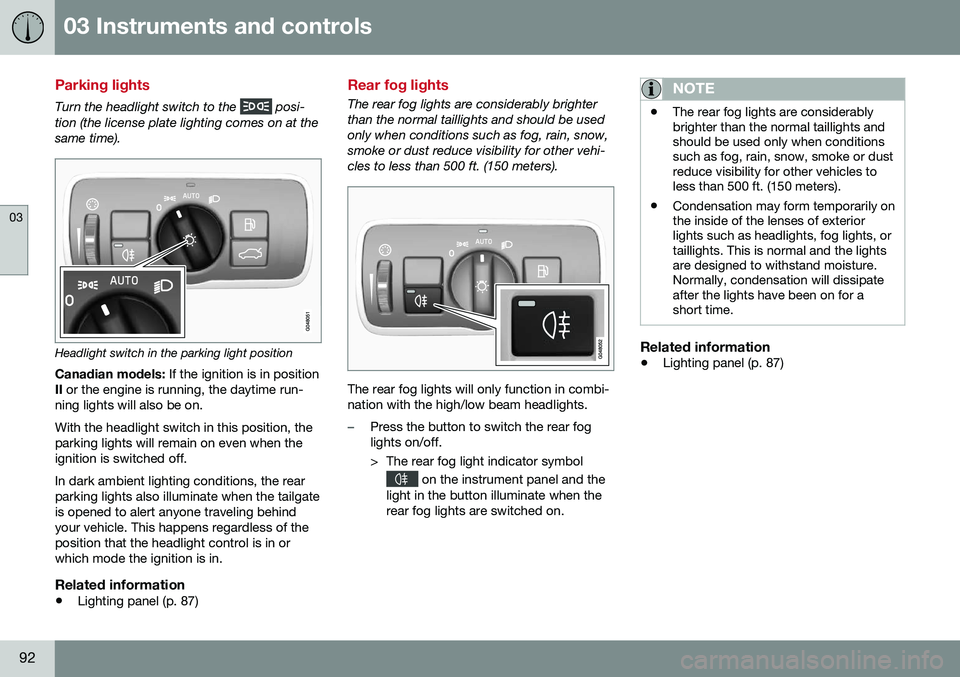
Turn the headlight switch to the posi-
tion (the license plate lighting comes on at the same time).
Headlight switch in the parking light position
Canadian models: If the ignition is in position
II or the engine is running, the daytime run-
ning lights will also be on. With the headlight switch in this position, the parking lights will remain on even when theignition is switched off. In dark ambient lighting conditions, the rear parking lights also illuminate when the tailgateis opened to alert anyone traveling behindyour vehicle. This happens regardless of theposition that the headlight control is in orwhich mode the ignition is in.
Related information
• Lighting panel (p. 87)
Rear fog lights
The rear fog lights are considerably brighter than the normal taillights and should be usedonly when conditions such as fog, rain, snow,smoke or dust reduce visibility for other vehi-cles to less than 500 ft. (150 meters).
The rear fog lights will only function in combi- nation with the high/low beam headlights.
–Press the button to switch the rear fog lights on/off.
> The rear fog light indicator symbol
on the instrument panel and the
light in the button illuminate when the rear fog lights are switched on.
NOTE
• The rear fog lights are considerably brighter than the normal taillights andshould be used only when conditionssuch as fog, rain, snow, smoke or dustreduce visibility for other vehicles toless than 500 ft. (150 meters).
• Condensation may form temporarily onthe inside of the lenses of exteriorlights such as headlights, fog lights, ortaillights. This is normal and the lightsare designed to withstand moisture.Normally, condensation will dissipateafter the lights have been on for ashort time.
Related information
•
Lighting panel (p. 87)
Page 97 of 402
03 Instruments and controls
03
95
Related information
•Rear interior lighting (p. 95)
Rear interior lighting
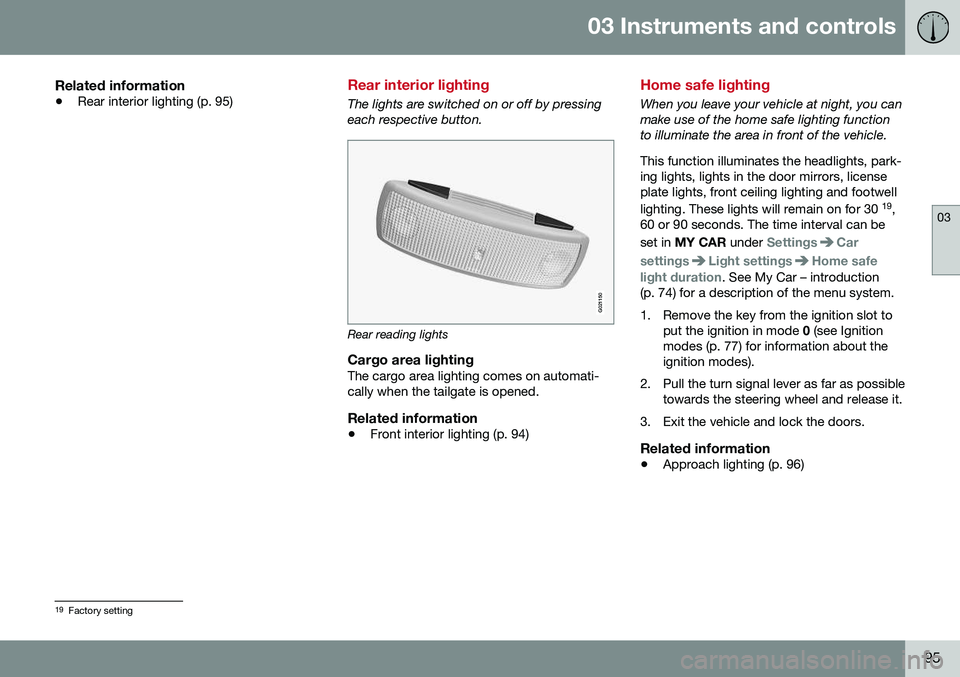
The lights are switched on or off by pressing each respective button.
G021150
Rear reading lights
Cargo area lightingThe cargo area lighting comes on automati- cally when the tailgate is opened.
Related information
•Front interior lighting (p. 94)
Home safe lighting
When you leave your vehicle at night, you can make use of the home safe lighting functionto illuminate the area in front of the vehicle. This function illuminates the headlights, park- ing lights, lights in the door mirrors, licenseplate lights, front ceiling lighting and footwell lighting. These lights will remain on for 30 19
,
60 or 90 seconds. The time interval can be set in MY CAR under
SettingsCar
settings
Light settingsHome safe
light duration. See My Car – introduction
(p. 74) for a description of the menu system.
1. Remove the key from the ignition slot to put the ignition in mode 0 (see Ignition
modes (p. 77) for information about the ignition modes).
2. Pull the turn signal lever as far as possible towards the steering wheel and release it.
3. Exit the vehicle and lock the doors.
Related information
• Approach lighting (p. 96)
19
Factory setting
Page 100 of 402
||
03 Instruments and controls
03
98
every five times the windshield is washed within a 10-minute period.
• Parking lights on.
Optional Active Bend-
ing Lights will be washed once for everyfive times the windshield is washed. Nor-mal halogen headlights will not bewashed.
CAUTION
• Use ample washer fluid when washing the windshield. The windshield shouldbe thoroughly wet when the wipers arein operation.
• When approx. 1 US quart (1 liter) ofwasher fluid remains in the reservoir,the headlights will no longer bewashed. A text message will also bedisplayed to remind the driver to fill thewasher fluid reservoir.
Related information
•
Engine compartment – washer fluid (p. 348)
Tailgate wiper/washer
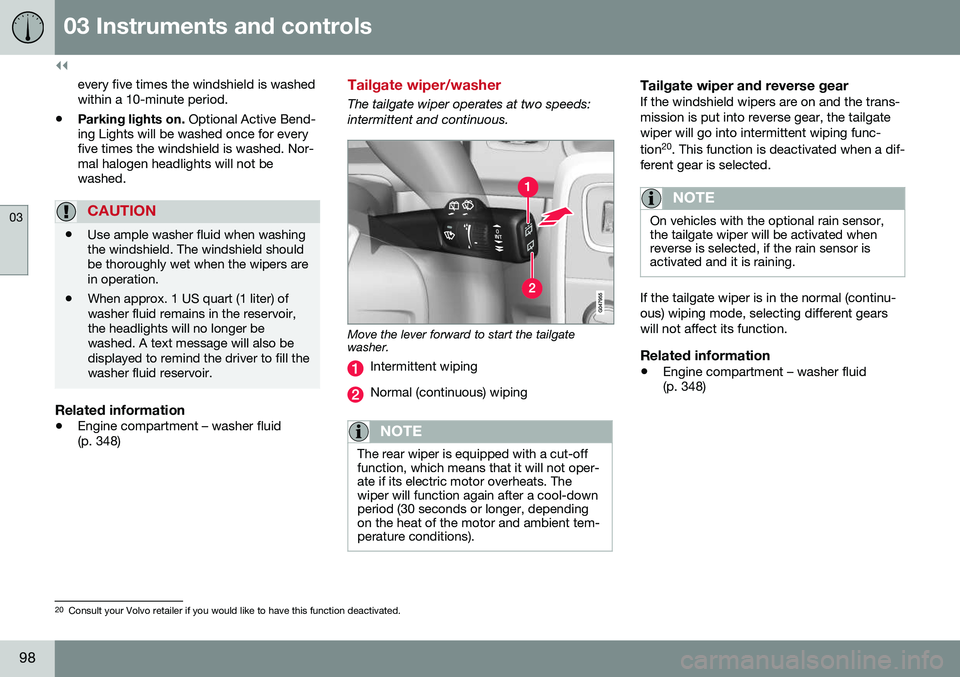
The tailgate wiper operates at two speeds: intermittent and continuous.
Move the lever forward to start the tailgate washer.
Intermittent wiping
Normal (continuous) wiping
NOTE
The rear wiper is equipped with a cut-off function, which means that it will not oper-ate if its electric motor overheats. Thewiper will function again after a cool-downperiod (30 seconds or longer, dependingon the heat of the motor and ambient tem-perature conditions).
Tailgate wiper and reverse gearIf the windshield wipers are on and the trans- mission is put into reverse gear, the tailgatewiper will go into intermittent wiping func- tion20
. This function is deactivated when a dif-
ferent gear is selected.
NOTE
On vehicles with the optional rain sensor, the tailgate wiper will be activated whenreverse is selected, if the rain sensor isactivated and it is raining.
If the tailgate wiper is in the normal (continu- ous) wiping mode, selecting different gearswill not affect its function.
Related information
• Engine compartment – washer fluid (p. 348)
20
Consult your Volvo retailer if you would like to have this function deactivated.
Page 148 of 402
06 Locks and alarm
06
146
Remote key and key blade
Two remote keys are provided with your vehi- cle. They enable you to unlock the doors andtailgate, and also function as ignition keys tostart the vehicle or operate electrical compo-nents. The remote keys contain detachablemetal key blades for manually locking orunlocking the driver's door and the glovecompartment. The visible ends of these keyblades are unique to make it easier to identify"your" remote key. Up to six remotes can beprogrammed for use on the same vehicle.
WARNING
Never leave the remote key in the ignition slot if children are to remain in the vehicle.
For more information on the various ignition modes, see Ignition modes (p. 77).
Related information
•Remote key – functions (p. 149)
• Remote key – functions (p. 149)
• Remote key – range (p. 150)
Remote key – loss
If either of the remote keys (p. 146) is lost, the other should be taken with the vehicle to aVolvo retailer. As an anti-theft measure, thecode of the lost remote key must be erasedfrom the system.
NOTE
Additional or duplicate remote control keys can be obtained from any authorized Volvoretailer. You can also obtain additional or duplicate remote control keys from certain inde-pendent repair facilities and locksmithsthat are qualified to make remote controlkeys. Each key must be programmed towork with your vehicle. California Only: A list of independent repair facilities and/or locksmiths known to Volvo that can cutand code replacement keys can be found:
• on the Volvo website at http://www.volvocars.com/us/keys
• by calling Volvo Customer Care at1-800-458-1552
The number of registered keys for the vehicle can be found by pressing
MY CAR and going
into
SettingsInformationNumber of
keys. For a description of the menu system,
see My Car – introduction (p. 74). USA-5WK49264 FCC ID:KR55WK49264 + Siemens VDO 5WK49236 FCC ID:KR55WK49236, 5WK49266FCC ID:KR55WK49266 + Siemens VDO 5WK49233 FCC ID:KR55WK49233This device complies with part 15 of the FCC rules and RSS-210. Operation is subject tothe following conditions: (1) This device maynot cause harmful interference, and (2) thisdevice must accept any interferencereceived, including interference that maycause undesired operation. Canada-5WK49264IC:267T-5WK49264 + Siemens VDO 5WK49236 IC:267T-5WK49236, 5WK49266IC:267T-5WK49266 + Siemens VDO 5WK49233 IC:267T-5WK49233Operation is subject to the following condi- tions: (1) this device may not cause interfer-ence, and (2) this device must accept anyinterference, including interference that maycause undesired operation of the device.Related information
•
Remote key – functions (p. 149)
Page 149 of 402
06 Locks and alarm
06
}}
* Option/accessory, for more information, see Introduction.147
Key memory
The memory in the remote key makes it possi- ble to store certain personal settings. The position of the side door mirrors, power driver's seat* and the selected instrument panel theme 1
are stored in the remote keys
when the vehicle is locked. The next time the
driver's door is unlocked with the same
remote key and the door is opened within 2 minutes , the power driver's seat and side
door mirrors will automatically move to theposition that they were in when the doorswere most recently locked with the sameremote key. If the seat/mirrors have not beenreadjusted since the vehicle was locked, theywill already be in the position stored in thatparticular remote key and will not move. Formore information on this feature, see Frontseats – power seat (p. 79). This feature can be activated or deactivated in the vehicle's menu by pressing MY CAR
and going into
SettingsCar settingsCar key memory. For a description of the
menu system, see My Car – introduction (p. 74).
NOTE
If the vehicle is locked with the remote key or is left unlocked for more than 30minutes, the key memory function will bedeactivated. To reactivate the key's memory: • Press the unlock button on the remote key.
For information regarding vehicles with the optional keyless drive, see Keyless drive*–locking/unlocking (p. 155).
Related information
•
Locking/unlocking confirmation (p. 147)
Locking/unlocking confirmation
Settings can be made in the menu system for audible and visual confirmation when thevehicle has been locked or unlocked. Withthese functions activated, the following willoccur when the vehicle is locked/unlocked:
Locking confirmation
•
The turn signals flash once, an audible signal sounds and the door mirrors willfold* in.
Confirmation will only be given when all doors and the tailgate are properly closed andlocked.
NOTE
If you do not receive confirmation when locking the vehicle, check whether a dooror the tailgate is ajar, or if this feature hasbeen turned off in the menu.
Unlocking confirmation
• The turn signals will flash twice and the door mirrors will fold* out.
1
Optional digital instrument panel only