air condition VOLVO V60 2017 Owner´s Manual
[x] Cancel search | Manufacturer: VOLVO, Model Year: 2017, Model line: V60, Model: VOLVO V60 2017Pages: 406, PDF Size: 9.65 MB
Page 132 of 406
CLIMATE
* Option/accessory, for more information, see Introduction.
130
Electronic climate control (ECC)
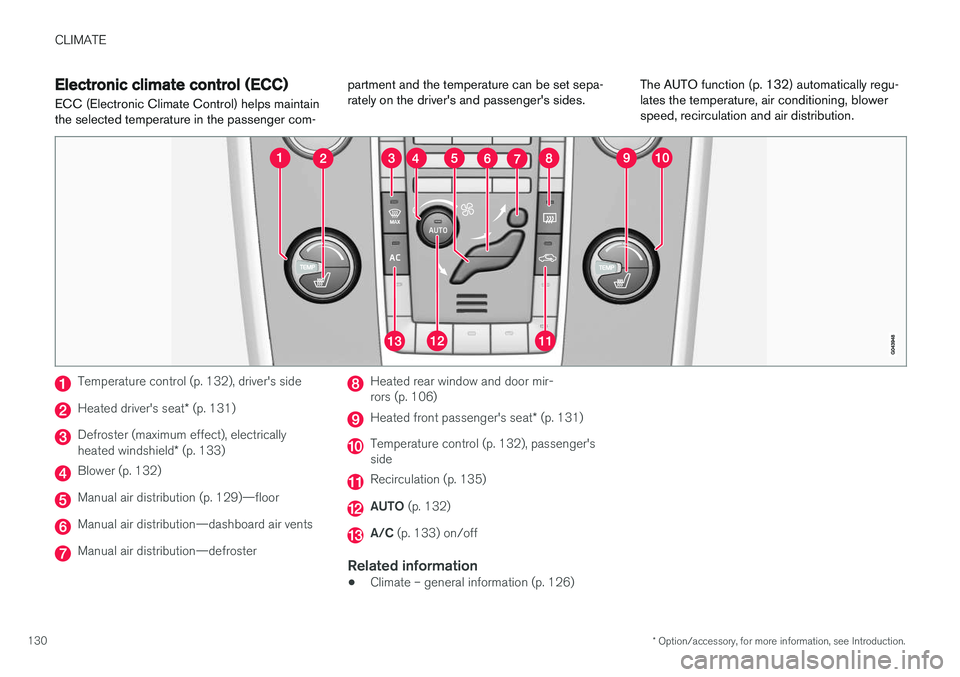
ECC (Electronic Climate Control) helps maintain the selected temperature in the passenger com- partment and the temperature can be set sepa-rately on the driver's and passenger's sides.
The AUTO function (p. 132) automatically regu-lates the temperature, air conditioning, blowerspeed, recirculation and air distribution.
Temperature control (p. 132), driver's side
Heated driver's seat
* (p. 131)
Defroster (maximum effect), electrically heated windshield * (p. 133)
Blower (p. 132)
Manual air distribution (p. 129)—floor
Manual air distribution—dashboard air vents
Manual air distribution—defroster
Heated rear window and door mir- rors (p. 106)
Heated front passenger's seat * (p. 131)
Temperature control (p. 132), passenger's side
Recirculation (p. 135)
AUTO (p. 132)
A/C (p. 133) on/off
Related information
•Climate – general information (p. 126)
Page 134 of 406
CLIMATE
132
Temperature and blower control
When the vehicle is started, the most recent set- ting is resumed. The blower should always be activated to help avoid condensation and fogging on the win-dows.
Temperature controlThe temperatures on the driver and passenger sides can beset separately.
NOTE
Heating or cooling cannot be speeded up by selecting a higher/lower temperature thanthe actual temperature required.
Blower controlTurn the control clockwise to increase or counterclockwise todecrease the blower speed. If AUTO (p. 132) is selected,
blower speed will be regulated automatically and this will over-ride manual adjustment.
NOTE
If the blower is turned off completely, the air conditioning is disengaged, which may resultin fogging on the windows.
Related information
• Climate – general information (p. 126)
• Electronic climate control (ECC) (p. 130)
• Air conditioning (p. 133)
• Climate – sensors (p. 126)
Automatic climate control The Auto function automatically controls tem- perature (p. 132), air conditioning (p. 133),blower speed (p. 132), recirculation (p. 135)and air distribution (p. 129).
If you select one or more man- ual functions, the other func-tions continue to be controlledautomatically. The air qual-ity (p. 127) sensor is engagedand all manual settings are switched off when
AUTO is
pressed. The display shows
AUTO CLIMATE.
Blower speed in automatic mode can be set under
Climate settingsAutomatic blower
adjustment. Choose between Low, Normal orHigh.
NOTE
Selecting the lowest blower speed may increases the risk of fog forming on the win-dows.
Related information
• Climate – general information (p. 126)
Page 135 of 406
CLIMATE
}}
* Option/accessory, for more information, see Introduction.133
Air conditioning
The air conditioning function cools and dehu- midifies the air in the passenger compartment.
When the indicator light in the button is on, the air condition-ing is controlled automatically.This cools/heats and dehu-midifies the incoming air. Whenthe indicator light in the buttonis off, the air conditioning is
disengaged. Other functions are still controlledautomatically. When maximum defroster (p. 133)is selected, the air conditioning system is set formaximum blower speed and dehumidifies thecabin as quickly as possible.
Related information
• Climate – general information (p. 126)
• Automatic climate control (p. 132)
Max. defroster and electrically heated windshield
*
The heated windshield and max. defroster func- tions are used to clear the windshield and frontside windows of condensation and ice asquickly as possible.
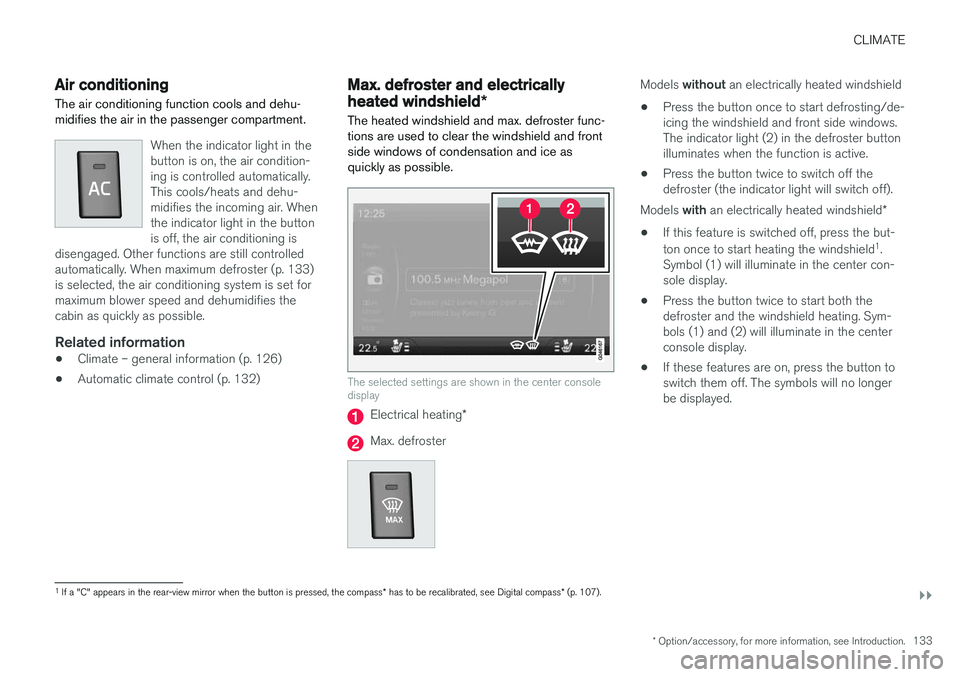
The selected settings are shown in the center console display
Electrical heating *
Max. defroster
Models without an electrically heated windshield
• Press the button once to start defrosting/de- icing the windshield and front side windows.The indicator light (2) in the defroster buttonilluminates when the function is active.
• Press the button twice to switch off thedefroster (the indicator light will switch off).
Models with an electrically heated windshield *
• If this feature is switched off, press the but- ton once to start heating the windshield 1
.
Symbol (1) will illuminate in the center con- sole display.
• Press the button twice to start both thedefroster and the windshield heating. Sym-bols (1) and (2) will illuminate in the centerconsole display.
• If these features are on, press the button toswitch them off. The symbols will no longerbe displayed.
1
If a "C" appears in the rear-view mirror when the button is pressed, the compass * has to be recalibrated, see Digital compass * (p. 107).
Page 136 of 406
||
CLIMATE
* Option/accessory, for more information, see Introduction.
134
NOTE
• Triangular areas at the far sides of the windshield are not heated electrically andwill take slightly longer to defrost/de-ice.
• The heated windshield may affect theperformance/range of e.g., transpondersused to automatically pay highway tolls orother communication equipment.
The following occurs when the defroster/wind- shield heating functions have been activated:
• Blower speed increases automatically andthe air conditioning (p. 133) will switch on (ifnot already on and if the passenger compart-ment blower is not turned off) to dehumidifythe air in the passenger compartment. Airconditioning can be switched off by pressing the
AC button.
• Recirculation (p. 135) will not function while defrost is engaged.
The climate system will return to its previous set-tings when the defroster/windshield heatingfunction is switched off. See also Heated windshield *, rear window and
door mirror defrosters (p. 106) for additional information.
Related information
• Climate – general information (p. 126)
• Automatic climate control (p. 132)
Air distribution – function
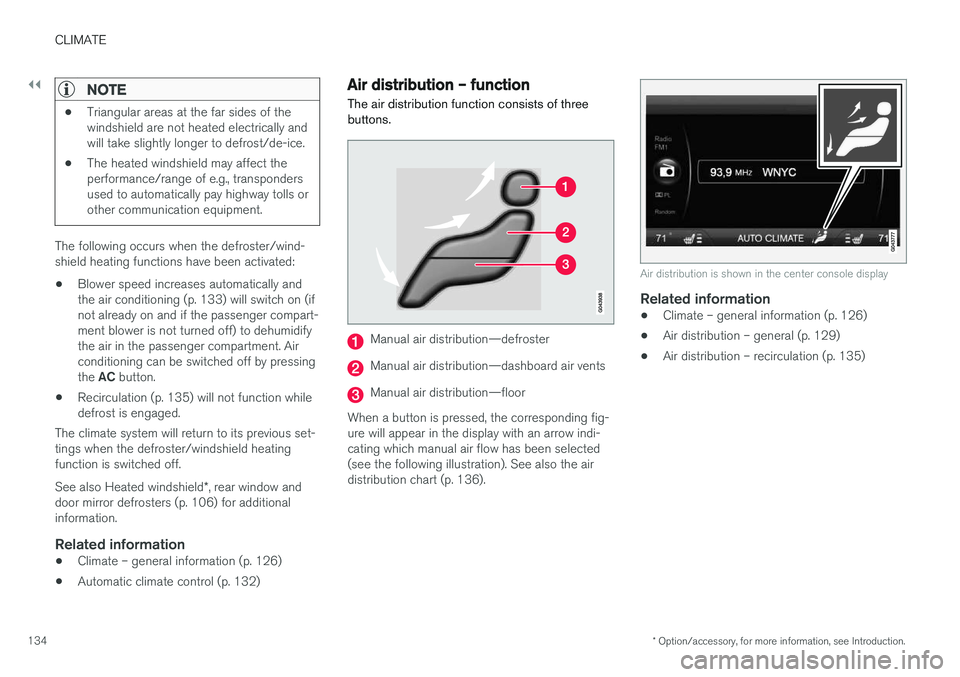
The air distribution function consists of three buttons.
Manual air distribution—defroster
Manual air distribution—dashboard air vents
Manual air distribution—floor
When a button is pressed, the corresponding fig- ure will appear in the display with an arrow indi-cating which manual air flow has been selected(see the following illustration). See also the airdistribution chart (p. 136).
Air distribution is shown in the center console display
Related information
• Climate – general information (p. 126)
• Air distribution – general (p. 129)
• Air distribution – recirculation (p. 135)
Page 138 of 406
CLIMATE
136
Air distribution – table
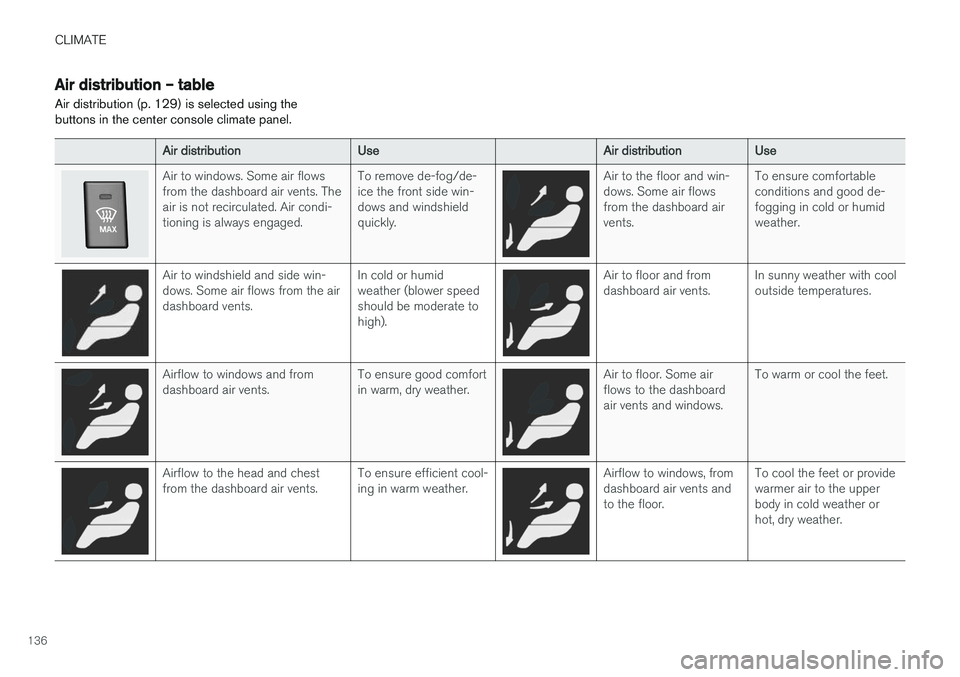
Air distribution (p. 129) is selected using the buttons in the center console climate panel.
Air distributionUseAir distributionUse
Air to windows. Some air flows from the dashboard air vents. Theair is not recirculated. Air condi-tioning is always engaged.To remove de-fog/de- ice the front side win-dows and windshieldquickly.Air to the floor and win- dows. Some air flowsfrom the dashboard airvents.To ensure comfortable conditions and good de-fogging in cold or humidweather.
Air to windshield and side win- dows. Some air flows from the airdashboard vents.In cold or humid weather (blower speedshould be moderate tohigh).Air to floor and from dashboard air vents.In sunny weather with cool outside temperatures.
Airflow to windows and from dashboard air vents.To ensure good comfort in warm, dry weather.Air to floor. Some air flows to the dashboardair vents and windows.To warm or cool the feet.
Airflow to the head and chest from the dashboard air vents.To ensure efficient cool- ing in warm weather.Airflow to windows, from dashboard air vents andto the floor.To cool the feet or provide warmer air to the upperbody in cold weather orhot, dry weather.
Page 152 of 406
LOCKS AND ALARM
150
Remote key and key blade
Two remote keys are provided with your vehicle. They enable you to unlock the doors and tail-gate, and also function as ignition keys to startthe vehicle or operate electrical components.The remote keys contain detachable metal keyblades for manually locking or unlocking the driv-er's door and the glove compartment. The visibleends of these key blades are unique to make iteasier to identify "your" remote key. Up to sixremotes can be programmed for use on thesame vehicle.
WARNING
Never leave the remote key in the ignition slot if children are to remain in the vehicle.
For more information on the various ignition modes, see Ignition modes (p. 80).
Related information
• Remote key – functions (p. 153)
• Remote key – functions (p. 153)
• Remote key – range (p. 154)
Remote key – loss
If either of the remote keys (p. 150) is lost, the other should be taken with the vehicle to a Volvoretailer. As an anti-theft measure, the code of thelost remote key must be erased from the system.
NOTE
Additional or duplicate remote control keys can be obtained from any authorized Volvoretailer. You can also obtain additional or duplicate remote control keys from certain independentrepair facilities and locksmiths that are quali-fied to make remote control keys. Each keymust be programmed to work with your vehi-cle. California Only: A list of independent repair facilities and/or locksmiths known to Volvo that can cut andcode replacement keys can be found: • on the Volvo website at http://www.volvocars.com/us/keys
• by calling Volvo Customer Care at1-800-458-1552
The number of registered keys for the vehicle can be found by pressing
MY CAR and going into
SettingsInformationNumber of keys.For a description of the menu system, see My Car – introduction (p. 77). USA-5WK49264FCC ID:KR55WK49264 + Siemens VDO 5WK49236 FCC ID:KR55WK49236, 5WK49266FCC ID:KR55WK49266 + Siemens VDO 5WK49233 FCC ID:KR55WK49233This device complies with part 15 of the FCC rules and RSS-210. Operation is subject to thefollowing conditions: (1) This device may notcause harmful interference, and (2) this devicemust accept any interference received, includinginterference that may cause undesired operation. Canada-5WK49264IC:267T-5WK49264 + Siemens VDO 5WK49236 IC:267T-5WK49236, 5WK49266IC:267T-5WK49266 + Siemens VDO 5WK49233 IC:267T-5WK49233Operation is subject to the following conditions: (1) this device may not cause interference, and(2) this device must accept any interference,including interference that may cause undesiredoperation of the device.
Page 170 of 406
LOCKS AND ALARM
168
Alarm – general information
The alarm system provides a warning if an attempt is made to break into the vehicle. The alarm is automatically armed (p. 169) whenever the vehicle is locked with the remotekey. When armed, the alarm continuously monitors a number of points on the vehicle. The followingconditions will trigger the alarm:
• The hood is forced open.
• The tailgate is forced open.
• A door is forced open.
• The ignition slot is tampered with.
• An attempt is made to start the vehicle with a non-approved key (a key not coded to thecar's ignition).
• The battery is disconnected (while the alarmis armed).
• The siren is disconnected when the alarm isdisarmed.
A message will appear in the information displayif a fault should occur in the alarm system. Con-tact a trained and qualified Volvo service techni-cian.
NOTE
Do not attempt to repair any of the compo- nents in the alarm system yourself. This couldaffect the insurance policy on the vehicle.
Related information
• Alarm – turning off (p. 170)
• Alarm signal (p. 169)
• Alarm indicator (p. 168)
Alarm indicator
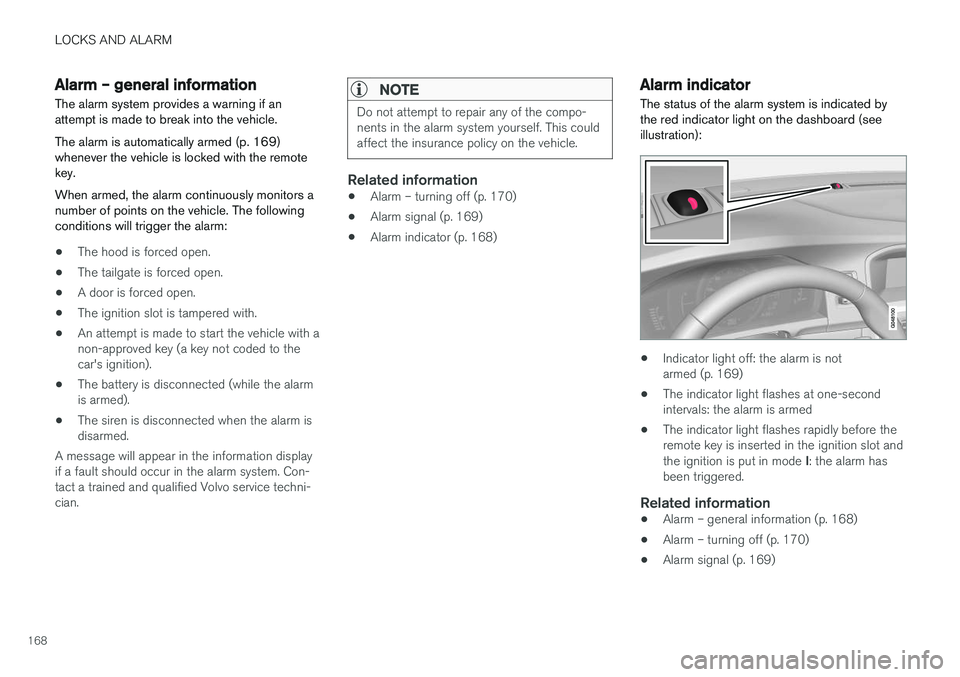
The status of the alarm system is indicated by the red indicator light on the dashboard (seeillustration):
• Indicator light off: the alarm is not armed (p. 169)
• The indicator light flashes at one-secondintervals: the alarm is armed
• The indicator light flashes rapidly before theremote key is inserted in the ignition slot and the ignition is put in mode
I: the alarm has
been triggered.
Related information
• Alarm – general information (p. 168)
• Alarm – turning off (p. 170)
• Alarm signal (p. 169)
Page 275 of 406
STARTING AND DRIVING
}}
* Option/accessory, for more information, see Introduction.273
ECO*
Eco is a function 10
developed by Volvo to give
the driver the opportunity to actively drive more economically and to help reduce fuel consump-tion.
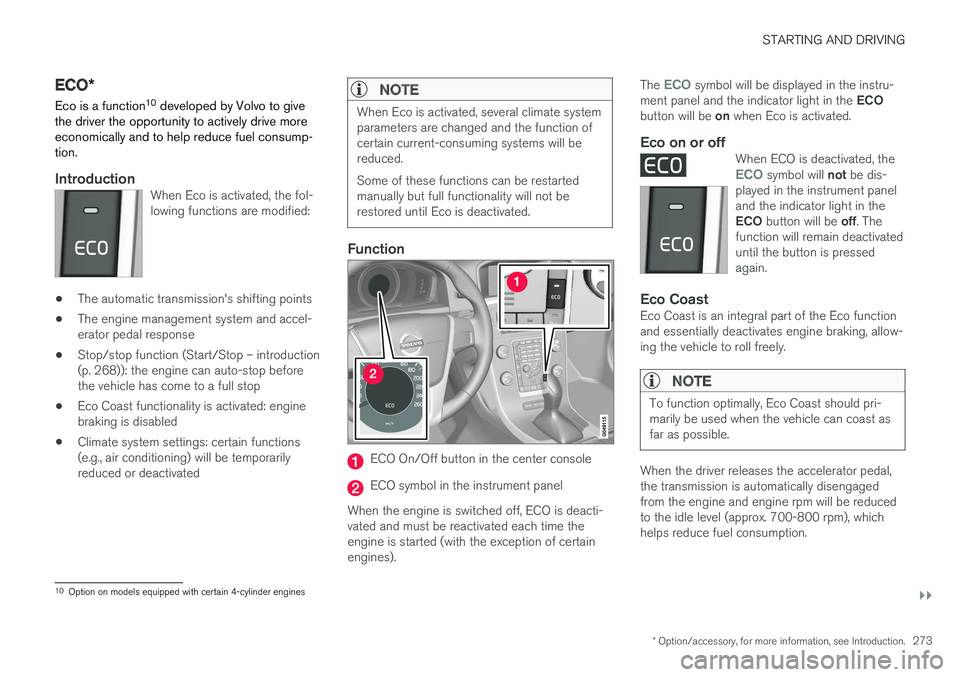
IntroductionWhen Eco is activated, the fol- lowing functions are modified:
• The automatic transmission's shifting points
• The engine management system and accel- erator pedal response
• Stop/stop function (Start/Stop – introduction(p. 268)): the engine can auto-stop beforethe vehicle has come to a full stop
• Eco Coast functionality is activated: enginebraking is disabled
• Climate system settings: certain functions(e.g., air conditioning) will be temporarilyreduced or deactivated
NOTE
When Eco is activated, several climate system parameters are changed and the function ofcertain current-consuming systems will bereduced. Some of these functions can be restarted manually but full functionality will not berestored until Eco is deactivated.
Function
ECO On/Off button in the center console
ECO symbol in the instrument panel
When the engine is switched off, ECO is deacti- vated and must be reactivated each time theengine is started (with the exception of certainengines). The
ECO symbol will be displayed in the instru-
ment panel and the indicator light in the ECO
button will be on when Eco is activated.
Eco on or offWhen ECO is deactivated, theECO symbol will not be dis-
played in the instrument panel and the indicator light in the ECO button will be off. The
function will remain deactivated until the button is pressedagain.
Eco CoastEco Coast is an integral part of the Eco function and essentially deactivates engine braking, allow-ing the vehicle to roll freely.
NOTE
To function optimally, Eco Coast should pri- marily be used when the vehicle can coast asfar as possible.
When the driver releases the accelerator pedal, the transmission is automatically disengagedfrom the engine and engine rpm will be reducedto the idle level (approx. 700-800 rpm), whichhelps reduce fuel consumption.
10 Option on models equipped with certain 4-cylinder engines
Page 286 of 406
STARTING AND DRIVING
284
Driving through water
The vehicle should be driven with extreme cau- tion if it is necessary to drive through standingwater.
The vehicle can be driven through water up to a depth of approximately 10 in. (25 cm), (V60Cross Country: approximately 12 in. (30 cm)) atwalking speed to help prevent water from enter-ing the differential and the transmission. Waterreduces the oil's lubricating capacity and mayshorten the service life of these components.
• Take particular care when driving throughflowing water.
• Clean the electrical connections for trailerwiring after driving in mud or water.
• When driving through water, maintain lowspeed and do not stop in the water.
WARNING
•Avoid driving through standing or rushing water. Doing so can be dangerous and itmay also be difficult to determine theactual depth of the water.
• If water cannot be avoided, after drivingthrough the water, press lightly on thebrake pedal to ensure that the brakes arefunctioning normally. Water or mud canmake the brake linings slippery, resultingin delayed braking effect.
CAUTION
•Engine damage will occur if water is drawn into the air cleaner.
• If the vehicle is driven through waterdeeper than approximately 10 in.(25 cm), (V60 Cross Country: approxi-mately 12 in. (30 cm)), water may enterthe differential and the transmission. Thisreduces the oil's lubricating capacity andmay shorten the service life of thesecomponents.
• Damage to any components, the engine,transmission, turbo-charger, differential orits internal components caused by flood-ing, vapor lock or insufficient oil is notcovered under warranty.
• Do not allow the vehicle to stand in waterup to the door sills longer than absolutelynecessary. This could result in electricalmalfunctions.
• If the engine has been stopped while thevehicle is in water, do not attempt torestart it. Have the vehicle towed out ofthe water.
Related information
•Towing the vehicle (p. 295)
• Towing by tow truck (p. 296)
Engine and cooling system
Under special conditions, for example when driv- ing in hilly terrain, extreme heat or with heavyloads, there is a risk that the engine and coolingsystem will overheat.
Proceed as follows to avoid overheating the engine.
• Maintain a low speed when driving with atrailer up long, steep hills. For information,see Towing a trailer (p. 292)
• Do not turn the engine off immediately whenstopping after a hard drive.
WARNING
The cooling fan may start or continue to oper- ate (for up to 6 minutes) after the engine hasbeen switched off.
• Remove any auxiliary lights from in front of the grille when driving in hot weather condi-tions.
• Do not exceed engine speeds of 4500 rpm ifdriving with a trailer in hilly terrain. The oiltemperature could become too high.
Page 293 of 406
STARTING AND DRIVING
}}
* Option/accessory, for more information, see Introduction.291
nents, altering emission system components or location or removing components, and/orrepeated use of leaded fuel.
NOTE
Unleaded fuel is required for vehicles with three-way catalytic converters.
Heated oxygen sensorsThe heated oxygen sensors monitor the oxygen content of the exhaust gases. Readings are fedinto a control module that continuously monitorsengine functions and controls fuel injection. Theratio of fuel to air into the engine is continuouslyadjusted for efficient combustion to help reduceharmful emissions.
Related information
•
Information displays – warning symbols(p. 75)
• Engine and cooling system (p. 284)
Economical driving
Better driving economy may be obtained by thinking ahead, avoiding rapid starts and stopsand adjusting the speed of your vehicle to imme-diate traffic conditions.
Economical driving conserves natural
resources
Observe the following rules: • Bring the engine to normal operating tem- perature as soon as possible by driving witha light foot on the accelerator pedal for thefirst few minutes of operation. A cold engineuses more fuel and is subject to increasedwear.
• Whenever possible, avoid using the vehiclefor driving short distances. This does notallow the engine to reach normal operatingtemperature.
• Drive carefully and avoid rapid accelerationand hard braking.
• Use the transmission's Drive (
D) position as
often as possible and avoid using kick-down.
• Using the engine's optional Eco function canhelp improve fuel economy. For additional information, see ECO
* (p. 273).
• Using the transmission's Sport mode may increase fuel consumption somewhat. Use the transmission's Drive (
D) position as often
as possible. For additional information about Sport mode, see Transmission – Geartronic (p. 264).
• Do not exceed posted speed limits.
• Avoid carrying unnecessary items (extra load)in the vehicle.
• Maintain correct tire pressure. Check tirepressure regularly (when tires are cold).
• Remove snow tires when threat of snow orice has ended.
• Note that roof racks, ski racks, etc, increaseair resistance and also fuel consumption.
• At highway driving speeds, fuel consumptionwill be lower with the air conditioning on andthe windows closed than with the air condi-tioning off and the windows open.
• Using the onboard trip computer's fuel con-sumption modes can help you learn how todrive more economically.
Other factors that decrease gas mileage are:
• Dirty air cleaner
• Dirty engine oil and clogged oil filter
• Dragging brakes
• Incorrect front end alignment
Some of the above mentioned items and othersare checked at the standard maintenance inter-vals.