mirror VOLVO V60 2017 Owner´s Manual
[x] Cancel search | Manufacturer: VOLVO, Model Year: 2017, Model line: V60, Model: VOLVO V60 2017Pages: 406, PDF Size: 9.65 MB
Page 106 of 406
INSTRUMENTS AND CONTROLS
* Option/accessory, for more information, see Introduction.
104
Power door mirrors
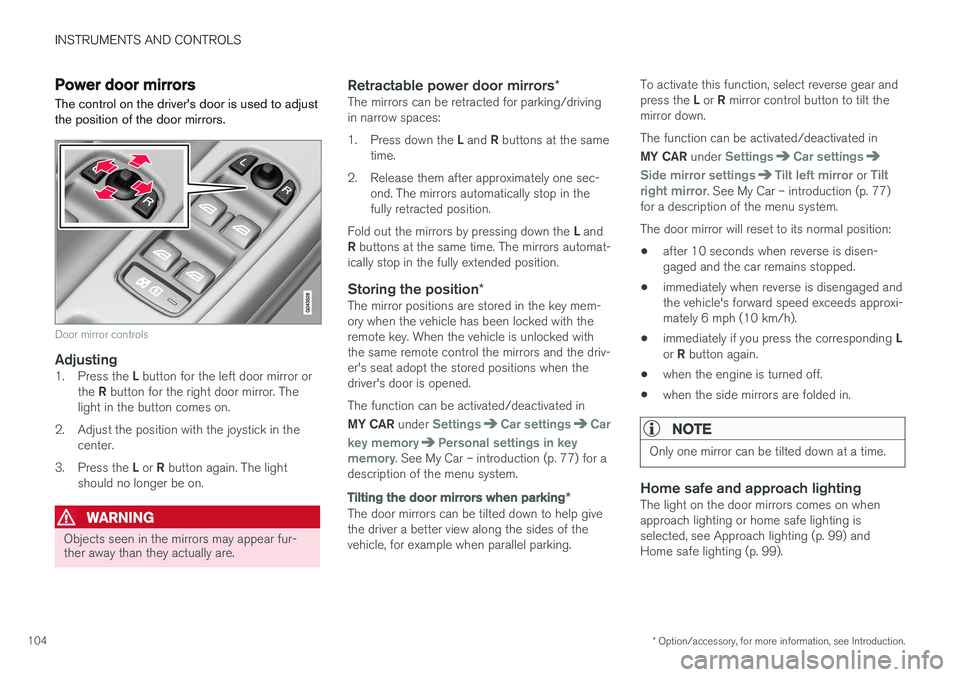
The control on the driver's door is used to adjust the position of the door mirrors.
Door mirror controls
Adjusting1. Press the L button for the left door mirror or
the R button for the right door mirror. The
light in the button comes on.
2. Adjust the position with the joystick in the center.
3. Press the L or R button again. The light
should no longer be on.
WARNING
Objects seen in the mirrors may appear fur- ther away than they actually are.
Retractable power door mirrors *The mirrors can be retracted for parking/driving in narrow spaces: 1.
Press down the L and R buttons at the same
time.
2. Release them after approximately one sec- ond. The mirrors automatically stop in the fully retracted position.
Fold out the mirrors by pressing down the L and
R buttons at the same time. The mirrors automat-
ically stop in the fully extended position.
Storing the position *The mirror positions are stored in the key mem-ory when the vehicle has been locked with theremote key. When the vehicle is unlocked withthe same remote control the mirrors and the driv-er's seat adopt the stored positions when thedriver's door is opened. The function can be activated/deactivated in MY CAR under
SettingsCar settingsCar
key memory
Personal settings in key
memory. See My Car – introduction (p. 77) for a
description of the menu system.
Tilting the door mirrors when parking *
The door mirrors can be tilted down to help give the driver a better view along the sides of thevehicle, for example when parallel parking. To activate this function, select reverse gear and press the
L or R mirror control button to tilt the
mirror down. The function can be activated/deactivated in MY CAR under
SettingsCar settings
Side mirror settingsTilt left mirror or Tilt
right mirror. See My Car – introduction (p. 77)
for a description of the menu system. The door mirror will reset to its normal position:
• after 10 seconds when reverse is disen- gaged and the car remains stopped.
• immediately when reverse is disengaged andthe vehicle's forward speed exceeds approxi-mately 6 mph (10 km/h).
• immediately if you press the corresponding
L
or R button again.
• when the engine is turned off.
• when the side mirrors are folded in.
NOTE
Only one mirror can be tilted down at a time.
Home safe and approach lightingThe light on the door mirrors comes on when approach lighting or home safe lighting isselected, see Approach lighting (p. 99) andHome safe lighting (p. 99).
Page 107 of 406
INSTRUMENTS AND CONTROLS
* Option/accessory, for more information, see Introduction.105
Related information
•Interior rearview mirror (p. 106)
• Heated windshield
*, rear window and door
mirror defrosters (p. 106)
• Power door mirrors – automatic tilting/ retraction (p. 105)
Power door mirrors – automatic tilting/retraction
The control on the driver's door is used to adjust the position of the door mirrors.
Automatically tilting the door mirrors
when parking
The door mirrors can tilt down automatically to help give the driver a better view along the sidesof the vehicle, for example when parallel parking.When the transmission is no longer in reverse,the mirrors will automatically return to their origi-nal position. This function can be activated/deactivated in MY
CAR under
SettingsCar settingsSide
mirror settings
In reverse gear tilt left
mirror or In reverse gear tilt right mirror. See
My Car – introduction (p. 77) for information about the MY CAR menu system.
Automatic retraction when lockingWhen the vehicle is locked/unlocked with the remote key the door mirrors are automaticallyretracted/extended. The function can be activated/deactivated in MY CAR under
SettingsCar settings
Side mirror settingsRetract side mirrors
when locking. See My Car – introduction (p. 77)
for a description of the menu system.
Resetting to neutralMirrors that have been moved out of position by an external force must be electrically reset to theneutral position for electric retracting/extendingto work. • Retract the mirrors with the
L and R buttons.
• Fold them out again with the
L and R but-
tons.
The mirrors are now reset in neutral position.
Related information
• Interior rearview mirror (p. 106)
• Heated windshield
*, rear window and door
mirror defrosters (p. 106)
Page 108 of 406
INSTRUMENTS AND CONTROLS
* Option/accessory, for more information, see Introduction.
106
Heated windshield *, rear window
and door mirror defrosters
The heating function is used to defrost/de-ice the windshield and/or the rear window and doormirrors.
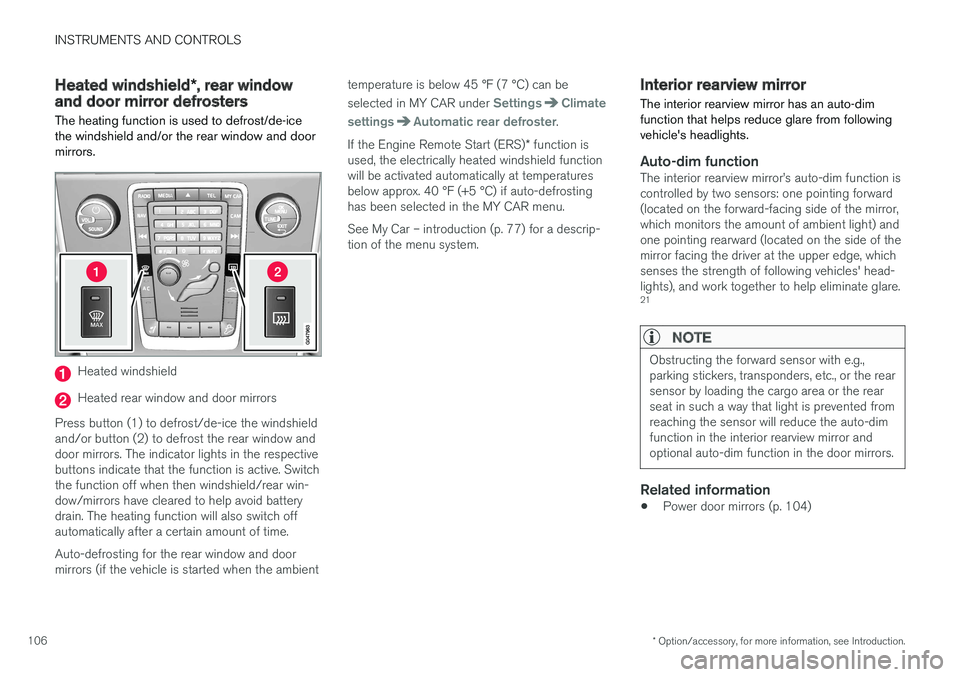
Heated windshield
Heated rear window and door mirrors
Press button (1) to defrost/de-ice the windshield and/or button (2) to defrost the rear window anddoor mirrors. The indicator lights in the respectivebuttons indicate that the function is active. Switchthe function off when then windshield/rear win-dow/mirrors have cleared to help avoid batterydrain. The heating function will also switch offautomatically after a certain amount of time. Auto-defrosting for the rear window and door mirrors (if the vehicle is started when the ambient temperature is below 45 °F (7 °C) can be selected in MY CAR under
SettingsClimate
settings
Automatic rear defroster.
If the Engine Remote Start (ERS) * function is
used, the electrically heated windshield function will be activated automatically at temperaturesbelow approx. 40 °F (+5 °C) if auto-defrostinghas been selected in the MY CAR menu. See My Car – introduction (p. 77) for a descrip- tion of the menu system.
Interior rearview mirror The interior rearview mirror has an auto-dim function that helps reduce glare from followingvehicle's headlights.
Auto-dim functionThe interior rearview mirror
Page 109 of 406
INSTRUMENTS AND CONTROLS
}}
* Option/accessory, for more information, see Introduction.107
Digital compass*
The rear-view mirror has an integrated display that shows the compass direction in which thevehicle is traveling.
Operation
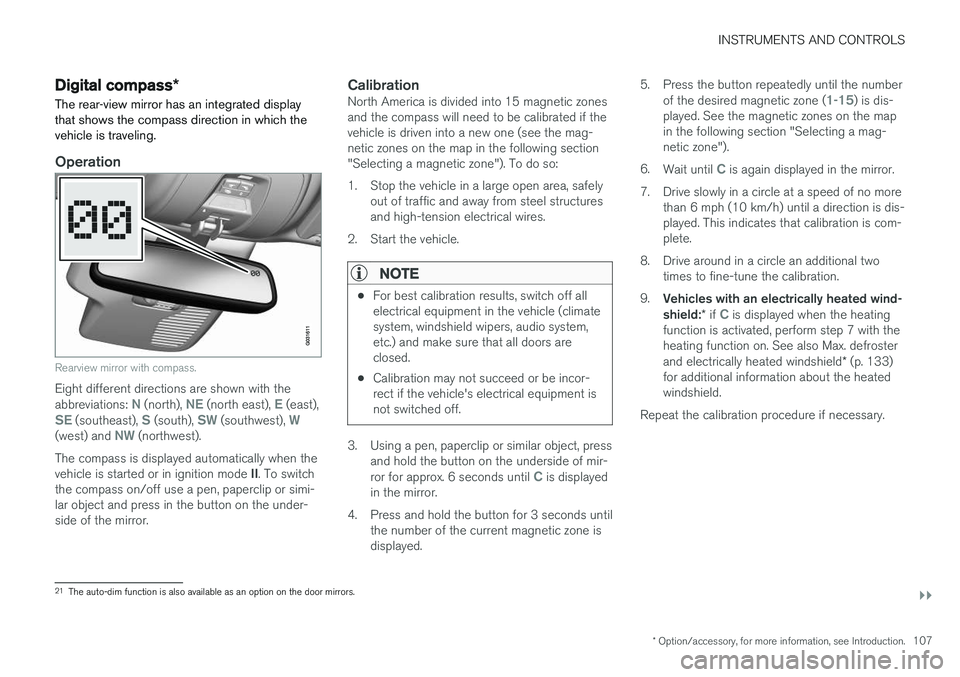
Rearview mirror with compass.
Eight different directions are shown with the abbreviations: N (north), NE (north east), E (east),SE (southeast), S (south), SW (southwest), W(west) and NW (northwest).
The compass is displayed automatically when the vehicle is started or in ignition mode II. To switch
the compass on/off use a pen, paperclip or simi- lar object and press in the button on the under-side of the mirror.
CalibrationNorth America is divided into 15 magnetic zonesand the compass will need to be calibrated if thevehicle is driven into a new one (see the mag-netic zones on the map in the following section"Selecting a magnetic zone"). To do so:
1. Stop the vehicle in a large open area, safely out of traffic and away from steel structures and high-tension electrical wires.
2. Start the vehicle.
NOTE
• For best calibration results, switch off all electrical equipment in the vehicle (climatesystem, windshield wipers, audio system,etc.) and make sure that all doors areclosed.
• Calibration may not succeed or be incor-rect if the vehicle's electrical equipment isnot switched off.
3. Using a pen, paperclip or similar object, press
and hold the button on the underside of mir- ror for approx. 6 seconds until
C is displayed
in the mirror.
4. Press and hold the button for 3 seconds until the number of the current magnetic zone is displayed. 5. Press the button repeatedly until the number
of the desired magnetic zone (
1-15) is dis-
played. See the magnetic zones on the map in the following section "Selecting a mag-netic zone").
6. Wait until
C is again displayed in the mirror.
7. Drive slowly in a circle at a speed of no more than 6 mph (10 km/h) until a direction is dis- played. This indicates that calibration is com-plete.
8. Drive around in a circle an additional two times to fine-tune the calibration.
9. Vehicles with an electrically heated wind- shield: * if
C is displayed when the heating
function is activated, perform step 7 with the heating function on. See also Max. defroster and electrically heated windshield * (p. 133)
for additional information about the heated windshield.
Repeat the calibration procedure if necessary.
21 The auto-dim function is also available as an option on the door mirrors.
Page 110 of 406
||
INSTRUMENTS AND CONTROLS
* Option/accessory, for more information, see Introduction.
108
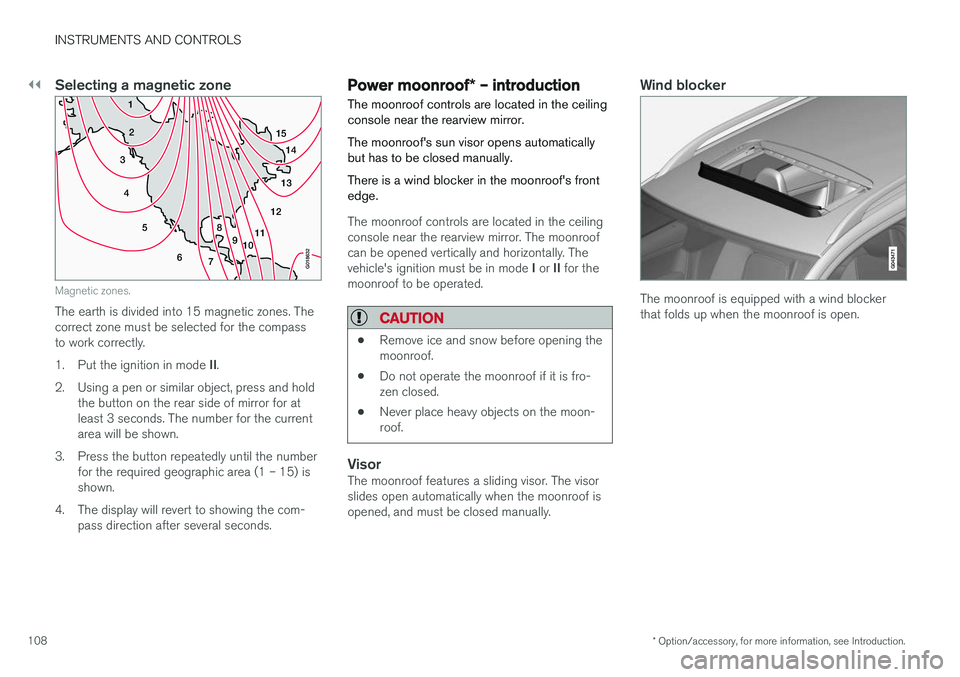
Selecting a magnetic zone
15
14
13
12
11
9
8
7
6
5
4
3
2
1
10
G018632
Magnetic zones.
The earth is divided into 15 magnetic zones. The correct zone must be selected for the compassto work correctly. 1.Put the ignition in mode II.
2. Using a pen or similar object, press and hold the button on the rear side of mirror for at least 3 seconds. The number for the currentarea will be shown.
3. Press the button repeatedly until the number for the required geographic area (1 – 15) isshown.
4. The display will revert to showing the com- pass direction after several seconds.
Power moonroof * – introduction
The moonroof controls are located in the ceiling console near the rearview mirror. The moonroof's sun visor opens automatically but has to be closed manually. There is a wind blocker in the moonroof's front edge.
The moonroof controls are located in the ceiling console near the rearview mirror. The moonroofcan be opened vertically and horizontally. The vehicle's ignition must be in mode I or II for the
moonroof to be operated.
CAUTION
• Remove ice and snow before opening the moonroof.
• Do not operate the moonroof if it is fro-zen closed.
• Never place heavy objects on the moon-roof.
VisorThe moonroof features a sliding visor. The visor slides open automatically when the moonroof isopened, and must be closed manually.
Wind blocker
The moonroof is equipped with a wind blocker that folds up when the moonroof is open.
Page 111 of 406
INSTRUMENTS AND CONTROLS
}}
* Option/accessory, for more information, see Introduction.109
Power moonroof* – operation
The moonroof controls are located in the ceiling console near the rearview mirror. The moonroof's sun visor opens automatically but has to be closed manually. There is a wind blocker in the moonroof's front edge.
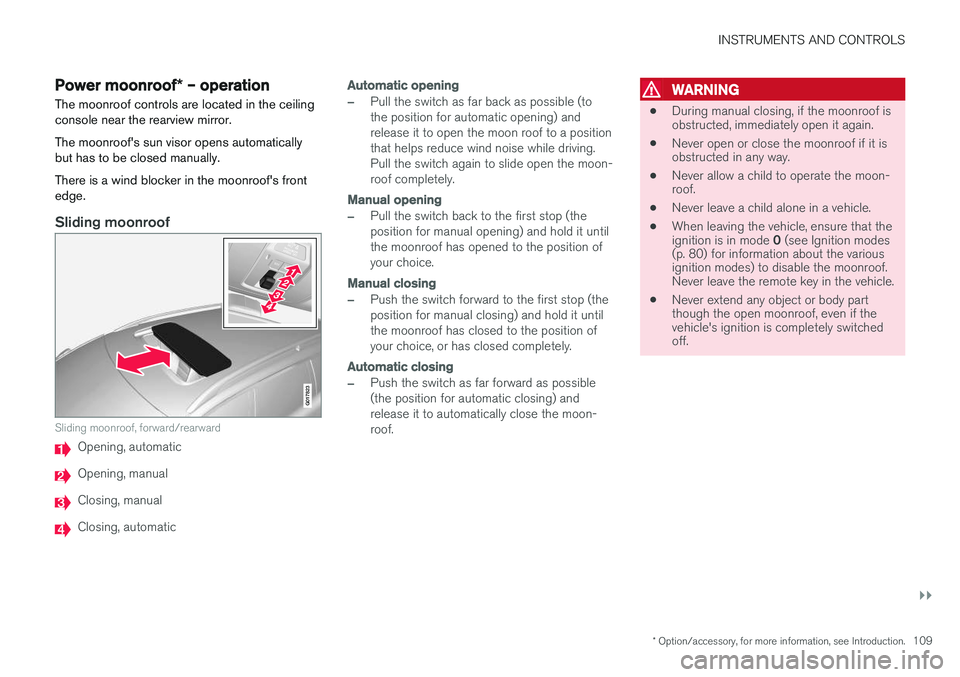
Sliding moonroof
G017823
Sliding moonroof, forward/rearward
Opening, automatic
Opening, manual
Closing, manual
Closing, automatic
Automatic opening
–Pull the switch as far back as possible (to the position for automatic opening) andrelease it to open the moon roof to a positionthat helps reduce wind noise while driving.Pull the switch again to slide open the moon-roof completely.
Manual opening
–Pull the switch back to the first stop (the position for manual opening) and hold it untilthe moonroof has opened to the position ofyour choice.
Manual closing
–Push the switch forward to the first stop (the position for manual closing) and hold it untilthe moonroof has closed to the position ofyour choice, or has closed completely.
Automatic closing
–Push the switch as far forward as possible (the position for automatic closing) andrelease it to automatically close the moon-roof.
WARNING
• During manual closing, if the moonroof is obstructed, immediately open it again.
• Never open or close the moonroof if it isobstructed in any way.
• Never allow a child to operate the moon-roof.
• Never leave a child alone in a vehicle.
• When leaving the vehicle, ensure that the ignition is in mode
0 (see Ignition modes
(p. 80) for information about the various ignition modes) to disable the moonroof.Never leave the remote key in the vehicle.
• Never extend any object or body partthough the open moonroof, even if thevehicle's ignition is completely switchedoff.
Page 128 of 406
CLIMATE
* Option/accessory, for more information, see Introduction.
126
Climate – general information
The vehicle is equipped with Electronic Climate
Control (ECC) (p. 130) that cools, heats ordehumidifies the air in the passenger compart-ment.
Air conditioning
NOTE
• The air conditioning can be switched off, but to ensure the best possible climatecomfort in the passenger compartmentand to prevent the windows from misting,it should always be on.
• In warm weather, a small amount of watermay accumulate under the car when ithas been parked. This water is condensa-tion from the A/C system and is normal.
Side windows and moonroofTo ensure that the air conditioning works opti- mally, the side windows, and the optional moon-roof should be closed.
Fog on the inside of the windowsThe defroster function (p. 133) should be usedto remove fog or mist from the inside of the win-dows. Keeping the windows clean with a com-mercially available window washing spray will alsohelp prevent fogging or misting.
Temporary shut-off of the air conditioning
The air conditioning (p. 133) is momentarily dis- engaged during full acceleration or when drivinguphill with a trailer. This may result in a temporaryincrease in cabin temperature.
Ice and snowAlways keep the air intake grille at the base ofthe windshield free of snow.
Climate system maintenanceSpecial tools and equipment are required tomaintain and carry out repairs on the climate sys-tem. Work of this type should only be done by atrained and qualified Volvo service technician.
RefrigerantVolvo cares about the environment. The air condi-tioning system in your car contains a CFC-freerefrigerant – R134a. This substance will notdeplete the ozone layer. The air conditioning sys-tem contains 1.76 lbs (800 g) of R134a. Thesystems uses PAG oil.
Related information
• Climate – sensors (p. 126)
• Climate – menu settings (p. 128)
Climate – sensors
The climate system utilizes a number of sensors to help regulate the temperature and humiditylevel in the passenger compartment.
Sensor location
• The sunlight sensor is located on the top side of the dashboard.
NOTE
The sunlight sensor monitors which side of the car that is most exposed to sunlight. Thiscan mean that the temperature may differbetween the right and left-side air vents, evenif the temperatures set for both sides of thepassenger compartment are the same.
•
The temperature sensor for the passenger compartment is located below the climatecontrol panel.
• The outside (ambient) temperature sensor islocated on the door mirror.
• The humidity sensor
* is located in the interior
rearview mirror.
NOTE
Do not cover or block the sensors with cloth- ing or other objects.
Page 135 of 406
CLIMATE
}}
* Option/accessory, for more information, see Introduction.133
Air conditioning
The air conditioning function cools and dehu- midifies the air in the passenger compartment.
When the indicator light in the button is on, the air condition-ing is controlled automatically.This cools/heats and dehu-midifies the incoming air. Whenthe indicator light in the buttonis off, the air conditioning is
disengaged. Other functions are still controlledautomatically. When maximum defroster (p. 133)is selected, the air conditioning system is set formaximum blower speed and dehumidifies thecabin as quickly as possible.
Related information
• Climate – general information (p. 126)
• Automatic climate control (p. 132)
Max. defroster and electrically heated windshield
*
The heated windshield and max. defroster func- tions are used to clear the windshield and frontside windows of condensation and ice asquickly as possible.
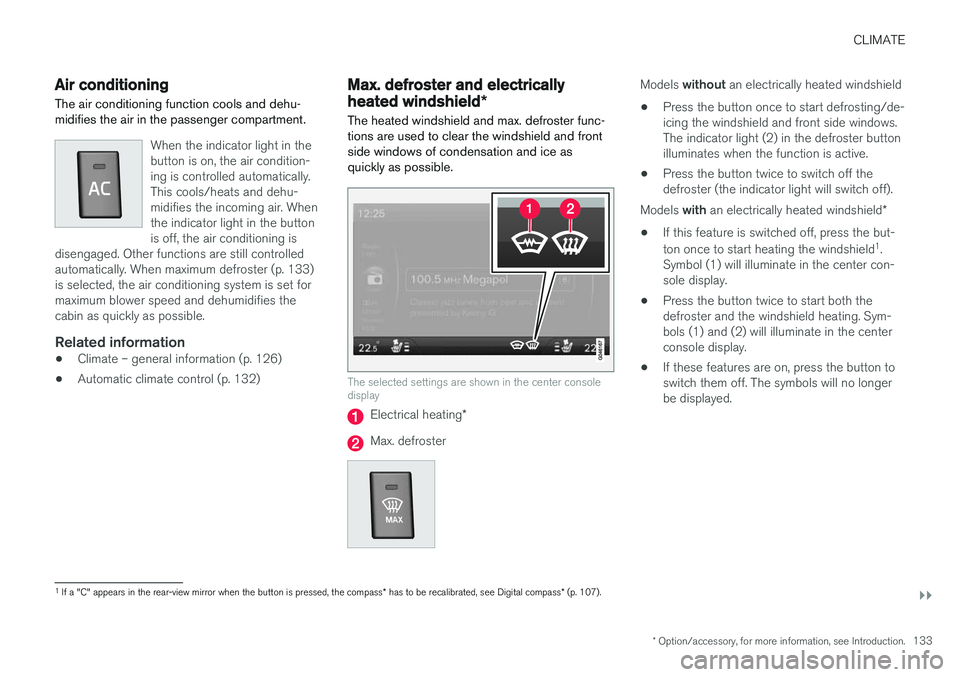
The selected settings are shown in the center console display
Electrical heating *
Max. defroster
Models without an electrically heated windshield
• Press the button once to start defrosting/de- icing the windshield and front side windows.The indicator light (2) in the defroster buttonilluminates when the function is active.
• Press the button twice to switch off thedefroster (the indicator light will switch off).
Models with an electrically heated windshield *
• If this feature is switched off, press the but- ton once to start heating the windshield 1
.
Symbol (1) will illuminate in the center con- sole display.
• Press the button twice to start both thedefroster and the windshield heating. Sym-bols (1) and (2) will illuminate in the centerconsole display.
• If these features are on, press the button toswitch them off. The symbols will no longerbe displayed.
1
If a "C" appears in the rear-view mirror when the button is pressed, the compass * has to be recalibrated, see Digital compass * (p. 107).
Page 136 of 406
||
CLIMATE
* Option/accessory, for more information, see Introduction.
134
NOTE
• Triangular areas at the far sides of the windshield are not heated electrically andwill take slightly longer to defrost/de-ice.
• The heated windshield may affect theperformance/range of e.g., transpondersused to automatically pay highway tolls orother communication equipment.
The following occurs when the defroster/wind- shield heating functions have been activated:
• Blower speed increases automatically andthe air conditioning (p. 133) will switch on (ifnot already on and if the passenger compart-ment blower is not turned off) to dehumidifythe air in the passenger compartment. Airconditioning can be switched off by pressing the
AC button.
• Recirculation (p. 135) will not function while defrost is engaged.
The climate system will return to its previous set-tings when the defroster/windshield heatingfunction is switched off. See also Heated windshield *, rear window and
door mirror defrosters (p. 106) for additional information.
Related information
• Climate – general information (p. 126)
• Automatic climate control (p. 132)
Air distribution – function
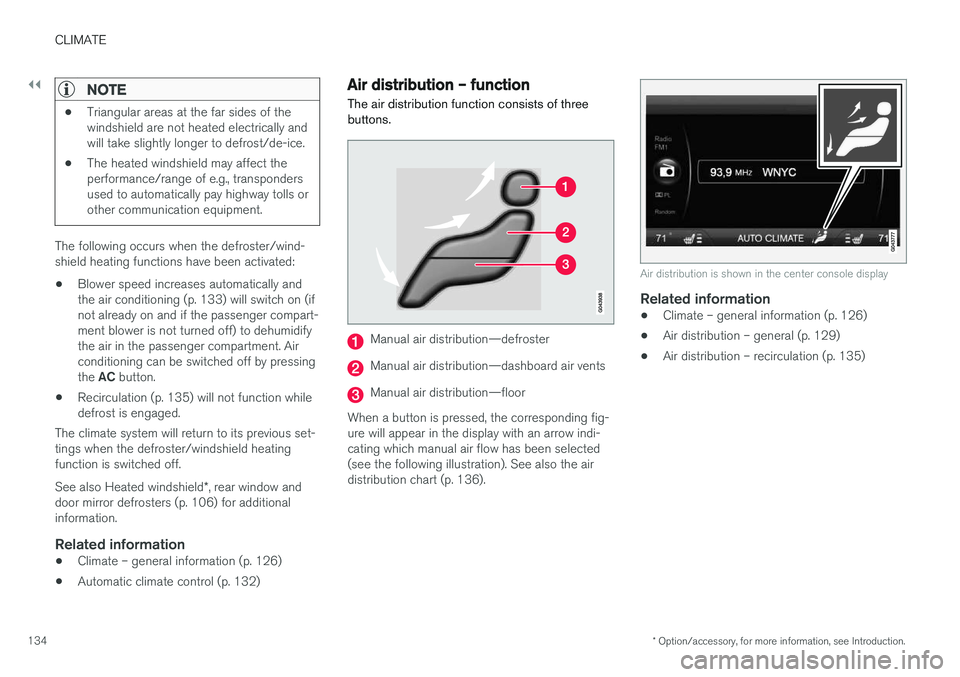
The air distribution function consists of three buttons.
Manual air distribution—defroster
Manual air distribution—dashboard air vents
Manual air distribution—floor
When a button is pressed, the corresponding fig- ure will appear in the display with an arrow indi-cating which manual air flow has been selected(see the following illustration). See also the airdistribution chart (p. 136).
Air distribution is shown in the center console display
Related information
• Climate – general information (p. 126)
• Air distribution – general (p. 129)
• Air distribution – recirculation (p. 135)
Page 143 of 406
LOADING AND STORAGE
* Option/accessory, for more information, see Introduction.141
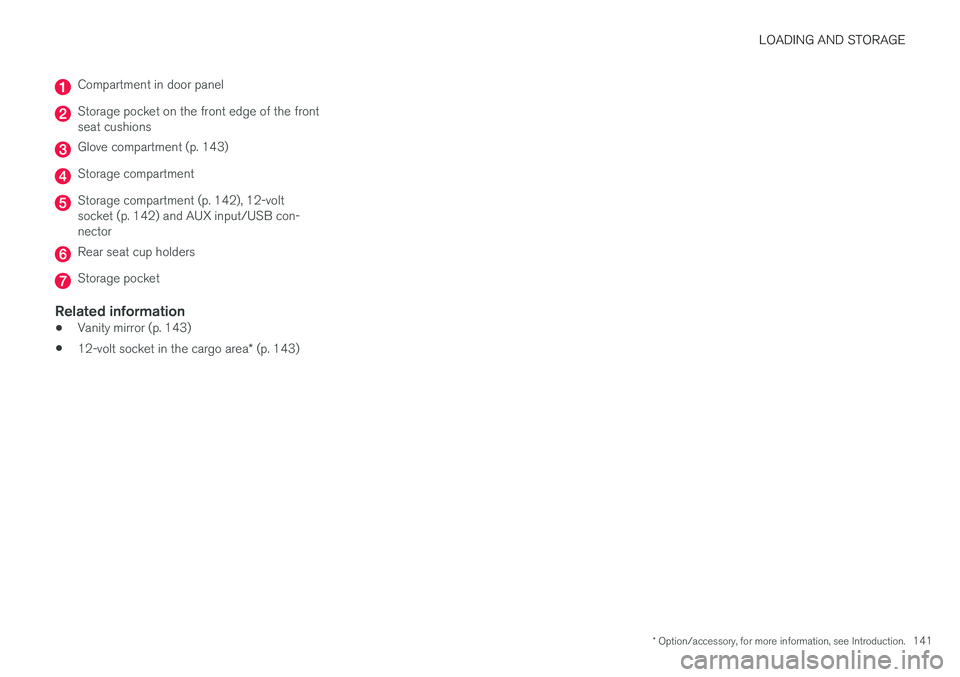
Compartment in door panel
Storage pocket on the front edge of the front seat cushions
Glove compartment (p. 143)
Storage compartment
Storage compartment (p. 142), 12-volt socket (p. 142) and AUX input/USB con-nector
Rear seat cup holders
Storage pocket
Related information
•Vanity mirror (p. 143)
• 12-volt socket in the cargo area
* (p. 143)