alarm VOLVO V60 2017 Owner´s Manual
[x] Cancel search | Manufacturer: VOLVO, Model Year: 2017, Model line: V60, Model: VOLVO V60 2017Pages: 406, PDF Size: 9.65 MB
Page 169 of 406
LOCKS AND ALARM
167
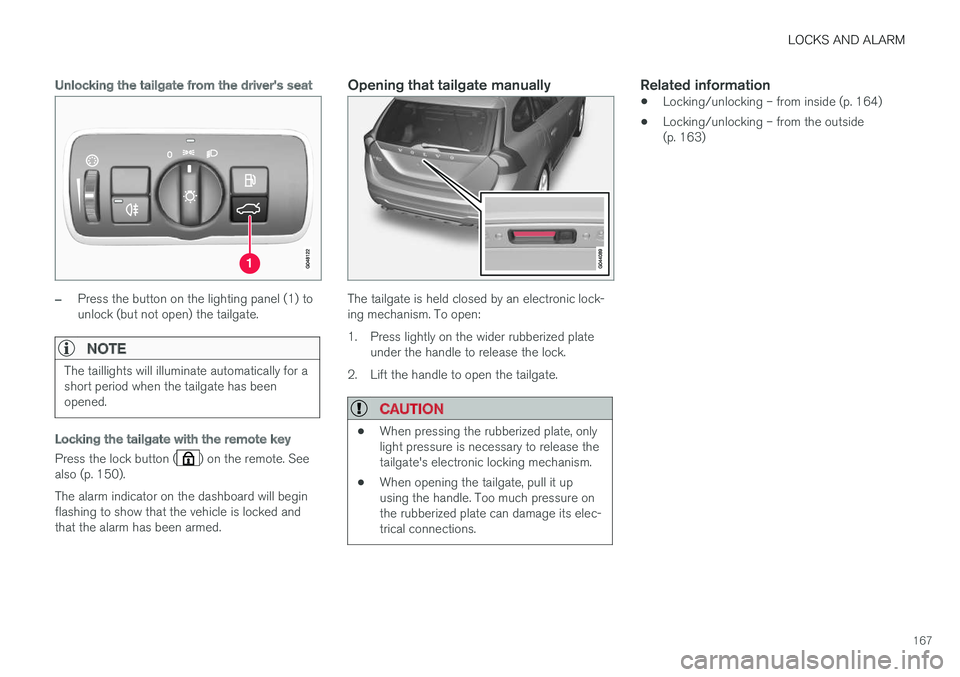
Unlocking the tailgate from the driver's seat
–Press the button on the lighting panel (1) to unlock (but not open) the tailgate.
NOTE
The taillights will illuminate automatically for a short period when the tailgate has beenopened.
Locking the tailgate with the remote key
Press the lock button () on the remote. See
also (p. 150). The alarm indicator on the dashboard will begin flashing to show that the vehicle is locked andthat the alarm has been armed.
Opening that tailgate manually
The tailgate is held closed by an electronic lock- ing mechanism. To open:
1. Press lightly on the wider rubberized plate under the handle to release the lock.
2. Lift the handle to open the tailgate.
CAUTION
• When pressing the rubberized plate, only light pressure is necessary to release thetailgate's electronic locking mechanism.
• When opening the tailgate, pull it upusing the handle. Too much pressure onthe rubberized plate can damage its elec-trical connections.
Related information
• Locking/unlocking – from inside (p. 164)
• Locking/unlocking – from the outside (p. 163)
Page 170 of 406
LOCKS AND ALARM
168
Alarm – general information
The alarm system provides a warning if an attempt is made to break into the vehicle. The alarm is automatically armed (p. 169) whenever the vehicle is locked with the remotekey. When armed, the alarm continuously monitors a number of points on the vehicle. The followingconditions will trigger the alarm:
• The hood is forced open.
• The tailgate is forced open.
• A door is forced open.
• The ignition slot is tampered with.
• An attempt is made to start the vehicle with a non-approved key (a key not coded to thecar's ignition).
• The battery is disconnected (while the alarmis armed).
• The siren is disconnected when the alarm isdisarmed.
A message will appear in the information displayif a fault should occur in the alarm system. Con-tact a trained and qualified Volvo service techni-cian.
NOTE
Do not attempt to repair any of the compo- nents in the alarm system yourself. This couldaffect the insurance policy on the vehicle.
Related information
• Alarm – turning off (p. 170)
• Alarm signal (p. 169)
• Alarm indicator (p. 168)
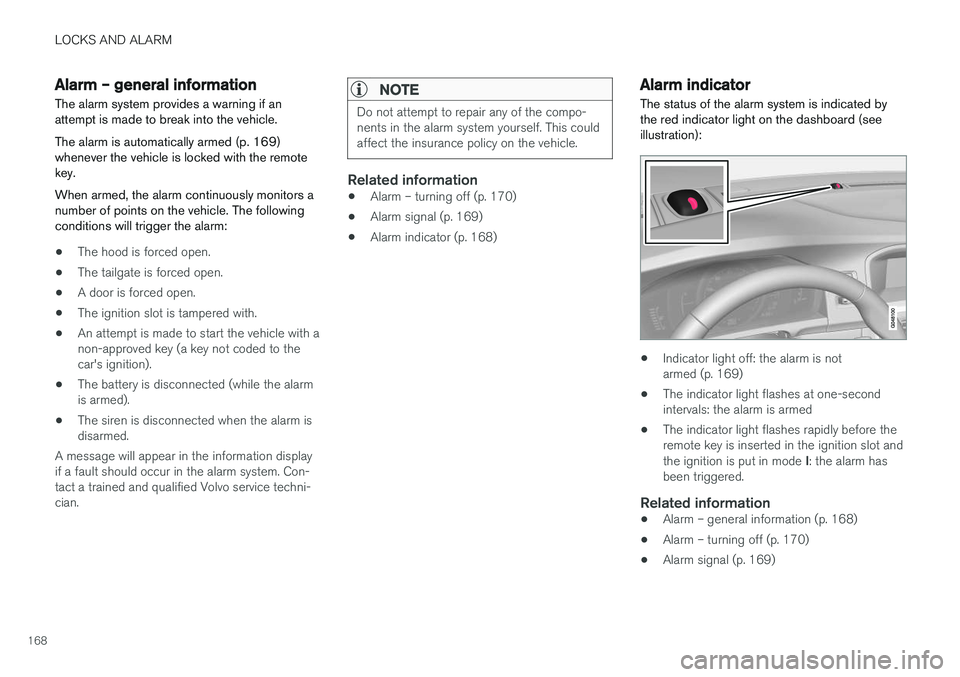
Alarm indicator
The status of the alarm system is indicated by the red indicator light on the dashboard (seeillustration):
• Indicator light off: the alarm is not armed (p. 169)
• The indicator light flashes at one-secondintervals: the alarm is armed
• The indicator light flashes rapidly before theremote key is inserted in the ignition slot and the ignition is put in mode
I: the alarm has
been triggered.
Related information
• Alarm – general information (p. 168)
• Alarm – turning off (p. 170)
• Alarm signal (p. 169)
Page 171 of 406
LOCKS AND ALARM
169
Alarm – arming/disarming The alarm system provides a warning if an attempt is made to break into the vehicle.
Arming the alarm
–Press the Lock button on the remote key. One long flash of the turn signals will confirmthat the alarm (p. 168) is armed.
Alarm confirmation settings can be changed in MY CAR , under
Car settingsLock settings
Keyless entry. For a description of the menu
system, see My Car – introduction (p. 77).
USA FCC ID: MAYDA 5823(3) This device complies with part 15 of the FCC rules. Operation is subject to the following condi-tions: (1) This device may not cause harmfulinterference, and (2) this device must accept anyinterference received, including interference thatmay cause undesired operation.
Canada IC: 4405A-DA 5823(3)
This device is subject to the following conditions:(1) this device may not cause interference, and(2) this device must accept any interference,including interference that may cause undesiredoperation of the device.
Disarming the alarm
–Press the Unlock button on the remote key.
> Two short flashes from the car's direction indicators confirm that the alarm has been deactivated and that all doors areunlocked.
Related information
• Alarm indicator (p. 168)
• Alarm signal (p. 169)
• Alarm – turning off (p. 170)
• Alarm-related functions (p. 170)
Alarm signal
An audible (p. 168) signal is given by a battery powered siren. The alarm cycle lasts for 30 sec-onds.
The visual alarm signal is given by flashing all turn signals for approximately 5 minutes or untilthe alarm is turned off.
Related information
• Alarm indicator (p. 168)
• Alarm – arming/disarming (p. 169)
• Alarm – turning off (p. 170)
Page 172 of 406
LOCKS AND ALARM
170
Alarm – turning off
The alarm system provides a warning if an attempt is made to break into the vehicle.
If the alarm is sounding, it can be stopped by pressing the Unlock button on the remote key orby inserting the remote key in the ignition slot.Two short flashes from the car's turn signals con-firm that the alarm has been turned off.
Related information
• Alarm indicator (p. 168)
• Alarm – arming/disarming (p. 169)
• Remote key – replacing the battery (p. 157)
Alarm-related functions
The following is general information regarding the alarm system in your vehicle.
Automatic re-armingIf the doors are unlocked, the locks will automati- cally re-engage (re-lock) and the alarm will re-arm after 2 minutes unless a door or the tailgatehas been opened.
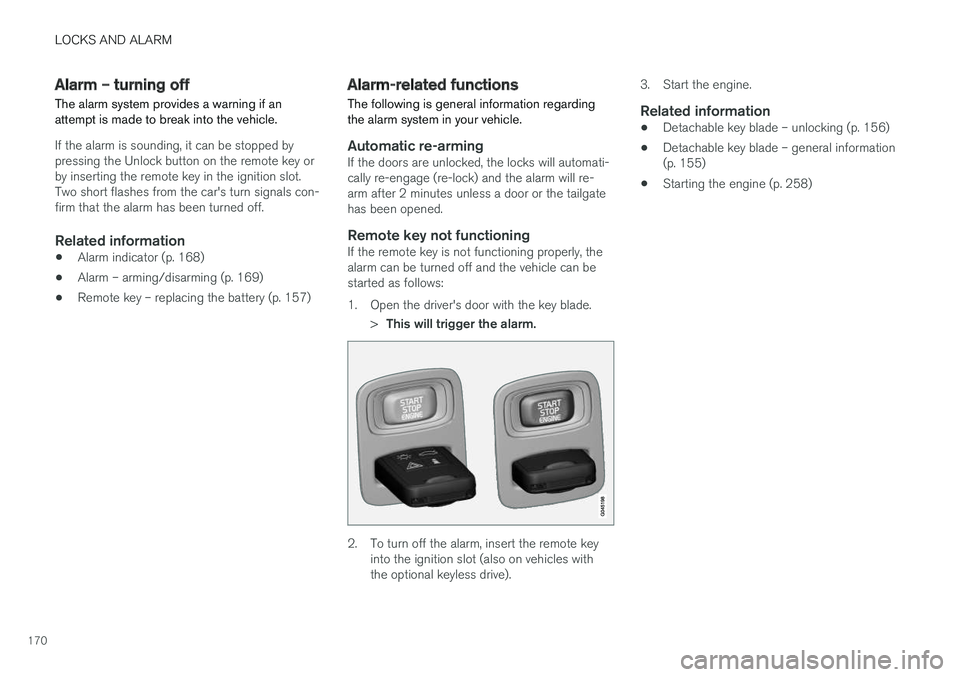
Remote key not functioningIf the remote key is not functioning properly, thealarm can be turned off and the vehicle can bestarted as follows:
1. Open the driver's door with the key blade.
>This will trigger the alarm.
2. To turn off the alarm, insert the remote key
into the ignition slot (also on vehicles with the optional keyless drive). 3. Start the engine.
Related information
•
Detachable key blade – unlocking (p. 156)
• Detachable key blade – general information(p. 155)
• Starting the engine (p. 258)
Page 230 of 406
DRIVER SUPPORT
228
Lane Departure Warning (LDW) – operation
Operation and function
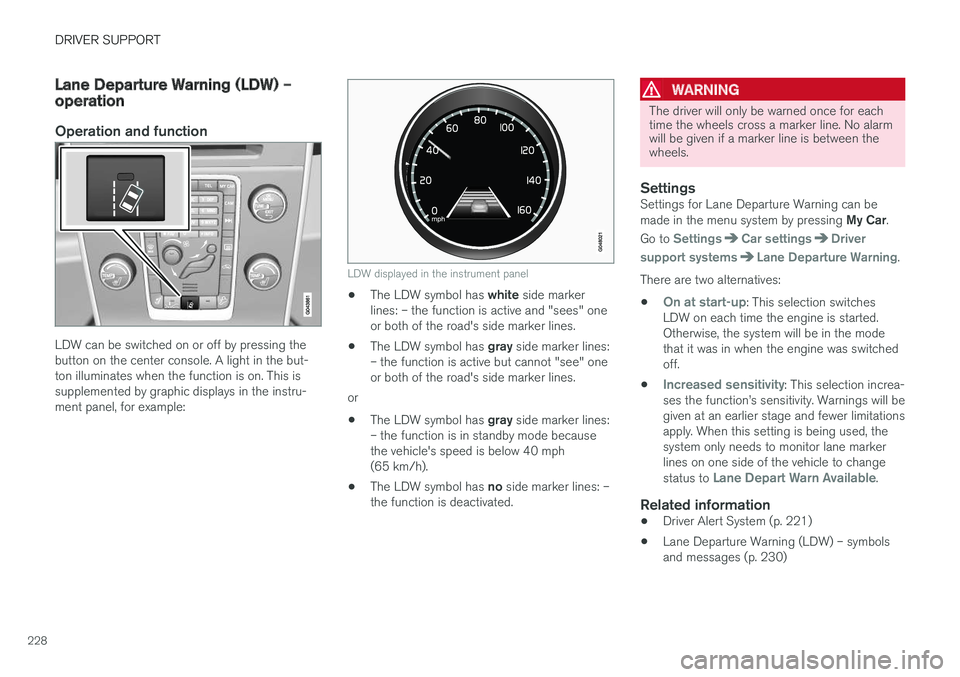
LDW can be switched on or off by pressing the button on the center console. A light in the but-ton illuminates when the function is on. This issupplemented by graphic displays in the instru-ment panel, for example:
LDW displayed in the instrument panel
•The LDW symbol has
white side marker
lines: – the function is active and "sees" one or both of the road's side marker lines.
• The LDW symbol has
gray side marker lines:
– the function is active but cannot "see" oneor both of the road's side marker lines.
or
• The LDW symbol has
gray side marker lines:
– the function is in standby mode becausethe vehicle's speed is below 40 mph(65 km/h).
• The LDW symbol has
no side marker lines: –
the function is deactivated.
WARNING
The driver will only be warned once for each time the wheels cross a marker line. No alarmwill be given if a marker line is between thewheels.
SettingsSettings for Lane Departure Warning can be made in the menu system by pressing My Car.
Go to
SettingsCar settingsDriver
support systems
Lane Departure Warning.
There are two alternatives:
•
On at start-up: This selection switches
LDW on each time the engine is started. Otherwise, the system will be in the modethat it was in when the engine was switchedoff.
•
Increased sensitivity: This selection increa-
ses the function
Page 263 of 406
STARTING AND DRIVING
}}
* Option/accessory, for more information, see Introduction.261
1. The turn signals will flash several times.
2. The engine will start.
3. The turn signals will illuminate for 3 seconds
to indicate that the engine has started.
After the engine has started, the vehicle remains locked but the alarm is disarmed.
Active functions
When the engine is started with ERS, the follow- ing functions are activated: • The climate control system
• The infotainment system.
• Approach lighting
Deactivated functions
When the engine is started with ERS, the follow- ing functions are deactivated: •
Headlights
• Parking lights
• License plate lights
• Windshield wipers
Related information
•
Engine Remote Start (ERS)
* – switching off
the engine (p. 261)
• Engine Remote Start (ERS)
* – introduction
(p. 260)
Engine Remote Start (ERS) * –
switching off the engine
Any of the following will switch off the engine if it has been started with ERS: • Pressing the lock button (1) or the unlock button (2) on the remote key
• Unlocking the vehicle
• Opening a door
• Depressing the accelerator or brake pedal
• Moving the gear selector from the
P position
• If there are less than approx. 2.5 gallons(10 liters) of fuel in the tank
• More than 15 minutes have elapsed.
If the engine has been started with ERS andswitches off, the turn signals will illuminate for3 seconds.
Message in the instrument panel display
If ERS is interrupted, a text message will be dis- played in the instrument panel.
Related information
• Engine Remote Start (ERS)
* – introduction
(p. 260)
• Engine Remote Start (ERS)
* – starting the
engine (p. 260)
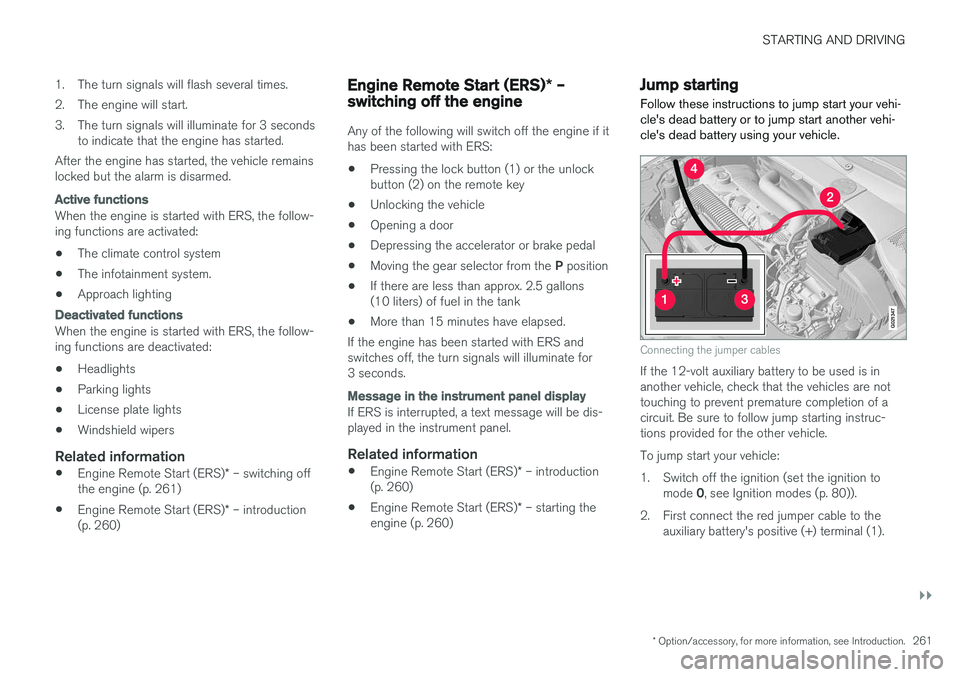
Jump starting
Follow these instructions to jump start your vehi- cle's dead battery or to jump start another vehi-cle's dead battery using your vehicle.
G021347
Connecting the jumper cables
If the 12-volt auxiliary battery to be used is in another vehicle, check that the vehicles are nottouching to prevent premature completion of acircuit. Be sure to follow jump starting instruc-tions provided for the other vehicle. To jump start your vehicle:
1. Switch off the ignition (set the ignition to mode 0, see Ignition modes (p. 80)).
2. First connect the red jumper cable to the auxiliary battery's positive (+) terminal (1).
Page 366 of 406
||
MAINTENANCE AND SERVICING
* Option/accessory, for more information, see Introduction.
364
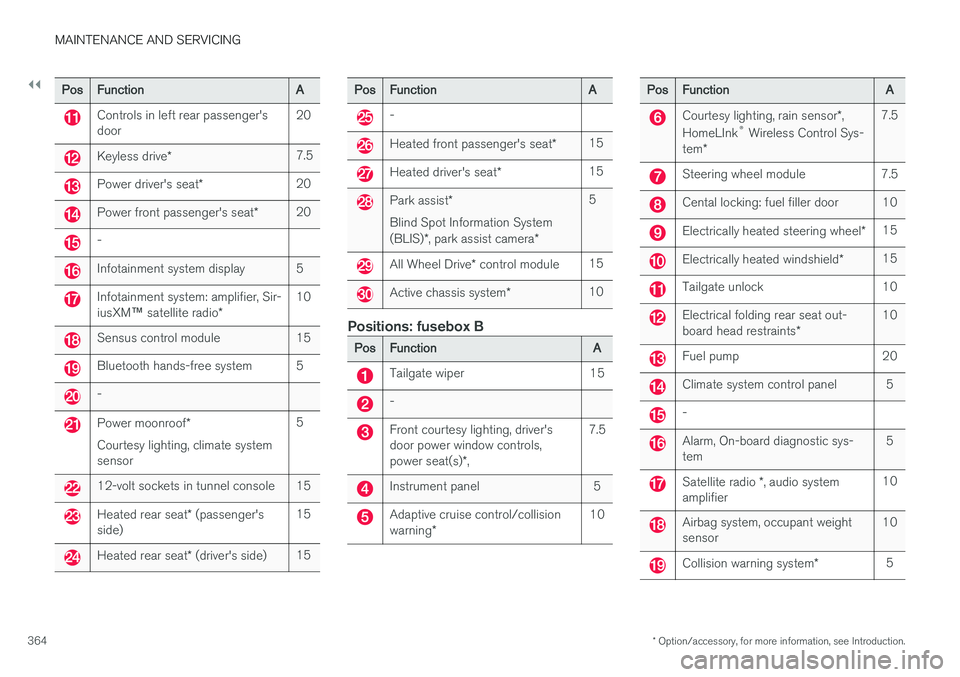
PosFunctionA
Controls in left rear passenger's door20
Keyless drive *7.5
Power driver's seat *20
Power front passenger's seat *20
-
Infotainment system display5
Infotainment system: amplifier, Sir- iusXM™ satellite radio *10
Sensus control module15
Bluetooth hands-free system5
-
Power moonroof *
Courtesy lighting, climate system sensor5
12-volt sockets in tunnel console15
Heated rear seat * (passenger's
side)15
Heated rear seat * (driver's side)15
PosFunctionA
-
Heated front passenger's seat *15
Heated driver's seat*15
Park assist*
Blind Spot Information System (BLIS) *, park assist camera *5
All Wheel Drive* control module15
Active chassis system *10
Positions: fusebox B
PosFunctionA
Tailgate wiper15
-
Front courtesy lighting, driver's door power window controls, power seat(s)*,7.5
Instrument panel5
Adaptive cruise control/collision warning *10
PosFunctionA
Courtesy lighting, rain sensor *,
HomeLInk ®
Wireless Control Sys-
tem *7.5
Steering wheel module7.5
Cental locking: fuel filler door10
Electrically heated steering wheel *15
Electrically heated windshield*15
Tailgate unlock10
Electrical folding rear seat out- board head restraints*10
Fuel pump20
Climate system control panel5
-
Alarm, On-board diagnostic sys- tem5
Satellite radio *, audio system
amplifier10
Airbag system, occupant weight sensor10
Collision warning system *5