remote control VOLVO V60 2017 Owner´s Manual
[x] Cancel search | Manufacturer: VOLVO, Model Year: 2017, Model line: V60, Model: VOLVO V60 2017Pages: 406, PDF Size: 9.65 MB
Page 152 of 406
LOCKS AND ALARM
150
Remote key and key blade
Two remote keys are provided with your vehicle. They enable you to unlock the doors and tail-gate, and also function as ignition keys to startthe vehicle or operate electrical components.The remote keys contain detachable metal keyblades for manually locking or unlocking the driv-er's door and the glove compartment. The visibleends of these key blades are unique to make iteasier to identify "your" remote key. Up to sixremotes can be programmed for use on thesame vehicle.
WARNING
Never leave the remote key in the ignition slot if children are to remain in the vehicle.
For more information on the various ignition modes, see Ignition modes (p. 80).
Related information
• Remote key – functions (p. 153)
• Remote key – functions (p. 153)
• Remote key – range (p. 154)
Remote key – loss
If either of the remote keys (p. 150) is lost, the other should be taken with the vehicle to a Volvoretailer. As an anti-theft measure, the code of thelost remote key must be erased from the system.
NOTE
Additional or duplicate remote control keys can be obtained from any authorized Volvoretailer. You can also obtain additional or duplicate remote control keys from certain independentrepair facilities and locksmiths that are quali-fied to make remote control keys. Each keymust be programmed to work with your vehi-cle. California Only: A list of independent repair facilities and/or locksmiths known to Volvo that can cut andcode replacement keys can be found: • on the Volvo website at http://www.volvocars.com/us/keys
• by calling Volvo Customer Care at1-800-458-1552
The number of registered keys for the vehicle can be found by pressing
MY CAR and going into
SettingsInformationNumber of keys.For a description of the menu system, see My Car – introduction (p. 77). USA-5WK49264FCC ID:KR55WK49264 + Siemens VDO 5WK49236 FCC ID:KR55WK49236, 5WK49266FCC ID:KR55WK49266 + Siemens VDO 5WK49233 FCC ID:KR55WK49233This device complies with part 15 of the FCC rules and RSS-210. Operation is subject to thefollowing conditions: (1) This device may notcause harmful interference, and (2) this devicemust accept any interference received, includinginterference that may cause undesired operation. Canada-5WK49264IC:267T-5WK49264 + Siemens VDO 5WK49236 IC:267T-5WK49236, 5WK49266IC:267T-5WK49266 + Siemens VDO 5WK49233 IC:267T-5WK49233Operation is subject to the following conditions: (1) this device may not cause interference, and(2) this device must accept any interference,including interference that may cause undesiredoperation of the device.
Page 159 of 406
LOCKS AND ALARM
}}
157
G017870
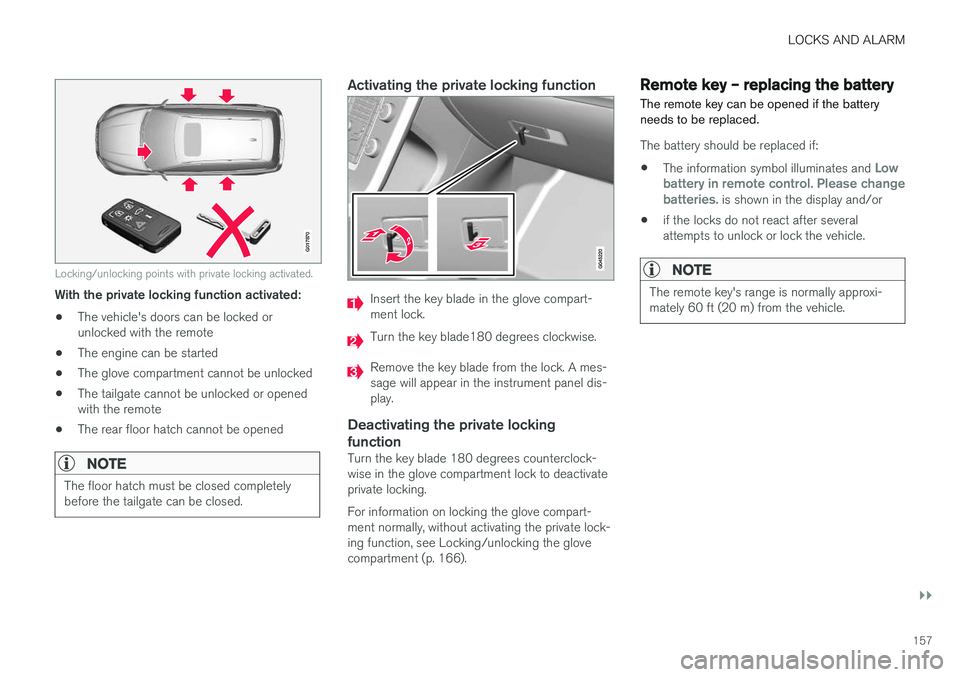
Locking/unlocking points with private locking activated.
With the private locking function activated:• The vehicle's doors can be locked or unlocked with the remote
• The engine can be started
• The glove compartment cannot be unlocked
• The tailgate cannot be unlocked or openedwith the remote
• The rear floor hatch cannot be opened
NOTE
The floor hatch must be closed completely before the tailgate can be closed.
Activating the private locking function
Insert the key blade in the glove compart- ment lock.
Turn the key blade180 degrees clockwise.
Remove the key blade from the lock. A mes- sage will appear in the instrument panel dis-play.
Deactivating the private locking function
Turn the key blade 180 degrees counterclock- wise in the glove compartment lock to deactivateprivate locking. For information on locking the glove compart- ment normally, without activating the private lock-ing function, see Locking/unlocking the glovecompartment (p. 166).
Remote key – replacing the battery The remote key can be opened if the battery needs to be replaced.
The battery should be replaced if:
• The information symbol illuminates and
Low
battery in remote control. Please change batteries.
is shown in the display and/or
• if the locks do not react after several attempts to unlock or lock the vehicle.
NOTE
The remote key's range is normally approxi- mately 60 ft (20 m) from the vehicle.
Page 160 of 406
||
LOCKS AND ALARM
158
Opening the remote key
The remote key has one CR 2430, 3V battery only
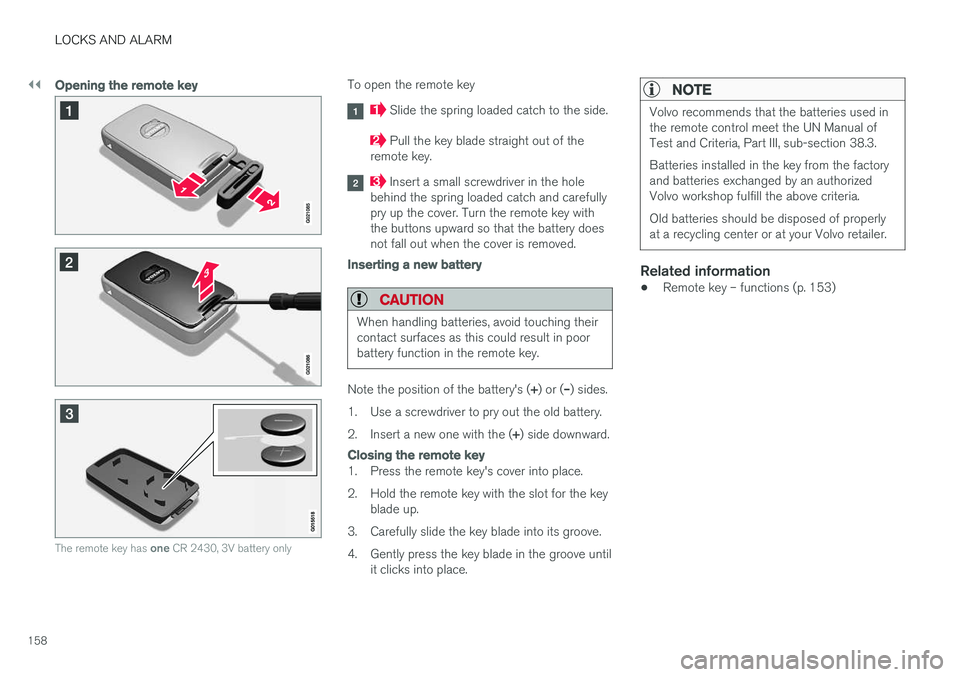
To open the remote key
Slide the spring loaded catch to the side.
Pull the key blade straight out of the
remote key.
Insert a small screwdriver in the hole
behind the spring loaded catch and carefully pry up the cover. Turn the remote key withthe buttons upward so that the battery doesnot fall out when the cover is removed.
Inserting a new battery
CAUTION
When handling batteries, avoid touching their contact surfaces as this could result in poorbattery function in the remote key.
Note the position of the battery's ( +) or ( –) sides.
1. Use a screwdriver to pry out the old battery. 2. Insert a new one with the ( +) side downward.
Closing the remote key
1. Press the remote key's cover into place.
2. Hold the remote key with the slot for the key
blade up.
3. Carefully slide the key blade into its groove.
4. Gently press the key blade in the groove until it clicks into place.
NOTE
Volvo recommends that the batteries used in the remote control meet the UN Manual ofTest and Criteria, Part III, sub-section 38.3. Batteries installed in the key from the factory and batteries exchanged by an authorizedVolvo workshop fulfill the above criteria. Old batteries should be disposed of properly at a recycling center or at your Volvo retailer.
Related information
• Remote key – functions (p. 153)
Page 161 of 406
LOCKS AND ALARM
}}
* Option/accessory, for more information, see Introduction.159
Keyless drive*– locking/unlocking
This system makes it possible to unlock and lock the vehicle without having to press any buttonson the remote key. It is only necessary to have akeyless drive remote key in your possession tooperate the central locking system.
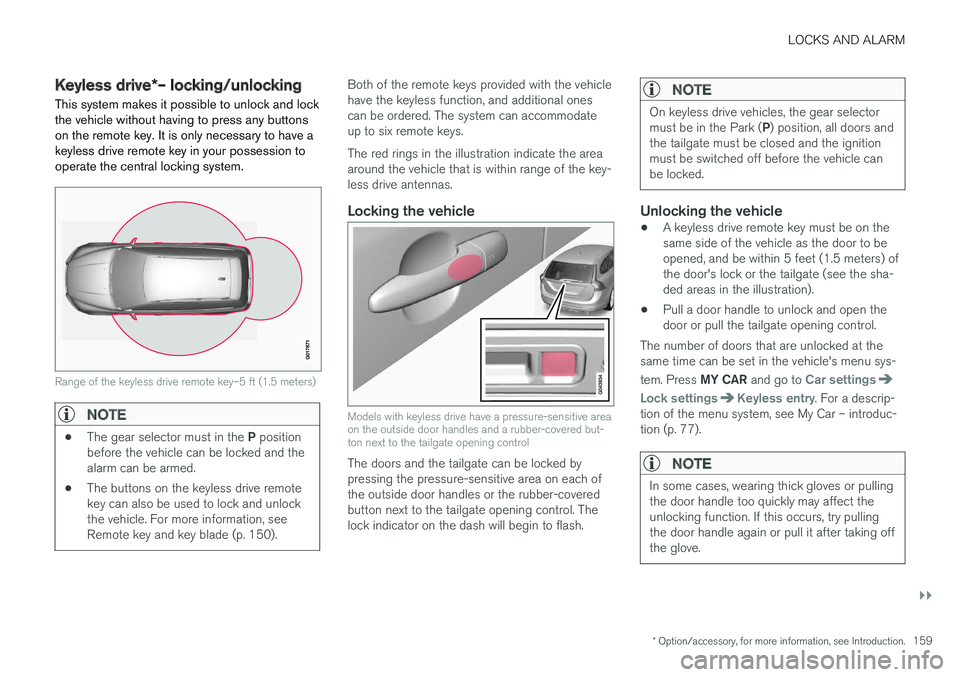
Range of the keyless drive remote key–5 ft (1.5 meters)
NOTE
• The gear selector must in the
P position
before the vehicle can be locked and the alarm can be armed.
• The buttons on the keyless drive remotekey can also be used to lock and unlockthe vehicle. For more information, seeRemote key and key blade (p. 150).
Both of the remote keys provided with the vehicle have the keyless function, and additional onescan be ordered. The system can accommodateup to six remote keys. The red rings in the illustration indicate the area around the vehicle that is within range of the key-less drive antennas.
Locking the vehicle
Models with keyless drive have a pressure-sensitive area on the outside door handles and a rubber-covered but-ton next to the tailgate opening control
The doors and the tailgate can be locked by pressing the pressure-sensitive area on each ofthe outside door handles or the rubber-coveredbutton next to the tailgate opening control. Thelock indicator on the dash will begin to flash.
NOTE
On keyless drive vehicles, the gear selector must be in the Park (
P) position, all doors and
the tailgate must be closed and the ignition must be switched off before the vehicle canbe locked.
Unlocking the vehicle
• A keyless drive remote key must be on the same side of the vehicle as the door to beopened, and be within 5 feet (1.5 meters) ofthe door's lock or the tailgate (see the sha-ded areas in the illustration).
• Pull a door handle to unlock and open thedoor or pull the tailgate opening control.
The number of doors that are unlocked at thesame time can be set in the vehicle's menu sys- tem. Press MY CAR and go to
Car settings
Lock settingsKeyless entry. For a descrip-
tion of the menu system, see My Car – introduc- tion (p. 77).
NOTE
In some cases, wearing thick gloves or pulling the door handle too quickly may affect theunlocking function. If this occurs, try pullingthe door handle again or pull it after taking offthe glove.
Page 163 of 406
LOCKS AND ALARM
}}
* Option/accessory, for more information, see Introduction.161
Keyless drive* – key memory
When you leave the vehicle with a remote key in your possession and lock any door, the position of the driver's seat 2
and door mirrors will be
stored in the remote key's memory.
The next time a door is opened by a person with the same remote key in his/her possession, the
driver's seat and door mirrors will automatically move to the position that they were in when thedoor was most recently locked.
NOTE
If several people carrying remote keys approach the vehicle at the same time, thedriver's seat and door mirrors will assume thepositions they were in for the person whoopens the driver's door.
See also power seats (p. 82) for information on adjusting and storing the seat's position in theseat memory.
NOTE
If the vehicle is locked by pressing the button on one of the door handles or by pressing thelock button on the remote key, or if it is leftunlocked for more than 30 minutes, the keymemory function will be deactivated. To reactivate the key's memory:
• Unlock the vehicle by pulling a door han- dle with the remote key in your posses-sion or by pressing the unlock button onthe remote key.
Related information
•
Keyless drive
*– locking/unlocking (p. 159)
• Remote key – functions (p. 153)
Keyless drive
* – messages
If all of the remote keys are removed from the vehicle while the engine is running or if the igni-tion modes (p. 80) is in mode II and all of the
doors are closed, a message will appear in theinstrument panel display and an audible signalwill sound.
When at least one remote key has been returned to the car, the message will be erased in the dis-play and the audible signal will stop when:
• A door has been opened and closed
• The remote key has been inserted in theignition slot
• The
OK button has been pressed. For the
location of this button, see Information dis-play – menu controls (p. 114)
2 Power seats only
Page 261 of 406
STARTING AND DRIVING
259
WARNING
•Always remove the remote key from the ignition slot when leaving the vehicle and ensure that the ignition in mode
0 (see
Ignition modes (p. 80) for information about the ignition modes).
• On vehicles with the optional keylessdrive, never remove the remote key fromthe vehicle while it is being driven ortowed.
• Always place the gear selector in Parkand apply the parking brake before leav-ing the vehicle. Never leave the vehicleunattended with the engine running.
• Always open garage doors fully beforestarting the engine inside a garage toensure adequate ventilation. The exhaustgases contain carbon monoxide, which isinvisible and odorless but very poisonous.
NOTE
•After a cold start, idle speed may be noticeably higher than normal for a shortperiod. This is done to help bring compo-nents in the emission control system totheir normal operating temperature asquickly as possible, which enables themto control emissions and help reduce the vehicle's impact on the environment 3
.
CAUTION
• When starting in cold weather, the auto- matic transmission may shift up at slightlyhigher engine speeds than normal untilthe automatic transmission fluid reachesnormal operating temperature.
• Do not race a cold engine immediatelyafter starting. Oil flow may not reachsome lubrication points fast enough toprevent engine damage.
• The engine should be idling when youmove the gear selector. Never accelerateuntil after you feel the transmissionengage. Accelerating immediately afterselecting a gear will cause harsh engage-ment and premature transmission wear.
• Selecting
P or N when idling at a stand-
still for prolonged periods of time will helpprevent overheating of the automatictransmission fluid.
Related information
• Switching off the engine (p. 259)
Switching off the engine Switch off the engine by pressing the
START/
STOP ENGINE button.
If the gear selector is not in the P position or if
the vehicle is moving, press the START/STOP
ENGINE button twice or press and hold it in until
the engine switches off.
Related information
• Ignition modes (p. 80)
3
If the gear selector is in the D or R positions and the car is not moving, engine speed (rpm) will be lower and it will take longer for the engine to reach normal operating temperature.
Page 263 of 406
STARTING AND DRIVING
}}
* Option/accessory, for more information, see Introduction.261
1. The turn signals will flash several times.
2. The engine will start.
3. The turn signals will illuminate for 3 seconds
to indicate that the engine has started.
After the engine has started, the vehicle remains locked but the alarm is disarmed.
Active functions
When the engine is started with ERS, the follow- ing functions are activated: • The climate control system
• The infotainment system.
• Approach lighting
Deactivated functions
When the engine is started with ERS, the follow- ing functions are deactivated: •
Headlights
• Parking lights
• License plate lights
• Windshield wipers
Related information
•
Engine Remote Start (ERS)
* – switching off
the engine (p. 261)
• Engine Remote Start (ERS)
* – introduction
(p. 260)
Engine Remote Start (ERS) * –
switching off the engine
Any of the following will switch off the engine if it has been started with ERS: • Pressing the lock button (1) or the unlock button (2) on the remote key
• Unlocking the vehicle
• Opening a door
• Depressing the accelerator or brake pedal
• Moving the gear selector from the
P position
• If there are less than approx. 2.5 gallons(10 liters) of fuel in the tank
• More than 15 minutes have elapsed.
If the engine has been started with ERS andswitches off, the turn signals will illuminate for3 seconds.
Message in the instrument panel display
If ERS is interrupted, a text message will be dis- played in the instrument panel.
Related information
• Engine Remote Start (ERS)
* – introduction
(p. 260)
• Engine Remote Start (ERS)
* – starting the
engine (p. 260)
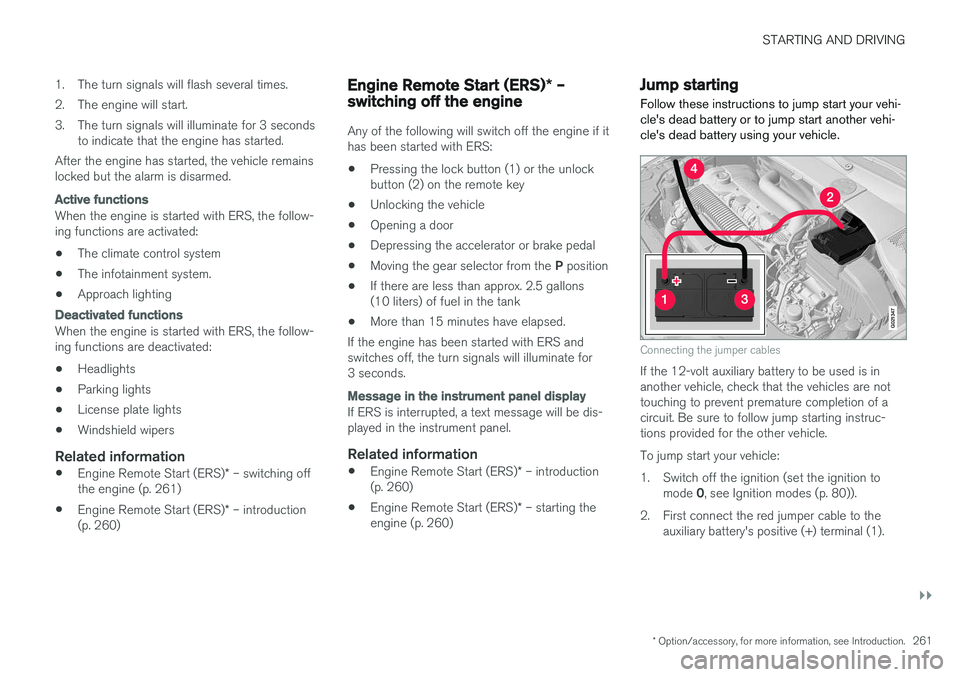
Jump starting
Follow these instructions to jump start your vehi- cle's dead battery or to jump start another vehi-cle's dead battery using your vehicle.
G021347
Connecting the jumper cables
If the 12-volt auxiliary battery to be used is in another vehicle, check that the vehicles are nottouching to prevent premature completion of acircuit. Be sure to follow jump starting instruc-tions provided for the other vehicle. To jump start your vehicle:
1. Switch off the ignition (set the ignition to mode 0, see Ignition modes (p. 80)).
2. First connect the red jumper cable to the auxiliary battery's positive (+) terminal (1).
Page 283 of 406
STARTING AND DRIVING
}}
281
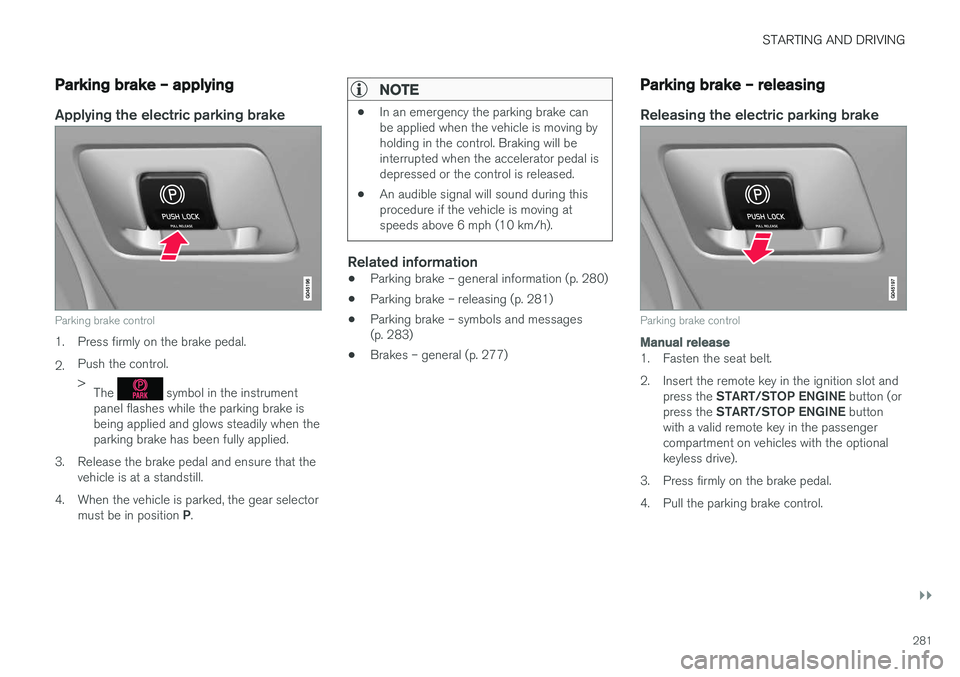
Parking brake – applying
Applying the electric parking brake
Parking brake control
1. Press firmly on the brake pedal. 2.Push the control. >
The
symbol in the instrument
panel flashes while the parking brake is being applied and glows steadily when theparking brake has been fully applied.
3. Release the brake pedal and ensure that the vehicle is at a standstill.
4. When the vehicle is parked, the gear selector must be in position P.
NOTE
• In an emergency the parking brake can be applied when the vehicle is moving byholding in the control. Braking will beinterrupted when the accelerator pedal isdepressed or the control is released.
• An audible signal will sound during thisprocedure if the vehicle is moving atspeeds above 6 mph (10 km/h).
Related information
•Parking brake – general information (p. 280)
• Parking brake – releasing (p. 281)
• Parking brake – symbols and messages (p. 283)
• Brakes – general (p. 277)
Parking brake – releasing
Releasing the electric parking brake
Parking brake control
Manual release
1. Fasten the seat belt.
2. Insert the remote key in the ignition slot and
press the START/STOP ENGINE button (or
press the START/STOP ENGINE button
with a valid remote key in the passenger compartment on vehicles with the optionalkeyless drive).
3. Press firmly on the brake pedal.
4. Pull the parking brake control.
Page 360 of 406
||
MAINTENANCE AND SERVICING
* Option/accessory, for more information, see Introduction.
358
Removal
Switch off the ignition, remove the remote key from the ignition slot and wait at least 5 minutesbefore disconnecting the battery so that all infor-mation in the vehicle's electrical system can bestored in the control modules.
Open the clips on the front cover and remove the cover.
Release the rubber molding so that the rear cover is free.
Remove the rear cover by pulling it away.
Detach the black negative cable.
Detach the red positive cable
Detach the ventilation hose from the bat-
tery
Loosen the screw holding the battery
clamp.
Move the battery to the side and lift it up.
WARNING
PROPOSITION 65 WARNING! Battery posts, terminals, and related accesso- ries contain lead and lead compounds, chemi-cals known to the state of California to causecancer and reproductive harm. Wash handsafter handling.
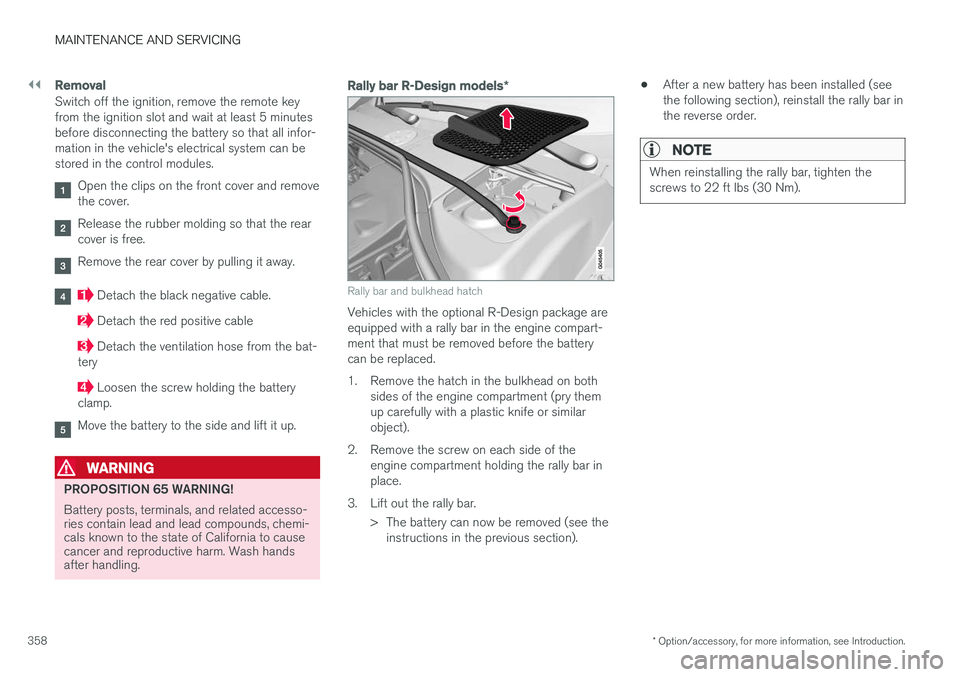
Rally bar R-Design models *
Rally bar and bulkhead hatch
Vehicles with the optional R-Design package are equipped with a rally bar in the engine compart-ment that must be removed before the batterycan be replaced.
1. Remove the hatch in the bulkhead on both
sides of the engine compartment (pry them up carefully with a plastic knife or similarobject).
2. Remove the screw on each side of the engine compartment holding the rally bar inplace.
3. Lift out the rally bar. > The battery can now be removed (see theinstructions in the previous section). •
After a new battery has been installed (seethe following section), reinstall the rally bar inthe reverse order.
NOTE
When reinstalling the rally bar, tighten the screws to 22 ft lbs (30 Nm).
Page 399 of 406
INDEX
397
Emergency starting 261
Emergency towing 295, 296
Emission inspection readiness 335Engine
overheating 76
specifications 383
Start/Stop 267, 268, 269, 270, 271, 272
starting 258
switching off 259, 261
Engine compartment overview 338
Engine Drag Control (EDC) 173
Engine oil 384 checking 339
low pressure warning light 75
volumes 385
Engine remote start (ERS) 260
Environment 23
F
Federal Clean Air Act 332 Flat tires repairing with tire sealing system 324
Floor mats cleaning 373
placing correctly 258
Fluid specifications 386, 387
Fog lights 74rear 96
Four C (active chassis system) 172
Front airbags 35 disconnecting passenger