belt VOLVO V60 2017 Owner´s Manual
[x] Cancel search | Manufacturer: VOLVO, Model Year: 2017, Model line: V60, Model: VOLVO V60 2017Pages: 406, PDF Size: 9.65 MB
Page 60 of 406
SAFETY
58
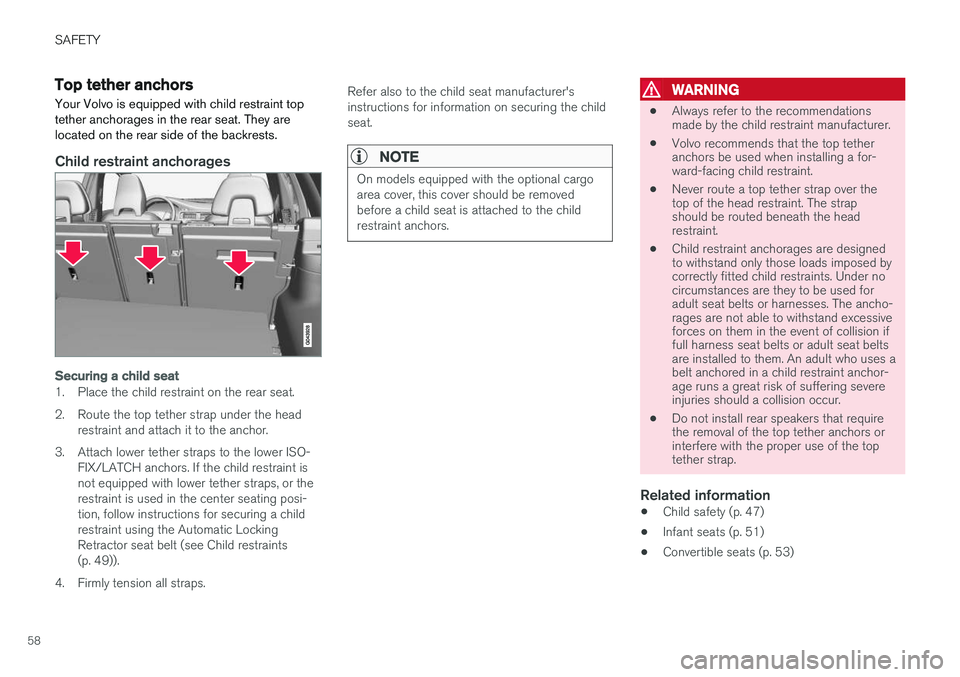
Top tether anchorsYour Volvo is equipped with child restraint top tether anchorages in the rear seat. They arelocated on the rear side of the backrests.
Child restraint anchorages
Securing a child seat
1. Place the child restraint on the rear seat.
2. Route the top tether strap under the head restraint and attach it to the anchor.
3. Attach lower tether straps to the lower ISO- FIX/LATCH anchors. If the child restraint is not equipped with lower tether straps, or therestraint is used in the center seating posi-tion, follow instructions for securing a childrestraint using the Automatic LockingRetractor seat belt (see Child restraints(p. 49)).
4. Firmly tension all straps. Refer also to the child seat manufacturer'sinstructions for information on securing the childseat.
NOTE
On models equipped with the optional cargo area cover, this cover should be removedbefore a child seat is attached to the childrestraint anchors.
WARNING
•
Always refer to the recommendations made by the child restraint manufacturer.
• Volvo recommends that the top tetheranchors be used when installing a for-ward-facing child restraint.
• Never route a top tether strap over thetop of the head restraint. The strapshould be routed beneath the headrestraint.
• Child restraint anchorages are designedto withstand only those loads imposed bycorrectly fitted child restraints. Under nocircumstances are they to be used foradult seat belts or harnesses. The ancho-rages are not able to withstand excessiveforces on them in the event of collision iffull harness seat belts or adult seat beltsare installed to them. An adult who uses abelt anchored in a child restraint anchor-age runs a great risk of suffering severeinjuries should a collision occur.
• Do not install rear speakers that requirethe removal of the top tether anchors orinterfere with the proper use of the toptether strap.
Related information
•Child safety (p. 47)
• Infant seats (p. 51)
• Convertible seats (p. 53)
Page 61 of 406
SAFETY
}}
59
•
Integrated booster cushion – general infor- mation (p. 59)
• ISOFIX/LATCH lower anchors (p. 56)
Integrated booster cushion – general information
The booster cushions are designed to raise the child higher so that the shoulder strap crossesover the child's collarbone, not over the neck.
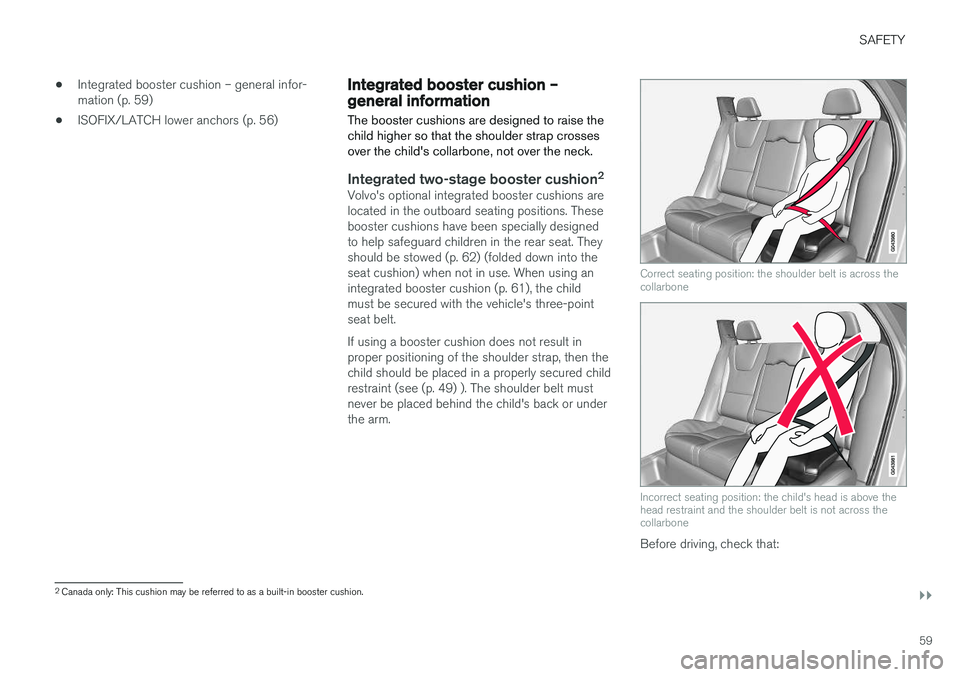
Integrated two-stage booster cushion 2Volvo's optional integrated booster cushions are located in the outboard seating positions. Thesebooster cushions have been specially designedto help safeguard children in the rear seat. Theyshould be stowed (p. 62) (folded down into theseat cushion) when not in use. When using anintegrated booster cushion (p. 61), the childmust be secured with the vehicle's three-pointseat belt. If using a booster cushion does not result in proper positioning of the shoulder strap, then thechild should be placed in a properly secured childrestraint (see (p. 49) ). The shoulder belt mustnever be placed behind the child's back or underthe arm.
Correct seating position: the shoulder belt is across the collarbone
Incorrect seating position: the child's head is above the head restraint and the shoulder belt is not across thecollarbone
Before driving, check that:
2
Canada only: This cushion may be referred to as a built-in booster cushion.
Page 62 of 406
||
SAFETY
60•
The integrated two-stage booster cushion is set in the correct position according to thechild's height and weight (see the tablebelow) and is locked in position.
• That the seat belt (p. 30) is properly posi-tioned and is taut.
• The shoulder section of the seat belt isacross the child's collarbone, not over theneck.
• The lap section of the seat belt is across thechild's hips and not the abdomen.
• The head restraint is set to same height asthe child
Page 77 of 406
INSTRUMENTS AND CONTROLS
}}
75
Related information
•Information displays – introduction (p. 69)
• Information displays – warning symbols (p. 75)
Information displays – warning symbols
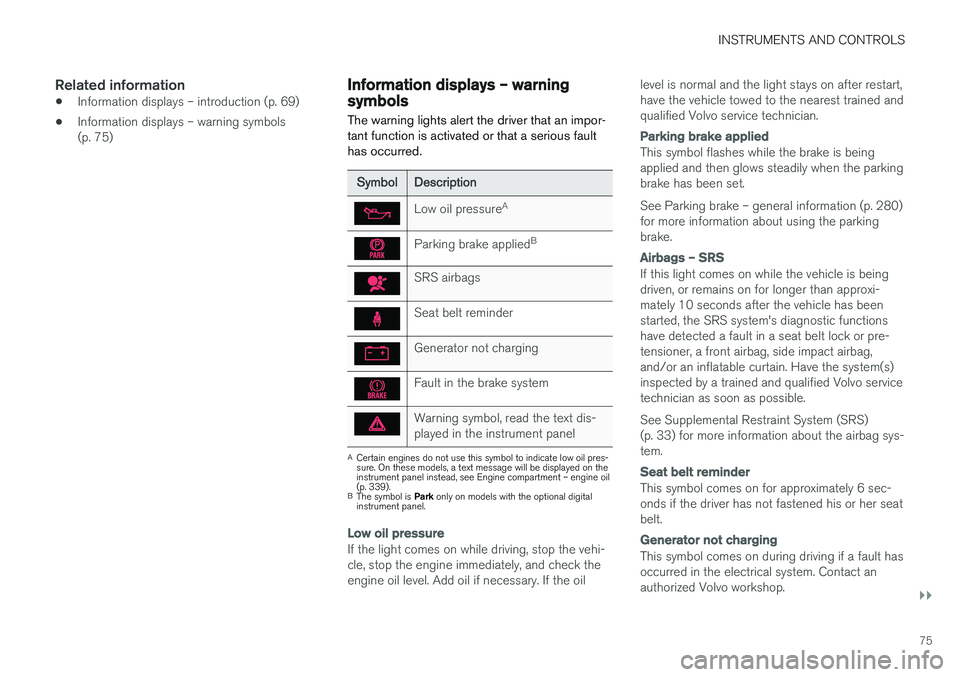
The warning lights alert the driver that an impor- tant function is activated or that a serious faulthas occurred.
SymbolDescription
Low oil pressure A
Parking brake applied B
SRS airbags
Seat belt reminder
Generator not charging
Fault in the brake system
Warning symbol, read the text dis- played in the instrument panel
A
Certain engines do not use this symbol to indicate low oil pres- sure. On these models, a text message will be displayed on theinstrument panel instead, see Engine compartment – engine oil(p. 339).
B The symbol is Park only on models with the optional digital
instrument panel.
Low oil pressure
If the light comes on while driving, stop the vehi- cle, stop the engine immediately, and check theengine oil level. Add oil if necessary. If the oil level is normal and the light stays on after restart,have the vehicle towed to the nearest trained andqualified Volvo service technician.
Parking brake applied
This symbol flashes while the brake is being applied and then glows steadily when the parkingbrake has been set. See Parking brake – general information (p. 280) for more information about using the parkingbrake.
Airbags – SRS
If this light comes on while the vehicle is being driven, or remains on for longer than approxi-mately 10 seconds after the vehicle has beenstarted, the SRS system's diagnostic functionshave detected a fault in a seat belt lock or pre-tensioner, a front airbag, side impact airbag,and/or an inflatable curtain. Have the system(s)inspected by a trained and qualified Volvo servicetechnician as soon as possible. See Supplemental Restraint System (SRS) (p. 33) for more information about the airbag sys-tem.
Seat belt reminder
This symbol comes on for approximately 6 sec- onds if the driver has not fastened his or her seatbelt.
Generator not charging
This symbol comes on during driving if a fault has occurred in the electrical system. Contact anauthorized Volvo workshop.
Page 147 of 406
LOADING AND STORAGE
145
•
The vehicle's wind resistance and fuel con- sumption will increase with the size of theload.
• Drive smoothly. Avoid rapid starts, fast cor-nering and hard braking.
Related information
• Loading – general (p. 144)
• Load anchoring eyelets (p. 145)
Load anchoring eyelets
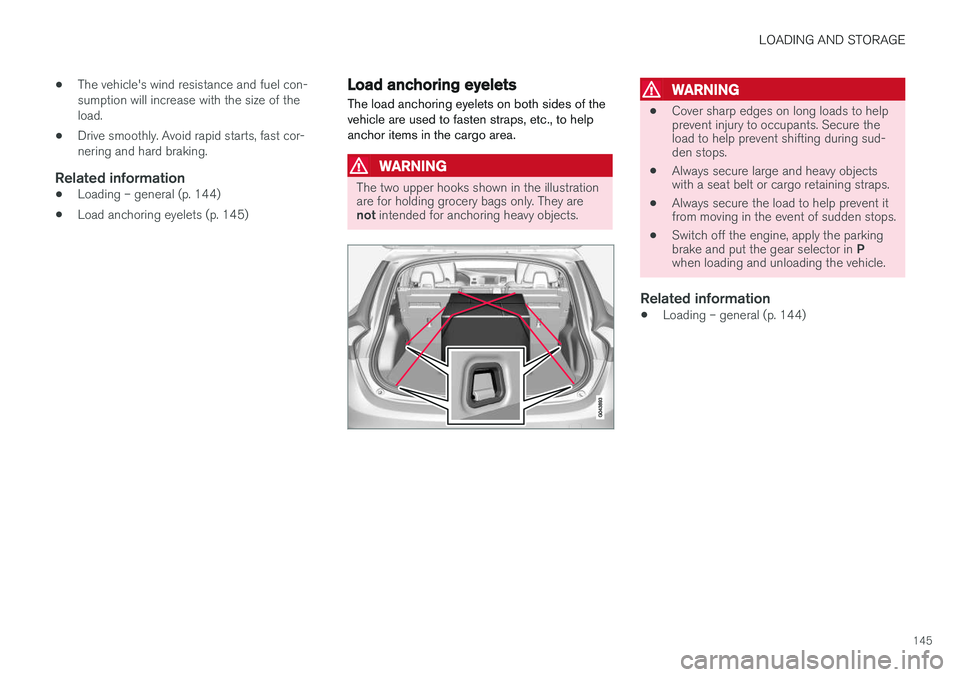
The load anchoring eyelets on both sides of the vehicle are used to fasten straps, etc., to helpanchor items in the cargo area.
WARNING
The two upper hooks shown in the illustration are for holding grocery bags only. They are not intended for anchoring heavy objects.
WARNING
• Cover sharp edges on long loads to help prevent injury to occupants. Secure theload to help prevent shifting during sud-den stops.
• Always secure large and heavy objectswith a seat belt or cargo retaining straps.
• Always secure the load to help prevent itfrom moving in the event of sudden stops.
• Switch off the engine, apply the parking brake and put the gear selector in
P
when loading and unloading the vehicle.
Related information
• Loading – general (p. 144)
Page 187 of 406
DRIVER SUPPORT
185
WARNING
Adaptive Cruise Control only warns of vehicles detected by the radar sensor, see AdaptiveCruise Control – limitations (p. 192). In somecases there may be no warning or the warn-ing may be delayed. The driver should alwaysapply the brakes when necessary.
Steep inclines and/or heavy loadsACC is primarily intended for use on fairly level roads. The system may have difficulty maintainingthe correct distance to a vehicle ahead on steepinclines, if the vehicle is carrying a heavy load oris towing a trailer. In these situations, the drivershould always be prepared to apply the brakes ifnecessary.
Related information
•Adaptive Cruise Control – introduction(p. 182)
Adaptive Cruise Control – engaging
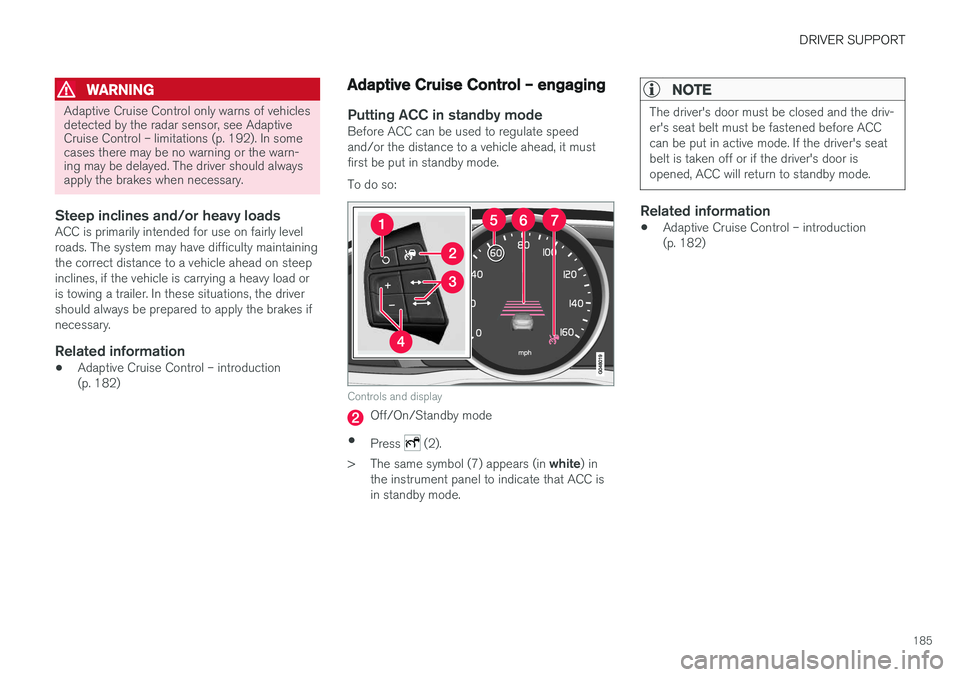
Putting ACC in standby modeBefore ACC can be used to regulate speed and/or the distance to a vehicle ahead, it mustfirst be put in standby mode. To do so:
Controls and display
Off/On/Standby mode
• Press
(2).
> The same symbol (7) appears (in white) in
the instrument panel to indicate that ACC is in standby mode.
NOTE
The driver's door must be closed and the driv- er's seat belt must be fastened before ACCcan be put in active mode. If the driver's seatbelt is taken off or if the driver's door isopened, ACC will return to standby mode.
Related information
• Adaptive Cruise Control – introduction (p. 182)
Page 190 of 406
||
DRIVER SUPPORT
188
WARNING
The vehicle may accelerate quickly after has been pressed if its current speed is con- siderably lower than the set speed.
Standby mode due to action by the driver
ACC is temporarily deactivated and put in standby mode:• if the brakes are applied
• if the gear selector is moved to
N
• if the driver drives faster than the set speed for more than
1 minute.
In this happens, the driver will have to regulate
the vehicle's speed.
NOTE
If the accelerator pedal is only depressed for a short time, such as when passing anothervehicle, ACC is deactivated temporarily and isreactivated when the pedal is released.
Automatic standby modeACC is linked to other systems such as the sta- bility system. If this system is not functioningproperly, ACC will switch off automatically. In the event of automatic deactivation, an audible signal will sound and the message
Cruise control Cancelled
is shown in the instrument
panel. The driver must then intervene and adapt the vehicle's speed to the surrounding traffic andregulate the distance to the vehicle ahead. An automatic switch to standby mode may be caused if:
• engine speed (rpm) is too high/low
• The driver's door is opened
• The driver unbuckles his/her seat belt
• the vehicle's speed goes below 18 mph(30 km/h)
• the wheels lose traction
• brake temperature is high
• the radar sensor is obstructed by, for exam-ple, wet snow or rain.
Resuming the set speedIf ACC is in standby mode, it can be reactivated by pressing the
button on the steering wheel
keypad. The vehicle will return to the most recently set speed.
WARNING
The vehicle may accelerate quickly after has been pressed if its current speed is con- siderably lower than the set speed.
Turning ACC off completely
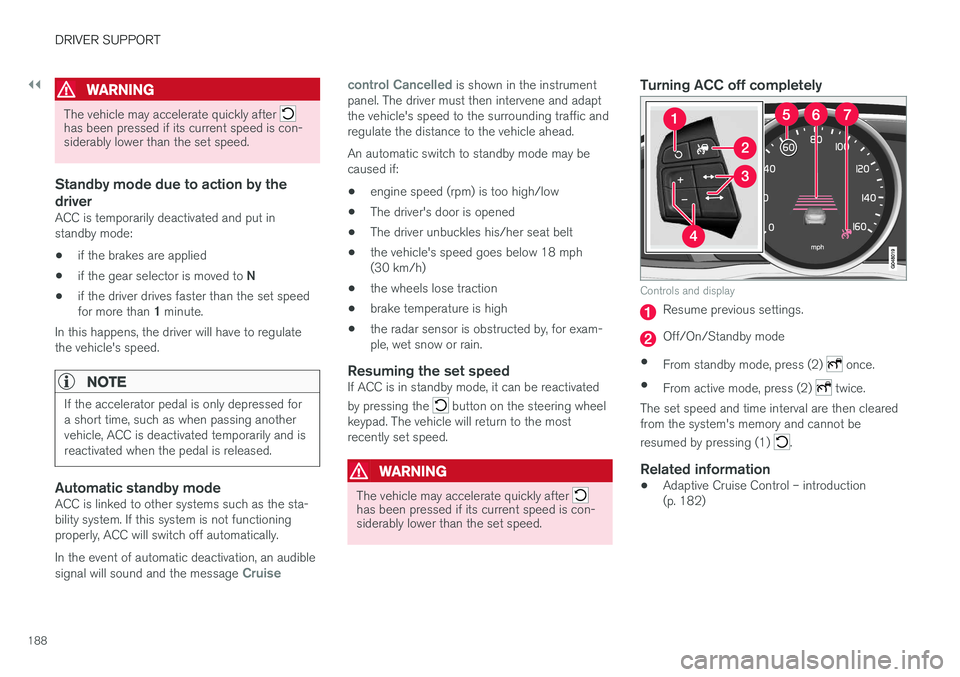
Controls and display
Resume previous settings.
Off/On/Standby mode
• From standby mode, press (2)
once.
• From active mode, press (2)
twice.
The set speed and time interval are then cleared from the system's memory and cannot be resumed by pressing (1)
.
Related information
• Adaptive Cruise Control – introduction (p. 182)
Page 192 of 406
||
DRIVER SUPPORT
190The driver will then have to reactivate ACC in one of the following ways: •
By pressing
• By accelerating up to at least 3 mph (4 km/h). ACC will then resume following thevehicle ahead.
Your vehicle will then resume following the vehi-cle ahead at the set time interval.
NOTE
ACC can remain active and keep your vehicle at a standstill for up to 4 minutes. After4 minutes have elapsed, the parking brakewill be engaged and ACC will go into standbymode. To reactivate ACC, the driver must release the parking brake (see Parking brake – generalinformation (p. 280)).
Automatic standby mode when ACC changes target vehicles
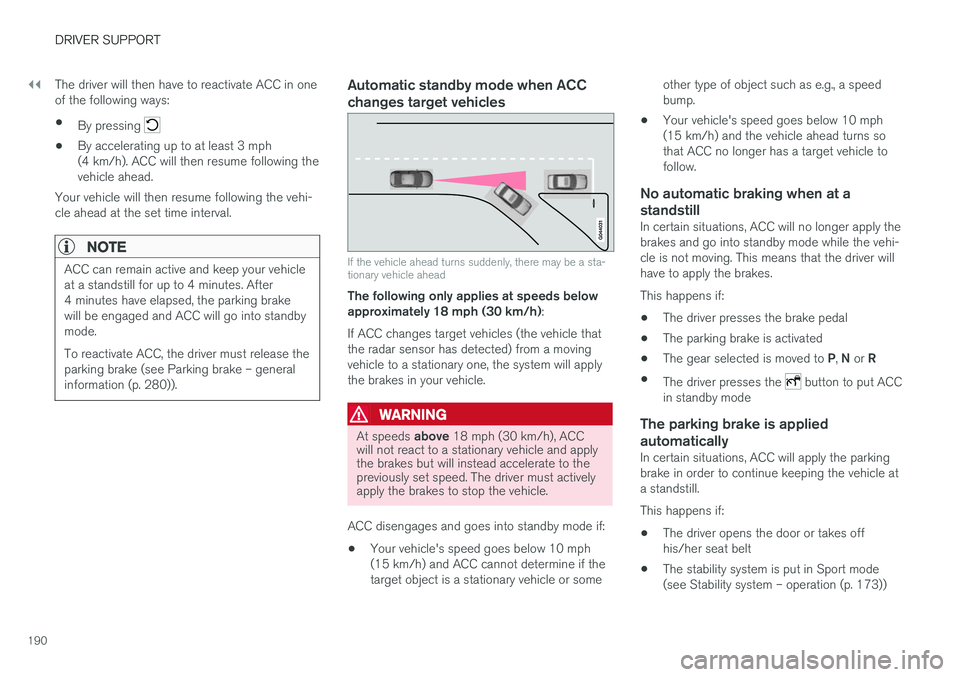
If the vehicle ahead turns suddenly, there may be a sta- tionary vehicle ahead
The following only applies at speeds below approximately 18 mph (30 km/h) :
If ACC changes target vehicles (the vehicle thatthe radar sensor has detected) from a movingvehicle to a stationary one, the system will applythe brakes in your vehicle.
WARNING
At speeds above 18 mph (30 km/h), ACC
will not react to a stationary vehicle and apply the brakes but will instead accelerate to thepreviously set speed. The driver must activelyapply the brakes to stop the vehicle.
ACC disengages and goes into standby mode if: • Your vehicle's speed goes below 10 mph (15 km/h) and ACC cannot determine if thetarget object is a stationary vehicle or some other type of object such as e.g., a speedbump.
• Your vehicle's speed goes below 10 mph(15 km/h) and the vehicle ahead turns sothat ACC no longer has a target vehicle tofollow.
No automatic braking when at a
standstill
In certain situations, ACC will no longer apply thebrakes and go into standby mode while the vehi-cle is not moving. This means that the driver willhave to apply the brakes. This happens if:
• The driver presses the brake pedal
• The parking brake is activated
• The gear selected is moved to
P, N or R
• The driver presses the
button to put ACC
in standby mode
The parking brake is applied
automatically
In certain situations, ACC will apply the parking brake in order to continue keeping the vehicle ata standstill. This happens if:
• The driver opens the door or takes off his/her seat belt
• The stability system is put in Sport mode(see Stability system – operation (p. 173))
Page 260 of 406
STARTING AND DRIVING
* Option/accessory, for more information, see Introduction.
258
Starting the engine
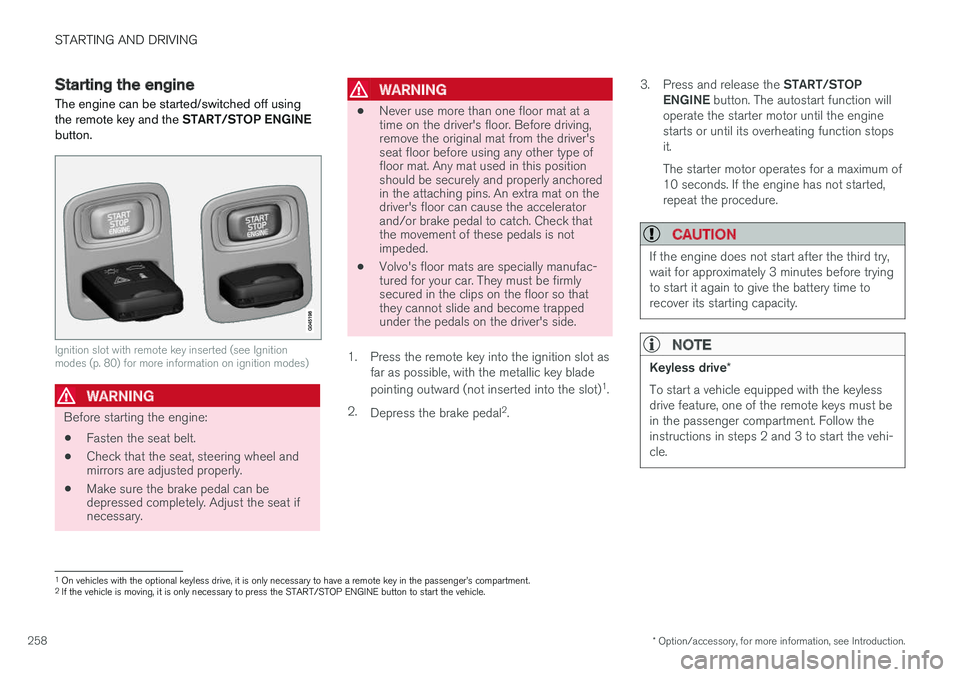
The engine can be started/switched off using the remote key and the START/STOP ENGINE
button.
Ignition slot with remote key inserted (see Ignition modes (p. 80) for more information on ignition modes)
WARNING
Before starting the engine:
• Fasten the seat belt.
• Check that the seat, steering wheel and mirrors are adjusted properly.
• Make sure the brake pedal can bedepressed completely. Adjust the seat ifnecessary.
WARNING
•Never use more than one floor mat at a time on the driver's floor. Before driving,remove the original mat from the driver'sseat floor before using any other type offloor mat. Any mat used in this positionshould be securely and properly anchoredin the attaching pins. An extra mat on thedriver's floor can cause the acceleratorand/or brake pedal to catch. Check thatthe movement of these pedals is notimpeded.
• Volvo's floor mats are specially manufac-tured for your car. They must be firmlysecured in the clips on the floor so thatthey cannot slide and become trappedunder the pedals on the driver's side.
1. Press the remote key into the ignition slot as far as possible, with the metallic key blade pointing outward (not inserted into the slot) 1
.
2. Depress the brake pedal 2
. 3.
Press and release the START/STOP
ENGINE button. The autostart function will
operate the starter motor until the engine starts or until its overheating function stopsit. The starter motor operates for a maximum of 10 seconds. If the engine has not started,repeat the procedure.
CAUTION
If the engine does not start after the third try, wait for approximately 3 minutes before tryingto start it again to give the battery time torecover its starting capacity.
NOTE
Keyless drive *
To start a vehicle equipped with the keyless drive feature, one of the remote keys must bein the passenger compartment. Follow theinstructions in steps 2 and 3 to start the vehi-cle.
1 On vehicles with the optional keyless drive, it is only necessary to have a remote key in the passenger
Page 271 of 406
STARTING AND DRIVING
* Option/accessory, for more information, see Introduction.269
Related information
•Start/Stop – introduction (p. 268)
• Start/Stop – settings (p. 271)
• Start/Stop – Auto-stop exceptions (p. 269)
• Start/Stop – Auto-start exceptions (p. 270)
• Start/Stop – Hill Start Assist (HSA) (p. 267)
• Start/Stop – symbols and messages (p. 272)
Start/Stop – Auto-stop exceptions
In certain situations or conditions, the engine may not auto-stop
when the vehicle comes to a
standstill, such as if:
Condition/situation
The vehicle's speed has not reached a speed of approx. 6 mph (10 km/h) after the mostrecent auto-start or after the driver has startedthe engine.
The driver unbuckles his/her seat belt.
The main battery's charge is below the mini- mum level.
The engine has not reached its normal operat- ing temperature.
The ambient temperature is below approx. 25°F (-4°C) or above approx. 85°F (30°C).
The windshield's heating function * is activated.
The climate system cannot keep the desired settings in the passenger compartment; theblower will operate at high speed.
The vehicle is backing up.
The main battery's temperature is below freez- ing or too high.
The driver is turning the steering wheel hard.
Condition/situation
The road's incline is very steep.
A trailer's electrical system is connected to the vehicle.
The hood has been opened A
.
The transmission has not reached its normal operating temperature.
Atmospheric pressure is below a level equiva- lent to an altitude of approx. 4,900–8,200 ft(1500–2500 m) above sea level. The actualpressure is also affected by current weatherconditions.
The Adaptive Cruise Control's * Queue Assist
feature is activated.
The gear selector is in the SB
or " +/–" posi-
tion.
A Certain engines only
B Sport mode (where applicable)
Related information
• Start/Stop – introduction (p. 268)
• Start/Stop – function (p. 268)
• Start/Stop – settings (p. 271)
• Start/Stop – Auto-start exceptions (p. 270)
• Start/Stop – Hill Start Assist (HSA) (p. 267)
• Start/Stop – symbols and messages (p. 272)