lock VOLVO V60 2018 Owner´s Manual
[x] Cancel search | Manufacturer: VOLVO, Model Year: 2018, Model line: V60, Model: VOLVO V60 2018Pages: 406, PDF Size: 9.59 MB
Page 348 of 406
||
MAINTENANCE AND SERVICING
3462. Reinstall the headlight housing and locking
pins. The short locking pin should be closest to the grille. Check that they are correctlyinserted. The headlight housing must be properly in place and the wiring connector correctlyreconnected before the lighting is switchedon or the remote key is inserted into the igni-tion slot.
3. Check that the lights function properly.
Related information
• Bulbs – introduction (p. 344)
• Bulbs – cover (p. 346)
• Bulbs – specifications (p. 351)
Bulbs – cover The larger cover has to be removed in order to change the high/low beam headlight bulbs.
Removing the cover to access the
bulbs
NOTE
Before starting to replace a bulb, see Bulbs – introduction (p. 344).
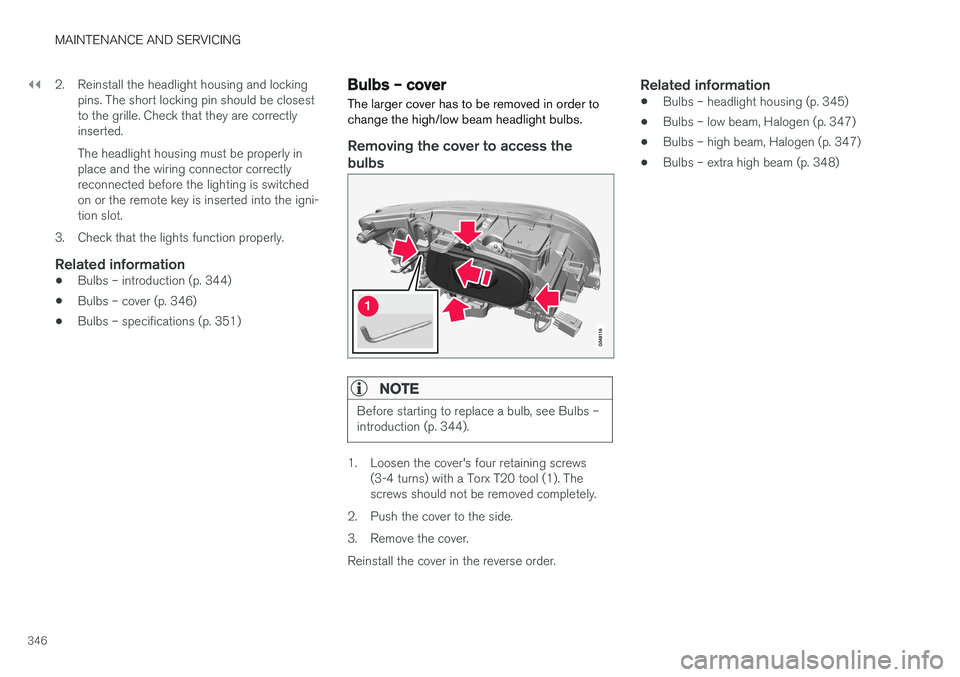
1. Loosen the cover's four retaining screws (3-4 turns) with a Torx T20 tool (1). The screws should not be removed completely.
2. Push the cover to the side.
3. Remove the cover.Reinstall the cover in the reverse order.
Related information
• Bulbs – headlight housing (p. 345)
• Bulbs – low beam, Halogen (p. 347)
• Bulbs – high beam, Halogen (p. 347)
• Bulbs – extra high beam (p. 348)
Page 349 of 406
MAINTENANCE AND SERVICING
347
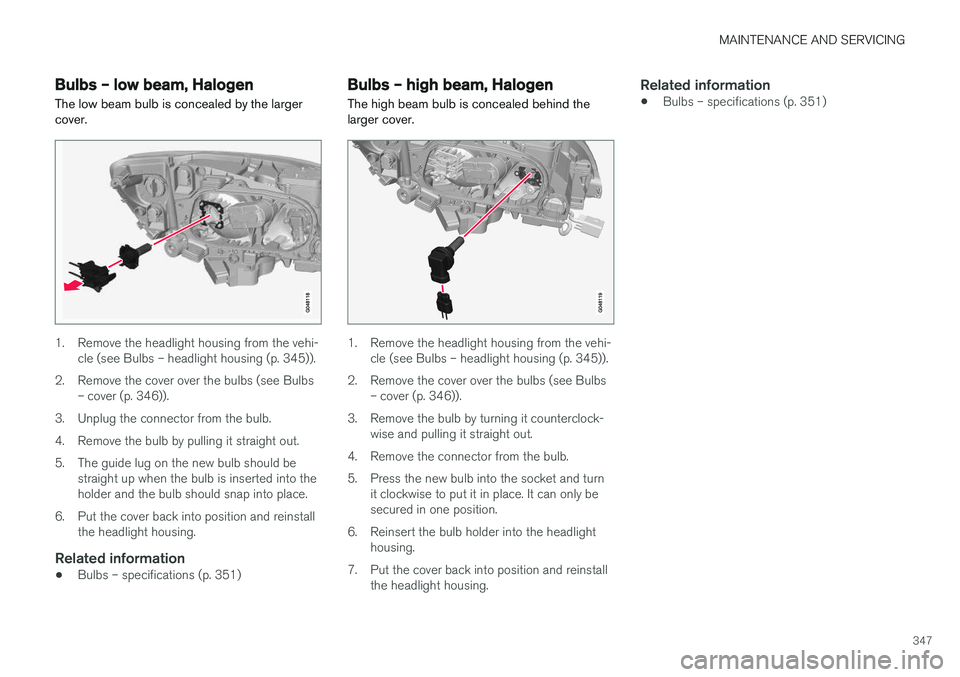
Bulbs – low beam, Halogen The low beam bulb is concealed by the larger cover.
1. Remove the headlight housing from the vehi-cle (see Bulbs – headlight housing (p. 345)).
2. Remove the cover over the bulbs (see Bulbs – cover (p. 346)).
3. Unplug the connector from the bulb.
4. Remove the bulb by pulling it straight out.
5. The guide lug on the new bulb should be straight up when the bulb is inserted into the holder and the bulb should snap into place.
6. Put the cover back into position and reinstall the headlight housing.
Related information
• Bulbs – specifications (p. 351)
Bulbs – high beam, Halogen
The high beam bulb is concealed behind the larger cover.
1. Remove the headlight housing from the vehi- cle (see Bulbs – headlight housing (p. 345)).
2. Remove the cover over the bulbs (see Bulbs – cover (p. 346)).
3. Remove the bulb by turning it counterclock- wise and pulling it straight out.
4. Remove the connector from the bulb.
5. Press the new bulb into the socket and turn it clockwise to put it in place. It can only be secured in one position.
6. Reinsert the bulb holder into the headlight housing.
7. Put the cover back into position and reinstall the headlight housing.
Related information
• Bulbs – specifications (p. 351)
Page 350 of 406
MAINTENANCE AND SERVICING
348
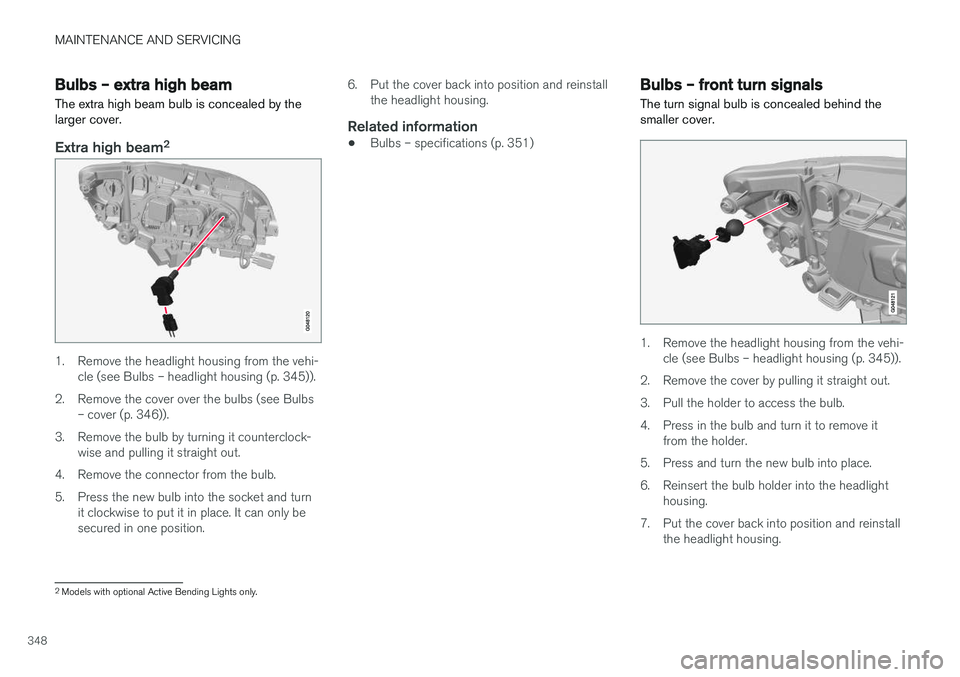
Bulbs – extra high beam The extra high beam bulb is concealed by the larger cover.
Extra high beam2
1. Remove the headlight housing from the vehi-
cle (see Bulbs – headlight housing (p. 345)).
2. Remove the cover over the bulbs (see Bulbs – cover (p. 346)).
3. Remove the bulb by turning it counterclock- wise and pulling it straight out.
4. Remove the connector from the bulb.
5. Press the new bulb into the socket and turn it clockwise to put it in place. It can only be secured in one position. 6. Put the cover back into position and reinstall
the headlight housing.
Related information
• Bulbs – specifications (p. 351)
Bulbs – front turn signals The turn signal bulb is concealed behind the smaller cover.
1. Remove the headlight housing from the vehi-
cle (see Bulbs – headlight housing (p. 345)).
2. Remove the cover by pulling it straight out.
3. Pull the holder to access the bulb.
4. Press in the bulb and turn it to remove it from the holder.
5. Press and turn the new bulb into place.
6. Reinsert the bulb holder into the headlight housing.
7. Put the cover back into position and reinstall the headlight housing.
2Models with optional Active Bending Lights only.
Page 351 of 406
MAINTENANCE AND SERVICING
349
Related information
•Bulbs – specifications (p. 351)
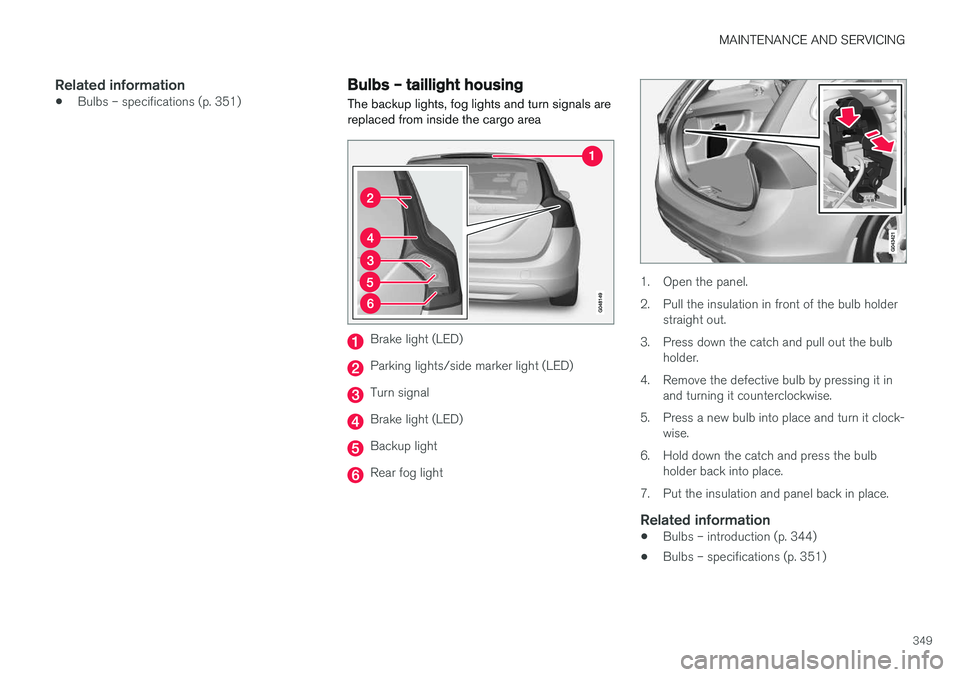
Bulbs – taillight housing The backup lights, fog lights and turn signals are replaced from inside the cargo area
Brake light (LED)
Parking lights/side marker light (LED)
Turn signal
Brake light (LED)
Backup light
Rear fog light
1. Open the panel.
2. Pull the insulation in front of the bulb holder
straight out.
3. Press down the catch and pull out the bulb holder.
4. Remove the defective bulb by pressing it in and turning it counterclockwise.
5. Press a new bulb into place and turn it clock- wise.
6. Hold down the catch and press the bulb holder back into place.
7. Put the insulation and panel back in place.
Related information
• Bulbs – introduction (p. 344)
• Bulbs – specifications (p. 351)
Page 365 of 406
MAINTENANCE AND SERVICING
}}
* Option/accessory.363
Fuses – glove compartment
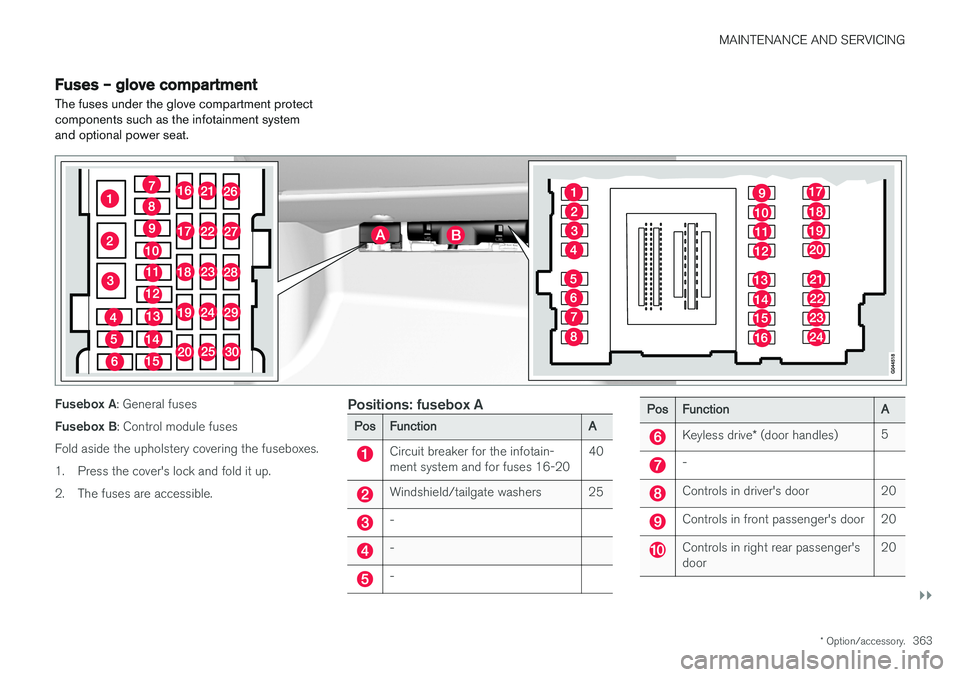
The fuses under the glove compartment protect components such as the infotainment systemand optional power seat.
Fusebox A : General fuses
Fusebox B : Control module fuses
Fold aside the upholstery covering the fuseboxes.
1. Press the cover's lock and fold it up.
2. The fuses are accessible.Positions: fusebox A
Pos Function A
Circuit breaker for the infotain- ment system and for fuses 16-2040
Windshield/tailgate washers 25
-
-
-
Pos
Function A
Keyless drive* (door handles) 5
-
Controls in driver's door 20
Controls in front passenger's door 20
Controls in right rear passenger's door 20
Page 366 of 406
||
MAINTENANCE AND SERVICING
* Option/accessory.
364
Pos Function A
Controls in left rear passenger's door20
Keyless drive
* 7.5
Power driver's seat
*20
Power front passenger's seat
*20
-
Infotainment system display 5
Infotainment system: amplifier, Sir- iusXM
™ satellite radio * 10
Sensus control module 15
Bluetooth hands-free system 5
-
Power moonroof
*
Courtesy lighting, climate system sensor 5
12-volt sockets in tunnel console 15
Heated rear seat
* (passenger's
side) 15
Heated rear seat
* (driver's side) 15
Pos
Function A
-
Heated front passenger's seat*15
Heated driver's seat
*15
Park assist
*
Blind Spot Information System (BLIS) *, park assist camera *5
All Wheel Drive
* control module 15
Active chassis system
*10
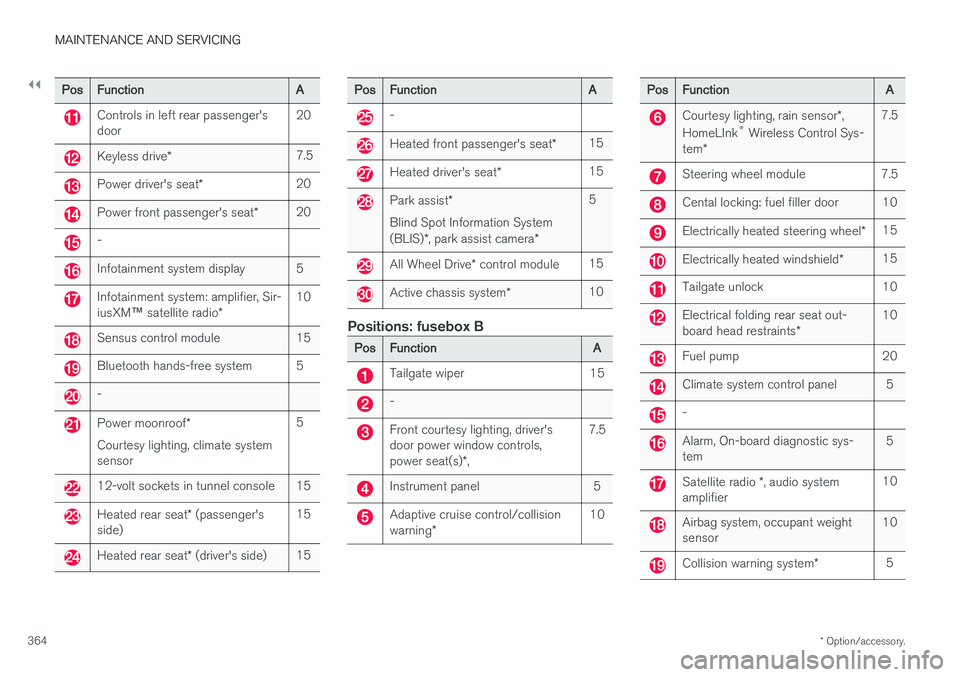
Positions: fusebox B
Pos
Function A
Tailgate wiper 15
-
Front courtesy lighting, driver's door power window controls, power seat(s)*, 7.5
Instrument panel 5
Adaptive cruise control/collision warning
* 10
Pos
Function A
Courtesy lighting, rain sensor*,
HomeLInk ®
Wireless Control Sys-
tem * 7.5
Steering wheel module 7.5
Cental locking: fuel filler door 10
Electrically heated steering wheel
*15
Electrically heated windshield
*15
Tailgate unlock 10
Electrical folding rear seat out- board head restraints
*10
Fuel pump 20
Climate system control panel 5
-
Alarm, On-board diagnostic sys- tem
5
Satellite radio
*, audio system
amplifier 10
Airbag system, occupant weight sensor
10
Collision warning system
*5
Page 371 of 406
MAINTENANCE AND SERVICING
}}
* Option/accessory.369
Washing the vehicle
The vehicle should be washed at regular inter- vals since dirt, dust, insects and tar spotsadhere to the paint and may cause damage. Tohelp prevent corrosion, it is particularly importantto wash the car frequently in the wintertime.
The following points should be kept in mind when washing and cleaning the car:
CAUTION
Avoid using car washing detergents with a pH value lower than 3.5 or higher than 11.5.Doing so could result in discoloring of ano-dized aluminum surfaces on e.g., roof rails orthe frames around the side windows.
• Avoid washing your car in direct sunlight. Doing so may cause detergents and wax todry out and become abrasive. To avoidscratching, use lukewarm water to soften thedirt before you wash with a soft sponge, andplenty of sudsy water.
• Bird droppings
: Remove from paintwork as
soon as possible. Otherwise the finish maybe permanently damaged.
• A detergent can be used to facilitate thesoftening of dirt and oil.
• Dry the car with a clean chamois andremember to clean the drain holes in thedoors and rocker panels. •
Tar spots can be removed with tar removerafter the car has been washed.
• A stiff-bristle brush and lukewarm soapywater can be used to clean the wiper blades.Frequent cleaning of the windshield andwiper blades improves visibility considerablyand also helps prolong the service life of thewiper blades.
• Wash off the dirt from the underside (wheelhousings, fenders, etc).
• In areas of high industrial fallout, more fre-quent washing is recommended.
NOTE
When washing the vehicle, remember to remove dirt from the drain holes in the doorsand sills.
CAUTION
•
During high pressure washing, the spray mouthpiece must never be closer to thevehicle than 13" (30 cm). Do not sprayinto the locks.
• Dirt, snow, etc., on the headlights canreduce lighting capacity considerably.Clean the headlights regularly, for exam-ple when refueling.
Special moonroof cautions:
• Always close the moonroof and sunshade before washing your vehicle.
• Never use abrasive cleaning agents onthe moonroof.
• Never use wax on the rubber sealsaround the moonroof.
Exterior componentsVolvo recommends the use of special cleaning products, available at your Volvo retailer, forcleaning colored plastic, rubber, or ornamentalcomponents such as chromed strips on the exte-rior of your vehicle. The instructions for usingthese products should be followed carefully. Sol-vents or stain removers should not be used. The frames around the side windows, roof rails and door frames near the windows
* are made of
anodized aluminum and should only be washed
Page 391 of 406

SPECIFICATIONS
}}
389
Air conditioning – specification and volume
The air conditioning system in your vehicle con- tains the following:
Refrigerant : R134a (HFC134a)
Volume: 1.7 lbs (770 g)
Compressor oil : PAG
Battery specifications If the battery is replaced, replace it with a battery of the same cold start capacity as the original(see the decal on the battery).
General information
WARNING
PROPOSITION 65 WARNING! Battery posts, terminals, and related accesso- ries contain lead and lead compounds, chemi-cals known to the state of California to causecancer and reproductive harm. Wash handsafter handling.
12 volt system with a voltage-regulated alterna- tor. Single pole system in which the chassis andengine block are used as conductors. The nega-tive terminal is connected to the chassis.
Voltage (V) 12 Cold start capacity (Cold CrankingAmperes - CCA) (A) 760
Dimensions, L×W×H in.(mm) 10.9×6.9×7.5
(278×175×190)
Capacity (Ah) 70
Symbols – general information The following tables list the most common warn- ing and indicator lights and symbols and a refer-ence to where more detailed information can befound.
IntroductionThe symbols in the vehicle's various displays are divided into three main categories: • Warning symbols
• Indicator symbols
• Information symbols
The following tables list the most common sym- bols, their meaning and the pages in this manualthat provide more detailed information.
NOTE
Not all of the symbols shown in the related articles are available in all models or on allmarkets. Local variations may occur.
Warning symbol
: The red warning symbol illuminates to
indicate a problem related to safety and/or driva- bility. A message will also appear in the maininstruments panel's display.
Information symbol
: The information symbol illuminates and a
text message is displayed to provide the driver
Page 393 of 406

SPECIFICATIONS
}}
* Option/accessory.391
Indicator symbols
The following tables list the most common warn- ing and indicator lights and symbols and a refer-ence to where more detailed information can befound.
: The red warning symbol illuminates to
indicate a problem related to safety and/or driva- bility. A message will also appear in the maininstruments panel's display.
: The information symbol illuminates and a
text message is displayed to provide the driver with necessary information about one of thevehicle's systems.
Indicator symbols in the instrument panel
Symbol Description See
Fault in the Active Bend- ing Light (ABL)*system (p. 75)
Malfunction indicator light
(p. 75)
Anti-lock brake system (ABS)(p. 75)
Rear fog lights on (p. 75)
Stability system, Hill Descent Control, Trailer Stability Assist
*(p. 75)
Symbol
Description See
Tire pressure monitoring sensor (TPMS)(p. 75)
Low fuel level (p. 75)
Information symbol, see text in information dis-play(p. 75)
High beam indicator (p. 75)
Left turn signal indicator (p. 75)
Right turn signal indica- tor
(p. 75)
Stability system , Sport mode(p. 175)
Related information
•
Information displays – indicator symbols (p. 75)
• Information displays – warning symbols(p. 77)
• Information display – messages (p. 117)
Information symbols
The following tables list the most common warn- ing and indicator lights and symbols and a refer-ence to where more detailed information can befound.
: The red warning symbol illuminates to
indicate a problem related to safety and/or driva- bility. A message will also appear in the maininstruments panel's display.
: The information symbol illuminates and a
text message is displayed to provide the driver with necessary information about one of thevehicle's systems.
Information symbols in the instrument panel
Symbol Description See
Adaptive Cruise Con- trol * (p. 183)
Adaptive Cruise Con- trol
* (p. 183)
Adaptive Cruise Con- trol
* (p. 183)
Adaptive Cruise Con- trol
* (Distance alert) (p. 183)
Radar sensor
*(p. 193)
Page 397 of 406

INDEX
395
A
ABS (anti-lock brake system) 279
Accessory installation warning 24
Active high beams 94
Active yaw control 174, 175
Adaptive brake lights 279
Adaptive cruise control 183, 184Airbagsdisconnecting the front passenger