brake light VOLVO V60 2018 Owner´s Manual
[x] Cancel search | Manufacturer: VOLVO, Model Year: 2018, Model line: V60, Model: VOLVO V60 2018Pages: 406, PDF Size: 9.59 MB
Page 80 of 406

||
INSTRUMENTS AND CONTROLS
78
Engine temperature
Engine overheating can result from low oil or coolant levels, towing or hard driving at high heatand altitude, or mechanical malfunction. Engineoverheating will be signaled with text and a redwarning triangle in the middle of the instrumentdisplay. The exact text will depend on the degree of overheating. It may range from
High engine
temp Reduce speed to High engine temp
Stop engine. If appropriate, other messages,
such as Coolant level low, Stop safely will
also be displayed. If your engine does overheat so that you must stop the engine, always allowthe engine to cool before attempting to check oiland coolant levels. See Engine compartment – coolant (p. 342) for more information.
Fault in brake system
If this symbol lights, the brake fluid level may be too low. Stop the vehicle in a safe place andcheck the level in the brake fluid reservoir, seeEngine compartment – brake fluid (p. 343). If the level in the reservoir is below MIN, the vehicle
should be transported to an authorized Volvo workshop to have the brake system checked. If the
and symbols come on at
the same time, there may be a fault in the brake force distribution system. 1. Stop the vehicle in a safe place and turn off
the engine.
2. Restart the engine.
• If both symbols extinguish, continue driving.
• If the symbols remain on, check the level inthe brake fluid reservoir, see Engine com-partment – brake fluid (p. 343). If the brakefluid level is normal but the symbols are stilllit, the vehicle can be driven, with great care,to an authorized Volvo workshop to have thebrake system checked.
• If the level in the reservoir is below
MIN, the
vehicle should be transported to an author-ized Volvo workshop to have the brake sys-tem checked.
WARNING
• If the fluid level is below the
MIN mark in
the reservoir or if a warning message is displayed in the text window: DO NOT
DRIVE . Have the vehicle towed to a
trained and qualified Volvo service techni- cian and have the brake system inspec-ted.
• If the
and symbols are
on at the same time, there is a risk of reduced vehicle stability.
Warning symbol
The red warning symbol lights up to indicate a problem related to safety and/or drivability. Amessage will also appear in the instrument panel.The symbol remains visible until the fault hasbeen rectified but the text message can be cleared with the OK button, see Information dis-
play – menu controls (p. 116). The warning sym- bol can also come on in conjunction with othersymbols. Action:
1. Stop in a safe place. Do not drive the vehicle further.
2. Read the information on the display. Imple- ment the action in accordance with the mes- sage in the display. Clear the message using OK.
Page 84 of 406
||
INSTRUMENTS AND CONTROLS
* Option/accessory.
82
CAUTION
Foreign objects in the ignition slot can impair function or cause damage.
Removing the remote keyThe remote key can be removed from the ignition slot by pulling it out.
Related information
• Ignition modes (p. 82)
Ignition modes
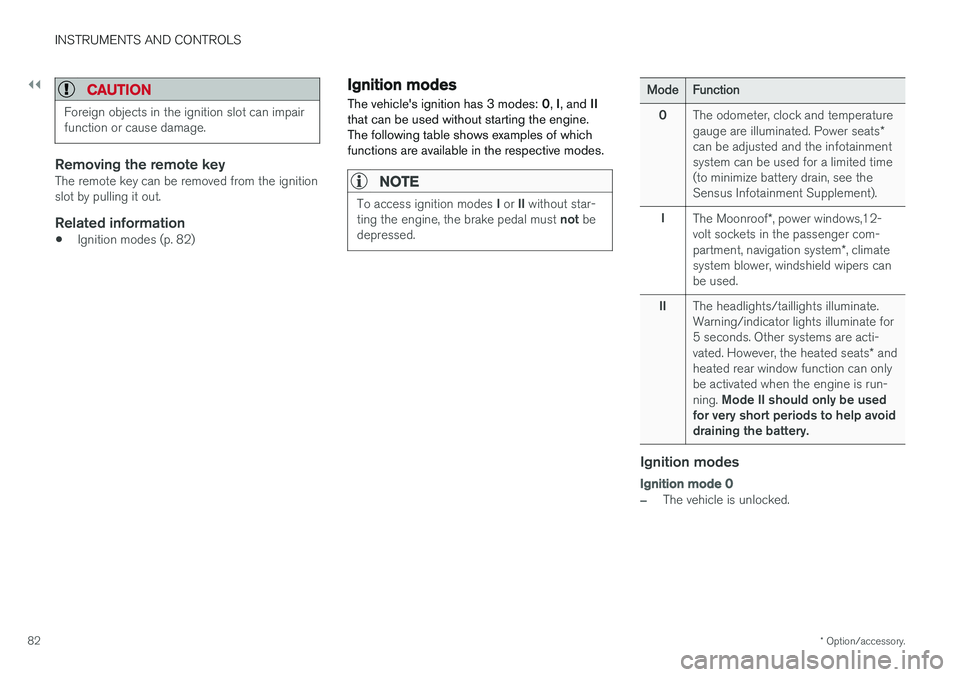
The vehicle's ignition has 3 modes: 0, I, and II
that can be used without starting the engine. The following table shows examples of whichfunctions are available in the respective modes.
NOTE
To access ignition modes I or II without star-
ting the engine, the brake pedal must not be
depressed.
Mode Function
0 The odometer, clock and temperature gauge are illuminated. Power seats
*
can be adjusted and the infotainment system can be used for a limited time(to minimize battery drain, see theSensus Infotainment Supplement).
I The Moonroof *, power windows,12-
volt sockets in the passenger com- partment, navigation system *, climate
system blower, windshield wipers can be used.
II The headlights/taillights illuminate.Warning/indicator lights illuminate for5 seconds. Other systems are acti- vated. However, the heated seats
* and
heated rear window function can only be activated when the engine is run- ning. Mode II should only be used
for very short periods to help avoid draining the battery.
Ignition modes
Ignition mode 0
–The vehicle is unlocked.
Page 187 of 406
DRIVER SUPPORT
}}
185
•
Adaptive Cruise Control – setting speed (p. 187)
• Radar sensor (p. 193)
• Adaptive Cruise Control (ACC) – QueueAssist (p. 191)
• Adaptive Cruise Control – passing anothervehicle (p. 190)
• Adaptive Cruise Control – limitations(p. 193)
• Adaptive Cruise Control – function (p. 185)
• Adaptive Cruise Control – engaging (p. 187)
• Adaptive Cruise Control – deactivating(p. 189)
Adaptive Cruise Control – function
Function
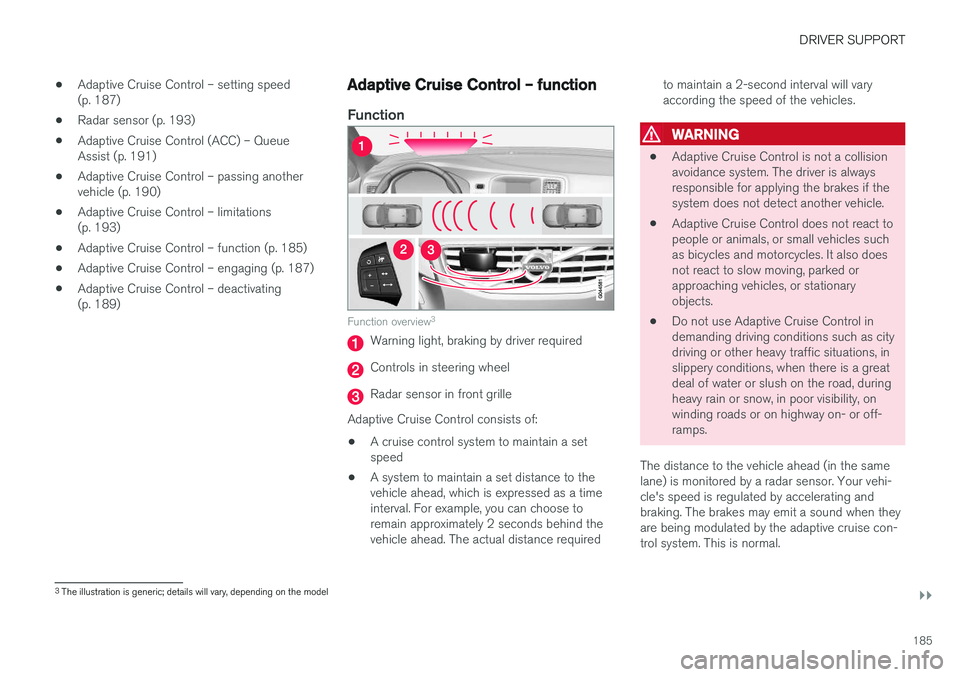
Function overview 3
Warning light, braking by driver required
Controls in steering wheel
Radar sensor in front grille
Adaptive Cruise Control consists of:
• A cruise control system to maintain a set speed
• A system to maintain a set distance to thevehicle ahead, which is expressed as a timeinterval. For example, you can choose toremain approximately 2 seconds behind thevehicle ahead. The actual distance required to maintain a 2-second interval will varyaccording the speed of the vehicles.
WARNING
•
Adaptive Cruise Control is not a collision avoidance system. The driver is alwaysresponsible for applying the brakes if thesystem does not detect another vehicle.
• Adaptive Cruise Control does not react topeople or animals, or small vehicles suchas bicycles and motorcycles. It also doesnot react to slow moving, parked orapproaching vehicles, or stationaryobjects.
• Do not use Adaptive Cruise Control indemanding driving conditions such as citydriving or other heavy traffic situations, inslippery conditions, when there is a greatdeal of water or slush on the road, duringheavy rain or snow, in poor visibility, onwinding roads or on highway on- or off-ramps.
The distance to the vehicle ahead (in the samelane) is monitored by a radar sensor. Your vehi-cle's speed is regulated by accelerating andbraking. The brakes may emit a sound when theyare being modulated by the adaptive cruise con-trol system. This is normal.
3 The illustration is generic; details will vary, depending on the model
Page 188 of 406
||
DRIVER SUPPORT
* Option/accessory.
186
WARNING
The brake pedal moves when the adaptive cruise control system modulates the brakes.Do not rest your foot under the brake pedal.
The ACC system is designed to smoothly regu- late speed. However, the driver must apply thebrakes in situations that require immediate brak-ing. This applies when there are great differencesin speed between vehicles, or if the vehicle aheadbrakes suddenly.
WARNING
Due to limitations in the radar sensor, braking may occur unexpectedly or not at all, seeAdaptive Cruise Control – limitations (p. 193).
Adaptive Cruise Control can be put in active mode at any permitted speed. However, if thevehicle's speed falls below 18 mph (30 km/h) orif engine speed (rpm) becomes too low, ACC dis-engages (goes into standby mode) and will nolonger modulate the brakes. The driver will thenhave to maintain a safe distance to the vehicleahead.
WARNING
When Adaptive Cruise Control is in standby mode or is switched off completely, thebrakes will not be modulated automatically.The driver must assume full control over thevehicle.
Warning light—driver braking requiredAdaptive Cruise Control can exert brake force that is equivalent to approximately 40% of thevehicle's total braking capacity. In situationsrequiring more brake force than ACC can provideand if the driver does not apply the brakes, anaudible signal from the Collision Warning systemwill sound and warning light will illuminate (see Collision warning * – function (p. 211)) in the
windshield to alert the driver to react.
NOTE
Strong sunlight, reflections, extreme light con- trasts, the use of sunglasses, or if the driver isnot looking straight ahead may make thewarning symbol in the windshield difficult tosee.
WARNING
Adaptive Cruise Control only warns of vehicles detected by the radar sensor, see AdaptiveCruise Control – limitations (p. 193). In somecases there may be no warning or the warn-ing may be delayed. The driver should alwaysapply the brakes when necessary.
Steep inclines and/or heavy loadsACC is primarily intended for use on fairly level roads. The system may have difficulty maintainingthe correct distance to a vehicle ahead on steepinclines, if the vehicle is carrying a heavy load oris towing a trailer. In these situations, the drivershould always be prepared to apply the brakes ifnecessary.
Related information
• Adaptive Cruise Control – introduction(p. 183)
Page 191 of 406
DRIVER SUPPORT
}}
189
Different time intervals can be selected and are shown in the instrument panel
4
as 1–5 hori-
zontal bars. The greater the number of bars, the longer thetime interval. One bar repre-sents a time interval of approxi-
mately 1 second; 5 bars is approximately3 seconds.
To set/change a time interval:
• Press the
/ buttons (3).
At low speeds, when the distance to the vehicle ahead is short, ACC increases the time intervalslightly. In order to follow the vehicle ahead assmoothly as possible, ACC allows the time inter-val to vary considerably in certain situations.
WARNING
• Only use a time interval that is suitable in current traffic conditions.
• A short time interval gives the driver lim-ited reaction time if an unexpected situa-tion occurs in traffic.
Related information
• Adaptive Cruise Control – introduction(p. 183)
Adaptive Cruise Control – deactivating
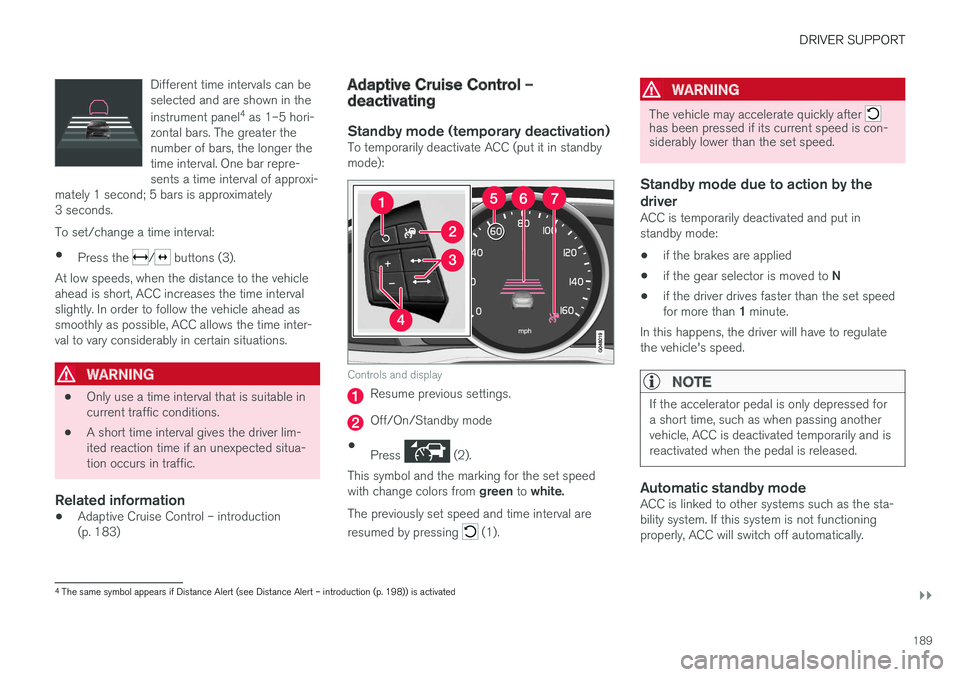
Standby mode (temporary deactivation)To temporarily deactivate ACC (put it in standby mode):
Controls and display
Resume previous settings.
Off/On/Standby mode
• Press
(2).
This symbol and the marking for the set speed with change colors from green to white.
The previously set speed and time interval are resumed by pressing
(1).
WARNING
The vehicle may accelerate quickly after has been pressed if its current speed is con- siderably lower than the set speed.
Standby mode due to action by the driver
ACC is temporarily deactivated and put in standby mode:
• if the brakes are applied
• if the gear selector is moved to
N
• if the driver drives faster than the set speed for more than
1 minute.
In this happens, the driver will have to regulate
the vehicle's speed.
NOTE
If the accelerator pedal is only depressed for a short time, such as when passing anothervehicle, ACC is deactivated temporarily and isreactivated when the pedal is released.
Automatic standby modeACC is linked to other systems such as the sta- bility system. If this system is not functioningproperly, ACC will switch off automatically.
4 The same symbol appears if Distance Alert (see Distance Alert – introduction (p. 198)) is activated
Page 195 of 406
DRIVER SUPPORT
}}
193
Radar sensor
The radar sensor is designed to help detect cars or larger vehicles driving in the same direction asyour vehicle, in the same lane.
The radar sensor and its limitationsIn addition to being used by the Adaptive Cruise Control (ACC), the radar sensor is also used byDistance Alert (see Distance Alert – introduction(p. 198)) and Collision Warning with Full Auto-brake and Pedestrian Detection (see Collisionwarning – introduction (p. 209)).
WARNING
• If there is visible damage to the front grille or you suspect that the radar sensormay be damaged in any way, contact atrained and qualified Volvo service techni-cian as soon as possible. The radar sen-sor may only function partially (or not atall) if it is damaged or is not securely fas-tened in place.
• Accessories or other objects, such asextra headlights, must not be installed infront of the grille.
• Modification of the radar sensor couldmake its use illegal.
The radar sensor's capacity to detect vehiclesahead is impeded: •
if the radar sensor is obstructed and cannotdetect other vehicles, for example in heavyrain, or if snow or other objects are obscuringthe radar sensor.
NOTE
Keep the area in front of the radar sensor clean.
•
if the speed of vehicles ahead is significantly different from your own speed.
Related information
•Adaptive Cruise Control – introduction(p. 183)
• Collision warning – introduction (p. 209)
• Distance Alert – introduction (p. 198)
Adaptive Cruise Control – limitations
The ACC cannot cover all driving situations and traffic, weather and road conditions.
Situations where ACC may not function optimally
WARNING
• The radar sensor has a limited field of vision. In some situations it may detect avehicle later than expected or not detectother vehicles at all.
• If ACC is not functioning properly, cruisecontrol will also be disabled.
Page 205 of 406
DRIVER SUPPORT
203
•
City Safety – symbols and messages (p. 207)
• City Safety – Laser sensor (p. 208)
City Safety – function
Function
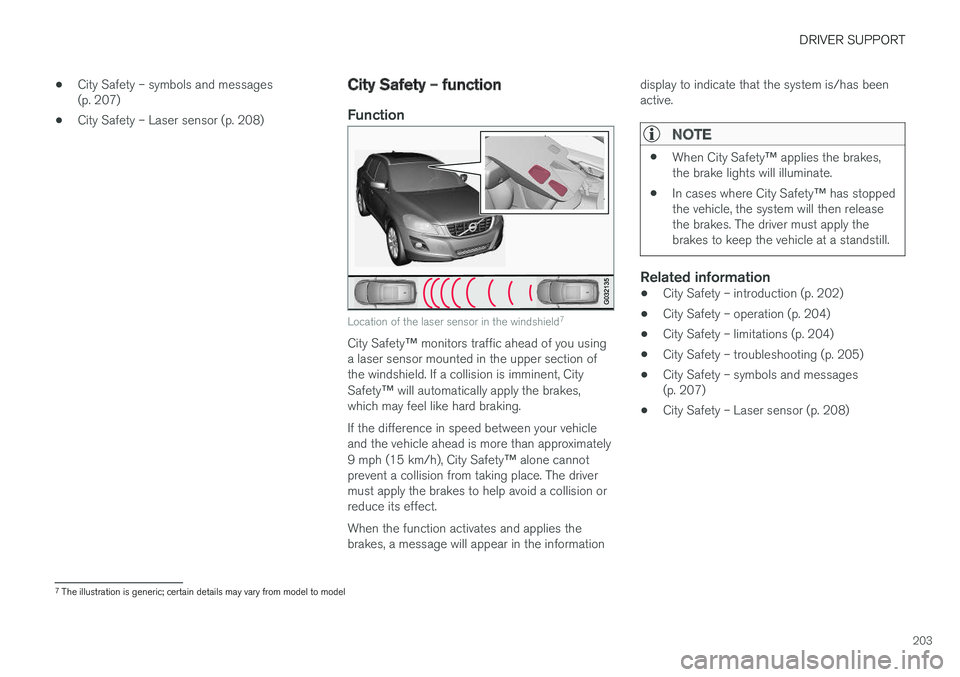
Location of the laser sensor in the windshield 7
City Safety
™ monitors traffic ahead of you using
a laser sensor mounted in the upper section of the windshield. If a collision is imminent, City Safety ™ will automatically apply the brakes,
which may feel like hard braking. If the difference in speed between your vehicle and the vehicle ahead is more than approximately 9 mph (15 km/h), City Safety ™ alone cannot
prevent a collision from taking place. The driver must apply the brakes to help avoid a collision orreduce its effect. When the function activates and applies the brakes, a message will appear in the information display to indicate that the system is/has beenactive.
NOTE
•
When City Safety
™ applies the brakes,
the brake lights will illuminate.
• In cases where City Safety
™ has stopped
the vehicle, the system will then release the brakes. The driver must apply thebrakes to keep the vehicle at a standstill.
Related information
• City Safety – introduction (p. 202)
• City Safety – operation (p. 204)
• City Safety – limitations (p. 204)
• City Safety – troubleshooting (p. 205)
• City Safety – symbols and messages (p. 207)
• City Safety – Laser sensor (p. 208)
7
The illustration is generic; certain details may vary from model to model
Page 212 of 406
||
DRIVER SUPPORT
* Option/accessory.
210
WARNING
• Pedestrian and Cyclist Detection with Full Auto Brake does not work in all driving,traffic, weather and road conditions. Itdoes not react to vehicles not traveling inthe same direction as your vehicle.
• Pedestrian and Cyclist Detection with FullAuto Brake does not react to animals.
• Warnings are only provided when the riskof collision is high. The "Function" sectionprovides information about limitations thatthe driver must be aware of before usingCollision Warning.
• Pedestrian and Cyclist Detection with FullAuto Brake will not provide a warning orbrake the vehicle for pedestrians orcyclists at speeds above 50 mph(80 km/h).
WARNING
•
Pedestrian and Cyclist Detection with Full Auto Brake will not provide a warning orbrake the vehicle for pedestrians in dark-ness or in tunnels, even if there is streetlighting in the area.
• The auto-brake function can help preventa collision or reduce the speed at impactbut the driver should always apply thebrakes for the best possible brakingeffect, even if auto-brake is actively apply-ing the brakes.
• Never wait for a collision warning. Thissystem is designed to be a supplemen-tary driving aid. It is not, however,intended to replace the driver's attentionand judgement. The driver is responsiblefor maintaining a safe distance andspeed, even when the collision warningsystem is in use.
• Maintenance of the Pedestrian andCyclist Detection with Full Auto Brakesystem's components must only be per-formed by a trained and qualified Volvotechnician.
Related information
•
Collision warning
* – function (p. 211)
• Collision warning
* – operation (p. 212) •
Collision warning
* – Pedestrian detection
(p. 214)
• Collision warning
* – Cyclist detection
(p. 213)
• Collision warning
* – limitations (p. 215)
• The camera
Page 213 of 406
DRIVER SUPPORT
* Option/accessory.211
Collision warning * – function
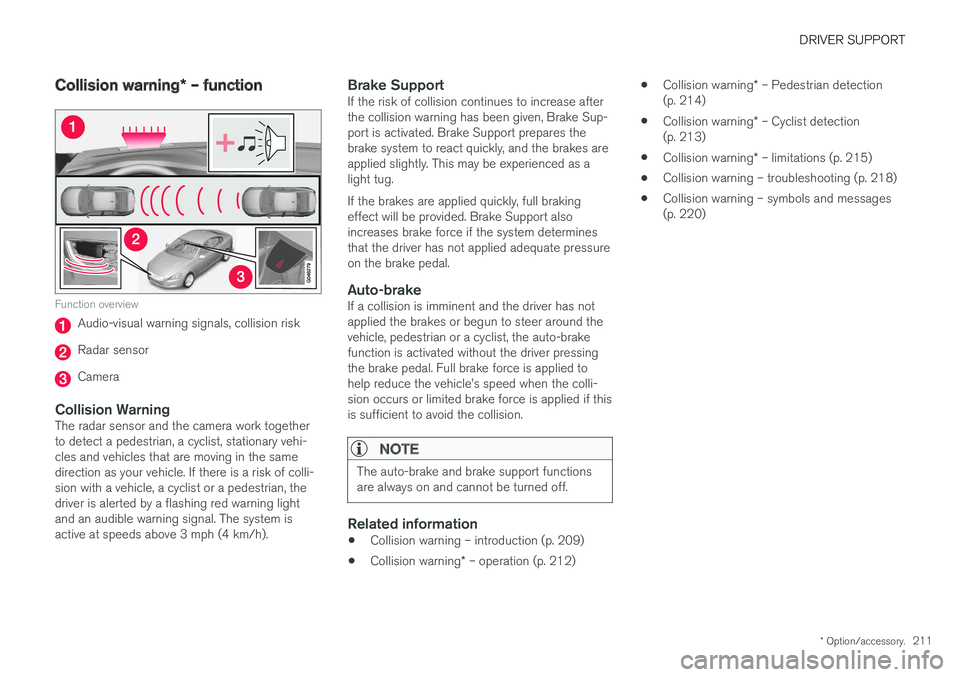
Function overview
Audio-visual warning signals, collision risk
Radar sensor
Camera
Collision WarningThe radar sensor and the camera work together to detect a pedestrian, a cyclist, stationary vehi-cles and vehicles that are moving in the samedirection as your vehicle. If there is a risk of colli-sion with a vehicle, a cyclist or a pedestrian, thedriver is alerted by a flashing red warning lightand an audible warning signal. The system isactive at speeds above 3 mph (4 km/h).
Brake SupportIf the risk of collision continues to increase afterthe collision warning has been given, Brake Sup-port is activated. Brake Support prepares thebrake system to react quickly, and the brakes areapplied slightly. This may be experienced as alight tug. If the brakes are applied quickly, full braking effect will be provided. Brake Support alsoincreases brake force if the system determinesthat the driver has not applied adequate pressureon the brake pedal.
Auto-brakeIf a collision is imminent and the driver has notapplied the brakes or begun to steer around thevehicle, pedestrian or a cyclist, the auto-brakefunction is activated without the driver pressingthe brake pedal. Full brake force is applied tohelp reduce the vehicle
Page 214 of 406
DRIVER SUPPORT
* Option/accessory.
212
Collision warning * – operation
Settings are made by pressing MY CAR on the
center console control panel and using the menus displayed.
Activating/deactivating both warning
signals
To switch the system's audible and visual sig-
nals on or off at the same time, press MY CAR
on the center console control panel and go to
SettingsCar settingsDriver support
systems
Collision Warning. If Pedestrian
and Cyclist Detection with Full Auto Brake is on, the system will perform a self-test each time theengine is started by briefly illuminating the warn-ing light. See My Car – introduction (p. 79) for adescription of the menu system. When the engine is switched on, the system set- ting that was being used when it was switchedoff will be the default setting.
NOTE
The auto-brake and pedestrian/cyclist detec- tion features are always on, even if the audi-ble and visual warning signals have beendeactivated.
Activating/deactivating the audible warning signal only
The audible warning signal can be activated/ deactivated by pressing MY CAR on the center
console control panel and going to
Settings
Car settingsDriver support systemsWarning sound if risk of collision.
Setting a warning distanceThis setting determines the distance at which the visual and audible warnings are triggered. Select
Long, Normal or Short by pressing MY CAR on
the center console control panel and going to
SettingsCar settingsDriver support
systems
Collision WarningWarning
distance.
The warning distance determines the level of sensitivity used by the system. The warning dis- tance
Long provides an earlier warning. Begin by
using Long and if the system gives too many
warnings, try changing to Normal.
WARNING
• The setting Short should only be used in
situations where traffic is light and mov- ing at low speeds.
• Pedestrian and Cyclist Detection with FullAuto Brake alerts the driver to the risk ofa collision but this function cannot reducethe driver