child lock VOLVO V60 2018 Owner´s Manual
[x] Cancel search | Manufacturer: VOLVO, Model Year: 2018, Model line: V60, Model: VOLVO V60 2018Pages: 406, PDF Size: 9.59 MB
Page 64 of 406
SAFETY
62•
Booster cushions (p. 56)
• Seat belts – general (p. 30)
Integrated booster cushion – using
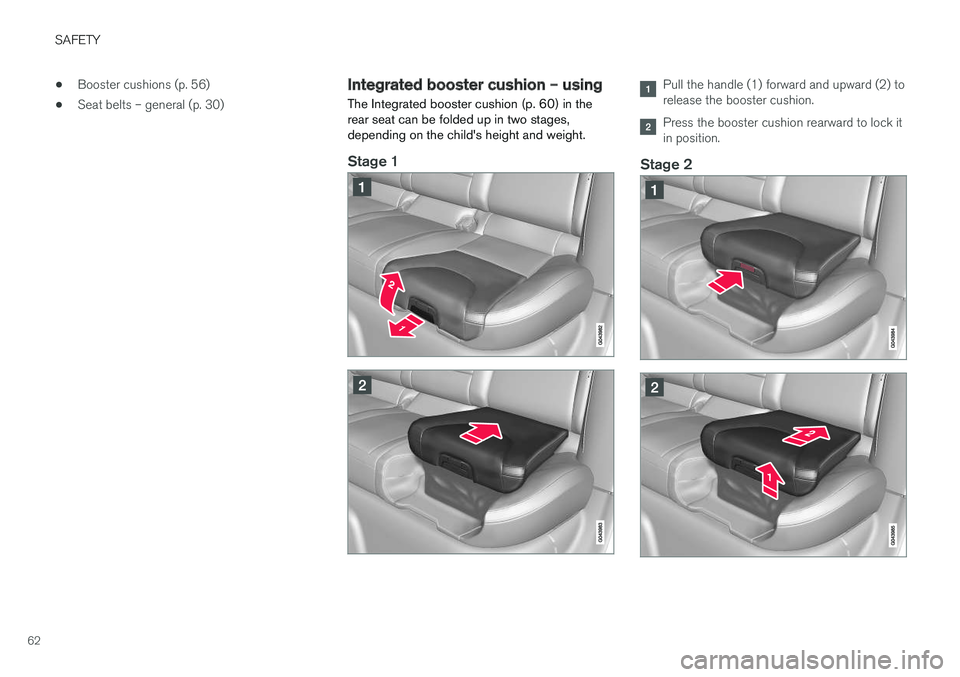
The Integrated booster cushion (p. 60) in the rear seat can be folded up in two stages,depending on the child's height and weight.
Stage 1
Pull the handle (1) forward and upward (2) to release the booster cushion.
Press the booster cushion rearward to lock it in position.
Stage 2
Page 65 of 406
SAFETY
63
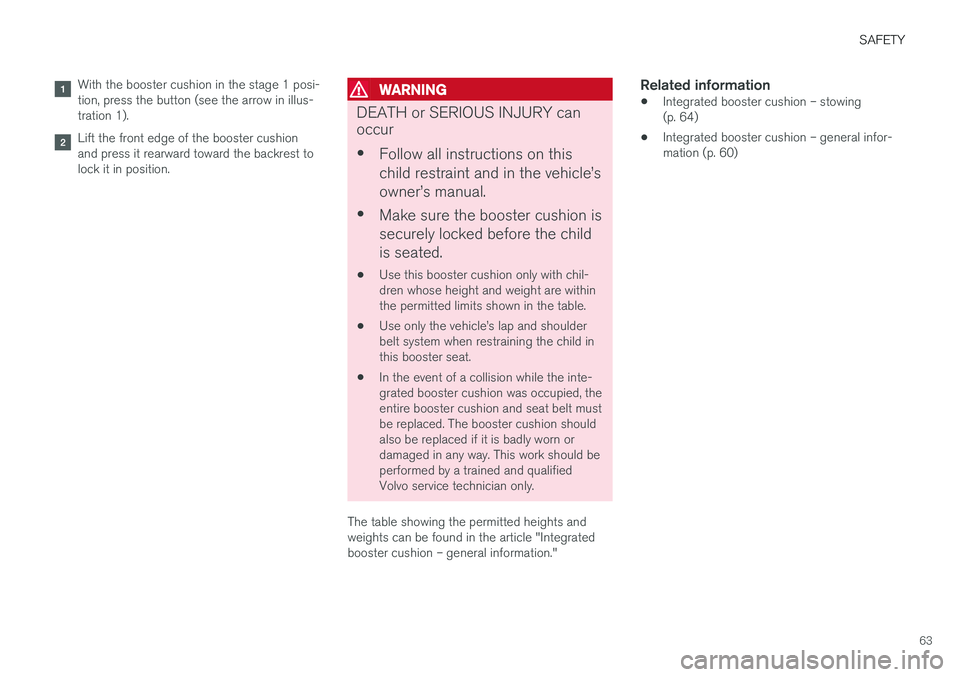
With the booster cushion in the stage 1 posi- tion, press the button (see the arrow in illus-tration 1).
Lift the front edge of the booster cushion and press it rearward toward the backrest tolock it in position.
WARNING
DEATH or SERIOUS INJURY can occur •Follow all instructions on this child restraint and in the vehicle
Page 67 of 406
SAFETY
}}
* Option/accessory.65
Related information
•Integrated booster cushion – using (p. 62)
• Integrated booster cushion – general infor- mation (p. 60)
Child safety locks
Power child safety locks * help prevent children
from inadvertently opening one of the rear doors or windows from inside the vehicle.
Manual child safety locks
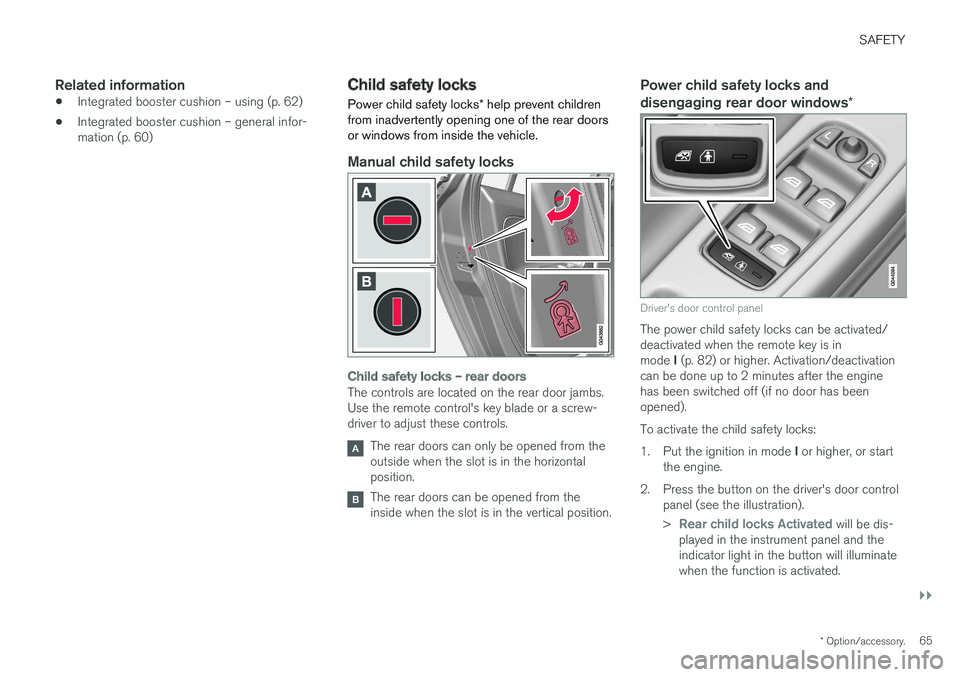
Child safety locks – rear doors
The controls are located on the rear door jambs. Use the remote control's key blade or a screw-driver to adjust these controls.
The rear doors can only be opened from the outside when the slot is in the horizontalposition.
The rear doors can be opened from the inside when the slot is in the vertical position.
Power child safety locks and disengaging rear door windows *
Driver's door control panel
The power child safety locks can be activated/ deactivated when the remote key is in mode I (p. 82) or higher. Activation/deactivation
can be done up to 2 minutes after the engine has been switched off (if no door has beenopened). To activate the child safety locks:1. Put the ignition in mode I or higher, or start
the engine.
2. Press the button on the driver's door control panel (see the illustration). >
Rear child locks Activated will be dis-
played in the instrument panel and the indicator light in the button will illuminatewhen the function is activated.
Page 68 of 406
||
SAFETY
66When the child safety locks are activated: •
The rear door windows can only be opened from the driver's door control panel
• The rear doors cannot be opened from theinside
The child safety locks' current setting is storedwhen the engine is switched off. If these lockswere activated when the engine was switched off,they will also be active when the engine is restar-ted.
Related information
• Detachable key blade – general information(p. 157)
• Locking/unlocking – from inside (p. 166)
Page 89 of 406
INSTRUMENTS AND CONTROLS
}}
87
Returning the seat/mirrors to the stored positions
To move the seat and door mirrors to the position stored in the remote key: 1.Unlock the driver's door with the same
remote key (the one used to lock the doors). For models equipped with the optional key-less drive, you must have the same remotekey in your possession.
2. Open the driver's door within 2 minutes. The driver's seat and door mirrors will automati- cally move to the position in which you left them(if the vehicle has been unlocked with one of theother keys and new seat/mirror adjustments havebeen made).
NOTE
• The seat will move to this position even if someone else has moved it to a different position and locked the vehicle with a
dif-
ferent remote key.
• This feature will work in the same way with all of the remote keys that you usewith your vehicle.
Emergency stop
WARNING
•
Because the driver's seat can be adjusted with the ignition off, children should neverbe left unattended in the vehicle.
• Movement of the seat can be STOPPEDat any time by pressing any button on thepower seat control panel.
• Do not adjust the seat while driving. Theseat should be adjusted so that the brakepedal can be depressed fully. In addition,position the seat as far rearward as com-fort and control allow.
• The seat rails on the floor must not beobstructed in any way when the seat is inmotion.
Related information
• Remote key – functions (p. 155)
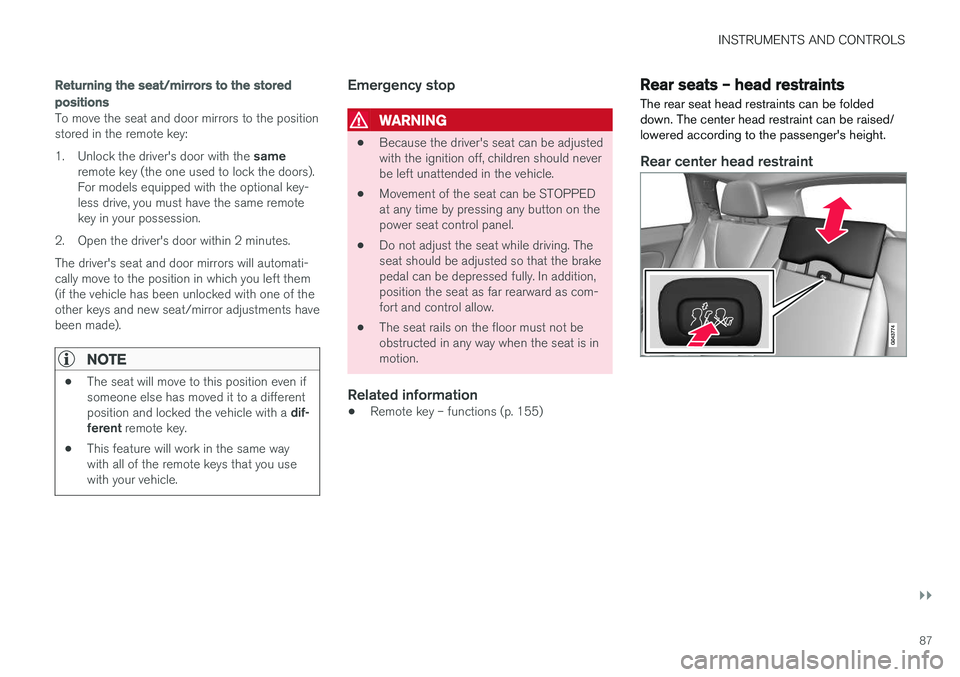
Rear seats – head restraints The rear seat head restraints can be folded down. The center head restraint can be raised/lowered according to the passenger's height.
Rear center head restraint
Page 113 of 406
INSTRUMENTS AND CONTROLS
}}
* Option/accessory.111
Power moonroof * – operation
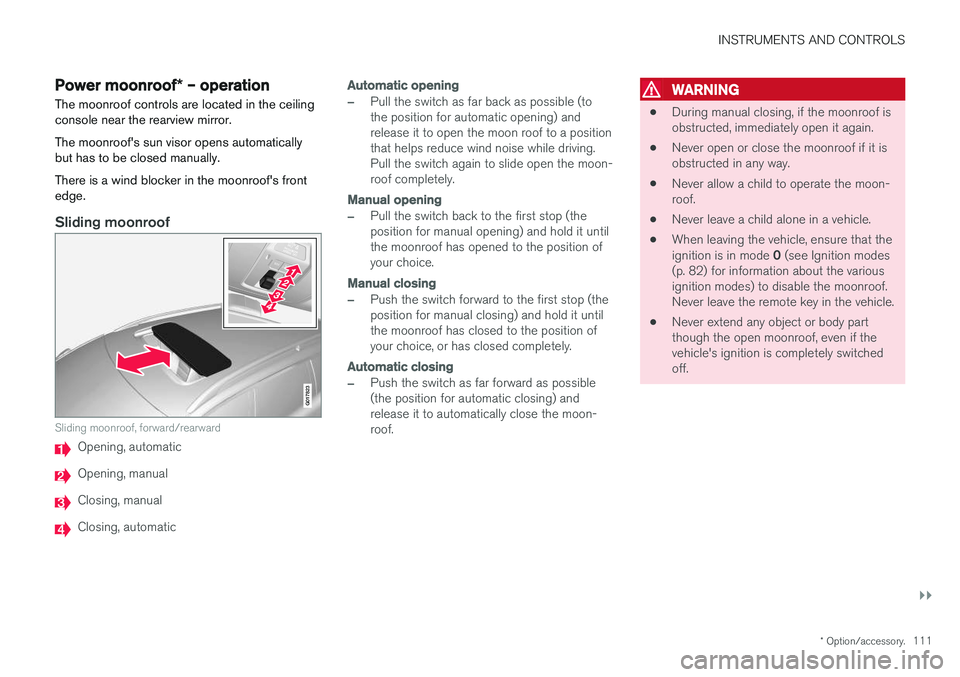
The moonroof controls are located in the ceiling console near the rearview mirror. The moonroof's sun visor opens automatically but has to be closed manually. There is a wind blocker in the moonroof's front edge.
Sliding moonroof
G017823
Sliding moonroof, forward/rearward
Opening, automatic
Opening, manual
Closing, manual
Closing, automatic
Automatic opening
–Pull the switch as far back as possible (to the position for automatic opening) andrelease it to open the moon roof to a positionthat helps reduce wind noise while driving.Pull the switch again to slide open the moon-roof completely.
Manual opening
–Pull the switch back to the first stop (the position for manual opening) and hold it untilthe moonroof has opened to the position ofyour choice.
Manual closing
–Push the switch forward to the first stop (the position for manual closing) and hold it untilthe moonroof has closed to the position ofyour choice, or has closed completely.
Automatic closing
–Push the switch as far forward as possible (the position for automatic closing) andrelease it to automatically close the moon-roof.
WARNING
• During manual closing, if the moonroof is obstructed, immediately open it again.
• Never open or close the moonroof if it isobstructed in any way.
• Never allow a child to operate the moon-roof.
• Never leave a child alone in a vehicle.
• When leaving the vehicle, ensure that the ignition is in mode
0 (see Ignition modes
(p. 82) for information about the various ignition modes) to disable the moonroof.Never leave the remote key in the vehicle.
• Never extend any object or body partthough the open moonroof, even if thevehicle's ignition is completely switchedoff.
Page 152 of 406
||
LOADING AND STORAGE
1503. Press both sides of the cover until they click
into place
. The red mark will no longer be
visible.
4. Check that both ends of the cover are securely locked in place.
Removing the cover1. Press one of the end pieces of the coverinward.
2. Pull the cover carefully upward and outward. The other end will release automatically from its retaining bracket.
Folding down the cargo area cover's rear flap
The cargo area cover's rear flap points horizon- tally when the cover is retracted (rolled up). Tofold it down:
–Pull the flap slightly rearward past its sup- ports and fold it down.
NOTE
On models equipped with this cover, it should be removed before a child seat is attached tothe child restraint anchors.
Related information
• Loading – general (p. 146)
Steel cargo grid
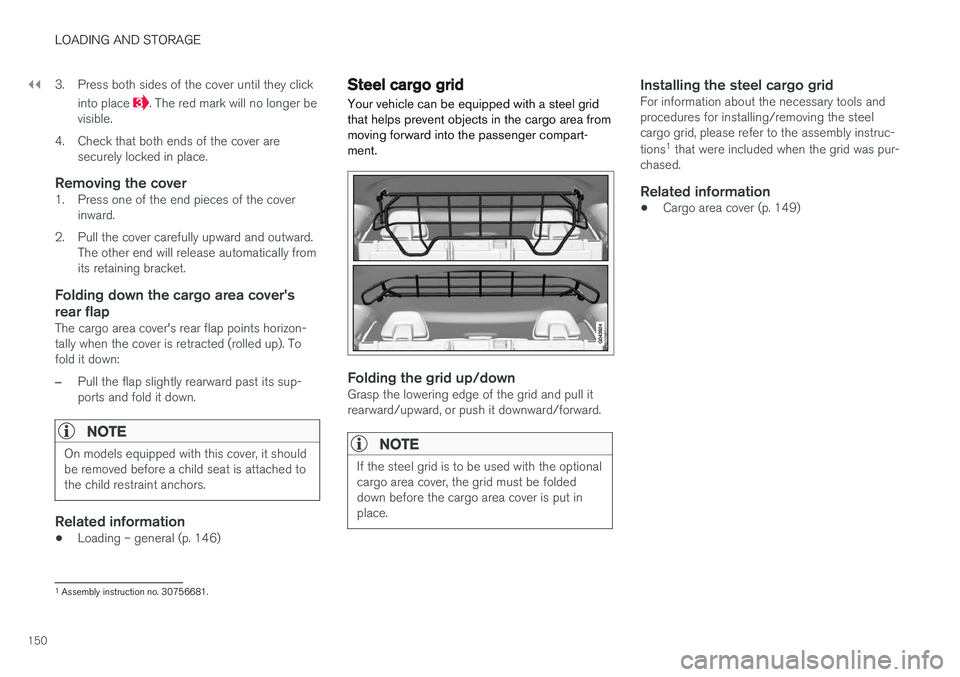
Your vehicle can be equipped with a steel grid that helps prevent objects in the cargo area frommoving forward into the passenger compart-ment.
Folding the grid up/downGrasp the lowering edge of the grid and pull it rearward/upward, or push it downward/forward.
NOTE
If the steel grid is to be used with the optional cargo area cover, the grid must be foldeddown before the cargo area cover is put inplace.
Installing the steel cargo gridFor information about the necessary tools and procedures for installing/removing the steelcargo grid, please refer to the assembly instruc- tions 1
that were included when the grid was pur-
chased.
Related information
• Cargo area cover (p. 149)
1
Assembly instruction no. 30756681.
Page 154 of 406
LOCKS AND ALARM
152
Remote key and key blade
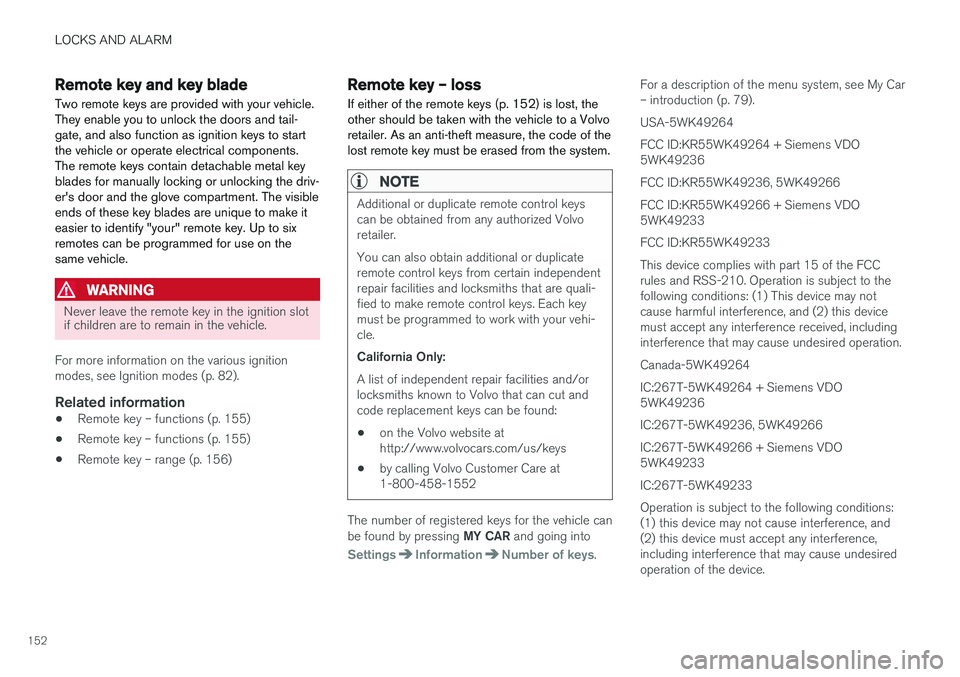
Two remote keys are provided with your vehicle. They enable you to unlock the doors and tail-gate, and also function as ignition keys to startthe vehicle or operate electrical components.The remote keys contain detachable metal keyblades for manually locking or unlocking the driv-er's door and the glove compartment. The visibleends of these key blades are unique to make iteasier to identify "your" remote key. Up to sixremotes can be programmed for use on thesame vehicle.
WARNING
Never leave the remote key in the ignition slot if children are to remain in the vehicle.
For more information on the various ignition modes, see Ignition modes (p. 82).
Related information
• Remote key – functions (p. 155)
• Remote key – functions (p. 155)
• Remote key – range (p. 156)
Remote key – loss
If either of the remote keys (p. 152) is lost, the other should be taken with the vehicle to a Volvoretailer. As an anti-theft measure, the code of thelost remote key must be erased from the system.
NOTE
Additional or duplicate remote control keys can be obtained from any authorized Volvoretailer. You can also obtain additional or duplicate remote control keys from certain independentrepair facilities and locksmiths that are quali-fied to make remote control keys. Each keymust be programmed to work with your vehi-cle. California Only: A list of independent repair facilities and/or locksmiths known to Volvo that can cut andcode replacement keys can be found: • on the Volvo website at http://www.volvocars.com/us/keys
• by calling Volvo Customer Care at1-800-458-1552
The number of registered keys for the vehicle can be found by pressing
MY CAR and going into
SettingsInformationNumber of keys.For a description of the menu system, see My Car – introduction (p. 79). USA-5WK49264FCC ID:KR55WK49264 + Siemens VDO 5WK49236 FCC ID:KR55WK49236, 5WK49266FCC ID:KR55WK49266 + Siemens VDO 5WK49233 FCC ID:KR55WK49233This device complies with part 15 of the FCC rules and RSS-210. Operation is subject to thefollowing conditions: (1) This device may notcause harmful interference, and (2) this devicemust accept any interference received, includinginterference that may cause undesired operation. Canada-5WK49264IC:267T-5WK49264 + Siemens VDO 5WK49236 IC:267T-5WK49236, 5WK49266IC:267T-5WK49266 + Siemens VDO 5WK49233 IC:267T-5WK49233Operation is subject to the following conditions: (1) this device may not cause interference, and(2) this device must accept any interference,including interference that may cause undesiredoperation of the device.
Page 159 of 406
LOCKS AND ALARM
157
Detachable key blade – general informationEach remote key contains a detachable metal key blade (p. 152) for mechanically locking orunlocking the driver's door and the glove com-partment, and to enable the private lock-ing(p. 158) function. For more information onthe key blade. The key blades have a uniquecode, which is used if new ones need to be pro-duced. This code is available at an authorizedVolvo retailer. The visible ends of these key blades are unique to make it easier to identify "your" remote key.
Related information
• Detachable key blade – unlocking (p. 158)
• Detachable key blade – detaching/reinsert- ing (p. 157)
Detachable key blade – detaching/ reinserting
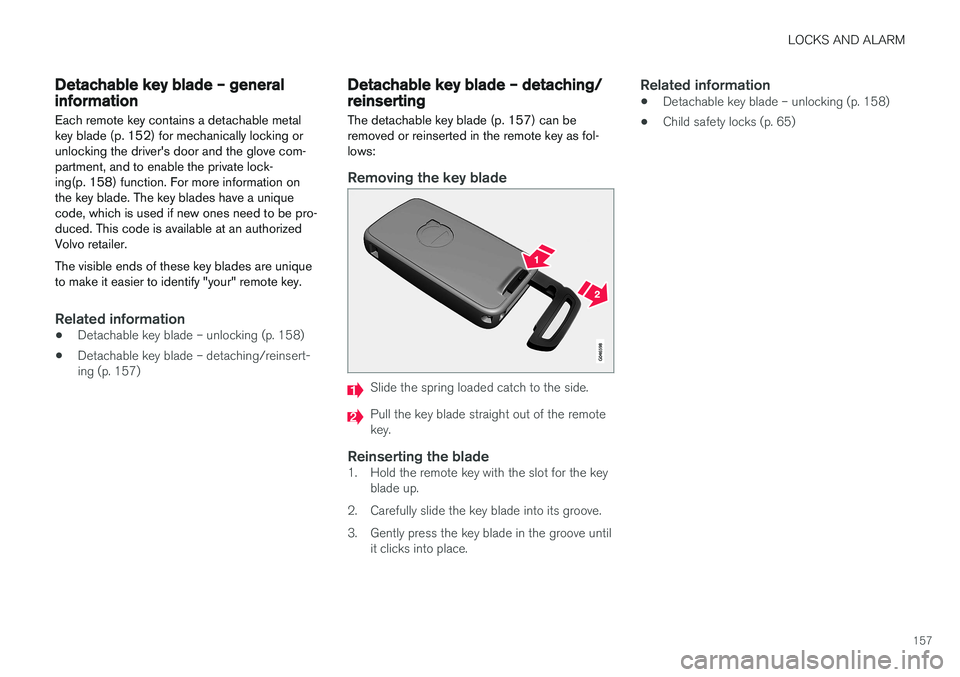
The detachable key blade (p. 157) can be removed or reinserted in the remote key as fol-lows:
Removing the key blade
Slide the spring loaded catch to the side.
Pull the key blade straight out of the remote key.
Reinserting the blade1. Hold the remote key with the slot for the key blade up.
2. Carefully slide the key blade into its groove.
3. Gently press the key blade in the groove until it clicks into place.
Related information
• Detachable key blade – unlocking (p. 158)
• Child safety locks (p. 65)
Page 168 of 406
LOCKS AND ALARM
166
Manual locking
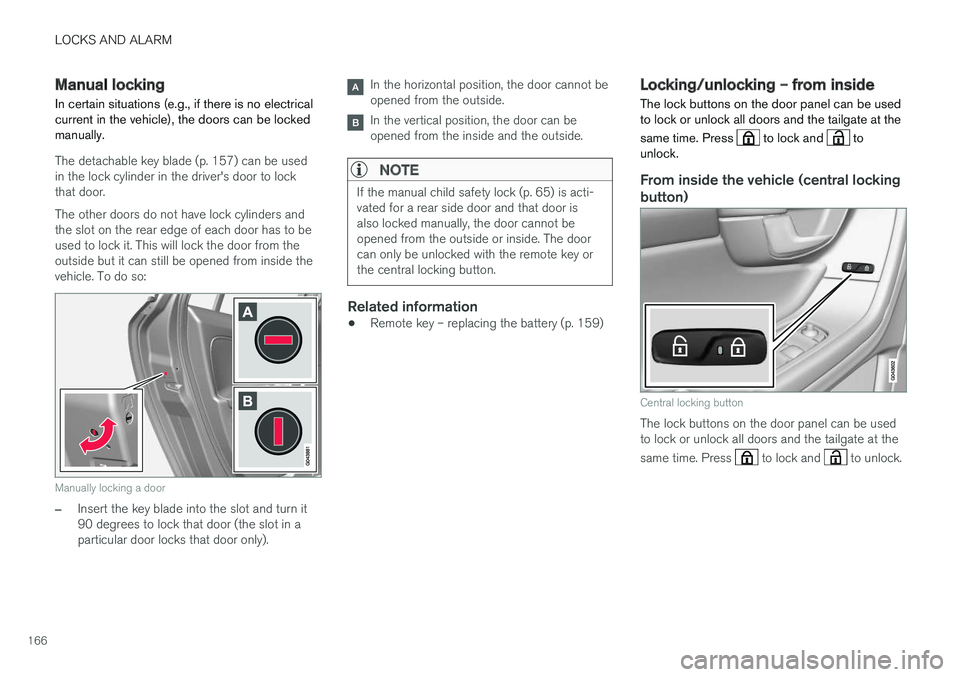
In certain situations (e.g., if there is no electrical current in the vehicle), the doors can be lockedmanually.
The detachable key blade (p. 157) can be used in the lock cylinder in the driver's door to lockthat door. The other doors do not have lock cylinders and the slot on the rear edge of each door has to beused to lock it. This will lock the door from theoutside but it can still be opened from inside thevehicle. To do so:
Manually locking a door
–Insert the key blade into the slot and turn it 90 degrees to lock that door (the slot in aparticular door locks that door only).
In the horizontal position, the door cannot be opened from the outside.
In the vertical position, the door can be opened from the inside and the outside.
NOTE
If the manual child safety lock (p. 65) is acti- vated for a rear side door and that door isalso locked manually, the door cannot beopened from the outside or inside. The doorcan only be unlocked with the remote key orthe central locking button.
Related information
• Remote key – replacing the battery (p. 159)
Locking/unlocking – from inside
The lock buttons on the door panel can be used to lock or unlock all doors and the tailgate at the same time. Press
to lock and to
unlock.
From inside the vehicle (central locking
button)
Central locking button
The lock buttons on the door panel can be used to lock or unlock all doors and the tailgate at the same time. Press
to lock and to unlock.