ECO mode VOLVO V60 2018 Owner´s Manual
[x] Cancel search | Manufacturer: VOLVO, Model Year: 2018, Model line: V60, Model: VOLVO V60 2018Pages: 406, PDF Size: 9.59 MB
Page 106 of 406
||
INSTRUMENTS AND CONTROLS
104the windshield is washed within a 10-minute period.
• Parking lights on.
Optional Active Bending
Lights will be washed once for every fivetimes the windshield is washed. Normal halo-gen headlights will not be washed.
CAUTION
• Use ample washer fluid when washing the windshield. The windshield should bethoroughly wet when the wipers are inoperation.
• When approx. 1 US quart (1 liter) ofwasher fluid remains in the reservoir, theheadlights will no longer be washed. Atext message will also be displayed toremind the driver to fill the washer fluidreservoir.
Related information
•Engine compartment – washer fluid (p. 354)
Tailgate wiper/washer
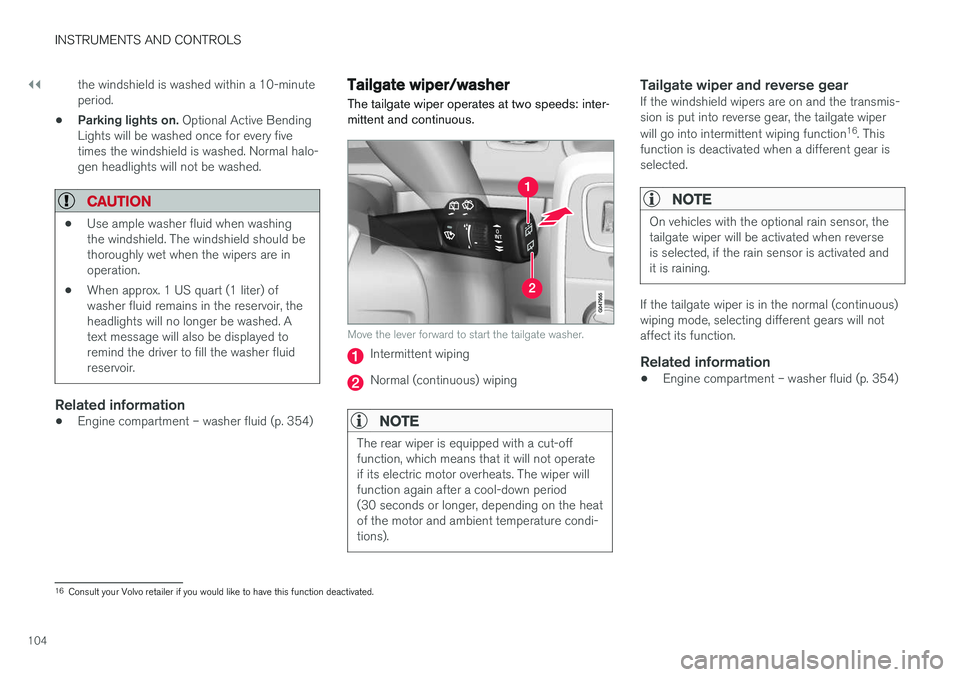
The tailgate wiper operates at two speeds: inter- mittent and continuous.
Move the lever forward to start the tailgate washer.
Intermittent wiping
Normal (continuous) wiping
NOTE
The rear wiper is equipped with a cut-off function, which means that it will not operateif its electric motor overheats. The wiper willfunction again after a cool-down period(30 seconds or longer, depending on the heatof the motor and ambient temperature condi-tions).
Tailgate wiper and reverse gearIf the windshield wipers are on and the transmis- sion is put into reverse gear, the tailgate wiper will go into intermittent wiping function 16
. This
function is deactivated when a different gear is selected.
NOTE
On vehicles with the optional rain sensor, the tailgate wiper will be activated when reverseis selected, if the rain sensor is activated andit is raining.
If the tailgate wiper is in the normal (continuous) wiping mode, selecting different gears will notaffect its function.
Related information
• Engine compartment – washer fluid (p. 354)
16
Consult your Volvo retailer if you would like to have this function deactivated.
Page 107 of 406
INSTRUMENTS AND CONTROLS
105
Power windows
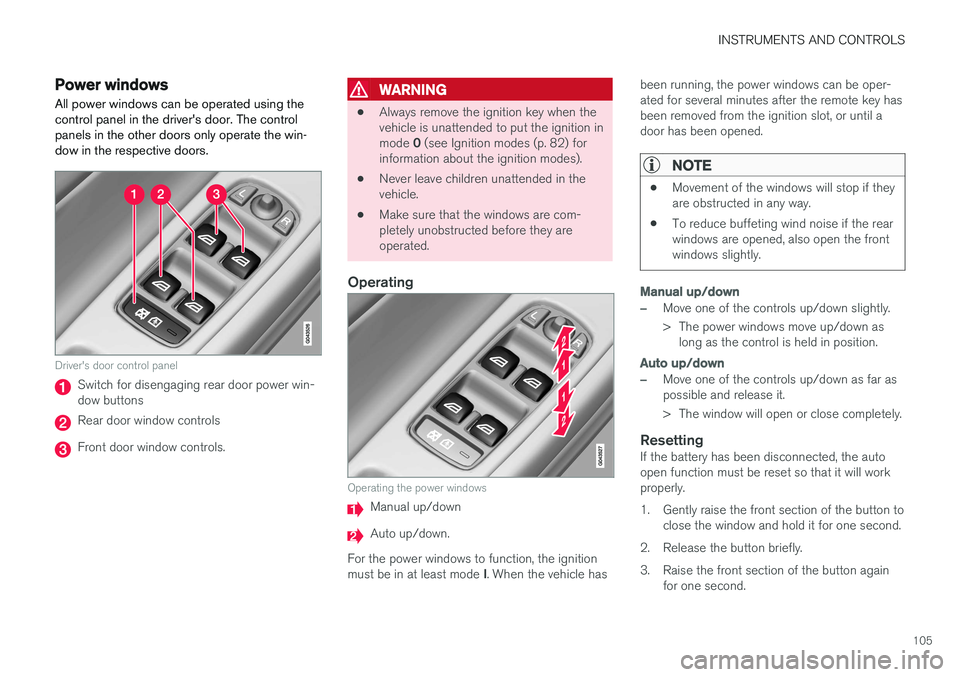
All power windows can be operated using the control panel in the driver's door. The controlpanels in the other doors only operate the win-dow in the respective doors.
Driver's door control panel
Switch for disengaging rear door power win- dow buttons
Rear door window controls
Front door window controls.
WARNING
• Always remove the ignition key when the vehicle is unattended to put the ignition in mode
0 (see Ignition modes (p. 82) for
information about the ignition modes).
• Never leave children unattended in the vehicle.
• Make sure that the windows are com-pletely unobstructed before they areoperated.
Operating
Operating the power windows
Manual up/down
Auto up/down.
For the power windows to function, the ignition must be in at least mode I. When the vehicle has been running, the power windows can be oper- ated for several minutes after the remote key hasbeen removed from the ignition slot, or until adoor has been opened.
NOTE
•
Movement of the windows will stop if they are obstructed in any way.
• To reduce buffeting wind noise if the rearwindows are opened, also open the frontwindows slightly.
Manual up/down
–Move one of the controls up/down slightly.
> The power windows move up/down as
long as the control is held in position.
Auto up/down
–Move one of the controls up/down as far as possible and release it.
> The window will open or close completely.
ResettingIf the battery has been disconnected, the auto open function must be reset so that it will workproperly.
1. Gently raise the front section of the button to close the window and hold it for one second.
2. Release the button briefly.
3. Raise the front section of the button again for one second.
Page 111 of 406
INSTRUMENTS AND CONTROLS
}}
* Option/accessory.109
Digital compass *
The rear-view mirror has an integrated display that shows the compass direction in which thevehicle is traveling.
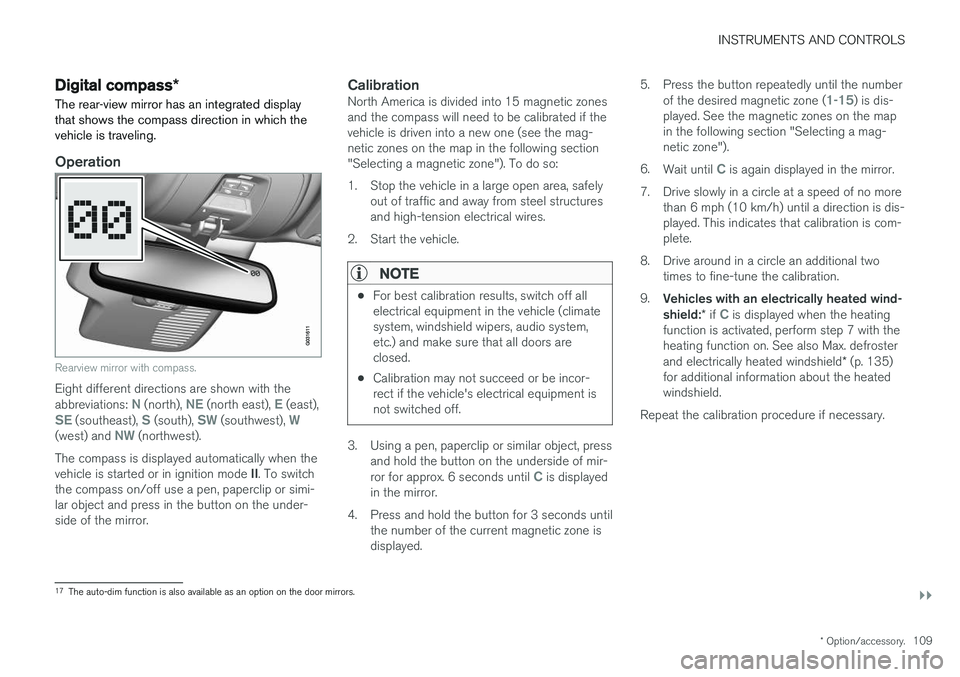
Operation
Rearview mirror with compass.
Eight different directions are shown with the abbreviations: N (north), NE (north east), E (east),SE (southeast), S (south), SW (southwest), W(west) and NW (northwest).
The compass is displayed automatically when the vehicle is started or in ignition mode II. To switch
the compass on/off use a pen, paperclip or simi- lar object and press in the button on the under-side of the mirror.
CalibrationNorth America is divided into 15 magnetic zonesand the compass will need to be calibrated if thevehicle is driven into a new one (see the mag-netic zones on the map in the following section"Selecting a magnetic zone"). To do so:
1. Stop the vehicle in a large open area, safely out of traffic and away from steel structures and high-tension electrical wires.
2. Start the vehicle.
NOTE
• For best calibration results, switch off all electrical equipment in the vehicle (climatesystem, windshield wipers, audio system,etc.) and make sure that all doors areclosed.
• Calibration may not succeed or be incor-rect if the vehicle's electrical equipment isnot switched off.
3. Using a pen, paperclip or similar object, press
and hold the button on the underside of mir- ror for approx. 6 seconds until
C is displayed
in the mirror.
4. Press and hold the button for 3 seconds until the number of the current magnetic zone is displayed. 5. Press the button repeatedly until the number
of the desired magnetic zone (
1-15) is dis-
played. See the magnetic zones on the map in the following section "Selecting a mag-netic zone").
6. Wait until
C is again displayed in the mirror.
7. Drive slowly in a circle at a speed of no more than 6 mph (10 km/h) until a direction is dis- played. This indicates that calibration is com-plete.
8. Drive around in a circle an additional two times to fine-tune the calibration.
9. Vehicles with an electrically heated wind- shield: * if
C is displayed when the heating
function is activated, perform step 7 with the heating function on. See also Max. defroster and electrically heated windshield * (p. 135)
for additional information about the heated windshield.
Repeat the calibration procedure if necessary.
17 The auto-dim function is also available as an option on the door mirrors.
Page 112 of 406
||
INSTRUMENTS AND CONTROLS
* Option/accessory.
110
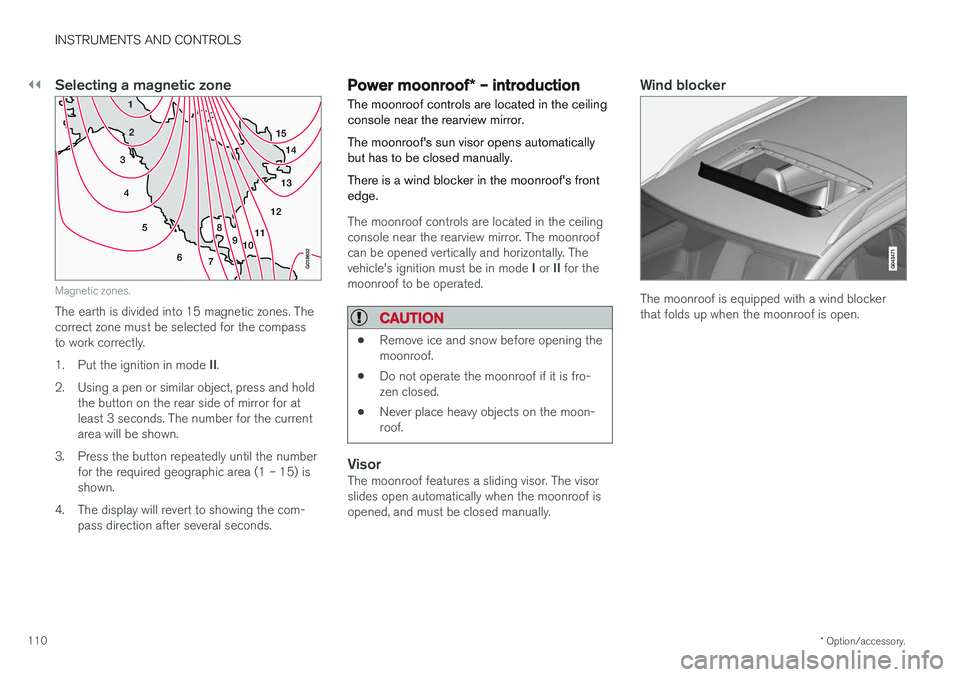
Selecting a magnetic zone
15
14
13
12
11
9
8
7
6
5
4
3
2
1
10
G018632
Magnetic zones.
The earth is divided into 15 magnetic zones. The correct zone must be selected for the compassto work correctly. 1.Put the ignition in mode II.
2. Using a pen or similar object, press and hold the button on the rear side of mirror for at least 3 seconds. The number for the currentarea will be shown.
3. Press the button repeatedly until the number for the required geographic area (1 – 15) isshown.
4. The display will revert to showing the com- pass direction after several seconds.
Power moonroof * – introduction
The moonroof controls are located in the ceiling console near the rearview mirror. The moonroof's sun visor opens automatically but has to be closed manually. There is a wind blocker in the moonroof's front edge.
The moonroof controls are located in the ceiling console near the rearview mirror. The moonroofcan be opened vertically and horizontally. The vehicle's ignition must be in mode I or II for the
moonroof to be operated.
CAUTION
• Remove ice and snow before opening the moonroof.
• Do not operate the moonroof if it is fro-zen closed.
• Never place heavy objects on the moon-roof.
VisorThe moonroof features a sliding visor. The visor slides open automatically when the moonroof isopened, and must be closed manually.
Wind blocker
The moonroof is equipped with a wind blocker that folds up when the moonroof is open.
Page 115 of 406
INSTRUMENTS AND CONTROLS
}}
* Option/accessory.113
Retain the original transmitter of the RF device you are programming for use in other vehicles aswell as for future HomeLink programming. It isalso suggested that upon the sale of the vehicle,the programmed HomeLink buttons be erasedfor security purposes. Refer to “Resetting Home- Link Buttons” in HomeLink
®
Wireless Control
System * – programming (p. 113).
Using HomeLinkTo operate, simply press and hold the pro- grammed HomeLink button until the traineddevice begins to operate (this may take severalseconds). Activation will now occur for the traineddevice (i.e., garage door opener, gate operator,security system, entry door lock, home/officelighting, etc.). For convenience, the hand-heldtransmitter of the device may also be used at anytime. In the event that there are still programmingdifficulties or questions, contact HomeLink at:www.homelink.com/www.youtube.com/HomeLinkGentex or by phoning the hotline at 1–800–355–3515.
NOTE
If the ignition is switched off, HomeLink will function for 30 minutes after the driver's doorhas been opened.
HomeLink ®
Wireless Control
System * – programming
The HomeLink Wireless Control System pro- vides a convenient way to replace up to threehand-held radio-frequency (RF) transmittersused to activate devices such as gate operators,garage door openers, entry door locks, securitysystems, even home lighting. Additional informa-tion can be found on the Internetatwww.homelink.com/www.youtube.com/HomeLinkGentex or by phoning the hotline at 1–800–355–3515.
NOTE
Some vehicles may require the ignition to be switched on or be in the “accessories” posi-tion for programming and/or operation ofHomeLink. It is also recommended that a newbattery be placed in the hand-held transmitterof the device being programmed to Home-Link for quicker training and accurate trans-mission of the radio-frequency signal. TheHomeLink buttons must be reset first. Whenthis has been completed, Homelink is inlearning mode so that you can perform pro-gramming.
1. Position the end of your hand-held transmit- ter 1–3 inches (5–14 cm) away from the HomeLink button you wish to program whilekeeping the indicator light in view. 2. Simultaneously press and hold both the
chosen HomeLink and hand-held transmitterbuttons until the HomeLink indicator lightchanges from a slow to a rapidly blinkinglight. Now you may release both the Home-Link and hand-held transmitter buttons.
NOTE
Some devices may require you to replace this Programming Step 2 with procedures notedin the “Gate Operator / Canadian Program-ming” section. If the HomeLink indicator lightdoes not change to a rapidly blinking lightafter performing these steps, contact Home-Link at www.homelink.com/www.youtube.com/HomeLinkGentex or byphoning the hotline at 1–800–355–3515.
Page 116 of 406
||
INSTRUMENTS AND CONTROLS
1143.
Firmly press, hold for five seconds and
release the programmed HomeLink button
up to two separate times to activate the door. If the door does not activate, press and holdthe just-trained HomeLink button andobserve the indicator light.
• If the indicator light
stays on constantly,
programming is complete and your
device should activate when the Home-Link button is pressed and released.
• If the indicator light blinks
rapidly for two
seconds and then turns to a constantlight continue with “Programming”steps 4-6 to complete the programming
of a rolling code equipped device (mostcommonly a garage door opener).
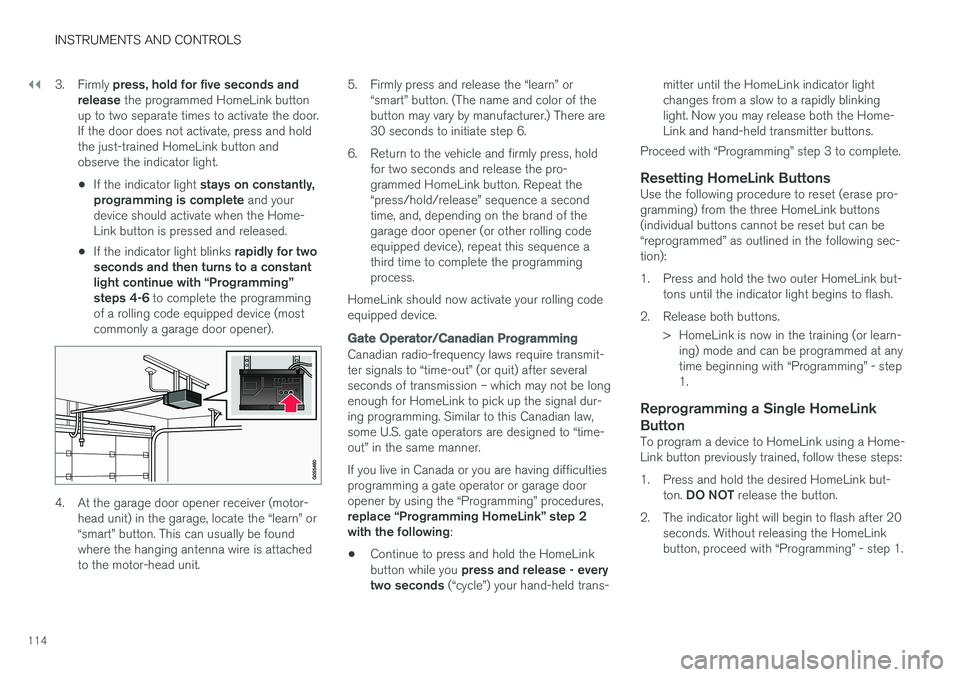
4. At the garage door opener receiver (motor- head unit) in the garage, locate the “learn” or “smart” button. This can usually be foundwhere the hanging antenna wire is attachedto the motor-head unit. 5. Firmly press and release the “learn” or
“smart” button. (The name and color of thebutton may vary by manufacturer.) There are30 seconds to initiate step 6.
6. Return to the vehicle and firmly press, hold for two seconds and release the pro-grammed HomeLink button. Repeat the“press/hold/release” sequence a secondtime, and, depending on the brand of thegarage door opener (or other rolling codeequipped device), repeat this sequence athird time to complete the programmingprocess.
HomeLink should now activate your rolling codeequipped device.
Gate Operator/Canadian Programming
Canadian radio-frequency laws require transmit- ter signals to “time-out” (or quit) after severalseconds of transmission – which may not be longenough for HomeLink to pick up the signal dur-ing programming. Similar to this Canadian law,some U.S. gate operators are designed to “time-out” in the same manner. If you live in Canada or you are having difficulties programming a gate operator or garage dooropener by using the “Programming” procedures, replace “Programming HomeLink” step 2 with the following :
• Continue to press and hold the HomeLink button while you
press and release - every
two seconds (“cycle”) your hand-held trans- mitter until the HomeLink indicator light changes from a slow to a rapidly blinkinglight. Now you may release both the Home-Link and hand-held transmitter buttons.
Proceed with “Programming” step 3 to complete.
Resetting HomeLink ButtonsUse the following procedure to reset (erase pro-gramming) from the three HomeLink buttons(individual buttons cannot be reset but can be“reprogrammed” as outlined in the following sec-tion):
1. Press and hold the two outer HomeLink but- tons until the indicator light begins to flash.
2. Release both buttons. > HomeLink is now in the training (or learn-ing) mode and can be programmed at any time beginning with “Programming” - step1.
Reprogramming a Single HomeLink Button
To program a device to HomeLink using a Home- Link button previously trained, follow these steps:
1. Press and hold the desired HomeLink but-
ton. DO NOT release the button.
2. The indicator light will begin to flash after 20 seconds. Without releasing the HomeLink button, proceed with “Programming” - step 1.
Page 120 of 406
||
INSTRUMENTS AND CONTROLS
118
MessageDescription
Time for reg- ular mainte-nanceTime for regular service at an authorized Volvo workshop.The timing is determined bythe number of miles driven,number of months since thelast service, engine runningtime.
Maintenance overdueIf the service intervals are not followed, the warranty doesnot cover any damaged parts.Contact an authorized Volvoworkshop for service.
Temporarily OFFAA function has been tempo- rarily switched off and isreset automatically while driv-ing or after starting again.
Low battery Power savemodeThe audio system is switched off to save current. Chargethe battery.
A
There will also be a system-specific part of this message
Related information
• Information displays – introduction (p. 71)
• Information display – menu overview (p. 117)
• Information display – menu controls (p. 116)
Trip computer – introduction
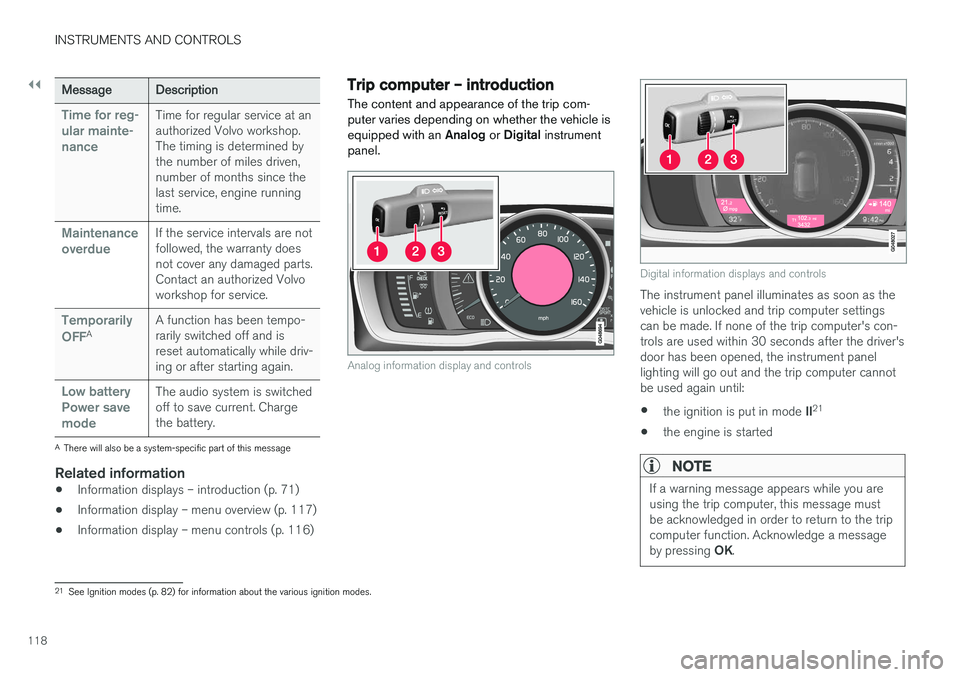
The content and appearance of the trip com- puter varies depending on whether the vehicle isequipped with an Analog or Digital instrument
panel.
Analog information display and controls
Digital information displays and controls
The instrument panel illuminates as soon as the vehicle is unlocked and trip computer settingscan be made. If none of the trip computer's con-trols are used within 30 seconds after the driver'sdoor has been opened, the instrument panellighting will go out and the trip computer cannotbe used again until: • the ignition is put in mode
II21
• the engine is started
NOTE
If a warning message appears while you are using the trip computer, this message mustbe acknowledged in order to return to the tripcomputer function. Acknowledge a message by pressing
OK.
21
See Ignition modes (p. 82) for information about the various ignition modes.
Page 128 of 406
INSTRUMENTS AND CONTROLS
* Option/accessory.
126
Trip computer – Trip statistics
Trip information from previous trips regarding average fuel consumption and average speed isstored and can be displayed in the form of a barchart.
Function
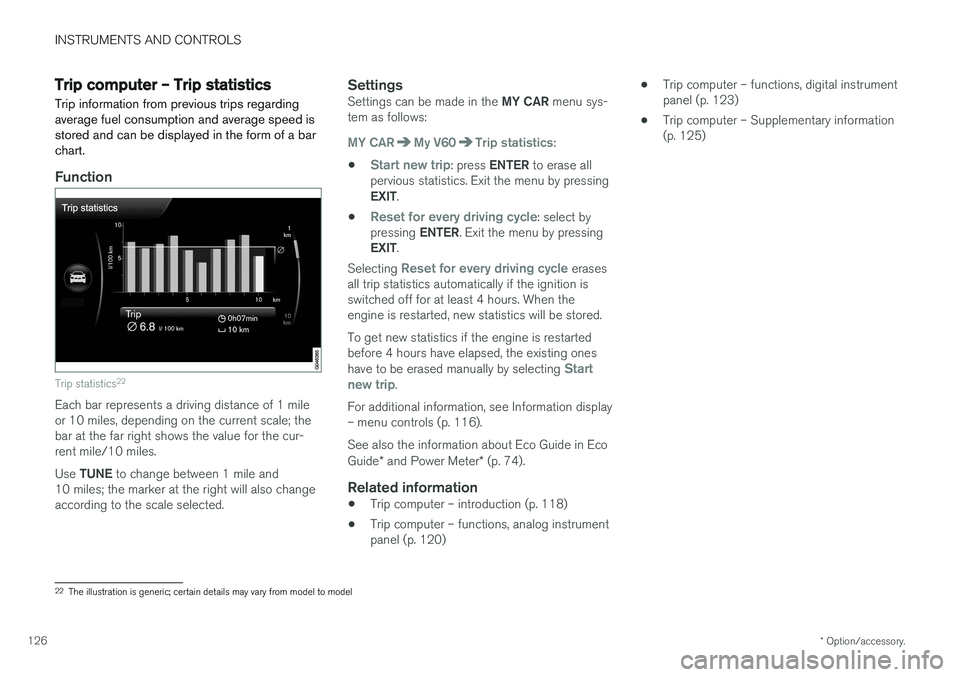
Trip statistics 22
Each bar represents a driving distance of 1 mile or 10 miles, depending on the current scale; thebar at the far right shows the value for the cur-rent mile/10 miles. Use
TUNE to change between 1 mile and
10 miles; the marker at the right will also change according to the scale selected.
SettingsSettings can be made in the MY CAR menu sys-
tem as follows:
MY CARMy V60Trip statistics:
•
Start new trip: press ENTER to erase all
pervious statistics. Exit the menu by pressing EXIT .
•
Reset for every driving cycle: select by
pressing ENTER. Exit the menu by pressing
EXIT .
Selecting
Reset for every driving cycle erases
all trip statistics automatically if the ignition is switched off for at least 4 hours. When theengine is restarted, new statistics will be stored. To get new statistics if the engine is restarted before 4 hours have elapsed, the existing ones have to be erased manually by selecting
Start
new trip.
For additional information, see Information display – menu controls (p. 116). See also the information about Eco Guide in Eco Guide * and Power Meter * (p. 74).
Related information
• Trip computer – introduction (p. 118)
• Trip computer – functions, analog instrument panel (p. 120) •
Trip computer – functions, digital instrumentpanel (p. 123)
• Trip computer – Supplementary information(p. 125)
22
The illustration is generic; certain details may vary from model to model
Page 140 of 406
CLIMATE
138
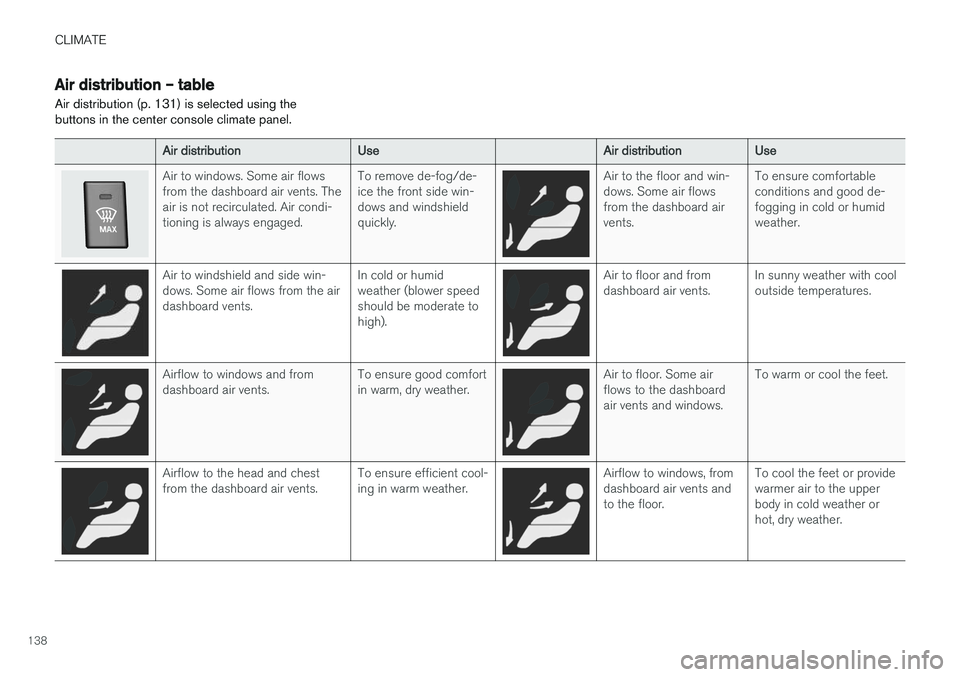
Air distribution – table
Air distribution (p. 131) is selected using the buttons in the center console climate panel.
Air distribution Use Air distributionUse
Air to windows. Some air flows from the dashboard air vents. Theair is not recirculated. Air condi-tioning is always engaged. To remove de-fog/de-ice the front side win-dows and windshieldquickly.Air to the floor and win- dows. Some air flowsfrom the dashboard airvents.To ensure comfortableconditions and good de-fogging in cold or humidweather.
Air to windshield and side win- dows. Some air flows from the airdashboard vents.
In cold or humidweather (blower speedshould be moderate tohigh).Air to floor and from dashboard air vents.
In sunny weather with cooloutside temperatures.
Airflow to windows and from dashboard air vents. To ensure good comfortin warm, dry weather.Air to floor. Some air flows to the dashboardair vents and windows.To warm or cool the feet.
Airflow to the head and chest from the dashboard air vents.
To ensure efficient cool-ing in warm weather.Airflow to windows, from dashboard air vents andto the floor.To cool the feet or providewarmer air to the upperbody in cold weather orhot, dry weather.
Page 146 of 406
LOADING AND STORAGE
* Option/accessory.
144
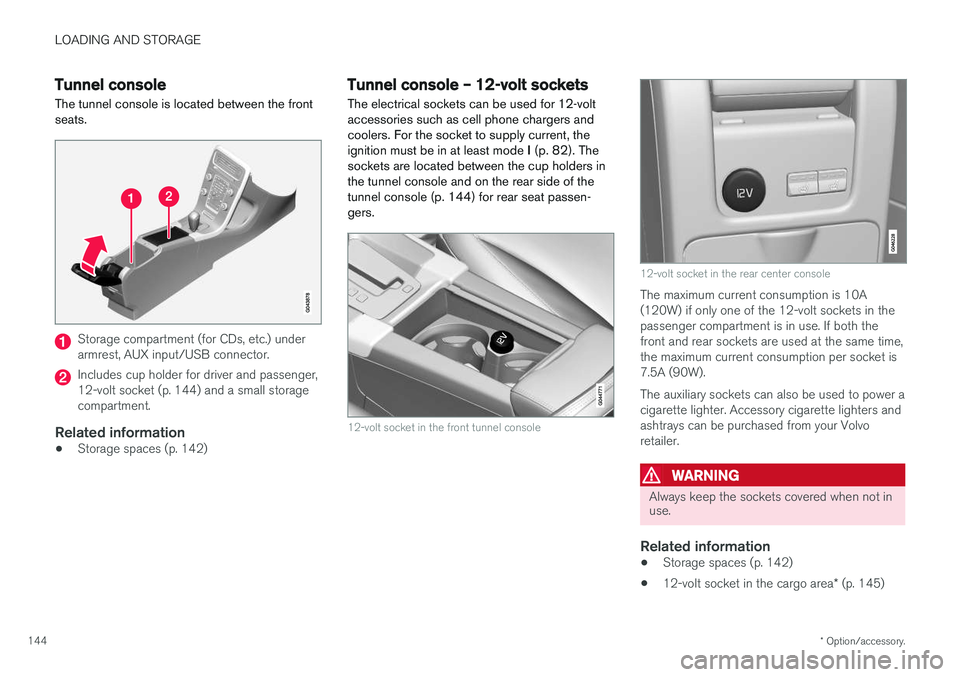
Tunnel console The tunnel console is located between the front seats.
Storage compartment (for CDs, etc.) under armrest, AUX input/USB connector.
Includes cup holder for driver and passenger, 12-volt socket (p. 144) and a small storagecompartment.
Related information
• Storage spaces (p. 142)
Tunnel console – 12-volt sockets
The electrical sockets can be used for 12-volt accessories such as cell phone chargers andcoolers. For the socket to supply current, theignition must be in at least mode I (p. 82). The
sockets are located between the cup holders inthe tunnel console and on the rear side of the
tunnel console (p. 144) for rear seat passen-gers.
12-volt socket in the front tunnel console
12-volt socket in the rear center console
The maximum current consumption is 10A (120W) if only one of the 12-volt sockets in thepassenger compartment is in use. If both thefront and rear sockets are used at the same time,the maximum current consumption per socket is7.5A (90W). The auxiliary sockets can also be used to power a cigarette lighter. Accessory cigarette lighters andashtrays can be purchased from your Volvoretailer.
WARNING
Always keep the sockets covered when not in use.
Related information
• Storage spaces (p. 142)
• 12-volt socket in the cargo area
* (p. 145)