brake VOLVO V60 2018 Owner´s Manual
[x] Cancel search | Manufacturer: VOLVO, Model Year: 2018, Model line: V60, Model: VOLVO V60 2018Pages: 406, PDF Size: 9.59 MB
Page 178 of 406
DRIVER SUPPORT
176
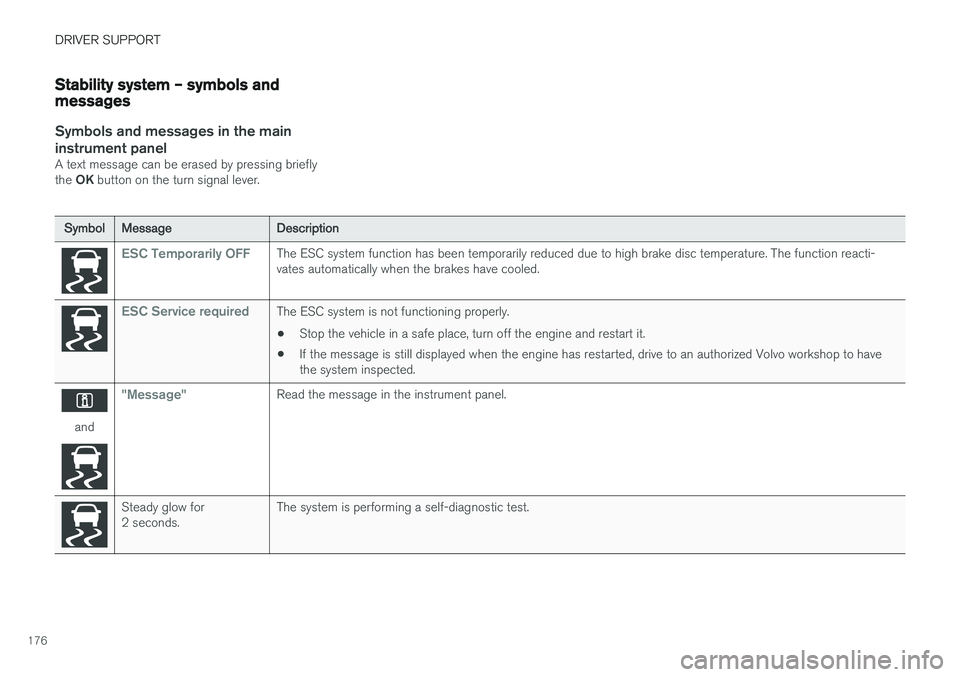
Stability system – symbols and messages
Symbols and messages in the maininstrument panel
A text message can be erased by pressing briefly the OK button on the turn signal lever.
Symbol Message Description
ESC Temporarily OFFThe ESC system function has been temporarily reduced due to high brake disc temperature. The function reacti- vates automatically when the brakes have cooled.
ESC Service requiredThe ESC system is not functioning properly.
• Stop the vehicle in a safe place, turn off the engine and restart it.
• If the message is still displayed when the engine has restarted, drive to an authorized Volvo workshop to have the system inspected.
and
"Message"Read the message in the instrument panel.
Steady glow for 2 seconds. The system is performing a self-diagnostic test.
Page 184 of 406
||
DRIVER SUPPORT
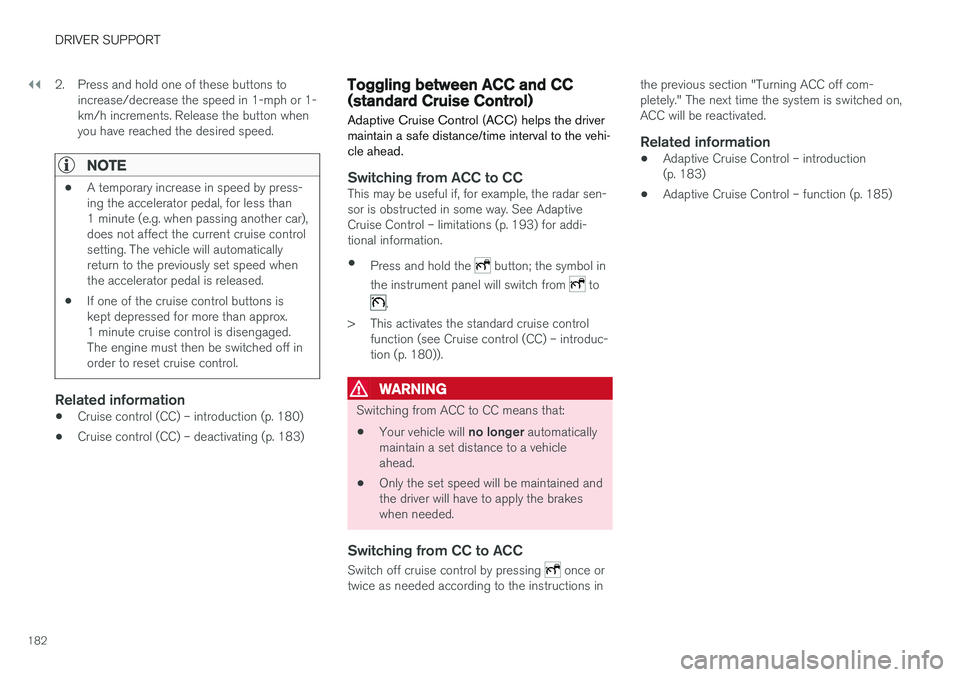
1822. Press and hold one of these buttons to
increase/decrease the speed in 1-mph or 1- km/h increments. Release the button whenyou have reached the desired speed.
NOTE
• A temporary increase in speed by press- ing the accelerator pedal, for less than1 minute (e.g. when passing another car),does not affect the current cruise controlsetting. The vehicle will automaticallyreturn to the previously set speed whenthe accelerator pedal is released.
• If one of the cruise control buttons iskept depressed for more than approx.1 minute cruise control is disengaged.The engine must then be switched off inorder to reset cruise control.
Related information
•Cruise control (CC) – introduction (p. 180)
• Cruise control (CC) – deactivating (p. 183)
Toggling between ACC and CC (standard Cruise Control)
Adaptive Cruise Control (ACC) helps the driver maintain a safe distance/time interval to the vehi-cle ahead.
Switching from ACC to CCThis may be useful if, for example, the radar sen- sor is obstructed in some way. See AdaptiveCruise Control – limitations (p. 193) for addi-tional information.
• Press and hold the
button; the symbol in
the instrument panel will switch from
to
.
> This activates the standard cruise control function (see Cruise control (CC) – introduc- tion (p. 180)).
WARNING
Switching from ACC to CC means that:
• Your vehicle will
no longer automatically
maintain a set distance to a vehicle ahead.
• Only the set speed will be maintained andthe driver will have to apply the brakeswhen needed.
Switching from CC to ACC
Switch off cruise control by pressing once or
twice as needed according to the instructions in the previous section "Turning ACC off com- pletely." The next time the system is switched on,ACC will be reactivated.
Related information
•
Adaptive Cruise Control – introduction(p. 183)
• Adaptive Cruise Control – function (p. 185)
Page 185 of 406
DRIVER SUPPORT
}}
183
Cruise control (CC) – deactivating Cruise control is designed to assist the driver by maintaining a set speed. It is primarily intendedfor use on long straight roads in steady traffic,such as on highways and other main roads.
Automatic deactivationThe cruise control is automatically deactivated temporarily if one of the following occurs:
• If the speed drops below approximately 20 mph (30 km/h).
• When the brake pedal is depressed.
• If the gear selector is moved to position
N.
• During wheel spin or wheel lock-up.
• If the vehicle's speed is increased by usingthe accelerator pedal for more than 1 minute.
• Engine speed (rpm) is too high or too low.
The currently set speed will be saved in the sys-tem's memory.
Temporary deactivationThe driver can temporarily deactivate the cruise control by pressing 0. The saved speed is shown
in brackets in the information display.
Resume set speedIf the cruise control has been deactivated tempo- rarily, it can be reactivated by pressing
. The
vehicle's speed returns to the most recently set speed.
WARNING
There may be a significant increase in speed after the
button has been pressed.
Deactivation
The Cruise control is disengaged by pressing or by switching off the engine. The set speed is cleared.
WARNING
Cruise control should not be used in heavy traffic or when driving on wet or slipperyroads. Cruise control may not maintain setspeed on steep downgrades.
Related information
• Cruise control (CC) – introduction (p. 180)
• Cruise control (CC) – engaging and setting speed (p. 181)
Adaptive Cruise Control – introduction
ACC is an optional system designed to assist the driver by maintaining a set speed or a settime interval to the vehicle ahead. It is primarilyintended for use on long straight roads in steadytraffic, such as on highways and other mainroads.
When the driver has set the desired speed and the time interval to the vehicle ahead, ACC func-tions as follows:
• If there are no other vehicles in the laneahead of you, your vehicle will travel at theset speed.
• If ACC's radar sensor detects a slower mov-ing vehicle in the lane ahead, the system willadapt your vehicle's speed to help maintainthe set time interval to the vehicle ahead.When there are no longer slower movingvehicles ahead, your vehicle will accelerate toresume the set speed.
If ACC is switched off completely or in standbymode and your vehicle comes too close toanother vehicle ahead, the driver will be warnedby the Distance Alert system (see Distance Alert– introduction (p. 198)).
Page 187 of 406
DRIVER SUPPORT
}}
185
•
Adaptive Cruise Control – setting speed (p. 187)
• Radar sensor (p. 193)
• Adaptive Cruise Control (ACC) – QueueAssist (p. 191)
• Adaptive Cruise Control – passing anothervehicle (p. 190)
• Adaptive Cruise Control – limitations(p. 193)
• Adaptive Cruise Control – function (p. 185)
• Adaptive Cruise Control – engaging (p. 187)
• Adaptive Cruise Control – deactivating(p. 189)
Adaptive Cruise Control – function
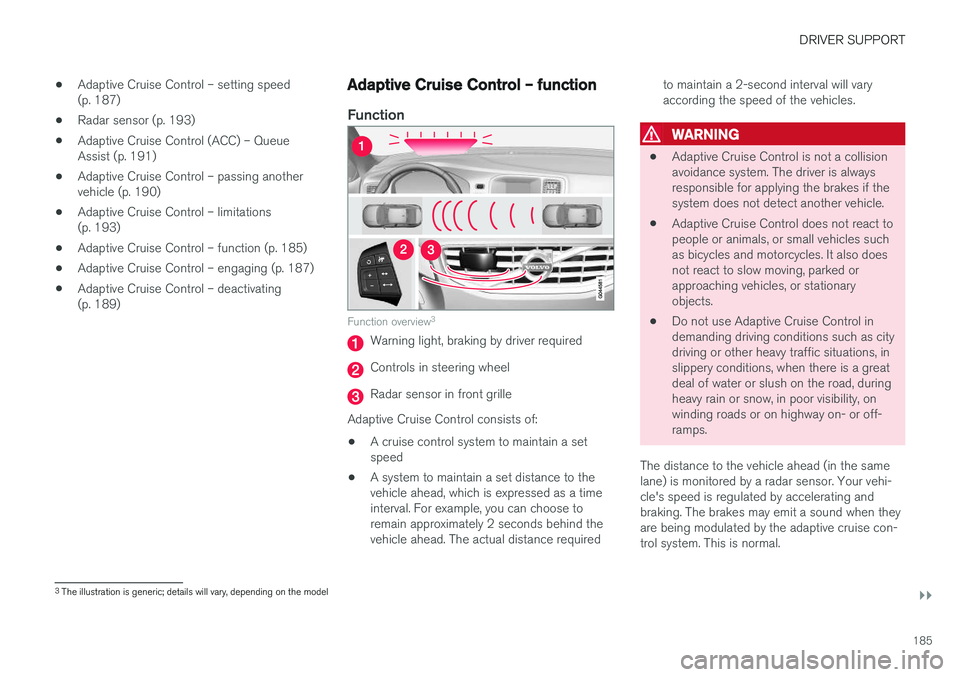
Function
Function overview 3
Warning light, braking by driver required
Controls in steering wheel
Radar sensor in front grille
Adaptive Cruise Control consists of:
• A cruise control system to maintain a set speed
• A system to maintain a set distance to thevehicle ahead, which is expressed as a timeinterval. For example, you can choose toremain approximately 2 seconds behind thevehicle ahead. The actual distance required to maintain a 2-second interval will varyaccording the speed of the vehicles.
WARNING
•
Adaptive Cruise Control is not a collision avoidance system. The driver is alwaysresponsible for applying the brakes if thesystem does not detect another vehicle.
• Adaptive Cruise Control does not react topeople or animals, or small vehicles suchas bicycles and motorcycles. It also doesnot react to slow moving, parked orapproaching vehicles, or stationaryobjects.
• Do not use Adaptive Cruise Control indemanding driving conditions such as citydriving or other heavy traffic situations, inslippery conditions, when there is a greatdeal of water or slush on the road, duringheavy rain or snow, in poor visibility, onwinding roads or on highway on- or off-ramps.
The distance to the vehicle ahead (in the samelane) is monitored by a radar sensor. Your vehi-cle's speed is regulated by accelerating andbraking. The brakes may emit a sound when theyare being modulated by the adaptive cruise con-trol system. This is normal.
3 The illustration is generic; details will vary, depending on the model
Page 188 of 406
||
DRIVER SUPPORT
* Option/accessory.
186
WARNING
The brake pedal moves when the adaptive cruise control system modulates the brakes.Do not rest your foot under the brake pedal.
The ACC system is designed to smoothly regu- late speed. However, the driver must apply thebrakes in situations that require immediate brak-ing. This applies when there are great differencesin speed between vehicles, or if the vehicle aheadbrakes suddenly.
WARNING
Due to limitations in the radar sensor, braking may occur unexpectedly or not at all, seeAdaptive Cruise Control – limitations (p. 193).
Adaptive Cruise Control can be put in active mode at any permitted speed. However, if thevehicle's speed falls below 18 mph (30 km/h) orif engine speed (rpm) becomes too low, ACC dis-engages (goes into standby mode) and will nolonger modulate the brakes. The driver will thenhave to maintain a safe distance to the vehicleahead.
WARNING
When Adaptive Cruise Control is in standby mode or is switched off completely, thebrakes will not be modulated automatically.The driver must assume full control over thevehicle.
Warning light—driver braking requiredAdaptive Cruise Control can exert brake force that is equivalent to approximately 40% of thevehicle's total braking capacity. In situationsrequiring more brake force than ACC can provideand if the driver does not apply the brakes, anaudible signal from the Collision Warning systemwill sound and warning light will illuminate (see Collision warning * – function (p. 211)) in the
windshield to alert the driver to react.
NOTE
Strong sunlight, reflections, extreme light con- trasts, the use of sunglasses, or if the driver isnot looking straight ahead may make thewarning symbol in the windshield difficult tosee.
WARNING
Adaptive Cruise Control only warns of vehicles detected by the radar sensor, see AdaptiveCruise Control – limitations (p. 193). In somecases there may be no warning or the warn-ing may be delayed. The driver should alwaysapply the brakes when necessary.
Steep inclines and/or heavy loadsACC is primarily intended for use on fairly level roads. The system may have difficulty maintainingthe correct distance to a vehicle ahead on steepinclines, if the vehicle is carrying a heavy load oris towing a trailer. In these situations, the drivershould always be prepared to apply the brakes ifnecessary.
Related information
• Adaptive Cruise Control – introduction(p. 183)
Page 191 of 406
DRIVER SUPPORT
}}
189
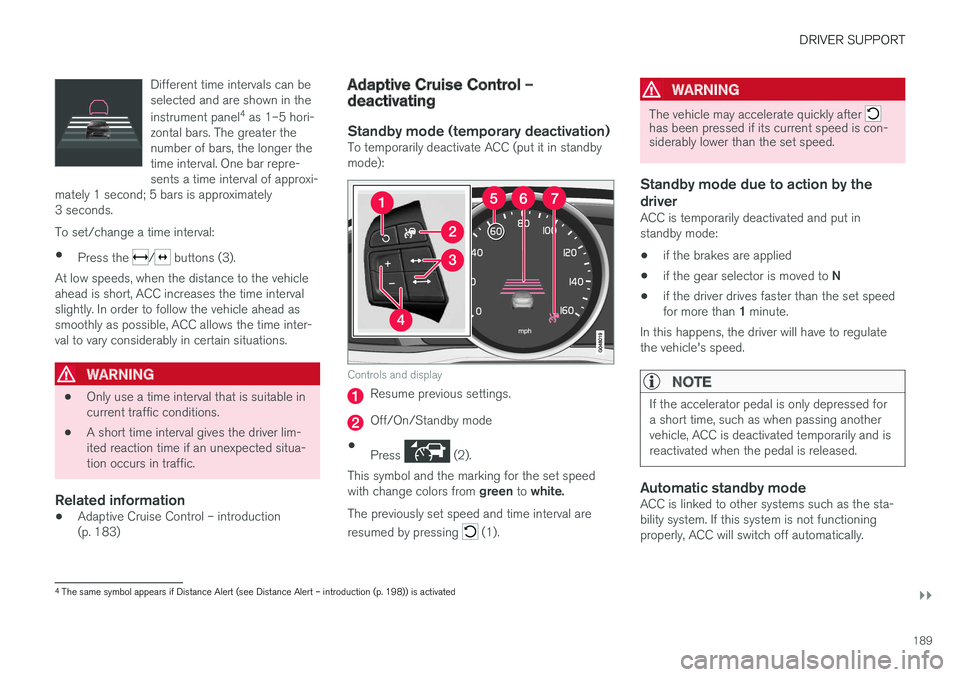
Different time intervals can be selected and are shown in the instrument panel
4
as 1–5 hori-
zontal bars. The greater the number of bars, the longer thetime interval. One bar repre-sents a time interval of approxi-
mately 1 second; 5 bars is approximately3 seconds.
To set/change a time interval:
• Press the
/ buttons (3).
At low speeds, when the distance to the vehicle ahead is short, ACC increases the time intervalslightly. In order to follow the vehicle ahead assmoothly as possible, ACC allows the time inter-val to vary considerably in certain situations.
WARNING
• Only use a time interval that is suitable in current traffic conditions.
• A short time interval gives the driver lim-ited reaction time if an unexpected situa-tion occurs in traffic.
Related information
• Adaptive Cruise Control – introduction(p. 183)
Adaptive Cruise Control – deactivating
Standby mode (temporary deactivation)To temporarily deactivate ACC (put it in standby mode):
Controls and display
Resume previous settings.
Off/On/Standby mode
• Press
(2).
This symbol and the marking for the set speed with change colors from green to white.
The previously set speed and time interval are resumed by pressing
(1).
WARNING
The vehicle may accelerate quickly after has been pressed if its current speed is con- siderably lower than the set speed.
Standby mode due to action by the driver
ACC is temporarily deactivated and put in standby mode:
• if the brakes are applied
• if the gear selector is moved to
N
• if the driver drives faster than the set speed for more than
1 minute.
In this happens, the driver will have to regulate
the vehicle's speed.
NOTE
If the accelerator pedal is only depressed for a short time, such as when passing anothervehicle, ACC is deactivated temporarily and isreactivated when the pedal is released.
Automatic standby modeACC is linked to other systems such as the sta- bility system. If this system is not functioningproperly, ACC will switch off automatically.
4 The same symbol appears if Distance Alert (see Distance Alert – introduction (p. 198)) is activated
Page 192 of 406
||
DRIVER SUPPORT
190In the event of automatic deactivation, an audible signal will sound and the message
Cruise
control Cancelled is shown in the instrument
panel. The driver must then intervene and adapt the vehicle's speed to the surrounding traffic andregulate the distance to the vehicle ahead. An automatic switch to standby mode may be caused if:
• engine speed (rpm) is too high/low
• The driver's door is opened
• The driver unbuckles his/her seat belt
• the vehicle's speed goes below 18 mph(30 km/h)
• the wheels lose traction
• brake temperature is high
• the radar sensor is obstructed by, for exam-ple, wet snow or rain.
Resuming the set speedIf ACC is in standby mode, it can be reactivated by pressing the
button on the steering wheel
keypad. The vehicle will return to the most recently set speed.
WARNING
The vehicle may accelerate quickly after has been pressed if its current speed is con- siderably lower than the set speed.
Turning ACC off completely
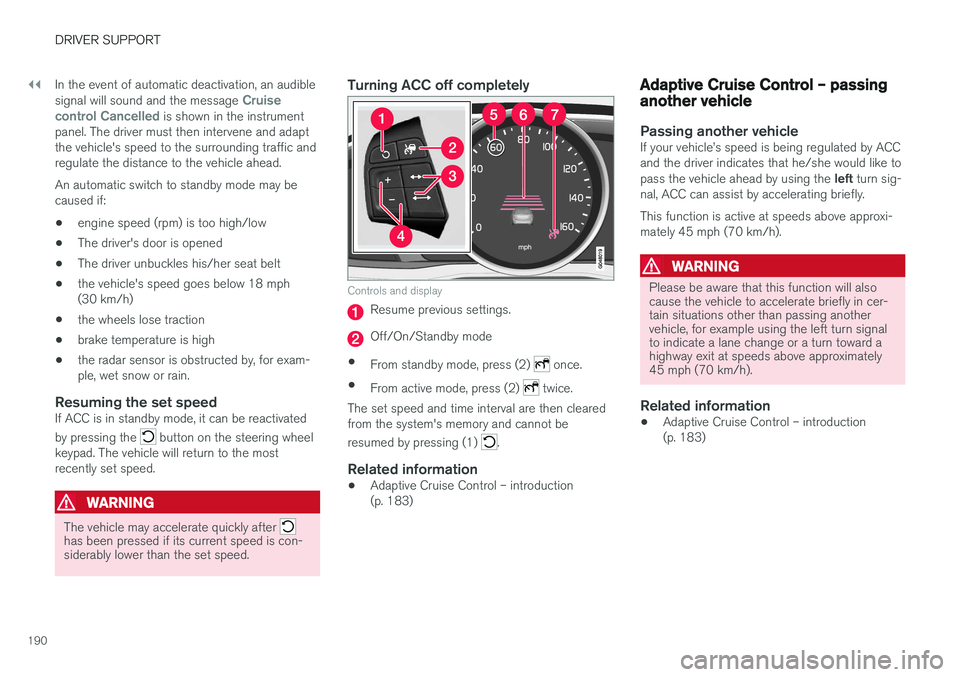
Controls and display
Resume previous settings.
Off/On/Standby mode
• From standby mode, press (2)
once.
• From active mode, press (2)
twice.
The set speed and time interval are then cleared from the system's memory and cannot be resumed by pressing (1)
.
Related information
• Adaptive Cruise Control – introduction (p. 183)
Adaptive Cruise Control – passing another vehicle
Passing another vehicleIf your vehicle
Page 193 of 406
DRIVER SUPPORT
}}
191
Adaptive Cruise Control (ACC) – Queue AssistQueue Assist is an added ACC feature that is linked to your vehicle's automatic transmission.
IntroductionQueue Assist is an added ACC feature that is linked to your vehicle's automatic transmission. Queue Assist consists of the following functions:
• Enhanced speed interval (including when the vehicle is at a complete stop or is moving atspeed below 18 mph (30 km/h))
• Automatic standby mode when ACC changestarget vehicles
• No automatic braking when at a standstill
• The parking brake is applied automatically
Please note that the lowest speed that can beset is 18 mph (30 km/h), although ACC canmaintain a set speed/distance to a vehicle aheaddown to a standstill. Queue Assist consists of thefollowing features:
Enhanced speed interval
NOTE
The driver's door must be closed and the driv- er's seat belt must be fastened before ACCcan be put in active mode. If the driver's seatbelt is taken off or if the driver's door isopened, ACC will return to standby mode.
Your vehicle can maintain the set time interval to the vehicle ahead at any permissible speed,including a complete stop. In order to activate ACC at speeds below 18 mph (30 km/h):
• The vehicle ahead must be within a reasona-ble distance (not farther away than approx.100 ft/30 meters)
• The lowest speed that can be selected is18 mph (30 km/h), although ACC will alsohelp maintain the set time interval to thevehicle ahead at lower speeds, including acomplete stop.
During short stops (less than approximately3 seconds) in slow-moving traffic, your vehiclewill begin moving again automatically as soon asthe vehicle ahead begins to move. If it takes more than 3 seconds for the vehicle ahead to begin moving, ACC will be automaticallygo into standby mode. The driver will then have to reactivate ACC in oneof the following ways: •
By pressing
• By accelerating up to at least 3 mph (4 km/h). ACC will then resume following thevehicle ahead.
Your vehicle will then resume following the vehi-cle ahead at the set time interval.
NOTE
ACC can remain active and keep your vehicle at a standstill for up to 4 minutes. After4 minutes have elapsed, the parking brakewill be engaged and ACC will go into standbymode. To reactivate ACC, the driver must release the parking brake (see Parking brake – generalinformation (p. 280)).
Page 194 of 406
||
DRIVER SUPPORT
192
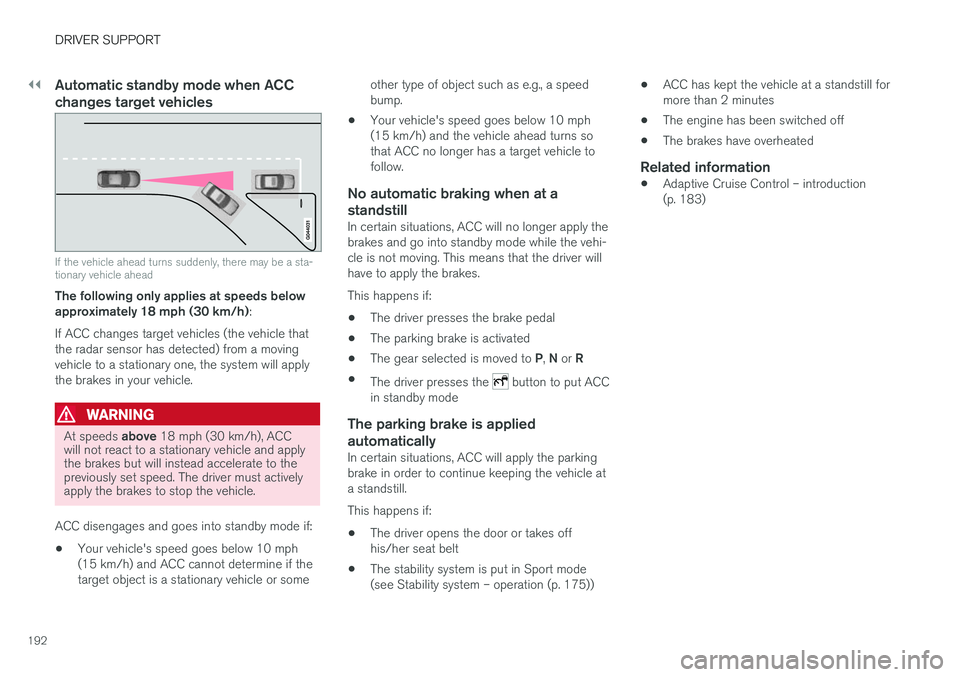
Automatic standby mode when ACC changes target vehicles
If the vehicle ahead turns suddenly, there may be a sta- tionary vehicle ahead
The following only applies at speeds below approximately 18 mph (30 km/h):
If ACC changes target vehicles (the vehicle thatthe radar sensor has detected) from a movingvehicle to a stationary one, the system will applythe brakes in your vehicle.
WARNING
At speeds above 18 mph (30 km/h), ACC
will not react to a stationary vehicle and apply the brakes but will instead accelerate to thepreviously set speed. The driver must activelyapply the brakes to stop the vehicle.
ACC disengages and goes into standby mode if: • Your vehicle's speed goes below 10 mph (15 km/h) and ACC cannot determine if thetarget object is a stationary vehicle or some other type of object such as e.g., a speedbump.
• Your vehicle's speed goes below 10 mph(15 km/h) and the vehicle ahead turns sothat ACC no longer has a target vehicle tofollow.
No automatic braking when at a
standstill
In certain situations, ACC will no longer apply thebrakes and go into standby mode while the vehi-cle is not moving. This means that the driver willhave to apply the brakes. This happens if:
• The driver presses the brake pedal
• The parking brake is activated
• The gear selected is moved to
P, N or R
• The driver presses the
button to put ACC
in standby mode
The parking brake is applied
automatically
In certain situations, ACC will apply the parking brake in order to continue keeping the vehicle ata standstill. This happens if:
• The driver opens the door or takes off his/her seat belt
• The stability system is put in Sport mode(see Stability system – operation (p. 175)) •
ACC has kept the vehicle at a standstill formore than 2 minutes
• The engine has been switched off
• The brakes have overheated
Related information
•
Adaptive Cruise Control – introduction(p. 183)
Page 195 of 406
DRIVER SUPPORT
}}
193
Radar sensor
The radar sensor is designed to help detect cars or larger vehicles driving in the same direction asyour vehicle, in the same lane.
The radar sensor and its limitationsIn addition to being used by the Adaptive Cruise Control (ACC), the radar sensor is also used byDistance Alert (see Distance Alert – introduction(p. 198)) and Collision Warning with Full Auto-brake and Pedestrian Detection (see Collisionwarning – introduction (p. 209)).
WARNING
• If there is visible damage to the front grille or you suspect that the radar sensormay be damaged in any way, contact atrained and qualified Volvo service techni-cian as soon as possible. The radar sen-sor may only function partially (or not atall) if it is damaged or is not securely fas-tened in place.
• Accessories or other objects, such asextra headlights, must not be installed infront of the grille.
• Modification of the radar sensor couldmake its use illegal.
The radar sensor's capacity to detect vehiclesahead is impeded: •
if the radar sensor is obstructed and cannotdetect other vehicles, for example in heavyrain, or if snow or other objects are obscuringthe radar sensor.
NOTE
Keep the area in front of the radar sensor clean.
•
if the speed of vehicles ahead is significantly different from your own speed.
Related information
•Adaptive Cruise Control – introduction(p. 183)
• Collision warning – introduction (p. 209)
• Distance Alert – introduction (p. 198)
Adaptive Cruise Control – limitations
The ACC cannot cover all driving situations and traffic, weather and road conditions.
Situations where ACC may not function optimally
WARNING
• The radar sensor has a limited field of vision. In some situations it may detect avehicle later than expected or not detectother vehicles at all.
• If ACC is not functioning properly, cruisecontrol will also be disabled.