door lock VOLVO V60 2018 Owner´s Manual
[x] Cancel search | Manufacturer: VOLVO, Model Year: 2018, Model line: V60, Model: VOLVO V60 2018Pages: 406, PDF Size: 9.59 MB
Page 120 of 406
||
INSTRUMENTS AND CONTROLS
118
MessageDescription
Time for reg- ular mainte-nanceTime for regular service at an authorized Volvo workshop.The timing is determined bythe number of miles driven,number of months since thelast service, engine runningtime.
Maintenance overdueIf the service intervals are not followed, the warranty doesnot cover any damaged parts.Contact an authorized Volvoworkshop for service.
Temporarily OFFAA function has been tempo- rarily switched off and isreset automatically while driv-ing or after starting again.
Low battery Power savemodeThe audio system is switched off to save current. Chargethe battery.
A
There will also be a system-specific part of this message
Related information
• Information displays – introduction (p. 71)
• Information display – menu overview (p. 117)
• Information display – menu controls (p. 116)
Trip computer – introduction
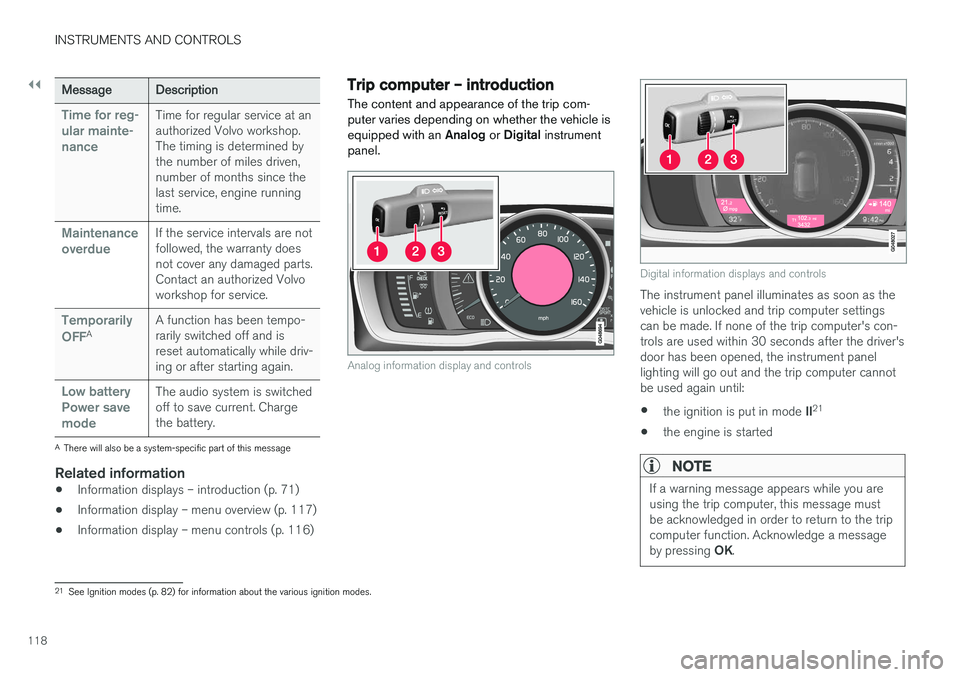
The content and appearance of the trip com- puter varies depending on whether the vehicle isequipped with an Analog or Digital instrument
panel.
Analog information display and controls
Digital information displays and controls
The instrument panel illuminates as soon as the vehicle is unlocked and trip computer settingscan be made. If none of the trip computer's con-trols are used within 30 seconds after the driver'sdoor has been opened, the instrument panellighting will go out and the trip computer cannotbe used again until: • the ignition is put in mode
II21
• the engine is started
NOTE
If a warning message appears while you are using the trip computer, this message mustbe acknowledged in order to return to the tripcomputer function. Acknowledge a message by pressing
OK.
21
See Ignition modes (p. 82) for information about the various ignition modes.
Page 130 of 406
CLIMATE
* Option/accessory.
128
Climate – general information
The vehicle is equipped with Electronic Climate
Control (ECC) (p. 132) that cools, heats or dehumidifies the air in the passenger compart-ment.
Air conditioning
NOTE
• The air conditioning can be switched off, but to ensure the best possible climatecomfort in the passenger compartmentand to prevent the windows from misting,it should always be on.
• In warm weather, a small amount of watermay accumulate under the car when ithas been parked. This water is condensa-tion from the A/C system and is normal.
Side windows and moonroofTo ensure that the air conditioning works opti- mally, the side windows, and the optional moon-roof should be closed.
Fog on the inside of the windowsThe defroster function (p. 135) should be usedto remove fog or mist from the inside of the win-dows. Keeping the windows clean with a com-mercially available window washing spray will alsohelp prevent fogging or misting.
Temporary shut-off of the air conditioning
The air conditioning (p. 135) is momentarily dis- engaged during full acceleration or when drivinguphill with a trailer. This may result in a temporaryincrease in cabin temperature.
Ice and snowAlways keep the air intake grille at the base ofthe windshield free of snow.
Climate system maintenanceSpecial tools and equipment are required tomaintain and carry out repairs on the climate sys-tem. Work of this type should only be done by atrained and qualified Volvo service technician.
RefrigerantVolvo cares about the environment. The air condi-tioning system in your car contains a CFC-freerefrigerant – R134a. This substance will notdeplete the ozone layer. The air conditioning sys-tem contains 1.76 lbs (800 g) of R134a. Thesystems uses PAG oil.
Related information
• Climate – sensors (p. 128)
• Climate – menu settings (p. 130)
Climate – sensors
The climate system utilizes a number of sensors to help regulate the temperature and humiditylevel in the passenger compartment.
Sensor location
• The sunlight sensor is located on the top side of the dashboard.
NOTE
The sunlight sensor monitors which side of the car that is most exposed to sunlight. Thiscan mean that the temperature may differbetween the right and left-side air vents, evenif the temperatures set for both sides of thepassenger compartment are the same.
•
The temperature sensor for the passenger compartment is located below the climatecontrol panel.
• The outside (ambient) temperature sensor islocated on the door mirror.
• The humidity sensor
* is located in the interior
rearview mirror.
NOTE
Do not cover or block the sensors with cloth- ing or other objects.
Page 150 of 406
LOADING AND STORAGE
148
Grocery bag holder
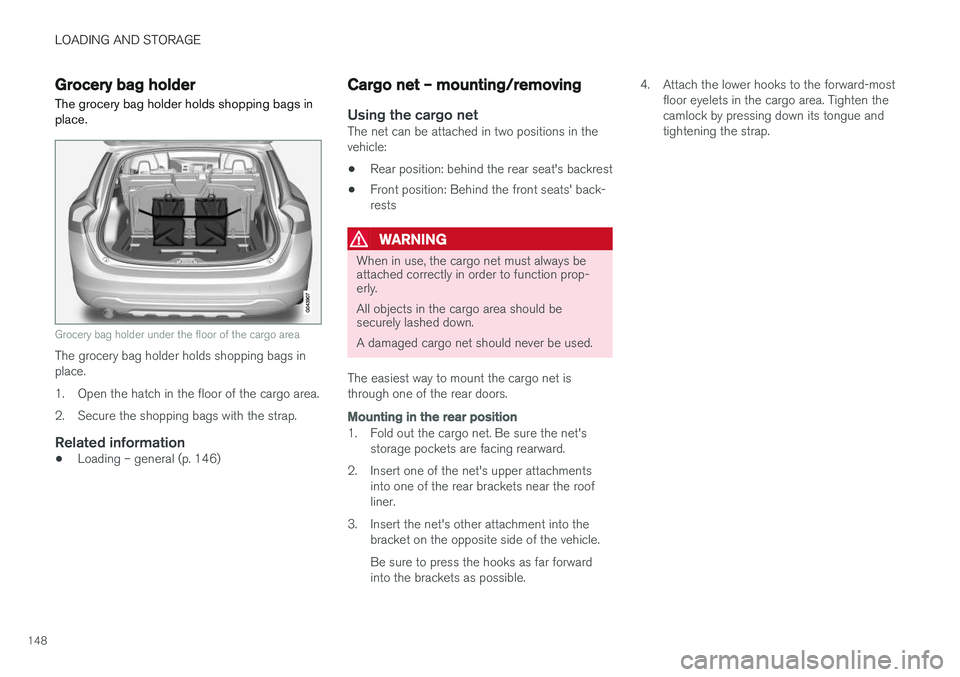
The grocery bag holder holds shopping bags in place.
Grocery bag holder under the floor of the cargo area
The grocery bag holder holds shopping bags in place.
1. Open the hatch in the floor of the cargo area.
2. Secure the shopping bags with the strap.
Related information
• Loading – general (p. 146)
Cargo net – mounting/removing
Using the cargo netThe net can be attached in two positions in the vehicle:
• Rear position: behind the rear seat's backrest
• Front position: Behind the front seats' back-rests
WARNING
When in use, the cargo net must always be attached correctly in order to function prop-erly. All objects in the cargo area should be securely lashed down. A damaged cargo net should never be used.
The easiest way to mount the cargo net is through one of the rear doors.
Mounting in the rear position
1. Fold out the cargo net. Be sure the net's storage pockets are facing rearward.
2. Insert one of the net's upper attachments into one of the rear brackets near the roof liner.
3. Insert the net's other attachment into the bracket on the opposite side of the vehicle. Be sure to press the hooks as far forward into the brackets as possible. 4. Attach the lower hooks to the forward-most
floor eyelets in the cargo area. Tighten thecamlock by pressing down its tongue andtightening the strap.
Page 154 of 406
LOCKS AND ALARM
152
Remote key and key blade
Two remote keys are provided with your vehicle. They enable you to unlock the doors and tail-gate, and also function as ignition keys to startthe vehicle or operate electrical components.The remote keys contain detachable metal keyblades for manually locking or unlocking the driv-er's door and the glove compartment. The visibleends of these key blades are unique to make iteasier to identify "your" remote key. Up to sixremotes can be programmed for use on thesame vehicle.
WARNING
Never leave the remote key in the ignition slot if children are to remain in the vehicle.
For more information on the various ignition modes, see Ignition modes (p. 82).
Related information
• Remote key – functions (p. 155)
• Remote key – functions (p. 155)
• Remote key – range (p. 156)
Remote key – loss
If either of the remote keys (p. 152) is lost, the other should be taken with the vehicle to a Volvoretailer. As an anti-theft measure, the code of thelost remote key must be erased from the system.
NOTE
Additional or duplicate remote control keys can be obtained from any authorized Volvoretailer. You can also obtain additional or duplicate remote control keys from certain independentrepair facilities and locksmiths that are quali-fied to make remote control keys. Each keymust be programmed to work with your vehi-cle. California Only: A list of independent repair facilities and/or locksmiths known to Volvo that can cut andcode replacement keys can be found: • on the Volvo website at http://www.volvocars.com/us/keys
• by calling Volvo Customer Care at1-800-458-1552
The number of registered keys for the vehicle can be found by pressing
MY CAR and going into
SettingsInformationNumber of keys.For a description of the menu system, see My Car – introduction (p. 79). USA-5WK49264FCC ID:KR55WK49264 + Siemens VDO 5WK49236 FCC ID:KR55WK49236, 5WK49266FCC ID:KR55WK49266 + Siemens VDO 5WK49233 FCC ID:KR55WK49233This device complies with part 15 of the FCC rules and RSS-210. Operation is subject to thefollowing conditions: (1) This device may notcause harmful interference, and (2) this devicemust accept any interference received, includinginterference that may cause undesired operation. Canada-5WK49264IC:267T-5WK49264 + Siemens VDO 5WK49236 IC:267T-5WK49236, 5WK49266IC:267T-5WK49266 + Siemens VDO 5WK49233 IC:267T-5WK49233Operation is subject to the following conditions: (1) this device may not cause interference, and(2) this device must accept any interference,including interference that may cause undesiredoperation of the device.
Page 155 of 406
LOCKS AND ALARM
* Option/accessory.153
Related information
•Remote key – functions (p. 155)
Key memory
The memory in the remote key makes it possible to store certain personal settings.
The position of the side door mirrors, power driv- er's seat * and the selected instrument panel
theme 1
are stored in the remote keys when the
vehicle is locked . The next time the driver's door
is unlocked with the same remote key and the
door is opened within 2 minutes, the power driv-
er's seat and side door mirrors will automatically move to the position that they were in when thedoors were most recently locked with the sameremote key. If the seat/mirrors have not beenreadjusted since the vehicle was locked, they willalready be in the position stored in that particularremote key and will not move. For more informa-tion on this feature, see Front seats – power seat(p. 84). This feature can be activated or deactivated in the vehicle's menu by pressing MY CAR and
going into
SettingsCar settingsCar key
memory. For a description of the menu system,
see My Car – introduction (p. 79).
NOTE
If the vehicle is locked with the remote key or is left unlocked for more than 30 minutes, thekey memory function will be deactivated. To reactivate the key's memory:
• Press the unlock button on the remote key.
For information regarding vehicles with the optional keyless drive, see Keyless drive
*– lock-
ing/unlocking (p. 161).
Related information
• Locking/unlocking confirmation (p. 154)
1
Optional digital instrument panel only
Page 156 of 406
LOCKS AND ALARM
* Option/accessory.
154
Locking/unlocking confirmation Settings can be made in the menu system for audible and visual confirmation when the vehiclehas been locked or unlocked. With these func-tions activated, the following will occur when thevehicle is locked/unlocked:
Locking confirmation
• The turn signals flash once, an audible signal sounds and the door mirrors will fold
* in.
Confirmation will only be given when all doors and the tailgate are properly closed and locked.
NOTE
If you do not receive confirmation when lock- ing the vehicle, check whether a door or thetailgate is ajar, or if this feature has beenturned off in the menu.
Unlocking confirmation
• The turn signals will flash twice and the door mirrors will fold
* out.
Making a setting
Different alternatives for locking/unlocking con- firmation can be selected in the menus by press- ing MY CAR on the center console control panel.
• To activate visual confirmation: go to
SettingsCar settingsLight settingsand select Door lock confirmation light
and/or Unlock confirmation light by
pressing OK/MENU .
• To activate audible confirmation: go to
SettingsCar settingsLock settingsand select Audible confirmation by press-
ing OK/MENU .
For a description of the menu system, see My Car – introduction (p. 79).
Lock indicator
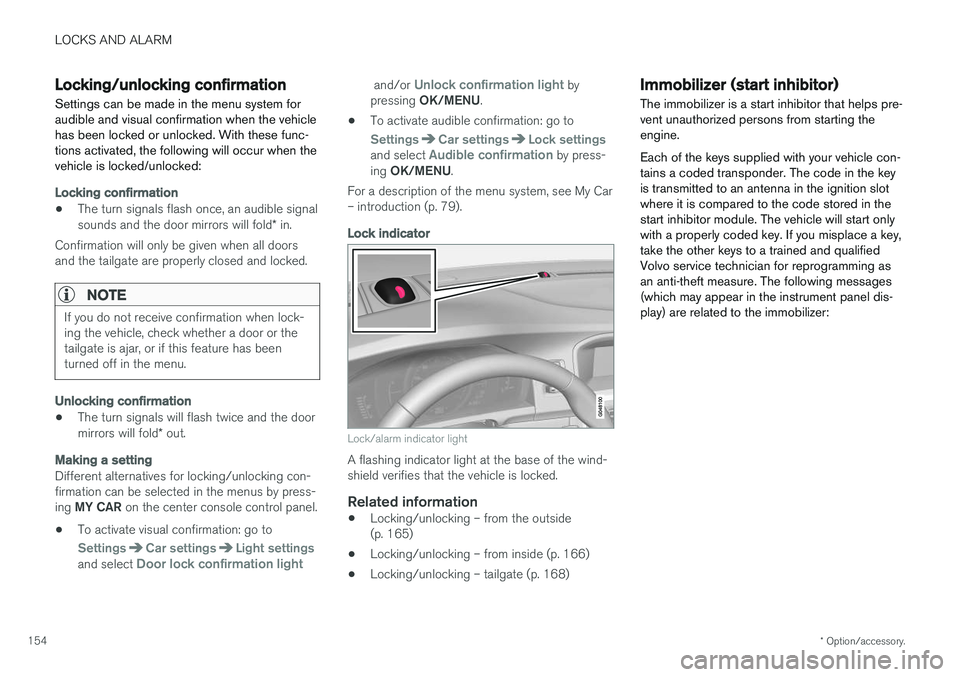
Lock/alarm indicator light
A flashing indicator light at the base of the wind- shield verifies that the vehicle is locked.
Related information
• Locking/unlocking – from the outside(p. 165)
• Locking/unlocking – from inside (p. 166)
• Locking/unlocking – tailgate (p. 168)
Immobilizer (start inhibitor)
The immobilizer is a start inhibitor that helps pre- vent unauthorized persons from starting theengine. Each of the keys supplied with your vehicle con- tains a coded transponder. The code in the keyis transmitted to an antenna in the ignition slotwhere it is compared to the code stored in thestart inhibitor module. The vehicle will start onlywith a properly coded key. If you misplace a key,take the other keys to a trained and qualifiedVolvo service technician for reprogramming asan anti-theft measure. The following messages(which may appear in the instrument panel dis-play) are related to the immobilizer:
Page 157 of 406
LOCKS AND ALARM
}}
* Option/accessory.155
MessageMeaning
Insert car keyRemote key not recognized dur- ing start. Try to start the vehicleagain.
Car key not foundVehicles with keyless drive *
only. Remote key not recog- nized during start. Try to startthe vehicle again. If the problem continues, insert the remote key into the ignitionslot and try to start the vehicleagain.
Immobil- izer Trystart againRemote key fault during start. Contact an authorized Volvoworkshop.
CAUTION
Never use force when inserting the remote key in the ignition slot. The vehicle cannot bestarted if the transponder is damaged.
USA–FCC ID: LTQWFS 125VO This device complies with part 15 of the FCC rules. Operation is subject to the following condi-tion: (1) This device may not cause harmful inter-ference, and (2) this device must accept anyinterference received, including interference thatmay cause undesired operation. Canada–IC: 3659A-WFS125VO Operation is subject to the following conditions: (1) this device may not cause interference, and(2) this device must accept any interference,including interference that may cause undesiredoperation of the device. For information on starting the vehicle, see Star- ting the engine (p. 258).
Remote key – functions
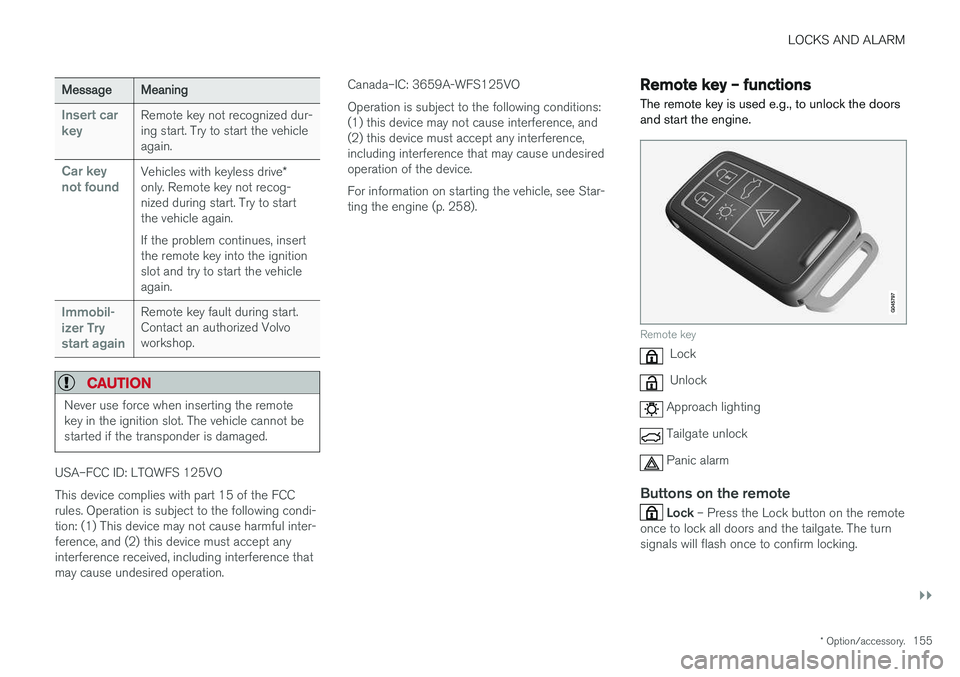
The remote key is used e.g., to unlock the doors and start the engine.
Remote key
Lock
Unlock
Approach lighting
Tailgate unlock
Panic alarm
Buttons on the remote
Lock – Press the Lock button on the remote
once to lock all doors and the tailgate. The turn signals will flash once to confirm locking.
Page 158 of 406
||
LOCKS AND ALARM
* Option/accessory.
156
Unlock – Press the Unlock button on the
remote once to unlock the driver's door. After a short pause, press the Unlock button a second time within 10 seconds to unlock theother doors and the tailgate. This function can be changed so that all doors unlock at the same time by pressing My Car and
going to
SettingsCar settingsLock
settings
Change doors unlock setting. For
a description of the menu system, see My Car – introduction (p. 79).
Approach lighting – As you approach the
vehicle, press the button on the remote key to light the interior lighting, parking lights, license plate lighting and the lights in the door mirrors *.
These lights will switch off automatically after 30, 60 or 90 seconds. For a description of the menusystem, see My Car – introduction (p. 79).
Unlock tailgate – Press the button twice
within several seconds to disarm the alarm sys- tem (the alarm indicator light on the dashboardwill go out), and unlock only the tailgate.
NOTE
As an added safety precaution, the parking lights will come on automatically for a shortperiod when the tailgate has been opened.
After closing, the tailgate will not automatically relock. Press Lock to relock it and rearm thealarm. For information on opening the tailgate from the passenger compartment, see Locking/unlocking– tailgate (p. 168)
Panic alarm – This button can be used to
attract attention during emergency situations. To activate the panic alarm, press and hold this button for at least 3 seconds or press it twicewithin 3 seconds. The turn signals and horn willbe activated. The panic alarm will stop automati-cally after 2 minutes and 45 seconds. To deactivate, wait approximately 5 seconds and press the button again. The Panic alarm button will not unlock the vehi- cle.
Related information
• Locking/unlocking – from inside (p. 166)
• Locking/unlocking – from the outside(p. 165)
• Locking/unlocking confirmation (p. 154)
Remote key – range The remote key has a range of approximately 60 ft. (20 m) from the vehicle.
NOTE
Buildings or other obstacles may interfere with the function of the remote key. The vehi-cle can also be locked or unlocked with thekey blade, see Alarm-related functions(p. 172).
If the remote key is removed from the vehicle while the engine is running or if the ignition is in mode
I or II and all of the doors are closed, a
message will appear in the instrument panel dis- play and there will be an audible signal. When the remote key is returned to the vehicle, the message will be erased and the audible sig-nal will stop after one of the following has beendone:
• The remote key is inserted in the ignition slot
• The vehicle's speed exceeds 20 mph(30 km/h)
• The
OK button on the left steering wheel
lever is pressed
Related information
• Remote key – functions (p. 155)
Page 159 of 406
LOCKS AND ALARM
157
Detachable key blade – general informationEach remote key contains a detachable metal key blade (p. 152) for mechanically locking orunlocking the driver's door and the glove com-partment, and to enable the private lock-ing(p. 158) function. For more information onthe key blade. The key blades have a uniquecode, which is used if new ones need to be pro-duced. This code is available at an authorizedVolvo retailer. The visible ends of these key blades are unique to make it easier to identify "your" remote key.
Related information
• Detachable key blade – unlocking (p. 158)
• Detachable key blade – detaching/reinsert- ing (p. 157)
Detachable key blade – detaching/ reinserting
The detachable key blade (p. 157) can be removed or reinserted in the remote key as fol-lows:
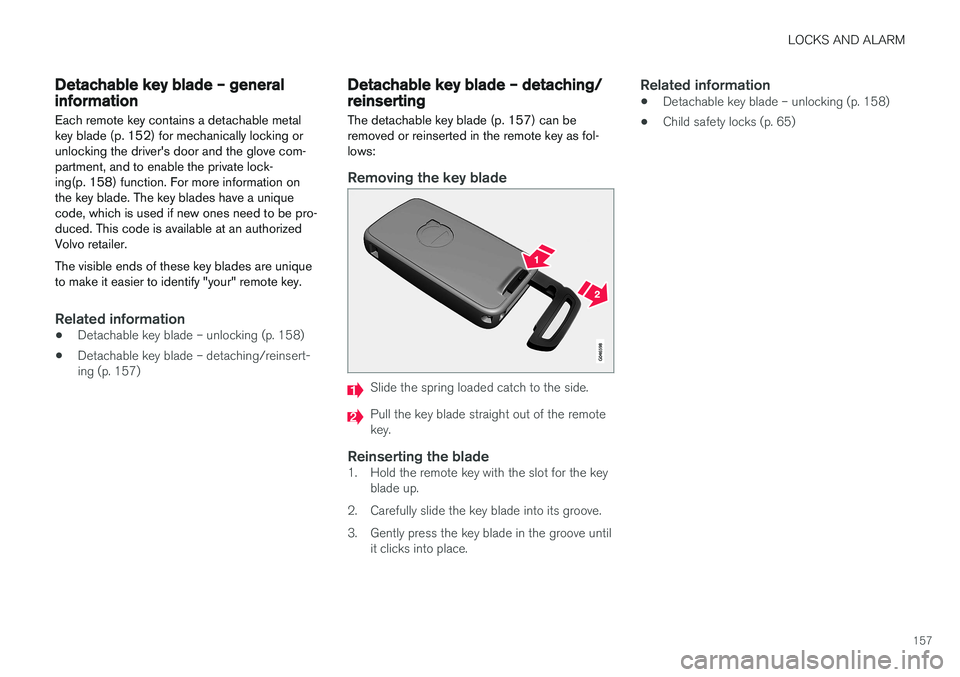
Removing the key blade
Slide the spring loaded catch to the side.
Pull the key blade straight out of the remote key.
Reinserting the blade1. Hold the remote key with the slot for the key blade up.
2. Carefully slide the key blade into its groove.
3. Gently press the key blade in the groove until it clicks into place.
Related information
• Detachable key blade – unlocking (p. 158)
• Child safety locks (p. 65)
Page 160 of 406
LOCKS AND ALARM
158
Detachable key blade – unlockingYour vehicle's remote key (p. 152) contains a metal, detachable key blade that can be used tounlock the driver's door, lock the glove compart-ment, etc.
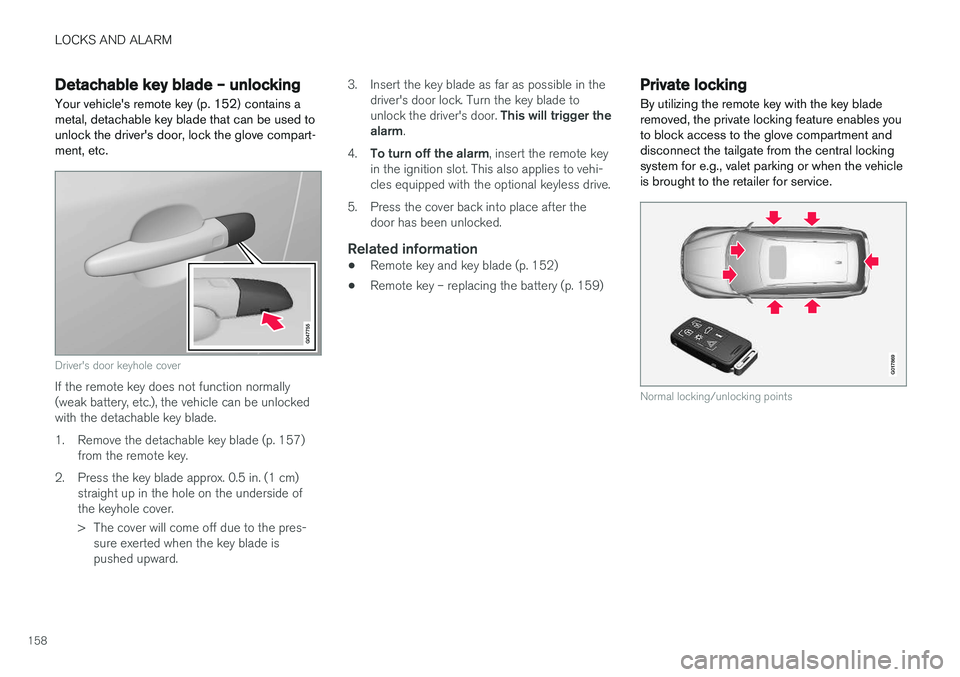
Driver's door keyhole cover
If the remote key does not function normally (weak battery, etc.), the vehicle can be unlockedwith the detachable key blade.
1. Remove the detachable key blade (p. 157) from the remote key.
2. Press the key blade approx. 0.5 in. (1 cm) straight up in the hole on the underside of the keyhole cover.
> The cover will come off due to the pres-sure exerted when the key blade is pushed upward. 3. Insert the key blade as far as possible in the
driver's door lock. Turn the key blade to unlock the driver's door. This will trigger the
alarm .
4. To turn off the alarm , insert the remote key
in the ignition slot. This also applies to vehi- cles equipped with the optional keyless drive.
5. Press the cover back into place after the door has been unlocked.
Related information
• Remote key and key blade (p. 152)
• Remote key – replacing the battery (p. 159)
Private locking
By utilizing the remote key with the key blade removed, the private locking feature enables youto block access to the glove compartment anddisconnect the tailgate from the central lockingsystem for e.g., valet parking or when the vehicleis brought to the retailer for service.
G017869
Normal locking/unlocking points