automatic transmission VOLVO V60 2021 User Guide
[x] Cancel search | Manufacturer: VOLVO, Model Year: 2021, Model line: V60, Model: VOLVO V60 2021Pages: 661, PDF Size: 12.68 MB
Page 412 of 661
||
STARTING AND DRIVING
410
Activating the steering wheel paddles in the D position
To be able to shift gears using the paddles, they must be activated:
–Pull one of the paddles toward the steer- ing wheel.
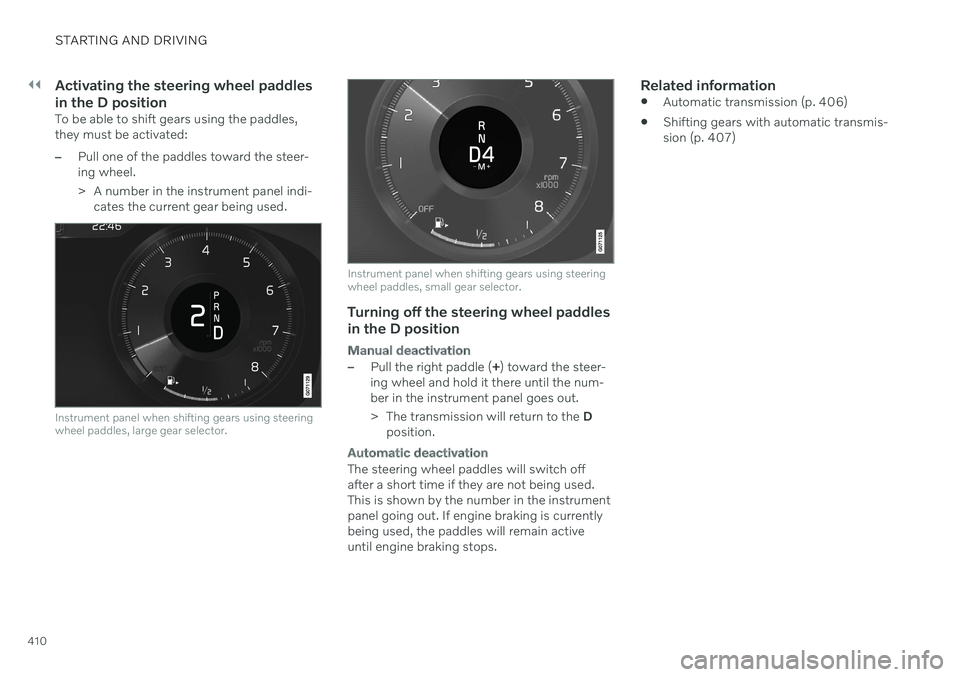
> A number in the instrument panel indi-cates the current gear being used.
Instrument panel when shifting gears using steering wheel paddles, large gear selector.
Instrument panel when shifting gears using steering wheel paddles, small gear selector.
Turning off the steering wheel paddles
in the D position
Manual deactivation
–Pull the right paddle ( +) toward the steer-
ing wheel and hold it there until the num- ber in the instrument panel goes out.
> The transmission will return to the D
position.
Automatic deactivation
The steering wheel paddles will switch off after a short time if they are not being used.This is shown by the number in the instrumentpanel going out. If engine braking is currentlybeing used, the paddles will remain activeuntil engine braking stops.
Related information
Automatic transmission (p. 406)
Shifting gears with automatic transmis-sion (p. 407)
Page 413 of 661
STARTING AND DRIVING
}}
411
Shiftlock The automatic transmission's shiftlock func- tion helps prevent inadvertently moving thegear selector between different positions.
There are two types of shiftlocks: mechanical and automatic.
Mechanical shiftlock
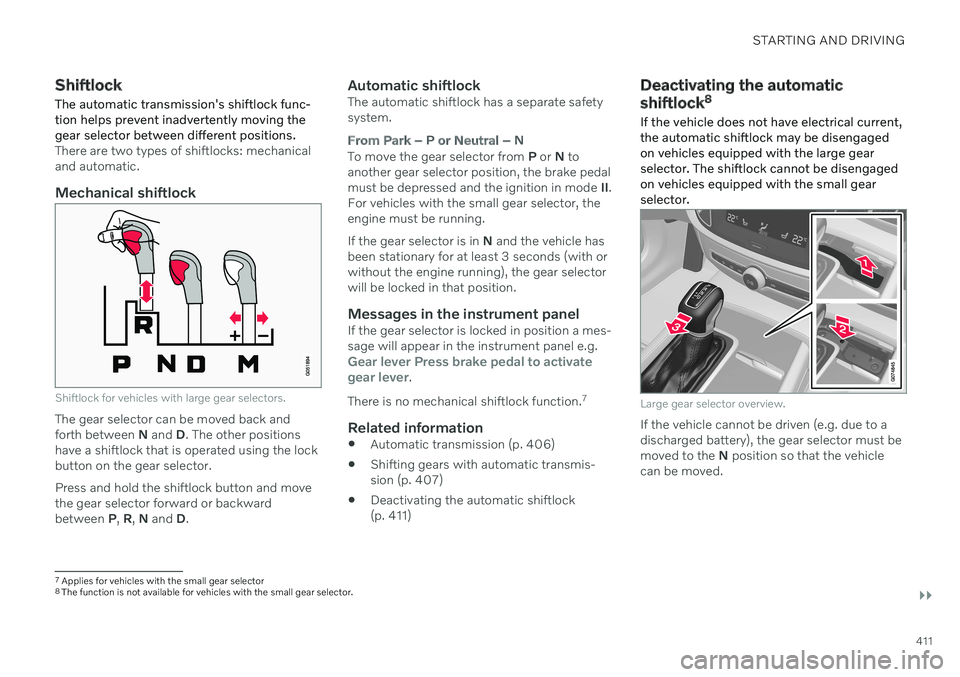
Shiftlock for vehicles with large gear selectors.
The gear selector can be moved back and forth between N and D. The other positions
have a shiftlock that is operated using the lockbutton on the gear selector. Press and hold the shiftlock button and move the gear selector forward or backwardbetween P, R , N and D.
Automatic shiftlockThe automatic shiftlock has a separate safetysystem.
From Park – P or Neutral – N
To move the gear selector from P or N to
another gear selector position, the brake pedal must be depressed and the ignition in mode II.
For vehicles with the small gear selector, theengine must be running. If the gear selector is in N and the vehicle has
been stationary for at least 3 seconds (with or without the engine running), the gear selectorwill be locked in that position.
Messages in the instrument panelIf the gear selector is locked in position a mes-sage will appear in the instrument panel e.g.
Gear lever Press brake pedal to activate
gear lever.
There is no mechanical shiftlock function. 7
Related information
Automatic transmission (p. 406)
Shifting gears with automatic transmis- sion (p. 407)
Deactivating the automatic shiftlock(p. 411)
Deactivating the automatic shiftlock 8
If the vehicle does not have electrical current, the automatic shiftlock may be disengagedon vehicles equipped with the large gearselector. The shiftlock cannot be disengagedon vehicles equipped with the small gearselector.
Large gear selector overview.
If the vehicle cannot be driven (e.g. due to a discharged battery), the gear selector must bemoved to the N position so that the vehicle
can be moved.
7 Applies for vehicles with the small gear selector
8 The function is not available for vehicles with the small gear selector.
Page 414 of 661
||
STARTING AND DRIVING
* Option/accessory.
412
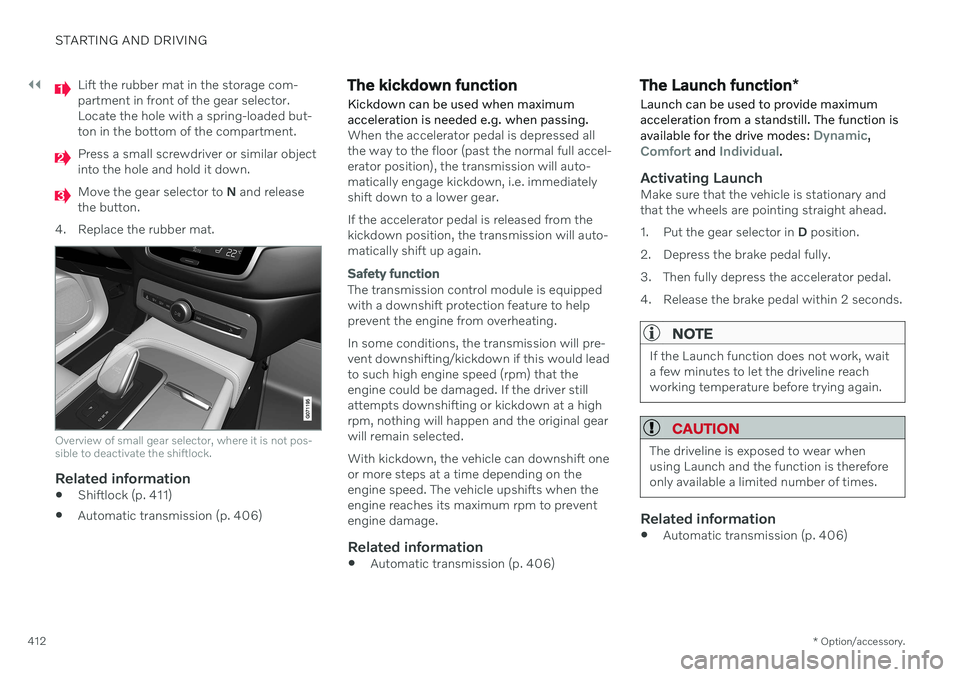
Lift the rubber mat in the storage com- partment in front of the gear selector.Locate the hole with a spring-loaded but-ton in the bottom of the compartment.
Press a small screwdriver or similar object into the hole and hold it down.
Move the gear selector to N and release
the button.
4. Replace the rubber mat.
Overview of small gear selector, where it is not pos- sible to deactivate the shiftlock.
Related information
Shiftlock (p. 411)
Automatic transmission (p. 406)
The kickdown function Kickdown can be used when maximum acceleration is needed e.g. when passing.
When the accelerator pedal is depressed all the way to the floor (past the normal full accel-erator position), the transmission will auto-matically engage kickdown, i.e. immediatelyshift down to a lower gear. If the accelerator pedal is released from the kickdown position, the transmission will auto-matically shift up again.
Safety function
The transmission control module is equipped with a downshift protection feature to helpprevent the engine from overheating. In some conditions, the transmission will pre- vent downshifting/kickdown if this would leadto such high engine speed (rpm) that theengine could be damaged. If the driver stillattempts downshifting or kickdown at a highrpm, nothing will happen and the original gearwill remain selected. With kickdown, the vehicle can downshift one or more steps at a time depending on theengine speed. The vehicle upshifts when theengine reaches its maximum rpm to preventengine damage.
Related information
Automatic transmission (p. 406)
The Launch function
*
Launch can be used to provide maximum acceleration from a standstill. The function is available for the drive modes:
Dynamic,Comfort and Individual.
Activating LaunchMake sure that the vehicle is stationary and that the wheels are pointing straight ahead.
1. Put the gear selector in D position.
2. Depress the brake pedal fully.
3. Then fully depress the accelerator pedal.
4. Release the brake pedal within 2 seconds.
NOTE
If the Launch function does not work, wait a few minutes to let the driveline reachworking temperature before trying again.
CAUTION
The driveline is exposed to wear when using Launch and the function is thereforeonly available a limited number of times.
Related information
Automatic transmission (p. 406)
Page 415 of 661
STARTING AND DRIVING
}}
* Option/accessory.413
Automatic transmission symbols and messages If a problem occurs with the transmission, a symbol and a message are displayed in theinstrument panel.
CAUTION
Check the operating temperature of the transmission to help avoid damage to anyof the drive system components. If there isa risk of overheating, a warning symbol willappear in the instrument panel and a textmessage will be displayed. Follow the rec-ommendations given.
Symbol Meaning
A fault has occurred in the trans- mission. Read the message in the instru- ment panel.
Hot or overheated transmission. Read the message in the instru- ment panel.
Temporary fault in driveline. Read the message in the instru- ment panel.
Related information
Automatic transmission (p. 406)
All Wheel Drive (AWD)
*
All-wheel drive (AWD 9
), also called four-
wheel drive, means that power is distributed to all four wheels, which improves traction.
To achieve the best traction, power is auto- matically directed to the wheels that have thebest grip. The system continuously calculatesthe need for torque to the rear wheels, andcan immediately redistribute up to half of theengine's torque to the rear wheels. All-wheel drive also has a stabilizing effect at higher speeds. In normal driving conditions,most of the engine's power is directed to thefront wheels. When the vehicle is stationary,all-wheel drive is always activated in prepara-tion for maximum traction during acceleration. All-wheel drive reacts differently depending on which drive mode is selected.
Related information
Drive modes
* (p. 413)
Transmission (p. 406)
Drive modes
*
Drive modes affect the vehicle's driving cha- racteristics in different ways to enhance andsimplify the driving experience in certaintypes of situations.
Drive modes enable easy access to the vehi- cle's many functions and settings in differentdriving situations. The following systems areadapted to help optimize driving characteris-tics in each drive mode: Steering
Engine/transmission/all-wheel drive
*
Brakes
Shock absorbers
Instrument panel
Start/Stop function
Climate control settings
Select the drive mode that is adapted to the current driving conditions. Keep in mind thatnot all drive modes are available in all situa-tions.
Available drive modesWhen the engine is started, the vehicle will be in Comfort mode and the start/stop function
will be activated. Drive mode can be changed once the vehicle is started, e.g. to
Individualmode. Once Individual mode is selected, you
can adjust settings to personal preferences, e.g. to show the tachometer.
Page 418 of 661
STARTING AND DRIVING
* Option/accessory.
416
Eco drive mode
Eco drive mode can help make driving more
fuel-efficient and eco-friendly.
Use this mode to save fuel and promote eco- friendly driving. When
Eco mode is activated, the following
characteristics are modified:
The automatic transmission's shifting points.
Engine control and accelerator pedalresponse.
Eco Coast functionality is activated andengine braking is disabled when the accel-erator pedal is released at speedsbetween 65 and 140 km/h(40 and 87 mph).
Some of the climate system settings willbe reduced or switched off.
Information will be shown in the ECOgauge in the instrument panel to help pro-mote more eco-friendly and economicaldriving.
Coast function Eco CoastEco Coast essentially deactivates engine brak-ing, allowing the vehicle's kinetic energy to beused to roll greater distances. When the driverreleases the accelerator pedal, the transmis-sion is automatically disengaged from theengine. Engine speed is reduced to idlingspeed to reduce fuel consumption. This function is most effective in driving situa-tions where the vehicle can roll freely for along distance e.g. on roads with slight down-grades or when a decrease in speed is antici-pated such as when approaching an area witha lower speed limit.
Activating Eco Coast
The function is activated when the accelerator pedal is fully released and the following condi-tions are met:
Eco drive mode is activated.
The gear selector is in
D.
The vehicle's speed is approximately 65-140 km/h (40-87 mph).
The gradient of the downgrade is less thanapproximately 6%.
COASTING will be displayed in the instrument
panel when Eco Coast is being used.
Limitations
Eco Coast is not available if
the engine and/or transmission are not at normal working temperatures
the gear selector is moved from
D to man-
ual shifting mode
the vehicle's speed is not within the65-140 km/h (40-87 mph) range
the gradient of the downgrade is morethan approximately 6%
the steering wheel paddles
* are being
used for manual shifting.
Deactivating and turning off Eco Coast
In certain situations, it may be advisable to deactivate or turn off Eco Coast so that enginebraking can be used. These situations mightinclude driving down steep hills or beforepassing another vehicle to help ensure thiscan be done as safely as possible. Deactivate Eco Coast by
pressing the accelerator or brake pedal
moving the gear selector to manual mode
using the steering wheel paddles
* to shift.
Turn off Eco Coast by
switching to another drive mode
*
deactivating
Eco drive mode in Function
view.
It is possible to roll short distances even with- out Eco Coast in order to help conserve fuel.However, for the best fuel economy, EcoCoast should be activated and used to rolllonger distances.
Cruise control Eco CruiseWhen cruise control is activated in the Ecodrive mode, the vehicle's acceleration and deceleration will be slower than in other drivemodes to help further conserve fuel. Becauseof this, the vehicle's actual speed may beslightly above or below the set speed.
Page 419 of 661

STARTING AND DRIVING
* Option/accessory.417
On a level road, the vehicle's actual speed may differ from the set speed when cruisecontrol is active and the vehicle is coast-ing.
On a steep uphill gradient, the vehicle'sspeed is reduced until the transmissiondownshifts. Reduced acceleration is theninitiated in order to reach the set speed.
On a downhill gradient in which the vehi-cle is coasting, the vehicle's actual speedmay be slightly above or below the setspeed. The function uses engine brakingto keep the set speed. If necessary, thenormal brakes are also applied.
ECO gauge in the instrument panel
Eco gauge in 12" instrument panel
*.
Eco gauge in 8" instrument panel.
The ECO gauge indicates how economical current driving is:
A low reading in the green area of thegauge indicates economical driving.
A high reading is shown when driving isnot economical, e.g. heavy braking orrapid acceleration.
The ECO gauge also has an indicator showinghow a reference driver would drive in the samedriving situation. This is shown by the shortpointer in the gauge.
ECO ClimateIn Eco mode, ECO climate is automatically
activated in the passenger compartment to help reduce energy consumption.
NOTE
When the Eco drive mode is activated, set-
tings for certain climate system and elec- tricity consuming functions are reduced.Some of these settings can be reset man-ually, but full functionality will only be restored by switching off
Eco mode or
adapting the Individual* drive mode to full
climate system functionality.
If condensation forms on the windows, tap the max defroster button, which will function nor-mally.
Related information
Changing drive mode
* (p. 415)
Activating and deactivating Eco drivemode using the function button (p. 418)
Drive modes
* (p. 413)
Economical driving (p. 423)
Start/Stop function (p. 418)
Page 437 of 661
STARTING AND DRIVING
* Option/accessory.435
NOTE
Extreme weather conditions, towing a trailer, high altitude and lower fuel gradethan recommended are factors that cansignificantly increase the vehicle's fuel con-sumption.
Trailer weights
WARNING
Please adhere to the recommendations provided for trailer weight. If the recom-mendations are not followed, the vehicleand trailer may be difficult to control duringevasive maneuvers and braking.
NOTE
The specified maximum trailer weights are those permitted by Volvo. National vehicleregulations may set additional restrictionson trailer weight and speed. The trailerhitches may be certified for higher towingweights than the vehicle is permitted totow.
Self-leveling suspension *The vehicle's self-leveling system attempts to keep the vehicle at a constant level, regardlessof load (up to the maximum permitted weight).When the vehicle is stationary, the rear end of the vehicle will be slightly lowered, which isnormal.
Driving in hilly terrain or hot weatherIn certain conditions, there is a risk of over-heating when driving with a trailer. If overheat-ing of the engine and drive system is detected,a warning symbol will illuminate in the instru-ment panel and a message will appear. The automatic transmission adapts the gear for the current load and engine speed.
Steep inclines
Do not lock the automatic transmission into a higher gear than what the engine can handle
‒
it is not always preferable to drive in highgears at low rpm.
Parking on a hill
1. Depress the brake pedal.
2. Apply the parking brake.
3. Put the gear selector in P.
4. Release the brake pedal.Put chocks behind the wheels when the vehi- cle is parked on a hill with a trailer attached.
Starting on a hill
1. Depress the brake pedal.
2. Put the gear selector in D.
3. Release the parking brake.
4. Release the brake pedal and start driving.
Related information
Trailer Stability Assist
* (p. 436)
Checking trailer lights (p. 437)
Towing capacity and tongue weight (p. 634)
Overheating of engine and transmission(p. 430)
Page 440 of 661
STARTING AND DRIVING
438
Towing using a towline
This section refers to one vehicle being towed behind another using a towline.
Before towing another vehicle, check applica- ble speed limit regulations.
Preparations and towing
CAUTION
For some transmission variants, it is not possible to shift from P position if theengine is switched off. Contact an author-ized Volvo workshop for assistance towingor call a professional towing service.
CAUTION
Note that the vehicle must always be towed with the wheels rolling forward.
Do not tow a vehicle with automatictransmission at a speed greater than80 km/h (50 mph) or for a distancegreater than 80 km (50 miles).
WARNING
Ignition mode
II must be active – all
airbags are deactivated in ignition mode I.
Always have the remote key in thevehicle when it is towed.
WARNING
The brake and steering servos do not work when the engine is off – it takesabout 5 times more pressure on the brakepedal and steering requires much moreeffort than normal.
1. Turn on the hazard warning flashers.
2. Attach the towline to the towing eyelet.
3. Put the vehicle in ignition mode II – with-
out pressing the brake pedal, turn the start knob clockwise and hold it there for about4 seconds. Release the knob, which willautomatically return to its original position.
4. Move the gear selector to neutral (N) and release the parking brake. If the battery charge level is too low, it may not be possible to release the parkingbrake. Connect an auxiliary battery to thevehicle if the battery is discharged.
> The towing vehicle can now start driv-ing. 5. Keep the towline taut when the towing
vehicle slows down by applying light pres- sure to the brake pedal. This will helpavoid jarring movements.
6. Be prepared to apply the brakes to stop the vehicle.
Jump startingDo not tow the vehicle to start the engine. Usean auxiliary battery if the start battery's chargelevel is so low that the engine cannot bestarted.
CAUTION
Attempting to tow with the engine running could result in damage to the three-waycatalytic converter.
Related information
Attaching and removing the towing eyelet (p. 439)
Hazard warning flashers (p. 159)
Recovery (p. 440)
Jump starting using another battery(p. 431)
Selecting ignition mode (p. 396)
Transmission (p. 406)
Page 638 of 661
SPECIFICATIONS
636
Engine oil specifications Engine oil of type VCC RBS0-2AE 0W-20 must be used. Lower oil grades may not offerthe same fuel economy, engine performanceor engine protection.
Volvo recommends:
GeneralSee the Service and warranty booklet for infor- mation about oil change intervals.
NOTE
This vehicle is delivered from the factory with synthetic oil.
Do not use oil additives.
Oil viscosityThe wrong oil viscosity can shorten engine service life during normal use.VCC RBS0-2AE 0W-20 provides good fueleconomy and engine protection. See the vis-cosity chart.
Viscosity chart
Oil volumeEngine oil volumes (including oil filter) are shown in the table.
Liter (approx) 5.6
US qts (approx) 5.9
Related information
Type designations (p. 628)
Checking and filling engine oil (p. 580)
Engine oil (p. 579)
Transmission fluid specifications
Under normal driving conditions, the trans- mission fluid will not need to be changed dur-ing the transmission's service life. However,it may need to be changed if the vehicle isdriven frequently in adverse driving condi-tions.
Automatic transmission
Prescribed transmission fluid: AW-1
Related information
Type designations (p. 628)
Page 644 of 661
INDEX
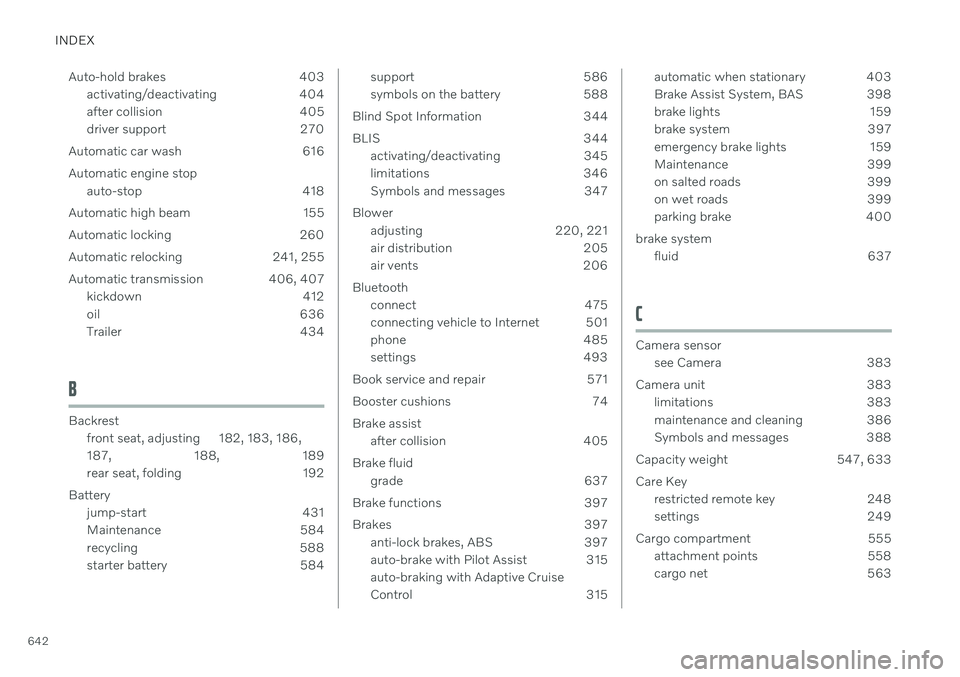
642Auto-hold brakes 403
activating/deactivating 404
after collision 405
driver support 270
Automatic car wash 616 Automatic engine stop auto-stop 418
Automatic high beam 155
Automatic locking 260
Automatic relocking 241, 255
Automatic transmission 406, 407 kickdown 412
oil 636
Trailer 434
B
Backrestfront seat, adjusting 182, 183, 186, 187 , 188, 189
rear seat, folding 192
Battery jump-start 431
Maintenance 584
recycling 588
starter battery 584
support 586
symbols on the battery 588
Blind Spot Information 344
BLIS 344 activating/deactivating 345
limitations 346
Symbols and messages 347
Blower adjusting 220, 221
air distribution 205
air vents 206
Bluetooth connect 475
connecting vehicle to Internet 501
phone 485
settings 493
Book service and repair 571
Booster cushions 74 Brake assist after collision 405
Brake fluid grade 637
Brake functions 397
Brakes 397 anti-lock brakes, ABS 397
auto-brake with Pilot Assist 315auto-braking with Adaptive Cruise
Control 315automatic when stationary 403
Brake Assist System, BAS 398
brake lights 159
brake system 397
emergency brake lights 159
Maintenance 399
on salted roads 399
on wet roads 399
parking brake 400
brake system fluid 637
C
Camera sensorsee Camera 383
Camera unit 383 limitations 383
maintenance and cleaning 386
Symbols and messages 388
Capacity weight 547, 633 Care Key restricted remote key 248
settings 249
Cargo compartment 555 attachment points 558
cargo net 563