fog light VOLVO V60 2021 User Guide
[x] Cancel search | Manufacturer: VOLVO, Model Year: 2021, Model line: V60, Model: VOLVO V60 2021Pages: 661, PDF Size: 12.68 MB
Page 219 of 661
CLIMATE CONTROL
217
Activating and deactivating recirculation The climate system's recirculation function helps shut out smog, smoke, exhaust fumes,etc. by reusing the air in the passenger com-partment.
1. Tap the symbol in the center of the climatebar to open Climate view in the center dis- play.
2.Tap Recirc.
> Air recirculation is activated/deacti- vated and the button lights up/goes out.
CAUTION
If the air in the vehicle is recirculated too long, there is a risk of fogging on the insideof the windows.
NOTE
Recirculation cannot be activated when the max defroster is on.
Related information
Climate system controls (p. 210)
Activating and deactivating the recircula- tion timer setting (p. 217)
Activating and deactivating the recirculation timer setting
The climate system's recirculation function helps shut out smog, smoke, exhaust fumes,etc. by reusing the air in the passenger com-partment.
When the recirculation timer is activated, air recirculation will switch off automatically after20 minutes. 1. Tap
Settings in the Top view in the center
display.
2. Tap
Climate.
3. Tap
Recirculation Timer to activate/
deactivate the recirculation timer.
Related information
Activating and deactivating recirculation (p. 217)
Page 222 of 661
CLIMATE CONTROL
220
Setting the blower speed for the front seats4
The blower can be set to several different automatically controlled speeds for the frontseat.
1. Tap the symbol in the center of the climate bar to open Climate view in the center dis- play.
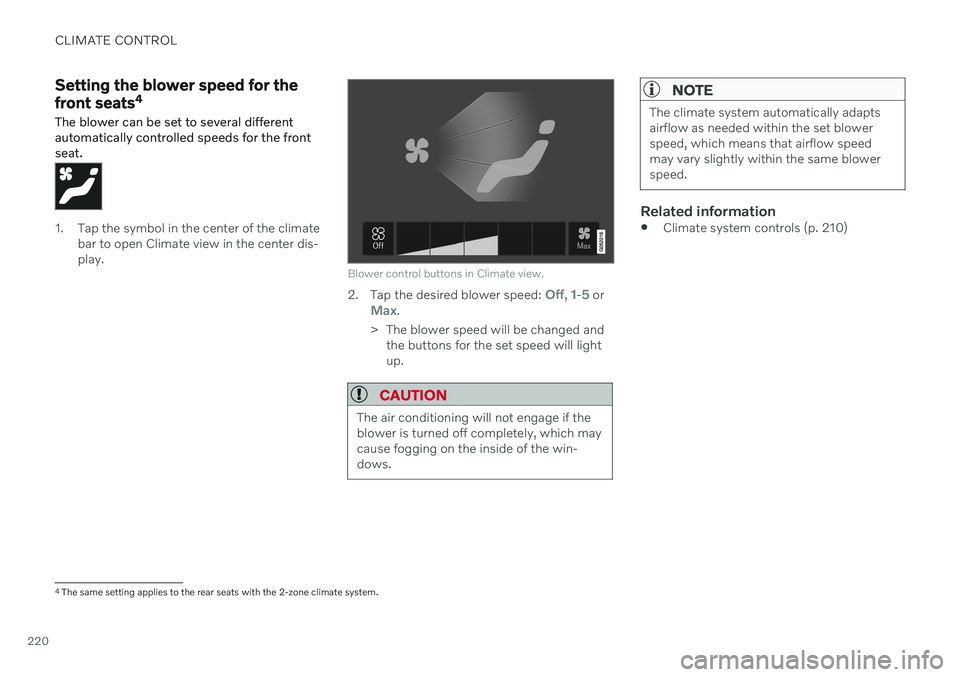
Blower control buttons in Climate view.
2.Tap the desired blower speed: Off, 1-5 orMax.
> The blower speed will be changed and the buttons for the set speed will light up.
CAUTION
The air conditioning will not engage if the blower is turned off completely, which maycause fogging on the inside of the win-dows.
NOTE
The climate system automatically adapts airflow as needed within the set blowerspeed, which means that airflow speedmay vary slightly within the same blowerspeed.
Related information
Climate system controls (p. 210)
4
The same setting applies to the rear seats with the 2-zone climate system.
Page 306 of 661
DRIVER SUPPORT
* Option/accessory.
304
Pilot Assist *62
limitations
Pilot Assist functionality may be reduced in certain situations.
Pilot Assist is a driver support function designed to simplify driving and assist thedriver in many situations. However, the driveris always responsible for maintaining a suita-ble distance to vehicles or objects around itand ensuring that the vehicle is correctly posi-tioned in the traffic lane.
WARNING
In some situations, Pilot Assist may have trouble helping the driver properly or maybe deactivated automatically – we adviseagainst using Pilot Assist in such cases.Examples of such situations include:
the lane markings are unclear, worn, missing, cross each other, or there aremultiple sets of road markings.
the lane division changes, e.g. whenlanes split or merge, and at off-ramps.
when there is road construction andsudden changes to the road surface,e.g. when the lines may no longer markthe correct route.
edges or other lines than lane markingsare present on or near the road, e.g.curbs, joints or repairs to the road sur-face, edges of barriers, roadside edgesor strong shadows.
the lane is narrow or winding.
the lane contains ridges or holes.
weather conditions are poor, e.g. rain,snow or fog or slush or reduced visibil-
ity with poor light conditions, back- lighting, wet road surface, etc.
The driver should also note that Pilot Assist has the following limitations:
High curbs, roadside barriers, tempo- rary obstacles (traffic cones, safety bar-riers, etc.) are not detected. Alterna-tively, they may be detected incorrectlyas lane markings, with a subsequentrisk of contact between the vehicle andsuch obstacles. The driver is responsi-ble for ensuring that the vehicle main-tains a suitable distance from suchobstacles.
The camera and radar sensors do nothave the capacity to detect all oncom-ing objects and obstacles in trafficenvironments, e.g. potholes, stationaryobstacles or objects that completely orpartially block the route.
Pilot Assist does not "see" pedestrians,animals, etc.
The steering assistance is limited inforce, which means that Pilot Assistcannot always help the driver to steerand keep the vehicle within the lane.
In vehicles equipped with Sensus Navigation
*, the function is able to use
62
Depending on market, this function can be either standard or optional.
Page 387 of 661
DRIVER SUPPORT
}}
* Option/accessory.385
Limited field of vision
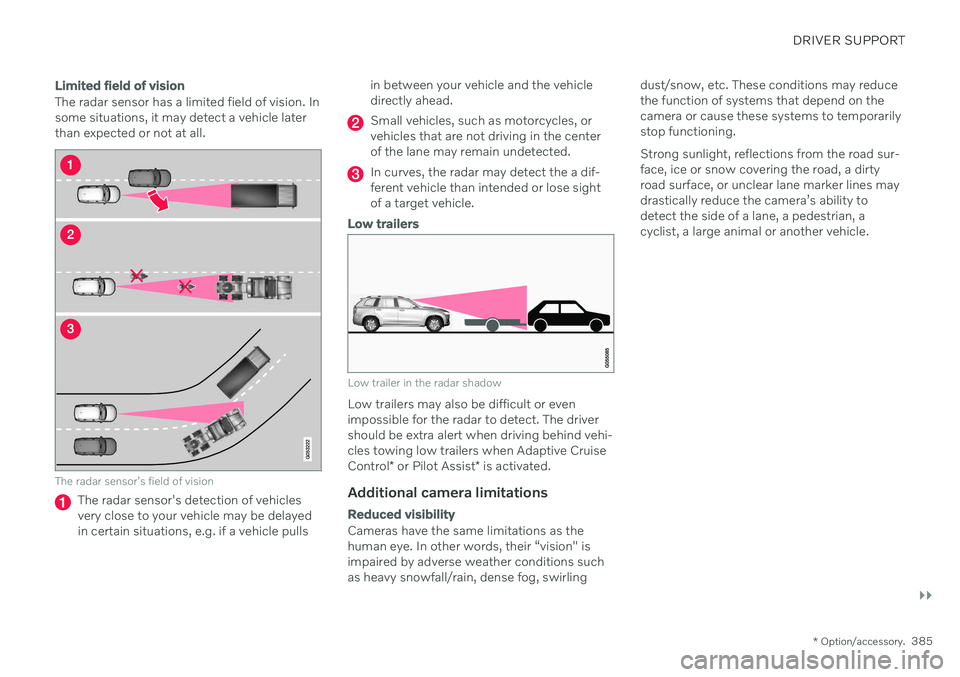
The radar sensor has a limited field of vision. In some situations, it may detect a vehicle laterthan expected or not at all.
The radar sensor's field of vision
The radar sensor's detection of vehicles very close to your vehicle may be delayedin certain situations, e.g. if a vehicle pulls in between your vehicle and the vehicledirectly ahead.
Small vehicles, such as motorcycles, or vehicles that are not driving in the centerof the lane may remain undetected.
In curves, the radar may detect the a dif- ferent vehicle than intended or lose sightof a target vehicle.
Low trailers
Low trailer in the radar shadow
Low trailers may also be difficult or even impossible for the radar to detect. The drivershould be extra alert when driving behind vehi- cles towing low trailers when Adaptive Cruise Control
* or Pilot Assist
* is activated.
Additional camera limitations
Reduced visibility
Cameras have the same limitations as the human eye. In other words, their “vision" isimpaired by adverse weather conditions suchas heavy snowfall/rain, dense fog, swirling dust/snow, etc. These conditions may reducethe function of systems that depend on thecamera or cause these systems to temporarilystop functioning. Strong sunlight, reflections from the road sur- face, ice or snow covering the road, a dirtyroad surface, or unclear lane marker lines maydrastically reduce the camera
Page 390 of 661
DRIVER SUPPORT
388
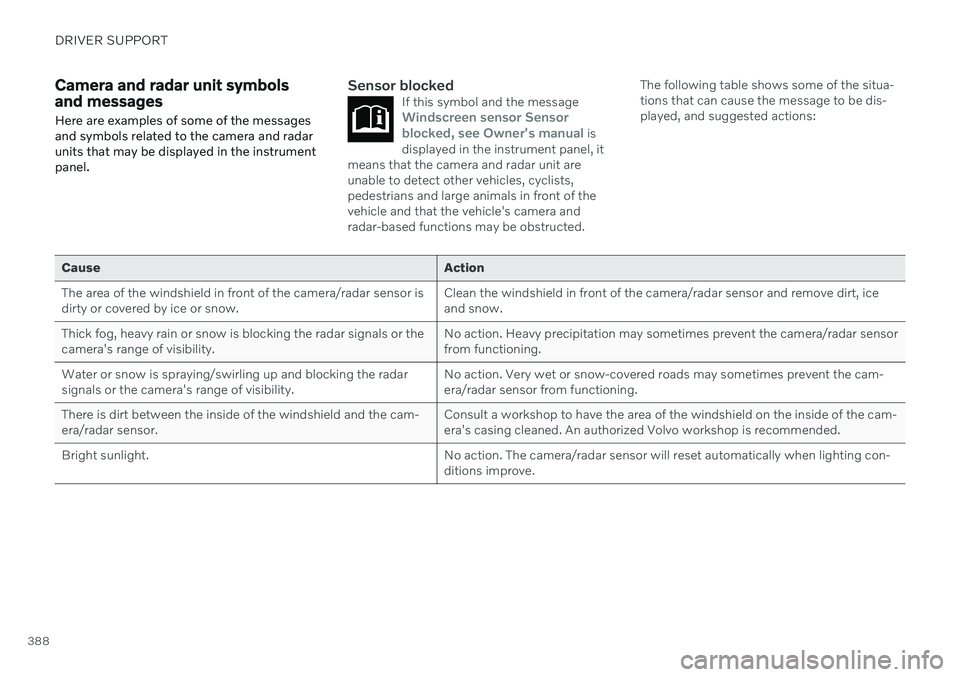
Camera and radar unit symbols and messages Here are examples of some of the messages and symbols related to the camera and radarunits that may be displayed in the instrumentpanel.Sensor blockedIf this symbol and the messageWindscreen sensor Sensor
blocked, see Owner's manual is
displayed in the instrument panel, it
means that the camera and radar unit are unable to detect other vehicles, cyclists,pedestrians and large animals in front of thevehicle and that the vehicle's camera andradar-based functions may be obstructed.
The following table shows some of the situa- tions that can cause the message to be dis-played, and suggested actions:
Cause Action
The area of the windshield in front of the camera/radar sensor is dirty or covered by ice or snow. Clean the windshield in front of the camera/radar sensor and remove dirt, iceand snow.
Thick fog, heavy rain or snow is blocking the radar signals or thecamera's range of visibility. No action. Heavy precipitation may sometimes prevent the camera/radar sensorfrom functioning.
Water or snow is spraying/swirling up and blocking the radarsignals or the camera's range of visibility. No action. Very wet or snow-covered roads may sometimes prevent the cam-era/radar sensor from functioning.
There is dirt between the inside of the windshield and the cam-era/radar sensor. Consult a workshop to have the area of the windshield on the inside of the cam-era's casing cleaned. An authorized Volvo workshop is recommended.
Bright sunlight. No action. The camera/radar sensor will reset automatically when lighting con-ditions improve.
Page 439 of 661
STARTING AND DRIVING
* Option/accessory.437
Checking trailer lights
When connecting a trailer, make sure that all of the lights on the trailer are functioningbefore starting to drive.
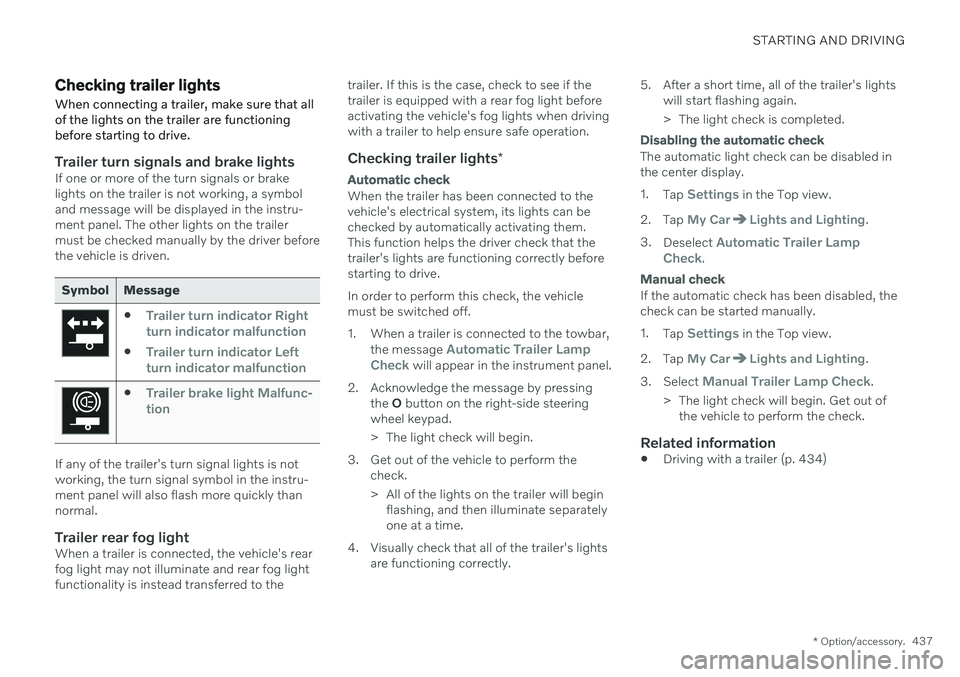
Trailer turn signals and brake lightsIf one or more of the turn signals or brake lights on the trailer is not working, a symboland message will be displayed in the instru-ment panel. The other lights on the trailermust be checked manually by the driver beforethe vehicle is driven.
Symbol Message
Trailer turn indicator Right
turn indicator malfunction
Trailer turn indicator Left
turn indicator malfunction
Trailer brake light Malfunc-
tion
If any of the trailer's turn signal lights is not working, the turn signal symbol in the instru-ment panel will also flash more quickly thannormal.
Trailer rear fog lightWhen a trailer is connected, the vehicle's rearfog light may not illuminate and rear fog lightfunctionality is instead transferred to the trailer. If this is the case, check to see if thetrailer is equipped with a rear fog light beforeactivating the vehicle's fog lights when drivingwith a trailer to help ensure safe operation.
Checking trailer lights
*
Automatic check
When the trailer has been connected to the vehicle's electrical system, its lights can bechecked by automatically activating them.This function helps the driver check that thetrailer's lights are functioning correctly beforestarting to drive. In order to perform this check, the vehicle must be switched off.
1. When a trailer is connected to the towbar,
the message
Automatic Trailer Lamp
Check will appear in the instrument panel.
2. Acknowledge the message by pressing the O button on the right-side steering
wheel keypad.
> The light check will begin.
3. Get out of the vehicle to perform the check.
> All of the lights on the trailer will beginflashing, and then illuminate separately one at a time.
4. Visually check that all of the trailer's lights are functioning correctly. 5. After a short time, all of the trailer's lights
will start flashing again.
> The light check is completed.
Disabling the automatic check
The automatic light check can be disabled in the center display. 1.Tap
Settings in the Top view.
2. Tap
My CarLights and Lighting.
3. Deselect
Automatic Trailer Lamp
Check.
Manual check
If the automatic check has been disabled, the check can be started manually. 1. Tap
Settings in the Top view.
2. Tap
My CarLights and Lighting.
3. Select
Manual Trailer Lamp Check.
> The light check will begin. Get out of the vehicle to perform the check.
Related information
Driving with a trailer (p. 434)
Page 648 of 661
INDEX
646Fluids and oils 581, 636, 637 Fog lights
front 157
rear 158
Four-C 422 Front seat blower 220
climate 210
heating 212, 213
temperature 222
ventilation 215
Front seat manual 182
Front seats, power 183 adjusting passenger seat from driv-
er's seat 191
adjusting seat 183
lumbar support 189
massage 186, 187, 188
multifunction control 186, 187, 188, 189
side bolsters 189
store position 184, 185
FSC, environmental labeling 23
Fuel 427 Travel Link service 467
Fuel filling 426
Fuel gauge 87
Fuel requirements 427, 428
Fuel tank volume 637
Fuse box 589
Fuses 589 below the glove compartment 596
in engine compartment 591
in the cargo compartment 602
replacing 589
G
Gasoline grade 427 Gaugefuel gauge 87
Gear selector positions automatic transmission 407
Glass, laminated/reinforced 164
Glove compartment 554 Gracenote ® 473
Grocery bag holders 557
Gross vehicle weight 633
H
Handbrake 400
Hand wash 615
Hard disk space 508
Hazard warning flashers 159
HD radio 457
Head restraint 193
Head-up display 140 activating/deactivating 141
cleaning 609
Distance Alert 350
replacing windshield 576
settings 142
store position 142, 184, 185
Heated wiper blades 174 Heating Seats 212, 213
steering wheel 215, 216
windows 219
high beams 154, 155
High engine temperature 430
Hill Start Assist 405 Hill Start Assist (HSA) 405
Hoisting the vehicle 573 HomeLink ®
441
programming 442
type approval 444
use 443
Page 650 of 661
INDEX
648
L
Labelslocation 628
Laminated glass 164 Lamps changing 607
Trailer 437
Lane Keeping Aid 316 activating/deactivating 318
display 322
limitations 319
see Lane Keeping Aid 316
select assistance option 319
Symbols and messages 320
Language 130
Large Animal Detection (LAD) 327
Launch function 412Leather upholstery, cleaning instruc-
tions 611 Leveling control suspension 422
License agreement 96, 509
Lifting tools 537 Light bulbs changing 607
Light control 150, 162
Lighting Active Bending Lights 156
approach lighting 160
automatic high beam 155
brake lights 159
control, instrument, display 162
controls 150, 160
cornering illumination 157
daytime running lights 152
emergency brake lights 159
front fog lights 157
Hazard warning flashers 159
high beams 154, 155
home safe lighting 160
in passenger compartment 160
low beams 153
position lights 152
rear fog light 158
settings 151
Turn signals 156
Lighting, replacing bulbs 607
Limp home 406 Load anchoring eyelets cargo compartment 558
Load anchoring hooks 557
Load carriers 557
Load index 524Loading general 556
load anchoring eyelets 558
long load 556
Lock indication 236 setting 238
Locking/unlocking Tailgate 243, 256
Locking wheel bolts 537 Locks locking/unlocking 241
Locks and remote keys 236Low battery charge level start battery 431
Low beams 153
M
Maintained climate comfort 231 start/stop 231
Maintenance 566 corrosion protection 620
Max. axle weight 633
Max. roof load 633