key battery VOLVO V60 2021 User Guide
[x] Cancel search | Manufacturer: VOLVO, Model Year: 2021, Model line: V60, Model: VOLVO V60 2021Pages: 661, PDF Size: 12.68 MB
Page 253 of 661

KEY, LOCKS AND ALARM
* Option/accessory.251
NOTE
When the door is unlocked using the detachable key blade and then opened, thealarm will be triggered. The alarm must bedeactivated manually; see separate sec-tion.
LockingThe left-hand front door can be locked by inserting the detachable key into the door'slock cylinder. The other doors have lock mechanisms in the side of the door that must be pushed in usingthe key blade. The door will then be lockedmechanically and cannot be opened from theoutside. The doors can still be opened from inside.
Manual door lock. This is not the child lock.
1. Remove the detachable key blade from
the remote key.
2. Insert the key blade into the opening for the lock mechanism.
3. Push in the key until it stops, about 12 mm (0.5 inch).
The door can be opened from both the outside and the inside.
The door cannot be opened from the out- side. To return to position A, open the doorusing the inside door handle.
NOTE
The door's lock controls only lock that specific door, not all doors simultane-ously.
A manually locked rear door with acti-vated child lock cannot be openedfrom either the outside or the inside.The door can only be unlocked usingthe buttons on the key, the centrallocking button, the keyless locking sys- tem
* or Volvo On Call.
Related information
Detachable key blade (p. 249)
Arming and disarming the alarm (p. 267)
Starting the vehicle (p. 392)
Replacing the remote key's battery (p. 244)
Remote key (p. 238)
Page 268 of 661
||
KEY, LOCKS AND ALARM
266
Related information
Private Locking (p. 264)
Alarm The alarm emits sound and light signals if anyone without a valid remote key attemptsto break into the vehicle or interferes with thestart battery or alarm siren.
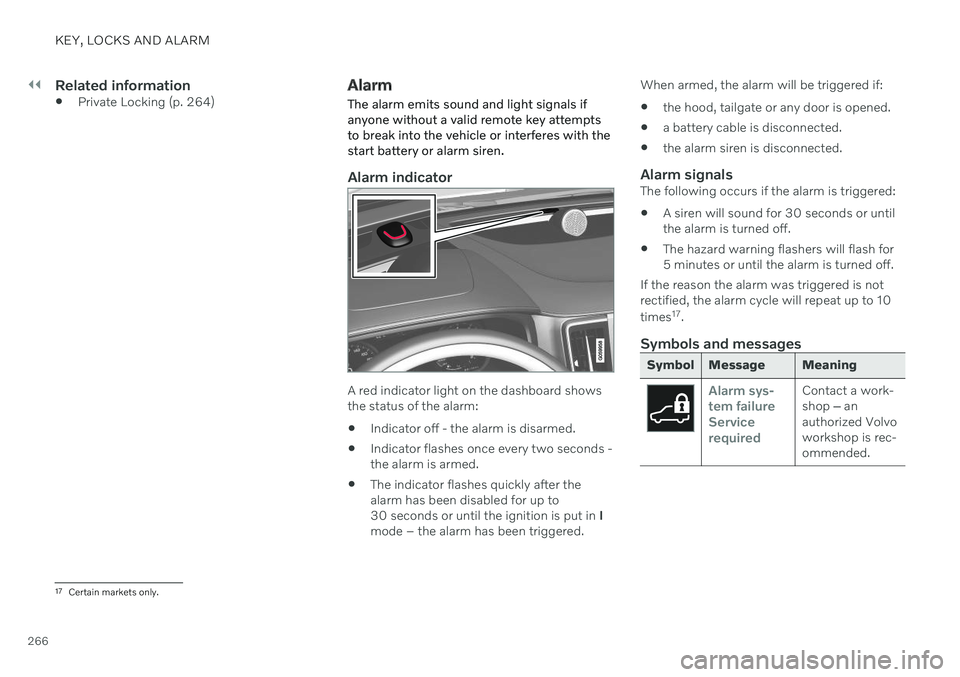
Alarm indicator
A red indicator light on the dashboard shows the status of the alarm:
Indicator off - the alarm is disarmed.
Indicator flashes once every two seconds -the alarm is armed.
The indicator flashes quickly after thealarm has been disabled for up to30 seconds or until the ignition is put in
I
mode – the alarm has been triggered. When armed, the alarm will be triggered if:
the hood, tailgate or any door is opened.
a battery cable is disconnected.
the alarm siren is disconnected.
Alarm signalsThe following occurs if the alarm is triggered:
A siren will sound for 30 seconds or untilthe alarm is turned off.
The hazard warning flashers will flash for5 minutes or until the alarm is turned off.
If the reason the alarm was triggered is notrectified, the alarm cycle will repeat up to 10 times 17
.
Symbols and messages
Symbol Message Meaning
Alarm sys- tem failureServicerequiredContact a work- shop ‒ an
authorized Volvoworkshop is rec-ommended.
17 Certain markets only.
Page 269 of 661
KEY, LOCKS AND ALARM
267
NOTE
Do not attempt to repair or alter any of the components in the alarm system yourself.Any such attempt could affect the termsand conditions of your insurance policy.
Related information
Arming and disarming the alarm (p. 267)
Arming and disarming the alarm
The alarm is armed when the vehicle is locked and disarmed when the vehicle isunlocked. The alarm can also be disarmedwithout a functioning key.
Arming and disarming the alarmThe alarm is armed when the vehicle is locked and disarmed when the vehicle is unlocked.
Disarming the alarm without a functioning remote key
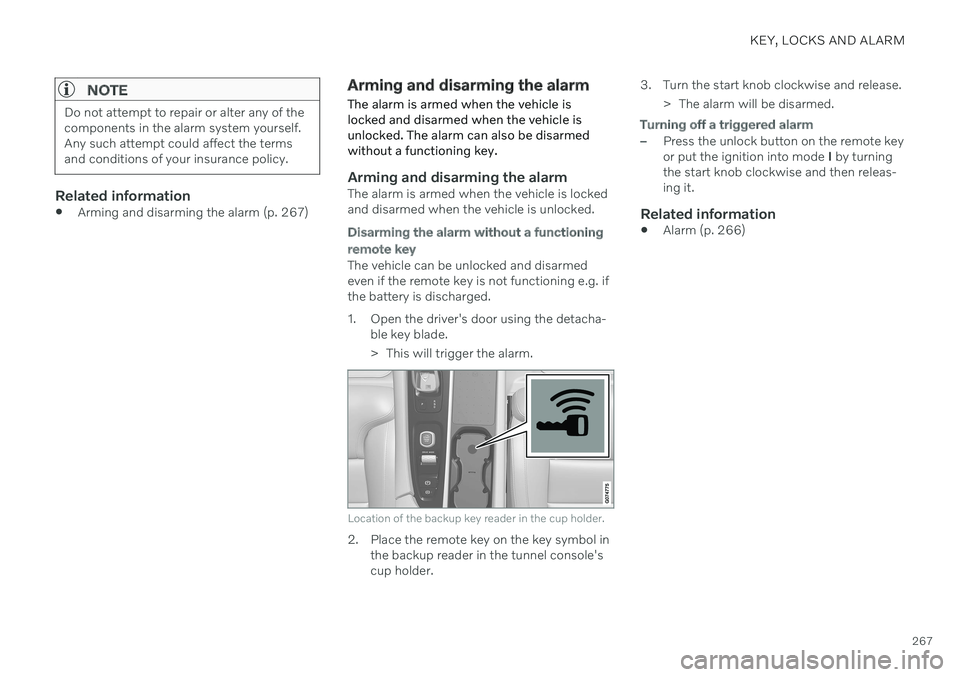
The vehicle can be unlocked and disarmed even if the remote key is not functioning e.g. ifthe battery is discharged.
1. Open the driver's door using the detacha- ble key blade.
> This will trigger the alarm.
Location of the backup key reader in the cup holder.
2. Place the remote key on the key symbol inthe backup reader in the tunnel console's cup holder. 3. Turn the start knob clockwise and release.
> The alarm will be disarmed.
Turning off a triggered alarm
–Press the unlock button on the remote key or put the ignition into mode I by turning
the start knob clockwise and then releas-ing it.
Related information
Alarm (p. 266)
Page 395 of 661
STARTING AND DRIVING
}}
393
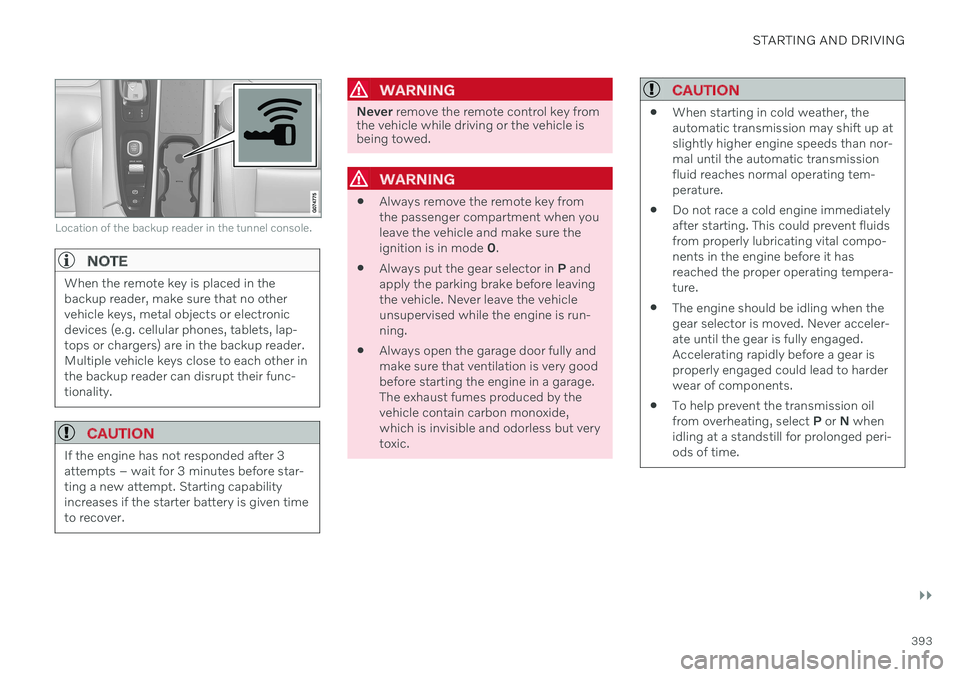
Location of the backup reader in the tunnel console.
NOTE
When the remote key is placed in the backup reader, make sure that no othervehicle keys, metal objects or electronicdevices (e.g. cellular phones, tablets, lap-tops or chargers) are in the backup reader.Multiple vehicle keys close to each other inthe backup reader can disrupt their func-tionality.
CAUTION
If the engine has not responded after 3 attempts – wait for 3 minutes before star-ting a new attempt. Starting capabilityincreases if the starter battery is given timeto recover.
WARNING
Never remove the remote control key from
the vehicle while driving or the vehicle is being towed.
WARNING
Always remove the remote key from the passenger compartment when youleave the vehicle and make sure theignition is in mode
0.
Always put the gear selector in
P and
apply the parking brake before leavingthe vehicle. Never leave the vehicleunsupervised while the engine is run-ning.
Always open the garage door fully andmake sure that ventilation is very goodbefore starting the engine in a garage.The exhaust fumes produced by thevehicle contain carbon monoxide,which is invisible and odorless but verytoxic.
CAUTION
When starting in cold weather, the automatic transmission may shift up atslightly higher engine speeds than nor-mal until the automatic transmissionfluid reaches normal operating tem-perature.
Do not race a cold engine immediatelyafter starting. This could prevent fluidsfrom properly lubricating vital compo-nents in the engine before it hasreached the proper operating tempera-ture.
The engine should be idling when thegear selector is moved. Never acceler-ate until the gear is fully engaged.Accelerating rapidly before a gear isproperly engaged could lead to harderwear of components.
To help prevent the transmission oilfrom overheating, select
P or N when
idling at a standstill for prolonged peri-ods of time.
Page 398 of 661
||
STARTING AND DRIVING
396
Related information
Starting the vehicle (p. 392)
Adjusting the steering wheel (p. 195)
Jump starting using another battery (p. 431)
Selecting ignition mode (p. 396)
Selecting ignition mode
The vehicle's ignition can be put in various modes (levels) to make different functionsavailable.
Selecting an ignition mode
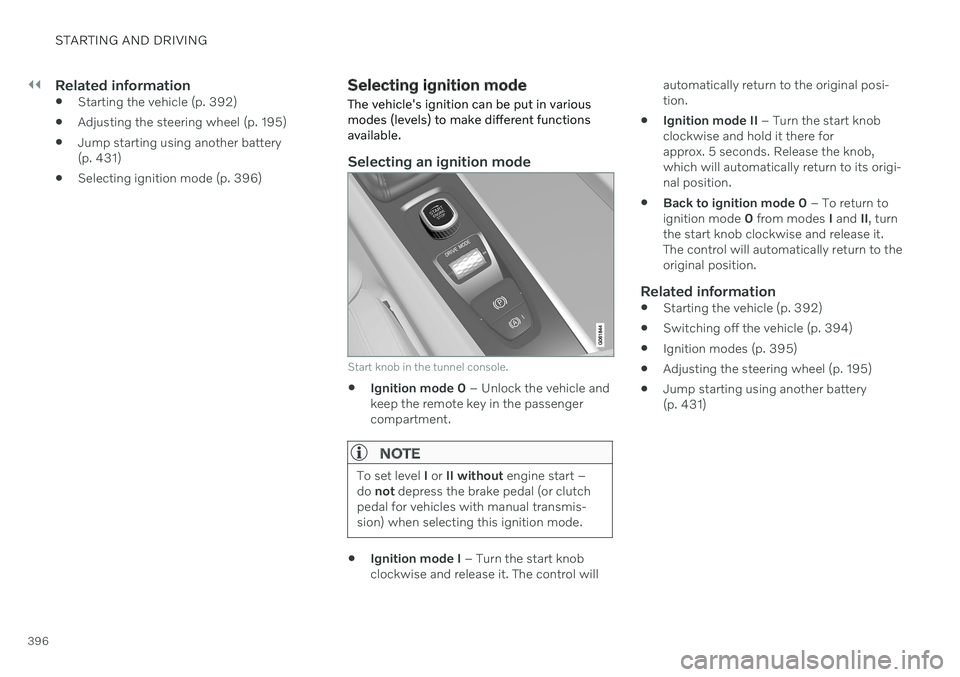
Start knob in the tunnel console.
Ignition mode 0
– Unlock the vehicle and
keep the remote key in the passenger compartment.
NOTE
To set level I or II without engine start –
do not depress the brake pedal (or clutch
pedal for vehicles with manual transmis- sion) when selecting this ignition mode.
Ignition mode I
– Turn the start knob
clockwise and release it. The control will automatically return to the original posi- tion.
Ignition mode II
– Turn the start knob
clockwise and hold it there forapprox. 5 seconds. Release the knob,which will automatically return to its origi-nal position.
Back to ignition mode 0
– To return to
ignition mode 0 from modes I and II, turn
the start knob clockwise and release it.The control will automatically return to theoriginal position.
Related information
Starting the vehicle (p. 392)
Switching off the vehicle (p. 394)
Ignition modes (p. 395)
Adjusting the steering wheel (p. 195)
Jump starting using another battery(p. 431)
Page 440 of 661
STARTING AND DRIVING
438
Towing using a towline
This section refers to one vehicle being towed behind another using a towline.
Before towing another vehicle, check applica- ble speed limit regulations.
Preparations and towing
CAUTION
For some transmission variants, it is not possible to shift from P position if theengine is switched off. Contact an author-ized Volvo workshop for assistance towingor call a professional towing service.
CAUTION
Note that the vehicle must always be towed with the wheels rolling forward.
Do not tow a vehicle with automatictransmission at a speed greater than80 km/h (50 mph) or for a distancegreater than 80 km (50 miles).
WARNING
Ignition mode
II must be active – all
airbags are deactivated in ignition mode I.
Always have the remote key in thevehicle when it is towed.
WARNING
The brake and steering servos do not work when the engine is off – it takesabout 5 times more pressure on the brakepedal and steering requires much moreeffort than normal.
1. Turn on the hazard warning flashers.
2. Attach the towline to the towing eyelet.
3. Put the vehicle in ignition mode II – with-
out pressing the brake pedal, turn the start knob clockwise and hold it there for about4 seconds. Release the knob, which willautomatically return to its original position.
4. Move the gear selector to neutral (N) and release the parking brake. If the battery charge level is too low, it may not be possible to release the parkingbrake. Connect an auxiliary battery to thevehicle if the battery is discharged.
> The towing vehicle can now start driv-ing. 5. Keep the towline taut when the towing
vehicle slows down by applying light pres- sure to the brake pedal. This will helpavoid jarring movements.
6. Be prepared to apply the brakes to stop the vehicle.
Jump startingDo not tow the vehicle to start the engine. Usean auxiliary battery if the start battery's chargelevel is so low that the engine cannot bestarted.
CAUTION
Attempting to tow with the engine running could result in damage to the three-waycatalytic converter.
Related information
Attaching and removing the towing eyelet (p. 439)
Hazard warning flashers (p. 159)
Recovery (p. 440)
Jump starting using another battery(p. 431)
Selecting ignition mode (p. 396)
Transmission (p. 406)
Page 570 of 661
||
MAINTENANCE AND SERVICE
568
Monthly:
Check cold tire pressure in all tires. Inspect the tires for wear.
Check that engine coolant and other fluidlevels are between the indicated "min"and "max" markings.
Clean interior glass surfaces with a glasscleaner and soft paper towels.
Wipe driver information displays with asoft cloth.
Visually inspect battery terminals for cor-rosion. Corrosion may indicate a loose ter-minal connector, or a battery near the endof its useful service life. Consult your Volvoretailer for additional information.
As needed:
Wash the vehicle, including the undercarriage, to reduce wear that can be caused by abuildup of dirt, and corrosion that can becaused by salt residues. Clean leaves and twigs from air intake vents at the base of the windshield, and from other pla-ces where they may collect.
NOTE
Complete service information for qualified technicians is available online for purchaseor subscription at www.volvotechinfo.com.
Related information
Vehicle status (p. 570)
Scheduling service and repairs (p. 571)
Connecting equipment to the vehicle's data link connector (p. 37)
Technician certification (p. 38)
Climate control system service (p. 576)
Maintenance of the brake system (p. 399)
Engine compartment overview (p. 578)
Data transfer between vehicle and workshop over Wi-Fi
Volvo workshops have a designated Wi-Fi network for data transfer between your vehi-cle and the workshop. Your visit to the work-shop will be easier and more effective whendiagnostics information and software can betransferred over the workshop's network.
At the workshop, your service technician can connect your vehicle to the workshop's Wi-Finetwork to perform troubleshooting anddownload software. For this type of communi-cation, the vehicle only connects to a work-shop's network. It is not possible to connectthe vehicle to another Wi-Fi network (e.g. yourhome network) in the same way as to a work-shop's network.
Connecting with remote keyConnection is usually managed by the servicetechnician, who will use the remote key but-tons. It is therefore important to bring a keywith buttons with you when you visit theworkshop. Pressing the lock button on theremote key three times will connect the vehi-cle to the workshop's Wi-Fi network. When the car is connected to a Wi-Fi net- work, the
symbol appears in the center
display.
Page 644 of 661
INDEX
642Auto-hold brakes 403
activating/deactivating 404
after collision 405
driver support 270
Automatic car wash 616 Automatic engine stop auto-stop 418
Automatic high beam 155
Automatic locking 260
Automatic relocking 241, 255
Automatic transmission 406, 407 kickdown 412
oil 636
Trailer 434
B
Backrestfront seat, adjusting 182, 183, 186, 187 , 188, 189
rear seat, folding 192
Battery jump-start 431
Maintenance 584
recycling 588
starter battery 584
support 586
symbols on the battery 588
Blind Spot Information 344
BLIS 344 activating/deactivating 345
limitations 346
Symbols and messages 347
Blower adjusting 220, 221
air distribution 205
air vents 206
Bluetooth connect 475
connecting vehicle to Internet 501
phone 485
settings 493
Book service and repair 571
Booster cushions 74 Brake assist after collision 405
Brake fluid grade 637
Brake functions 397
Brakes 397 anti-lock brakes, ABS 397
auto-brake with Pilot Assist 315auto-braking with Adaptive Cruise
Control 315automatic when stationary 403
Brake Assist System, BAS 398
brake lights 159
brake system 397
emergency brake lights 159
Maintenance 399
on salted roads 399
on wet roads 399
parking brake 400
brake system fluid 637
C
Camera sensorsee Camera 383
Camera unit 383 limitations 383
maintenance and cleaning 386
Symbols and messages 388
Capacity weight 547, 633 Care Key restricted remote key 248
settings 249
Cargo compartment 555 attachment points 558
cargo net 563
Page 650 of 661
INDEX
648
L
Labelslocation 628
Laminated glass 164 Lamps changing 607
Trailer 437
Lane Keeping Aid 316 activating/deactivating 318
display 322
limitations 319
see Lane Keeping Aid 316
select assistance option 319
Symbols and messages 320
Language 130
Large Animal Detection (LAD) 327
Launch function 412Leather upholstery, cleaning instruc-
tions 611 Leveling control suspension 422
License agreement 96, 509
Lifting tools 537 Light bulbs changing 607
Light control 150, 162
Lighting Active Bending Lights 156
approach lighting 160
automatic high beam 155
brake lights 159
control, instrument, display 162
controls 150, 160
cornering illumination 157
daytime running lights 152
emergency brake lights 159
front fog lights 157
Hazard warning flashers 159
high beams 154, 155
home safe lighting 160
in passenger compartment 160
low beams 153
position lights 152
rear fog light 158
settings 151
Turn signals 156
Lighting, replacing bulbs 607
Limp home 406 Load anchoring eyelets cargo compartment 558
Load anchoring hooks 557
Load carriers 557
Load index 524Loading general 556
load anchoring eyelets 558
long load 556
Lock indication 236 setting 238
Locking/unlocking Tailgate 243, 256
Locking wheel bolts 537 Locks locking/unlocking 241
Locks and remote keys 236Low battery charge level start battery 431
Low beams 153
M
Maintained climate comfort 231 start/stop 231
Maintenance 566 corrosion protection 620
Max. axle weight 633
Max. roof load 633
Page 653 of 661
INDEX
651
Symbols and messages 388
type approval 381
Radio 452 changing radio waveband and radio
station 454
HD radio 457
RBDS 456
search radio station 454
settings 456SiriusXM ®
Satellite radio 460, 461, 463
start 453
voice control 147
Radio favorites 455
Rain sensor 175, 176
Rain sensor's memory function 176
Rear camera 361
Rear Collision Warning 343 limitations 343
Rear seat blower 221
climate 210
folding backrest 192
head restraint 193
heating 213
temperature 223
Rearview/door mirrors adjusting door mirrors 168
dimming 168
heating 219
interior 167
Rearview mirror 167 dimming 168
Rear window heating 219
washers 178, 179
wipers 178, 179
Recalls 47
Recommendations when driving 424
Recommendations when loading 556
Recovery 440
Refrigerant 576 climate system 637
Refueling filling 426
fuel filler door, fuel flap 425
Regenerative braking 405
Remote immobilizer 252
Remote key 238 battery replacement 244
connecting to driver profile 136
detachable key blade 249
loss 248
Range 243
Remote updates 569
Reporting safety defects 46Resetting door mirrors 168
Resetting settings 132 change of owner 132
Driver profile 137
Resetting trip odometer 90
Road Sign Information 278 activate/deactivate warnings 281
activating/deactivating 279
display 279
limitations 282
Sensus Navigation 280
speed camera information 280
Speed warning 280
Road trip 424
Roll-over protection 271
Roll Stability Control 271
Roof load, max. weight 633
Run-off Mitigation 338
S
Safety 44 pregnancy 45
Safety belt, see Seat belt 49
Safety defects, reporting 46