tow VOLVO V60 2021 User Guide
[x] Cancel search | Manufacturer: VOLVO, Model Year: 2021, Model line: V60, Model: VOLVO V60 2021Pages: 661, PDF Size: 12.68 MB
Page 208 of 661
CLIMATE CONTROL
* Option/accessory.
206
Opening, closing and directing air vents
Some of the air vents in the passenger com- partment can be individually opened, closedand directed.
Misting can be eliminated by directing the outer air vents towards the door windows. Direct the outer air vents into the passenger compartment to maintain a comfortable tem-perature in warm weather.
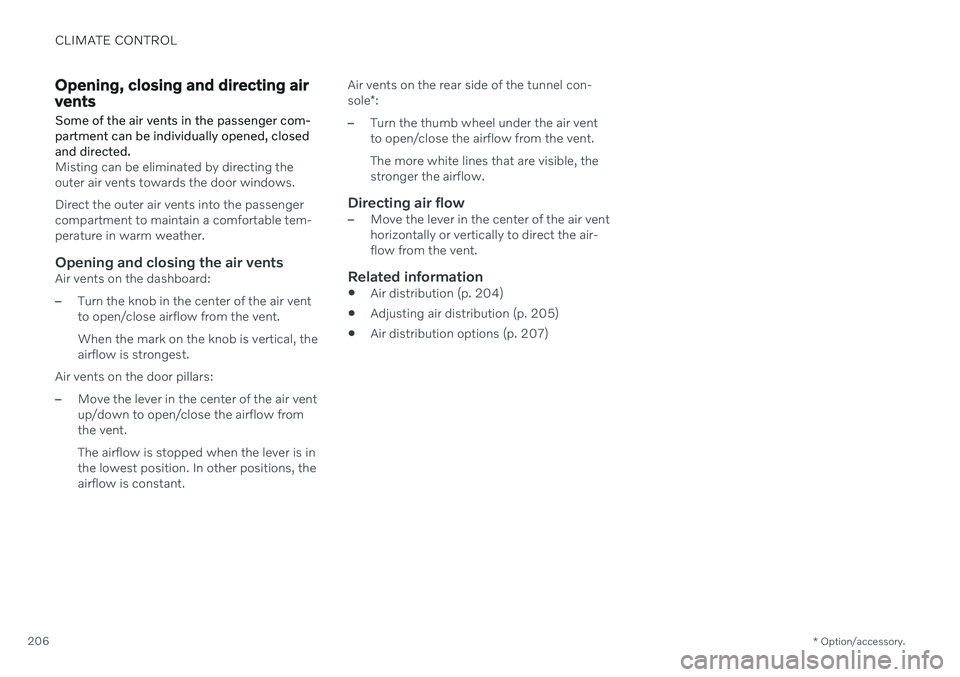
Opening and closing the air ventsAir vents on the dashboard:
–Turn the knob in the center of the air vent to open/close airflow from the vent. When the mark on the knob is vertical, the airflow is strongest.
Air vents on the door pillars:
–Move the lever in the center of the air vent up/down to open/close the airflow fromthe vent. The airflow is stopped when the lever is in the lowest position. In other positions, theairflow is constant. Air vents on the rear side of the tunnel con- sole
*:
–Turn the thumb wheel under the air vent to open/close the airflow from the vent. The more white lines that are visible, the stronger the airflow.
Directing air flow–Move the lever in the center of the air vent horizontally or vertically to direct the air-flow from the vent.
Related information
Air distribution (p. 204)
Adjusting air distribution (p. 205)
Air distribution options (p. 207)
Page 242 of 661
||
KEY, LOCKS AND ALARM
* Option/accessory.
240
NOTE
Be aware of the risk of locking the remote key in the vehicle. If the remote key or key tag is left in the vehicle, it will be deactivated whenthe vehicle is locked and the alarm setusing another valid key. The key will bereactivated when the vehicle isunlocked.
If the remote key or Care Key is left inthe vehicle, it will be deactivated evenif the vehicle is locked using Volvo OnCall, and will be reactivated when thevehicle is unlocked using Volvo On Callor another valid key.
Button-less key (Key Tag)
*
The button-less key4
provided with the keyless
locking and unlocking function works in the same way as the regular remote key for key-less start, locking and unlocking. The key iswaterproof up to a depth of approx. 10 meters(30 feet) for up to 60 minutes. It does nothave a detachable key blade and its batterycannot be replaced.
Care Key - restricted remote keyA Care Key enables the vehicle owner to set amaximum speed limit for the vehicle. This limit is intended to promote safe use of the vehicle,e.g. when it is loaned out.
InterferenceElectromagnetic fields or obstructing objectsmay interfere with the remote key's functionsfor keyless start and keyless locking and unlocking
*.
NOTE
Avoid storing the remote key near metal objects or electronic devices, e.g. cellphones, tablets, laptops or chargers – pref-erably no closer than 10-15 cm (4-6 in.).
If you experience interference, use the remote key's detachable blade to unlock the vehicleand then place the remote key in the backupreader in the tunnel console cup holder to dis-arm the alarm and start the vehicle.
NOTE
When the remote control key is placed in the cup holder, make sure that no othervehicle keys, metal objects or electronicdevices (e.g. cell phones, tablets, laptopsor chargers) are found in the cup holder.Multiple vehicle keys close to each other inthe cup holder can disrupt their functional-ity.
WARNING
California Proposition 65 Operating, servicing and maintaining a pas- senger vehicle can expose you to chemi-cals including engine exhaust, carbon mon-oxide, phthalates, and lead, which areknown to the State of California to causecancer and birth defects or other reproduc-tive harm. To minimize exposure, avoidbreathing exhaust, do not idle the engineexcept as necessary, service your vehicle ina well ventilated area and wear gloves orwash your hands frequently when servicingyour vehicle. For more information go towww.P65Warnings.ca.gov/passenger-vehicle.
4
Also called sport key.
Page 249 of 661
KEY, LOCKS AND ALARM
247
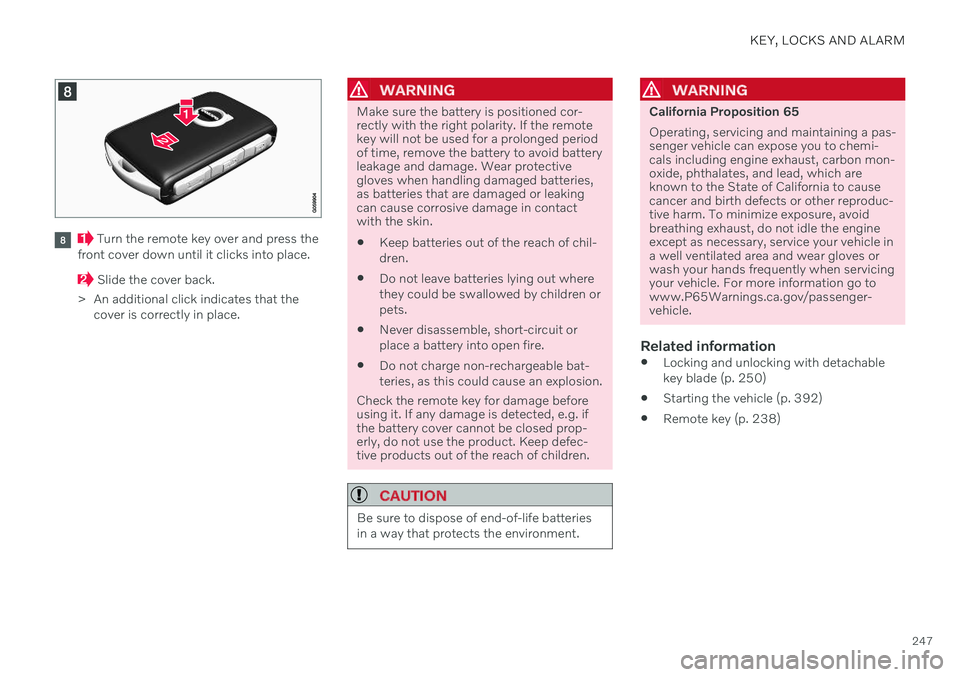
Turn the remote key over and press the
front cover down until it clicks into place.
Slide the cover back.
> An additional click indicates that the cover is correctly in place.
WARNING
Make sure the battery is positioned cor- rectly with the right polarity. If the remotekey will not be used for a prolonged periodof time, remove the battery to avoid batteryleakage and damage. Wear protectivegloves when handling damaged batteries,as batteries that are damaged or leakingcan cause corrosive damage in contactwith the skin. Keep batteries out of the reach of chil- dren.
Do not leave batteries lying out wherethey could be swallowed by children orpets.
Never disassemble, short-circuit orplace a battery into open fire.
Do not charge non-rechargeable bat-teries, as this could cause an explosion.
Check the remote key for damage before using it. If any damage is detected, e.g. ifthe battery cover cannot be closed prop-erly, do not use the product. Keep defec-tive products out of the reach of children.
CAUTION
Be sure to dispose of end-of-life batteries in a way that protects the environment.
WARNING
California Proposition 65 Operating, servicing and maintaining a pas- senger vehicle can expose you to chemi-cals including engine exhaust, carbon mon-oxide, phthalates, and lead, which areknown to the State of California to causecancer and birth defects or other reproduc-tive harm. To minimize exposure, avoidbreathing exhaust, do not idle the engineexcept as necessary, service your vehicle ina well ventilated area and wear gloves orwash your hands frequently when servicingyour vehicle. For more information go towww.P65Warnings.ca.gov/passenger-vehicle.
Related information
Locking and unlocking with detachable key blade (p. 250)
Starting the vehicle (p. 392)
Remote key (p. 238)
Page 274 of 661
||
DRIVER SUPPORT
* Option/accessory.
272 additional power to wheels that are not spin- ning. This function can also help prevent the wheels from spinning while the vehicle is accelerating.
Engine drag control
Engine drag control (EDC
3
) can help prevent
inadvertent wheel lock, e.g. after downshiftingor using engine braking when driving at lowspeeds on a slippery surface. Inadvertent wheel lock while driving could impair the driver's ability to steer the vehicle.
Trailer Stability Assist *4
Trailer Stability Assist (TSA
5
) is designed to
help stabilize a vehicle that is towing a trailer ifthe vehicle and trailer have begun to sway.
NOTE
Trailer Stability Assist is deactivated if ESC
Sport Mode is activated.
Related information
Driver support systems (p. 270)
Activating or deactivating Sport mode for Electronic Stability Control (p. 273)
Electronic Stability Control symbols andmessages (p. 274)
Trailer Stability Assist
* (p. 436)
Electronic Stability Control in sport mode The stability system (ESC 6
) is always acti-
vated and cannot be switched off. However, the driver can select
ESC Sport Mode,
which offers more active driving characteris- tics.
With the ESC Sport Mode sub-function
selected, intervention from the system is reduced and more lateral movement is permit-ted, giving the driver more control of the vehi-cle than usual. When
ESC Sport Mode is selected, the func-
tion may seem to be disabled even though it continues to assist the driver.
NOTE
When ESC Sport Mode is selected, the
trailer stabilizer (TSA 7
) is switched off.
ESC Sport Mode also helps provide more
traction, even if the vehicle gets stuck or is driving on a loose surface such as deep snowor loose sand.
3 Engine Drag Control4Trailer Stability Assist is included if the vehicle is equipped with a Volvo original towbar.5 Trailer Stability Assist
6 Electronic Stability Control
7 Trailer Stability Assist
Page 294 of 661

||
DRIVER SUPPORT
* Option/accessory.
292 such as Electronic Stability Control (ESC
45
).
The driver opens the door.
The driver unbuckles the seat belt.
The engine speed (rpm) is too low/high.
One or more of the wheels lose traction.
The brake temperature is high.
The parking brake is applied.
The camera and radar unit is covered by snow or heavy rain (the camera lens/radarwaves are blocked).
Your vehicle's speed goes below 5 km/h(3 mph) and ACC cannot determine if thevehicle ahead is stationary or if it isanother object, e.g. a speed bump.
Your vehicle's speed goes below 5 km/h(3 mph) and the vehicle ahead turns sothat ACC no longer has a vehicle to follow.
Related information
Adaptive Cruise Control
* (p. 286)
Selecting and activating Adaptive Cruise Control
* (p. 289)
Deactivating Adaptive Cruise Control
*
(p. 290)
Adaptive Cruise Control
* limitations
(p. 292)
Adaptive Cruise Control *46
limitations Adaptive Cruise Control (ACC 47
) may have
limited functionality in certain situations.
Steep roads and/or heavy loadsAdaptive Cruise Control is primarily intended to be driven on flat roads. The function maynot be able to maintain the correct time inter-val to the vehicle ahead when driving downsteep hills. The driver should be extra attentiveand prepared to apply the brakes. Do not use Adaptive Cruise Control if the vehi- cle is carrying a heavy load or towing a trailer.
Drive mode unavailableThe Off Road drive mode cannot be selected
if Adaptive Cruise Control is activated.
WARNING
This is not a collision avoidance sys- tem. The driver is always responsibleand must intervene if the system failsto detect a vehicle ahead.
The function does not brake for peopleor animals and does not brake for smallvehicles, such as bikes and motorcy-cles. Similarly, it does not brake for lowtrailers, oncoming, slow-moving or sta-tionary vehicles and objects.
Do not use the function in demandingsituations, such as in city traffic, atintersections, on slippery surfaces,with a lot of water or slush on the road,in heavy rain/snow, in poor visibility, onwinding roads, or on on/off ramps.
NOTE
The function uses the vehicle's camera and radar sensor, which has certain generallimitations.
Related information
Adaptive Cruise Control
* (p. 286)
Camera/radar sensor limitations (p. 383)
45
Electronic Stability Control
46 Depending on market, this function can be either standard or optional.
Page 299 of 661
DRIVER SUPPORT
}}
297
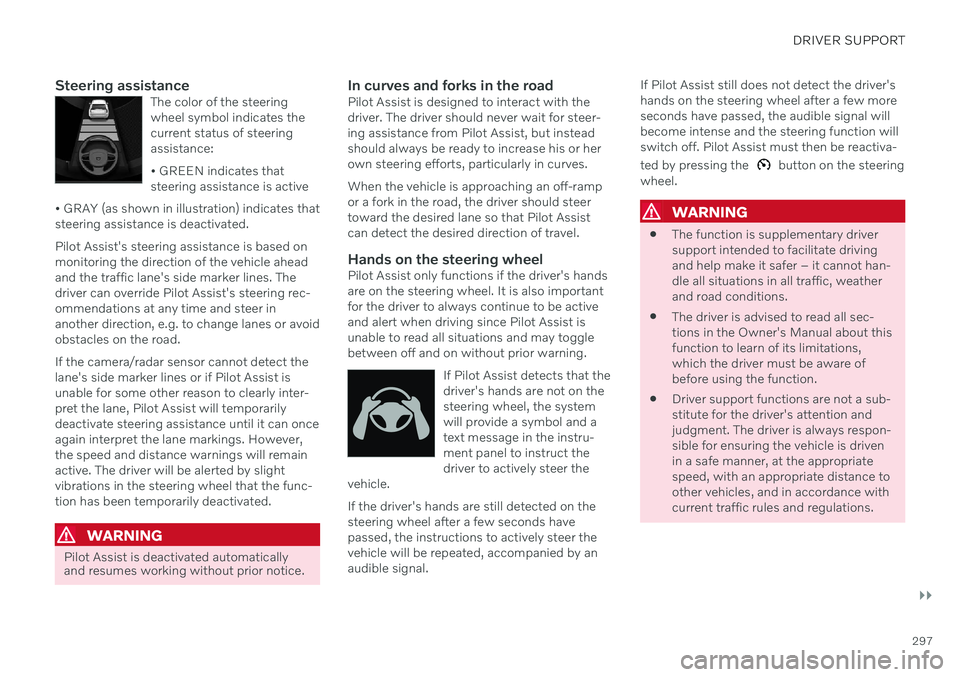
Steering assistanceThe color of the steering wheel symbol indicates thecurrent status of steeringassistance: • GREEN indicates that steering assistance is active
• GRAY (as shown in illustration) indicates thatsteering assistance is deactivated.
Pilot Assist's steering assistance is based on monitoring the direction of the vehicle aheadand the traffic lane's side marker lines. Thedriver can override Pilot Assist's steering rec-ommendations at any time and steer inanother direction, e.g. to change lanes or avoidobstacles on the road. If the camera/radar sensor cannot detect the lane's side marker lines or if Pilot Assist isunable for some other reason to clearly inter-pret the lane, Pilot Assist will temporarilydeactivate steering assistance until it can onceagain interpret the lane markings. However,the speed and distance warnings will remainactive. The driver will be alerted by slightvibrations in the steering wheel that the func-tion has been temporarily deactivated.
WARNING
Pilot Assist is deactivated automatically and resumes working without prior notice.
In curves and forks in the roadPilot Assist is designed to interact with the driver. The driver should never wait for steer-ing assistance from Pilot Assist, but insteadshould always be ready to increase his or herown steering efforts, particularly in curves. When the vehicle is approaching an off-ramp or a fork in the road, the driver should steertoward the desired lane so that Pilot Assistcan detect the desired direction of travel.
Hands on the steering wheelPilot Assist only functions if the driver's handsare on the steering wheel. It is also importantfor the driver to always continue to be activeand alert when driving since Pilot Assist isunable to read all situations and may togglebetween off and on without prior warning.
If Pilot Assist detects that thedriver's hands are not on thesteering wheel, the systemwill provide a symbol and atext message in the instru-ment panel to instruct thedriver to actively steer the
vehicle.
If the driver's hands are still detected on the steering wheel after a few seconds havepassed, the instructions to actively steer thevehicle will be repeated, accompanied by anaudible signal. If Pilot Assist still does not detect the driver'shands on the steering wheel after a few moreseconds have passed, the audible signal willbecome intense and the steering function willswitch off. Pilot Assist must then be reactiva- ted by pressing the
button on the steering
wheel.
WARNING
The function is supplementary driver support intended to facilitate drivingand help make it safer – it cannot han-dle all situations in all traffic, weatherand road conditions.
The driver is advised to read all sec-tions in the Owner's Manual about thisfunction to learn of its limitations,which the driver must be aware ofbefore using the function.
Driver support functions are not a sub-stitute for the driver's attention andjudgment. The driver is always respon-sible for ensuring the vehicle is drivenin a safe manner, at the appropriatespeed, with an appropriate distance toother vehicles, and in accordance withcurrent traffic rules and regulations.
Page 307 of 661
DRIVER SUPPORT
* Option/accessory.305
information from map data, which could cause variations in performance.
Pilot Assist will be switched off if thespeed-dependent power steeringwheel resistance is working at reducedpower, e.g. during cooling due to over-heating.
WARNING
Pilot Assist should only be used if there are clear lane lines painted on each side of thelane. All other use will increase the risk ofcontact with nearby obstacles that cannotbe detected by the functions.
WARNING
This is not a collision avoidance sys- tem. The driver is always responsibleand must intervene if the system failsto detect a vehicle ahead.
The function does not brake for peopleor animals and does not brake for smallvehicles, such as bikes and motorcy-cles. Similarly, it does not brake for lowtrailers, oncoming, slow-moving or sta-tionary vehicles and objects.
Do not use the function in demandingsituations, such as in city traffic, atintersections, on slippery surfaces,with a lot of water or slush on the road,in heavy rain/snow, in poor visibility, onwinding roads, or on on/off ramps.
The driver can always correct or adjust steer-ing assistance provided by Pilot Assist by turn-ing the steering wheel to the desired position.
Steep roads and/or heavy loadsPilot Assist is primarily intended to be drivenon flat roads. The function may not be able tomaintain the correct time interval to the vehi-cle ahead when driving down steep hills. Thedriver should be extra attentive and preparedto apply the brakes. Do not use Pilot Assist if the vehicle is carryinga heavy load or towing a trailer.
NOTE
Pilot Assist cannot be activated if a trailer, bike carrier or similar is connected to thevehicle electrical system.
Drive mode unavailableThe Off Road drive mode cannot be selected
when Pilot Assist is activated.
NOTE
The function uses the vehicle's camera and radar sensor, which has certain generallimitations.
Related information
Pilot Assist
* (p. 296)
Camera/radar sensor limitations (p. 383)
Speed-dependent steering wheel resis- tance (p. 270)
Drive modes
* (p. 413)
Page 312 of 661
DRIVER SUPPORT
* Option/accessory.
310
Passing assistance *
Passing assistance can assist the driver when passing other vehicles. The function can be used with Adaptive Cruise Control * or Pilot
Assist *.
When Adaptive Cruise Control or Pilot Assist is following another vehicle and you indicatethat you intend to pass that vehicle by using the turn signal 68
, the system will begin accel-
erating toward the vehicle ahead before your
vehicle has moved into the passing lane. The function will then delay a speed reduction to avoid early braking as your vehicleapproaches a slower-moving vehicle. The function remains active until your vehicle has passed the other vehicle.
WARNING
Please note that this function can be acti- vated in more situations than just passinganother vehicle, such as when a directionindicator is used to indicate a lane changeor before exiting to another road – the vehi-cle will then briefly accelerate.
WARNING
The function is supplementary driver support intended to facilitate drivingand help make it safer – it cannot han-dle all situations in all traffic, weatherand road conditions.
The driver is advised to read all sec-tions in the Owner's Manual about thisfunction to learn of its limitations,which the driver must be aware ofbefore using the function.
Driver support functions are not a sub-stitute for the driver's attention andjudgment. The driver is always respon-sible for ensuring the vehicle is drivenin a safe manner, at the appropriatespeed, with an appropriate distance toother vehicles, and in accordance withcurrent traffic rules and regulations.
Related information
Driver support systems (p. 270)
Using passing assistance (p. 310)
Adaptive Cruise Control
* (p. 286)
Pilot Assist
* (p. 296)
Using passing assistance Passing assistance can be used with Adap- tive Cruise Control * or Pilot Assist *. Several
conditions must be met for passing assis- tance to be possible.
In order to activate passing assistance:
your vehicle must be following a vehicle ahead (target vehicle)
your vehicle's
current speed must be
at least 70 km/h (43 mph)
the set speed
must be high enough to
safely pass another vehicle.
To start passing assistance:
–Turn on the left turn signal.
> Passing assistance will start.
68 Only the left-hand turn signal for left-hand drive vehicles, or right-hand turn signal for right-hand drive vehicles.
Page 348 of 661
DRIVER SUPPORT
* Option/accessory.
346
BLIS limitations
BLIS 90
functionality may be reduced in cer-
tain situations.
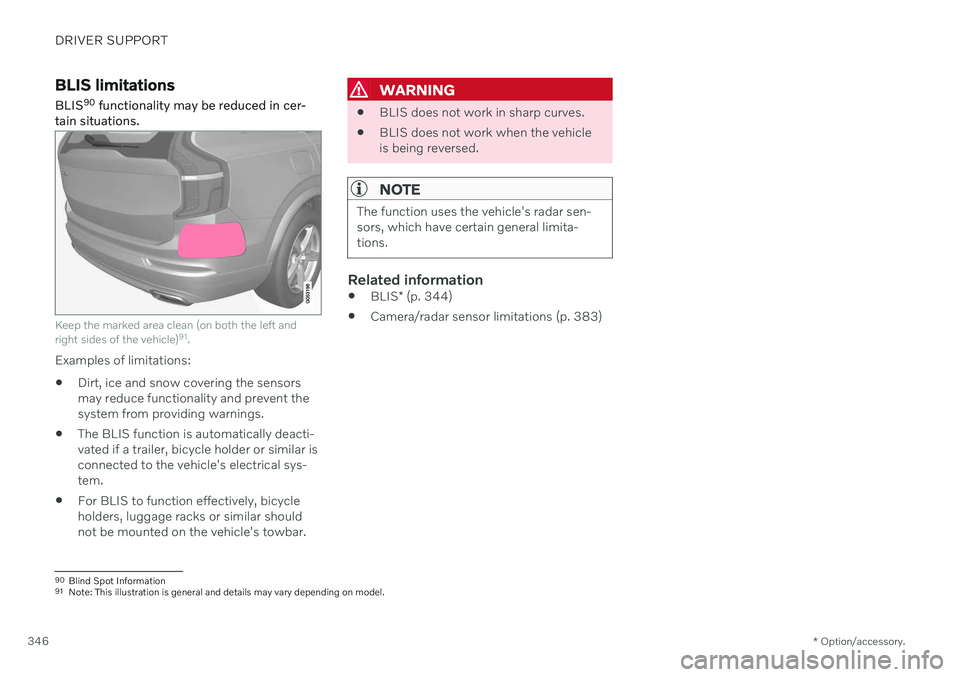
Keep the marked area clean (on both the left and right sides of the vehicle) 91
.
Examples of limitations:
Dirt, ice and snow covering the sensors may reduce functionality and prevent thesystem from providing warnings.
The BLIS function is automatically deacti-vated if a trailer, bicycle holder or similar isconnected to the vehicle's electrical sys-tem.
For BLIS to function effectively, bicycleholders, luggage racks or similar shouldnot be mounted on the vehicle's towbar.
WARNING
BLIS does not work in sharp curves.
BLIS does not work when the vehicle is being reversed.
NOTE
The function uses the vehicle's radar sen- sors, which have certain general limita-tions.
Related information
BLIS
* (p. 344)
Camera/radar sensor limitations (p. 383)
90
Blind Spot Information
91 Note: This illustration is general and details may vary depending on model.
Page 356 of 661
||
DRIVER SUPPORT
* Option/accessory.
354
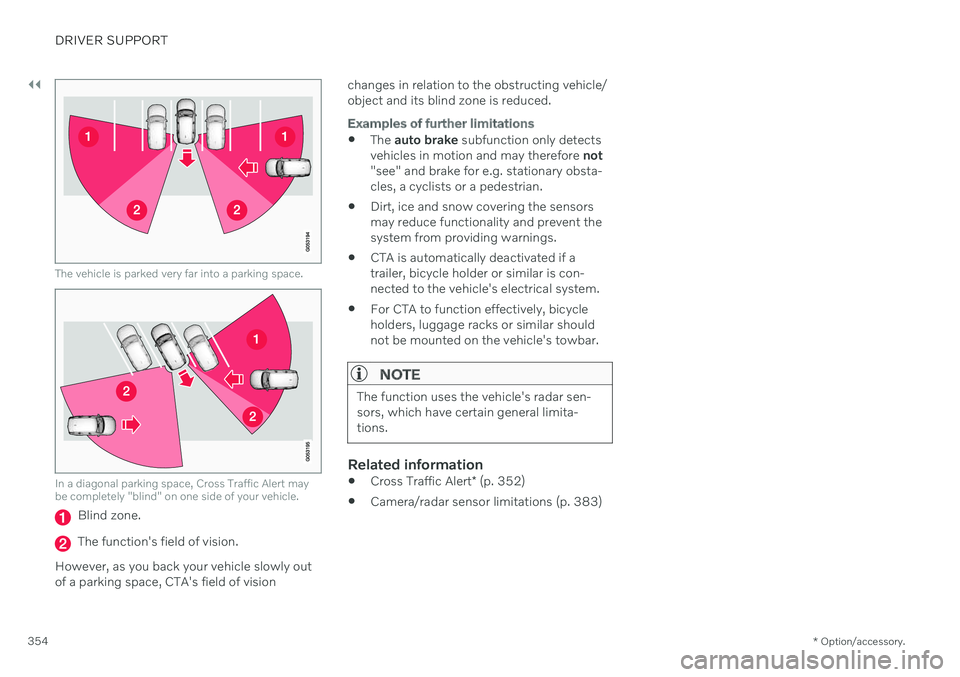
The vehicle is parked very far into a parking space.
In a diagonal parking space, Cross Traffic Alert may be completely "blind" on one side of your vehicle.
Blind zone.
The function's field of vision.
However, as you back your vehicle slowly out of a parking space, CTA's field of vision changes in relation to the obstructing vehicle/object and its blind zone is reduced.
Examples of further limitations
The
auto brake subfunction only detects
vehicles in motion and may therefore not
"see" and brake for e.g. stationary obsta- cles, a cyclists or a pedestrian.
Dirt, ice and snow covering the sensorsmay reduce functionality and prevent thesystem from providing warnings.
CTA is automatically deactivated if atrailer, bicycle holder or similar is con-nected to the vehicle's electrical system.
For CTA to function effectively, bicycleholders, luggage racks or similar shouldnot be mounted on the vehicle's towbar.
NOTE
The function uses the vehicle's radar sen- sors, which have certain general limita-tions.
Related information
Cross Traffic Alert
* (p. 352)
Camera/radar sensor limitations (p. 383)