air condition VOLVO V60 2021 Owner's Manual
[x] Cancel search | Manufacturer: VOLVO, Model Year: 2021, Model line: V60, Model: VOLVO V60 2021Pages: 661, PDF Size: 12.68 MB
Page 232 of 661
CLIMATE CONTROL
* Option/accessory.
230
Pre-cleaning *
Pre-cleaning of the vehicle before driving is used to improve the air quality in the passen-ger compartment.
It is only possible to activate pre-cleaning manually from the center display, but the func-tion is also started automatically when pre-conditioning has finished. The function uses the ventilation system to blow fresh air into the passenger compart-ment and then circulates the air through theclimate system's passenger compartment airfilter.
Related information
Parking climate
* (p. 226)
Starting and stopping pre-cleaning
*
(p. 230)
Preconditioning
* (p. 226)
Starting and stopping pre- cleaning *
Pre-cleaning improves the air quality in the
passenger compartment before driving. The function can be started in the center displayor from a cellular phone.
Starting and stopping from the vehicle
1. Tap the symbol in the center of the climate bar to open Climate view in the center dis- play.
2. Select the
Parking climate tab.
3. Tap
Start Pre-cleaning.
> Pre-cleaning starts/stops and the but- ton lights up/goes out.
Starting from app *A device with the Volvo On Call * app can be
used to start pre-cleaning or check settings.
NOTE
Precleaning always starts automatically when preconditioning is complete.
Related information
Parking climate
* (p. 226)
Pre-cleaning
* (p. 230)
Preconditioning
* (p. 226)
Page 269 of 661
KEY, LOCKS AND ALARM
267
NOTE
Do not attempt to repair or alter any of the components in the alarm system yourself.Any such attempt could affect the termsand conditions of your insurance policy.
Related information
Arming and disarming the alarm (p. 267)
Arming and disarming the alarm
The alarm is armed when the vehicle is locked and disarmed when the vehicle isunlocked. The alarm can also be disarmedwithout a functioning key.
Arming and disarming the alarmThe alarm is armed when the vehicle is locked and disarmed when the vehicle is unlocked.
Disarming the alarm without a functioning remote key
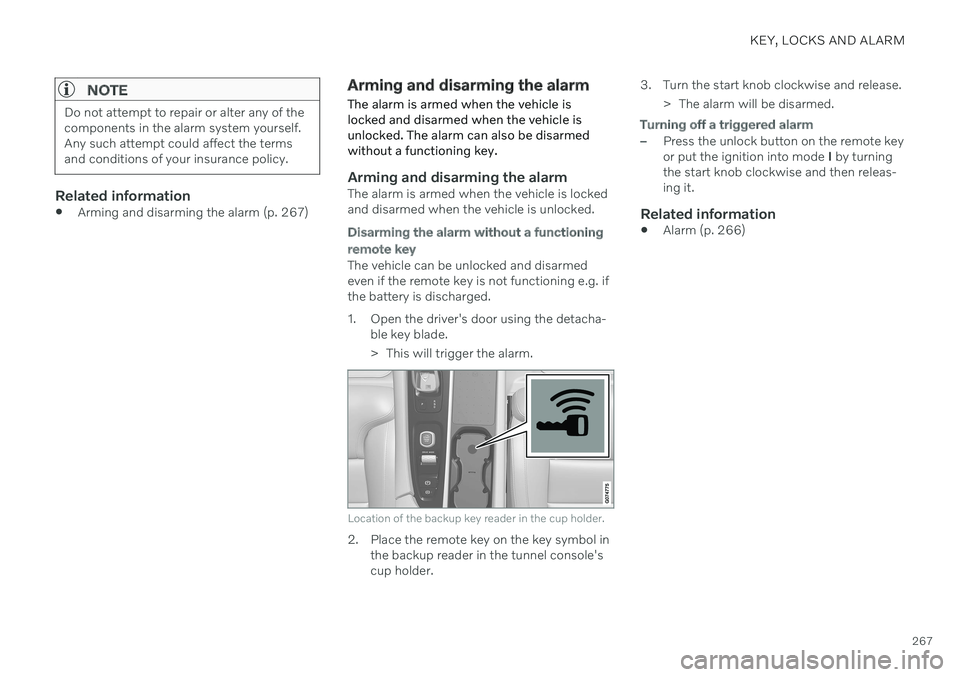
The vehicle can be unlocked and disarmed even if the remote key is not functioning e.g. ifthe battery is discharged.
1. Open the driver's door using the detacha- ble key blade.
> This will trigger the alarm.
Location of the backup key reader in the cup holder.
2. Place the remote key on the key symbol inthe backup reader in the tunnel console's cup holder. 3. Turn the start knob clockwise and release.
> The alarm will be disarmed.
Turning off a triggered alarm
–Press the unlock button on the remote key or put the ignition into mode I by turning
the start knob clockwise and then releas-ing it.
Related information
Alarm (p. 266)
Page 306 of 661
DRIVER SUPPORT
* Option/accessory.
304
Pilot Assist *62
limitations
Pilot Assist functionality may be reduced in certain situations.
Pilot Assist is a driver support function designed to simplify driving and assist thedriver in many situations. However, the driveris always responsible for maintaining a suita-ble distance to vehicles or objects around itand ensuring that the vehicle is correctly posi-tioned in the traffic lane.
WARNING
In some situations, Pilot Assist may have trouble helping the driver properly or maybe deactivated automatically – we adviseagainst using Pilot Assist in such cases.Examples of such situations include:
the lane markings are unclear, worn, missing, cross each other, or there aremultiple sets of road markings.
the lane division changes, e.g. whenlanes split or merge, and at off-ramps.
when there is road construction andsudden changes to the road surface,e.g. when the lines may no longer markthe correct route.
edges or other lines than lane markingsare present on or near the road, e.g.curbs, joints or repairs to the road sur-face, edges of barriers, roadside edgesor strong shadows.
the lane is narrow or winding.
the lane contains ridges or holes.
weather conditions are poor, e.g. rain,snow or fog or slush or reduced visibil-
ity with poor light conditions, back- lighting, wet road surface, etc.
The driver should also note that Pilot Assist has the following limitations:
High curbs, roadside barriers, tempo- rary obstacles (traffic cones, safety bar-riers, etc.) are not detected. Alterna-tively, they may be detected incorrectlyas lane markings, with a subsequentrisk of contact between the vehicle andsuch obstacles. The driver is responsi-ble for ensuring that the vehicle main-tains a suitable distance from suchobstacles.
The camera and radar sensors do nothave the capacity to detect all oncom-ing objects and obstacles in trafficenvironments, e.g. potholes, stationaryobstacles or objects that completely orpartially block the route.
Pilot Assist does not "see" pedestrians,animals, etc.
The steering assistance is limited inforce, which means that Pilot Assistcannot always help the driver to steerand keep the vehicle within the lane.
In vehicles equipped with Sensus Navigation
*, the function is able to use
62
Depending on market, this function can be either standard or optional.
Page 387 of 661
DRIVER SUPPORT
}}
* Option/accessory.385
Limited field of vision
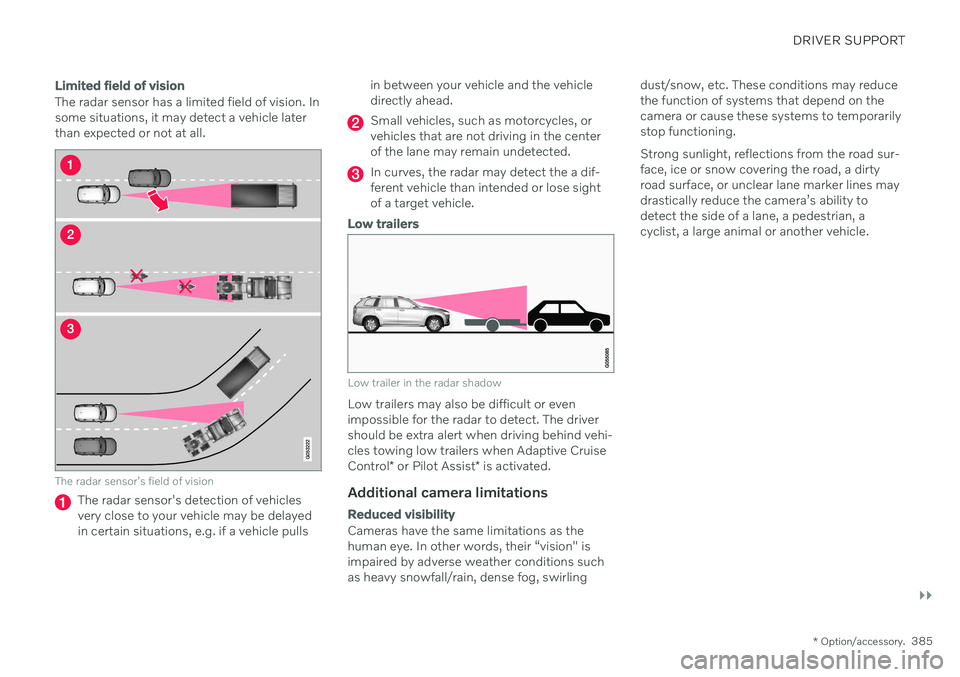
The radar sensor has a limited field of vision. In some situations, it may detect a vehicle laterthan expected or not at all.
The radar sensor's field of vision
The radar sensor's detection of vehicles very close to your vehicle may be delayedin certain situations, e.g. if a vehicle pulls in between your vehicle and the vehicledirectly ahead.
Small vehicles, such as motorcycles, or vehicles that are not driving in the centerof the lane may remain undetected.
In curves, the radar may detect the a dif- ferent vehicle than intended or lose sightof a target vehicle.
Low trailers
Low trailer in the radar shadow
Low trailers may also be difficult or even impossible for the radar to detect. The drivershould be extra alert when driving behind vehi- cles towing low trailers when Adaptive Cruise Control
* or Pilot Assist
* is activated.
Additional camera limitations
Reduced visibility
Cameras have the same limitations as the human eye. In other words, their “vision" isimpaired by adverse weather conditions suchas heavy snowfall/rain, dense fog, swirling dust/snow, etc. These conditions may reducethe function of systems that depend on thecamera or cause these systems to temporarilystop functioning. Strong sunlight, reflections from the road sur- face, ice or snow covering the road, a dirtyroad surface, or unclear lane marker lines maydrastically reduce the camera
Page 388 of 661
||
DRIVER SUPPORT
* Option/accessory.
386
Additional Park Assist Camera *
limitations
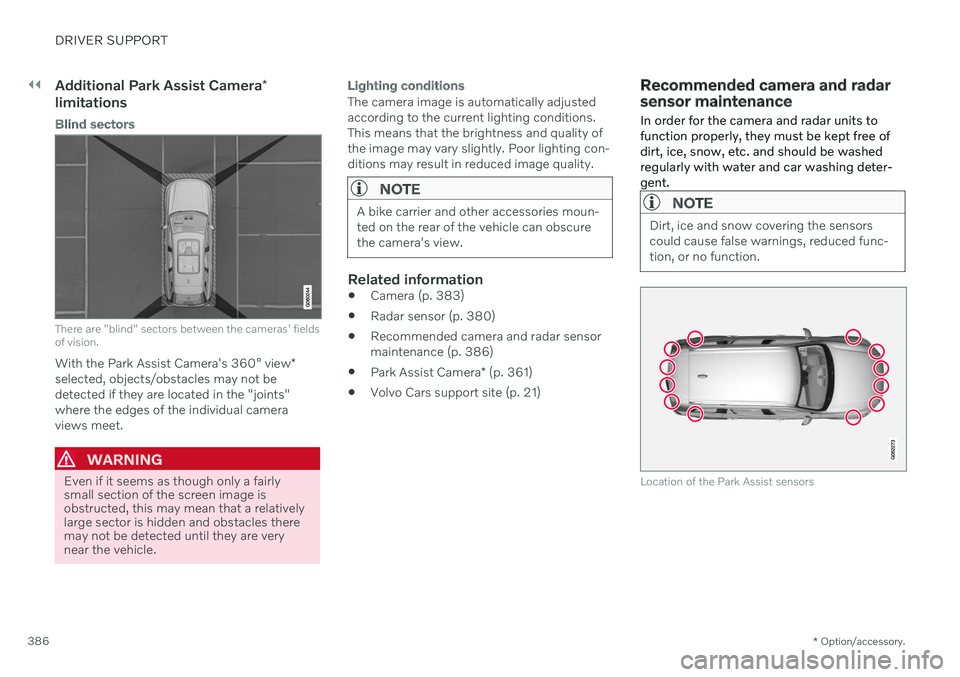
Blind sectors
There are "blind" sectors between the cameras' fields of vision.
With the Park Assist Camera's 360° view *
selected, objects/obstacles may not be detected if they are located in the "joints"where the edges of the individual cameraviews meet.
WARNING
Even if it seems as though only a fairly small section of the screen image isobstructed, this may mean that a relativelylarge sector is hidden and obstacles theremay not be detected until they are verynear the vehicle.
Lighting conditions
The camera image is automatically adjusted according to the current lighting conditions.This means that the brightness and quality ofthe image may vary slightly. Poor lighting con-ditions may result in reduced image quality.
NOTE
A bike carrier and other accessories moun- ted on the rear of the vehicle can obscurethe camera's view.
Related information
Camera (p. 383)
Radar sensor (p. 380)
Recommended camera and radar sensor maintenance (p. 386)
Park Assist Camera
* (p. 361)
Volvo Cars support site (p. 21)
Recommended camera and radar sensor maintenance
In order for the camera and radar units to function properly, they must be kept free ofdirt, ice, snow, etc. and should be washedregularly with water and car washing deter-gent.
NOTE
Dirt, ice and snow covering the sensors could cause false warnings, reduced func-tion, or no function.
Location of the Park Assist sensors
Page 425 of 661
STARTING AND DRIVING
* Option/accessory.423
Economical driving
A more economical driving style can help lower fuel consumption.
Before driving
If possible, precondition the vehicle before driving.
If preconditioning is not possible when itis cold outside, use seat and steeringwheel heating first. Avoid heating theentire passenger compartment to reducethe amount of current being taken fromthe start battery.
Avoid using idling to warm up the vehiclebefore driving.
The type of tires and inflation pressureused could affect energy consumption –consult an authorized Volvo retailer foradvice on suitable tires.
Remove unnecessary items from the vehi-cle - the heavier the load, the higher thefuel consumption.
While driving
Activate Eco drive mode.
Use gear selector position
D as often as
possible.
When using manual gear shifting, drive using the highest possible gear. Use the gear indicator 14
.
Maintain a steady speed and a generous following distance to traffic ahead to mini-mize braking. Use engine braking if possi-ble.
Higher speeds increase energy consump-tion because air resistance increases withspeed.
In a cold climate, reduce heating of thewindshield/rear window, mirrors, seatsand the steering wheel.
Avoid driving with the windows open.
Do not use the accelerator pedal to keepthe vehicle stationary on an uphill gradi-ent. Instead, activate the auto-hold brakefunction at a standstill.
Use trip data to see current fuel consump-tion.
WARNING
Never turn off the engine while the vehicle is moving, e.g. when driving downhill. Thisdeactivates certain important systemssuch as power steering and brakes.
After driving
If possible, park in a climate-controlled garage.
Related information
Eco drive mode (p. 416)
Starting and stopping preconditioning
*
(p. 226)
Checking tire pressure (p. 527)
Activating and deactivating Auto-hold at astandstill (p. 404)
Start/Stop function (p. 418)
Trip computer (p. 87)
14
Only available in certain markets.
Page 426 of 661
STARTING AND DRIVING
* Option/accessory.
424
Preparing for a long trip
It is important to have the vehicle's systems and equipment checked carefully before driv-ing long distances.
Check that
the engine is running properly and that fuel consumption is normal
there are no leaks (fuel, oil or other fluid)
the brake pedal is functioning properly
all lights work
tire tread depth and air pressure are atcorrect levels. Change to snow tires whendriving in areas where there is a risk ofsnowy or icy roads
the start battery is sufficiently charged
the wiper blades are in good condition
Related information
Checking tire pressure (p. 527)
Filling washer fluid (p. 626)
Winter driving (p. 424)
Economical driving (p. 423)
Vehicle modem settings (p. 503)
Loading recommendations (p. 556)
Driving with a trailer (p. 434)
Pilot Assist
* (p. 296)
Tire sealing system (p. 542)
Winter driving
It is important to check the vehicle before driving in cold/snowy conditions to makesure it can be driven safely.
Before the cold season arrives: Make sure the engine coolant contains 50% antifreeze. This mixture helps pro-tect the engine from frost erosion down toapprox. –35 °C (–31 °F). Do not mix dif-ferent types of antifreeze as this couldpose a health risk.
Keep the fuel tank well filled to preventcondensation from forming.
Check the viscosity of the engine oil. Oilwith low viscosity (thinner oil) improvescold-weather starting and reduces fuelconsumption when driving with a coldengine.
Check the condition and charge level ofthe start battery. Cold weather placesgreater demands on the start battery andreduces its capacity.
Use washer fluid containing antifreeze tohelp prevent ice from forming in thewasher fluid reservoir.
See separate section for engine oil recommen-dations.
Slippery driving conditionsTo help optimize traction and roadholding,Volvo recommends using snow tires on allwheels whenever there is a risk of snow or iceon the road.
NOTE
Certain countries require use of winter tires by law. Not all countries permit the use ofstudded tires.
Practice driving on slippery surfaces under controlled conditions to learn how the vehiclereacts.
Related information
Engine oil specifications (p. 636)
Snow tires (p. 540)
Snow chains (p. 541)
Braking on salted roads (p. 399)
Braking on wet roads (p. 399)
Filling washer fluid (p. 626)
Starter battery (p. 584)
Replacing windshield wiper blades(p. 624)
Changing rear window wipers (p. 622)
Refilling coolant (p. 582)
Page 432 of 661
||
STARTING AND DRIVING
430heating. This includes: altering fuel injec- tion settings or components, alteringemission system components or locationor removing components, and/or repeateduse of leaded fuel.
NOTE
Unleaded fuel is required for vehicles with three-way catalytic converters.
Heated oxygen sensorsThe heated oxygen sensors monitor the oxy- gen content of the exhaust gases. Readingsare fed into a control module that continuouslymonitors engine functions and controls fuelinjection. The ratio of fuel to air into the engineis continuously adjusted for efficient combus-tion to help reduce harmful emissions.
Related information
Octane rating (p. 428)
Fuel (p. 427)
Overheating of engine and transmission
In certain driving conditions, such as driving in mountainous areas or hot weather, there isa risk of the engine or transmission overheat-ing, especially when carrying heavy loads.
Engine power may be temporarily limited.
Remove any auxiliary lights mounted in front of the grille when driving in hotweather.
If the temperature in the engine's coolingsystem becomes too high, a warning sym-bol will appear in the instrument panel along with the message
Engine
temperature High temperature Stop
safely. Pull over to a safe location and let
the engine idle for a few minutes to cool down.
If the message
Engine temperature
High temperature Turn off engine orEngine coolant Level low, turn off
engine is displayed, stop the vehicle and
turn off the engine.
If the transmission begins to overheat, an alternative gear shifting program will beselected. An integrated protective functionwill also be activated, the warning symbolwill illuminate and the message
Transmission warm Reduce speed to
lower temperature or Transmission hot
Stop safely, wait for cooling will be dis- played in the instrument panel. Follow the recommendations given by reducingspeed or stopping the vehicle safely andletting the engine idle for a few minutes tolet the transmission cool.
If the vehicle begins to overheat, the airconditioning may be temporarily switchedoff.
After a prolonged period of driving indemanding conditions, do not turn off theengine immediately after stopping.
NOTE
It is normal for the engine's cooling fan to operate for a short time after the engine isswitched off.
Symbols in the instrument panel
Symbol Meaning
High engine temperature. Follow the recommendations provided.
Low coolant level. Follow the recommendations provided.
Transmission hot/overheated/ cooling. Follow the recommen-dations provided.
Page 495 of 661
AUDIO, MEDIA AND INTERNET
* Option/accessory.493
Head-up display
* (p. 140)
Sound settings (p. 448)
Settings for Bluetooth devices
Settings for Bluetooth-connected devices.
1. Tap Settings in the Top view.
2. Tap
CommunicationBluetooth
Devices and select settings:
Add device - start the procedure for pair-
ing a new device.
Previously paired devices - lists regis-
tered/paired devices.
Remove device - remove a connected
device.
Allowed services for this device - select
what the device will be used for: making calls, sending/receiving messages,streaming media, Internet connection.
Internet connection connect the vehicle
to the Internet using the device's Bluetooth connection.
Bluetooth ®
declaration of conformityUSA FCC CAUTIONChanges or modifications not expressly approved by the party responsible for compli-ance could void the user's authority to operatethe equipment. This transmitter must not beco-located or operated in conjunction with anyother antenna or transmitter. Canada This device complies with Industry Canada license-exempt RSS standard(s). Operation issubject to the following two conditions: (1) this device may not cause interference, and (2) this device must accept any interference, including interference that may cause unde-sired operation of the device.
Related information
Phone (p. 485)
Phone settings (p. 492)
Internet-connected vehicle
* (p. 500)
Connecting a phone to the car via Blue-tooth for the first time (p. 486)
Page 508 of 661
AUDIO, MEDIA AND INTERNET
* Option/accessory.
506
Wi-Fi technology and security
Networks must meet certain criteria in order for the vehicle to connect.
It is possible to connect to the following types of networks:
Frequency - 2.4 or 5 GHz 24
.
Standards - 802.11 a/b/g/n.
Security type - WPA2-AES-CCMP.
The vehicle's Wi-Fi system is designed to han- dle Wi-Fi devices inside the vehicle. Performance may be impaired if multiple devi- ces are using a frequency at the same time.
Related information
Internet-connected vehicle
* (p. 500)
Terms of use and data sharing The first time certain services and apps are started, a pop-up window with the heading
Terms and conditions and Data sharingmay open.The aim is to inform the user about Volvo's terms of use and data sharing policy. Byaccepting data sharing, the user accepts thatcertain information will be sent from the vehi-cle. This is required for certain services andapps to work with full functionality. The data sharing function for connected servi- ces and apps is disabled by default 25
. For cer-
tain connected services and apps in the vehi- cle to work, data sharing must be activated.Data sharing can be set from the center dis-play's settings menu or when the services orapps are started in the center display.
Privacy and data sharingThe software update that became available inNovember 2017 introduced privacy and datasharing settings for connected services anddownloaded apps. These settings can be found under
Privacy and data in the settings
menu in the vehicle's center display. There, you can choose which connected servi- ces will be allowed to share data. Data sharingfor downloaded apps can also be disabled there. Note that services and apps cannot beused as intended if data sharing is disabled. After a factory reset or e.g. a workshop visit or a software update, your data sharing preferen-ces may be reset to default settings. You willthen need to reactivate data sharing for con-nected services and downloaded apps.
NOTE
Settings for privacy and data sharing are unique for each driver profile.
Related information
Activating and deactivating data sharing (p. 507)
24
Selecting a frequency is not possible on all markets.
25 Does not apply to Volvo On Call.