airbag VOLVO V60 2021 Owner's Manual
[x] Cancel search | Manufacturer: VOLVO, Model Year: 2021, Model line: V60, Model: VOLVO V60 2021Pages: 661, PDF Size: 12.68 MB
Page 84 of 661
DISPLAYS AND VOICE CONTROL
* Option/accessory.
82
Instrument panel The instrument panel displays information related to the vehicle and driving.
The instrument panel contains gauges, indica- tors and monitoring and warning symbols.What is shown in the instrument panel variesdepending on the equipment, settings andfunctions currently active. The instrument panel is activated as soon as a door is opened, i.e. in ignition mode 0. The
panel will power down after a short period oftime if it is not used. To reactivate it, do one ofthe following:
Depress the brake pedal.
Activate ignition mode
I.
Open one of the doors. The instrument panel is available in two ver- sions: 8" and 12"
*.WARNING
If the instrument panel turns off, does not activate when the ignition is switched on,or part/all of the panel cannot be read, donot drive the vehicle. Consult a workshopimmediately. Volvo recommends anauthorized Volvo workshop.
WARNING
If the instrument panel is not functioning properly, information about brakes, airbagsor other safety-related systems may not bedisplayed. The driver will then not be ableto check the status of the vehicle systemsor receive relevant warnings and informa-tion.
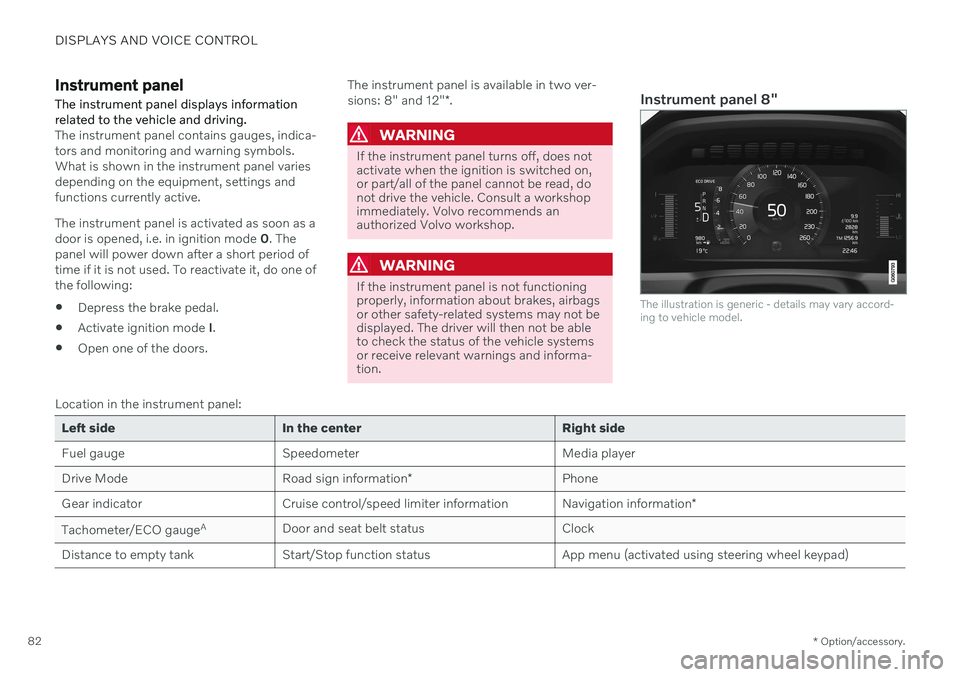
Instrument panel 8"
The illustration is generic - details may vary accord- ing to vehicle model.
Location in the instrument panel:
Left side In the center Right side
Fuel gauge Speedometer Media player Drive Mode
Road sign information* Phone
Gear indicator Cruise control/speed limiter information Navigation information*
Tachometer/ECO gauge A
Door and seat belt status Clock
Distance to empty tank Start/Stop function status App menu (activated using steering wheel keypad)
Page 95 of 661
DISPLAYS AND VOICE CONTROL
}}
93
Change the measurement standard for the temperature sensor etc. via system settings inthe center display's Top view.
Related information
Instrument panel (p. 82)
Changing system units of measurement(p. 130)
Indicator and warning symbols Indicator and warning symbols alert the driver that a function is active, that a symbolis working, or that an error or serious faulthas occurred.
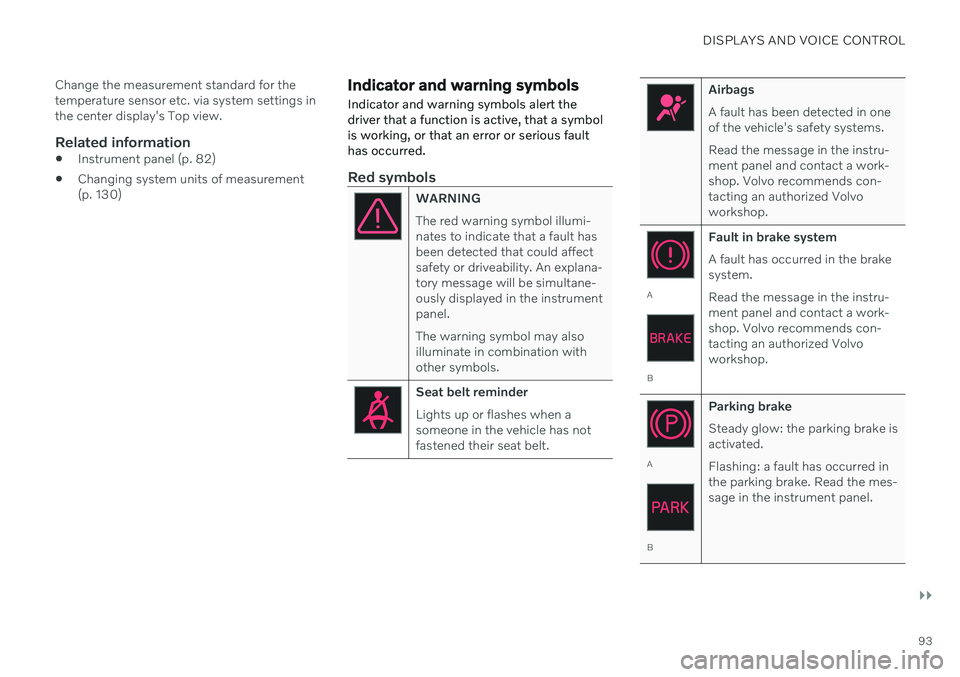
Red symbols
WARNING The red warning symbol illumi- nates to indicate that a fault hasbeen detected that could affectsafety or driveability. An explana-tory message will be simultane-ously displayed in the instrumentpanel. The warning symbol may also illuminate in combination withother symbols.
Seat belt reminder Lights up or flashes when a someone in the vehicle has notfastened their seat belt.
Airbags A fault has been detected in one of the vehicle's safety systems. Read the message in the instru- ment panel and contact a work-shop. Volvo recommends con-tacting an authorized Volvoworkshop.
A
B Fault in brake system A fault has occurred in the brake system. Read the message in the instru- ment panel and contact a work-shop. Volvo recommends con-tacting an authorized Volvoworkshop.
A
B
Parking brake Steady glow: the parking brake is activated. Flashing: a fault has occurred in the parking brake. Read the mes-sage in the instrument panel.
Page 407 of 661
STARTING AND DRIVING
* Option/accessory.405
Hill Start Assist
The function for assisting when starting the vehicle on inclines (HSA 4
) helps prevent the
vehicle from rolling backward when starting on an uphill gradient. When backing up a hill,HSA helps prevent the vehicle from rollingforward.
The function retains pressure from the brake pedal in the brake system for several secondsafter the brake pedal has been released. This temporary braking effect is released after a few seconds or when the driver begins driv-ing. Hill Start Assist is activated when the vehicle is stopped on steep inclines. The function isavailable even when the Auto-hold brake func-tion is switched off.
Related information
Auto-hold brakes (p. 403)
Brakes (p. 397)
Braking assist after a collision
In a collision in which the activation level is reached for the pyrotechnic seat belt tension-ers or airbags, or if a collision with a large ani-mal is detected, the vehicle's brakes will beautomatically activated. This function isintended to help prevent or reduce the effectsof any subsequent collision.
After a serious collision, it may no longer be possible to control and steer the vehicle. Inorder to avoid or mitigate a possible furthercollision with a vehicle or an object in the vehi-cle's path, the brake assist system is activatedautomatically to help stop the vehicle safely. If braking is not appropriate, e.g. if there is a risk of being hit by passing traffic, the drivercan override the system by depressing theaccelerator pedal. This function assumes that the brake system is intact after a collision.
Related information
Rear Collision Warning
* (p. 343)
BLIS
* (p. 344)
Brake functions (p. 397)
Regenerative braking
*
The vehicle recovers kinetic energy during braking in order to reduce fuel consumptionand emissions.
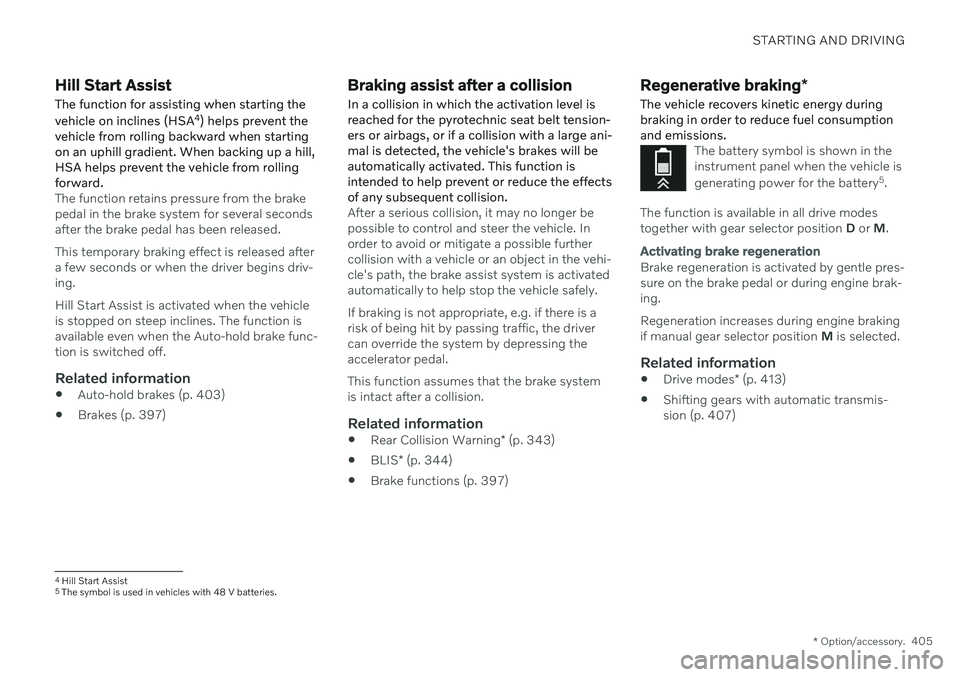
The battery symbol is shown in the instrument panel when the vehicle is generating power for the battery 5
.
The function is available in all drive modes together with gear selector position D or M.
Activating brake regeneration
Brake regeneration is activated by gentle pres- sure on the brake pedal or during engine brak-ing. Regeneration increases during engine braking if manual gear selector position M is selected.
Related information
Drive modes
* (p. 413)
Shifting gears with automatic transmis-sion (p. 407)
4
Hill Start Assist
5 The symbol is used in vehicles with 48 V batteries.
Page 440 of 661
STARTING AND DRIVING
438
Towing using a towline
This section refers to one vehicle being towed behind another using a towline.
Before towing another vehicle, check applica- ble speed limit regulations.
Preparations and towing
CAUTION
For some transmission variants, it is not possible to shift from P position if theengine is switched off. Contact an author-ized Volvo workshop for assistance towingor call a professional towing service.
CAUTION
Note that the vehicle must always be towed with the wheels rolling forward.
Do not tow a vehicle with automatictransmission at a speed greater than80 km/h (50 mph) or for a distancegreater than 80 km (50 miles).
WARNING
Ignition mode
II must be active – all
airbags are deactivated in ignition mode I.
Always have the remote key in thevehicle when it is towed.
WARNING
The brake and steering servos do not work when the engine is off – it takesabout 5 times more pressure on the brakepedal and steering requires much moreeffort than normal.
1. Turn on the hazard warning flashers.
2. Attach the towline to the towing eyelet.
3. Put the vehicle in ignition mode II – with-
out pressing the brake pedal, turn the start knob clockwise and hold it there for about4 seconds. Release the knob, which willautomatically return to its original position.
4. Move the gear selector to neutral (N) and release the parking brake. If the battery charge level is too low, it may not be possible to release the parkingbrake. Connect an auxiliary battery to thevehicle if the battery is discharged.
> The towing vehicle can now start driv-ing. 5. Keep the towline taut when the towing
vehicle slows down by applying light pres- sure to the brake pedal. This will helpavoid jarring movements.
6. Be prepared to apply the brakes to stop the vehicle.
Jump startingDo not tow the vehicle to start the engine. Usean auxiliary battery if the start battery's chargelevel is so low that the engine cannot bestarted.
CAUTION
Attempting to tow with the engine running could result in damage to the three-waycatalytic converter.
Related information
Attaching and removing the towing eyelet (p. 439)
Hazard warning flashers (p. 159)
Recovery (p. 440)
Jump starting using another battery(p. 431)
Selecting ignition mode (p. 396)
Transmission (p. 406)
Page 597 of 661
MAINTENANCE AND SERVICE
595
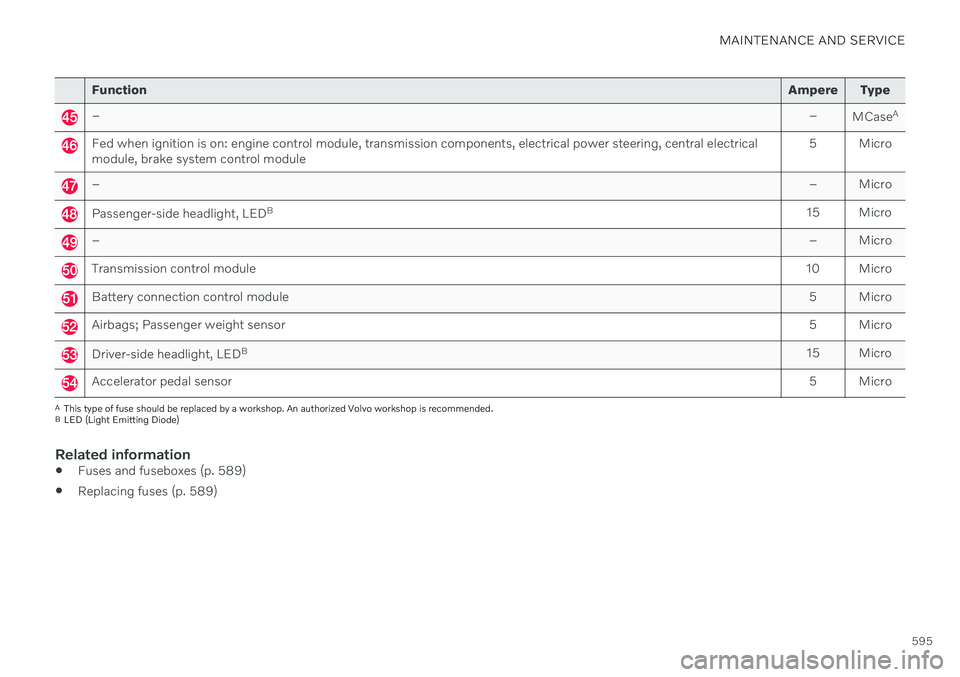
FunctionAmpere Type
– –
MCaseA
Fed when ignition is on: engine control module, transmission components, electrical power steering, central electrical module, brake system control module 5 Micro
–
– Micro
Passenger-side headlight, LEDB
15 Micro
– – Micro
Transmission control module10 Micro
Battery connection control module 5 Micro
Airbags; Passenger weight sensor5 Micro
Driver-side headlight, LEDB
15 Micro
Accelerator pedal sensor 5 Micro
A
This type of fuse should be replaced by a workshop. An authorized Volvo workshop is recommended.
B LED (Light Emitting Diode)
Related information
Fuses and fuseboxes (p. 589)
Replacing fuses (p. 589)
Page 601 of 661
MAINTENANCE AND SERVICE
}}
* Option/accessory.599
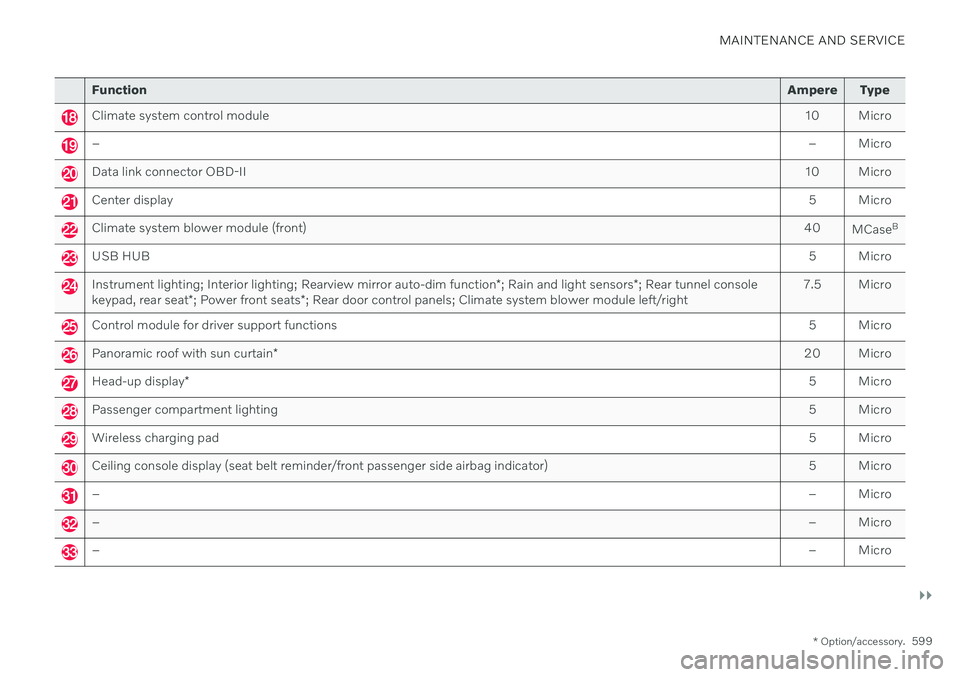
Function Ampere Type
Climate system control module 10 Micro
– – Micro
Data link connector OBD-II10 Micro
Center display 5 Micro
Climate system blower module (front)40
MCaseB
USB HUB
5 Micro
Instrument lighting; Interior lighting; Rearview mirror auto-dim function*; Rain and light sensors *; Rear tunnel console
keypad, rear seat *; Power front seats *; Rear door control panels; Climate system blower module left/right 7.5 Micro
Control module for driver support functions
5 Micro
Panoramic roof with sun curtain* 20 Micro
Head-up display
* 5 Micro
Passenger compartment lighting
5 Micro
Wireless charging pad5 Micro
Ceiling console display (seat belt reminder/front passenger side airbag indicator)5 Micro
–– Micro
–– Micro
–– Micro
Page 604 of 661
MAINTENANCE AND SERVICE
* Option/accessory.
602
Fuses in the cargo compartment
The fuses in the cargo compartment help pro- tect electrical components such as the power seats *, airbags and seat belt tensioners.
Page 643 of 661
INDEX
641
1, 2, 3 ...
4WD 413
A
ABSanti-lock brakes 397
AC (Air conditioning) 225
Accessories and extra equipment 36 installation 37
Accessory installation warning 37
Active Bending Lights 156
Adapting driving characteristics 413
Adaptive Cruise Control 286 activating 289
auto-brake 315
change cruise control functionality 293
controls 288
deactivate 290
display 288
limitations 292
passing 310
set time interval 314
standby mode 291
stored speed 313
switching target vehicles 312
Symbols and messages 294
troubleshooting 292
WARNING 311
Adjusting the steering wheel 195
Advanced Air Cleaner 204
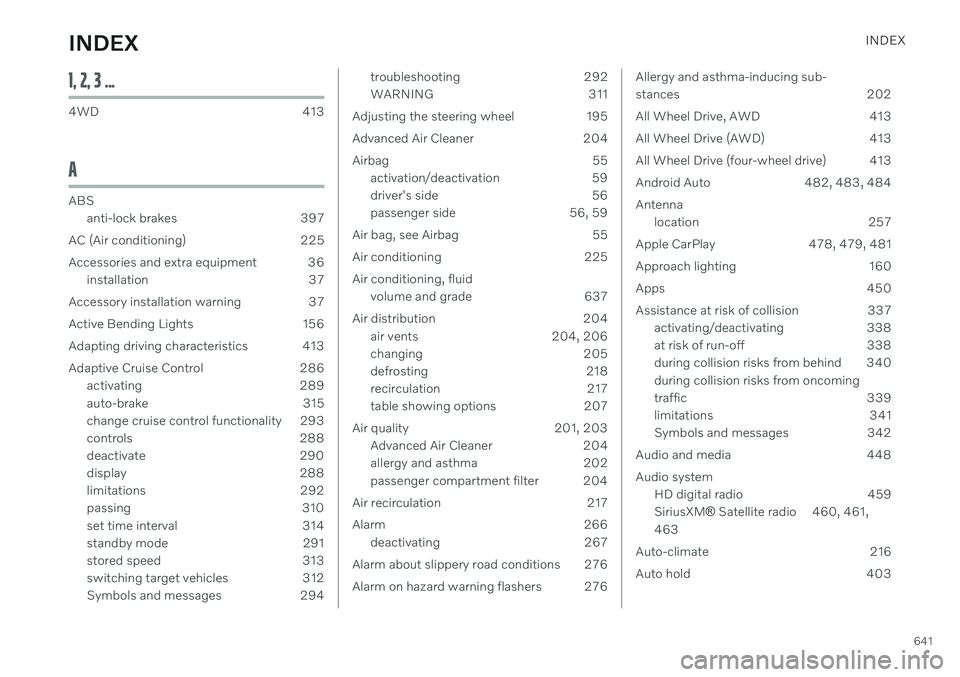
Airbag 55 activation/deactivation 59
driver's side 56
passenger side 56, 59
Air bag, see Airbag 55
Air conditioning 225 Air conditioning, fluid volume and grade 637
Air distribution 204 air vents 204, 206
changing 205
defrosting 218
recirculation 217
table showing options 207
Air quality 201, 203 Advanced Air Cleaner 204
allergy and asthma 202
passenger compartment filter 204
Air recirculation 217
Alarm 266 deactivating 267
Alarm about slippery road conditions 276
Alarm on hazard warning flashers 276Allergy and asthma-inducing sub-
stances 202
All Wheel Drive, AWD 413
All Wheel Drive (AWD) 413
All Wheel Drive (four-wheel drive) 413
Android Auto 482, 483, 484Antenna location 257
Apple CarPlay 478, 479, 481
Approach lighting 160
Apps 450
Assistance at risk of collision 337 activating/deactivating 338
at risk of run-off 338
during collision risks from behind 340 during collision risks from oncoming
traffic 339
limitations 341
Symbols and messages 342
Audio and media 448 Audio system HD digital radio 459 SiriusXM ®
Satellite radio 460, 461,
463
Auto-climate 216
Auto hold 403
INDEX
Page 654 of 661
INDEX
652Safety mode 64
starting/moving 65
Sealing compound 542
Seat, see Seats 182
Seat belt reminder 54
Seat belts 49 Automatic locking retractor/Emer-
gency locking retractor 68
buckling/unbuckling 50
pregnancy 45
seat belt reminder 54
seat belt tensioner 52
securing child restraint systems 70, 72, 74
Seat belt tensioner 52 resetting 53
Seats heating 212, 213
manual front seat 182
power front seats 183
store position 184, 185
ventilation 215
whiplash protection 48
Security code 265 Sensors air quality 203
Camera unit 383
climate 199
Radar unit 380
Sensus connection and entertainment 30
Sensus Navigation Road Sign Information 280
Service position 625
Service program 566settings Categories 133
contextual 131
resetting 132
Shiftlock 411 deactivate 411
Side airbag 62
Side Impact Protection System 62, 63
SIM card 503 SIPS (Side Impact Protection Sys-
tem) 62, 63 Sirius Satellite radio Travel link 464
SiriusXM ®
Satellite radio
traffic information 460, 461, 463
Ski hatch 559
Slippery conditions 424
Slippery road conditions 424Snow chains 541
Software updates 33
Sound experience 449
Sound settings 448, 491 phone 492
playing media 470, 471
text message 491
Spare tire 538 handling 539
Speed camera information 280 activating/deactivating 281
Speed symbols, tires 524
Spin control 271
Stability and traction control system 271 sport mode 272, 273
Symbols and messages 274
Stains 607, 609, 610, 611, 612, 613 Start/Stop deactivate 420
Driving 418
limitations 420
vehicle function 418
Start and lock system type designations 252
Start battery 431, 584 overload 431
Start engine 392