brakes VOLVO V60 2021 Owner's Manual
[x] Cancel search | Manufacturer: VOLVO, Model Year: 2021, Model line: V60, Model: VOLVO V60 2021Pages: 661, PDF Size: 12.68 MB
Page 318 of 661
||
DRIVER SUPPORT
* Option/accessory.
316
WARNING
The driver support system only issues a warning for obstacles detected by its radarsensor – thus, a warning may come after adelay or not at all.
Never wait for a warning or assistance. Apply the brakes when necessary.
NOTE
Driver support can keep the vehicle sta- tionary for no more than 5 minutes – afterthat time the parking brake is applied andthe function is deactivated. The parking brake must be released before driver support can be reactivated.
Deactivation of the Auto-hold brake function
In certain situations, auto-hold will be deacti- vated when the vehicle is at a standstill andthe function will go into standby mode. This means that the brakes will be released and the vehicle could begin to roll. The driver mustactively apply the brakes to keep the vehiclestationary. This can occur if:
The driver depresses the brake pedal.
The parking brake is applied.
The gear selector is moved to the
P, N or
R position.
The driver puts Adaptive Cruise Control or Pilot Assist in standby mode.
Auto Activate Parking BrakeThe parking brake will be applied if the func-tion is keeping the vehicle stationary using thebrakes and:
The driver opens the door or unbuckleshis/her seat belt.
The function has kept the vehicle at astandstill for more than approx. 5 minutes.
The brakes overheat.
The driver switches off the engine.
Related information
Driver support systems (p. 270)
Adaptive Cruise Control
* (p. 286)
Pilot Assist
* (p. 296)
Brake functions (p. 397)
Lane Keeping Aid
Lane Keeping Aid (LKA 69
) is designed to
actively steer the vehicle on freeways, high- ways and other major roads to help the driverreduce the risk of the vehicle unintentionallyveering out of the lane.
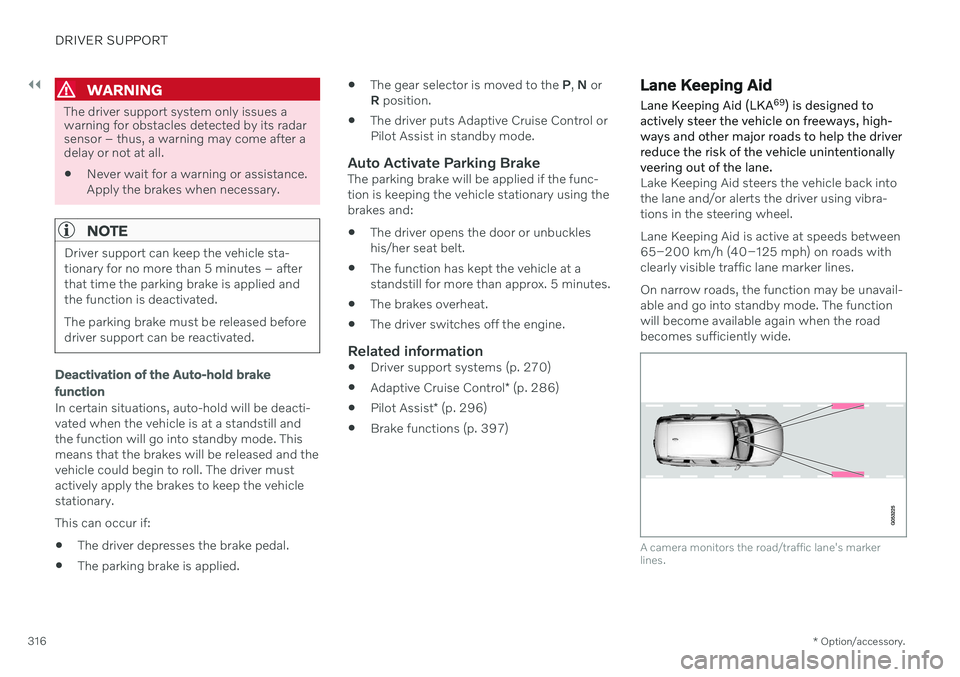
Lake Keeping Aid steers the vehicle back into the lane and/or alerts the driver using vibra-tions in the steering wheel. Lane Keeping Aid is active at speeds between 65–200 km/h (40–125 mph) on roads withclearly visible traffic lane marker lines. On narrow roads, the function may be unavail- able and go into standby mode. The functionwill become available again when the roadbecomes sufficiently wide.
A camera monitors the road/traffic lane's marker lines.
Page 325 of 661
DRIVER SUPPORT
}}
323
City Safety™
City Safety 75
can alert the driver with light,
sound and pulsations in the brake pedal to help the driver detect pedestrians, cyclists,large animals and vehicles.
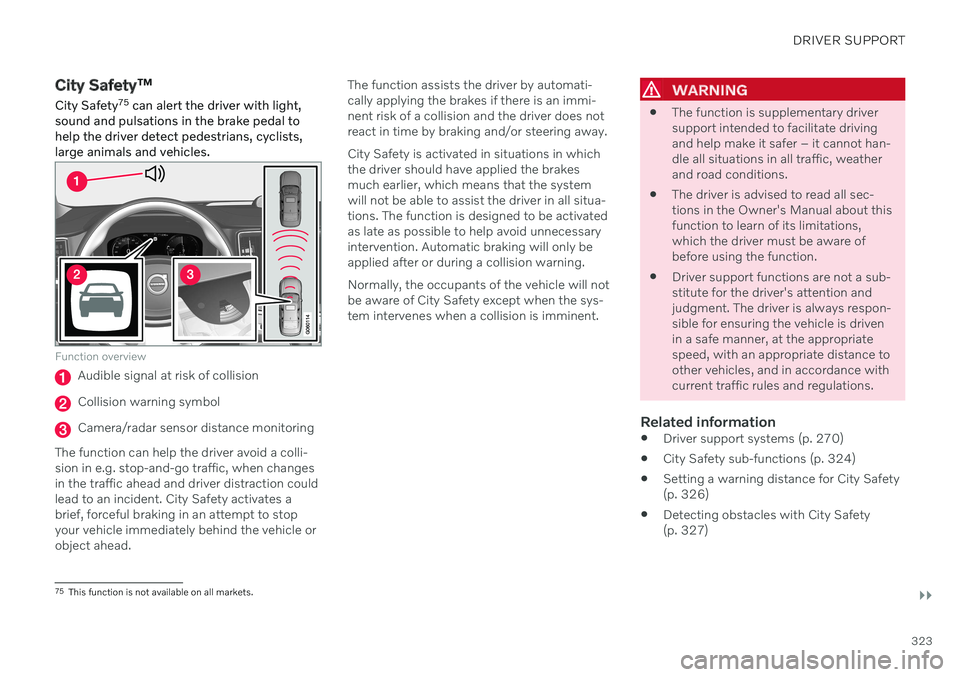
Function overview
Audible signal at risk of collision
Collision warning symbol
Camera/radar sensor distance monitoring
The function can help the driver avoid a colli- sion in e.g. stop-and-go traffic, when changesin the traffic ahead and driver distraction couldlead to an incident. City Safety activates abrief, forceful braking in an attempt to stopyour vehicle immediately behind the vehicle orobject ahead. The function assists the driver by automati-cally applying the brakes if there is an immi-nent risk of a collision and the driver does notreact in time by braking and/or steering away. City Safety is activated in situations in which the driver should have applied the brakesmuch earlier, which means that the systemwill not be able to assist the driver in all situa-tions. The function is designed to be activatedas late as possible to help avoid unnecessaryintervention. Automatic braking will only beapplied after or during a collision warning. Normally, the occupants of the vehicle will not be aware of City Safety except when the sys-tem intervenes when a collision is imminent.
WARNING
The function is supplementary driver support intended to facilitate drivingand help make it safer – it cannot han-dle all situations in all traffic, weatherand road conditions.
The driver is advised to read all sec-tions in the Owner's Manual about thisfunction to learn of its limitations,which the driver must be aware ofbefore using the function.
Driver support functions are not a sub-stitute for the driver's attention andjudgment. The driver is always respon-sible for ensuring the vehicle is drivenin a safe manner, at the appropriatespeed, with an appropriate distance toother vehicles, and in accordance withcurrent traffic rules and regulations.
Related information
Driver support systems (p. 270)
City Safety sub-functions (p. 324)
Setting a warning distance for City Safety(p. 326)
Detecting obstacles with City Safety(p. 327)
75
This function is not available on all markets.
Page 327 of 661
DRIVER SUPPORT
}}
* Option/accessory.325
1 - Collision warning
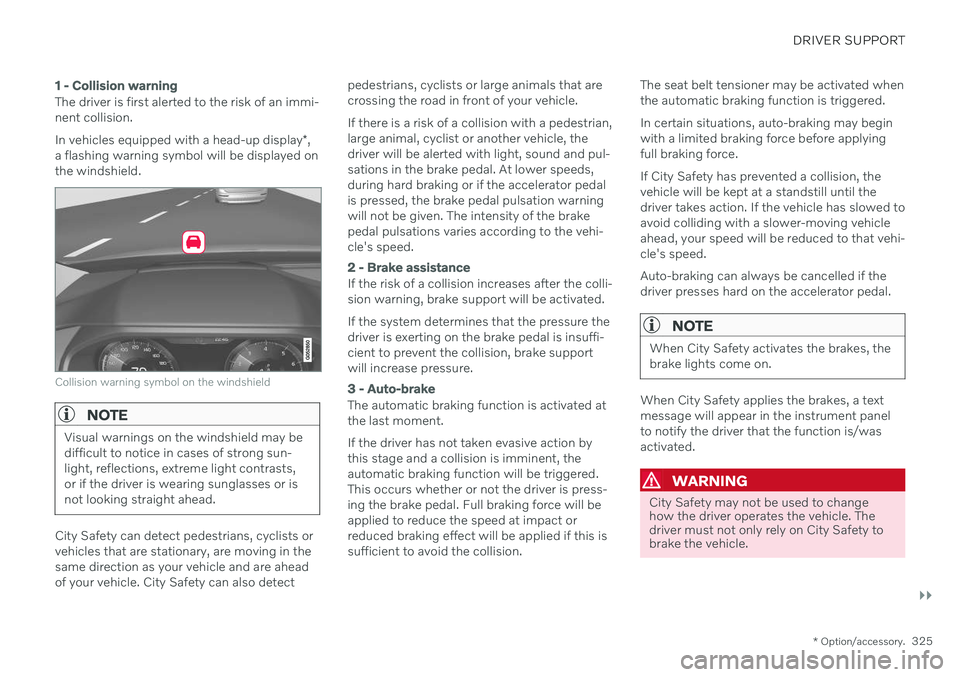
The driver is first alerted to the risk of an immi- nent collision. In vehicles equipped with a head-up display *,
a flashing warning symbol will be displayed on the windshield.
Collision warning symbol on the windshield
NOTE
Visual warnings on the windshield may be difficult to notice in cases of strong sun-light, reflections, extreme light contrasts,or if the driver is wearing sunglasses or isnot looking straight ahead.
City Safety can detect pedestrians, cyclists or vehicles that are stationary, are moving in thesame direction as your vehicle and are aheadof your vehicle. City Safety can also detect pedestrians, cyclists or large animals that arecrossing the road in front of your vehicle. If there is a risk of a collision with a pedestrian, large animal, cyclist or another vehicle, thedriver will be alerted with light, sound and pul-sations in the brake pedal. At lower speeds,during hard braking or if the accelerator pedalis pressed, the brake pedal pulsation warningwill not be given. The intensity of the brakepedal pulsations varies according to the vehi-cle's speed.
2 - Brake assistance
If the risk of a collision increases after the colli- sion warning, brake support will be activated. If the system determines that the pressure the driver is exerting on the brake pedal is insuffi-cient to prevent the collision, brake supportwill increase pressure.
3 - Auto-brake
The automatic braking function is activated at the last moment. If the driver has not taken evasive action by this stage and a collision is imminent, theautomatic braking function will be triggered.This occurs whether or not the driver is press-ing the brake pedal. Full braking force will beapplied to reduce the speed at impact orreduced braking effect will be applied if this issufficient to avoid the collision.
The seat belt tensioner may be activated whenthe automatic braking function is triggered. In certain situations, auto-braking may begin with a limited braking force before applyingfull braking force. If City Safety has prevented a collision, the vehicle will be kept at a standstill until thedriver takes action. If the vehicle has slowed toavoid colliding with a slower-moving vehicleahead, your speed will be reduced to that vehi-cle's speed. Auto-braking can always be cancelled if the driver presses hard on the accelerator pedal.
NOTE
When City Safety activates the brakes, the brake lights come on.
When City Safety applies the brakes, a text message will appear in the instrument panelto notify the driver that the function is/wasactivated.
WARNING
City Safety may not be used to change how the driver operates the vehicle. Thedriver must not only rely on City Safety tobrake the vehicle.
Page 329 of 661
DRIVER SUPPORT
}}
* Option/accessory.327
WARNING
No automatic system can guarantee 100% correct function in all situations.You should therefore never test use ofCity Safety in the direction of people,animals or vehicles – this could lead tosevere damage, serious personal injuryor even death.
City Safety warns the driver if there is arisk of collision, but the function cannotreduce the driver's reaction time.
Even if the warning distance has been set to
Early, warnings may be per-
ceived as late in certain situations – e.g. when there are large speed differ-ences or if the vehicle ahead suddenlybrakes heavily.
With the warning distance set to
Early,
warnings come further in advance. This may cause the warnings to come morefrequently than with warning distance
Normal, but is recommended since it
can make City Safety more effective.
Related information
City Safety
™ (p. 323)
City Safety limitations (p. 333)
Rear Collision Warning
* (p. 343)
Detecting obstacles with City Safety
City Safety 78
can help the driver detect other
vehicles, cyclists, large animals and pedes- trians.
VehiclesCity Safety can detect most vehicles that are stationary or are moving in the same directionas your vehicle. In some cases, it can alsodetect oncoming vehicles and crossing traffic. For City Safety to be able to detect a vehicle in the dark, its headlights and taillights must beon and clearly visible.
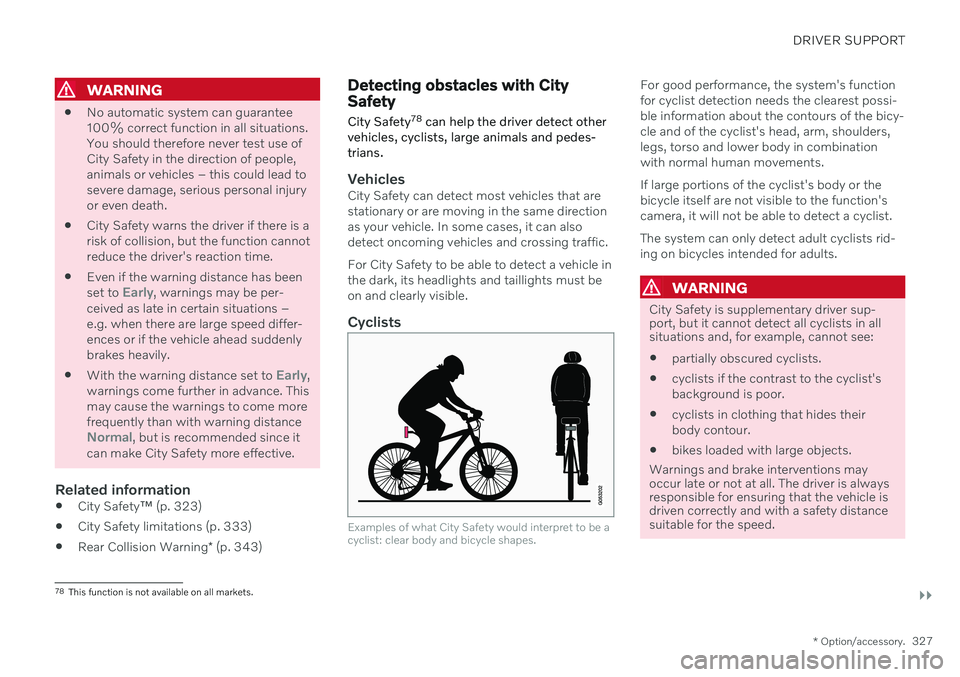
Cyclists
Examples of what City Safety would interpret to be a cyclist: clear body and bicycle shapes.
For good performance, the system's function for cyclist detection needs the clearest possi-ble information about the contours of the bicy-cle and of the cyclist's head, arm, shoulders,legs, torso and lower body in combinationwith normal human movements. If large portions of the cyclist's body or the bicycle itself are not visible to the function'scamera, it will not be able to detect a cyclist. The system can only detect adult cyclists rid- ing on bicycles intended for adults.
WARNING
City Safety is supplementary driver sup- port, but it cannot detect all cyclists in allsituations and, for example, cannot see:
partially obscured cyclists.
cyclists if the contrast to the cyclist's background is poor.
cyclists in clothing that hides theirbody contour.
bikes loaded with large objects.
Warnings and brake interventions may occur late or not at all. The driver is always responsible for ensuring that the vehicle isdriven correctly and with a safety distance suitable for the speed.
78 This function is not available on all markets.
Page 333 of 661
DRIVER SUPPORT
}}
331
function also helps stabilize the vehicle after it has passed the obstacle. City Safety steering assistance can detect:
vehicles
cyclists
pedestrians
large animals
Related information
City Safety
™ (p. 323)
City Safety steering assistance limitations during evasive maneuvers (p. 331)
City Safety limitations (p. 333)
City Safety steering assistance limitations during evasivemaneuvers
City Safety steering assistance may have lim- ited functionality in certain situations and notintervene, e.g.:
at speeds outside the range of 50-100 km/h (30-62 mph)
if the driver does not take evasive action
if speed-dependent power steering wheelresistance is working at reduced power –e.g. during cooling due to overheating.
NOTE
The function uses the vehicle's camera and radar sensor, which has certain generallimitations.
Related information
City Safety steering assistance for evasive maneuver (p. 330)
City Safety limitations (p. 333)
Speed-dependent steering wheel resis-tance (p. 270)
Camera/radar sensor limitations (p. 383)
Automatic braking during delayed evasive maneuvers with CitySafety
City Safety 80
can assist the driver by auto-
matically braking the vehicle when it is not possible to avoid a collision by steering alone.
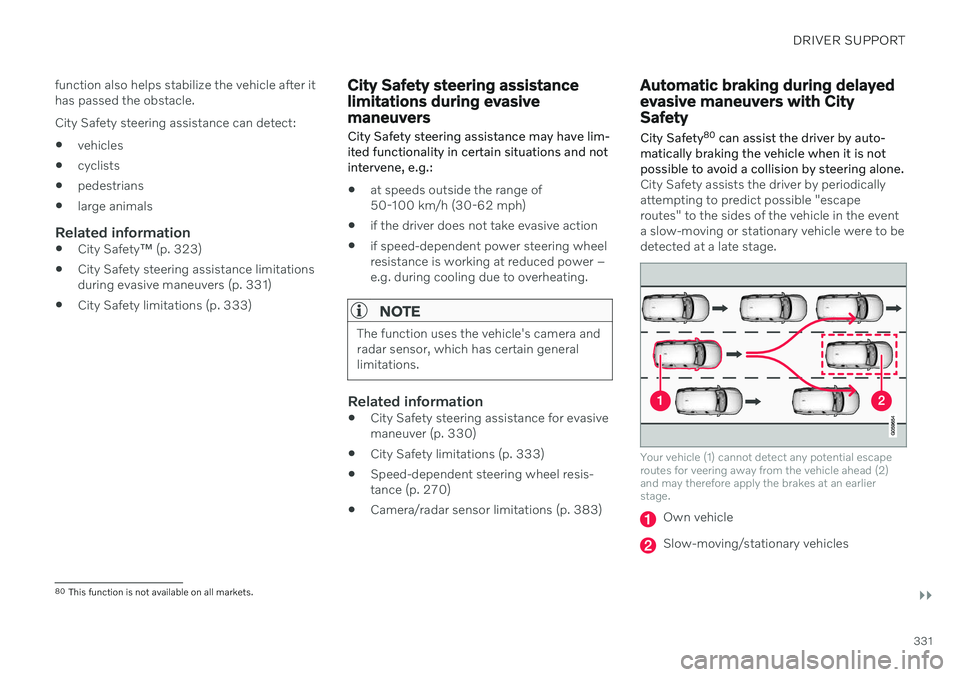
City Safety assists the driver by periodically attempting to predict possible "escaperoutes" to the sides of the vehicle in the eventa slow-moving or stationary vehicle were to bedetected at a late stage.
Your vehicle (1) cannot detect any potential escape routes for veering away from the vehicle ahead (2)and may therefore apply the brakes at an earlierstage.
Own vehicle
Slow-moving/stationary vehicles
80 This function is not available on all markets.
Page 334 of 661
||
DRIVER SUPPORT
332City Safety will not intervene to automatically apply the brakes if it is possible for the driverto avoid a collision by steering the vehicle. However, if City Safety determines that an evasive maneuver would not be possible dueto traffic in the adjacent lane(s), the functioncan assist the driver by automatically startingto apply the brakes at an earlier stage.
Related information
City Safety
™ (p. 323)
City Safety limitations (p. 333)
City Safety braking for oncoming vehicles City Safety can help you apply the brakes for an oncoming vehicle in your lane.
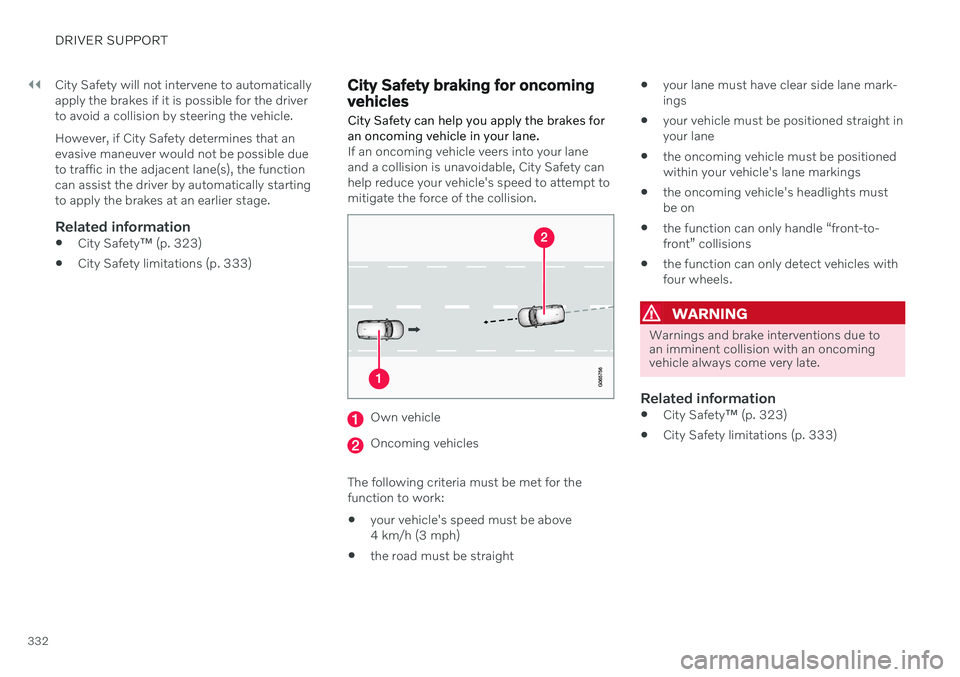
If an oncoming vehicle veers into your lane and a collision is unavoidable, City Safety canhelp reduce your vehicle's speed to attempt tomitigate the force of the collision.
Own vehicle
Oncoming vehicles
The following criteria must be met for the function to work:
your vehicle's speed must be above4 km/h (3 mph)
the road must be straight
your lane must have clear side lane mark-ings
your vehicle must be positioned straight inyour lane
the oncoming vehicle must be positionedwithin your vehicle's lane markings
the oncoming vehicle's headlights mustbe on
the function can only handle “front-to-front” collisions
the function can only detect vehicles withfour wheels.
WARNING
Warnings and brake interventions due to an imminent collision with an oncomingvehicle always come very late.
Related information
City Safety
™ (p. 323)
City Safety limitations (p. 333)
Page 336 of 661
||
DRIVER SUPPORT
334
Important warnings
WARNING
The driver support system only issues a warning for obstacles detected by its radarsensor – thus, a warning may come after adelay or not at all. Never wait for a warning or assistance. Apply the brakes when necessary.
WARNING
Warnings and brake interventions can be triggered late or not at all if the traf-fic situation or external influences pre-vent the camera and radar unit fromproperly detecting pedestrians,cyclists, large animals or vehiclesahead of the vehicle.
To be able to detect vehicles at night,its front and rear lights must work andilluminate clearly.
The camera and radar unit have a lim-ited range for pedestrians and cyclists– the system can provide effectivewarnings and brake interventions if therelative speed is lower than 50 km/h(30 mph). For stationary or slow-mov-ing vehicles, warnings and brake inter-ventions are effective at vehicle speedsof up to 70 km/h (43 mph). Speedreduction for large animals is less than15 km/h (9 mph) and can be achievedat vehicle speeds over 70 km/h(43 mph). At lower speeds, the warn-ing and brake intervention for large ani-mals is less effective.
Warnings for stationary or slow-mov-ing vehicles and large animals can bedisengaged due to darkness or poorvisibility.
Warnings and brake interventions for pedestrians and cyclists are disen-gaged at vehicle speeds over 80 km/h(50 mph).
Do not place, affix or mount anythingon the inside or outside of the wind-shield, or in front of or around the cam-era and radar unit – this could disruptcamera-based functions.
Objects, snow, ice or dirt in the area ofthe camera sensor can reduce thefunction, disengage it completely orgive an improper function response.
Page 337 of 661
DRIVER SUPPORT
335
WARNING
The City Safety auto-brake function can prevent a collision or reduce colli-sion speed, but to ensure full brakeperformance the driver should alwaysdepress the brake pedal – even whenthe car auto-brakes.
The warning and steering assistanceare only activated if there is a high riskof collision – you must therefore neverwait for the collision warning or CitySafety to intervene.
Warnings and brake interventions forpedestrians and cyclists are disen-gaged at vehicle speeds over 80 km/h(50 mph).
City Safety does not activate auto-braking intervention during heavyacceleration.
NOTE
The function uses the vehicle's camera and radar sensor, which has certain generallimitations.
Market limitationsCity Safety is not available in all countries. If City Safety is not shown in the center display's
Settings menu, your vehicle is not equipped
with this function. In the center display's Top view, tap:
SettingsMy CarIntelliSafe
Related information
City Safety
™ (p. 323)
Camera/radar sensor limitations (p. 383)
Page 341 of 661
DRIVER SUPPORT
}}
339
Steering assistance with braking
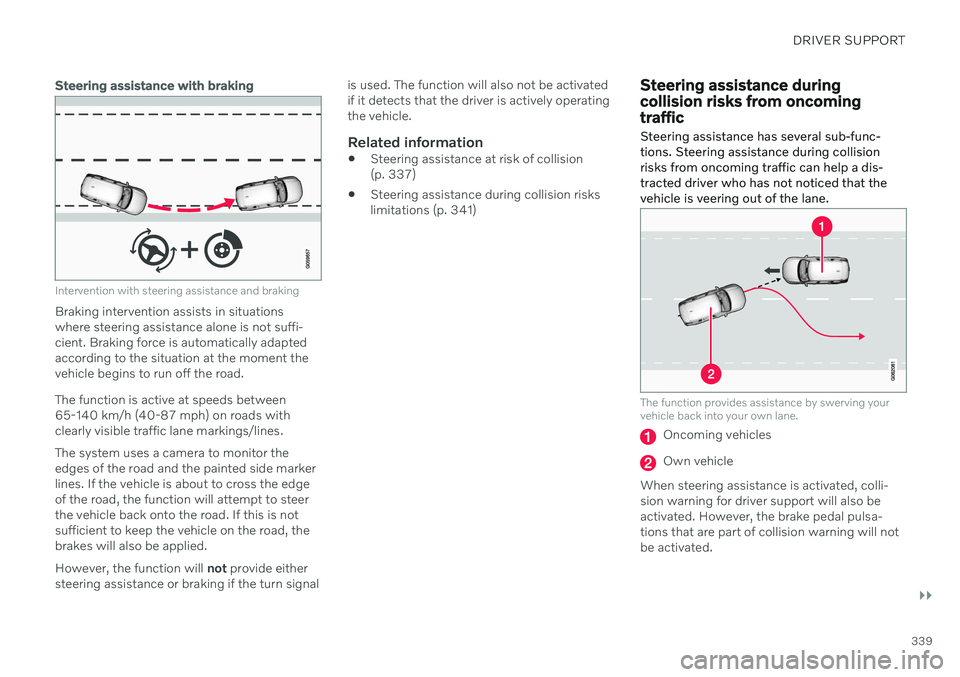
Intervention with steering assistance and braking
Braking intervention assists in situations where steering assistance alone is not suffi-cient. Braking force is automatically adaptedaccording to the situation at the moment thevehicle begins to run off the road. The function is active at speeds between 65-140 km/h (40-87 mph) on roads withclearly visible traffic lane markings/lines. The system uses a camera to monitor the edges of the road and the painted side markerlines. If the vehicle is about to cross the edgeof the road, the function will attempt to steerthe vehicle back onto the road. If this is notsufficient to keep the vehicle on the road, thebrakes will also be applied. However, the function will not provide either
steering assistance or braking if the turn signal is used. The function will also not be activated if it detects that the driver is actively operatingthe vehicle.
Related information
Steering assistance at risk of collision(p. 337)
Steering assistance during collision riskslimitations (p. 341)
Steering assistance during collision risks from oncomingtraffic Steering assistance has several sub-func- tions. Steering assistance during collisionrisks from oncoming traffic can help a dis-tracted driver who has not noticed that thevehicle is veering out of the lane.
The function provides assistance by swerving your vehicle back into your own lane.
Oncoming vehicles
Own vehicle
When steering assistance is activated, colli- sion warning for driver support will also beactivated. However, the brake pedal pulsa-tions that are part of collision warning will notbe activated.
Page 345 of 661
DRIVER SUPPORT
}}
* Option/accessory.343
Rear Collision Warning *85
The Rear Collision Warning 86
(RCW) function
can help the driver avoid rear-end collisions from vehicles approaching from behind.
The function can alert drivers of following vehi- cles of the risk of a collision by rapidly flashingthe turn signals. If, at a speed below 30 km/h (20 mph), the function detects that the vehicle is in dangerof being hit from behind, the seat belt tension-ers may tension the front seat belts. TheWhiplash Protection System will also be acti-vated in a collision. Immediately before a collision from behind, the function may also activate the brakes inorder to reduce the forward acceleration of thevehicle during the collision. However, thebrakes will only be applied if your vehicle isstationary. The brakes will be immediatelyreleased if the accelerator pedal is depressed. The function is automatically activated each time the engine is started.
WARNING
The function is supplementary driver support intended to facilitate drivingand help make it safer – it cannot han-dle all situations in all traffic, weatherand road conditions.
The driver is advised to read all sec-tions in the Owner's Manual about thisfunction to learn of its limitations,which the driver must be aware ofbefore using the function.
Driver support functions are not a sub-stitute for the driver's attention andjudgment. The driver is always respon-sible for ensuring the vehicle is drivenin a safe manner, at the appropriatespeed, with an appropriate distance toother vehicles, and in accordance withcurrent traffic rules and regulations.
Related information
Driver support systems (p. 270)
Rear Collision Warning
* limitations
(p. 343)
Whiplash Protection System (p. 48)
Rear Collision Warning
*87
limitations In some situations, it may be difficult for Rear Collision Warning (RCW) to warn the driverof a collision risk.
This may be the case if: the vehicle approaching from the rear is detected at a late stage
the vehicle approaching from the rearchanges lanes at a late stage
a trailer, bicycle holder or similar is con-nected to the vehicle's electrical system -the function will then be automaticallydeactivated.
NOTE
In certain markets RCW does
not warn
with the direction indicators due to local traffic regulations – in such cases, that partof the function is deactivated.
NOTE
The function uses the vehicle's camera and radar sensor, which has certain generallimitations.
85 Warning of collision from the rear.
86 This function is not available on all markets.
87 Warning of collision from the rear.