center console VOLVO V60 2021 Owner's Manual
[x] Cancel search | Manufacturer: VOLVO, Model Year: 2021, Model line: V60, Model: VOLVO V60 2021Pages: 661, PDF Size: 12.68 MB
Page 553 of 661
LOADING, STORAGE AND PASSENGER COMPARTMENT
* Option/accessory.551
Tunnel console
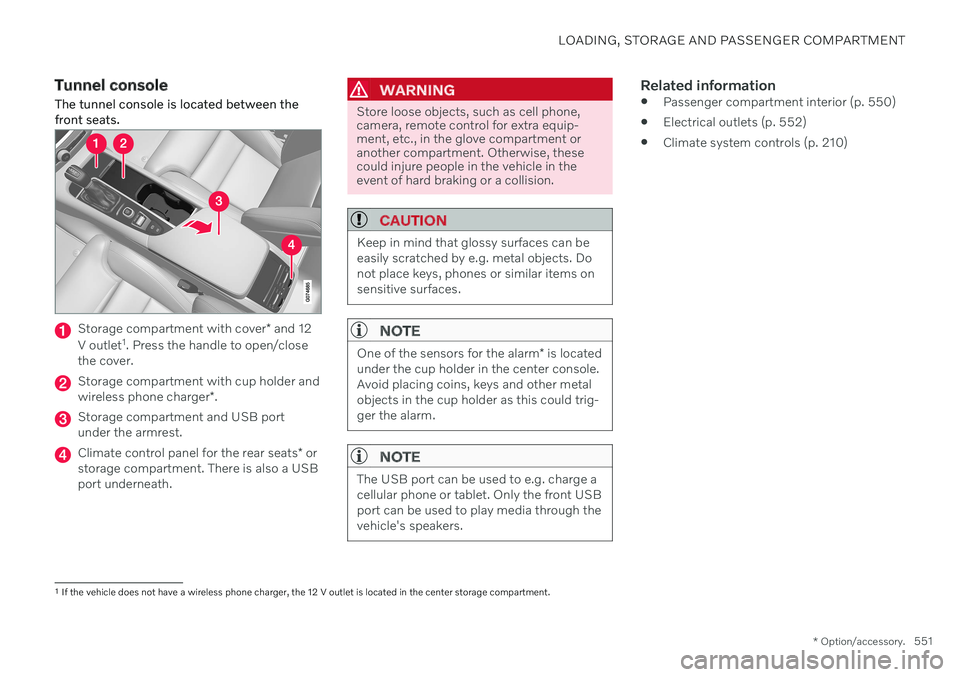
The tunnel console is located between the front seats.
Storage compartment with cover * and 12
V outlet 1
. Press the handle to open/close
the cover.
Storage compartment with cup holder and wireless phone charger *.
Storage compartment and USB port under the armrest.
Climate control panel for the rear seats * or
storage compartment. There is also a USB port underneath.
WARNING
Store loose objects, such as cell phone, camera, remote control for extra equip-ment, etc., in the glove compartment oranother compartment. Otherwise, thesecould injure people in the vehicle in theevent of hard braking or a collision.
CAUTION
Keep in mind that glossy surfaces can be easily scratched by e.g. metal objects. Donot place keys, phones or similar items onsensitive surfaces.
NOTE
One of the sensors for the alarm * is located
under the cup holder in the center console. Avoid placing coins, keys and other metalobjects in the cup holder as this could trig-ger the alarm.
NOTE
The USB port can be used to e.g. charge a cellular phone or tablet. Only the front USBport can be used to play media through thevehicle's speakers.
Related information
Passenger compartment interior (p. 550)
Electrical outlets (p. 552)
Climate system controls (p. 210)
1
If the vehicle does not have a wireless phone charger, the 12 V outlet is located in the center storage compartment.
Page 600 of 661
||
MAINTENANCE AND SERVICE
* Option/accessory.
598
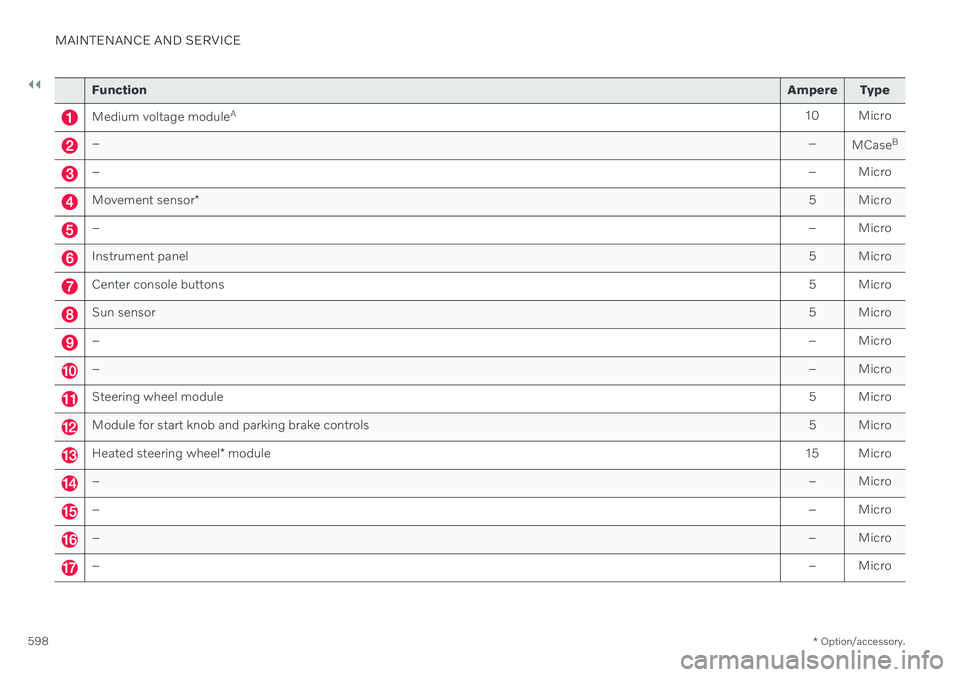
Function Ampere Type
Medium voltage moduleA
10 Micro
– –
MCaseB
–
– Micro
Movement sensor* 5 Micro
–
– Micro
Instrument panel 5 Micro
Center console buttons5 Micro
Sun sensor5 Micro
–– Micro
–– Micro
Steering wheel module 5 Micro
Module for start knob and parking brake controls5 Micro
Heated steering wheel* module 15 Micro
–
– Micro
–– Micro
–– Micro
–– Micro
Page 601 of 661
MAINTENANCE AND SERVICE
}}
* Option/accessory.599
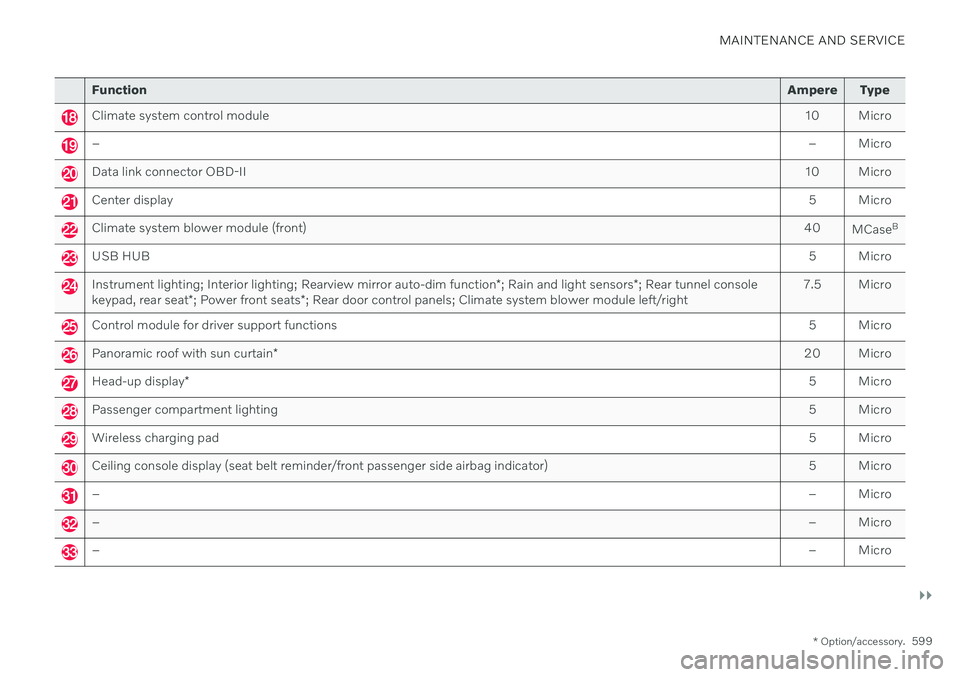
Function Ampere Type
Climate system control module 10 Micro
– – Micro
Data link connector OBD-II10 Micro
Center display 5 Micro
Climate system blower module (front)40
MCaseB
USB HUB
5 Micro
Instrument lighting; Interior lighting; Rearview mirror auto-dim function*; Rain and light sensors *; Rear tunnel console
keypad, rear seat *; Power front seats *; Rear door control panels; Climate system blower module left/right 7.5 Micro
Control module for driver support functions
5 Micro
Panoramic roof with sun curtain* 20 Micro
Head-up display
* 5 Micro
Passenger compartment lighting
5 Micro
Wireless charging pad5 Micro
Ceiling console display (seat belt reminder/front passenger side airbag indicator)5 Micro
–– Micro
–– Micro
–– Micro
Page 618 of 661
||
MAINTENANCE AND SERVICE
616
CAUTION
Remember to remove dirt from the drain holes in the doors and sills after washingthe vehicle.
Related information
Cleaning the exterior (p. 613)
Polishing and waxing (p. 614)
Automatic car washes (p. 616)
High-pressure washing (p. 617)
Cleaning the wiper blades (p. 618)
Cleaning exterior plastic, rubber and trim components (p. 618)
Cleaning rims (p. 619)
Corrosion protection (p. 620)
Settings for automatically activating theparking brake (p. 402)
Automatic car washes
The vehicle should be washed as soon as it becomes dirty. The longer the dirt remains,the more difficult it will be to keep the vehicleclean. It could also lead to paint damage.
Washing your vehicle in an automatic car wash is a fast and easy way to keep your vehi-cle clean, but it does not reach all areas of thevehicle. Volvo recommends washing yourvehicle by hand or supplementing automaticcar washes with a hand wash.
NOTE
Volvo recommends not washing the vehi- cle in an automatic car wash during thefirst few months; the paintwork on newvehicles takes some time to fully harden.
CAUTION
Before driving the vehicle into a car wash, deactivate the Automatic Braking whenStationary and Automatic Parking BrakeApplication functions. If the functions arenot deactivated, the brake system willseize when the vehicle is stationary and thevehicle will not be able to roll.
CAUTION
For automatic car washes in which the vehicle is pulled forward on rolling wheels:
1. Before washing the vehicle, make sure that the automatic rain sensor is deac- tivated. If it is not deactivated andinadvertently starts, the wiper armscould be damaged.
2. To help prevent damage from the auto- matic car wash machinery, make surethat the door mirrors are folded in,antennas retracted or removed, andany auxiliary lights secured.
3. Drive into the automatic car wash.
4. Turn off the "Automatic Braking when Stationary" function using the
but-
ton in the tunnel console.
5. Turn off the "Automatic Parking Brake Application" function in the center dis- play's Top view.
6. Turn off the engine by turning the start knob in the tunnel console clockwise.Hold the knob in position for at least2 seconds.
The vehicle is now ready for the automaticcar wash.
Page 645 of 661
INDEX
643
electrical outlet 552, 553
Lighting 161
Cargo compartment cover 559, 560
cargo net 563
Cargo net 563
Car wash 613, 615, 616, 617, 618, 619
Catalytic converter 429 recovery 438
Cell phone, see Phone 486
Center console 551
Center display change appearance 129
cleaning 608
climate controls 210
Function view 120
handling 110, 113, 117, 122
keyboard 124
messages 138, 139
overview 108
settings 130, 131
switch off and change volume 129
symbols in status bar 122
views 113
Central locking 258
Certificate 496
Change of owner 132
Changing target vehicle 312
Checking engine oil level 580 Child lock activating/deactivating 259
Child restraints 66, 68 booster cushions 74
convertible seats 72
infant seats 70
ISOFIX/LATCH anchors 77
lower attachment points 77
recalls and registration 68
top tether anchors 75
Child safety 66
City Safety 323 braking for oncoming vehicles 332
crossing traffic 329
delayed evasive maneuver 331
detecting obstacles 327
evasive maneuver 330
limitations 333
limitations for evasive maneuvers 331
limitations in crossing traffic 330
setting warning distance 326
sub-functions 324
Symbols and messages 336
Cleaning 611, 612, 613 automatic car wash 616
car wash 613, 615, 616, 617, 618, 619
center display 608
Seat belts 610textile upholstery 607, 609, 611
upholstery 607, 609, 610, 611, 612, 613
wheels 619
Cleaning wheels 619
Cleaning wiper blades 618
CleanZone 202
Clean Zone Interior Package 202
Climate 198 auto-regulation 216
blower control 220, 221
parking 226
perceived temperature 200
Sensors 199
temperature control 222, 223, 224
voice control 200
zones 198
Climate controls 210 center display 210
rear seat 210
Climate system 198, 210 Refrigerant 637
repairs 576
Clock, setting 92
Collision 44, 49, 55, 64Collision warner crossing traffic rear 352
see City Safety 323
Page 652 of 661
INDEX
650parking
on hills 402
Parking Assist 356 activating/deactivating 358
front, rear and sides 357
limitations 359
Symbols and messages 360
Parking brake 400 activating/deactivating 400
automatic activation 402
Low battery charge level 402
Parking climate 226 Symbols and messages 233
Passenger compartment filter 204
Passenger compartment interior 550 center console 551
electrical outlet 552
glove compartment 554
sun visor 555
Passenger compartment lighting 160 adjusting 162
auto switch 161
Passing assistance 310 activating 310
personal information (Customer Privacy
Policy) 35
Phone 485 changing to another 489
connect 486
connect automatically 488
connect manually 488
delete 489
disconnect 488
phone call 489, 492
text message 490
voice control 146
Phone charger 494
Pilot Assist 296 activating 300
auto-brake 315
controls 298
disengaged steering assistance 303
display 299
limitations 304
passing 310
set time interval 314
standby mode 302
stored speed 313
switching target vehicles 312
Symbols and messages 306
turn off 301
WARNING 311
pinch protection 164 resetting 165
PIN code 503 Private locking 265
Polishing 614Position lights 152
Power 635
Power folding door mirrors 168
Power panoramic roof 170
Power save mode 431
Power seats 183
Power windows 165, 166 opening and closing 166
pinch protection 164
Precleaning 230 start/stop 230
Preconditioning 226 start/stop 226
timer 227
Pressure wash 617
Privacy Policy (Customer Privacy Policy) 35
Private locking 264 activating/deactivating 265
PROPOSITION 65 WARNING 431
R
Radar unit 380 limitations 383
maintenance and cleaning 386
Page 655 of 661
INDEX
653
Starting the engine
after a collision 65
Start the vehicle 392
Steel cargo grid 561 Steering assistance at risk of collision 337Steering power level, see Steering wheel
resistance 270
Steering wheel 195 heating 215, 216
keypad 195
paddle 195
steering wheel adjustment 195
Steering wheel keypad 195
Steering wheel paddles 409 Steering wheel resistance, speed-
dependent 270
Stone chips and scratches 620, 621, 622
Stop/start function 418
Storage compartments 550 center console 551
glove compartment 554
sun visor 555
Stored speed 313 Sunroof pinch protection 164
Sun shade
panoramic roof 170, 173
pinch protection 164
Sun visor 555 mirror lighting 161
Support battery 586 Symbols dynamic 82
indicator symbols 93
warning symbols 93
Symbols and messages center display's status bar 122
parking climate 233
system updates 569
T
Tailgate closing and locking using button 261
locking/unlocking 243, 256
open/close with foot movement 263
unlocking from inside 259
Technician certification 38 Temperature adjusting 222, 223, 224
perceived 200
Temporary Spare 538
Temporary tire sealing system 542 Terms and conditions services 35
users 506
Time interval to the vehicle ahead 314 Tires age 520
designations 524
direction of rotation 522
economy and wear 520
glossary of terms 523
inflation pressure table 639
pressure 639
recommended 520
removing and installing 534
rotation when changing 520
specifications 524, 639
speed rating 524
storage 520
tread wear indicator 523
winter tires 540
Tire sealing system 542 Inflating tires 546
use 543
Tire tread 523
Tools 536 Top tether anchors (child restraint sys-
tems) 75