ignition VOLVO V60 2021 Workshop Manual
[x] Cancel search | Manufacturer: VOLVO, Model Year: 2021, Model line: V60, Model: VOLVO V60 2021Pages: 661, PDF Size: 12.68 MB
Page 535 of 661
WHEELS AND TIRES
* Option/accessory.533
Action when warned of low tire pressure When the tire inflation pressure monitoring system11
detects low inflation pressure in a
tire, immediate action is required.
If the system's indicator sym- bol illuminates and the mes- sage
Tire pressure low is
displayed, check the tire pressure and inflate if neces-sary.
1. Switch off the ignition.
2. Check the inflation pressure on all four tires using a tire pressure gauge.
3. Inflate the tire to the correct inflation pres- sure; see the tire pressure placard on the driver's side B pillar for recommendedpressures for factory-mounted tires.
4. After the inflation pressure has been adjusted, always save the new inflationpressure in the system via the center dis-play. Please be aware that the indicator symbol will not go out until the low tire pressurehas been corrected and a storing proce-dure has been started for the new inflationpressure.
NOTE
To help prevent incorrect inflation pressure, pressure should be checked when the tiresare cold. The tires are considered to becold when they have reached the sametemperature as the ambient temperature(about 3 hours after the vehicle was lastdriven). After driving for a few kilometers,the tires will warm up and the pressure willincrease.
NOTE
After inflating a tire, always replace the valve cap to help prevent valve damagecaused by gravel, dirt, etc.
Use plastic valve caps only. Metal capscould corrode and become difficult toremove.
WARNING
Incorrect inflation pressure could lead to tire failure, which could cause thedriver to lose control of the vehicle.
The system cannot predict sudden tiredamage.
Related information
Recommended tire pressure (p. 529)
Adjusting tire pressure (p. 528)
Saving new reference values for tire infla- tion pressure monitoring
* (p. 531)
Viewing tire pressure status in the centerdisplay
* (p. 532)
Tire pressure monitoring system
* (p. 529)
Inflate tires with the compressor included in the tire sealing system (p. 546)
11
Tire Pressure Monitoring System (TPMS)
Page 555 of 661
LOADING, STORAGE AND PASSENGER COMPARTMENT
553
Using the electrical outlets
The 12 V outlet can be used for devices intended for this such as MP3 players, cool-ers and cellular phones.
The ignition must be in at least mode I for the
outlets to supply current. The outlets will then be active as long as there is sufficient chargein the start battery. If the engine is turned off and the vehicle is locked, the outlets will be deactivated. If theengine is turned off and the vehicle remainsunlocked, the sockets will remain active for upto 7 minutes.
NOTE
Bear in mind that using the electrical out- lets when the engine is off could cause thestarter battery to have too low of a chargelevel, which could limit other functionality. Accessories connected to the electrical outlets can be activated even when thevehicle electrical system is off or if precon-ditioning is used. For this reason, discon-nect plugs when they are not in use to pre-vent the starter battery from becoming dis-charged.
WARNING
Do not use accessories with large or heavy plugs – they could damage theoutlet or come loose while you are driv-ing.
Do not use accessories that couldcause disruptions to e.g. the vehicle'sradio receiver or electrical system.
Position the accessory so that there isno risk of it injuring the driver or pas-sengers in the event of heavy brakingor a collision.
Pay attention to connected accessoriesas they can generate heat that couldburn passengers or the interior.
Using 12 V outlets1. Remove the stopper (tunnel console) or
fold down the cover (trunk/cargo com-partment) over the socket and plug in thedevice.
2. Unplug the device and put the stopper back in (tunnel console) or fold up thecover (trunk/cargo compartment) whenthe socket is not in use or left unattended.
CAUTION
The maximum power is 120 W (10 A) per outlet.
Related information
Electrical outlets (p. 552)
Passenger compartment interior (p. 550)
Page 556 of 661
LOADING, STORAGE AND PASSENGER COMPARTMENT
* Option/accessory.
554
Using the glove compartment
The glove compartment is located on the pas- senger side. The glove compartment can beused to store the Owner's Manual, maps, etc.There is also room for a pen and a cardholder.
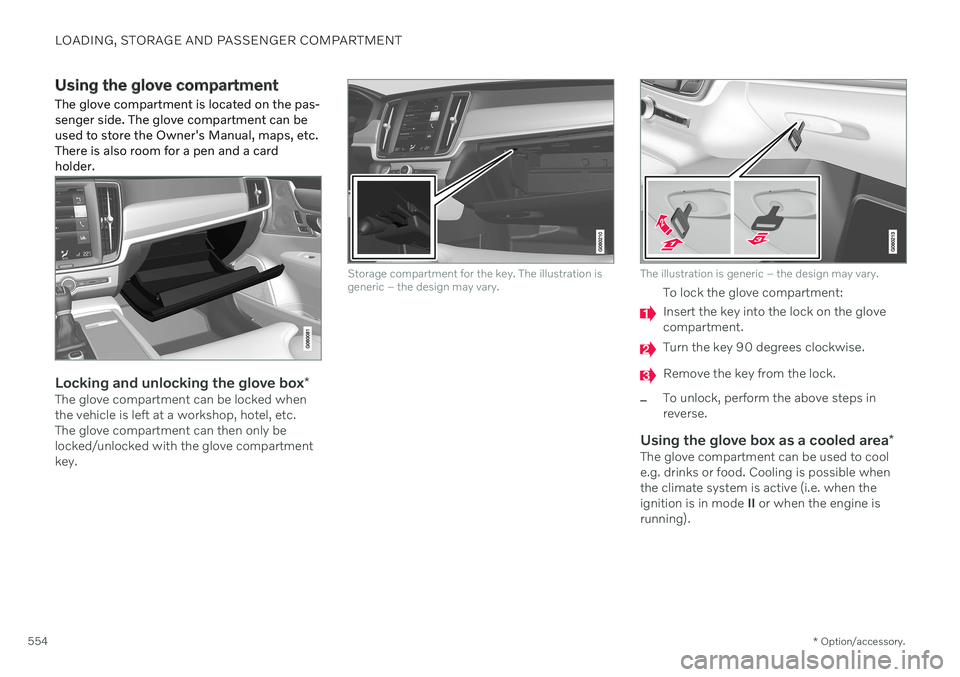
Locking and unlocking the glove box *The glove compartment can be locked when the vehicle is left at a workshop, hotel, etc.The glove compartment can then only belocked/unlocked with the glove compartmentkey.
Storage compartment for the key. The illustration is generic – the design may vary.The illustration is generic – the design may vary.
To lock the glove compartment:
Insert the key into the lock on the glove compartment.
Turn the key 90 degrees clockwise.
Remove the key from the lock.
–To unlock, perform the above steps in reverse.
Using the glove box as a cooled area*The glove compartment can be used to cool e.g. drinks or food. Cooling is possible when the climate system is active (i.e. when the ignition is in mode II or when the engine is
running).
Page 572 of 661
||
MAINTENANCE AND SERVICE
* Option/accessory.
570
NOTE
Data downloading can affect other services such as transfer data, e.g. web radio. If theaffect on other services is experienced asproblematic, the download can be interrup-ted. Alternatively, it may be appropriate toswitch off or cancel other services.
NOTE
An update can be interrupted when the ignition is switched off and the vehicle isleft. However, the update does not have to be completed before the vehicle is left as theupdate is resumed the next time the vehi-cle is used.
Updating all system software–Select Install all at the bottom of the list.
To avoid displaying a list, select
Install all viaSystem updates.
Updating individual system software–Select Install to choose the software you
would like to download.
Canceling software download–Tap the checkbox in the activity indicator that replaced Install when the download
began. Note that only a download can be cancelled. An installation cannot be cancelled once it hasbegun.
Deactivating the background search for software update
Automatic searching for software updates is activated as the default factory setting, but thefunction can be deactivated. 1.
Tap
Settings in the center display's Top
view.
2. Tap
SystemDownload Center.
3. Tap to deselect
Auto Software Update.
Related information
Download Center (p. 569)
Internet-connected vehicle
* (p. 500)
Navigating in the center display's views (p. 113)
Vehicle status The general status of the vehicle can be viewed in the center display.
The Car Status app is started
from the center display's App view and has four tabs:
Messages - status messages
Status – checking engine oil level and
AdBlue level 3
TPMS - tire inflation pressure check
Appointments - appointment information
and vehicle information 4
Related information
Handling messages saved from the instru- ment panel (p. 106)
Checking and filling engine oil (p. 580)
Tire pressure monitoring system
* (p. 529)
Scheduling service and repairs (p. 571)
Sending vehicle information to the work-shop (p. 572)
Navigating in the center display's views(p. 113)
Page 580 of 661

MAINTENANCE AND SERVICE
578
Engine compartment overview
This overview shows some service-related components.
The layout of the engine compartment may vary depending on model and engine variant.
Coolant expansion tank
Brake fluid reservoir (located on the driv- er's side)
Washer fluid filler pipe
Fusebox
Air filter
Engine oil filler pipe
Location of warning decal for the engine compart- ment. The layout of the engine compartment mayvary depending on model and engine variant.
NOTE
The decals shown in the Owner's Manual do not claim to be exact reproductions ofthose found in the vehicle. The purpose isto show approximately how they look andabout where they are located on the vehi-cle. The information that applies for yourvehicle in particular is found on the decalon the vehicle.
WARNING
Bear in mind that the cooling fan (located at the front of the engine compartmentbehind the radiator) may start or continuerunning automatically up to about6 minutes after the engine is turned off. Always entrust engine washing to a work- shop – an authorized Volvo workshop isrecommended. If the engine is hot, there isa risk of fire.
WARNING
The ignition system works with extremely high and dangerous voltages. The vehicleelectrical system should always be in igni-tion mode 0 when work in being per-
formed in the engine compartment. Do not touch any spark plugs or ignition coils when the vehicle electrical system isin ignition mode II or when the engine is
warm.
Related information
Opening and closing the hood (p. 576)
Filling washer fluid (p. 626)
Refilling coolant (p. 582)
Fuses in the engine compartment (p. 591)
Checking and filling engine oil (p. 580)
Ignition modes (p. 395)
Page 583 of 661
MAINTENANCE AND SERVICE
581
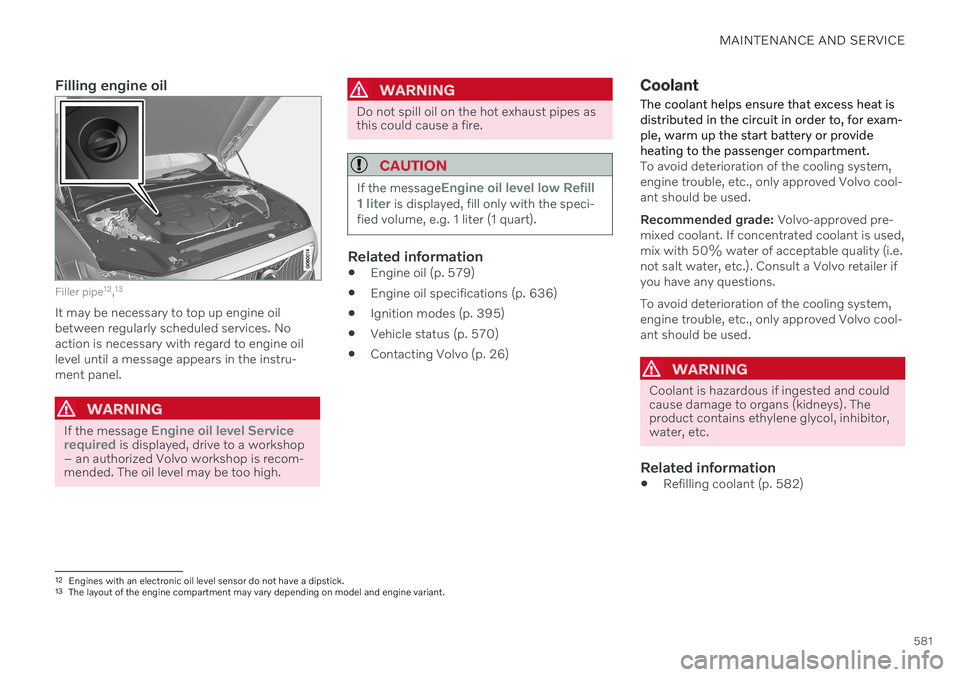
Filling engine oil
Filler pipe12
,13
It may be necessary to top up engine oil between regularly scheduled services. Noaction is necessary with regard to engine oillevel until a message appears in the instru-ment panel.
WARNING
If the message Engine oil level Service
required is displayed, drive to a workshop
– an authorized Volvo workshop is recom- mended. The oil level may be too high.
WARNING
Do not spill oil on the hot exhaust pipes as this could cause a fire.
CAUTION
If the messageEngine oil level low Refill
1 liter is displayed, fill only with the speci-
fied volume, e.g. 1 liter (1 quart).
Related information
Engine oil (p. 579)
Engine oil specifications (p. 636)
Ignition modes (p. 395)
Vehicle status (p. 570)
Contacting Volvo (p. 26)
Coolant
The coolant helps ensure that excess heat is distributed in the circuit in order to, for exam-ple, warm up the start battery or provideheating to the passenger compartment.
To avoid deterioration of the cooling system, engine trouble, etc., only approved Volvo cool-ant should be used. Recommended grade: Volvo-approved pre-
mixed coolant. If concentrated coolant is used, mix with 50% water of acceptable quality (i.e.not salt water, etc.). Consult a Volvo retailer ifyou have any questions. To avoid deterioration of the cooling system, engine trouble, etc., only approved Volvo cool-ant should be used.
WARNING
Coolant is hazardous if ingested and could cause damage to organs (kidneys). Theproduct contains ethylene glycol, inhibitor,water, etc.
Related information
Refilling coolant (p. 582)
12
Engines with an electronic oil level sensor do not have a dipstick.
13 The layout of the engine compartment may vary depending on model and engine variant.
Page 594 of 661

||
MAINTENANCE AND SERVICE
592Fuse pliers are provided on the inside of the fuse box cover to assist in removing andinserting fuses.
There are also spaces for several extra fuses inthe fusebox.
PositionsThere is a decal with a diagram of the loca-tions of the fuses on the inside of the cover.
Function
Ampere Type
– – Micro
–– Micro
Lambda sensors; Electric charge pressure module15 Micro
Ignition coils (gasoline); spark plugs (gasoline) Exhaust sensor; Diesel particulate sensor15 Micro
Oil pump solenoid; A/C magnetic coupling; heated oxygen sensor, center (gasoline); heated oxygen sensor, rear (diesel); heated oxygen sensor, front (gasoline/diesel)
15 Micro
Vacuum regulator; Valve; Output pulse valve (diesel); Oil level/temperature sensor (gasoline/diesel); Glow plug (GCU) (diesel)7.5 Micro
Engine control module; actuator; throttle unit; EGR valve (diesel); turbo position sensor (diesel); turbocharger valve (gasoline) 20 Micro
Engine control module
5 Micro
–– Micro
Solenoids (gasoline); Fuel leakage control valve; Engine cooling system thermostat (gasoline); EGR vacuum valve (die- sel); Glow control module (diesel); Supercharger clutch (gasoline); Crankshaft ventilation heater (diesel); Transmissionoil cooler valve (diesel)10 Micro
Spoiler damper control module; Cooler damper control module; Relay coils for output pulse (diesel); Coolant valve Fuel leakage detection (gasoline)
5 Micro
Page 597 of 661
MAINTENANCE AND SERVICE
595
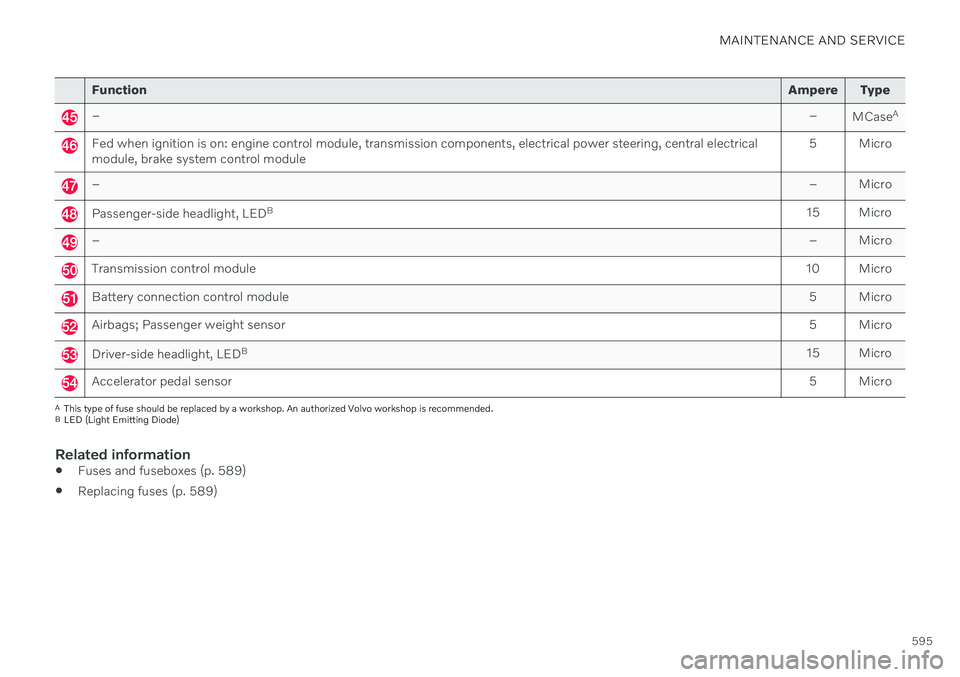
FunctionAmpere Type
– –
MCaseA
Fed when ignition is on: engine control module, transmission components, electrical power steering, central electrical module, brake system control module 5 Micro
–
– Micro
Passenger-side headlight, LEDB
15 Micro
– – Micro
Transmission control module10 Micro
Battery connection control module 5 Micro
Airbags; Passenger weight sensor5 Micro
Driver-side headlight, LEDB
15 Micro
Accelerator pedal sensor 5 Micro
A
This type of fuse should be replaced by a workshop. An authorized Volvo workshop is recommended.
B LED (Light Emitting Diode)
Related information
Fuses and fuseboxes (p. 589)
Replacing fuses (p. 589)
Page 649 of 661
INDEX
647
HomeLink
® remote control
programmable 441
Home safe lighting, Homesafe Lighting, Follow me home lighting, follow-me-
home lighting 160
Honk 195
Hood, opening 576
Horn 195
I
IAQS (Interior Air Quality System) 203
IC (Inflatable Curtain) 63
ID, Volvo 26
Identification number 39
Ignition mode 395, 396
Immobilizer 252 Electronic immobilizer 252
Indicator symbols 93
Individual drive mode 413
Infant seats 70
Inflatable curtain 63
Inflatable Curtain 63
Inflating tires 546
Inflation pressure adjusting 528
Checking 527
decal with recommended pressure 529
Inflation pressure monitoring 529 action 533
save new inflation pressure 531
Status 532
Inflation pressure table 639
Information display 82, 86
Infotainment (Audio and media) 448
Instrument cluster 82 settings 86
Instrument illumination 162
Instrument lighting 162
Instrument panel 82 app menu 102, 103
messages 104
settings 86
Instruments and controls 80 Instruments overview left-hand drive vehicle 80
IntelliSafe driver support 29
Interior Air Quality System 203
Intermittent wiping 175Internet, see Internet-connected vehi- cle 500
Internet-connected vehicle 500 book service and repair 571
No connection or poor connection 505
send car data 572
system updates 569
iPod ®, connecting 476
ISOFIX/LATCH anchors 77
J
Jack 537
Jump-start 431
K
Key 238
Keyboard 124, 127 change language 127
Keyless locking/unlocking 255
settings 256
touch-sensitive surfaces 254
Key tag 238