lock VOLVO V60 2021 Workshop Manual
[x] Cancel search | Manufacturer: VOLVO, Model Year: 2021, Model line: V60, Model: VOLVO V60 2021Pages: 661, PDF Size: 12.68 MB
Page 204 of 661
CLIMATE CONTROL
* Option/accessory.
202
CleanZone *
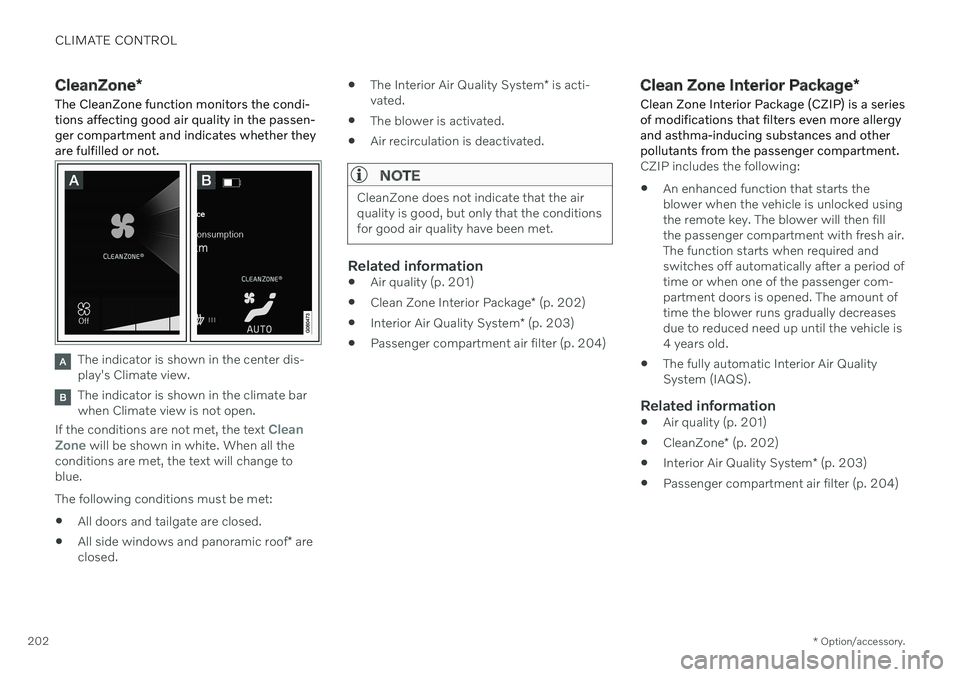
The CleanZone function monitors the condi- tions affecting good air quality in the passen-ger compartment and indicates whether theyare fulfilled or not.
The indicator is shown in the center dis- play's Climate view.
The indicator is shown in the climate bar when Climate view is not open.
If the conditions are not met, the text
Clean
Zone will be shown in white. When all the
conditions are met, the text will change to blue. The following conditions must be met:
All doors and tailgate are closed.
All side windows and panoramic roof
* are
closed.
The Interior Air Quality System
* is acti-
vated.
The blower is activated.
Air recirculation is deactivated.
NOTE
CleanZone does not indicate that the air quality is good, but only that the conditionsfor good air quality have been met.
Related information
Air quality (p. 201)
Clean Zone Interior Package
* (p. 202)
Interior Air Quality System
* (p. 203)
Passenger compartment air filter (p. 204)
Clean Zone Interior Package
*
Clean Zone Interior Package (CZIP) is a series of modifications that filters even more allergyand asthma-inducing substances and otherpollutants from the passenger compartment.
CZIP includes the following:
An enhanced function that starts the blower when the vehicle is unlocked usingthe remote key. The blower will then fillthe passenger compartment with fresh air.The function starts when required andswitches off automatically after a period oftime or when one of the passenger com-partment doors is opened. The amount oftime the blower runs gradually decreasesdue to reduced need up until the vehicle is4 years old.
The fully automatic Interior Air QualitySystem (IAQS).
Related information
Air quality (p. 201)
CleanZone
* (p. 202)
Interior Air Quality System
* (p. 203)
Passenger compartment air filter (p. 204)
Page 213 of 661
CLIMATE CONTROL
}}
* Option/accessory.211
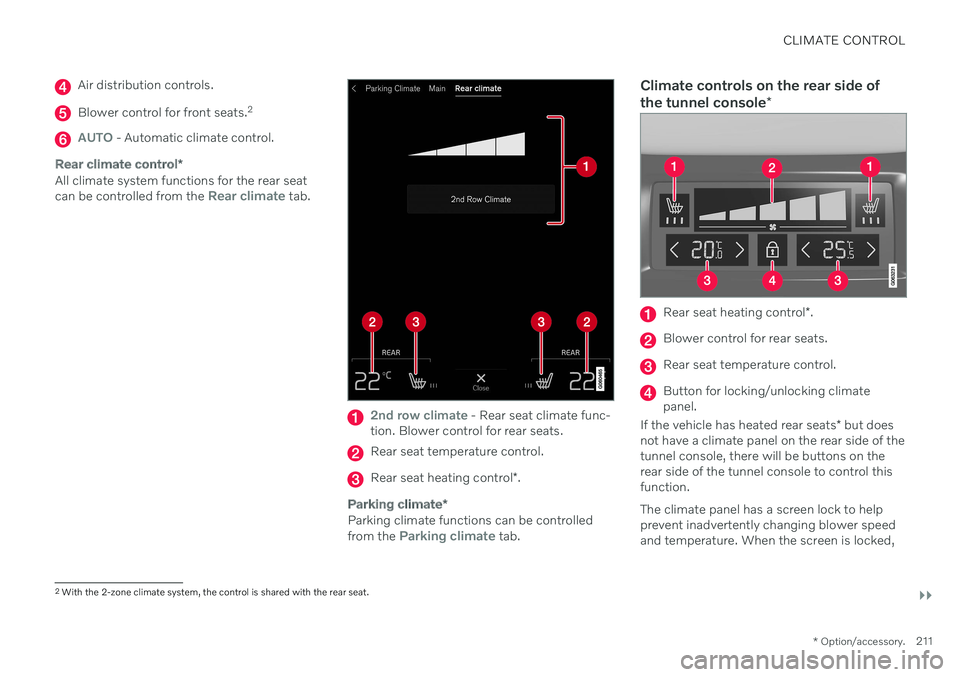
Air distribution controls.
Blower control for front seats. 2
AUTO - Automatic climate control.
Rear climate control
*
All climate system functions for the rear seat can be controlled from the Rear climate tab.
2nd row climate - Rear seat climate func-
tion. Blower control for rear seats.
Rear seat temperature control.
Rear seat heating control *.
Parking climate *
Parking climate functions can be controlled from the Parking climate tab.
Climate controls on the rear side of the tunnel console *
Rear seat heating control *.
Blower control for rear seats.
Rear seat temperature control.
Button for locking/unlocking climate panel.
If the vehicle has heated rear seats * but does
not have a climate panel on the rear side of thetunnel console, there will be buttons on therear side of the tunnel console to control thisfunction. The climate panel has a screen lock to help prevent inadvertently changing blower speedand temperature. When the screen is locked,
2 With the 2-zone climate system, the control is shared with the rear seat.
Page 214 of 661
||
CLIMATE CONTROL
* Option/accessory.
212 only the controls for seat adjustment
* and the
unlock button will be displayed. After unlocking, blower speed and tempera- ture can also be changed from the climatepanel and all selected climate settings will bedisplayed. The screen locks automatically aftera period of inactivity.
Related information
Climate (p. 198)
Activating and deactivating power front seats
* (p. 212)
Activating and deactivating the heatedrear seats
* (p. 213)
Activating and deactivating front seat ven-tilation
* (p. 215)
Activating and deactivating the heatedsteering wheel
* (p. 215)
Activating auto climate control (p. 216)
Activating and deactivating recirculation (p. 217)
Activating and deactivating max defroster(p. 218)
Activating and deactivating the heatedrear window and door mirrors (p. 219)
Setting the blower speed for the frontseats (p. 220)
Setting the blower speed for the rear seats
* (p. 221)
Synchronize temperature (p. 224)
Activating and deactivating air condition- ing (p. 225)
Activating and deactivating power front seats
*
The seats can be heated for added comfort for the driver and passengers in cold weather.
1. Tap the left- or right-side steering wheel and seat button in the center display's cli- mate bar to open the controls for steeringwheel and seat heating. If the vehicle is not equipped with ventila- ted seats or heated steering wheel (for thedriver's side), the button for seat heating isdirectly accessible in the climate bar.
2. Tap the seat heating button repeatedly to
select one of the four levels: Off, High,Medium or Low.
> The level is changed and the set level is displayed in the button.
Page 223 of 661
CLIMATE CONTROL
}}
* Option/accessory.221
Setting the blower speed for the rear seats*
The blower can be set to several different automatically controlled speeds for the rearseat.
Setting blower speed for the rear seats from the front seats
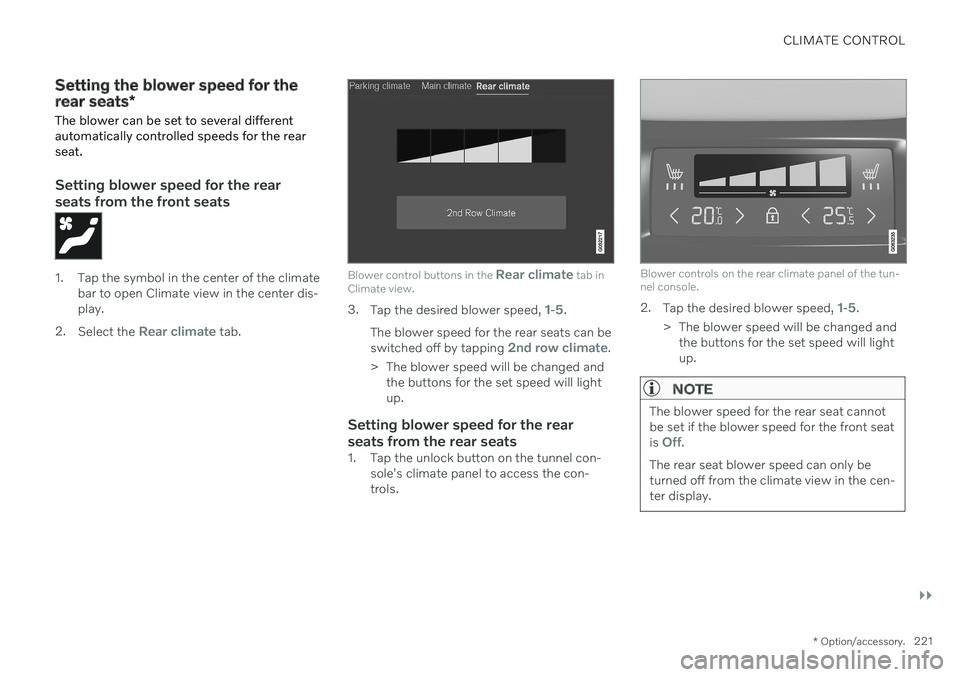
1. Tap the symbol in the center of the climate bar to open Climate view in the center dis- play.
2. Select the
Rear climate tab.
Blower control buttons in the Rear climate tab in
Climate view.
3. Tap the desired blower speed, 1-5.
The blower speed for the rear seats can be switched off by tapping
2nd row climate.
> The blower speed will be changed and the buttons for the set speed will light up.
Setting blower speed for the rear seats from the rear seats
1. Tap the unlock button on the tunnel con- sole's climate panel to access the con- trols.
Blower controls on the rear climate panel of the tun- nel console.
2.Tap the desired blower speed, 1-5.
> The blower speed will be changed and the buttons for the set speed will light up.
NOTE
The blower speed for the rear seat cannot be set if the blower speed for the front seat is
Off.
The rear seat blower speed can only be turned off from the climate view in the cen-ter display.
Page 226 of 661
||
CLIMATE CONTROL
224
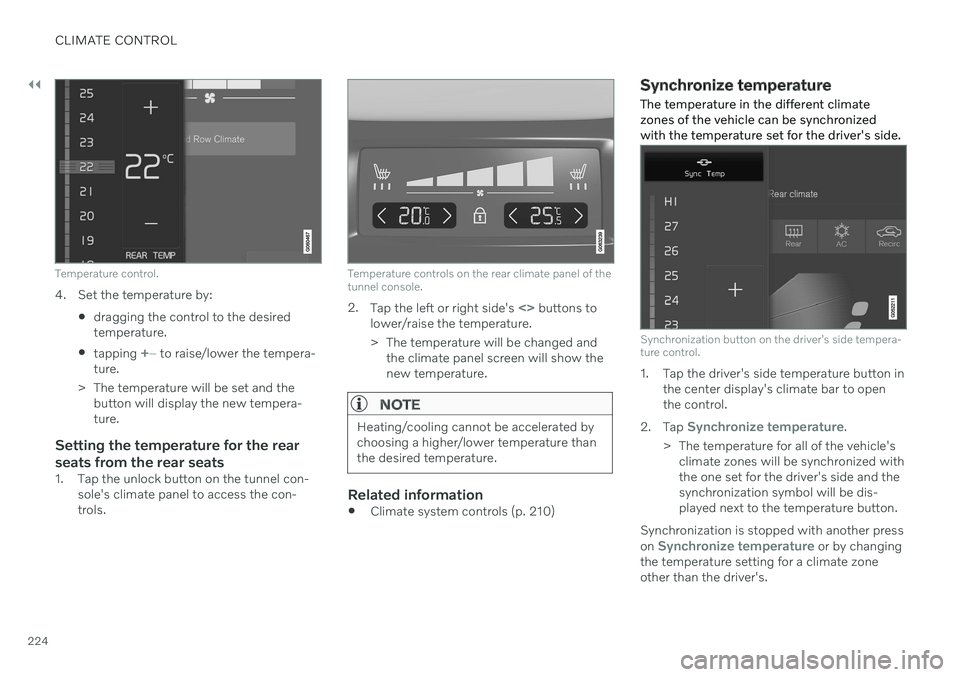
Temperature control.
4. Set the temperature by:dragging the control to the desired temperature.
tapping
+
− to raise/lower the tempera-
ture.
> The temperature will be set and the button will display the new tempera- ture.
Setting the temperature for the rear seats from the rear seats
1. Tap the unlock button on the tunnel con- sole's climate panel to access the con- trols.
Temperature controls on the rear climate panel of the tunnel console.
2.Tap the left or right side's <> buttons to
lower/raise the temperature.
> The temperature will be changed and the climate panel screen will show the new temperature.
NOTE
Heating/cooling cannot be accelerated by choosing a higher/lower temperature thanthe desired temperature.
Related information
Climate system controls (p. 210)
Synchronize temperature
The temperature in the different climate zones of the vehicle can be synchronizedwith the temperature set for the driver's side.
Synchronization button on the driver's side tempera- ture control.
1. Tap the driver's side temperature button in the center display's climate bar to open the control.
2. Tap
Synchronize temperature.
> The temperature for all of the vehicle's climate zones will be synchronized with the one set for the driver's side and thesynchronization symbol will be dis-played next to the temperature button.
Synchronization is stopped with another press on
Synchronize temperature or by changing
the temperature setting for a climate zone other than the driver's.
Page 230 of 661
||
CLIMATE CONTROL
* Option/accessory.
228 3.
Tap
Add timer.
> A pop-up window will appear.
NOTE
It is not possible to add a time setting if there are already 8 settings for the timer.Delete a time setting to be able to add anew one.
4. Tap Date to set a time for a specific date.
Tap
Days to set a time for one or more
days of the week. With
Days: Activate/deactivate the repeat
function by selecting/deselecting the
Repeat weekly checkbox.
5. With
Date: Select a date for precondition-
ing by scrolling in the date list using the arrows. With
Days: Select days of the week for
preconditioning by tapping the buttons for the days.
6. Set the time at which preconditioning should be completed by scrolling usingthe arrows in the clock.
7. Tap
Confirm to add a timer setting.
> The timer setting will be added to the list and activated.
Editing the timer setting1. Open Climate view in the center display. 2. Select the
Parking climate tab.
3. Tap the timer setting you would like to change.
> A pop-up window will appear.
4. To edit a timer setting, follow the proce- dures described under the heading "Add- ing a timer setting" above.
Related information
Preconditioning
* (p. 226)
Preconditioning timer
* (p. 227)
Activating and deactivating precondition- ing timer
* (p. 228)
Deleting preconditioning timer settings
*
(p. 229)
Activating and deactivating preconditioning timer *
Timer settings in the preconditioning timer can be activated or deactivated as needed.
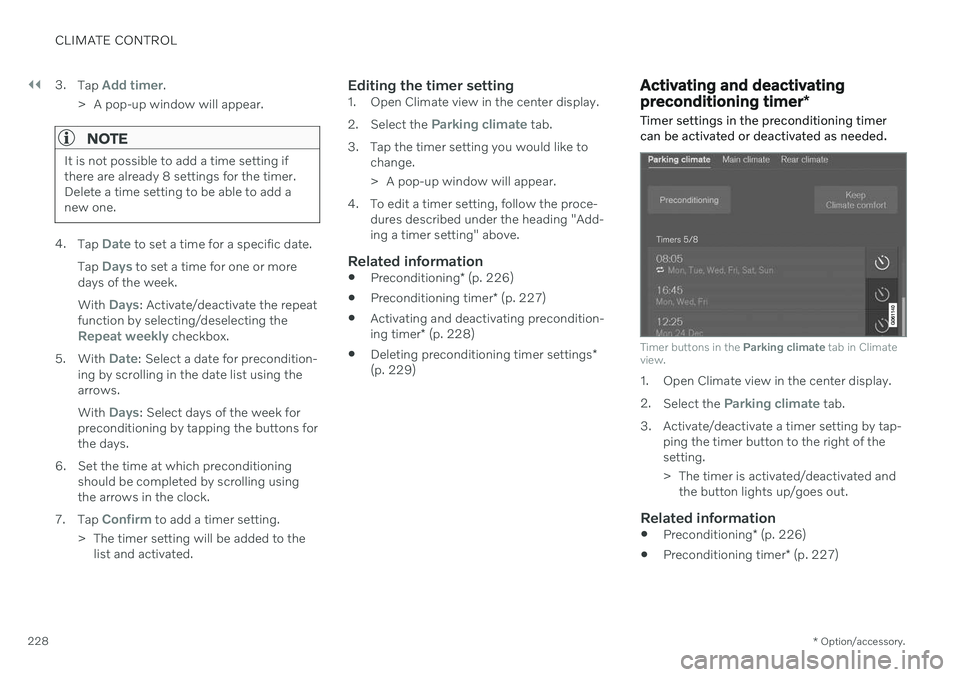
Timer buttons in the Parking climate tab in Climate
view.
1. Open Climate view in the center display. 2. Select the
Parking climate tab.
3. Activate/deactivate a timer setting by tap- ping the timer button to the right of the setting.
> The timer is activated/deactivated andthe button lights up/goes out.
Related information
Preconditioning
* (p. 226)
Preconditioning timer
* (p. 227)
Page 233 of 661
CLIMATE CONTROL
}}
* Option/accessory.231
Climate comfort retaining function*
The climate in the passenger compartment can be maintained when the vehicle isparked, e.g. if the engine is turned off but thedriver or passengers remain in the vehicle.
This function can only be direct-started from the center display. The function utilizes several of the vehicle's systems:
Residual heat from the engine is used tohelp heat the passenger compartment to acomfortable temperature.
In warm weather, the ventilation systemcools the passenger compartment byblowing air in from outside.
NOTE
Climate comfort maintenance will be deac- tivated if the vehicle is locked from the out-side in order to avoid using residual engineheat unnecessarily. This function isintended to be used to maintain climatecomfort when the driver or a passengerremains in the vehicle after the engine isturned off. The climate comfort retaining function is limited in duration in cold weather depend-ing on the amount of residual warmthavailable.
Related information
Parking climate
* (p. 226)
Starting and switching off the climate retaining function when parking
* (p. 231)
Starting and switching off the climate retaining function when parking *
The climate retaining function maintains the climate settings in the vehicle after theengine has been switched off. The functioncan be activated in the center display.
1. Tap the symbol in the center of the climate bar to open Climate view in the center dis- play.
2. Select the
Parking climate tab.
3. Tap
Keep climate comfort.
> The climate comfort retaining function will be activated/deactivated and the button light will go on/off.
NOTE
Maintained climate comfort is not possible when there is not sufficient residual engineheat to maintain the climate settings in thepassenger compartment, or if the outsidetemperature is above approximately 20 °C(68 °F).
Page 234 of 661
||
CLIMATE CONTROL
* Option/accessory.
232
NOTE
Climate comfort maintenance will be deac- tivated if the vehicle is locked from the out-side in order to avoid using residual engineheat unnecessarily. This function isintended to be used to maintain climatecomfort when the driver or a passengerremains in the vehicle after the engine isturned off. The climate comfort retaining function is limited in duration in cold weather depend-ing on the amount of residual warmthavailable.
Related information
Climate comfort retaining function
*
(p. 231)
Page 238 of 661
KEY, LOCKS AND ALARM
* Option/accessory.
236
Locking and unlocking
The vehicle can be locked and unlocked in several different ways.
The vehicle can be locked and unlocked
using the buttons on the remote key
with the detachable key blade (if the bat- tery in the remote key is discharged)
keyless
* (Passive Entry), the remote key
must be within range
from inside the vehicle using the lock con-trols in the doors
remote door unlocking with Volvo On Call.
There are also several types of remote keysthat can be used. For vehicles equipped with keyless locking and unlocking *, a smaller, lighter and button-
less key is provided (Key Tag). A Care Key * (restricted key) makes it possible
to set restrictions for some of the vehicle's functions e.g. maximum speed and maximumaudio system volume.
Related information
Locking and unlocking using the remotekey (p. 241)
Keyless locking and unlocking
* (p. 255)
Locking and unlocking from inside thevehicle (p. 258)
Private Locking (p. 264)
Alarm (p. 266)
Lock indication
The turn signals will flash when the vehicle is locked or unlocked.
Exterior confirmationLocking
The turn signals will flash once and the door mirrors will fold in 1
to confirm the
vehicle is locked.
Unlocking
The turn signals will flash twice and thedoor mirrors will fold out 1
to confirm the
vehicle is unlocked.
The tailgate, hood and all doors must be closed for confirmation to be given. If only thedriver's door is closed when the vehicle is locked 2
, the vehicle will be locked but the turn
signals will only flash to indicate locking when all doors and the tailgate and hood have beenclosed.
Page 239 of 661
KEY, LOCKS AND ALARM
* Option/accessory.237
Lock and alarm indicators on the dashboard
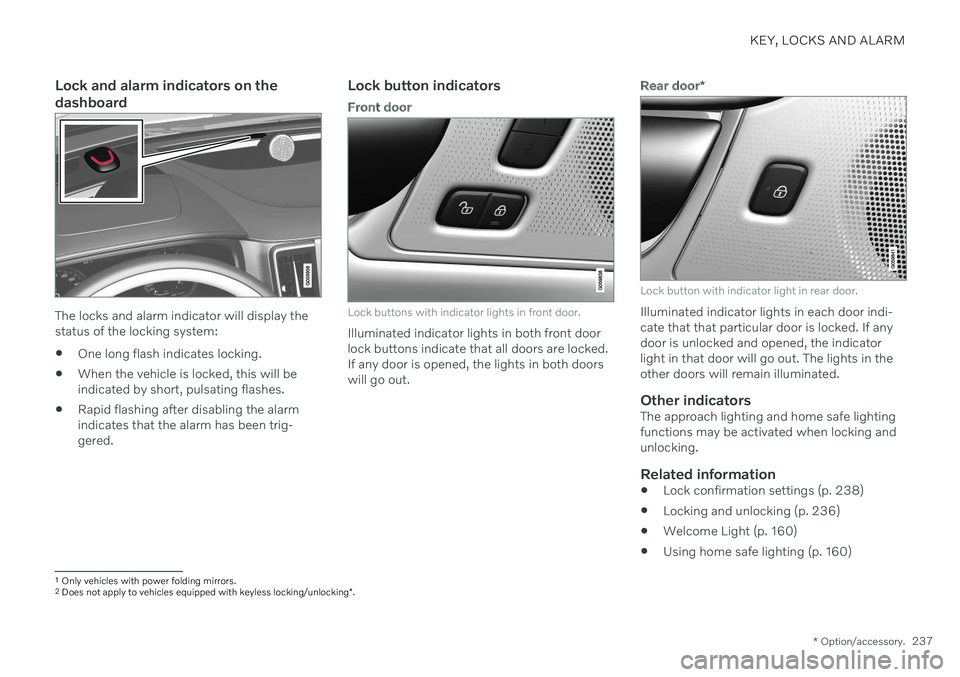
The locks and alarm indicator will display the status of the locking system:
One long flash indicates locking.
When the vehicle is locked, this will beindicated by short, pulsating flashes.
Rapid flashing after disabling the alarmindicates that the alarm has been trig-gered.
Lock button indicators
Front door
Lock buttons with indicator lights in front door.
Illuminated indicator lights in both front door lock buttons indicate that all doors are locked.If any door is opened, the lights in both doorswill go out.
Rear door
*
Lock button with indicator light in rear door.
Illuminated indicator lights in each door indi- cate that that particular door is locked. If anydoor is unlocked and opened, the indicatorlight in that door will go out. The lights in theother doors will remain illuminated.
Other indicatorsThe approach lighting and home safe lightingfunctions may be activated when locking andunlocking.
Related information
Lock confirmation settings (p. 238)
Locking and unlocking (p. 236)
Welcome Light (p. 160)
Using home safe lighting (p. 160)
1
Only vehicles with power folding mirrors.
2 Does not apply to vehicles equipped with keyless locking/unlocking *.