belt VOLVO V60 2021 Repair Manual
[x] Cancel search | Manufacturer: VOLVO, Model Year: 2021, Model line: V60, Model: VOLVO V60 2021Pages: 661, PDF Size: 12.68 MB
Page 606 of 661

||
MAINTENANCE AND SERVICE
* Option/accessory.
604
Positions
Function Ampere Type
– –
MCaseA
–
–
MCaseA
Pneumatic suspension
* compressor 40
MCaseA
–
–
MCaseA
–
–
MCaseA
–
–
MCaseA
Door module right side, rear
20
MCaseA
–
–
MCaseA
– –
– –
Power tailgate* 25
MCaseA
Power front passenger seat
*
Door module right side, front 20
MCaseA
Towbar
* control module 40
MCaseA
Seat belt tensioner module (right side)
40
MCaseA
Internal relay windings
5 Micro
Page 607 of 661
MAINTENANCE AND SERVICE
}}
* Option/accessory.605
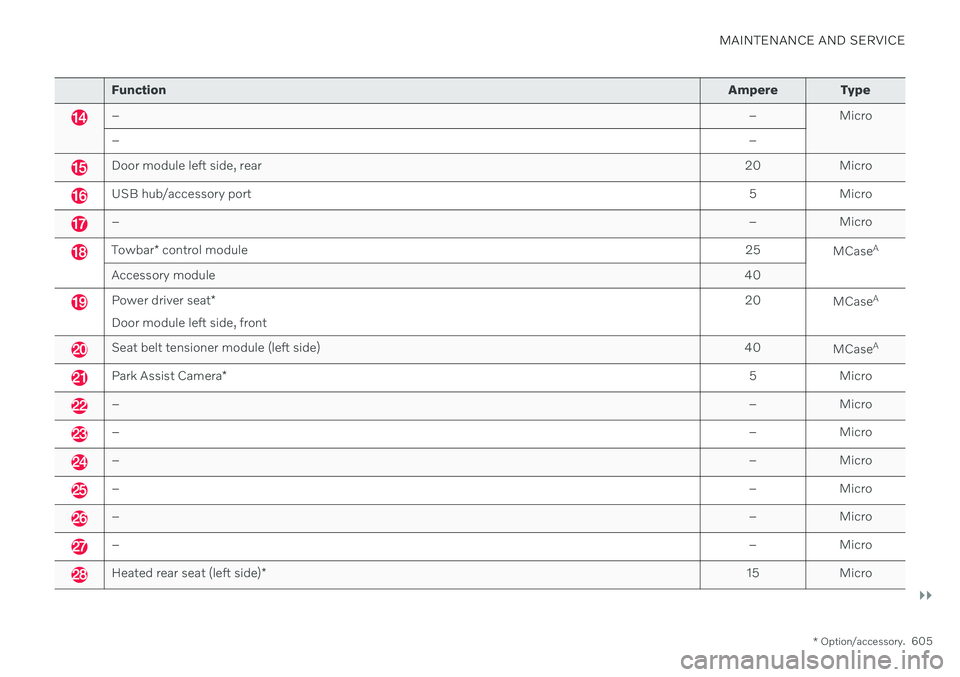
Function Ampere Type
– – Micro
– –
Door module left side, rear20 Micro
USB hub/accessory port 5 Micro
–– Micro
Towbar* control module 25
MCaseA
Accessory module 40
Power driver seat*
Door module left side, front 20
MCaseA
Seat belt tensioner module (left side)
40
MCaseA
Park Assist Camera
* 5 Micro
–
– Micro
–– Micro
–– Micro
–– Micro
–– Micro
–– Micro
Heated rear seat (left side)* 15 Micro
Page 608 of 661
||
MAINTENANCE AND SERVICE
* Option/accessory.
606
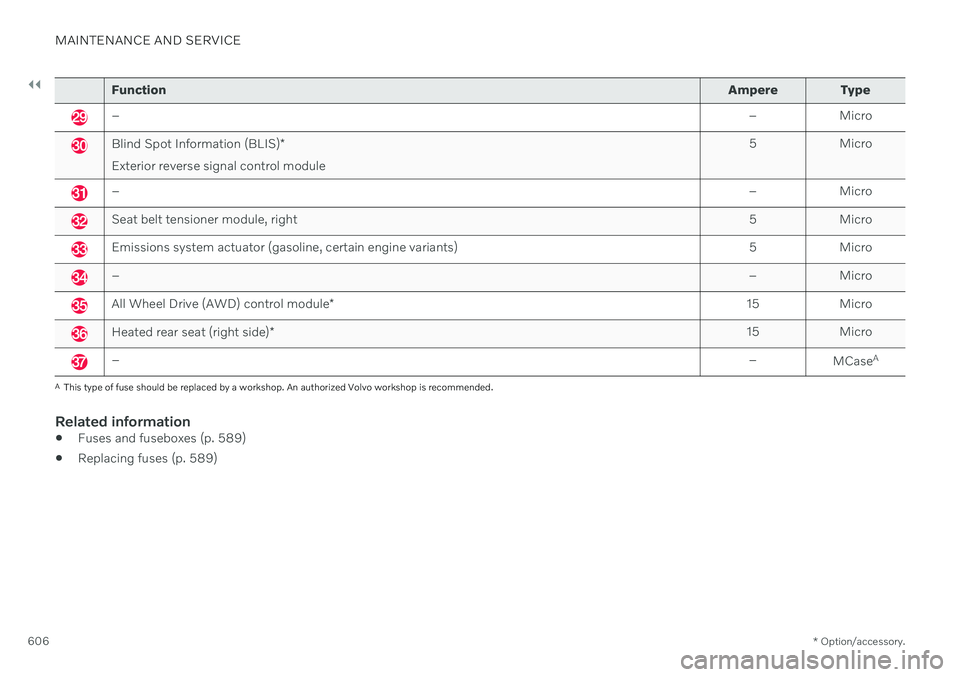
Function Ampere Type
– – Micro
Blind Spot Information (BLIS)*
Exterior reverse signal control module 5 Micro
–
– Micro
Seat belt tensioner module, right 5 Micro
Emissions system actuator (gasoline, certain engine variants)5 Micro
–– Micro
All Wheel Drive (AWD) control module* 15 Micro
Heated rear seat (right side)
* 15 Micro
–
–
MCaseA
A
This type of fuse should be replaced by a workshop. An authorized Volvo workshop is recommended.
Related information
Fuses and fuseboxes (p. 589)
Replacing fuses (p. 589)
Page 610 of 661
||
MAINTENANCE AND SERVICE
* Option/accessory.
608
Related information
Cleaning the center display (p. 608)
Cleaning fabric upholstery and ceiling liner (p. 609)
Cleaning the seat belt (p. 610)
Cleaning textile floor and inlay mats(p. 611)
Cleaning leather upholstery
* (p. 611)
Cleaning the leather steering wheel(p. 612)
Cleaning interior plastic, metal and woodsurfaces (p. 613)
Cleaning the center display
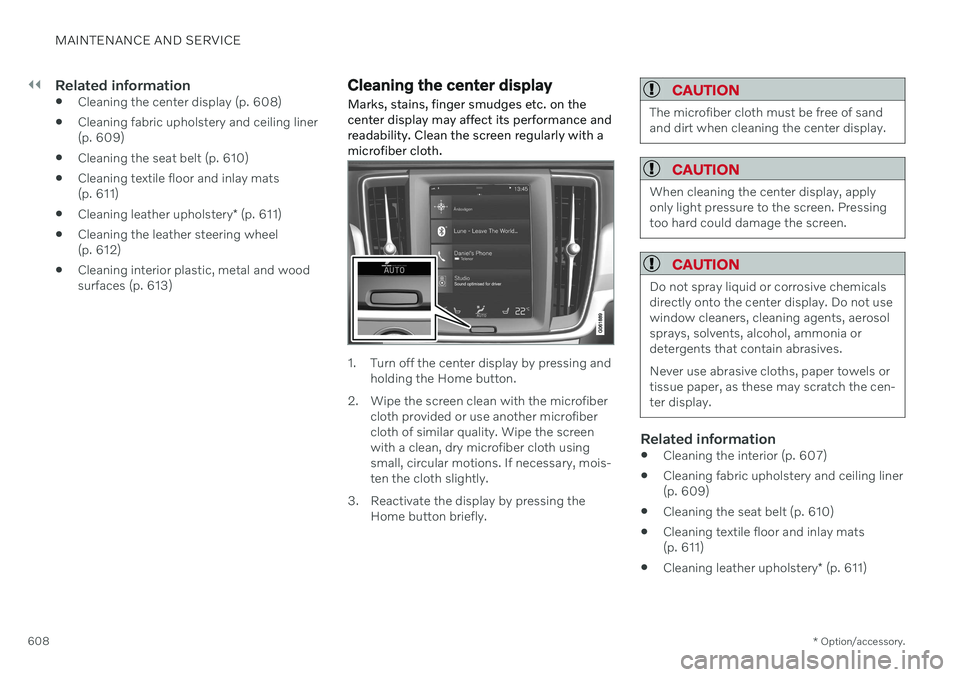
Marks, stains, finger smudges etc. on the center display may affect its performance andreadability. Clean the screen regularly with amicrofiber cloth.
1. Turn off the center display by pressing and holding the Home button.
2. Wipe the screen clean with the microfiber cloth provided or use another microfiber cloth of similar quality. Wipe the screenwith a clean, dry microfiber cloth usingsmall, circular motions. If necessary, mois-ten the cloth slightly.
3. Reactivate the display by pressing the Home button briefly.
CAUTION
The microfiber cloth must be free of sand and dirt when cleaning the center display.
CAUTION
When cleaning the center display, apply only light pressure to the screen. Pressingtoo hard could damage the screen.
CAUTION
Do not spray liquid or corrosive chemicals directly onto the center display. Do not usewindow cleaners, cleaning agents, aerosolsprays, solvents, alcohol, ammonia ordetergents that contain abrasives. Never use abrasive cloths, paper towels or tissue paper, as these may scratch the cen-ter display.
Related information
Cleaning the interior (p. 607)
Cleaning fabric upholstery and ceiling liner (p. 609)
Cleaning the seat belt (p. 610)
Cleaning textile floor and inlay mats(p. 611)
Cleaning leather upholstery
* (p. 611)
Page 612 of 661
||
MAINTENANCE AND SERVICE
* Option/accessory.
610
CAUTION
Always clean all of the upholstery, even if it only has isolated stains. This helps to pre-vent permanent water rings.
NOTE
Do not remove the upholstery when clean- ing.
Cleaning the ceiling liner1. Carefully brush the ceiling liner using a
soft brush.
2. Follow the instructions of the textile cleaner.
3. Then use a soft, lint-free cloth to wipe the ceiling liner.
CAUTION
Failure to take care during cleaning could lead to damage to the ceiling liner.
Related information
Cleaning the interior (p. 607)
Cleaning the center display (p. 608)
Cleaning the seat belt (p. 610)
Cleaning textile floor and inlay mats (p. 611)
Cleaning leather upholstery
* (p. 611)
Cleaning the leather steering wheel(p. 612)
Cleaning interior plastic, metal and woodsurfaces (p. 613)
Cleaning the seat belt
Use cleaning agents and car care products recommended by Volvo. Clean regularly andtreat stains immediately. It is important tovacuum before using a cleaning agent.
Use water and a synthetic soap solution. Spe- cially designed textile cleaning agents areavailable for purchase at Volvo retailers. Makesure the belt is dry before it is retracted.
Related information
Cleaning the interior (p. 607)
Cleaning the center display (p. 608)
Cleaning fabric upholstery and ceiling liner(p. 609)
Cleaning textile floor and inlay mats(p. 611)
Cleaning leather upholstery
* (p. 611)
Cleaning the leather steering wheel(p. 612)
Cleaning interior plastic, metal and woodsurfaces (p. 613)
Page 613 of 661
MAINTENANCE AND SERVICE
}}
* Option/accessory.611
Cleaning textile floor and inlay mats
Use of textile cleaner is recommended when cleaning textile mats. Clean regularly andtreat stains immediately. It is important tovacuum before using a cleaning agent.
Remove the inlay mats to clean the floor mats and inlay mats separately. Each inlay mat issecured into place with pins.
1. Remove the inlay mat by grasping the inlay mat at each pin and lifting the mat straight up.
2. Use a vacuum to remove dust and dirt.
NOTE
Do not swing or strike the inlay mats vio- lently against another object to remove dirtas this could damage the mats.
3. After vacuuming, a specially designed tex- tile cleaning agent should be used to remove stains on floor mats.
4. After cleaning, put the inlay mat back into place by pressing it in at each pin.
WARNING
Never use more than one inlay mat at a time on the driver's floor. If any othertype of floor mat is used, remove theoriginal mat from the driver's seat floorbefore driving. All types of mats mustbe securely anchored in the attach-ment points in the floor. Make sure thefloor mat does not impede the move-ment of the brake pedal or acceleratorpedal in any way, as this could be aserious safety hazard.
Volvo's floor mats are specially manu-factured for your vehicle. They must beproperly secured in the attachmentpoints in the floor to help ensure theycannot slide and become trappedunder the pedals.
Related information
Cleaning the interior (p. 607)
Cleaning the center display (p. 608)
Cleaning fabric upholstery and ceiling liner(p. 609)
Cleaning the seat belt (p. 610)
Cleaning leather upholstery
* (p. 611)
Cleaning the leather steering wheel(p. 612)
Cleaning interior plastic, metal and woodsurfaces (p. 613)
Cleaning leather upholstery
*
Use cleaning agents and car care products recommended by Volvo. Clean regularly andtreat stains immediately. It is important tovacuum before using a cleaning agent.
Volvo's leather upholstery * is treated to pro-
tect its original appearance. Over time, sun- light, grease, dirt, etc. could break down theprotective layer. This could result in scratchesand cracking. Leather upholstery * is a natural product that
changes and acquires a beautiful patina over time. Regular cleaning and treatments arerequired to preserve the qualities and color ofthe leather. Volvo offers a comprehensiveproduct, Volvo Leather Care KitWipes, forcleaning and treating leather upholstery.When used as directed, it helps preserve theleather's protective coating. For optimal results, Volvo recommends clean- ing and applying protective cream one to fourtimes a year (or more often as needed). VolvoLeather Care Kit 951 0251 and Volvo LeatherSoftener 943 7429 are available for purchaseat Volvo retailers.
Cleaning the leather upholstery1. Apply the leather cleaner to a damp sponge and squeeze it until the cleanerfoams.
Page 614 of 661
||
MAINTENANCE AND SERVICE
* Option/accessory.
612 2. Move the sponge in circular motions to
apply the foam to the stain.
3. Dampen the stain thoroughly with the sponge. Let the sponge absorb the stain and do not rub.
4. Dry the stain using a soft towel and let the leather dry completely.
Protecting the leather upholstery1. Apply a small amount of leather protector to a cloth and then apply the protector tothe leather using light circular movements.
2. Let it dry for approximately 20 minutes. > Protecting the leather upholsterymakes it better able to withstand sun-light's harmful UV rays.
Related information
Cleaning the interior (p. 607)
Cleaning the center display (p. 608)
Cleaning fabric upholstery and ceiling liner(p. 609)
Cleaning the seat belt (p. 610)
Cleaning textile floor and inlay mats(p. 611)
Cleaning the leather steering wheel(p. 612)
Cleaning interior plastic, metal and wood surfaces (p. 613)
Cleaning the leather steering wheel
Use cleaning agents and car care products recommended by Volvo. Clean regularly andtreat stains immediately. It is important tovacuum before using a cleaning agent.
Leather needs to breathe. Never cover the leather steering wheel with a plastic protector.Volvo Leather Care Kit 951 0251 and LeatherSoftener 943 7429 are recommended forcleaning the leather steering wheel. First,remove dirt, dust, etc. with a damp sponge orcloth.
CAUTION
Sharp objects such as rings could damage the leather on the steering wheel.
Treating stains on the steering wheel:Type 1 (ink, wine, coffee, milk, sweat or blood)
–Use a soft cloth or sponge. Wipe the steering wheel using a solution of 5%ammonia. For blood stains, mix approxi-mately 2 dl (1 cup) of water with 25 g(one ounce) of salt and wipe the stain.
Type 2 (grease, oil, sauces or chocolate)
1. Same procedure as for Type 1 stains.
2. Finish by wiping the wheel with an absorbent paper or towel. Type 3
(dry dirt or dust)
1. Remove the dirt/dust using a soft brush.
2. Same procedure as for Type 1 stains.
Related information
Cleaning the interior (p. 607)
Cleaning the center display (p. 608)
Cleaning fabric upholstery and ceiling liner (p. 609)
Cleaning the seat belt (p. 610)
Cleaning textile floor and inlay mats(p. 611)
Cleaning leather upholstery
* (p. 611)
Cleaning interior plastic, metal and woodsurfaces (p. 613)
Page 615 of 661
MAINTENANCE AND SERVICE
* Option/accessory.613
Cleaning interior plastic, metal and wood surfaces
Use cleaning agents and car care products recommended by Volvo. Clean regularly andtreat stains immediately.
A lightly dampened microfiber cloth is recom- mended for cleaning interior details and surfa-ces. These cloths are available for purchase atVolvo retailers. Never scrape or rub a stain. Never use strong stain removers.
CAUTION
Do not use solvent containing alcohol to clean the instrument panel glass.
CAUTION
Keep in mind that glossy surfaces can be easily scratched. Wipe these surfaces witha clean and dry microfiber cloth usingsmall, circular motions. If necessary, mois-ten the cloth lightly with clean water.
Related information
Cleaning the interior (p. 607)
Cleaning the center display (p. 608)
Cleaning fabric upholstery and ceiling liner (p. 609)
Cleaning the seat belt (p. 610)
Cleaning textile floor and inlay mats(p. 611)
Cleaning leather upholstery
* (p. 611)
Cleaning the leather steering wheel(p. 612)
Cleaning the exterior
The vehicle should be washed as soon as it becomes dirty. This makes the vehicle easierto clean because dirt does not attach asstrongly. It also reduces the risk of scratchesand keeps the vehicle looking new. Wash therims at a car wash or garage with an oil sepa-rator. Use a car washing detergent recom-mended by Volvo.
Related information
Cleaning the exterior (p. 613)
Polishing and waxing (p. 614)
Hand washing (p. 615)
Automatic car washes (p. 616)
High-pressure washing (p. 617)
Cleaning the wiper blades (p. 618)
Cleaning exterior plastic, rubber and trim components (p. 618)
Cleaning rims (p. 619)
Corrosion protection (p. 620)
Page 645 of 661
INDEX
643
electrical outlet 552, 553
Lighting 161
Cargo compartment cover 559, 560
cargo net 563
Cargo net 563
Car wash 613, 615, 616, 617, 618, 619
Catalytic converter 429 recovery 438
Cell phone, see Phone 486
Center console 551
Center display change appearance 129
cleaning 608
climate controls 210
Function view 120
handling 110, 113, 117, 122
keyboard 124
messages 138, 139
overview 108
settings 130, 131
switch off and change volume 129
symbols in status bar 122
views 113
Central locking 258
Certificate 496
Change of owner 132
Changing target vehicle 312
Checking engine oil level 580 Child lock activating/deactivating 259
Child restraints 66, 68 booster cushions 74
convertible seats 72
infant seats 70
ISOFIX/LATCH anchors 77
lower attachment points 77
recalls and registration 68
top tether anchors 75
Child safety 66
City Safety 323 braking for oncoming vehicles 332
crossing traffic 329
delayed evasive maneuver 331
detecting obstacles 327
evasive maneuver 330
limitations 333
limitations for evasive maneuvers 331
limitations in crossing traffic 330
setting warning distance 326
sub-functions 324
Symbols and messages 336
Cleaning 611, 612, 613 automatic car wash 616
car wash 613, 615, 616, 617, 618, 619
center display 608
Seat belts 610textile upholstery 607, 609, 611
upholstery 607, 609, 610, 611, 612, 613
wheels 619
Cleaning wheels 619
Cleaning wiper blades 618
CleanZone 202
Clean Zone Interior Package 202
Climate 198 auto-regulation 216
blower control 220, 221
parking 226
perceived temperature 200
Sensors 199
temperature control 222, 223, 224
voice control 200
zones 198
Climate controls 210 center display 210
rear seat 210
Climate system 198, 210 Refrigerant 637
repairs 576
Clock, setting 92
Collision 44, 49, 55, 64Collision warner crossing traffic rear 352
see City Safety 323
Page 653 of 661
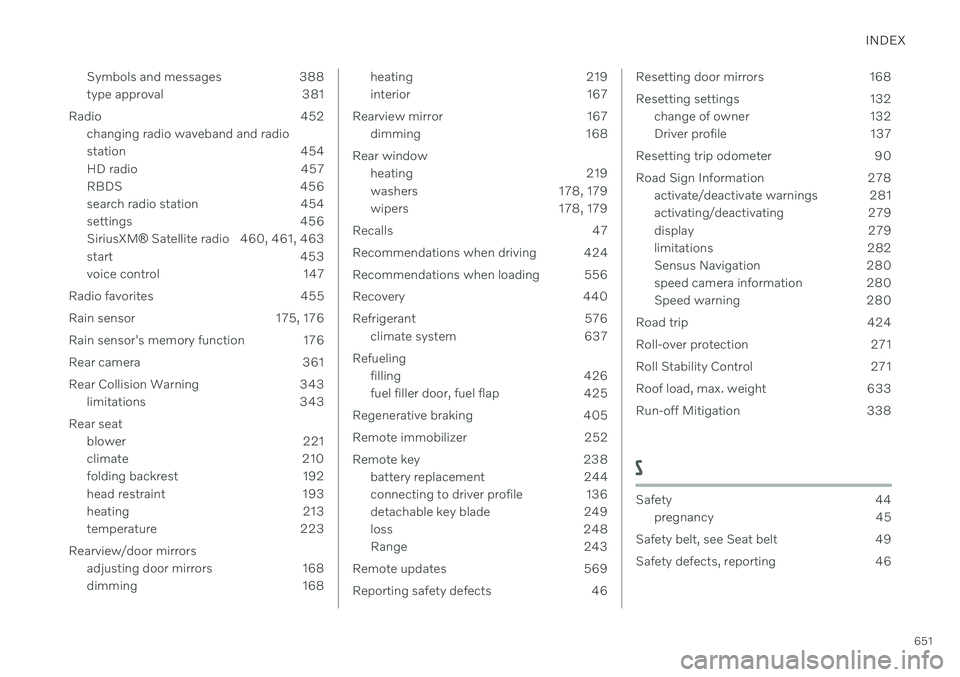
INDEX
651
Symbols and messages 388
type approval 381
Radio 452 changing radio waveband and radio
station 454
HD radio 457
RBDS 456
search radio station 454
settings 456SiriusXM ®
Satellite radio 460, 461, 463
start 453
voice control 147
Radio favorites 455
Rain sensor 175, 176
Rain sensor's memory function 176
Rear camera 361
Rear Collision Warning 343 limitations 343
Rear seat blower 221
climate 210
folding backrest 192
head restraint 193
heating 213
temperature 223
Rearview/door mirrors adjusting door mirrors 168
dimming 168
heating 219
interior 167
Rearview mirror 167 dimming 168
Rear window heating 219
washers 178, 179
wipers 178, 179
Recalls 47
Recommendations when driving 424
Recommendations when loading 556
Recovery 440
Refrigerant 576 climate system 637
Refueling filling 426
fuel filler door, fuel flap 425
Regenerative braking 405
Remote immobilizer 252
Remote key 238 battery replacement 244
connecting to driver profile 136
detachable key blade 249
loss 248
Range 243
Remote updates 569
Reporting safety defects 46Resetting door mirrors 168
Resetting settings 132 change of owner 132
Driver profile 137
Resetting trip odometer 90
Road Sign Information 278 activate/deactivate warnings 281
activating/deactivating 279
display 279
limitations 282
Sensus Navigation 280
speed camera information 280
Speed warning 280
Road trip 424
Roll-over protection 271
Roll Stability Control 271
Roof load, max. weight 633
Run-off Mitigation 338
S
Safety 44 pregnancy 45
Safety belt, see Seat belt 49
Safety defects, reporting 46