phone VOLVO V60 2021 Manual Online
[x] Cancel search | Manufacturer: VOLVO, Model Year: 2021, Model line: V60, Model: VOLVO V60 2021Pages: 661, PDF Size: 12.68 MB
Page 553 of 661
LOADING, STORAGE AND PASSENGER COMPARTMENT
* Option/accessory.551
Tunnel console
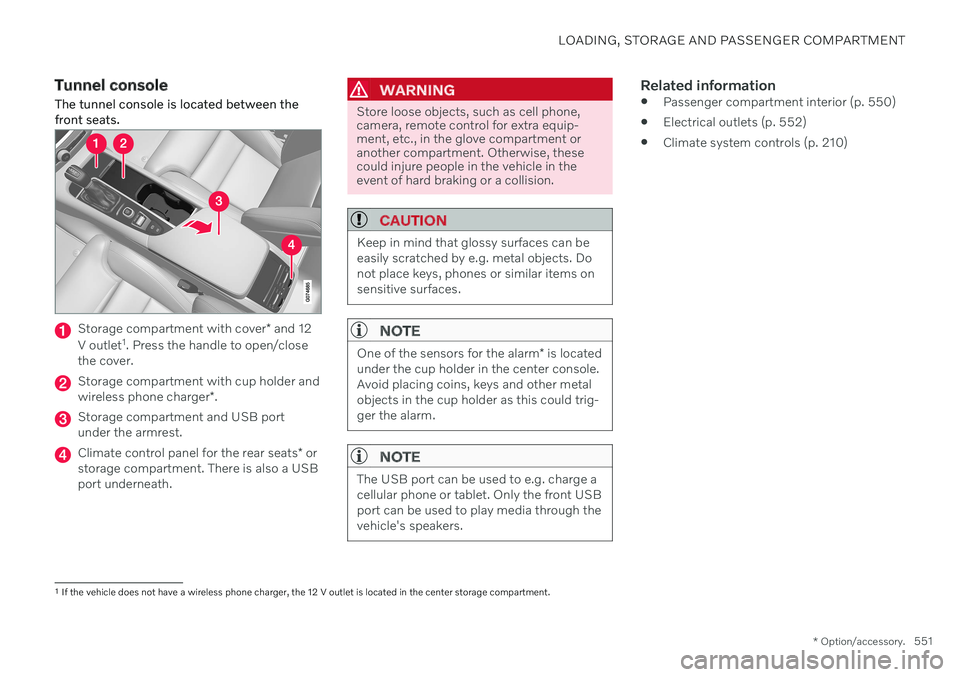
The tunnel console is located between the front seats.
Storage compartment with cover * and 12
V outlet 1
. Press the handle to open/close
the cover.
Storage compartment with cup holder and wireless phone charger *.
Storage compartment and USB port under the armrest.
Climate control panel for the rear seats * or
storage compartment. There is also a USB port underneath.
WARNING
Store loose objects, such as cell phone, camera, remote control for extra equip-ment, etc., in the glove compartment oranother compartment. Otherwise, thesecould injure people in the vehicle in theevent of hard braking or a collision.
CAUTION
Keep in mind that glossy surfaces can be easily scratched by e.g. metal objects. Donot place keys, phones or similar items onsensitive surfaces.
NOTE
One of the sensors for the alarm * is located
under the cup holder in the center console. Avoid placing coins, keys and other metalobjects in the cup holder as this could trig-ger the alarm.
NOTE
The USB port can be used to e.g. charge a cellular phone or tablet. Only the front USBport can be used to play media through thevehicle's speakers.
Related information
Passenger compartment interior (p. 550)
Electrical outlets (p. 552)
Climate system controls (p. 210)
1
If the vehicle does not have a wireless phone charger, the 12 V outlet is located in the center storage compartment.
Page 554 of 661
LOADING, STORAGE AND PASSENGER COMPARTMENT
* Option/accessory.
552
Electrical outlets
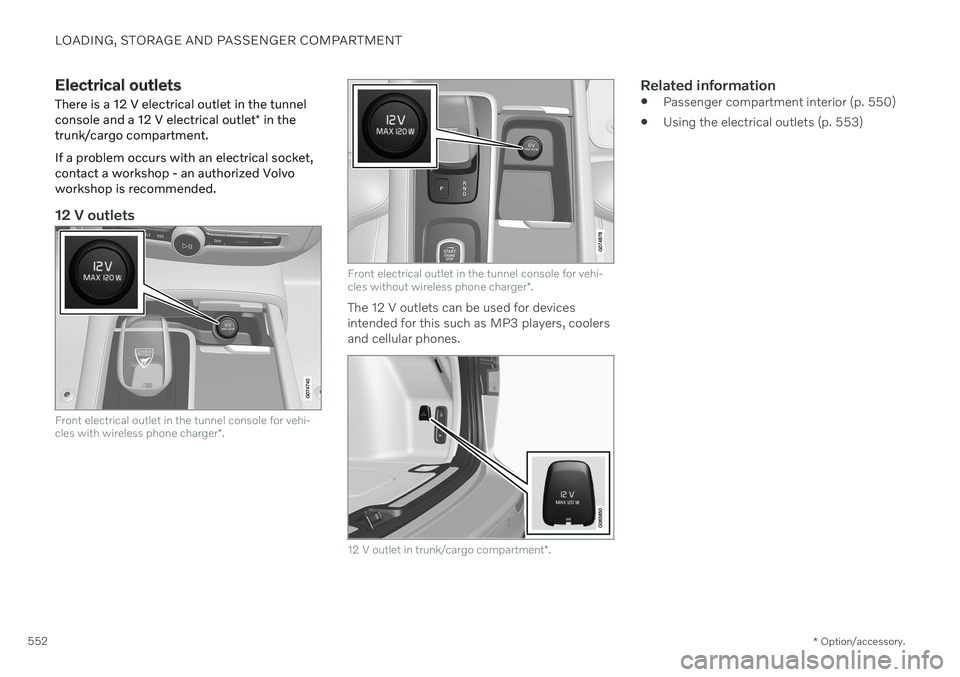
There is a 12 V electrical outlet in the tunnel console and a 12 V electrical outlet * in the
trunk/cargo compartment. If a problem occurs with an electrical socket, contact a workshop - an authorized Volvoworkshop is recommended.
12 V outlets
Front electrical outlet in the tunnel console for vehi- cles with wireless phone charger *.
Front electrical outlet in the tunnel console for vehi- cles without wireless phone charger *.
The 12 V outlets can be used for devices intended for this such as MP3 players, coolersand cellular phones.
12 V outlet in trunk/cargo compartment *.
Related information
Passenger compartment interior (p. 550)
Using the electrical outlets (p. 553)
Page 555 of 661
LOADING, STORAGE AND PASSENGER COMPARTMENT
553
Using the electrical outlets
The 12 V outlet can be used for devices intended for this such as MP3 players, cool-ers and cellular phones.
The ignition must be in at least mode I for the
outlets to supply current. The outlets will then be active as long as there is sufficient chargein the start battery. If the engine is turned off and the vehicle is locked, the outlets will be deactivated. If theengine is turned off and the vehicle remainsunlocked, the sockets will remain active for upto 7 minutes.
NOTE
Bear in mind that using the electrical out- lets when the engine is off could cause thestarter battery to have too low of a chargelevel, which could limit other functionality. Accessories connected to the electrical outlets can be activated even when thevehicle electrical system is off or if precon-ditioning is used. For this reason, discon-nect plugs when they are not in use to pre-vent the starter battery from becoming dis-charged.
WARNING
Do not use accessories with large or heavy plugs – they could damage theoutlet or come loose while you are driv-ing.
Do not use accessories that couldcause disruptions to e.g. the vehicle'sradio receiver or electrical system.
Position the accessory so that there isno risk of it injuring the driver or pas-sengers in the event of heavy brakingor a collision.
Pay attention to connected accessoriesas they can generate heat that couldburn passengers or the interior.
Using 12 V outlets1. Remove the stopper (tunnel console) or
fold down the cover (trunk/cargo com-partment) over the socket and plug in thedevice.
2. Unplug the device and put the stopper back in (tunnel console) or fold up thecover (trunk/cargo compartment) whenthe socket is not in use or left unattended.
CAUTION
The maximum power is 120 W (10 A) per outlet.
Related information
Electrical outlets (p. 552)
Passenger compartment interior (p. 550)
Page 644 of 661
INDEX
642Auto-hold brakes 403
activating/deactivating 404
after collision 405
driver support 270
Automatic car wash 616 Automatic engine stop auto-stop 418
Automatic high beam 155
Automatic locking 260
Automatic relocking 241, 255
Automatic transmission 406, 407 kickdown 412
oil 636
Trailer 434
B
Backrestfront seat, adjusting 182, 183, 186, 187 , 188, 189
rear seat, folding 192
Battery jump-start 431
Maintenance 584
recycling 588
starter battery 584
support 586
symbols on the battery 588
Blind Spot Information 344
BLIS 344 activating/deactivating 345
limitations 346
Symbols and messages 347
Blower adjusting 220, 221
air distribution 205
air vents 206
Bluetooth connect 475
connecting vehicle to Internet 501
phone 485
settings 493
Book service and repair 571
Booster cushions 74 Brake assist after collision 405
Brake fluid grade 637
Brake functions 397
Brakes 397 anti-lock brakes, ABS 397
auto-brake with Pilot Assist 315auto-braking with Adaptive Cruise
Control 315automatic when stationary 403
Brake Assist System, BAS 398
brake lights 159
brake system 397
emergency brake lights 159
Maintenance 399
on salted roads 399
on wet roads 399
parking brake 400
brake system fluid 637
C
Camera sensorsee Camera 383
Camera unit 383 limitations 383
maintenance and cleaning 386
Symbols and messages 388
Capacity weight 547, 633 Care Key restricted remote key 248
settings 249
Cargo compartment 555 attachment points 558
cargo net 563
Page 645 of 661
INDEX
643
electrical outlet 552, 553
Lighting 161
Cargo compartment cover 559, 560
cargo net 563
Cargo net 563
Car wash 613, 615, 616, 617, 618, 619
Catalytic converter 429 recovery 438
Cell phone, see Phone 486
Center console 551
Center display change appearance 129
cleaning 608
climate controls 210
Function view 120
handling 110, 113, 117, 122
keyboard 124
messages 138, 139
overview 108
settings 130, 131
switch off and change volume 129
symbols in status bar 122
views 113
Central locking 258
Certificate 496
Change of owner 132
Changing target vehicle 312
Checking engine oil level 580 Child lock activating/deactivating 259
Child restraints 66, 68 booster cushions 74
convertible seats 72
infant seats 70
ISOFIX/LATCH anchors 77
lower attachment points 77
recalls and registration 68
top tether anchors 75
Child safety 66
City Safety 323 braking for oncoming vehicles 332
crossing traffic 329
delayed evasive maneuver 331
detecting obstacles 327
evasive maneuver 330
limitations 333
limitations for evasive maneuvers 331
limitations in crossing traffic 330
setting warning distance 326
sub-functions 324
Symbols and messages 336
Cleaning 611, 612, 613 automatic car wash 616
car wash 613, 615, 616, 617, 618, 619
center display 608
Seat belts 610textile upholstery 607, 609, 611
upholstery 607, 609, 610, 611, 612, 613
wheels 619
Cleaning wheels 619
Cleaning wiper blades 618
CleanZone 202
Clean Zone Interior Package 202
Climate 198 auto-regulation 216
blower control 220, 221
parking 226
perceived temperature 200
Sensors 199
temperature control 222, 223, 224
voice control 200
zones 198
Climate controls 210 center display 210
rear seat 210
Climate system 198, 210 Refrigerant 637
repairs 576
Clock, setting 92
Collision 44, 49, 55, 64Collision warner crossing traffic rear 352
see City Safety 323
Page 646 of 661
INDEX
644Collision warning
from the rear 343
with Adaptive Cruise Control 311
with Pilot Assist 311
Color code, paintwork 622
Color codes 622
Compass 445 calibration 445
Condensation in headlights 615, 616, 617, 618
Connected Safety 276 activating/deactivating 277
limitations 277
Connecting vehicle to Internet No connection or poor connection 505
via a mobile device (WiFi) 501
via cellular phone (Bluetooth) 501
via vehicle's modem 502
Connect phone 486
Contact information 26
Convertible seats 72
coolant 581 filling 582
Cooling system overheating 430
Cornering assistance 308activating/deactivating 309
limitations 309
Cornering illumination 157
Corner Traction Control 271
Corrosion protection 620Covering cargo compartment 560
Crash, see Collision 44
Crash event data 33
Cross Traffic Alert 352 activating/deactivating 353
limitations 353
messages 355
Cruise control 283 activating 284
standby mode 286
stored speed 313
turn off 285
Curb weight 633
Customer Privacy Policy 35
CZIP (Clean Zone Interior Package) 202D
Data recording 33 transferring between vehicle and
workshop 568
Data sharing 506, 507
Daytime running lights 152Decals location 628
Defrosting 218Detecting obstacles City Safety 327
Diagnosis via the workshop's Wi-Fi 568
Dimensions 631
Dipstick, electronic 580
Direction of rotation 522
Disengaging the shiftlock 411 Display driver information 82
Display lighting 162
Distance Alert 350 activating/deactivating 351
limitations 351
Set time interval 314
DivX ®
474
Page 651 of 661
INDEX
649
Media player 469, 470, 471
compatible file formats 477
voice control 147
Messages and symbols Adaptive Cruise Control 294
Assistance at risk of collision 342
BLIS 347
camera and radar unit 388
City Safety 336
Cross Traffic Alert 355
Lane Keeping Aid 320
Park Assist Camera 369
Park Assist Pilot 379
Parking Assist 360
Pilot Assist 306
stability and traction control system 274
Messages in display 104, 138 handling 105, 138
saved 106, 139
Mileage 87 Misting condensation in headlights 613, 616
Mood lighting 161 adjusting 162
N
Net
cargo compartment 563
O
Occupant safety 45
Occupant weight sensor 59
Octane rating 428
Oil, see also Engine oil 636
Oil filter 579
Oil level 580
On-board diagnostics 566
On-board Diagnostic socket 37
Option/accessory 21
Outside temperature gauge 92
Overheating 430, 434
Owner's information 16
OWNER'S MANUAL 21
environmental labeling 23
in cellular phone 20
in the center display 17, 18
P
Paddle at steering wheel 195 Paintcolor code 622
paint damage and touch-up 620,621 , 622
Panoramic roof 170 opening and closing 171
pinch protection 164
sun shade 173
ventilation position 172
Parallel parking 371
Park Assist Camera 361 activating 367
limitations 383
location and views 362
sensor field 366
Symbols and messages 369
trajectory lines 364
Park Assist Pilot 371 limitations 376
parallel parking 372
perpendicular parking 372
pulling out of a parking space 376
Symbols and messages 379
use 373
Park Assist System 356
Page 652 of 661
INDEX
650parking
on hills 402
Parking Assist 356 activating/deactivating 358
front, rear and sides 357
limitations 359
Symbols and messages 360
Parking brake 400 activating/deactivating 400
automatic activation 402
Low battery charge level 402
Parking climate 226 Symbols and messages 233
Passenger compartment filter 204
Passenger compartment interior 550 center console 551
electrical outlet 552
glove compartment 554
sun visor 555
Passenger compartment lighting 160 adjusting 162
auto switch 161
Passing assistance 310 activating 310
personal information (Customer Privacy
Policy) 35
Phone 485 changing to another 489
connect 486
connect automatically 488
connect manually 488
delete 489
disconnect 488
phone call 489, 492
text message 490
voice control 146
Phone charger 494
Pilot Assist 296 activating 300
auto-brake 315
controls 298
disengaged steering assistance 303
display 299
limitations 304
passing 310
set time interval 314
standby mode 302
stored speed 313
switching target vehicles 312
Symbols and messages 306
turn off 301
WARNING 311
pinch protection 164 resetting 165
PIN code 503 Private locking 265
Polishing 614Position lights 152
Power 635
Power folding door mirrors 168
Power panoramic roof 170
Power save mode 431
Power seats 183
Power windows 165, 166 opening and closing 166
pinch protection 164
Precleaning 230 start/stop 230
Preconditioning 226 start/stop 226
timer 227
Pressure wash 617
Privacy Policy (Customer Privacy Policy) 35
Private locking 264 activating/deactivating 265
PROPOSITION 65 WARNING 431
R
Radar unit 380 limitations 383
maintenance and cleaning 386
Page 654 of 661
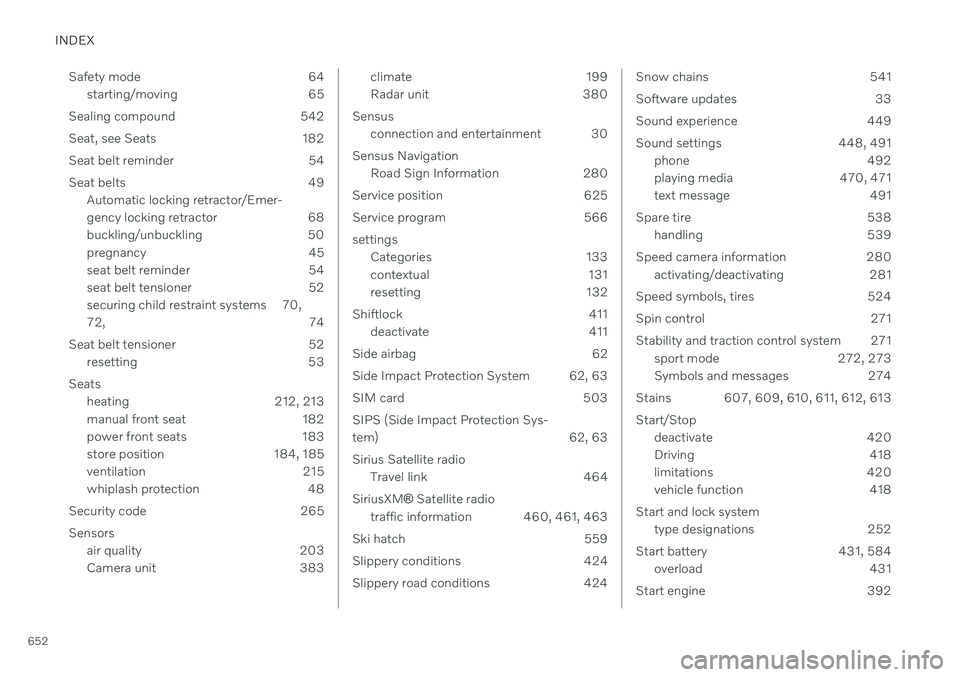
INDEX
652Safety mode 64
starting/moving 65
Sealing compound 542
Seat, see Seats 182
Seat belt reminder 54
Seat belts 49 Automatic locking retractor/Emer-
gency locking retractor 68
buckling/unbuckling 50
pregnancy 45
seat belt reminder 54
seat belt tensioner 52
securing child restraint systems 70, 72, 74
Seat belt tensioner 52 resetting 53
Seats heating 212, 213
manual front seat 182
power front seats 183
store position 184, 185
ventilation 215
whiplash protection 48
Security code 265 Sensors air quality 203
Camera unit 383
climate 199
Radar unit 380
Sensus connection and entertainment 30
Sensus Navigation Road Sign Information 280
Service position 625
Service program 566settings Categories 133
contextual 131
resetting 132
Shiftlock 411 deactivate 411
Side airbag 62
Side Impact Protection System 62, 63
SIM card 503 SIPS (Side Impact Protection Sys-
tem) 62, 63 Sirius Satellite radio Travel link 464
SiriusXM ®
Satellite radio
traffic information 460, 461, 463
Ski hatch 559
Slippery conditions 424
Slippery road conditions 424Snow chains 541
Software updates 33
Sound experience 449
Sound settings 448, 491 phone 492
playing media 470, 471
text message 491
Spare tire 538 handling 539
Speed camera information 280 activating/deactivating 281
Speed symbols, tires 524
Spin control 271
Stability and traction control system 271 sport mode 272, 273
Symbols and messages 274
Stains 607, 609, 610, 611, 612, 613 Start/Stop deactivate 420
Driving 418
limitations 420
vehicle function 418
Start and lock system type designations 252
Start battery 431, 584 overload 431
Start engine 392
Page 657 of 661
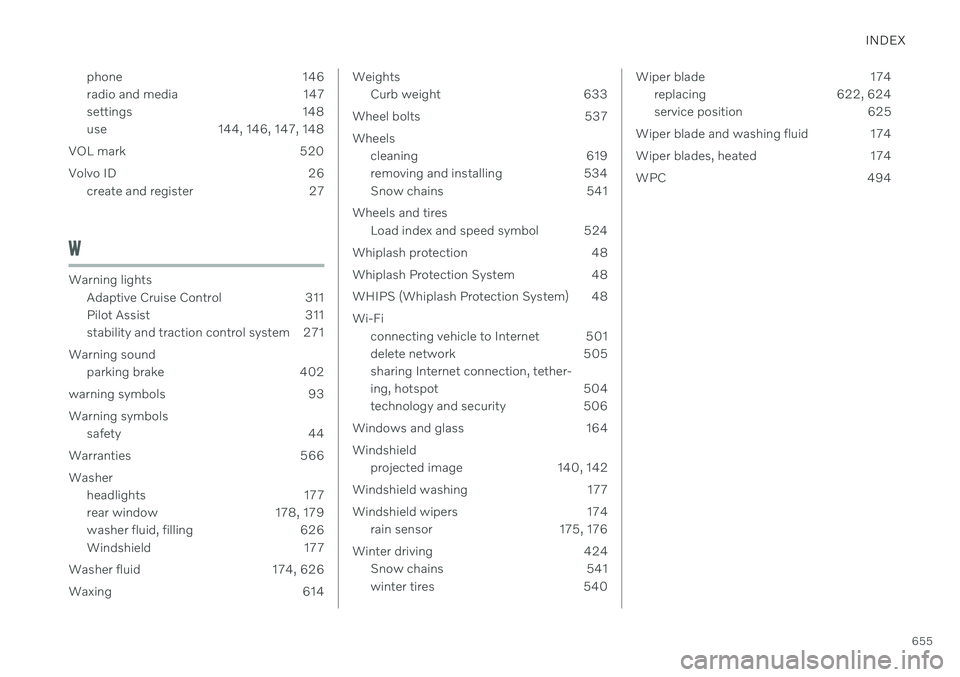
INDEX
655
phone 146
radio and media 147
settings 148
use 144, 146, 147, 148
VOL mark 520
Volvo ID 26 create and register 27
W
Warning lightsAdaptive Cruise Control 311
Pilot Assist 311
stability and traction control system 271
Warning sound parking brake 402
warning symbols 93 Warning symbols safety 44
Warranties 566Washer headlights 177
rear window 178, 179
washer fluid, filling 626
Windshield 177
Washer fluid 174, 626
Waxing 614
Weights Curb weight 633
Wheel bolts 537 Wheels cleaning 619
removing and installing 534
Snow chains 541
Wheels and tires Load index and speed symbol 524
Whiplash protection 48
Whiplash Protection System 48
WHIPS (Whiplash Protection System) 48 Wi-Fi connecting vehicle to Internet 501
delete network 505sharing Internet connection, tether-
ing, hotspot 504
technology and security 506
Windows and glass 164 Windshield projected image 140, 142
Windshield washing 177
Windshield wipers 174 rain sensor 175, 176
Winter driving 424 Snow chains 541
winter tires 540Wiper blade 174
replacing 622, 624
service position 625
Wiper blade and washing fluid 174
Wiper blades, heated 174
WPC 494