ad blue VOLVO V60 TWIN ENGINE 2020 User Guide
[x] Cancel search | Manufacturer: VOLVO, Model Year: 2020, Model line: V60 TWIN ENGINE, Model: VOLVO V60 TWIN ENGINE 2020Pages: 673, PDF Size: 14.2 MB
Page 389 of 673

HYBRID INFORMATION
387
Charging cable components
Charge module
240 V adapter clip
240 V adapter
Charge coupler
Release button
Related information
Charging cable residual current device (p. 387)
Charging cable temperature monitoring(p. 388)
Charging the hybrid battery (p. 383)
Charging status in the charging cable'scharging module (p. 391)
Charging cable residual current device The charging cable has a circuit breaker that helps protect against current overloads andthermal overheating.
WARNING
Charging the hybrid battery may only be done from approved, grounded 120/240 Voutlets (AC, alternating current). If the elec-trical circuit or electrical socket's capacityis not known, let a licensed electricianinspect the electrical circuit's capacity.Using a charge level that exceeds the elec-trical circuit's or electrical outlet's capacitymay start a fire or damage the electrical cir-cuit.
WARNING
The charging cable's residual current breaker helps protect the vehicle'scharging system but cannot ensurethat an current overload will neveroccur.
Never use visibly worn or damagedelectrical sockets. Doing so could leadto fires or serious injury.
Never connect the charging cable to anextension cord.
Maintenance or replacement of thehybrid battery may only be performedby a trained and qualified Volvo servicetechnician.
If the charging cable's residual current device
is triggered, the blue indicator light in thecharging module will not illuminate when thecharging cable is plugged into an electricaloutlet (or the red warning light will glowsteadily). Have the outlet checked by alicensed electrician or try using another walloutlet.
Related information
Charge cable (p. 385)
Charging status in the charging cable'scharging module (p. 391)
Page 393 of 673

HYBRID INFORMATION
391
LED indicator light's colorMeaning
White Courtesy light. Yellow Wait modeA
– waiting for
charging to start.
Flashing green Charging is in progress B
.
Green Charging completed C
.
Red Malfunction.
A E.g. after a door has been opened or if the charging cable handle is not locked in place.
B The more slowly the light flashes, the closer the battery is tobeing fully charged.
C The light will go out after a short time.
Related information
Charging the hybrid battery (p. 383)
Charging status in the instrument panel (p. 392)
Charging status in the charging cable'scharging module (p. 391)
Stopping hybrid battery charging (p. 394)
Charging status in the charging cable's charging module
The red and blue lights in the charging mod- ule indicate the status of ongoing and com-pleted charging.
Charge module: 1. Red warning light, 2. Blue status indicator
When the charge module is initially plugged into a wall outlet, the red warning light willflash once to indicate that a startup safetycheck has been performed. When the safetycheck has been completed, the blue statusindicator will glow steadily and the red warn-ing light will be off. The charger is now readyto be used. If the red warning light continuesto flash or glows steadily, a fault has beendetected and the charger will not deliverpower to the vehicle. Contact a Volvo retaileror a certified Volvo service technician. When the charging cable is connected to thevehicle's charging socket, the blue light willflash once. Charging cable connected to the vehicle's charging socket:
Indicator light's color
Meaning
Flashing blue Charging is in progress. Thelight flashes about onceevery other second.
Solid blue Charging completed. This will also be indicated in theinstrument panel.
Related information
Charging the hybrid battery (p. 383)
Charging status in the vehicle's charging socket (p. 390)
Charging status in the instrument panel(p. 392)
Stopping hybrid battery charging (p. 394)
Page 394 of 673

HYBRID INFORMATION
392
Charging status in the instrument panelCharging status is indicated in the instrument panel using both graphics and messages. This information is displayed as long as theinstrument panel is active.
Graphic Message
Meaning
Fully charged at: [Time] displayed along with an animated blue
pulsing light through the charging cable. Charging is in progress and the approximate time at which the battery will be fully charged is displayed.
Charging complete is displayed. An image will be superimposed
over the graphic of the vehicle with a green LED indicator light in the socket. The battery is fully charged.
Charging error will be displayed. The LED indicator light in the
charging socket will be red. Malfunction. Make sure the charging cable is correctly con- nected to the vehicle's charging socket and to the120/240 V outlet (alternating current).
Page 406 of 673

||
STARTING AND DRIVING
* Option/accessory.
404
Mode Functions
I The panoramic roof, power windows, 12-volt electricalsocket in the passenger com-partment, Bluetooth, naviga-tion, phone, blower and wind-shield wipers can be used.
The power seats can beadjusted.
The 12-volt electrical socket
* in
the cargo compartment can beused.
Electrical current will be taken
from the battery in this ignitionmode.
II The headlights illuminate.
Warning/indicator lights illumi-nate for 5 seconds.
A number of other systems areactivated. However, seat andrear window heating can onlybe activated when the engineis running.
This ignition mode uses a lot of
current from the battery andshould be avoided wheneverpossible!
A Also activated when the door is opened.
Related information
Starting the vehicle (p. 400)
Adjusting the steering wheel (p. 197)
Jump starting using another battery (p. 442)
Selecting ignition mode (p. 404)
Selecting ignition mode
The vehicle's ignition can be put in various modes (levels) to make different functionsavailable.
Selecting an ignition mode
Start knob in the tunnel console.
Ignition mode 0
– Unlock the vehicle and
keep the remote key in the passenger compartment.
NOTE
To set level I or II without engine start –
do not depress the brake pedal (or clutch
pedal for vehicles with manual transmis- sion) when selecting this ignition mode.
Ignition mode I
– Turn the start knob
clockwise and release it. The control will
Page 460 of 673
AUDIO, MEDIA AND INTERNET
* Option/accessory.
458
Audio, media and Internet
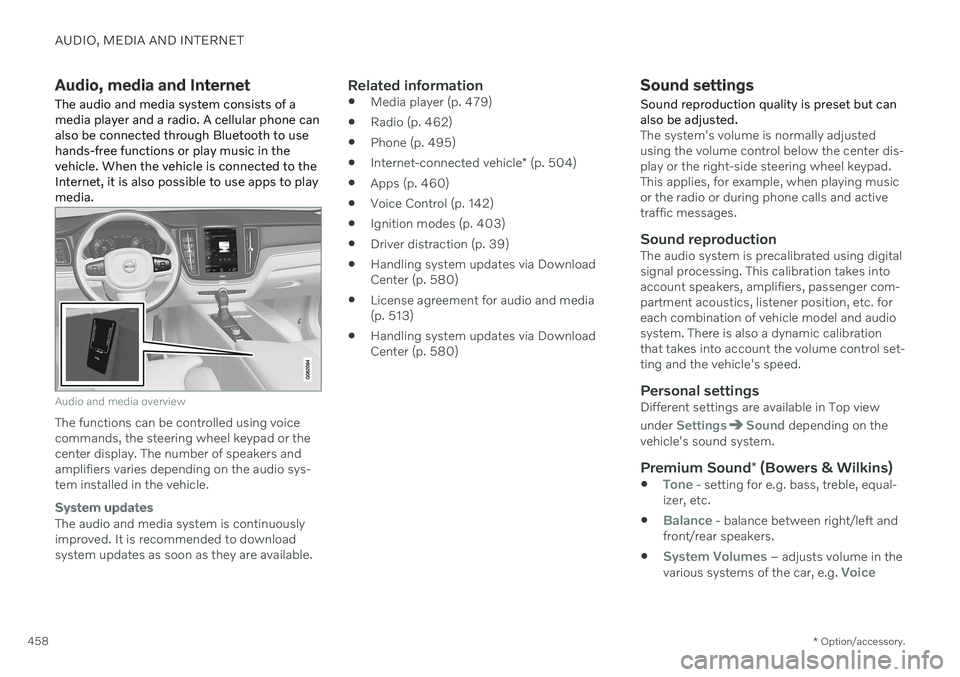
The audio and media system consists of a media player and a radio. A cellular phone canalso be connected through Bluetooth to usehands-free functions or play music in thevehicle. When the vehicle is connected to theInternet, it is also possible to use apps to playmedia.
Audio and media overview
The functions can be controlled using voice commands, the steering wheel keypad or thecenter display. The number of speakers andamplifiers varies depending on the audio sys-tem installed in the vehicle.
System updates
The audio and media system is continuously improved. It is recommended to download system updates as soon as they are available.
Related information
Media player (p. 479)
Radio (p. 462)
Phone (p. 495)
Internet-connected vehicle
* (p. 504)
Apps (p. 460)
Voice Control (p. 142)
Ignition modes (p. 403)
Driver distraction (p. 39)
Handling system updates via DownloadCenter (p. 580)
License agreement for audio and media(p. 513)
Handling system updates via DownloadCenter (p. 580)
Sound settings
Sound reproduction quality is preset but can also be adjusted.
The system's volume is normally adjusted using the volume control below the center dis-play or the right-side steering wheel keypad.This applies, for example, when playing musicor the radio or during phone calls and activetraffic messages.
Sound reproductionThe audio system is precalibrated using digitalsignal processing. This calibration takes intoaccount speakers, amplifiers, passenger com-partment acoustics, listener position, etc. foreach combination of vehicle model and audiosystem. There is also a dynamic calibrationthat takes into account the volume control set-ting and the vehicle's speed.
Personal settingsDifferent settings are available in Top view under
SettingsSound depending on the
vehicle's sound system.
Premium Sound * (Bowers & Wilkins)
Tone - setting for e.g. bass, treble, equal-
izer, etc.
Balance - balance between right/left and
front/rear speakers.
System Volumes – adjusts volume in the
various systems of the car, e.g. Voice
Page 481 of 673

AUDIO, MEDIA AND INTERNET
* Option/accessory.479
4. Tap one of the divisions to display:
In progress: play-by-play information
about a match/game/tournament cur- rently in progress. Continue tapping todisplay. In the detailed view, you canalso select a radio station that is cur-rently broadcasting an ongoing sport-ing event
Headlines for MLB: tap to display
brief headline information
Scheduled: schedules for coming
matches, games, etc.
Scores: match/game results
The same principle applies to all sports.
Related information
SiriusXM Travel Link ®
* (p. 474)
SiriusXM Travel Link ®
* - Notifications
(p. 476)
SiriusXM Travel Link ®
* - Fuel (p. 477)
SiriusXM Travel Link ®
* - Weather (p. 475)
Media player
The media player can play audio from the CD player * and from external audio sources con-
nected via USB port or Bluetooth. It can also play video format via the USB port.
When the vehicle is connected to the Internet, it is also possible to listen to web radio, audiobooks and to access music services via apps.
The media player is controlled from the center display. Sev-eral functions can also becontrolled using voice com-mands or the right-side steer-ing wheel keypad.
The radio, which is also handled by the media player, is described in a separate section.
Related information
Playing media (p. 480)
Controlling and changing media (p. 481)
Media searches (p. 482)
Apps (p. 460)
Radio (p. 462)
CD player
* (p. 483)
Video (p. 484)
Streaming media via Bluetooth ®
(p. 485)
Playing media via the USB port (p. 486)
Internet-connected vehicle
* (p. 504)
Page 482 of 673

AUDIO, MEDIA AND INTERNET
* Option/accessory.
480
Playing media
The media player is controlled from the cen- ter display. Several other functions can alsobe controlled using the right-side steeringwheel keypad or by using voice commands. The radio can also be controlled in the media player. See the section describing the radio.
Starting a media source
App view. (Generic illustration; basic apps vary depending on market and model).
CD *
1. Insert a CD. 2.
Open the
CD app from App view.
3. Select the track you would like to play. > Playback will begin.
USB flash drive
1. Inset a USB flash drive. 2.Open the
USB app from App view.
3. Select the track you would like to play. > Playback will begin.
MP3 player and iPod®
NOTE
To start playback from an iPod, the iPod app must be used (not USB). When an iPod is used as source, the car's audio and media system has a menu struc-ture similar to the iPod player's own menustructure.
1. Connect a media source.
2. Start playback in the connected media
source.
3. Open the app (
iPod, USB) from App view.
> Playback will begin.
Bluetooth-connected device
1. Activate Bluetooth in the media source. 2. Connect a media source.
3. Start playback in the connected media
source.
4. Open the
Bluetooth app from App view.
> Playback will begin.
Media with Internet connection
Medial playback from apps with Internet con- nection:
1. Connect the vehicle to the Internet.
2. Open the app from the App view. > Playback will begin.
Read the separate section on how to down- load apps.
Video
1. Connect a media source. 2. Open the
USB app from App view.
3. Tap the title you would like to play. > Playback will begin.
Apple CarPlay
CarPlay is described in a separate section.
Android Auto
Android Auto is described in a separate sec- tion.
Page 483 of 673

AUDIO, MEDIA AND INTERNET
}}
* Option/accessory.481
Related information
Handling the App menu in the instrument panel (p. 102)
Radio (p. 462)
Controlling and changing media (p. 481)
Connecting a device via the USB port(p. 486)
Connecting a device via Bluetooth ®
(p. 485)
Download apps (p. 461)
Internet-connected vehicle
* (p. 504)
Video (p. 484)
Apple ®
CarPlay ®
* (p. 488)
Android Auto
* (p. 492)
Voice control for radio and media (p. 146)
Compatible file formats for media (p. 487)
Controlling and changing media
Media playback can be controlled using voice commands, the steering wheel keypad or thecenter display.
The media player can be con- trolled using voice com-mands, the right-side steer-ing wheel keypad or the cen-ter display.
Volume - turn the knob under the center dis- play or tap
on the right-side steering
wheel keypad to raise or lower the volume. Play/pause - tap the image for the track you would like to play, or press the button below the center display or
on the right-side
steering wheel keypad. Changing track/song - tap the desired track in the center display, or press
or below
the center display or on the right-side steering wheel keypad. Rewinding/fast-forwarding - tap the time axis in the center display and drag it sideways, or press and hold
or below the center
display or on the right-side steering wheel keypad. Changing media source - select from among previous sources in the app, tap the desiredapp in App view or use the right-side steeringwheel keypad to select the app in the app menu
.
Library - tap the button to
play from the library.
Shuffle - tap the button to
play tracks in a random order.
Page 487 of 673
AUDIO, MEDIA AND INTERNET
485
Video settings
You can change some language settings for video playback.
Audio Language and Subtitle Language can
be adjusted with the video player in full-screen mode or by opening Top view and tapping
SettingsMediaVideo.
Related information
Video (p. 484)
Streaming media via Bluetooth ®
The vehicle's media player is equipped with Bluetooth and can play audio files fromBluetooth-enabled external devices such ascellular phones and tablets.
In order for the media player to be able to wirelessly play audio files from an externaldevice, the device must be connected to thevehicle via Bluetooth.
Related information
Connecting a device via Bluetooth ®
(p. 485)
Connecting a phone to the car via Blue-tooth for the first time (p. 496)
Playing media (p. 480)
Compatible file formats for media(p. 487)
Connecting a device via Bluetooth ®
Connect a Bluetooth ®
device to the vehicle to
wirelessly play media and give the vehicle an Internet connection if it is available.
Many cellular phones on the market currently offer wireless Bluetooth ®
technology, but not
all phones are fully compatible with the vehi- cle. The procedure for connecting a media device is the same as for connecting a cellular phone to the vehicle via Bluetooth ®
.
Related information
Streaming media via Bluetooth ®
(p. 485)
Connecting a phone to the car via Blue- tooth for the first time (p. 496)
Playing media (p. 480)
Page 494 of 673

||
AUDIO, MEDIA AND INTERNET
* Option/accessory.
492 but the text will be shown in your iOS device. When using Siri, note that it is thephone's microphones that are used andthe quality therefore depends on thephone's location.
If the device is connected to the vehiclethrough Bluetooth, the connection will bebroken when CarPlay is used. ResumeInternet connection in the vehicle by teth-ering using the device's Wi-Fi hotspot.
Some of CarPlay's functions (such asvoice calls and messages) interrupt theuse of the vehicle's own functions andCarPlay will instead be automatically dis-played. If you do not wish this to happen,deselect display of the correspondingfunction in CarPlay under the phone'snotification settings.
CarPlay only works with iPhone 9
.
NOTE
Availability and functionality can vary depending on market.
Related information
Apple ®
CarPlay ®
* (p. 488)
Connecting the vehicle to the Internet via a phone (Wi-Fi) (p. 505)
Android Auto
*
Android Auto lets you listen to music, make calls, get driving directions and use apps cus-tomized for your vehicle from an Androiddevice. Android Auto can be used withselected Android devices.
For information on supported apps and com- patible Android devices, please go towww.android.com/auto/. For third-party apps,see Google Play. Please note that Volvo is notresponsible for the content of Android Auto. Android Auto is started from App view. After Android Auto has been initially started, the appwill start automatically the next time thedevice is connected. The automatic start set-ting can be deactivated in Settings.
NOTE
When a device is connected to Android Auto, it is possible to steam to anothermedia player via Bluetooth. Bluetooth isactive while Android Auto is in use.
When using navigation guidance provided by Android Auto, navigation will only be shownon the center display and not in the instrumentpanel or head-up display. Android Auto can be controlled from the cen- ter display, with the right-side steering wheelkeypad or by using voice commands. Press and hold the
button on the steering wheel
keypad to start Google Assistant and press briefly to deactivate it.
By using Android Auto, you acknowledge the following: Android Auto is a serviceprovided by Google Inc. under its termsand conditions. Volvo Cars is notresponsible for Android Auto or itsfeatures or applications. When you useAndroid Auto, your car transfers certaininformation (including its location) to yourconnected Android phone. You are fullyresponsible for your and any otherperson