fog light VOLVO V60 TWIN ENGINE 2020 User Guide
[x] Cancel search | Manufacturer: VOLVO, Model Year: 2020, Model line: V60 TWIN ENGINE, Model: VOLVO V60 TWIN ENGINE 2020Pages: 673, PDF Size: 14.2 MB
Page 161 of 673

LIGHTING
* Option/accessory.159
ing wheel lever lighting ring is in position
or .
NOTE
Regulations concerning rear fog light use vary from country to country.
Related information
Lighting control and panel (p. 150)
Front fog lights/corner illumination
*
(p. 157)
Ignition modes (p. 403)
Brake lights
The brake lights are automatically illuminated when braking.
The brake lights are illuminated when the brake pedal is depressed and when the brakesare automatically applied by a driver supportsystem.
Related information
Emergency brake lights (p. 159)
Brake functions (p. 405)
Driver support systems (p. 268)
Emergency brake lights
The emergency brake lights are activated to warn following vehicles of hard braking. This function causes an additional taillight on each side of the vehicle to illuminate.
The emergency brake lights are activated in the event of hard braking or if the ABS systemis activated and the vehicle is traveling at ahigh speed. After the driver decelerates to a low speed and then releases the brake, the brake lightsresume their normal brightness.
Related information
Brake lights (p. 159)
Brakes (p. 405)
Hazard warning flashers (p. 160)
Page 217 of 673
CLIMATE CONTROL
}}
215
Activating auto climate control
If auto climate control is activated, several cli- mate system functions are controlled auto-matically.
1. Tap the symbol in the center of the climate bar to open Climate view in the center dis- play.
2. Tap or press and hold
AUTO Climate
Tap - air recirculation, air conditioning and air distribution are controlled auto-matically.
Press and hold - air recirculation, airconditioning and air distribution arecontrolled automatically. Temperatureand blower speed are changed tostandard settings: 22 °C (72 °F) and speed
3.
> Auto climate mode is activated and the button lights up.
NOTE
It is possible to change the temperature and blower speed without deactivatingautomatic climate control. Automatic cli-mate control is deactivated when the airdistribution is changed manually or whenthe max defroster is activated.
Related information
Climate system controls (p. 211)
Activating and deactivating recirculation The climate system's recirculation function helps shut out smog, smoke, exhaust fumes,etc. by reusing the air in the passenger com-partment.
1. Tap the symbol in the center of the climate
bar to open Climate view in the center dis- play.
2.Tap Recirc.
> Air recirculation is activated/deacti- vated and the button lights up/goes out.
CAUTION
If the air in the vehicle is recirculated too long, there is a risk of fogging on the insideof the windows.
NOTE
Recirculation cannot be activated when the max defroster is on.
Page 221 of 673
CLIMATE CONTROL
}}
219
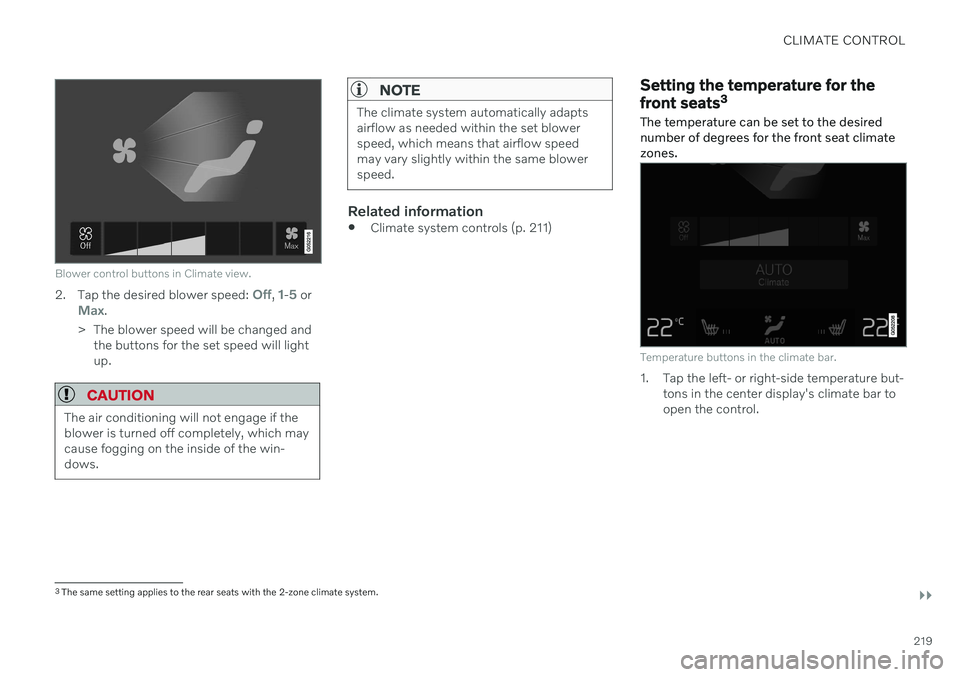
Blower control buttons in Climate view.
2.Tap the desired blower speed: Off, 1-5 orMax.
> The blower speed will be changed and the buttons for the set speed will light up.
CAUTION
The air conditioning will not engage if the blower is turned off completely, which maycause fogging on the inside of the win-dows.
NOTE
The climate system automatically adapts airflow as needed within the set blowerspeed, which means that airflow speedmay vary slightly within the same blowerspeed.
Related information
Climate system controls (p. 211)
Setting the temperature for the front seats 3
The temperature can be set to the desired number of degrees for the front seat climatezones.
Temperature buttons in the climate bar.
1. Tap the left- or right-side temperature but- tons in the center display's climate bar to open the control.
3The same setting applies to the rear seats with the 2-zone climate system.
Page 295 of 673

DRIVER SUPPORT
}}}}
* Option/accessory.293
Temporarily deactivating steering assistance with Pilot Assist *43
Pilot Assist steering assistance can be tem- porarily deactivated and reactivated withoutprior warning.
When the turn signals are used, Pilot Assist's steering assistance will be temporarily deacti-vated. When the turn signal is switched off,steering assistance will be automatically reac-tivated if the traffic lane's side markings canstill be detected. If Pilot Assist cannot clearly interpret the lane's side marker lines or if the camera/radarsensor is unable for some other reason toclearly interpret the lane, Pilot Assist will tem-porarily deactivate steering assistance. How-ever, the speed and distance warnings willremain active. Steering assistance will resumewhen the side marker lines can once again beinterpreted. In these situations, the driver maybe alerted through slight vibrations in thesteering wheel that steering assistance is tem-porarily deactivated.
Related information
Pilot Assist
* (p. 287)
Selecting and activating Pilot Assist
*
(p. 290)
Deactivating Pilot Assist
* (p. 291)
Pilot Assist
* limitations (p. 293)
Pilot Assist *44
limitations
Pilot Assist functionality may be reduced in certain situations.
Pilot Assist is a driver support function designed to simplify driving and assist thedriver in many situations. However, the driveris always responsible for maintaining a suita-ble distance to vehicles or objects around itand ensuring that the vehicle is correctly posi-tioned in the traffic lane.
WARNING
In some situations, Pilot Assist may have trouble helping the driver properly or maybe deactivated automatically – we adviseagainst using Pilot Assist in such cases.Examples of such situations include:
the lane markings are worn, missing or cross each other.
lane division is unclear, for example,when the lanes divide or merge or atexits or when there are multiple sets ofmarkings.
edges or other lines than lane markingsare present on or near the road, e.g.curbs, joints or repairs to the road sur-face, edges of barriers, roadside edgesor strong shadows.
the lane is narrow or winding.
the lane contains ridges or holes.
weather conditions are poor, e.g. rain,snow or fog or slush or reduced visibil-ity with poor light conditions, back-lighting, wet road surface, etc.
The driver should also note that Pilot Assist has the following limitations:
High curbs, roadside barriers, tempo- rary obstacles (traffic cones, safety bar-riers, etc.) are not detected. Alterna-
43
Depending on market, this function can be either standard or optional.
Page 313 of 673
DRIVER SUPPORT
}}
* Option/accessory.311
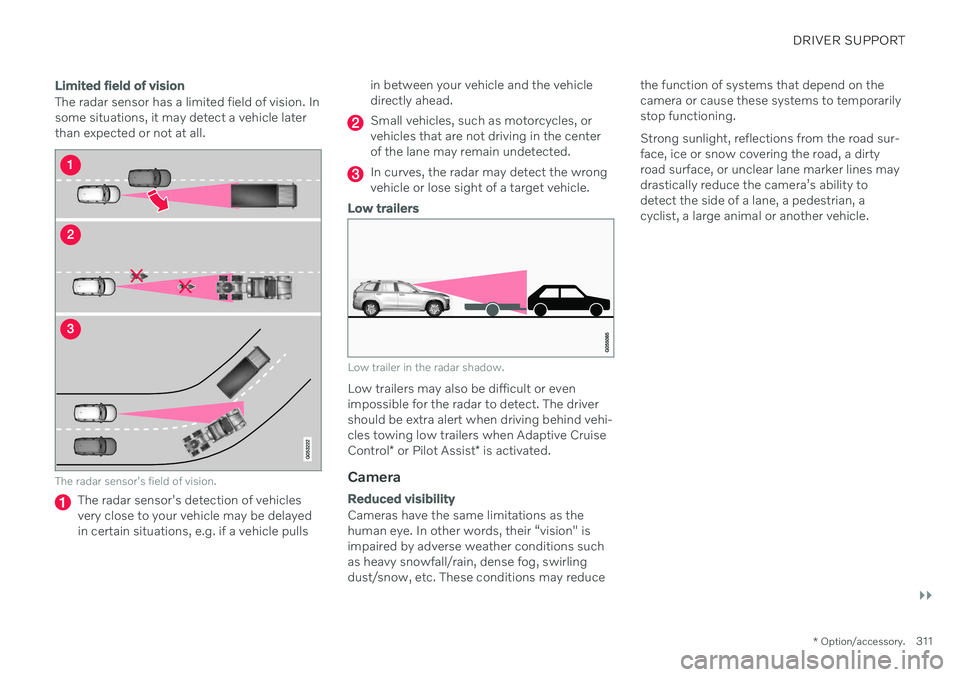
Limited field of vision
The radar sensor has a limited field of vision. In some situations, it may detect a vehicle laterthan expected or not at all.
The radar sensor's field of vision.
The radar sensor's detection of vehicles very close to your vehicle may be delayedin certain situations, e.g. if a vehicle pulls in between your vehicle and the vehicledirectly ahead.
Small vehicles, such as motorcycles, or vehicles that are not driving in the centerof the lane may remain undetected.
In curves, the radar may detect the wrong vehicle or lose sight of a target vehicle.
Low trailers
Low trailer in the radar shadow.
Low trailers may also be difficult or even impossible for the radar to detect. The driver should be extra alert when driving behind vehi- cles towing low trailers when Adaptive Cruise Control
* or Pilot Assist * is activated.
Camera
Reduced visibility
Cameras have the same limitations as the human eye. In other words, their “vision" isimpaired by adverse weather conditions suchas heavy snowfall/rain, dense fog, swirlingdust/snow, etc. These conditions may reduce the function of systems that depend on thecamera or cause these systems to temporarilystop functioning. Strong sunlight, reflections from the road sur- face, ice or snow covering the road, a dirtyroad surface, or unclear lane marker lines maydrastically reduce the camera
Page 449 of 673
STARTING AND DRIVING
}}
447
When Trailer Stability Assist is activated, the ESC symbolis displayed in the instrumentpanel.
Related information
Driving with a trailer (p. 444)
Electronic Stability Control (p. 269)
Checking trailer lights
When connecting a trailer, make sure that all of the lights on the trailer are functioningbefore starting to drive.
Trailer turn signals and brake lightsIf one or more of the turn signals or brake lights on the trailer is not working, a symboland message will be displayed in the instru-ment panel. The other lights on the trailermust be checked manually by the driver beforethe vehicle is driven.
Symbol Message
Trailer turn indicator Right
turn indicator malfunction
Trailer turn indicator Left
turn indicator malfunction
Trailer brake light Malfunc-
tion
If any of the trailer's turn signal lights is not working, the turn signal symbol in the instru-ment panel will also flash more quickly thannormal.
Trailer rear fog lightWhen a trailer is connected, the vehicle's rearfog light may not illuminate and rear fog lightfunctionality is instead transferred to the trailer. If this is the case, check to see if thetrailer is equipped with a rear fog light beforeactivating the vehicle's fog lights when drivingwith a trailer to help ensure safe operation.
Page 659 of 673

INDEX
657
limitations 344
rest stop guidance 343
Driver performance 88 settings 89
Driver profile 133 edit 134, 135, 137
select 134
Driver support system 268 Drive mode 301
Drive systems 420 Driving cooling system 441
with a trailer 444
Driving economy 429
Driving through standing water 434driving with a trailer towball load 646
towing capacity 646
E
Economical driving 429
Electrical outlet 560
use 562
Electrical system 593
Electric drive motor specifications 647
electric motor 420 Range 431
Electric parking brake 408
Electronic immobilizer 247
emergency brake lights 159
Emission inspection readiness 576Energy distribution using map data 426
Engine automatic start and stop of combus-
tion engine 421
overheating 441
start 400
turn off 402
Engine braking 405, 415 Engine compartment coolant 590
engine oil 588
overview 587
Engine drag control 269
Engine oil 588 filling 589
filter 588
grade and volume 648
Engine shutdown 402Engine specifications 647 Engine temperature high 441
Environment 28Ethanol content max. 10% by volume 437
Exterior dimensions 643
Extra heater (Auxiliary heater) 229
F
Federal Clean Air Act 576
Ferry transport 427
Flooded road 434
Fluids, volumes 636, 650
Fluids and oils 649, 650 Fog lights front 157
rear 158
Four-C 427 Front seat blower 218
climate 211
heating 212, 213
temperature 219
ventilation 213
Page 662 of 673

INDEX
660Keyless
locking/unlocking 250
settings 251
touch-sensitive surfaces 249
Key tag 234
L
Labels location 640
Laminated glass 166 Lamps changing 592
Trailer 447
Lane Keeping Aid 344 activating/deactivating 346
display 350
limitations 347
see Lane Keeping Aid 344
select assistance option 346
Symbols and messages 348
Language 129
Large Animal Detection (LAD) 318Leather upholstery, cleaning instruc-
tions 622 Leveling control suspension 427
License agreement 95, 513
Lifting tools 541Light bulbschanging 592
Light control 150, 162Lighting Active Bending Lights 157
approach lighting 160
automatic high beam 155
brake lights 159
control, instrument, display 162
controls 150, 161
cornering illumination 158
daytime running lights 153
emergency brake lights 159
front fog lights 157
Hazard warning flashers 160
high beams 154, 155
home safe lighting 160
in passenger compartment 161
low beams 154
position lights 152
rear fog light 158
settings 151
Turn signals 156
Lighting, replacing bulbs 592
Limp home 414Load anchoring eyelets cargo compartment 568Load anchoring hooks 567
Load carriers 566
Load index 530Loadinggeneral 565
load anchoring eyelets 568
long load 566
Lock indication 232 setting 233
Locking/unlocking Tailgate 238, 252
Locking wheel bolts 541 Locks locking/unlocking 236
Long-term storage 397 Low battery charge level start battery 442
Low beams 154
Low oil level 589
M
Maintained climate comfort 226 start/stop 226
Maintenance 576 corrosion protection 630