fold seats VOLVO V60 TWIN ENGINE 2020 User Guide
[x] Cancel search | Manufacturer: VOLVO, Model Year: 2020, Model line: V60 TWIN ENGINE, Model: VOLVO V60 TWIN ENGINE 2020Pages: 673, PDF Size: 14.2 MB
Page 574 of 673
||
LOADING, STORAGE AND PASSENGER COMPARTMENT
* Option/accessory.
572 4.
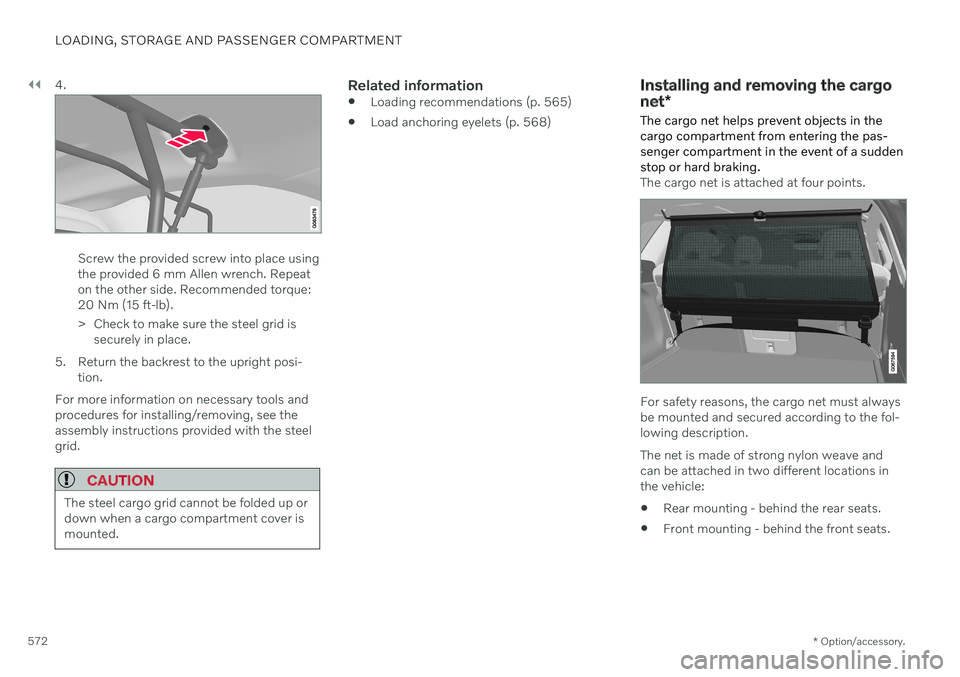
Screw the provided screw into place using the provided 6 mm Allen wrench. Repeaton the other side. Recommended torque:20 Nm (15 ft-lb).
> Check to make sure the steel grid is
securely in place.
5. Return the backrest to the upright posi- tion.
For more information on necessary tools and procedures for installing/removing, see theassembly instructions provided with the steelgrid.
CAUTION
The steel cargo grid cannot be folded up or down when a cargo compartment cover ismounted.
Related information
Loading recommendations (p. 565)
Load anchoring eyelets (p. 568)
Installing and removing the cargo net
*
The cargo net helps prevent objects in the cargo compartment from entering the pas-senger compartment in the event of a suddenstop or hard braking.
The cargo net is attached at four points.
For safety reasons, the cargo net must always be mounted and secured according to the fol-lowing description. The net is made of strong nylon weave and can be attached in two different locations inthe vehicle:
Rear mounting - behind the rear seats.
Front mounting - behind the front seats.
Page 576 of 673
||
LOADING, STORAGE AND PASSENGER COMPARTMENT
574
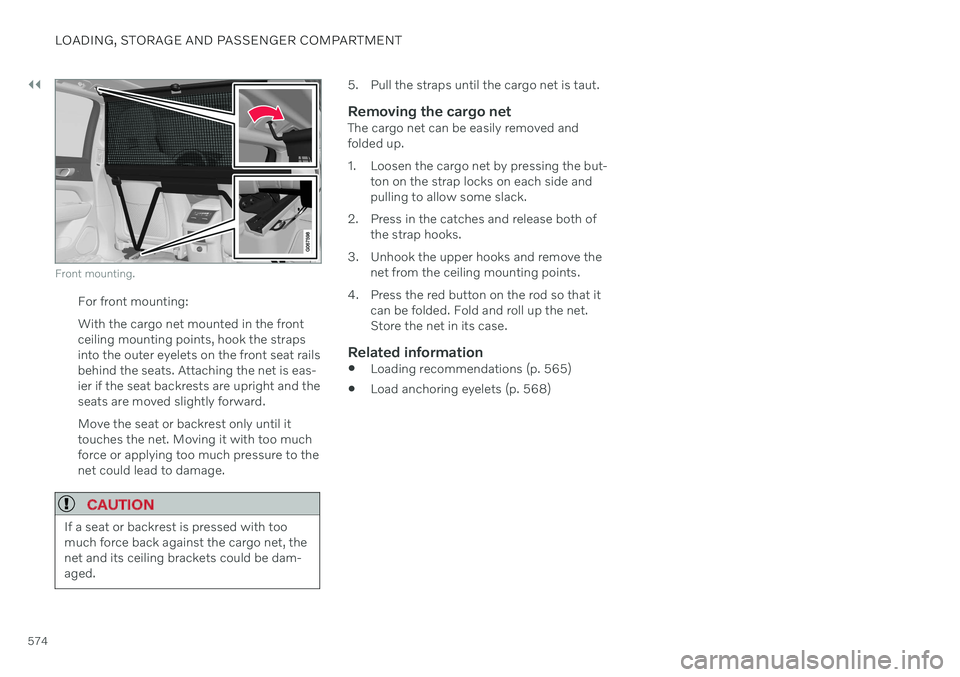
Front mounting.
For front mounting: With the cargo net mounted in the front ceiling mounting points, hook the strapsinto the outer eyelets on the front seat railsbehind the seats. Attaching the net is eas-ier if the seat backrests are upright and theseats are moved slightly forward. Move the seat or backrest only until it touches the net. Moving it with too muchforce or applying too much pressure to thenet could lead to damage.
CAUTION
If a seat or backrest is pressed with too much force back against the cargo net, thenet and its ceiling brackets could be dam-aged.
5. Pull the straps until the cargo net is taut.
Removing the cargo netThe cargo net can be easily removed and folded up.
1. Loosen the cargo net by pressing the but-ton on the strap locks on each side and pulling to allow some slack.
2. Press in the catches and release both of the strap hooks.
3. Unhook the upper hooks and remove the net from the ceiling mounting points.
4. Press the red button on the rod so that it can be folded. Fold and roll up the net.Store the net in its case.
Related information
Loading recommendations (p. 565)
Load anchoring eyelets (p. 568)
Page 658 of 673

INDEX
656Color codes 632
Compass 454, 455
calibration 455
Condensation in headlights 625, 627, 628, 629
Connecting vehicle to Internet No connection or poor connection 509
via a mobile device (WiFi) 505
via cellular phone (Bluetooth) 505
via vehicle's modem 506
Connect phone 496
Contact information 26
Convertible seats 69
coolant 649 filling 590
Cooling system overheating 441
Cornering assistance 302 activating/deactivating 303
limitations 303
Cornering illumination 158
Corner Traction Control 269
Corrosion protection 630 Covering cargo compartment 569
Crash, see Collision 42
Crash event data 33
Cross Traffic Alert 333 activating/deactivating 334
limitations 334
messages 336
Cruise control 275 activating 276
manage speed 298
standby mode 277
turn off 277
Curb weight 645
Customer Privacy Policy 35
CZIP (Clean Zone Interior Package) 204
D
Data recording 33 transferring between vehicle and
workshop 579
Data sharing 510, 511
Daytime running lights 153Decals location 640
Defrosting 216 Detecting obstacles City Safety 318
Dimensions 643
Dipstick, electronic 589
Direction of rotation 528Display
driver information 80
Display lighting 162
Distance Alert 273 activating/deactivating 274
limitations 274
Set time interval 299
DivX ®
484
Door mirrors 169 compass 454, 455
dimming 170
outer 169
power folding 170
resetting 170
store position 186, 187
Download Center 579 use 580
Driveline transmission 414
Drive mode 421 changing 425
driver support 301
Driver Alert Control 342 activating/deactivating 343
Page 664 of 673

INDEX
662Parking Assist 357
activating/deactivating 359
front, rear and sides 358
limitations 359
Symbols and messages 361
Parking brake 408 activating/deactivating 409
automatic activation 410
Low battery charge level 411
Parking climate 221 Symbols and messages 228
Parking heater 229
Passenger compartment filter 205 Passenger compartment heater (Parking
heater) 229
Passenger compartment interior 558 center console 559
electrical outlet 560
glove compartment 563
sun visor 565
Passenger compartment lighting 161 adjusting 162
auto switch 161
Passing assistance Adaptive Cruise Control 304
Pilot Assist 304
starting with Pilot Assist 304
start with Adaptive Cruise Control 304
personal information (Customer Privacy
Policy) 35
Phone 495changing to another 499
connect 496
connect automatically 498
connect manually 498
delete 499
disconnect 498
phone call 499, 502
text message 500
voice control 145
Pilot Assist 287 activating 290
auto-brake 300
disengaged steering assistance 293
limitations 293
manage speed 298
passing 304
set time interval 299
standby mode 292
switching target vehicles 297
Symbols and messages 295
turn off 291
WARNING 296
pinch protection 166 resetting 167
PIN code 507 Private locking 262Polestar Engineered 427, 428
Polishing 624
Position lights 152
Power 647electric motor 647
Power folding door mirrors 170
Power panoramic roof 172
Power save mode 442
Power seats 185
Power tailgate 257
Power windows 167, 168 pinch protection 166
Preconditioning 222 start/stop 222
timer 223
Pressure wash 628
Privacy Policy (Customer Privacy Policy) 35
Private locking 261 activating/deactivating 262
PROPOSITION 65 WARNING 442