height VOLVO V60 TWIN ENGINE 2020 User Guide
[x] Cancel search | Manufacturer: VOLVO, Model Year: 2020, Model line: V60 TWIN ENGINE, Model: VOLVO V60 TWIN ENGINE 2020Pages: 673, PDF Size: 14.2 MB
Page 187 of 673

SEATS AND STEERING WHEEL
}}
* Option/accessory.185
Power* front seats
The front seats can be adjusted in a number of different ways to help enhance your seat-ing comfort. The power seat can be movedforward/backward and up/down. The height and length * of the seat cushion and the tilt of
the backrest can be adjusted. Lumbar sup-port * can be adjusted up, down, forward and
backward 3
.
The seats can be adjusted when the engine is running and for a certain period of time afterthe door has been unlocked without theengine running. They can also be adjusted fora short period after the engine is turned off.
CAUTION
The power seats have an overload protec- tor that is triggered if a seat is blocked byany object. If this occurs, remove theobject and attempt to adjust the seatagain.
Related information
Manual front seats (p. 184)
Adjusting the power
* front seats (p. 185)
Storing positions for seats, mirrors and head-up display
* (p. 186)
Using stored positions for seats, mirrorsand head-up display
* (p. 187)
Adjusting front seat massage settings
*
(p. 189)
Adjusting
* front seat cushion length
(p. 190)
Front seat massage
* settings (p. 188)
Adjusting front seat side bolster settings
*
(p. 191)
Adjusting front seat lumbar support
*
(p. 191)
Adjusting the passenger seat from thedriver's seat
* (p. 193)
Adjusting the power * front seats
Set the desired seating position using the controls on the front seat cushion. To set theconvenience functions, turn the multifunction control 4
upward/downward.
The illustration shows the controls in a vehicle with four-way lumbar support *. Vehicles with two-way
lumbar support * do not have the rotary multifunction
control.
In vehicles with four-way lumbar support *,
turn the multifunction control 4
up/down to
set the convenience functions. In vehicles with two-way lumbar support *, use the
round button to adjust the lumbar support forward/rearward.
Raise/lower the front edge of the seat cushion by moving the control up/down.
3 Applies for four-way lumbar support *. Two-way lumbar support * is adjusted forward/rearward.
Page 197 of 673

SEATS AND STEERING WHEEL
}}
* Option/accessory.195
Pull up the handle on the backrest while folding down the backrest. The han- dle for the head restraint will be automati-cally pulled up when the backrest is low-ered. A red indicator light near the back- rest lock
indicates that the backrest is
no longer locked.
NOTE
When the backrest is folded down, the head restraint may come in contact withthe seat cushion of the seat being foldeddown. Adjust the head restraint of the seatbeing folded down to help prevent damageto the upholstery.
3. The backrest lock will release and the backrest will automatically fold down to the horizontal position.
Folding up the backrestTo fold up the backrest to the upright positionmanually:
1. Move the backrest upward/rearward.
2. Press the backrest until it locks into posi-tion.
3. Fold up the head restraints manually. 4. Adjust the center head restraint if neces-
sary.
WARNING
When the backrest is restored to an upright position, the red indicator shouldno longer be visible. If it is still visible, thebackrest is not locked in place.
WARNING
Make sure that the rear seat backrest and head restraint are locked securely in placeafter the seat is folded up. The head restraints at the outer seats must always be raised when there is a passengerin one of these spots of the rear seat.
Related information
Adjusting the rear seat head restraints (p. 195)
Private Locking (p. 261)
Activating and deactivating private locking(p. 262)
Adjusting the rear seat head restraints
Adjust the center head restraint in the rear seat to the seat occupant's height. Fold down the outboard head restraints * to improve rear
visibility.
Adjusting the center seat head restraint
The center head restraint should be adjusted to suit the passenger's height. The entire backof the head should be covered if possible.Manually move the restraint up or down asneeded.
Page 198 of 673

||
SEATS AND STEERING WHEEL
* Option/accessory.
196
To lower the restraint, push and hold the but- ton (see illustration) while carefully loweringthe head restraint.
WARNING
The center seat head restraint must be in its lowest position when the seat is notoccupied. When the center seat is occu-pied, the head restraint must be correctlyadjusted to the passenger's height, cover-ing the entire back of the head if possible.
Folding the rear seat outboard head restraints using the center display *
The outer head restraints can be folded via the center display's function view. The headrestraint can be folded down when the vehicle is in ignition mode 0.
Tap the Headrest Fold but-
ton to activate/deactivate folding.
Manually push the head restraint until it clicks into position.
WARNING
Do not lower the head restraint if there are passengers in any of the rear seats.
WARNING
The head restraint must be locked in the upright position after it has been folded up.
Folding the rear seat outboard head restraints using the handle
The outboard head restraints can be folded using the handle on the top of the seat (see illustration
). Note that this method also
folds down the backrests. To fold down only the head restraints, e.g. to improve visibility, use the center display * instead.
Related information
Folding down the rear seat backrests (p. 194)
Page 199 of 673
SEATS AND STEERING WHEEL
}}
* Option/accessory.197
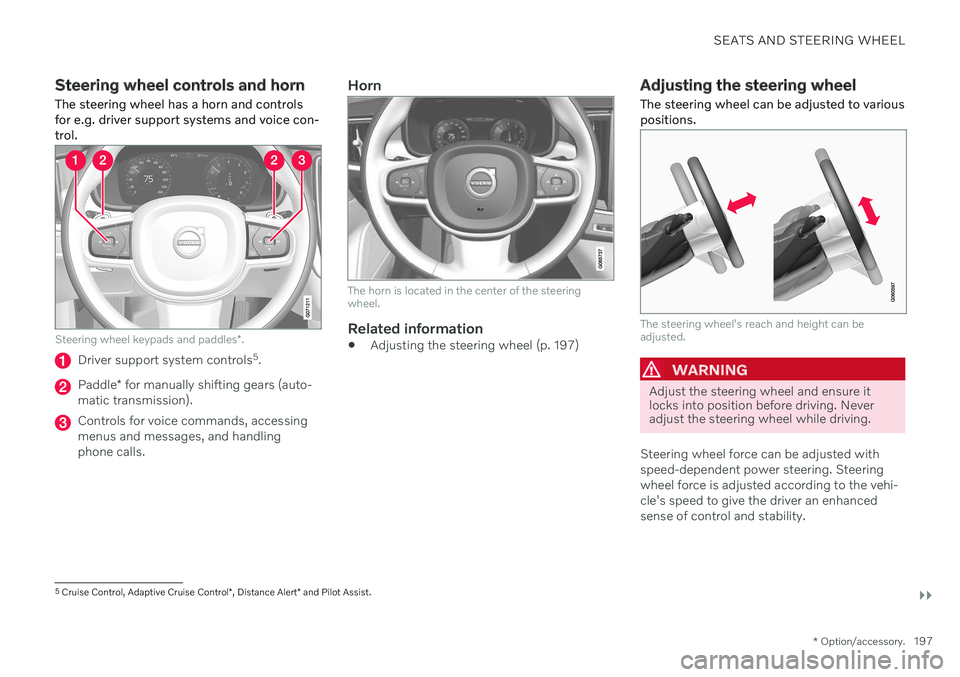
Steering wheel controls and horn The steering wheel has a horn and controls for e.g. driver support systems and voice con-trol.
Steering wheel keypads and paddles *.
Driver support system controls 5
.
Paddle * for manually shifting gears (auto-
matic transmission).
Controls for voice commands, accessing menus and messages, and handlingphone calls.
Horn
The horn is located in the center of the steering wheel.
Related information
Adjusting the steering wheel (p. 197)
Adjusting the steering wheel The steering wheel can be adjusted to various positions.
The steering wheel's reach and height can be adjusted.
WARNING
Adjust the steering wheel and ensure it locks into position before driving. Neveradjust the steering wheel while driving.
Steering wheel force can be adjusted with speed-dependent power steering. Steeringwheel force is adjusted according to the vehi-cle's speed to give the driver an enhancedsense of control and stability.
5 Cruise Control, Adaptive Cruise Control *, Distance Alert * and Pilot Assist.
Page 261 of 673

KEY, LOCKS AND ALARM
* Option/accessory.259
will sound if the key is not detected close enough to the tailgate.
CAUTION
When operating the tailgate manually, open and close it slowly. If you encounterresistance, do not use force. This couldlead to damage and loss of function.
Interrupting opening or closingInterrupt opening or closing by doing one of the following:
Press the button on the dashboard.
Press the button on the remote key.
Press the close button on the underside ofthe tailgate.
Press the rubberized pressure plate on theunderside of the tailgate's outer handle.
Using a foot movement
*.
Tailgate movement is interrupted and stops.The tailgate can then be opened or closedmanually. If the tailgate stops near the closed position, it will open the next time it is activated.
Pinch protectionIf anything obstructs the tailgate with enoughforce to prevent it from opening or closing,pinch protection will be activated.
When opening - the tailgate will stopmoving and an audible signal will sound.
When closing - the tailgate will stop, along audible signal will sound and the tail-gate will return to the programmed maxi-mum opening position.
WARNING
Be aware of the risk of injury when opening and closing. Before opening or closing, make sure that no one is near the tailgate's range ofmotion. Serious injury could occur. Always operate the tailgate with caution.
Preloaded springs
Preloaded springs for the power tailgate.
WARNING
Do not attempt to open or access the pre- loaded springs in the power tailgate struts.They are preloaded with high pressure andcan cause injury if opened.
Related information
Setting a maximum height for the power tailgate
* (p. 260)
Foot movement tailgate operation
*
(p. 260)
Remote key range (p. 238)
Page 262 of 673

KEY, LOCKS AND ALARM
* Option/accessory.
260
Setting a maximum height for the power tailgate *
The tailgate can be set to stop opening at a certain height, for example if the tailgateneeds to be opened in a garage with a lowceiling.
Setting maximum opening height:
1. Open the tailgate to the desired opening height.
NOTE
It is not possible to program an opening position lower than half-open tailgate.
2.Press the button on the lower edge of
the tailgate and hold for at least 3 seconds.
> Two brief audio signals will sound to indicate that the position has been stored.
Resetting to maximum opening position:
–Move the tailgate manually to its highest possible position and press the
but-
ton on the tailgate for at least 3 seconds.
> Two audio signals will sound to indicate that the stored position has been erased. The tailgate can then beopened to its maximum position.
NOTE
If the system has been working contin- uously for a prolonged period of time, itwill be switched off to avoid overload.It can be used again after approxi-mately 2 minutes.
Related information
Opening and closing the power tailgate
*
(p. 257)
Foot movement tailgate operation *
To make it easier to operate the tailgate when your hands are full, it can be opened andclosed by moving your foot in a forward kick-ing motion under the rear bumper.
The sensor is located to the left of center under the rear bumper.
One of the vehicle's remote keys must be within range behind the vehicle, approx.1 meter (3 feet), for opening and closing to bepossible. This applies even if the vehicle isunlocked in order to prevent the trunk lid frominadvertently opening e.g. at a car wash.
Page 326 of 673

||
DRIVER SUPPORT
324
your lane must have clear side lane mark- ings
your vehicle must be positioned straight inyour lane
the oncoming vehicle must be positionedwithin your vehicle's lane markings
the oncoming vehicle's headlights mustbe on
the function can only handle “front-to-front” collisions
the function can only detect vehicles withfour wheels.
WARNING
Warnings and brake interventions due to an imminent collision with an oncomingvehicle always come very late.
Related information
City Safety
™ (p. 314)
City Safety limitations (p. 324)
City Safety limitations
City Safety 60
functionality may be reduced in
certain situations.
Surroundings
Low objects
Hanging objects, such as flags for overhang- ing loads or accessories such as auxiliarylights or front protective grids that extendbeyond the height of the hood, may limit City Safety functionality.
Slippery road conditions
The extended braking distance on slippery roads may reduce City Safety's capacity tohelp avoid a collision. In these types of situa-tions, the Anti-lock Braking System and Elec- tronic Stability Control (ESC 61
) are designed
for optimal braking power with maintained stability.
Backlighting
The visual warning signal in the windshield may be difficult to detect in bright sunlight, ifthere are reflections, or if the driver is wearingsunglasses or not looking straight ahead.
Heat
If the temperature in the passenger compart- ment is high due to e.g. bright sunlight, thevisual warning signal in the windshield may betemporarily disabled.
Camera and radar sensor's field of vision
The camera's field of vision is limited and in certain situations, it may be unable to detectpedestrians, large animals, cyclists or vehicles,or it may detect them later than expected. Vehicles that are dirty may be detected later than clean vehicles, and in dark conditions,motorcycles may be detected late or not at all. If a text message displayed in the instrument panel indicates that the camera/radar sensoris obstructed, it may be difficult for City Safetyto detect pedestrians, large animals, cyclists,vehicles or lane markings in front of the vehi-cle. City Safety functionality may therefore bereduced. Text messages may not be displayed for all sit- uations in which the windshield sensors areblocked. The driver must therefore alwayskeep the windshield in front of the camera/radar sensor clean.
CAUTION
Only a workshop may perform mainte- nance on driver support components – anauthorized Volvo workshop is recom-mended.
60 This function is not available on all markets.
61 Electronic Stability Control
Page 435 of 673

STARTING AND DRIVING
}}
* Option/accessory.433
Preparing for a long trip
It is important to have the vehicle's systems and equipment checked carefully before driv-ing long distances.
Check that
the engine is running properly and that fuel consumption is normal
there are no leaks (fuel, oil or other fluid)
the brake pedal is functioning properly
all lights are working
‒ adjust the head-
light height if the vehicle is carrying aheavy load
tire tread depth and air pressure are atcorrect levels. Change to snow tires whendriving in areas where there is a risk ofsnowy or icy roads
the start battery is sufficiently charged
the wiper blades are in good condition
Related information
Checking tire pressure (p. 533)
Filling washer fluid (p. 636)
Winter driving (p. 433)
Economical driving (p. 429)
Vehicle modem settings (p. 507)
Loading recommendations (p. 565)
Driving with a trailer (p. 444)
Pilot Assist
* (p. 287)
Tire sealing system (p. 549)
Winter driving
It is important to check the vehicle before driving in cold/snowy conditions to makesure it can be driven safely.
Before the cold season arrives: Make sure the engine coolant contains 50% antifreeze. This mixture helps pro-tect the engine from frost erosion down toapprox. –35 °C (–31 °F). Do not mix dif-ferent types of antifreeze as this couldpose a health risk.
Keep the fuel tank well filled to preventcondensation from forming.
Check the viscosity of the engine oil. Oilwith low viscosity (thinner oil) improvescold-weather starting and reduces fuelconsumption when driving with a coldengine.
CAUTION
Low-viscosity oil should not be used with hard driving or in hot weather.
Check the condition and charge level of the start battery. Cold weather placesgreater demands on the start battery andreduces its capacity.
Use washer fluid containing antifreeze tohelp prevent ice from forming in thewasher fluid reservoir.
Page 531 of 673

WHEELS AND TIRES
}}
529
Tread wear indicatorThe tread wear indicator shows the status of the tire's tread.
The tread wear indicator is a narrow elevated strip running across the tire's longitudinaltread grooves. The letters TWI (Tread WearIndicator) are visible on the side of the tire.When approximately 1.6 mm (1/16 inch) is lefton the tread, the tread will be at the sameheight as the tread wear indicator. Replace thetire as soon as possible. Tires with low treadoffer very poor traction in rain or snow.
Related information
Tires (p. 526)
Tire terminology
The following is a glossary of tire-related terms.
The tire suppliers may have additional mark- ings, notes or warnings such as standard load,radial tubeless, etc.
Tire information placard
: A placard
showing the OE (Original Equipment) tiresizes, recommended inflation pressure,and the maximum weight the vehicle cancarry.
Tire Identification Number (TIN)
: A num-
ber on the sidewall of each tire providinginformation about the tire brand and man-ufacturing plant, tire size and date of man-ufacture.
Inflation pressure
: A measure of the
amount of air in a tire.
Standard load
: A class of P-metric or
Metric tires designed to carry a maximumload at 35 psi [37 psi (2.5 bar) for Metrictires]. Increasing the inflation pressurebeyond this pressure will not increase thetires load carrying capability.
Extra load
: A class of P-metric or Metric
tires designed to carry a heavier maximumload at 41 psi [43 psi (2.9 bar) for Metrictires]. Increasing the inflation pressurebeyond this pressure will not increase thetire's load carrying capability.
kPa
: Kilopascal, a metric unit of air pres-
sure.
PSI
: Pounds per square inch, a standard
unit of air pressure.
B-pillar
: The structural member at the
side of the vehicle behind the front door.
Bead area of the tire
: Area of the tire next
to the rim.
Sidewall of the tire
: Area between the
bead area and the tread.
Tread area of the tire
: Area of the perime-
ter of the tire that contacts the road whenmounted on the vehicle.
Rim
: The metal support (wheel) for a tire
or a tire and tube assembly upon whichthe tire beads are seated.
Maximum load rating
: a figure indicating
the maximum load in pounds and kilo-grams that can be carried by the tire. Thisrating is established by the tire manufac-turer.
Maximum permissible inflationpressure
: the greatest amount of air pres-
sure that should ever be put in the tire.This limit is set by the tire manufacturer.
Recommended tire inflation pressure
:
inflation pressure, established by Volvo,which is based on the type of tires that aremounted on a vehicle at the factory. Thisinformation can be found on the tire infla-
Page 532 of 673

||
WHEELS AND TIRES
530tion placard(s) located on the driver's side B-pillar and in the tire inflation table in thischapter.
Cold tires
: The tires are considered to be
cold when they have the same tempera-ture as the surrounding (ambient) air. Thistemperature is normally reached after thevehicle has been parked for at least 3hours.
Related information
Tires (p. 526)
Tire sidewall designations
The following information can be found on a tire's sidewall.
Federal law mandates that tire manufacturers place standardized information on the sidewallof all tires (see the illustration). The vehicle has been certified with certain combinations of wheels and tires. The following information is listed on the tire sidewall: The tire designation:
NOTE
Please be aware that the following tire designation is an example only and that
this particular tire may not be available onyour vehicle.
1. 215: The width of the tire (in millimeters)
from sidewall edge to sidewall edge. The larger the number, the wider the tire.
2. 65: The ratio of the tire's height to its
width in percent.
3. R: Radial tire (the designation RF and the
symbol indicate that the vehicle is
equipped with optional self-supporting run flat tires 3
.
4. 15: The diameter of the wheel rim (in
inches).
5. 95: The tire's load index. In this example, a
load index of 95 equals a maximum load of 1521 lbs (690 kg).
6. H: The tire's speed rating, or the maximum
speed at which the tire is designed to bedriven for extended periods of time, carry-ing a permissible load for the vehicle, andwith correct inflation pressure. For exam-ple, H indicates a speed rating of210 km/h (130 mph).
3 Self-supporting run flat tires may not be available on all models.