lock VOLVO V60 TWIN ENGINE 2020 Workshop Manual
[x] Cancel search | Manufacturer: VOLVO, Model Year: 2020, Model line: V60 TWIN ENGINE, Model: VOLVO V60 TWIN ENGINE 2020Pages: 673, PDF Size: 14.2 MB
Page 199 of 673
SEATS AND STEERING WHEEL
}}
* Option/accessory.197
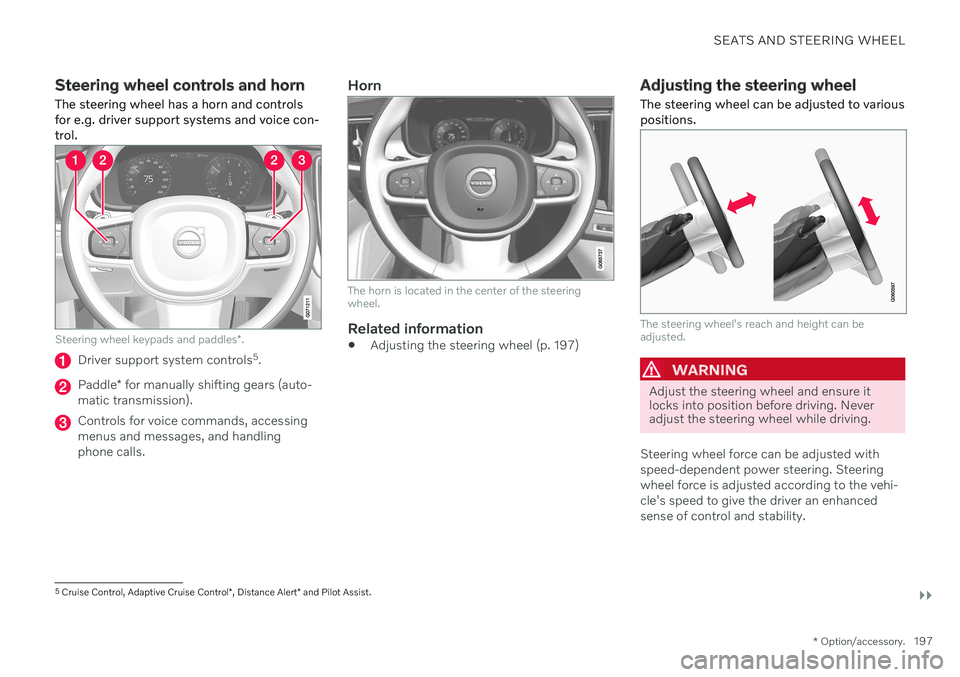
Steering wheel controls and horn The steering wheel has a horn and controls for e.g. driver support systems and voice con-trol.
Steering wheel keypads and paddles *.
Driver support system controls 5
.
Paddle * for manually shifting gears (auto-
matic transmission).
Controls for voice commands, accessing menus and messages, and handlingphone calls.
Horn
The horn is located in the center of the steering wheel.
Related information
Adjusting the steering wheel (p. 197)
Adjusting the steering wheel The steering wheel can be adjusted to various positions.
The steering wheel's reach and height can be adjusted.
WARNING
Adjust the steering wheel and ensure it locks into position before driving. Neveradjust the steering wheel while driving.
Steering wheel force can be adjusted with speed-dependent power steering. Steeringwheel force is adjusted according to the vehi-cle's speed to give the driver an enhancedsense of control and stability.
5 Cruise Control, Adaptive Cruise Control *, Distance Alert * and Pilot Assist.
Page 200 of 673
||
SEATS AND STEERING WHEEL
* Option/accessory.
198
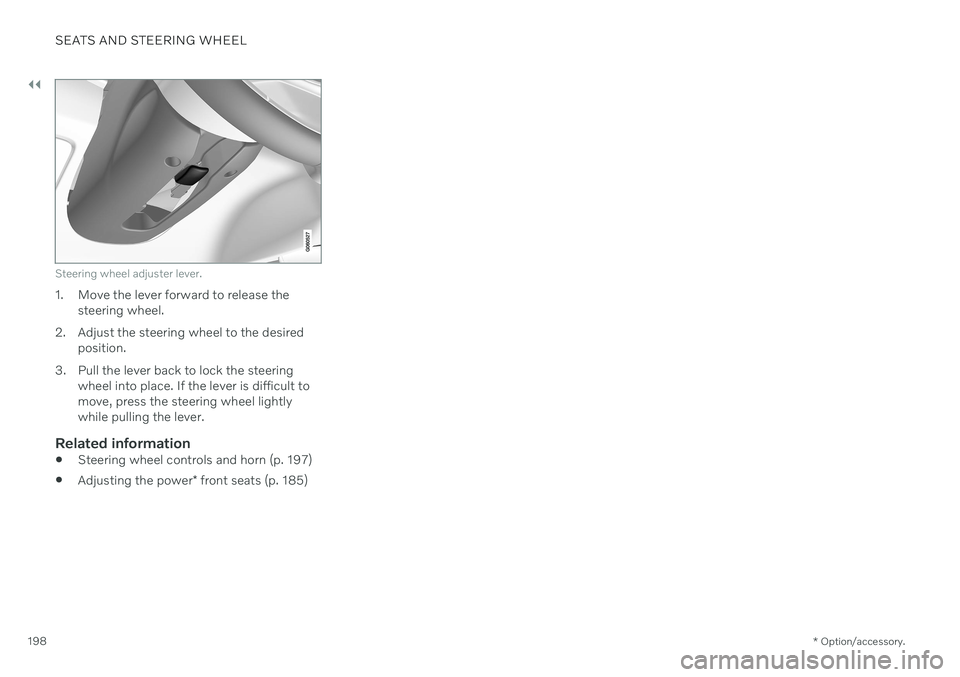
Steering wheel adjuster lever.
1. Move the lever forward to release the
steering wheel.
2. Adjust the steering wheel to the desired position.
3. Pull the lever back to lock the steering wheel into place. If the lever is difficult to move, press the steering wheel lightlywhile pulling the lever.
Related information
Steering wheel controls and horn (p. 197)
Adjusting the power
* front seats (p. 185)
Page 203 of 673

CLIMATE CONTROL
}}
* Option/accessory.201
NOTE
Do not cover or block the sensors with clothing or other objects.
On vehicles equipped with the Interior Air Quality System*, there is also an air quality
sensor in the climate system's air intake.
Related information
Climate (p. 200)
Interior Air Quality System
* (p. 204)
Perceived temperature
The climate control system regulates the cli- mate in the passenger compartment basedon perceived temperature, not actual tem-perature.
The selected passenger compartment tem- perature is based on the physical perception ofthe current ambient temperature, airflowspeed, humidity, sunlight in the passengercompartment, etc. The system has a sunlight sensor that detects which side of the vehicle the sunlight is shin-ing on and adjusts the temperature accord-ingly. This means that the temperature of theair coming out of the vents may be differentfor the left and right sides, even if the tem-perature setting is the same for both sides.
Related information
Climate (p. 200)
Climate control system voice commands 1
Voice commands can be used for the climate control system to e.g. change temperature, activate seat heating * or change blower
speed.
Tap and say one of the following com-
mands: "
Climate" - starts a command dialog for
climate controls and provides examples of commands that can be used.
"
Set temperature to X degrees" - sets
desired temperature.
"
Raise temperature"/"Lower
temperature" - raises/lowers the set tem-
perature.
"
Sync temperature" - synchronizes the
temperature for all climate zones in the vehicle with the temperature set for thedriver's side.
"
Air on feet"/"Air on body" - opens the
desired air vent.
"
Air on feet off"/"Air on body off" -
closes the desired air vent.
"
Set fan to max"/"Turn off fan" -
changes blower speed to Max/Off.
"
Raise fan speed"/"Lower fan speed" -
raises/lowers the set blower speed.
1 Certain markets only.
Page 206 of 673

CLIMATE CONTROL
* Option/accessory.
204
Clean Zone Interior Package *
Clean Zone Interior Package (CZIP) is a series of modifications that filters even more allergyand asthma-inducing substances from thepassenger compartment.
CZIP includes the following:
An enhanced function that starts the blower when the vehicle is unlocked usingthe remote key. The blower will then fillthe passenger compartment with fresh air.The function starts when required andswitches off automatically after a period oftime or when one of the passenger com-partment doors is opened. The amount oftime the blower runs gradually decreasesdue to reduced need up until the vehicle is4 years old.
The fully automatic Interior Air QualitySystem (IAQS).
Related information
Air quality (p. 202)
Clean Zone
* (p. 203)
Interior Air Quality System
* (p. 204)
Passenger compartment air filter (p. 205)
Interior Air Quality System
*
Interior Air Quality System (IAQS) is a fully automatic air quality system that removesgases and particles to reduce odors and con-taminants in the passenger compartment.
IAQS is part of the Clean Zone Interior Package (CZIP) and removes air contaminantssuch as particles, hydrocarbons, nitric oxidesand ground-level ozone. If the system's air quality sensors detect con- taminants in the outside air, the air intakecloses and air recirculation is activated.
NOTE
To ensure optimal air quality in the passen- ger compartment, the air quality sensorshould always be engaged. Recirculation is limited in cold weather to prevent fogging. In the event of fogging, use the defroster functions for the windshield, side windowsand rear window.
Related information
Activating and deactivating the air quality sensor
* (p. 205)
Air quality (p. 202)
Clean Zone
* (p. 203)
Clean Zone Interior Package
* (p. 204)
Passenger compartment air filter (p. 205)
Page 226 of 673

CLIMATE CONTROL
224
Adding and editing timer settings for preconditioningThe preconditioning timer can store up to 8 preset timer settings.
Adding a timer setting
Button for adding a timer setting in the Parking
climate tab in Climate view.
1. Open Climate view in the center display. 2.
Select the
Parking climate tab.
3. Tap
Add timer.
> A pop-up window will appear.
NOTE
It is not possible to add a time setting if there are already 8 settings for the timer.Delete a time setting to be able to add anew one.
4. Tap Date to set a time for a specific date.
Tap
Days to set a time for one or more
days of the week. With
Days: Activate/deactivate the repeat
function by selecting/deselecting the
Repeat weekly checkbox.
5. With
Date: Select a date for precondition-
ing by scrolling in the date list using the arrows. With
Days: Select days of the week for
preconditioning by tapping the buttons for the days.
6. Set the time at which preconditioning should be completed by scrolling usingthe arrows in the clock.
7. Tap
Confirm to add a timer setting.
> The timer setting will be added to the list and activated.
Editing a timer setting1. Open Climate view in the center display. 2. Select the
Parking climate tab.
3. Tap the timer setting you would like to change.
> A pop-up window will appear.
4. To edit a timer setting, follow the proce- dures described under the heading "Add- ing a timer setting" above.
Related information
Preconditioning (p. 222)
Preconditioning timer (p. 223)
Activating and deactivating precondition-ing timer (p. 225)
Deleting preconditioning timer settings(p. 225)
Page 228 of 673

CLIMATE CONTROL
226
Adding and editing timer settings for pre- conditioning (p. 224)
Activating and deactivating precondition-ing timer (p. 225)
Climate comfort retaining function
The climate in the passenger compartment can be maintained when the vehicle isparked, e.g. if the engine is turned off but thedriver or passengers remain in the vehicle.
This function can only be direct-started. The function utilizes several of the vehicle's systems:
Residual heat from the engine is used tohelp heat the passenger compartment to acomfortable temperature.
In warm weather, the ventilation systemcools the passenger compartment byblowing air in from outside.
NOTE
Climate comfort maintenance will be deac- tivated if the vehicle is locked from the out-side in order to avoid using residual engineheat unnecessarily. This function isintended to be used to maintain climatecomfort when the driver or a passengerremains in the vehicle after the engine isturned off.
Related information
Parking climate (p. 221)
Starting and switching off the climate retaining function when parking (p. 226)
Starting and switching off the climate retaining function whenparking
The climate retaining function maintains the climate settings in the vehicle after theengine has been switched off. The functioncan be activated in the center display.
1. Tap the symbol in the center of the climate bar to open Climate view in the center dis- play.
2. Select the
Parking climate tab.
3. Tap
Keep climate comfort.
> The climate comfort retaining function will be activated/deactivated and the button light will go on/off.
NOTE
Maintained climate comfort is not possible when there is not sufficient residual engineheat to maintain the climate settings in thepassenger compartment, or if the outsidetemperature is above approximately 20 °C(68 °F).
Page 229 of 673
CLIMATE CONTROL
227
NOTE
Climate comfort maintenance will be deac- tivated if the vehicle is locked from the out-side in order to avoid using residual engineheat unnecessarily. This function isintended to be used to maintain climatecomfort when the driver or a passengerremains in the vehicle after the engine isturned off.
Related information
Climate comfort retaining function (p. 226)
Page 234 of 673

KEY, LOCKS AND ALARM
* Option/accessory.
232
Lock indication
The turn signals will flash when the vehicle is locked or unlocked.
Exterior confirmationLocking
The turn signals will flash once and the door mirrors will fold in 1
to confirm the
vehicle is locked.
Unlocking
The turn signals will flash twice and thedoor mirrors will fold out 1
to confirm the
vehicle is unlocked.
The tailgate, hood and all doors must be closed for confirmation to be given. If only thedriver's door is closed when the vehicle is locked 2
, the vehicle will be locked but the turn
signals will only flash to indicate locking when all doors and the tailgate and hood have beenclosed.
Lock and alarm indicators on the dashboard
The locks and alarm indicator will display the status of the locking system:
One long flash indicates locking.
When the vehicle is locked, this will beindicated by short, pulsating flashes.
Rapid flashing after disabling the alarmindicates that the alarm has been trig-gered.
Lock button indicators
Front door
Lock buttons with indicator lights in front door.
Illuminated indicator lights in both front door lock buttons indicate that all doors are locked.If any door is opened, the lights in both doorswill go out.
1
Only vehicles with power folding mirrors.
2 Does not apply to vehicles equipped with keyless locking/unlocking *.
Page 235 of 673

KEY, LOCKS AND ALARM
* Option/accessory.233
Rear door*
Lock button with indicator light in rear door.
Illuminated indicator lights in each door indi- cate that that particular door is locked. If anydoor is unlocked and opened, the indicatorlight in that door will go out. The lights in theother doors will remain illuminated.
Other indicatorsThe approach lighting and home safe lightingfunctions may be activated when locking andunlocking.
Related information
Lock confirmation settings (p. 233)
Welcome Light (p. 160)
Using home safe lighting (p. 160)
Lock confirmation settings
Settings for how the vehicle confirms locking and unlocking can be adjusted in the centerdisplay's Settings menu.
To change the locking response settings: 1. Tap
Settings in the center display's Top
view.
2. Tap
My CarLocking.
3. Tap
Visible Locking Feedback to select
when the vehicle should provide a visible response:
Lock
Unlock
Both
Or turn off the function by marking Off .
4. Select to receive an audible response when locking the vehicle by marking
Audible Locking Feedback.
To change the settings for folding door mir- rors * when locking:
1. Tap
Settings in the center display's Top
view.
2. Tap
My CarMirrors and Convenience.
3. Select
Fold Mirror When Locked to acti-
vate or deactivate the function.
Related information
Lock indication (p. 232)
Page 236 of 673

KEY, LOCKS AND ALARM
* Option/accessory.
234
Remote key
The remote key is used to lock and unlock doors and the tailgate. The remote key mustbe in the vehicle in order to start the engine.
Remote key 3
and button-less key (Key Tag) *.
The remote key is not physically used to start the ignition because the vehicle is standard-equipped with keyless start (Passive Start).The key only needs to be in the front section ofthe passenger compartment. For vehicles equipped with keyless locking and unlocking (Passive Entry) *, the engine can
be started with the key anywhere in the vehi- cle. A smaller, lighter and button-less key (KeyTag) is also provided. The remote keys can be linked to different driver profiles to store personal settings in thevehicle.
Remote key buttons
The remote key has four buttons, one on the left side and three on the right.
Locking - Press once to lock the doors,
tailgate and fuel filler door and arm the alarm. Press and hold to close all windows.
Unlocking - Press once to unlock the
doors and tailgate and disarm the alarm. Press and hold to open all windows at the same time. This total airing function canbe used to e.g. quickly air out the vehiclein hot weather.
Tailgate - Unlock and disarm the tailgate
only. On vehicles equipped with the power tailgate *, press and hold to automatically
open the tailgate. Press and hold to close an open tailgate (an audible warning sig- nal will be given).
Panic alarm - Used to attract attention in
emergency situations. Press and hold the button for at least 3 seconds or presstwice within 3 seconds to activate theturn signals and horn. To deactivate, waitat least 5 seconds and press the buttonagain. If no action is taken, the panic alarmwill deactivate automatically after 3minutes.
WARNING
If anyone is left in the vehicle, make sure that power to the power windows and pan- oramic roof * is cut off by always taking the
remote key with you when you leave the vehicle.
3 The illustration is generic - details may vary according to vehicle model.