battery VOLVO V60 TWIN ENGINE 2020 Repair Manual
[x] Cancel search | Manufacturer: VOLVO, Model Year: 2020, Model line: V60 TWIN ENGINE, Model: VOLVO V60 TWIN ENGINE 2020Pages: 673, PDF Size: 14.2 MB
Page 433 of 673
STARTING AND DRIVING
431
Factors affecting electric motor rangeA number of factors affect the electric motor's driving range. The ability to achieve along driving range varies according to theoutside conditions and to how the vehicle isdriven.
The certified value for the distance that can be driven using the electric motor should not beconsidered an expected driving range. Theactual range is dependent on a number of fac-tors.
Factors affecting driving rangeThe driver can influence some factors affectingdriving range, but not all. The longest range is achieved under very favorable conditions when all factors positivelyinfluence range.
Factors the driver cannot control
There are several outside conditions that affect range to varying degrees:
the current traffic situation
driving short distances
topography
ambient temperature and headwinds
road conditions and road surface.
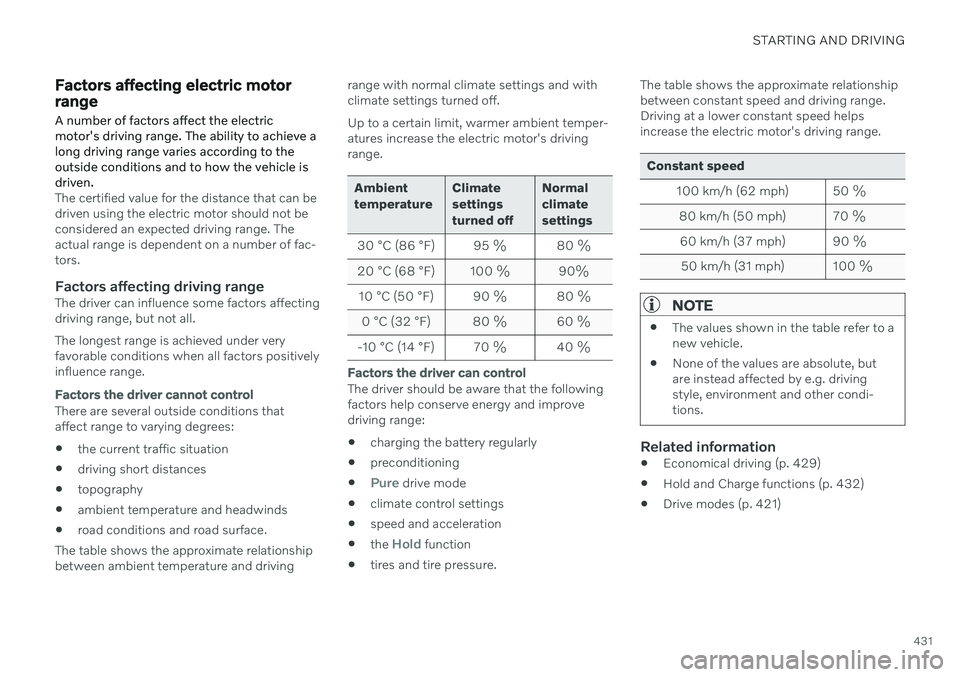
The table shows the approximate relationshipbetween ambient temperature and driving range with normal climate settings and withclimate settings turned off. Up to a certain limit, warmer ambient temper- atures increase the electric motor's drivingrange.
Ambient temperature
Climatesettingsturned offNormalclimatesettings
30 °C (86 °F) 95 % 80 %
20 °C (68 °F) 100 % 90%
10 °C (50 °F) 90 % 80 %
0 °C (32 °F) 80 % 60 %
-10 °C (14 °F) 70 % 40 %
Factors the driver can control
The driver should be aware that the following factors help conserve energy and improvedriving range: charging the battery regularly
preconditioning
Pure drive mode
climate control settings
speed and acceleration
the
Hold function
tires and tire pressure. The table shows the approximate relationship between constant speed and driving range.Driving at a lower constant speed helpsincrease the electric motor's driving range.
Constant speed
100 km/h (62 mph) 50 %80 km/h (50 mph) 70 %60 km/h (37 mph) 90 %
50 km/h (31 mph) 100 %
NOTE
The values shown in the table refer to a new vehicle.
None of the values are absolute, butare instead affected by e.g. drivingstyle, environment and other condi-tions.
Related information
Economical driving (p. 429)
Hold and Charge functions (p. 432)
Drive modes (p. 421)
Page 434 of 673

STARTING AND DRIVING
432
Hold and Charge functions
In certain situations, it can be useful to con- trol the hybrid battery's charge level while driving. This is possible with the
Hold andCharge functions.Hold and Charge are available in all drive
modes. The functions will switch off if Puredrive mode is activated.
Function buttons for Hold and ChargeThe functions can be activated in the center display's Function view.
Hold
Battery level sustained for later use.
This function retains the charge in the hybrid batteryfor the electric motor andsaves available electrical cur-
rent for use at a later time, such as when driv-ing in an urban area or residential neighbor-hood. The vehicle will function as in normal hybrid driving with a discharged battery - in additionto reusing energy from e.g. regenerative brak-ing, the combustion engine will be used morefrequently to maintain the charge in the bat-tery.
Charge
Engine charges hybrid battery.
This function charges the hybrid battery with the helpof the combustion engine forincreased use of the electric
motor at a later time.
Symbols in the instrument panel
The symbol is displayed in the hybrid battery
gauge when Hold is activated.
The symbol is displayed in the hybrid battery
gauge when Charge is activated.
Related information
Economical driving (p. 429)
Hybrid gauge (p. 83)
Page 435 of 673

STARTING AND DRIVING
}}
* Option/accessory.433
Preparing for a long trip
It is important to have the vehicle's systems and equipment checked carefully before driv-ing long distances.
Check that
the engine is running properly and that fuel consumption is normal
there are no leaks (fuel, oil or other fluid)
the brake pedal is functioning properly
all lights are working
‒ adjust the head-
light height if the vehicle is carrying aheavy load
tire tread depth and air pressure are atcorrect levels. Change to snow tires whendriving in areas where there is a risk ofsnowy or icy roads
the start battery is sufficiently charged
the wiper blades are in good condition
Related information
Checking tire pressure (p. 533)
Filling washer fluid (p. 636)
Winter driving (p. 433)
Economical driving (p. 429)
Vehicle modem settings (p. 507)
Loading recommendations (p. 565)
Driving with a trailer (p. 444)
Pilot Assist
* (p. 287)
Tire sealing system (p. 549)
Winter driving
It is important to check the vehicle before driving in cold/snowy conditions to makesure it can be driven safely.
Before the cold season arrives: Make sure the engine coolant contains 50% antifreeze. This mixture helps pro-tect the engine from frost erosion down toapprox. –35 °C (–31 °F). Do not mix dif-ferent types of antifreeze as this couldpose a health risk.
Keep the fuel tank well filled to preventcondensation from forming.
Check the viscosity of the engine oil. Oilwith low viscosity (thinner oil) improvescold-weather starting and reduces fuelconsumption when driving with a coldengine.
CAUTION
Low-viscosity oil should not be used with hard driving or in hot weather.
Check the condition and charge level of the start battery. Cold weather placesgreater demands on the start battery andreduces its capacity.
Use washer fluid containing antifreeze tohelp prevent ice from forming in thewasher fluid reservoir.
Page 436 of 673

||
STARTING AND DRIVING
434
Slippery driving conditionsTo help optimize traction and roadholding, Volvo recommends using snow tires on allwheels whenever there is a risk of snow or iceon the road.
NOTE
Certain countries require use of winter tires by law. Not all countries permit the use ofstudded tires.
Practice driving on slippery surfaces under controlled conditions to learn how the vehiclereacts.
Related information
Snow tires (p. 547)
Snow chains (p. 548)
Braking on salted roads (p. 408)
Braking on wet roads (p. 407)
Filling washer fluid (p. 636)
Start battery (p. 593)
Replacing windshield wiper blades(p. 634)
Changing rear window wipers (p. 633)
Refilling coolant (p. 590)
Driving through standing water
It may be necessary to drive the vehicle through standing water, e.g. deep puddles orflooding on the road. This must be done withgreat caution.
To help prevent damage to the vehicle when driving through water:
Do not drive in water higher than the floorof the vehicle. If possible, check the depthof the water at its deepest point beforedriving through it. Be particularly carefulwhen driving through flowing water.
Do not drive faster than walking speed.
Do not stop the vehicle in the water. Drivecarefully forward or back the vehicle out ofthe water.
Remember that waves created by passingvehicles could cause the water level to riseabove the vehicle's floor level.
Avoid driving through salt water to helpavoid the risk of corrosion.
CAUTION
Parts of the vehicle (e.g. engine, transmis- sion, driveline, electrical components, etc.)can be damaged if the vehicle is driventhrough water higher than its floor level.Damage to any components caused byflooding, vapor lock or insufficient oil is notcovered under warranty. If the engine stalls while the vehicle is in water, do not attempt to restart it. Havethe vehicle towed on the bed of a towtruck to a workshop - an authorized Volvoworkshop is recommended.
CAUTION
Because it can be difficult to determine the water depth, Volvo recommends not driv-ing through standing or running water. Thedriver is always responsible for operatingthe vehicle in a safe manner and adheringto all applicable laws and regulations.
When you have passed the water, press lightly on the brake pedal and check that the brakesare functioning properly. Water, mud, slush,etc. can make the brake linings slippery,resulting in delayed braking effect. If the vehicle is equipped with a trailer cou- pling contact, clean the contact after driving inwater or mud.
Page 444 of 673
STARTING AND DRIVING
442
Battery drain
The electrical functions in the vehicle drain the battery to varying degrees. Avoid usingignition mode II when the engine is switched
off. Use ignition mode I instead, as this uses
less electrical current.
Note that certain accessories may also drain power from the electrical system. Do not usefunctions that use a lot of electrical currentwhen the engine is turned off. Examples ofsuch functions are: blower
headlights
windshield wipers
audio system (especially at high volume).
If the starter battery voltage is low, a message is shown in the driver display. The vehicle'senergy-saving function will then turn off orreduce certain functions, such as the blowerand/or the audio system.
–Charge the battery by starting the engine and let it run for at least 15 minutes (driv-ing charges the battery faster than lettingthe engine idle).
Related information
Start battery (p. 593)
Ignition modes (p. 403)
Jump starting using another battery If the start battery is discharged, current from another battery can be used to start the vehi-cle.
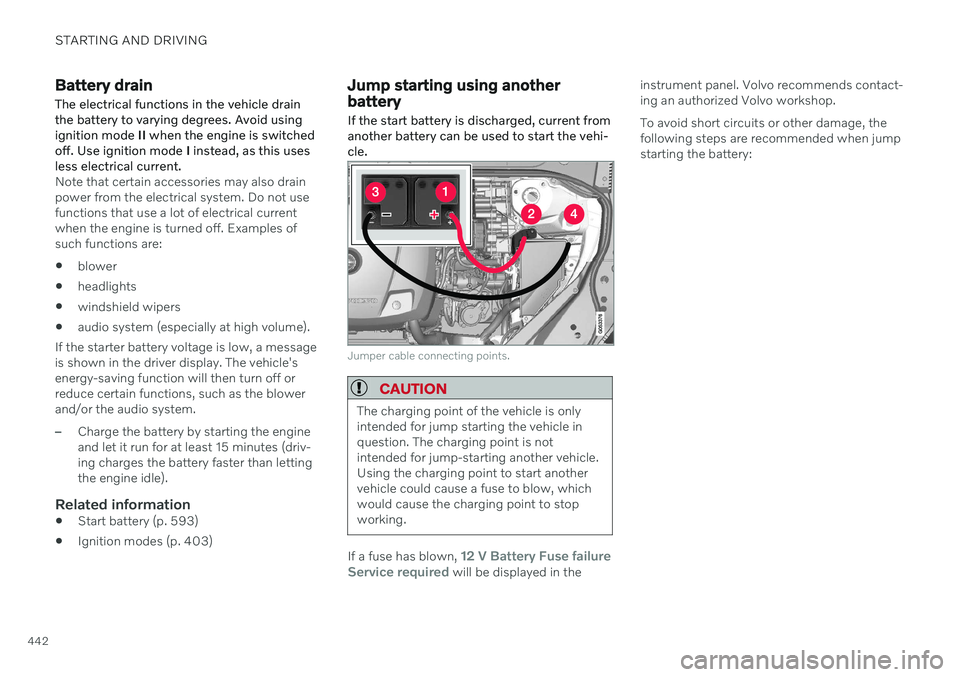
Jumper cable connecting points.
CAUTION
The charging point of the vehicle is only intended for jump starting the vehicle inquestion. The charging point is notintended for jump-starting another vehicle.Using the charging point to start anothervehicle could cause a fuse to blow, whichwould cause the charging point to stopworking.
If a fuse has blown, 12 V Battery Fuse failure
Service required will be displayed in the instrument panel. Volvo recommends contact- ing an authorized Volvo workshop. To avoid short circuits or other damage, the following steps are recommended when jumpstarting the battery:
Page 445 of 673

STARTING AND DRIVING
}}}}
443
1. Put the ignition in mode
0.
2. Make sure the auxiliary battery (the bat- tery used to jump start the discharged battery) has a voltage of 12 volts.
3. If the auxiliary battery is in another vehicle, turn off that vehicle's engine and makesure that the vehicles are not touchingeach other.
4. Clamp the red jumper cable onto the auxil- iary battery's positive (+) terminal (1).
CAUTION
Connect the jump cable carefully to pre- vent short circuits with other componentsin the engine compartment.
5. Fold back the cover over your vehicle's positive (+) jump start terminal (2).
6. Clamp the other end of the red jumper cable to your vehicle's positive (+) jump start terminal (2).
7. Clamp the black jumper cable onto the auxiliary battery's negative (-) terminal (3).
8. Clamp the other end of the black jumper cable to your vehicle's negative (-) groundpoint (4). 9. Make sure the jumper cables are securely
attached to help prevent sparks whilejump starting.
10. Start the engine of the assisting vehicle and let it run for a few minutes at a higheridling speed than normal, about1500 rpm.
11. Start your vehicle's engine. If the engine does not start, allow an additional 10minutes of charging time and then try tostart the engine again.
NOTE
When the engine is started under normal conditions, the vehicle's electrical drivemotor is prioritized – the gasoline engineremains off. This means that after the startknob has been turned clockwise, the elec-tric motor has "started" and the vehicle isready to be driven. Start of the electricmotor is indicated by the indicator lights onthe instrument panel going out and its pre-selected theme illuminating.
CAUTION
Do not touch the connections between the cable and the vehicle during the startattempt. Risk of sparking.
12. Remove the jumper cables in the reverseorder ‒ first the black cables and then the
red cables. Make sure that none of the clamps of the black jumper cables come into contactwith either vehicle's positive (+) jump startterminals or either of the red jumpercable's connected clamps.
WARNING
PROPOSITION 65 WARNING! Battery
posts, terminals, and related accessories contain lead and lead compounds, chemi-cals known to the state of California tocause cancer and reproductive harm. Washhands after handling.
WARNING
Batteries generate hydrogen gas, which is flammable and explosive.
Do not connect the jumper cable toany part of the fuel system or to anymoving parts. Avoid touching hotmanifolds.
Battery fluid contains sulfuric acid. Donot allow battery fluid to contact eyes,skin, fabrics or painted surfaces.
If contact occurs, flush the affectedarea immediately with water. Obtain
Page 446 of 673
||
STARTING AND DRIVING
444
medical help immediately if eyes are affected.
Never expose the battery to open flameor electric spark. Do not smoke nearthe battery. Failure to follow theinstructions for jump starting can leadto injury.
NOTE
The vehicle cannot be started if the hybrid battery is discharged.
Related information
Starting the vehicle (p. 400)
Ignition modes (p. 403)
Adjusting the steering wheel (p. 197)
Selecting ignition mode (p. 404)
Driving with a trailer
There are a number of things to consider when towing a trailer, such as the towbar, thetrailer and how the load is distributed in thetrailer.
Load-carrying capacity is determined by the vehicle's curb weight. The total weight of allpassengers and any installed accessories, e.g.towbar, reduces the vehicle's load-carryingcapacity by the corresponding amount.
Towbars used on the vehicle must beapproved for the applicable use.
Distribute the load on the trailer so thatthe weight on the towbar complies withthe specified maximum towball weight.The tongue weight is calculated as part ofthe vehicle's payload.
Increase the tire pressure to the recom-mended pressure for a full load.
The engine is subjected to more load thanusual when towing a trailer.
Towing a trailer affects the vehicle's han-dling, durability and driving economy.
Do not drive with a heavy trailer when thevehicle is very new. Wait until the mileagehas reached at least 1000 km (620 miles).
On long and steep downgrades, the vehi-cle's brakes are subjected to much moreload than usual. When manually shifting, downshift and adapt speed accordingly.
Follow applicable regulations regarding permitted speed and weight.
Drive slowly when towing a trailer up along and steep incline.
The maximum trailer weights given onlyapply to altitudes up to 1000 meters(3280 feet) above sea level. At higher alti-tudes, engine power (and thus the vehi-cle's climbing ability) is decreased due tothe reduced air density, and the maximumtrailer weight must therefore be reduced.The weight of the vehicle and trailer mustbe decreased by 10% for each additional1000 m (3280 feet) or part thereof.
Avoid driving with a trailer on inclines ofmore than 12%.
Avoid overloading and other incorrect use.
The trailer's brakes must be balanced withthe vehicle's brakes to help ensure safestops (follow applicable local regulations).
Page 450 of 673
||
STARTING AND DRIVING
* Option/accessory.
448
Checking trailer lights *
Automatic check
When the trailer has been connected to the vehicle's electrical system, its lights can bechecked by automatically activating them.This function helps the driver check that thetrailer's lights are functioning correctly beforestarting to drive. In order to perform this check, the vehicle must be switched off.
1. When a trailer is connected to the towbar,
the message
Automatic Trailer Lamp
Check will appear in the instrument panel.
2. Acknowledge the message by pressing the O button on the right-side steering
wheel keypad.
> The light check will begin.
3. Get out of the vehicle to perform the check.
> All of the lights on the trailer will beginflashing, and then illuminate separately one at a time.
4. Visually check that all of the trailer's lights are functioning correctly.
5. After a short time, all of the trailer's lights will start flashing again.
> The light check is completed.
Disabling the automatic check
The automatic light check can be disabled in the center display. 1.Tap
Settings in the Top view.
2. Tap
My CarLights and Lighting.
3. Deselect
Automatic Trailer Lamp
Check.
Manual check
If the automatic check has been disabled, the check can be started manually. 1. Tap
Settings in the Top view.
2. Tap
My CarLights and Lighting.
3. Select
Manual Trailer Lamp Check.
> The light check will begin. Get out of the vehicle to perform the check.
Related information
Driving with a trailer (p. 444)
Towing using a towline
This section refers to one vehicle being towed behind another using a towline.
Never attempt to tow a Twin Engine vehicle behind another vehicle as this could damagethe electric motor. The vehicle must instead belifted onto a tow truck and transported with allfour wheels on the bed or lifting platform ofthe truck (no wheels may touch the road).
Towing another vehicleTowing another vehicle requires a lot of power - use the Constant AWD drive mode. This
helps charge the hybrid battery and improve the vehicle's driving and roadholding characte-ristics. Before towing another vehicle, check applica- ble speed limit regulations.
Jump startingNever attempt to tow the vehicle to start theengine, as this could damage the electricmotor. Use an auxiliary battery if the start bat-tery's charge level is so low that the enginecannot be started.
CAUTION
Attempts to tow-start the vehicle could cause damage to the electrical drive motorand three-way catalytic converter.
Page 451 of 673

STARTING AND DRIVING
}}
449
Related information
Attaching and removing the towing eyelet (p. 449)
Hazard warning flashers (p. 160)
Recovery (p. 450)
Jump starting using another battery(p. 442)
Selecting ignition mode (p. 404)
Transmission (p. 414)
Attaching and removing the towing eyelet
Use the towing eyelet to tow another vehicle. Screw the towing eyelet securely into placein the threaded outlet behind the cover on theright-hand side of the rear bumper.
NOTE
If the vehicle is equipped with a towbar, there is no rear attachment for the towingeye.
Attaching the towing eyelet
Take out the towing eyelet, which is stored in a foam block under the floor inthe cargo compartment.
Remove the cover by pressing on the mark with a finger while folding out theopposite side/corner.
> The cover turns along its center line and can then be removed.
Page 526 of 673
VOLVO ON CALL
524
Planning and scheduling vehicle charging with the Volvo On Callapp With the Volvo On Call app, you can plan and schedule charging for your vehicle.
You can schedule charging for the charging locations that you have saved in your app,which can be practical of you want to e.g. plana charging stop along a travel route or plancharging intervals for your vehicle at home orin your neighborhood. 1.From the
home tab, select Fuel range orBattery charge.
> In the view that appears, you can see your saved charging locations under
Saved locations. If you haven't saved
any charging locations yet or you want to add new locations, e.g. stationsalong a route or in your neighborhood, you can choose
Add location (you can
save up to eight charging locations).
2. Choose the location you want to schedule a charging at.
> A view for the saved location will open.
3. Select a start time for the charging.
4. Select an end time for the charging. 5. Go back to the view for fuel.
> A charging icon will appear next to thesaved location you scheduled charging at. When the icon disappears, thescheduled charging is saved and input.