door lock VOLVO V70 2003 User Guide
[x] Cancel search | Manufacturer: VOLVO, Model Year: 2003, Model line: V70, Model: VOLVO V70 2003Pages: 117, PDF Size: 2.56 MB
Page 52 of 117
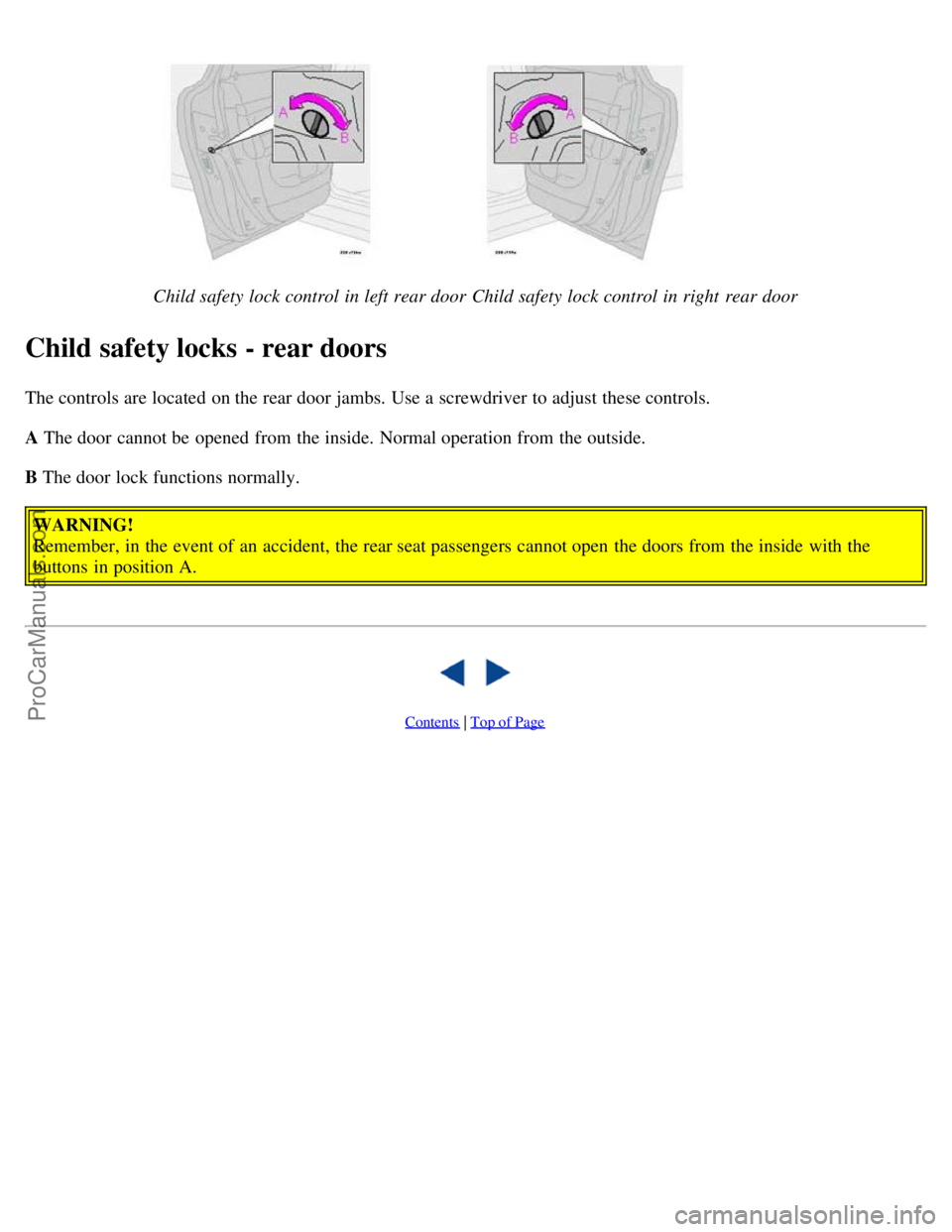
Child safety lock control in left rear doorChild safety lock control in right rear door
Child safety locks - rear doors
The controls are located on the rear door jambs. Use a screwdriver to adjust these controls.
A The door cannot be opened from the inside. Normal operation from the outside.
B The door lock functions normally.WARNING!
Remember, in the event of an accident, the rear seat passengers cannot open the doors from the inside with the
buttons in position A.
Contents | Top of Page
ProCarManuals.com
Page 55 of 117

Do not use gasoline that contains lead as a knock inhibitor, and do not use lead additives. Besides damaging the
exhaust emission control systems on your car, lead has been strongly linked to certain forms of cancer.
Many fuels contain benzene as a solvent. Unburned benzene has been strongly linked to certain forms of cancer. If you
live in an area where you must fill your own gas tank, take precautions. These may include:
standing upwind away from the filler nozzle while refueling
refueling only at gas stations with vapor recovery systems that fully seal the mouth of the filler neck during refueling
wear neoprene gloves while handling a fuel filler nozzle.
Use of Additives
With the exception of gas line antifreeze during winter months, do not add solvents, thickeners, or other store -bought
additives to your car's fuel, cooling, or lubricating systems. Overuse may damage your engine, and some of these
additives contain organically volatile chemicals. Do not needlessly expose yourself to these chemicals.
pg. 86 Refueling
Refueling
The fuel tank holds approximately 18.5 US gals (70 liters) or 19 US gals (72 liters) on models equipped with All
Wheel Drive, with sufficient volume left over to accommodate possible expansion of the fuel in hot weather. Be aware
that the "usable" tank capacity will be somewhat less than the specified maximum. When the fuel level is low, such
factors as ambient temperature, the fuel's "Reid vapor pressure" characteristics, and terrain can affect the fuel pump's
ability to supply the engine with an adequate supply of fuel. Therefore, it is advisable to refuel as soon as possible
when the needle nears the red zone, or when the fuel warning light comes on.
Fuel filler door
Press the button on the light switch panel (see illustration on page 34) when the car is at a standstill to unlock the fuel
filler door. Please note that the fuel filler door will remain unlocked until the car begins to move forward. An audible
click will be heard when the fuel filler door relocks.
If you intend to leave your car while it is being refueled, this features enables you to lock the door/tailgate while
leaving the fuel filler door unlocked.
You can also keep the car locked if you remain inside it during refueling. The central locking button does not lock the
fuel filler door.
Be sure the fuel filler door is not obstructed and is completely closed after refueling. Open the fuel filler cap slowly
during hot weather conditions.
NOTE: During a transitional period, a small number of service stations may still have fuel nozzles that are not
compatible with the fuel filler neck on cars equipped with the evaporative control system. Please refer to page 130
for
ProCarManuals.com
Page 77 of 117
2 0 0 3
VOLVO V70
HomeLink® Universal Transceiver (option)
pg. 167 HomeLink® Universal Transceiver (option)
HomeLink® Universal Transceiver
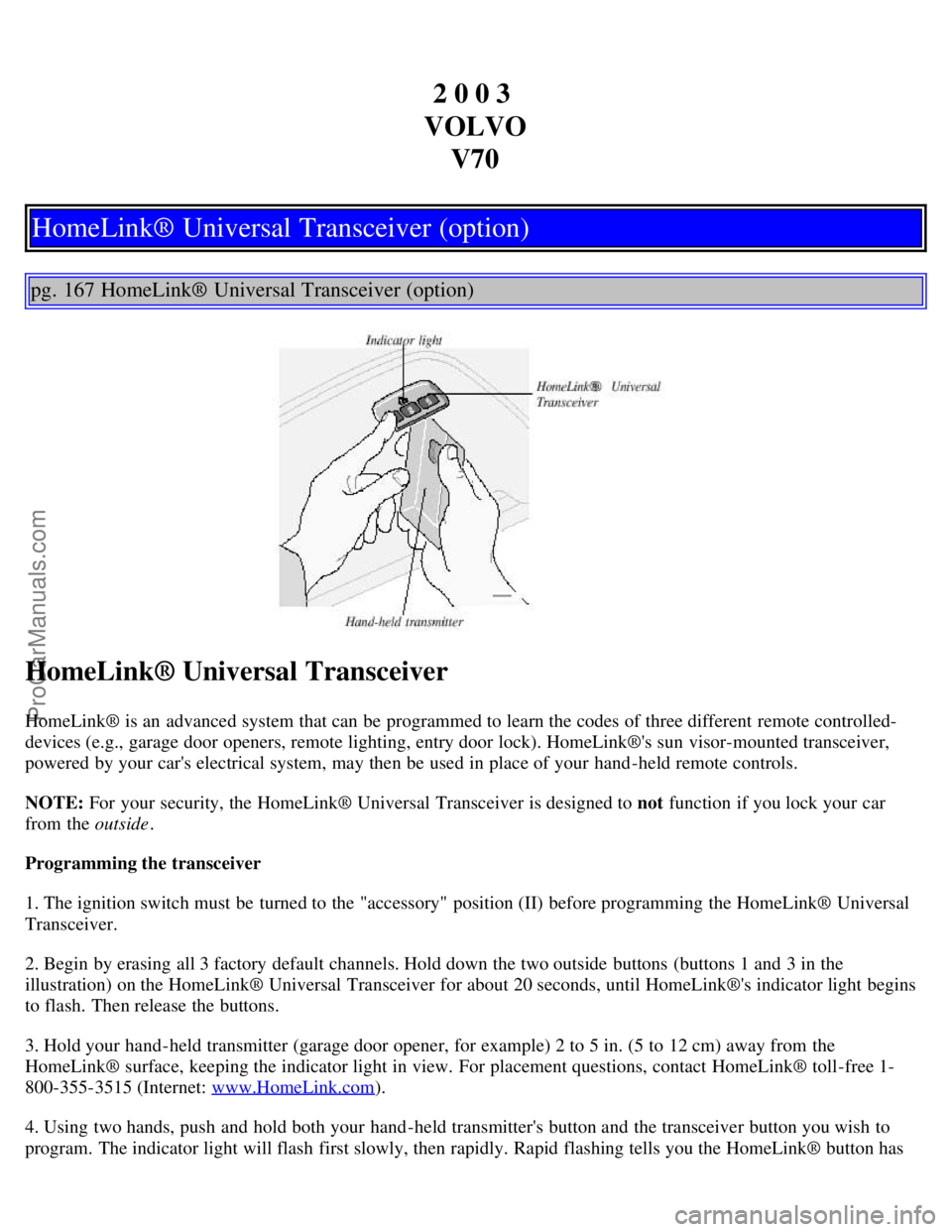
HomeLink® is an advanced system that can be programmed to learn the codes of three different remote controlled-
devices (e.g., garage door openers, remote lighting, entry door lock). HomeLink®'s sun visor-mounted transceiver,
powered by your car's electrical system, may then be used in place of your hand -held remote controls.
NOTE: For your security, the HomeLink® Universal Transceiver is designed to not function if you lock your car
from the outside .
Programming the transceiver
1. The ignition switch must be turned to the "accessory" position (II) before programming the HomeLink® Universal
Transceiver.
2. Begin by erasing all 3 factory default channels. Hold down the two outside buttons (buttons 1 and 3 in the
illustration) on the HomeLink® Universal Transceiver for about 20 seconds, until HomeLink®'s indicator light begins
to flash. Then release the buttons.
3. Hold your hand -held transmitter (garage door opener, for example) 2 to 5 in. (5 to 12 cm) away from the
HomeLink® surface, keeping the indicator light in view. For placement questions, contact HomeLink® toll-free 1-
800-355-3515 (Internet: www.HomeLink.com
).
4. Using two hands, push and hold both your hand -held transmitter's button and the transceiver button you wish to
program. The indicator light will flash first slowly, then rapidly. Rapid flashing tells you the HomeLink® button has
ProCarManuals.com
Page 78 of 117
been successfully programmed. Release both buttons.
5. If you are programming a rolling code-equipped device (e.g., garage door opener or entry door lock), refer to
"Programming rolling codes" on the next page to complete the programming process.
Repeat steps 3 and 4 to program the other two transceiver buttons.
If, after several attempts, you are unable to successfully train the HomeLink® Universal Transceiver to learn your
hand -held transmitter's signal, contact HomeLink® toll-free 1-800-355-3515 (Internet: www.HomeLink.com
).
WARNING!
If you use HomeLink® to open a garage door or gate, be sure no one is near the gate or door while it is in motion.
Do not use the HomeLink® Universal Transceiver with any garage door opener that lacks safety "stop" and
"reverse" features as required by federal safety standards. (This includes any garage door opener model
manufactured before April 1, 1982) A garage door opener that cannot "detect" an object, signalling the door to
"stop" and "reverse" does not meet current federal safety standards. Using a garage door opener without these
features increases the risk of serious injury or death. For more information on this matter, call toll-free 1-800-355-
3515 (Internet: www.HomeLink.com
).
pg. 168 HomeLink® Universal Transceiver (option)
NOTE - Canadian residents:
During programming, your hand -held transmitter may automatically stop transmitting. To successfully train
HomeLink®, continue to hold the HomeLink® button. At the same time, repeatedly press and hold your hand -held
transmitter's button at two-second intervals until HomeLink® has learned your transmitter's code. The HomeLink®
indicator light will flash first slowly, and then rapidly to indicate that the button has been successfully programmed.
Determining if your garage door uses a rolling code
Determine, in one of the following ways, if your garage door uses a rolling code system and is manufactured after
1996:
Refer to the garage door opener owner's manual for verification.
If your hand -held transmitter appears to program the HomeLink® Universal Transceiver but the programmed button
does not activate the garage door, your garage door opener may have a rolling code.
Press the programmed HomeLink® button. If the garage door opener has the rolling code feature, the HomeLink®
indicator light flashes rapidly and then glows steadily after approximately 2 seconds.
To train a rolling code garage door opener, follow these instructions after programming the desired transceiver
button according to "Programming the transceiver." The help of a second person may make training easier.
1. Locate the training button on the garage door opener motor head unit . The location and color of the training button
may vary. If you encounter difficulty, refer to the garage door opener owner's manual or call toll-free 1-800-355-3515
(Internet: www.HomeLink.com
).
2. Press the "training" button on the garage door opener motor head unit until the "training" light comes on.
3. Press and release the programmed HomeLink® button. Press and release the programmed HomeLink® button a
second time to complete the training process. Some garage door openers may require you to do this procedure a third
time to complete the training.
The programmed button on your HomeLink® Universal Transceiver should now operate your garage door opener. The
ProCarManuals.com
Page 85 of 117
33 Fuel pump15A
34 Power sun roof15A
35 Central locking system, power windows - left door mirror 25A
36 Central locking system, power windows - right door mirror 25A
37 Rear power windows, power child safety 30A
38 Alarm siren 5A
* Please be aware that if this fuse is not intact, or if it is removed, the alarm will sound.
pg. 119 Fuses in the cargo area
Fuses in the cargo area
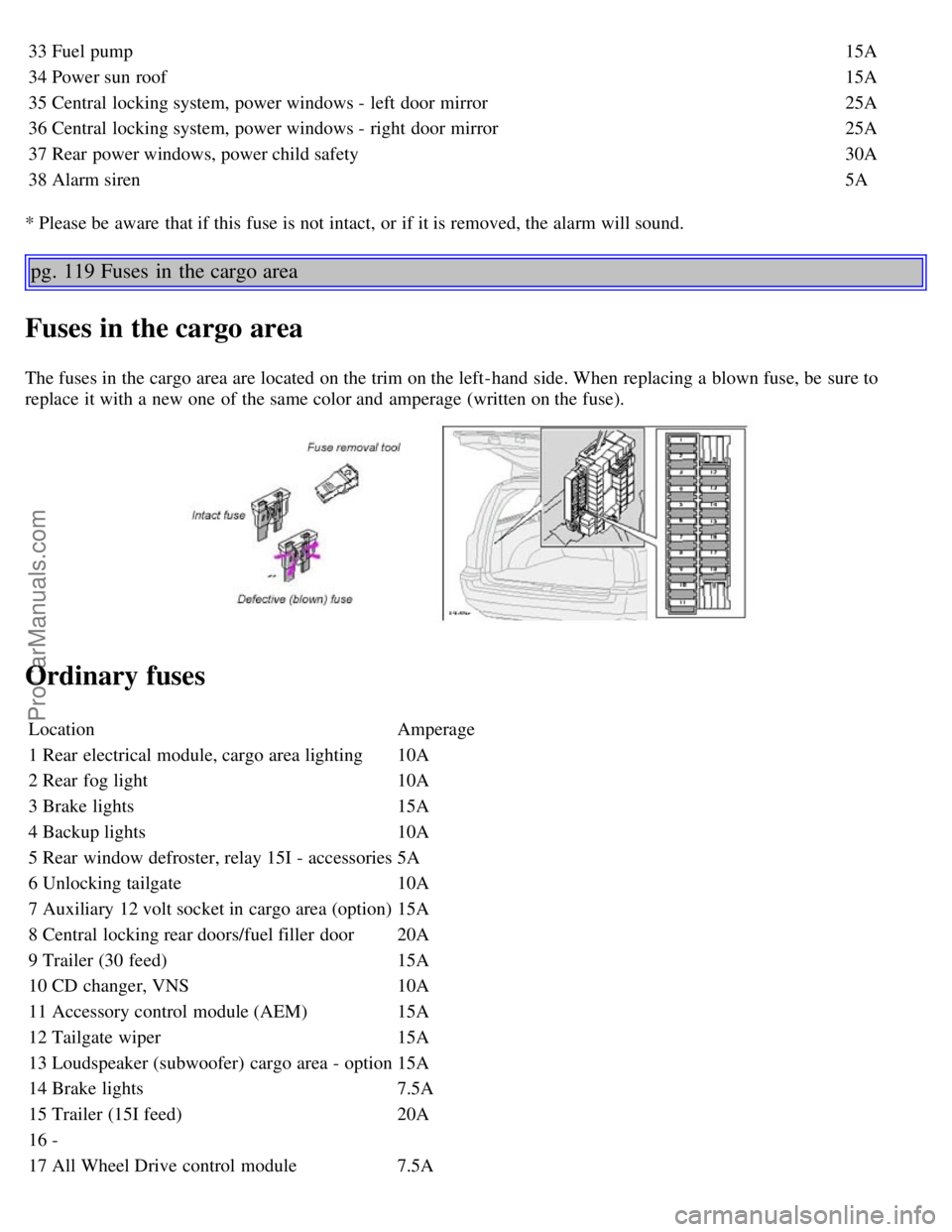
The fuses in the cargo area are located on the trim on the left-hand side. When replacing a blown fuse, be sure to
replace it with a new one of the same color and amperage (written on the fuse).
Ordinary fuses
Location Amperage
1 Rear electrical module, cargo area lighting 10A
2 Rear fog light 10A
3 Brake lights 15A
4 Backup lights 10A
5 Rear window defroster, relay 15I - accessories 5A
6 Unlocking tailgate 10A
7 Auxiliary 12 volt socket in cargo area (option) 15A
8 Central locking rear doors/fuel filler door 20A
9 Trailer (30 feed) 15A
10 CD changer, VNS 10A
11 Accessory control module (AEM) 15A
12 Tailgate wiper 15A
13 Loudspeaker (subwoofer) cargo area - option 15A
14 Brake lights 7.5A
15 Trailer (15I feed) 20A
16 -
17 All Wheel Drive control module 7.5A
ProCarManuals.com
Page 90 of 117
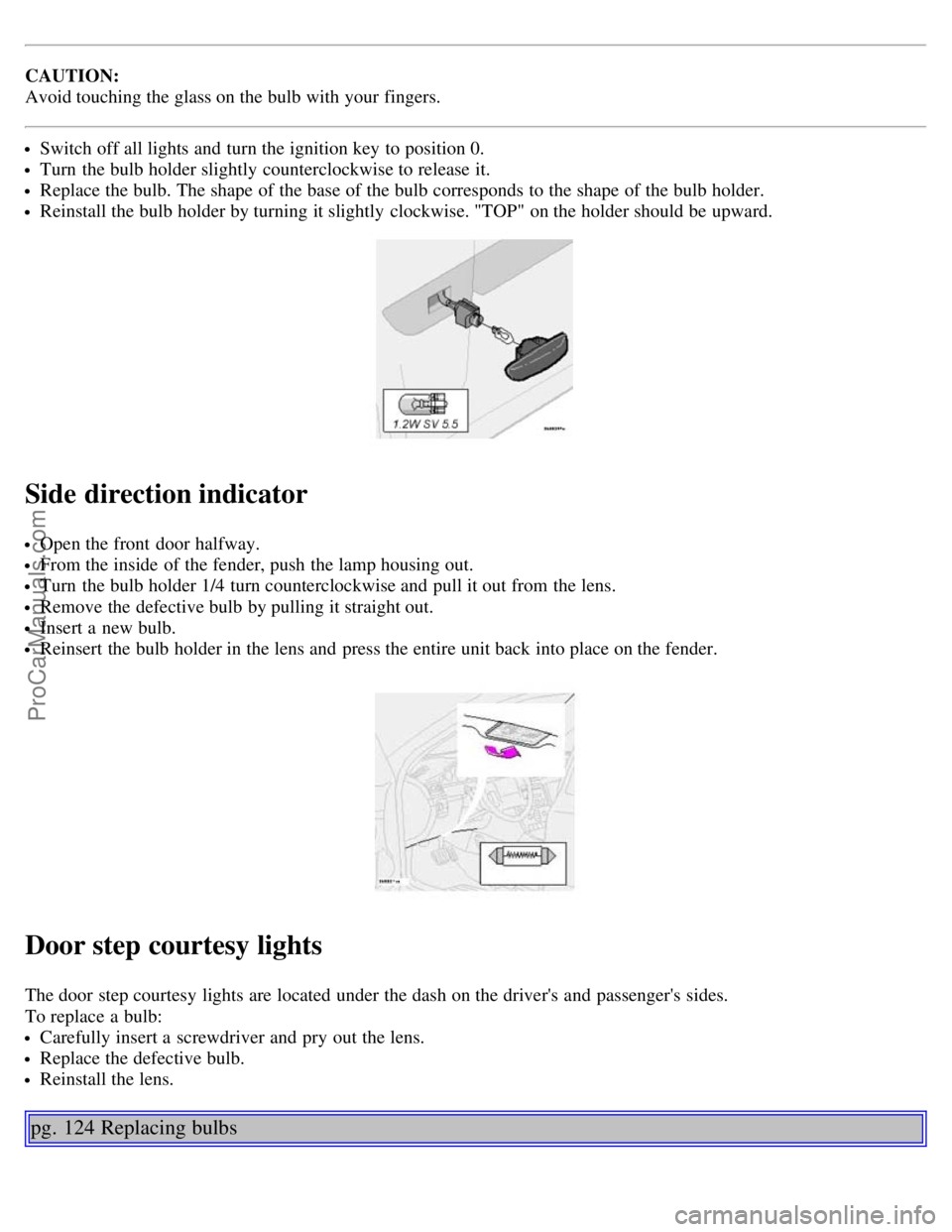
CAUTION:
Avoid touching the glass on the bulb with your fingers.
Switch off all lights and turn the ignition key to position 0.
Turn the bulb holder slightly counterclockwise to release it.
Replace the bulb. The shape of the base of the bulb corresponds to the shape of the bulb holder.
Reinstall the bulb holder by turning it slightly clockwise. "TOP" on the holder should be upward.
Side direction indicator
Open the front door halfway.
From the inside of the fender, push the lamp housing out.
Turn the bulb holder 1/4 turn counterclockwise and pull it out from the lens.
Remove the defective bulb by pulling it straight out.
Insert a new bulb.
Reinsert the bulb holder in the lens and press the entire unit back into place on the fender.
Door step courtesy lights
The door step courtesy lights are located under the dash on the driver's and passenger's sides.
To replace a bulb:
Carefully insert a screwdriver and pry out the lens.
Replace the defective bulb.
Reinstall the lens.
pg. 124 Replacing bulbs
ProCarManuals.com
Page 107 of 117
Automatic Locking Retractor (ALR)14
Automatic transmission90, 91, 145
- Geartronic92, 93
- Kickdown91, 92
Automatic transmission - cold starts91
Auxiliary socket31, 39
AWD
- general information94
- using snow chains109
B
Backrest (center) - 3-section rear seat64
Battery104, 148
Battery maintenance138, 139
- Replacing the battery139
- Ventilation hose139
Booster cushion12, 16
Brake failure warning light28
Brake fluid137
Brake system18
Bulbs (list)148
Bulbs - replacing120-125
C
Capacities (oils and fluids)141
, 146
Cargo compartment cover71
Cargo compartment lighting67
Cargo eyelets68
Cargo net69
Catalytic converters - three-way106
Center armrest - 3-section rear seat65
Center backrest (3-section rear seat)64
Center console - switches31
Center head restraint - 3-section rear seat64
Center head restraint - rear seat3
Center seat head restraint63
Central locking buttons79
Chains - winter driving109
Changing wheels112, 113
Child booster cushion12, 16
Child Restraint Anchorages15
Child safety11, 12, 14, 16
Child safety locks - rear doors82
Climate controls48-51
Climate system - general information47
Clock27
ProCarManuals.com
Page 108 of 117
Clutch interlock89
Coat hanger61
Coin compartment59
Cold weather driving104
Combination filter48, 51
Coolant131
Cooling system - general information96
Courtesy light74
Courtesy lights (front) - replacing124
Courtesy lights - exterior76
Cruise control33
Cup holder59
Cup holder in the center console60
D
Detachable trailer hitch - installing102
Dimensions143
Direction indicators36
Distributor ignition system147
Door step courtesy lights - replacing123
Doors and locks76
Drive belt131
Driver's seat and remote keyless entry system57
Driving economy95
Driving mode indicator27
Driving mode W91, 93, 104
Driving with trunk open96
E
Economical driving95
Electric socket in cargo compartment67
Electrical system148
Electrical system - general information96
Electrically operated front seats56
Electrically operated sideview mirrors41
Electrically operated sun roof42
Electrically operated windows40
Electronic Brake Force Distribution19
Electronic Climate Control (ECC)48 - 51
Emergency Locking Retractor (ELR)14
Emergency towing99, 100
Emergency warning flashers38
Emissions systems130
Engine - specifications144, 145
Engine - starting87, 88
Engine air filter132
ProCarManuals.com