ignition VOLVO V70 2003 Owner's Manual
[x] Cancel search | Manufacturer: VOLVO, Model Year: 2003, Model line: V70, Model: VOLVO V70 2003Pages: 117, PDF Size: 2.56 MB
Page 68 of 117
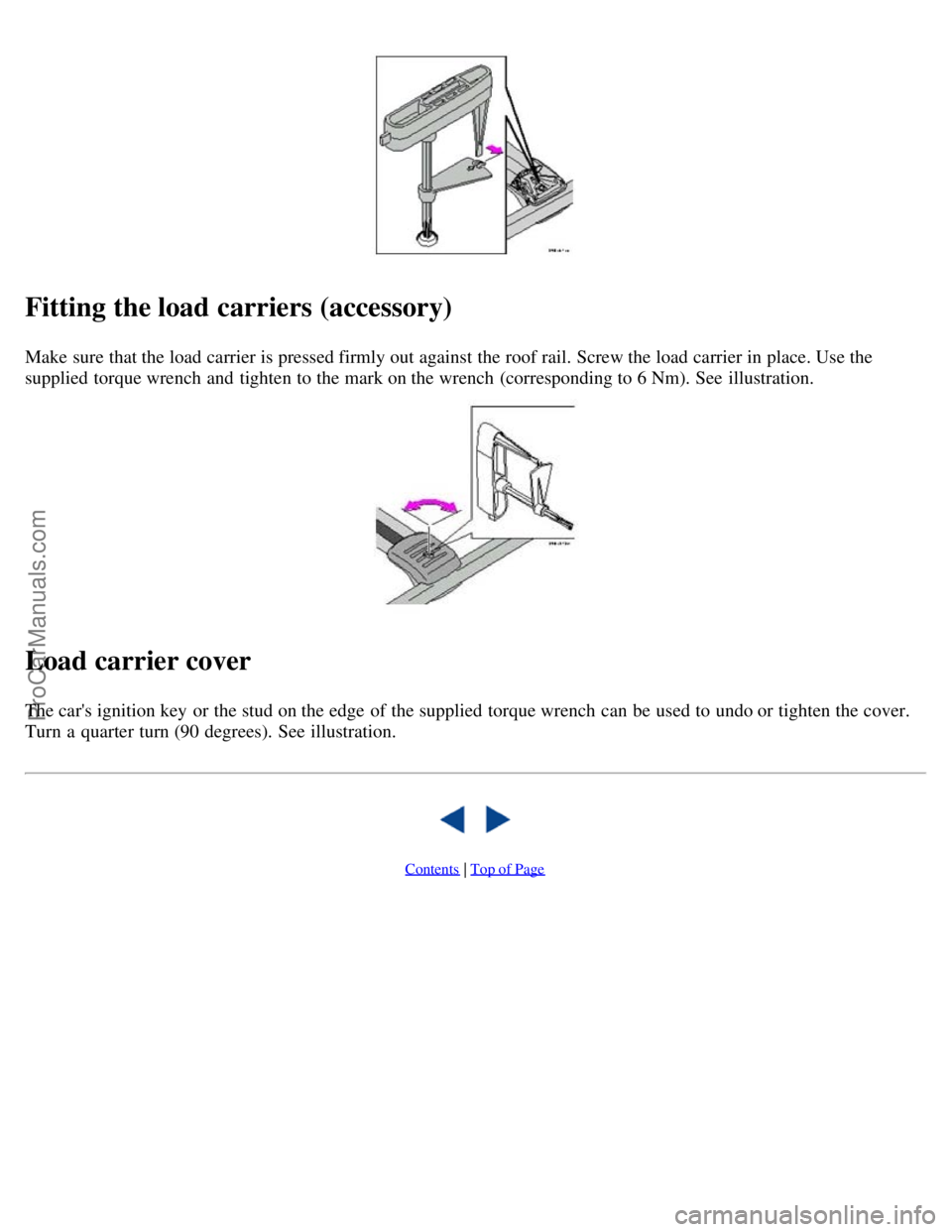
Fitting the load carriers (accessory)
Make sure that the load carrier is pressed firmly out against the roof rail. Screw the load carrier in place. Use the
supplied torque wrench and tighten to the mark on the wrench (corresponding to 6 Nm). See illustration.
Load carrier cover
The car's ignition key or the stud on the edge of the supplied torque wrench can be used to undo or tighten the cover.
Turn a quarter turn (90 degrees). See illustration.
Contents | Top of Page
ProCarManuals.com
Page 77 of 117
2 0 0 3
VOLVO V70
HomeLink® Universal Transceiver (option)
pg. 167 HomeLink® Universal Transceiver (option)
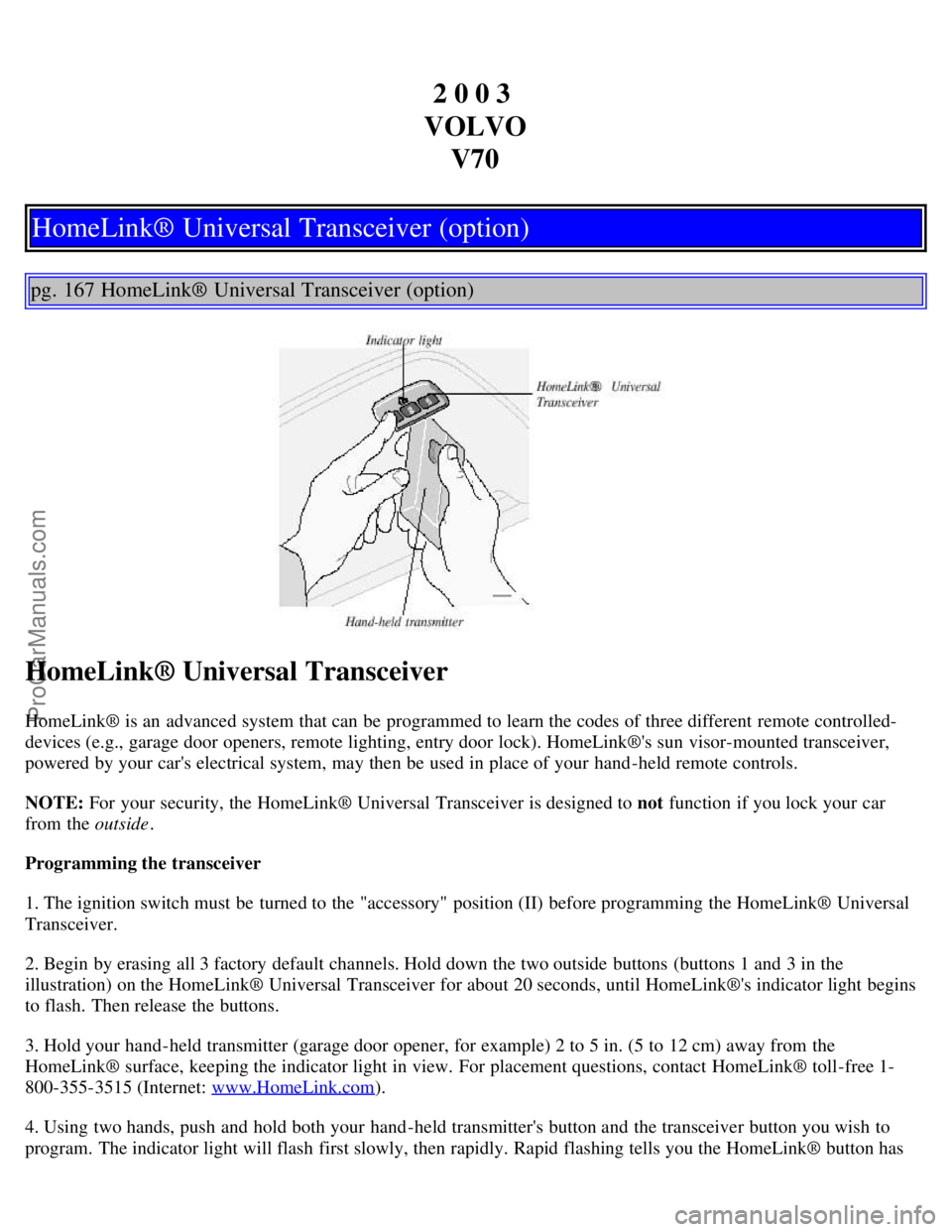
HomeLink® Universal Transceiver
HomeLink® is an advanced system that can be programmed to learn the codes of three different remote controlled-
devices (e.g., garage door openers, remote lighting, entry door lock). HomeLink®'s sun visor-mounted transceiver,
powered by your car's electrical system, may then be used in place of your hand -held remote controls.
NOTE: For your security, the HomeLink® Universal Transceiver is designed to not function if you lock your car
from the outside .
Programming the transceiver
1. The ignition switch must be turned to the "accessory" position (II) before programming the HomeLink® Universal
Transceiver.
2. Begin by erasing all 3 factory default channels. Hold down the two outside buttons (buttons 1 and 3 in the
illustration) on the HomeLink® Universal Transceiver for about 20 seconds, until HomeLink®'s indicator light begins
to flash. Then release the buttons.
3. Hold your hand -held transmitter (garage door opener, for example) 2 to 5 in. (5 to 12 cm) away from the
HomeLink® surface, keeping the indicator light in view. For placement questions, contact HomeLink® toll-free 1-
800-355-3515 (Internet: www.HomeLink.com
).
4. Using two hands, push and hold both your hand -held transmitter's button and the transceiver button you wish to
program. The indicator light will flash first slowly, then rapidly. Rapid flashing tells you the HomeLink® button has
ProCarManuals.com
Page 79 of 117
original hand -held transmitter can also be used, as desired, to operate the garage door.
The remaining two HomeLink® buttons can be programmed in the same way. In the event of any problems in
programming the HomeLink® Universal Transceiver, call toll-free 1-800-355-3515 (Internet: www.HomeLink.com
).
Operating the HomeLink® Universal Transceiver
Once programmed, the HomeLink® Universal Transceiver can be used in place of your hand -held transmitters.
To operate, the key must be turned to the "accessory" position (II) or the engine must be running. Press the
programmed HomeLink® button to activate the garage door, driveway gate, security lighting, home security system,
etc.
Your original hand -held transmitters may, of course, be used at any time.
Erasing programmed buttons
Individual buttons cannot be erased. To erase all three programmed buttons:
1. Turn the ignition key to the "accessory" position (II).
2. Hold down the two outside buttons on the HomeLink® Universal Transceiver for about 20 seconds, until
HomeLink®'s indicator light begins to flash.
3. Release both buttons.
The HomeLink® buttons can be reprogrammed using the procedures described on the previous page.
(HomeLink® information continues on the next page)
pg. 169 HomeLink® Universal Transceiver (option)
Reprogramming a single HomeLink® button
1. Press and hold the desired HomeLink® button. Do not release the button until step 3 has been completed.
2. When the indicator light begins to flash slowly (after approximately 20 seconds), position your hand -held
transmitter 2 to 5 in. (5 to 12 cm) away from the HomeLink® surface.
3. Press and hold the hand -held transmitter button. The HomeLink® indicator light will flash first slowly, then rapidly.
When the indicator light flashes rapidly, release both buttons.
The previously programmed device has now been erased and the new device can be activated by pressing the
HomeLink® button that has just been programmed. This procedure will not affect any other programmed HomeLink®
buttons.
NOTE:
Retain the original transmitter(s) for future programming procedures (e.g., if you purchase a new car).
For your own security, erase all programmed buttons on the HomeLink® Universal Transceiver when you sell your
car.
Metallic sun protection films should not be used on any windows in a car equipped with HomeLink® Universal
Transceiver. This could interfere with the transceiver's function.
ProCarManuals.com
Page 83 of 117
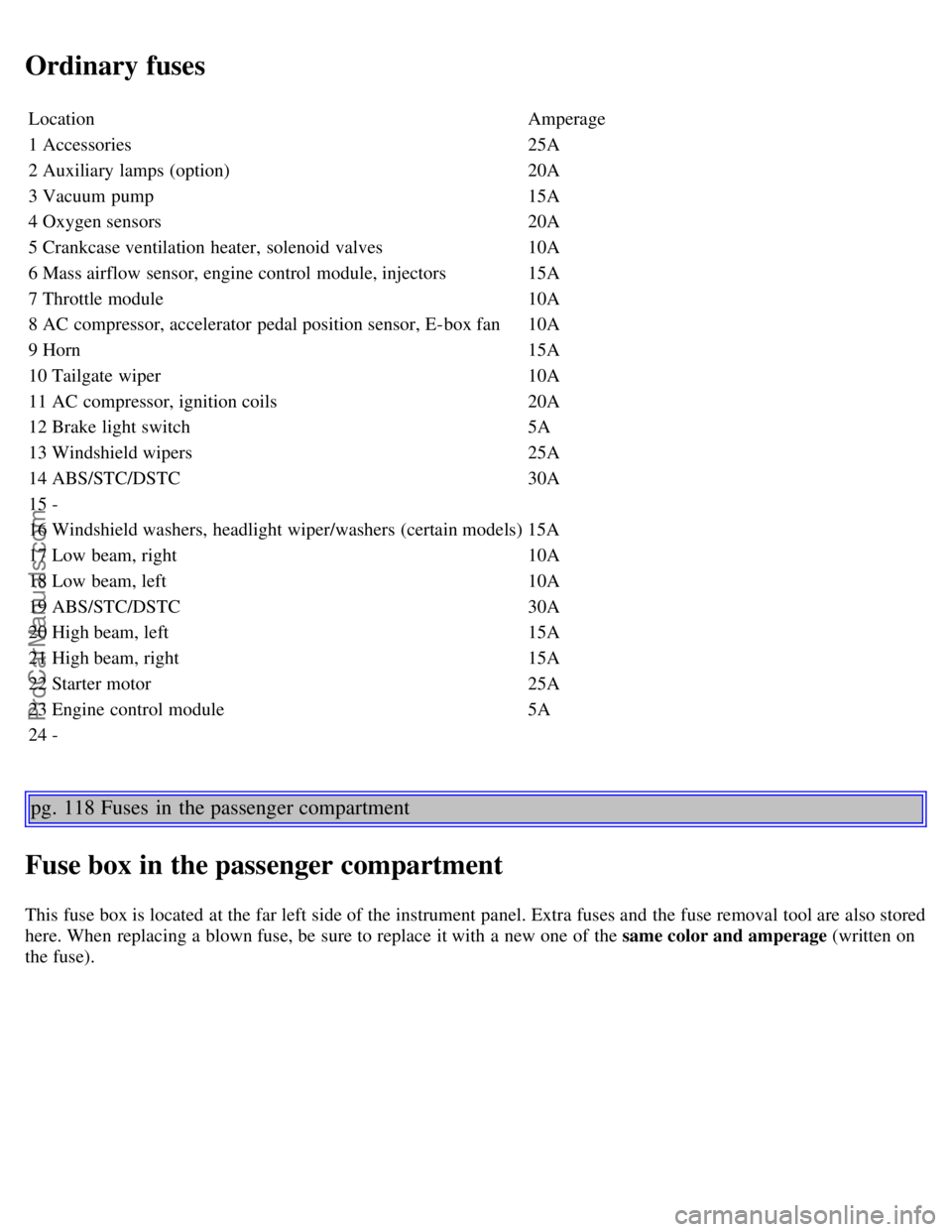
Ordinary fuses
LocationAmperage
1 Accessories 25A
2 Auxiliary lamps (option) 20A
3 Vacuum pump 15A
4 Oxygen sensors 20A
5 Crankcase ventilation heater, solenoid valves 10A
6 Mass airflow sensor, engine control module, injectors 15A
7 Throttle module 10A
8 AC compressor, accelerator pedal position sensor, E-box fan 10A
9 Horn 15A
10 Tailgate wiper 10A
11 AC compressor, ignition coils 20A
12 Brake light switch 5A
13 Windshield wipers 25A
14 ABS/STC/DSTC 30A
15 -
16 Windshield washers, headlight wiper/washers (certain models) 15A
17 Low beam, right 10A
18 Low beam, left 10A
19 ABS/STC/DSTC 30A
20 High beam, left 15A
21 High beam, right 15A
22 Starter motor 25A
23 Engine control module 5A
24 -
pg. 118 Fuses in the passenger compartment
Fuse box in the passenger compartment
This fuse box is located at the far left side of the instrument panel. Extra fuses and the fuse removal tool are also stored
here. When replacing a blown fuse, be sure to replace it with a new one of the same color and amperage (written on
the fuse).
ProCarManuals.com
Page 84 of 117

LocationAmperage
1 Low beam headlights 15A
2 High beam headlights 20A
3 Power driver's seat 30A
4 Power passenger's seat 30A
5 -
6 -
7 Heated seat - front left (option) 15A
8 Heated seat - front right (option) 15A
9 ABS/STC/DSTC 5A
10 -
11 -
12 Headlight wipers (certain models) 15A
13 Electric socket 12 V 15A
14 Power passenger's seat 5A
15 Audio system, VNS 5A
16 Audio system 20A
17 Audio amplifier 30A
18 Front fog lights 15A
19 VNS display 10A
20 -
21 Automatic transmission, shiftlock, extended D2 feed 10A
22 Direction indicators 20A
23 Headlight switch module, climate control system, onboard diagnostic connector, steering wheel lever
modules 5A
24 Relay for extended D1 feed: climate control system, power driver's seat, driver's info 10A
25 Ignition switch, relay starter motor, SRS, engine control module 10A
26 Climate control system blower 30A
27 -
28 Electronic module - courtesy lighting 10A
29 -
30 Left front/rear parking lights 7.5A
31 Right front/rear parking lights, license plate lights 7.5A
32 Central electrical module, vanity mirror lighting, power steering,
glove compartment light, interior courtesy lighting 10A
ProCarManuals.com
Page 86 of 117
18 -
pg. 120 Replacing bulbs
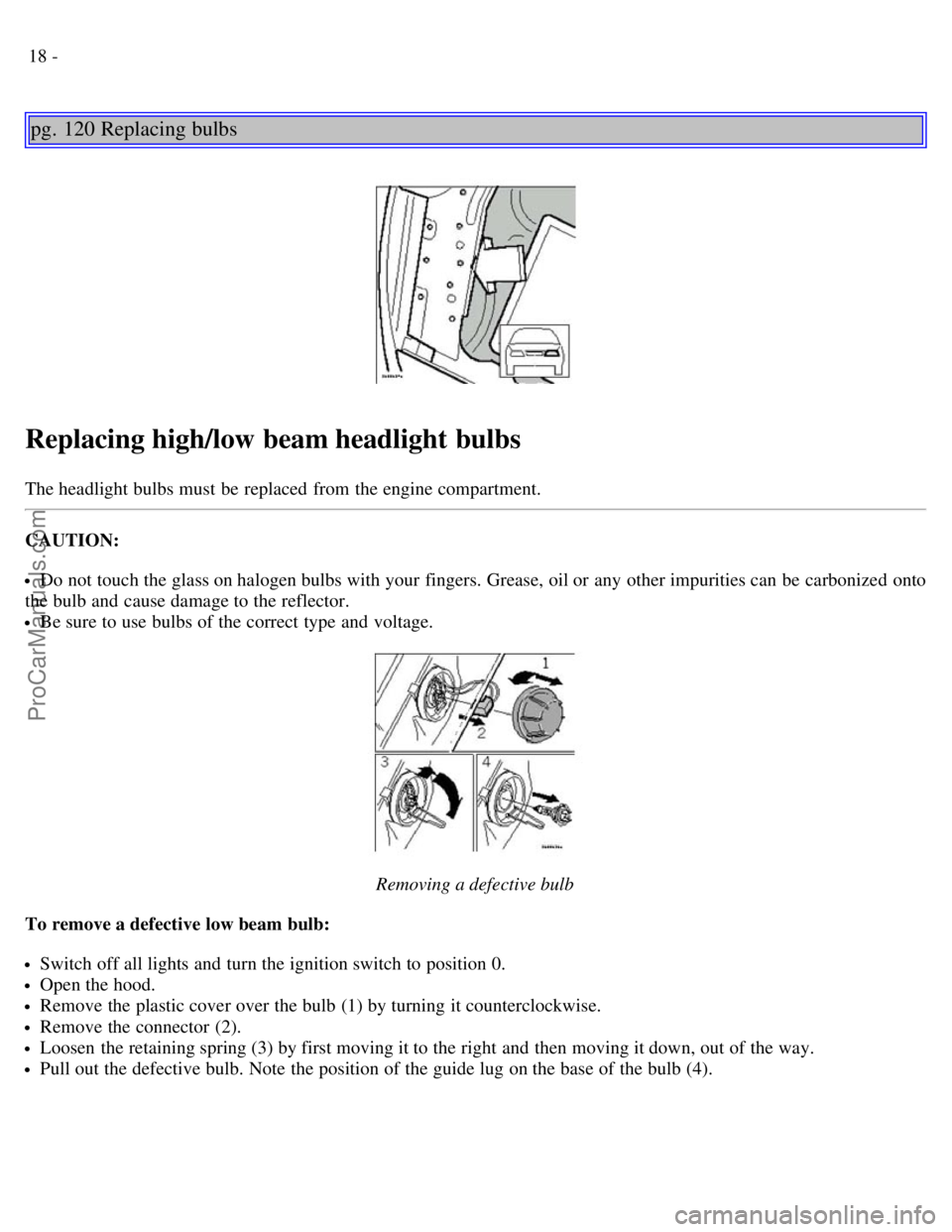
Replacing high/low beam headlight bulbs
The headlight bulbs must be replaced from the engine compartment.
CAUTION:
Do not touch the glass on halogen bulbs with your fingers. Grease, oil or any other impurities can be carbonized onto
the bulb and cause damage to the reflector.
Be sure to use bulbs of the correct type and voltage.
Removing a defective bulb
To remove a defective low beam bulb:
Switch off all lights and turn the ignition switch to position 0.
Open the hood.
Remove the plastic cover over the bulb (1) by turning it counterclockwise.
Remove the connector (2).
Loosen the retaining spring (3) by first moving it to the right and then moving it down, out of the way.
Pull out the defective bulb. Note the position of the guide lug on the base of the bulb (4).
ProCarManuals.com
Page 87 of 117
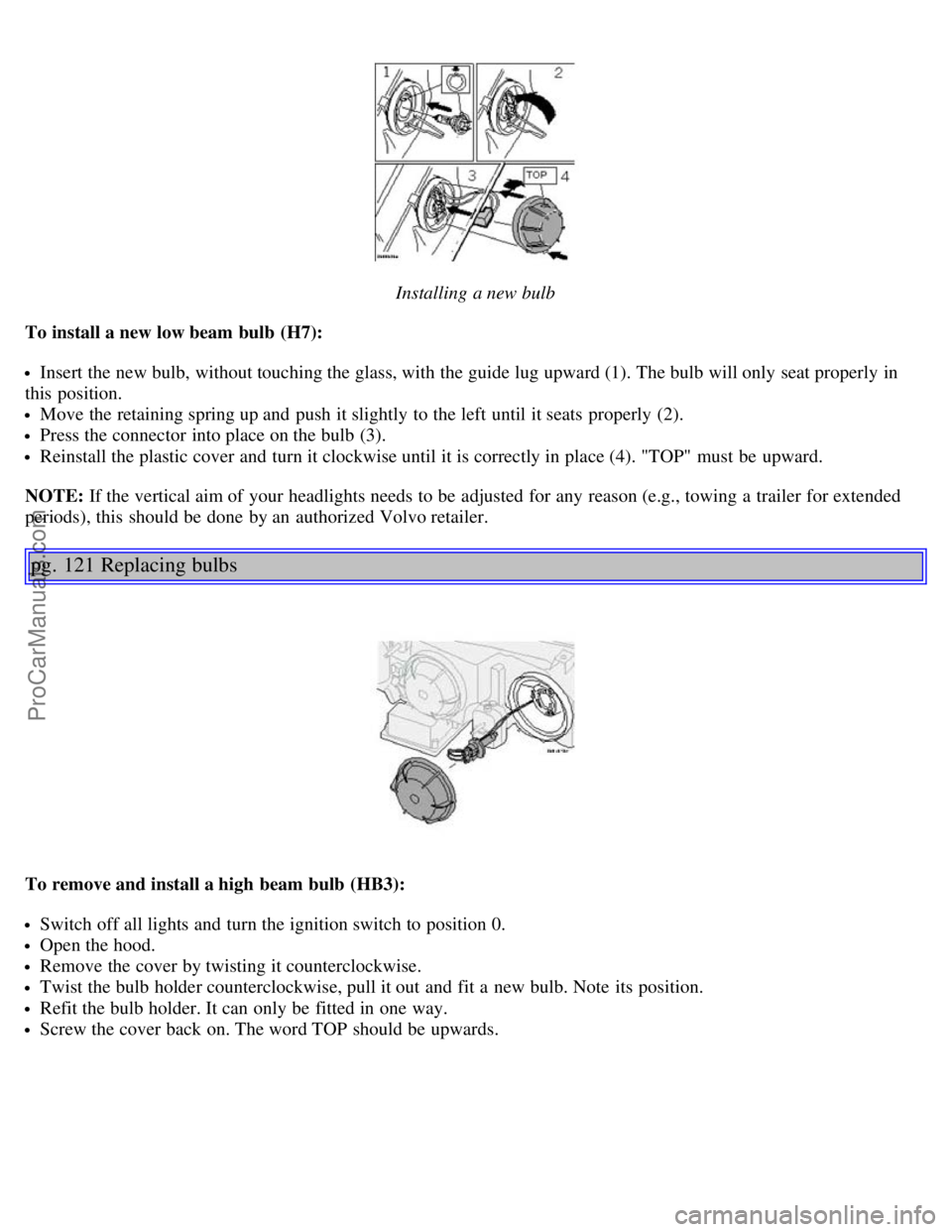
Installing a new bulb
To install a new low beam bulb (H7):
Insert the new bulb, without touching the glass, with the guide lug upward (1). The bulb will only seat properly in
this position.
Move the retaining spring up and push it slightly to the left until it seats properly (2).
Press the connector into place on the bulb (3).
Reinstall the plastic cover and turn it clockwise until it is correctly in place (4). "TOP" must be upward.
NOTE: If the vertical aim of your headlights needs to be adjusted for any reason (e.g., towing a trailer for extended
periods), this should be done by an authorized Volvo retailer.
pg. 121 Replacing bulbs
To remove and install a high beam bulb (HB3):
Switch off all lights and turn the ignition switch to position 0.
Open the hood.
Remove the cover by twisting it counterclockwise.
Twist the bulb holder counterclockwise, pull it out and fit a new bulb. Note its position.
Refit the bulb holder. It can only be fitted in one way.
Screw the cover back on. The word TOP should be upwards.
ProCarManuals.com
Page 88 of 117
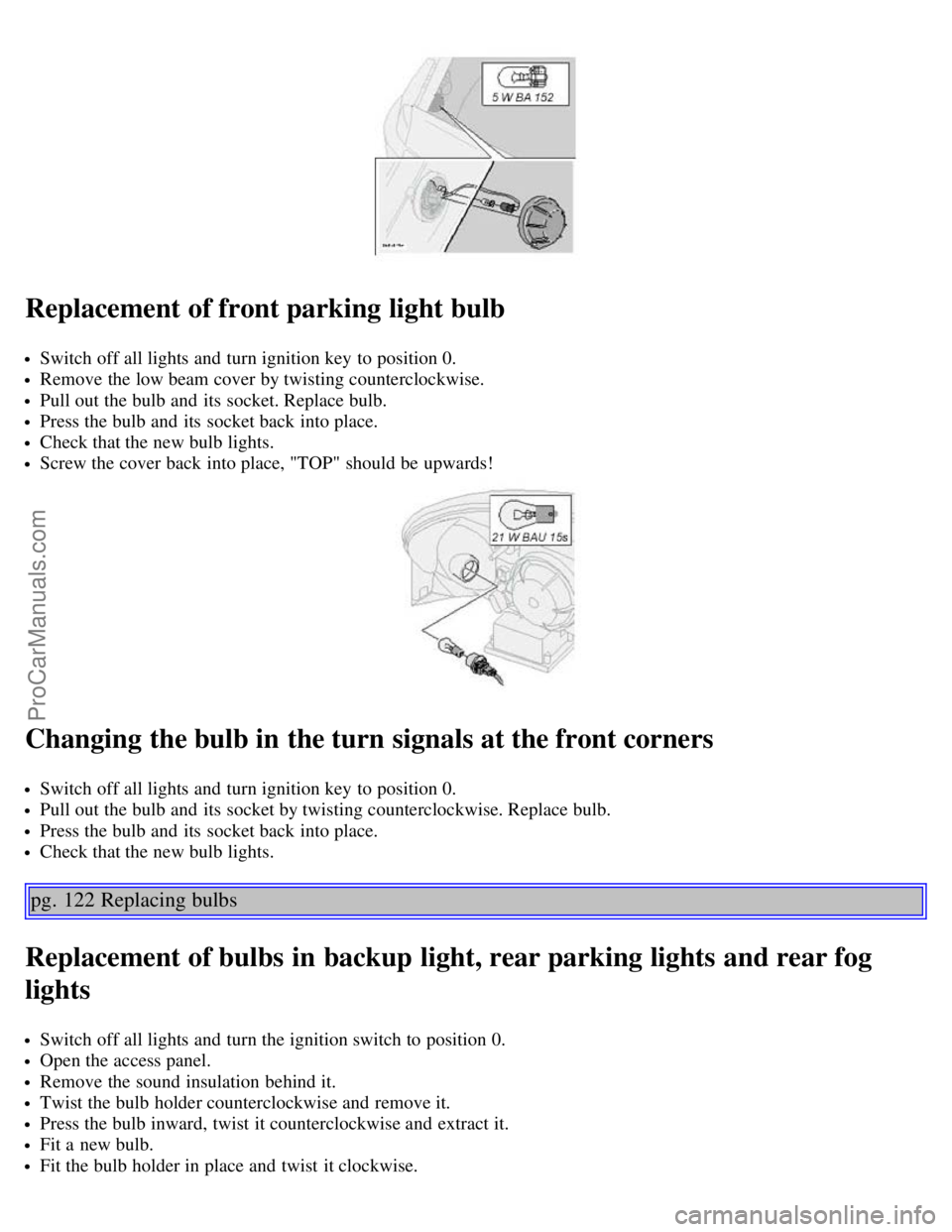
Replacement of front parking light bulb
Switch off all lights and turn ignition key to position 0.
Remove the low beam cover by twisting counterclockwise.
Pull out the bulb and its socket. Replace bulb.
Press the bulb and its socket back into place.
Check that the new bulb lights.
Screw the cover back into place, "TOP" should be upwards!
Changing the bulb in the turn signals at the front corners
Switch off all lights and turn ignition key to position 0.
Pull out the bulb and its socket by twisting counterclockwise. Replace bulb.
Press the bulb and its socket back into place.
Check that the new bulb lights.
pg. 122 Replacing bulbs
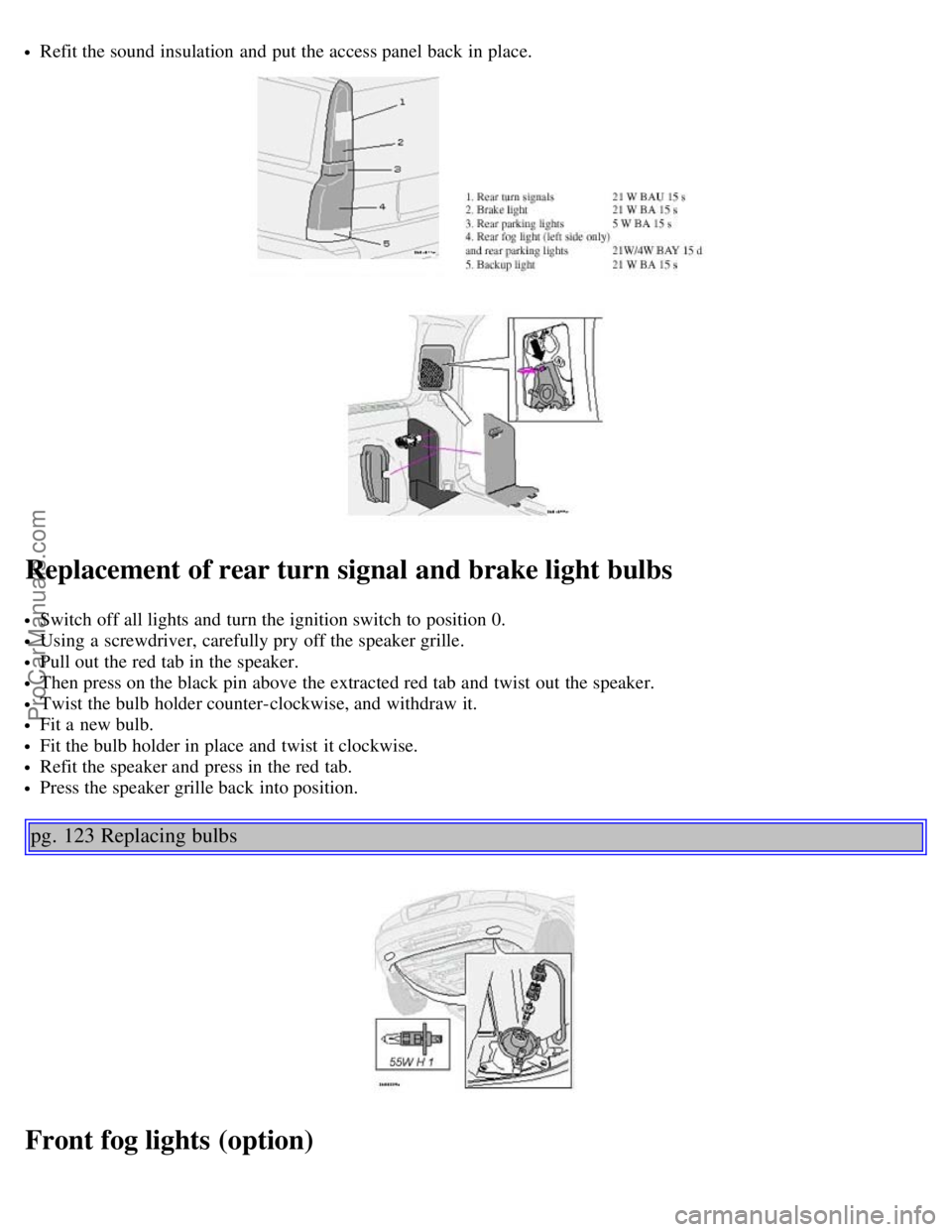
Replacement of bulbs in backup light, rear parking lights and rear fog
lights
Switch off all lights and turn the ignition switch to position 0.
Open the access panel.
Remove the sound insulation behind it.
Twist the bulb holder counterclockwise and remove it.
Press the bulb inward, twist it counterclockwise and extract it.
Fit a new bulb.
Fit the bulb holder in place and twist it clockwise.
ProCarManuals.com
Page 89 of 117
Refit the sound insulation and put the access panel back in place.
Replacement of rear turn signal and brake light bulbs
Switch off all lights and turn the ignition switch to position 0.
Using a screwdriver, carefully pry off the speaker grille.
Pull out the red tab in the speaker.
Then press on the black pin above the extracted red tab and twist out the speaker.
Twist the bulb holder counter-clockwise, and withdraw it.
Fit a new bulb.
Fit the bulb holder in place and twist it clockwise.
Refit the speaker and press in the red tab.
Press the speaker grille back into position.
pg. 123 Replacing bulbs
Front fog lights (option)
ProCarManuals.com
Page 90 of 117
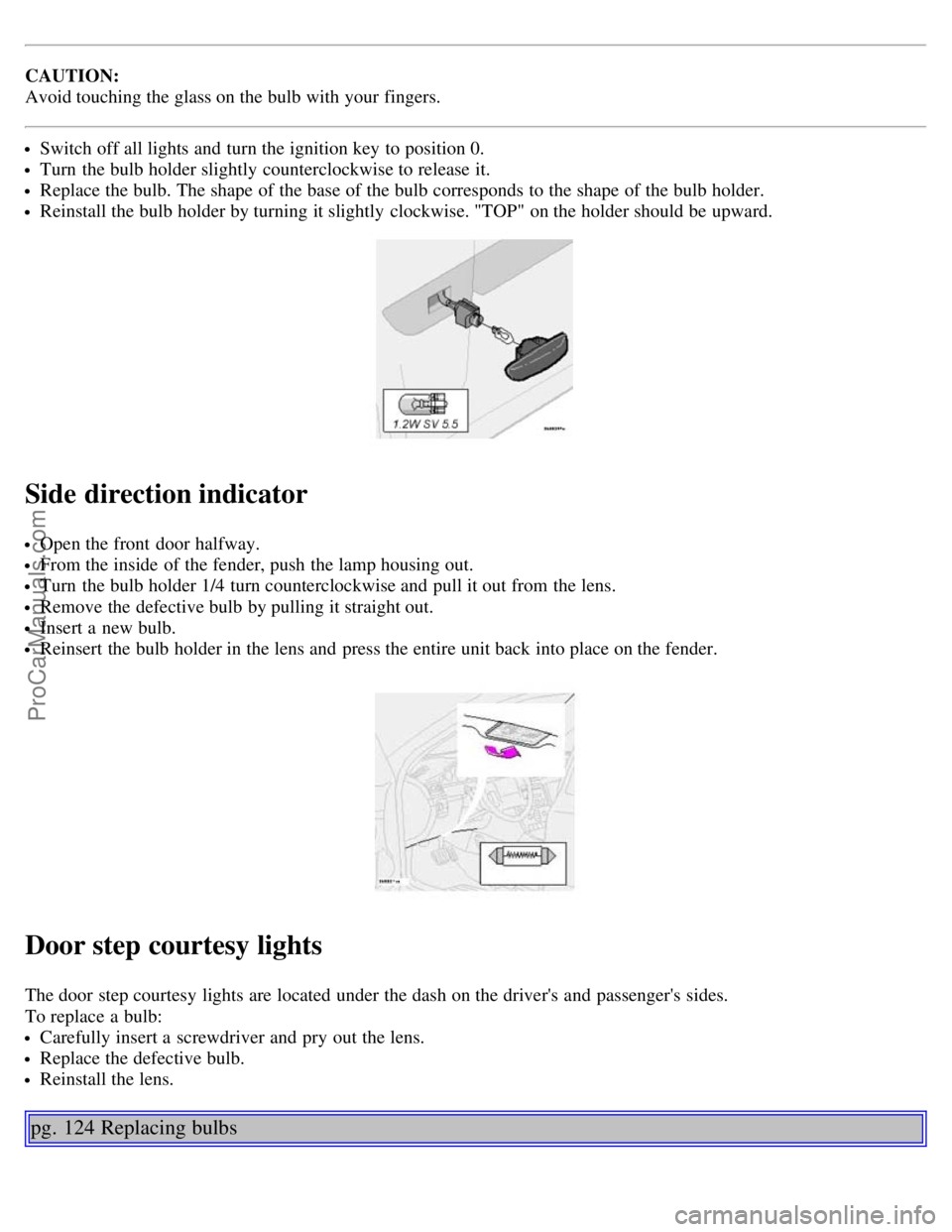
CAUTION:
Avoid touching the glass on the bulb with your fingers.
Switch off all lights and turn the ignition key to position 0.
Turn the bulb holder slightly counterclockwise to release it.
Replace the bulb. The shape of the base of the bulb corresponds to the shape of the bulb holder.
Reinstall the bulb holder by turning it slightly clockwise. "TOP" on the holder should be upward.
Side direction indicator
Open the front door halfway.
From the inside of the fender, push the lamp housing out.
Turn the bulb holder 1/4 turn counterclockwise and pull it out from the lens.
Remove the defective bulb by pulling it straight out.
Insert a new bulb.
Reinsert the bulb holder in the lens and press the entire unit back into place on the fender.
Door step courtesy lights
The door step courtesy lights are located under the dash on the driver's and passenger's sides.
To replace a bulb:
Carefully insert a screwdriver and pry out the lens.
Replace the defective bulb.
Reinstall the lens.
pg. 124 Replacing bulbs
ProCarManuals.com