turn signal VOLVO V70 2004 Owners Manual
[x] Cancel search | Manufacturer: VOLVO, Model Year: 2004, Model line: V70, Model: VOLVO V70 2004Pages: 127, PDF Size: 3.08 MB
Page 18 of 127
2 0 0 4
VOLVO V70
Chapter 2 - Instruments, switches and controls
pg. 23 Instruments, switches and controls
Interior24
Exterior25
Instruments26
Instrument panel27
Indicator and warning lights28
Text information window30
Switches in the center console31
Trip computer32
Cruise control33
Light switch panel34
Steering wheel adjustment/lock35
Ignition switch, Turn signals36
Windshield wipers/washers37
Warning flashers, heated mirrors/rear window, heated front seats38
Parking brake, auxiliary socket/ashtrays39
Electrically operated windows40
Rearview/sideview mirrors41
Power moonroof42
pg. 24 Interior
ProCarManuals.com
Page 20 of 127

pg. 27 Instrument panel
1 Turn signals
2 Text window
3 Temperature gauge
The pointer should be approximately midway on the gauge when driving.
Do not drive the car if the warning light is on. The text window will provide you with additional information.
If the engine temperature remains high, check coolant level - see page 133
.
4 Trip odometer/reset button
The trip odometer is used for measuring shorter distances. The last digit indicates 1/10 mile/kilometer. Press the button
quickly to toggle between trip odometers 1 and 2. Hold in the button for more than 2 seconds to reset.
5 Odometer
6 Speedometer
ProCarManuals.com
Page 23 of 127

If the light comes on while the engine is running, have the charging system checked.
* Rear fog light, if used, and trailer turn signal, if towing a trailer, will go on while driving.
pg. 29 Indicator and warning lights
Rear fog light
This light indicates that the rear fog light is on.
Malfunction indicator lamp
On-Board Diagnostic II (OBDII): As you drive, a computer called "OBDII" monitors your car's engine, transmission,
electrical and emission systems. The CHECK ENGINE light will light up if the computer senses a condition that
potentially may need correcting. When this happens, please have your car checked by a Volvo retailer as soon as
possible.
A CHECK ENGINE light may have many causes. Sometimes, you may not notice a change in your car's behavior.
Even so, an uncorrected condition could hurt fuel economy, emission cleanliness, and driveability. Extended driving
without correcting the cause could even damage other components in your car.
Canadian models are equipped with this warning light:
NOTE : If the fuel filler cap is not closed tightly or if the engine is running when the car is refueled, the Malfunction
Indicator Lamp may indicate a fault. However, your vehicle's performance will not be affected. Use only Volvo
original or approved fuel filler caps.
Anti-lock Brake System ABS
If the warning light comes on, there is a malfunction of the ABS system (the standard braking system will still
function). The vehicle should be driven to a Volvo retailer for inspection. See page 19
for additional information.
Stability Traction Control (STC) system (option), or Dynamic Stability and
Traction Control (DSTC) system (option)
An indicator light will flash when STC or DSTC is actively working to stabilize the car. See pages 20-21 for more
detailed information.
ProCarManuals.com
Page 24 of 127
Turn signal indicator - trailer (certain models)
If you are towing a trailer, this light will flash simultaneously with the turn signals on the trailer. If the light does not
flash when signaling, neither the trailer's turn signals nor the car's turn signals are functioning.
Seat belt reminder
This symbol lights up to indicate that the driver has not fastened his/her seat belt.
pg. 30 Text information window
Messages in the text window
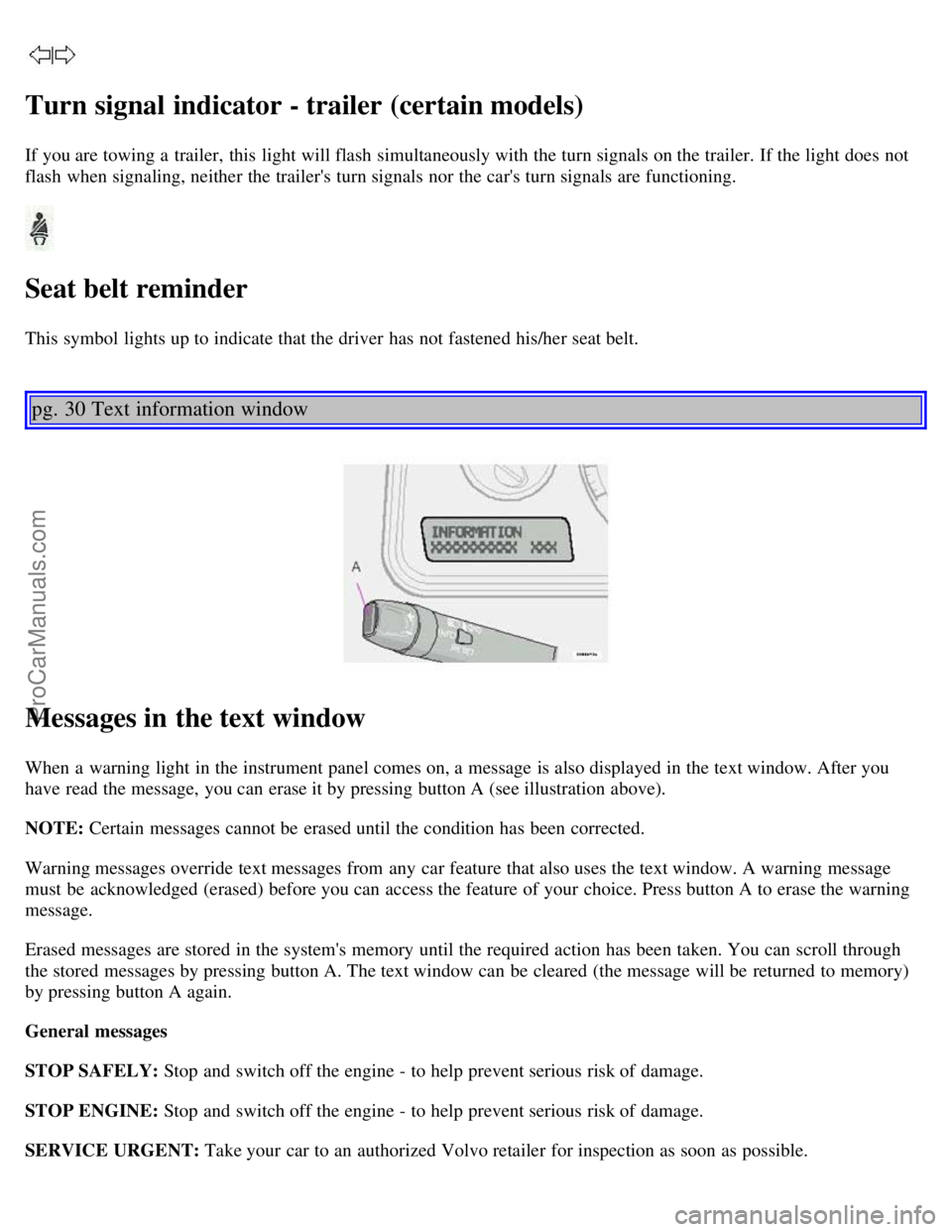
When a warning light in the instrument panel comes on, a message is also displayed in the text window. After you
have read the message, you can erase it by pressing button A (see illustration above).
NOTE: Certain messages cannot be erased until the condition has been corrected.
Warning messages override text messages from any car feature that also uses the text window. A warning message
must be acknowledged (erased) before you can access the feature of your choice. Press button A to erase the warning
message.
Erased messages are stored in the system's memory until the required action has been taken. You can scroll through
the stored messages by pressing button A. The text window can be cleared (the message will be returned to memory)
by pressing button A again.
General messages
STOP SAFELY: Stop and switch off the engine - to help prevent serious risk of damage.
STOP ENGINE: Stop and switch off the engine - to help prevent serious risk of damage.
SERVICE URGENT: Take your car to an authorized Volvo retailer for inspection as soon as possible.
ProCarManuals.com
Page 50 of 127

Alarm
The alarm is automatically armed whenever you lock your car. When armed, the alarm continuously monitors a
number of points on the car. The following conditions will set off the alarm:
The hood is forced open.
The tailgate is forced open.
A door is forced open.
The ignition switch is tampered with.
If there is movement in the passenger compartment (if the car is equipped with the optional movement sensor).
The car is lifted or towed (if the car is equipped with the optional inclination sensor).
The battery is disconnected (while the alarm is armed).
Arming the alarm
Press the LOCK button on the remote control, lock the car using the key in the driver's door or press the central lock
button on one of the front doors with the door open. One long flash of the turn signals will confirm that the alarm is
armed.
Disarming the alarm
Press the UNLOCK button on the remote control or unlock the doors with the key.
Turning off (stopping) the alarm
If the alarm is sounding, it can be stopped by pressing the UNLOCK button on the remote control or by unlocking the
driver's door with the key.
Visual alarm signal
The visual alarm signal is given by flashing all turn signals and turning on the interior lighting for approximately 5
minutes.
Audible alarm signal
An audible alarm signal is given by a battery powered siren. One alarm cycle lasts for 25 seconds.
"Panic" button
In an emergency situation, this feature can be used to attract attention. Activate the "panic" function by pressing the
red button on the remote control (see illustration on page 77
) for at least 3 seconds or by pressing this button twice
within 3 seconds. The turn signals will flash, the interior lights will go on and the car's horn will sound.
The function can be turned off by pressing any of the buttons on the remote control or will stop automatically
after 25 seconds. When a button is pressed, there is a 5 second delay before the panic alarm is deactivated.
NOTE: This function will NOT unlock the car.
pg. 81 Alarm
ProCarManuals.com
Page 51 of 127

Temporarily turning off the inclination and movement alarm sensor(s) -
accessory
This button will only be found in cars equipped with the accessory inclination and/or movement sensors.
FCC ID: MAYDA5823
This device complies with part 15 of the FCC rules. Operation is subject to the following conditions: (1) This device
may not cause harmful interference, and (2) this device must accept any interference received, including interference
that may cause undesired operation.
Canadian IC: 4405A-DA5823
Movement sensor DA5823 by Dynex
Operation is subject to the following conditions: (1) this device may not cause interference, and (2) this device must
accept any interference, including interference that may cause undesired operation of the device.
In certain situations it may be desirable to turn off the optional inclination and movement alarm sensors if, for
example, you drive your car onto a ferry where the rocking of the boat could trigger the alarm or if a pet is left in the
car with the doors locked.
To temporarily turn off the inclination and movement alarm sensors from the alarm system:
From the time the ignition key is turned from the Drive position (position II) until you lock the car, you can press the
button in the center console. The LED in the switch will light up and a message will be displayed in the text window
to indicate that the sensors are disconnected.
The car can then be locked in the usual way to set the alarm.
NOTE:
This function will not turn off the vehicle's standard alarm.
The optional sensors are automatically reconnected to the alarm system the next time the car is unlocked and then
locked again.
LED alarm status signals
ProCarManuals.com
Page 86 of 127
Replacement of front parking light bulb
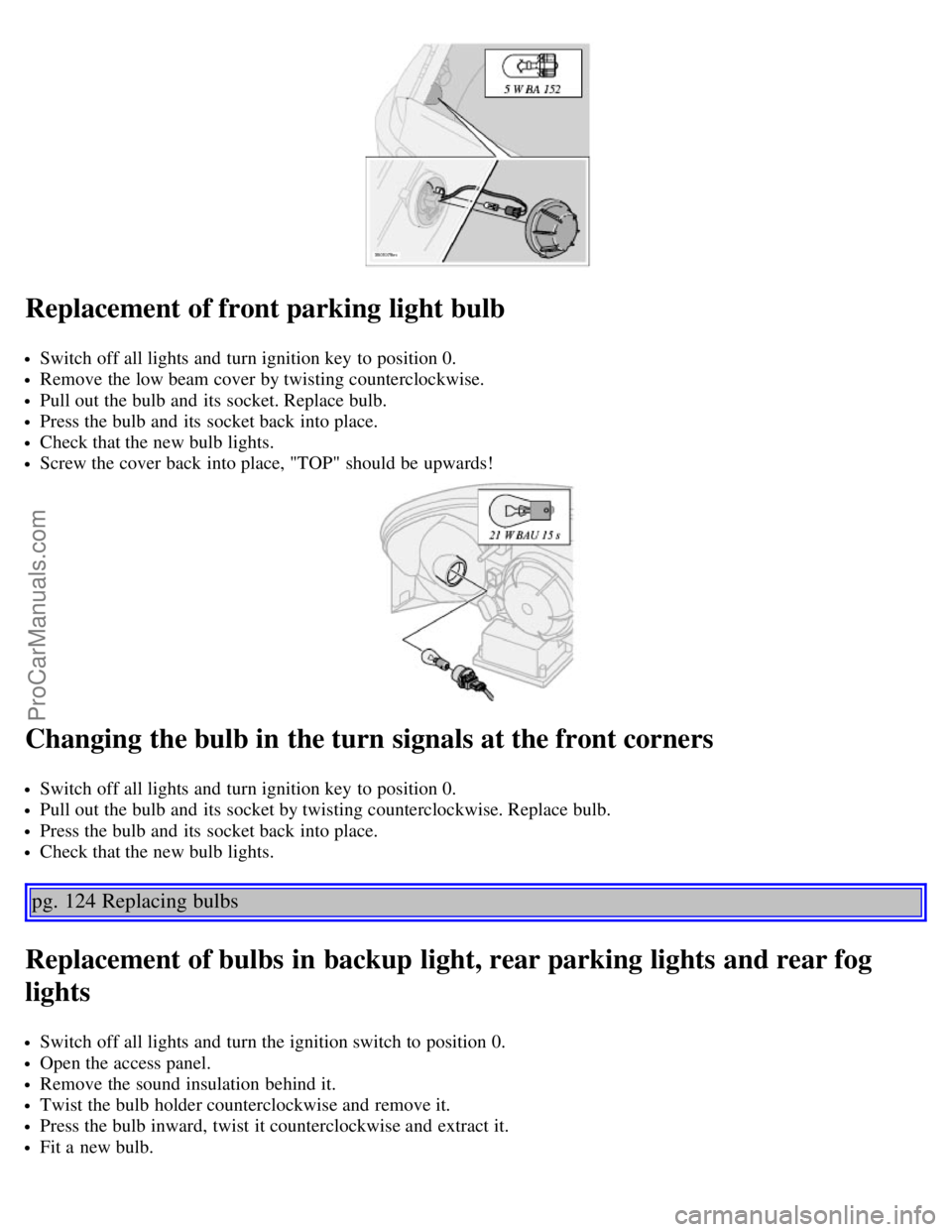
Switch off all lights and turn ignition key to position 0.
Remove the low beam cover by twisting counterclockwise.
Pull out the bulb and its socket. Replace bulb.
Press the bulb and its socket back into place.
Check that the new bulb lights.
Screw the cover back into place, "TOP" should be upwards!
Changing the bulb in the turn signals at the front corners
Switch off all lights and turn ignition key to position 0.
Pull out the bulb and its socket by twisting counterclockwise. Replace bulb.
Press the bulb and its socket back into place.
Check that the new bulb lights.
pg. 124 Replacing bulbs
Replacement of bulbs in backup light, rear parking lights and rear fog
lights
Switch off all lights and turn the ignition switch to position 0.
Open the access panel.
Remove the sound insulation behind it.
Twist the bulb holder counterclockwise and remove it.
Press the bulb inward, twist it counterclockwise and extract it.
Fit a new bulb.
ProCarManuals.com
Page 87 of 127

Fit the bulb holder in place and twist it clockwise.
Refit the sound insulation and put the access panel back in place.
Replacement of rear turn signal and brake light bulbs
Switch off all lights and turn the ignition switch to position 0.
Using a screwdriver, carefully pry off the speaker grille.
Pull out the red tab in the speaker.
Then press on the black pin above the extracted red tab and twist out the speaker.
Twist the bulb holder counterclockwise, and withdraw it.
Fit a new bulb.
Fit the bulb holder in place and twist it clockwise.
Refit the speaker and press in the red tab.
Press the speaker grille back into position.
pg. 125 Replacing bulbs
ProCarManuals.com
Page 109 of 127

A - Automatic station preset
This function seeks and stores up to 10 strong AM or FM stations in a separate memory. This function is especially
useful in areas where you are not familiar with the radio stations.
1. Press in the "AUTO" button for at least 2 seconds. A number of strong signal stations (max. 10) from the currently
selected waveband are now stored automatically in the memory. An "A" and "AUTO" is displayed. If there is no
station with sufficient signal strength "NO STATION" is displayed.
2. Turn "1-20/DISC" button if you wish to change to another of the auto-stored stations.
Another auto-stored station is selected with each turn.
Programming stations
1. Tune in the desired frequency.
2. Press the "1-20/DISC" button. Select a number by turning forwards or backwards. Press again to store the selected
frequency and station.
Preset
To choose a pre-set station, turn "1-20/DISC" button to the stored number. The currently selected station is displayed.
Radio Data System (RDS, also referred to as RBDS) -HU- 803 only
This feature, which may not work in your area, functions only with FM broadcasts. The HU -803 radio in your car is
equipped with an advanced system allowing information from broadcasters to be transmitted visually, as text, together
with the audio signal. This information is then decoded by the radio and made available for several new and unique
features.
The RDS or Radio Data System operates in the FM band only, and the information transmitted is supplied
exclusively by participating broadcasters. Volvo has no control over the accuracy of the data or information. Please
refer to the following pages regarding specific descriptions and operation of these functions.
Coverage by local broadcasters may be limited at this time, but as the technology and benefits grow, you will find the
radio in your car is equipped to take advantage of this system.
pg. 159 Audio systems HU-803 - radio
ProCarManuals.com
Page 110 of 127

Traffic information (TP) -HU- 803 only
This feature may not be apply in your area and only functions with FM broadcasts. (See previous page)
Push the "TP" button for traffic information from RDS stations. "TP" is displayed when the function is connected.
When the unit is in Cassette or CD mode, the FM radio function will seek in the background for a station with a strong
signal broadcasting traffic information. If a cassette or CD are playing when the radio receives a traffic bulletin, that
function is interrupted and the bulletin is broadcast with the volume pre-selected for traffic information.
When the bulletin is finished the unit immediately returns to the previously set volume and continues playing the
cassette or CD.
Traffic information can only be heard when is displayed.
If only TP is displayed, this indicates that no traffic information is being received at the time.
If you do not wish to listen to an ongoing traffic bulletin, press the "TP" button. The TP function will remain active
and the radio will continue to monitor traffic information.
To turn the TP function off, press the TP button. TP is no longer shown in the display.
News on/off - HU-803 only
This feature may not apply in your area and only functions with FM broadcasts. (See previous page)
Press the "NEWS" button to activate the news function. The text NEWS is displayed. Press the "NEWS" button again
if you want to switch off the function.
As soon as a news broadcast begins, the news program will interrupt the Cassette, CD or CD changer.
If you do not wish to listen to the news program, press the "NEWS" button again. The news function will remain active
and the radio will continue to monitor news programs.
ProCarManuals.com